原则:Cursor 编辑前先 plan
当你把 workflow 留在 editor 里,并要求 agent 在改档前先做 plan,Cursor 会很适合 SEO/GEO page refresh。一次 page refresh 通常会碰 copy、metadata、schema、internal links,有时还会碰 shared components。如果 Cursor 在没有控制的情况下一次改完,初学者很难 review 风险。
每次有意义的 SEO edit,都使用 Plan Mode 或 planning-first prompt。第一个输出应该是 diagnosis 和 file plan,而不是 diff。
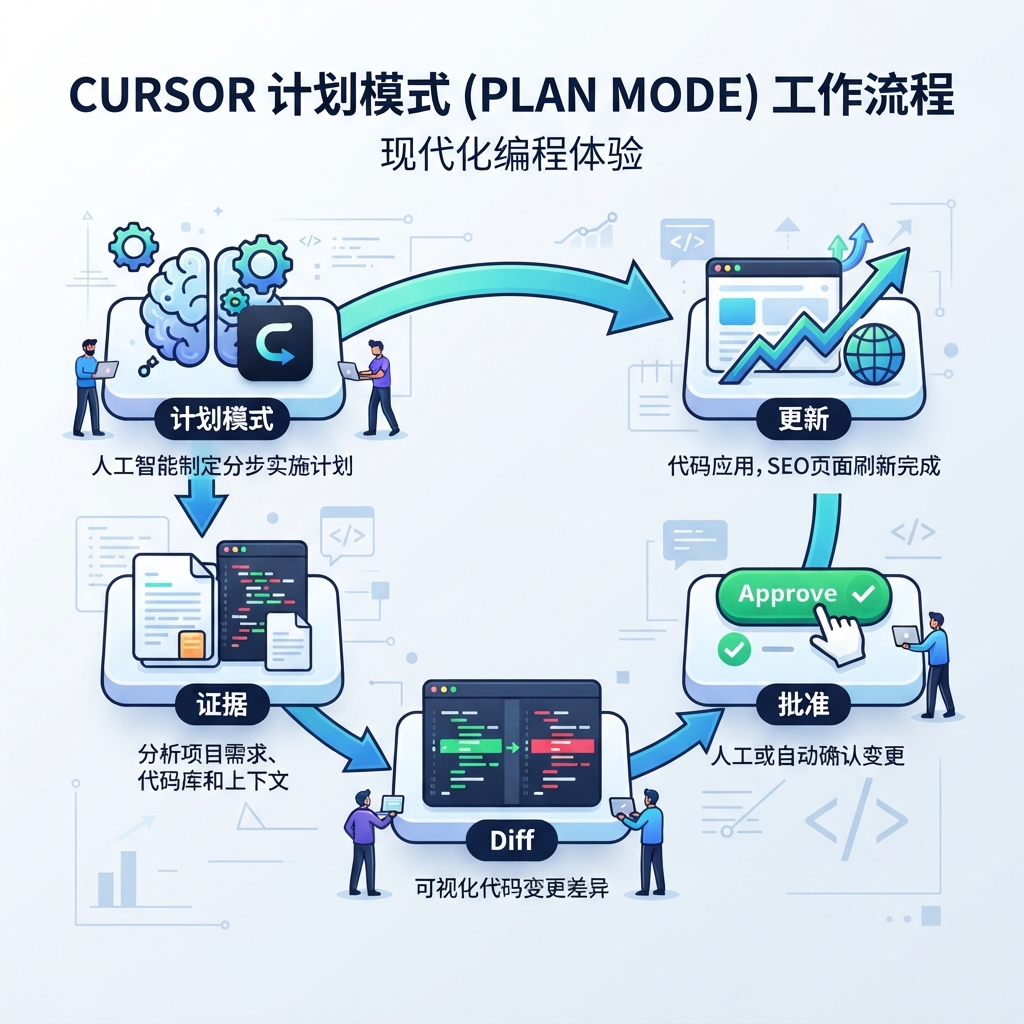
图说:先让 Cursor 说清楚 intent、档案、风险和 validation,再允许它改档。
什么时候用这个 workflow
在这些情境使用 Cursor workflow:
Situation | 适合吗? | 原因 |
|---|---|---|
Refresh 一篇 blog post | Yes | Diff 窄,容易 review。 |
Improve 一个 product 或 use-case page | Yes | Metadata、headings、answer blocks 和 CTA 可以一起 review。 |
Fix sitewide schema helper | Maybe | 需要额外 approval,因为一个 helper 可能影响很多 URLs。 |
Rewrite 整个网站 | No | 先从一页和 rule set 开始。 |
Change robots/canonicals/redirects | 只在明确核准后 | 这些会影响 indexing 和 migration risk。 |
步骤 1:打开正确 context
打开目标页面档案、metadata helper、schema component,以及任何相关内容档案。如果页面由 CMS 或 markdown collection 产生,也要同时打开来源内容和 template。
接著 prompt Cursor:
Use the SEO/GEO project rules.

I want to refresh only this page: [file path or URL].
Do not edit yet.

Return a page refresh plan with:
1. Search intent and user problem.
2. GEO question this page should answer.
3. Current metadata issues.
4. Current content structure issues.
5. Internal link opportunities.
6. Schema and technical risks.
7. Exact files you would edit.
8. Validation commands to run.
9. Changes that require my approval.
如果 Cursor 说不出 exact files,先停下来,要求它 inspect repo 后再编辑。
步骤 2:核准小范围
有用的 first refresh scope 通常是:
- 一个 title tag;
- 一个 meta description;
- 一个 direct answer block;
- 一个 comparison table 或 checklist;
- 1-3 个 internal links;
- 安全的 FAQ cleanup;
- 未核准时,不重写 shared component。
不要让 Cursor 加 fake proof。如果 proof 不足,draft 里应该标 TODO,或使用中性 claim。
步骤 3:套用已核准 edit
Apply only the approved refresh plan.

Constraints:
- Edit only the approved files.
- Do not change pricing, legal claims, testimonials, robots, canonicals, redirects, analytics, or shared templates without asking.
- Mark missing proof as TODO.
- Keep copy specific to this page; do not add generic SaaS filler.
- Run the validation command after editing.

Final response: changed files, validation result, remaining risks, and metrics to watch.
好的 page diagnosis 长什么样
Area | 弱 diagnosis | 强 diagnosis |
|---|---|---|
Intent | 「需要更好的 SEO」 | 「这页 targeting 正在比较 AI search visibility tools 的 buyers。」 |
GEO | 「加 FAQ」 | 「加入一段约 70 字的直接答案,说明产品做什么、适合谁。」 |
Metadata | 「改善 title」 | 「目前 title 缺少 category term 和 use case。」 |
Proof | 「增加信任」 | 「这个 claim 需要 evidence;先放 TODO proof slot。」 |
Links | 「加 internal links」 | 「从 monitoring section 连到 measurement guide。」 |
步骤 4:像 PR 一样 review diff
拒绝这些 diffs:
- 未核准就改变 page intent;
- 加入 unsupported numbers;
- 把 headings 变成 keyword stuffing;
- 建立不符合真实问题的 generic FAQ;
- 意外修改 shared components;
- 加入 fake ratings 或 reviews,导致 schema 坏掉。
步骤 5:记录 measurement
请 Cursor 加一份短 report:
Create seo-geo/reports/[date]-page-refresh.md.
Include target page, files changed, hypothesis, validation commands, risks, and metrics to check in GSC, Bing, GA4, and AI visibility prompts after publishing.
FAQ
Cursor 应该重写整篇文章吗?
只有 diagnosis 证明页面结构严重坏掉时才需要。大多数 refresh 应该只改 section-level。
每次都应该用 Plan Mode 吗?
只要会碰 SEO-critical files,就用。很小的 copy edits 可以更简单,但初学者一开始应该多用 planning。
发布后应该量测什么?
追踪 target query/prompt set 的 impressions、CTR、rankings、indexed status、conversions 与 AI answer mentions。
AI coding agents for SEO/GEO 学习路径
这篇属于 Cursor SEO/GEO track。先完成 Cursor-focused tutorials,再进到 Windsurf 或 operating model:
- Cursor vs Windsurf vs Gemini CLI:SEO/GEO 自动化怎么选
- 如何设定 Cursor Rules 做 SEO/GEO 工作
- 如何用 Cursor Plan Mode 安全更新 SEO 页面
- 如何用 MCP 将 Cursor 接上 SEO 资料
- 如何用 Cursor Cloud Agents 做 SEO/GEO PR Reviews
- 如何建立 Windsurf Cascade Workflows 做 SEO/GEO
- Cursor、Windsurf、Gemini CLI、Codex、Claude Code 的 SEO/GEO 营运模型
下一篇
上一篇:如何设定 Cursor Rules 做 SEO/GEO 工作
下一篇:如何用 MCP 将 Cursor 接上 SEO 资料
Sources and notes
- Cursor documentation hub: Cursor Docs,包含 Agent、Rules、MCP、Skills、CLI 与 background/agent capabilities 的公开文件。
- Related Auspia guide: Cursor vs Windsurf vs Gemini CLI for SEO/GEO Automation。
Author: Elise Morgan, Auspia 15-Year Editorial SEO Strategist。Elise 撰写 content refreshes、editorial quality 与 search-focused page improvements。