营运原则:分配 lanes,不是选冠军
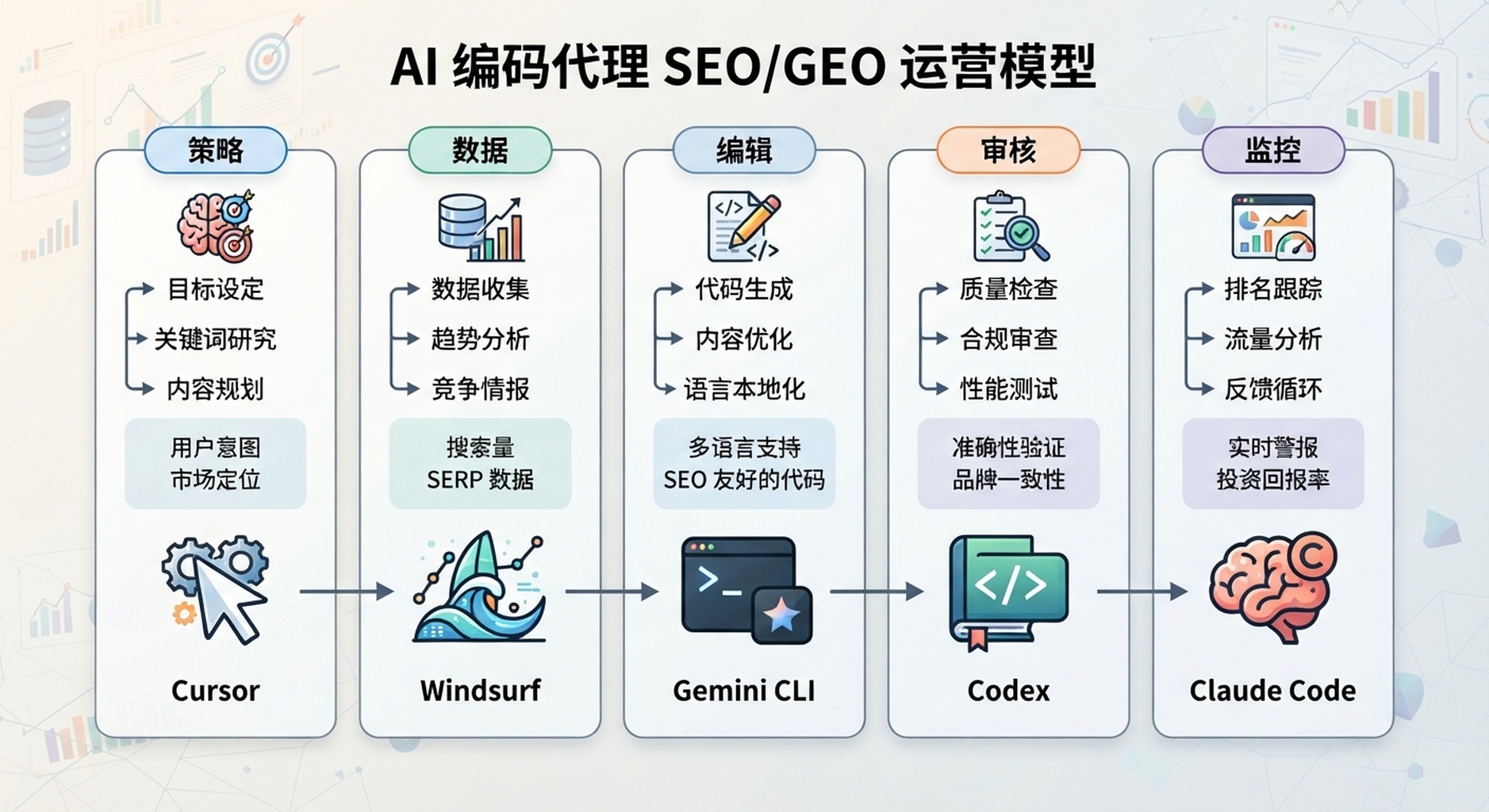
正确的 SEO/GEO agent stack 不是工具比赛。Cursor、Windsurf、Gemini CLI、Codex 和 Claude Code 各自适合不同工作层。常见错误是要求每个工具同时做 strategy、data、editing、review 和 deployment。
这篇文章给你一个简单营运模型:先把工作拆成 lanes,再把工具放到最适合的位置。

图说:不要把所有 agent 当成同一种工具。先分 lane,再设 approval gates。
建议 lane map
Layer | Best fit | Job |
|---|---|---|
Page/component edits | Cursor | visible editor diffs |
Repeatable team SOPs | Windsurf | Cascade workflows |
Daily data monitoring | Gemini CLI | terminal snapshots and reports |
Engineering-grade tasks | Codex | repo instructions, MCP, quality gates |
Review/governance | Claude Code | hooks, GitHub Actions, subagents |
这不是固定规则,而是初学者不容易失控的起点。如果你的团队只用一个工具,也可以先只跑一条 lane。重点是不要一开始就把 publishing、redirects、analytics、content claims 全部交给同一个 agent 自动处理。
安全的 weekly workflow
- Gemini CLI 产生 daily snapshots 与 weekly opportunity report。
- Windsurf 把已核准 opportunities 转成 briefs 或 workflows。
- Cursor 实作一个 page/component diff。
- Claude Code 或 Codex review technical and governance risk。
- 人工核准 publish/deploy。
- Monitoring 在 release 后检查结果。
这个流程看起来比「叫 AI 帮我做 SEO」慢,但更可靠。SEO/GEO 的风险通常不是 agent 不会写,而是它一次改太多、引用没有证据、或把单日资料波动当成策略。
不应该自动化的工作
不要完全自动化:
- legal、pricing 或 competitor claims;
- indexing changes;
- redirects and migrations;
- 没有 review 的 publishing;
- fake proof or testimonials;
- 没有 context 的 analytics interpretation。
这些工作可以让 AI 做 diagnosis、draft 或 checklist,但最终决策应该由人核准。
30 天 rollout
Week | Goal |
|---|---|
1 | 选一条 lane,执行 read-only diagnosis |
2 | 核准一个小 page 或 report workflow |
3 | 加上 validation and review gates |
4 | 把已证明可行的 process 变成 repeatable SOP |
第一个月不要追求完整 automation。先证明「资料能读、建议有证据、diff 可控、rollback 清楚、发布后能追踪」。这五件事稳定后,再扩大范围。
FAQ
小团队应该一次使用五个 tools 吗?
不用。先从一个或两个开始。只有 workflow shape 真的需要时,才增加工具。
GEO measurement 应该由哪个 tool 负责?
Gemini CLI、Codex 或 Claude Code 都可以。选择标准是你的团队更习惯 terminal scripts、Codex workflows,还是 Claude Code hooks/actions。
最安全的第一个 project 是什么?
一个 page refresh,并且包含 data-backed diagnosis、visible diff、build validation 与 post-publish measurement。
AI coding agents for SEO/GEO 学习路径
这篇是 Cursor、Windsurf、Gemini CLI SEO/GEO automation 的 full-series map。你可以用它在不同 platform tracks 之间跳转:
- Cursor vs Windsurf vs Gemini CLI:SEO/GEO 自动化怎么选
- 如何设定 Cursor Rules 做 SEO/GEO 工作
- 如何用 Cursor Plan Mode 安全更新 SEO 页面
- 如何用 MCP 将 Cursor 接上 SEO 资料
- 如何用 Cursor Cloud Agents 做 SEO/GEO PR Reviews
- 如何建立 Windsurf Cascade Workflows 做 SEO/GEO
- 如何把 Windsurf Rules and Memories 用在 SEO/GEO Projects
- 如何用 Windsurf 把 Keyword Research 变成 Content Briefs
- 如何用 Windsurf 处理 SEO/GEO PR Comments
- 如何设定 Gemini CLI SEO/GEO Automation 工作区
- 如何用 MCP 将 Gemini CLI 接上 SEO 资料
- 如何用 Gemini CLI 做每日 SEO/GEO Monitoring
- 如何用 Gemini CLI Checkpointing 安全修 SEO
- Cursor、Windsurf、Gemini CLI、Codex、Claude Code 的 SEO/GEO 营运模型
下一篇
上一篇:如何用 Gemini CLI Checkpointing 安全修 SEO
Sources and notes
- Cursor documentation hub: Cursor Docs,包含 Agent、Rules、MCP、Skills、CLI 与 background/agent capabilities 的公开文件。
- Windsurf/Devin Desktop documentation: Cascade Workflows,以及 Cascade、Memories & Rules、Skills、AGENTS.md、Worktrees、MCP、Cascade Hooks 等公开导览。
- Gemini CLI documentation: Gemini CLI Docs and MCP servers with Gemini CLI。
- Related Auspia guide: Cursor vs Windsurf vs Gemini CLI for SEO/GEO Automation。
Author: Aaron Wolfe, Auspia Organic Growth Systems Designer,拥有 15 年 SEO/GEO 经验。Aaron 撰写 organic growth systems、SEO/GEO process design 与 safe AI-assisted operations。