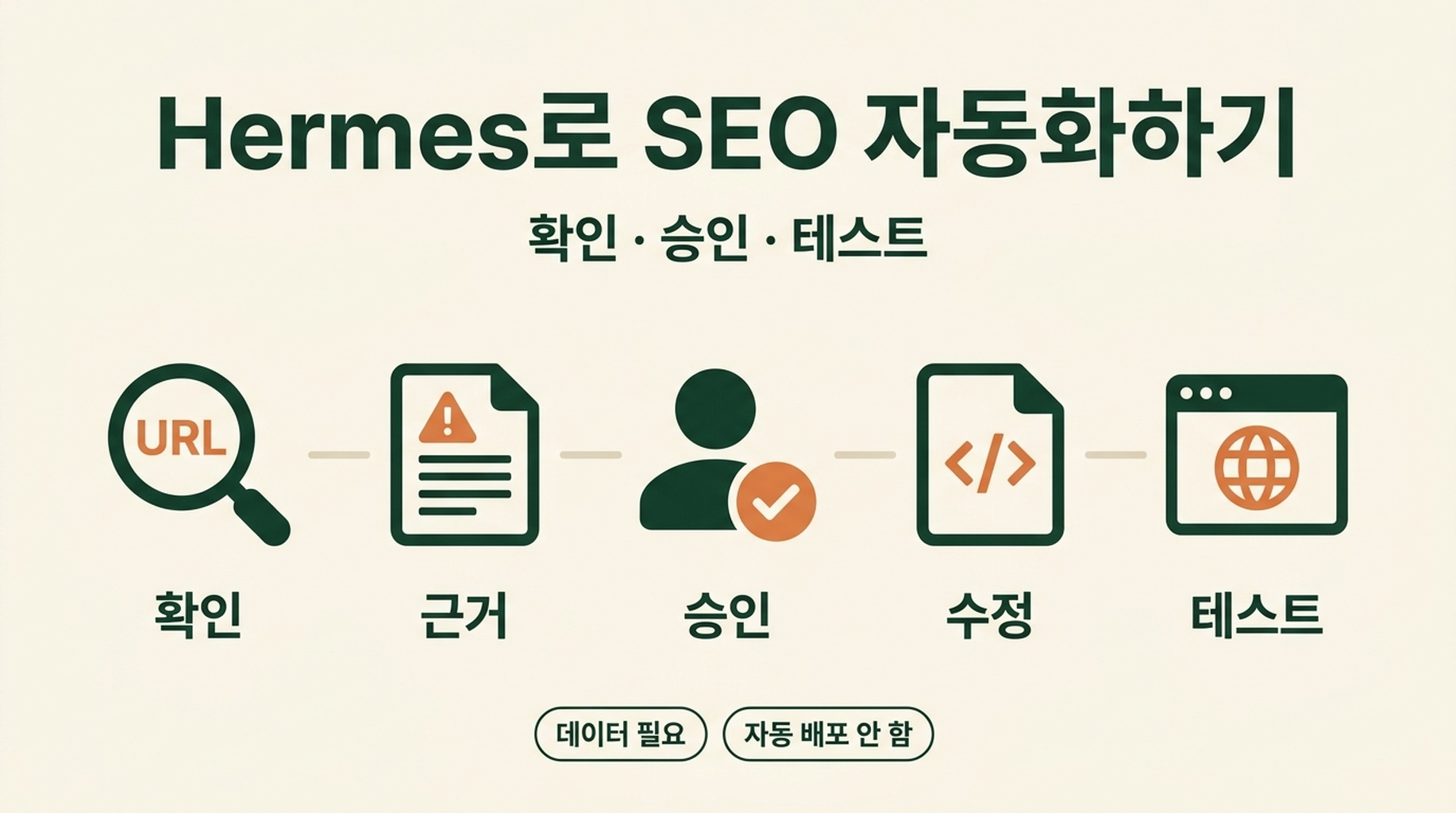

Hermes로 페이지를 개선하기 전에 canonical 태그가 무엇인지 알 필요는 없습니다. 필요한 것은 점검할 페이지 URL 하나, 실제 변경 단계에서 사용할 웹사이트 프로젝트 접근 권한, 그리고 분명한 원칙 하나입니다. 먼저 Hermes가 확인하고, 그다음에 내가 변경을 승인합니다.
이 가이드는 Hermes와 seo-auto-optimizer 스킬로 반복적인 SEO 작업을 초보자도 안전하게 자동화하는 방법을 보여 줍니다. Hermes가 페이지를 점검하게 하고, 발견 사항을 쉬운 말로 설명하게 하며, 승인한 업데이트를 사이트 파일에 준비하게 한 후 공개 전에 결과를 테스트합니다.
SEO 자동화는 에이전트에게 사이트를 맡기고 “전부 고쳐 줘”라고 말하는 일이 아닙니다. 시간이 오래 걸리는 반복 작업은 맡기되, 페이지가 검색 결과에서 사라지거나 방문자를 혼란스럽게 할 수 있는 결정은 계속 내가 통제하는 방식입니다.
이 워크플로를 마치면 갖게 되는 것
첫 번째 워크플로를 마치면 다음을 갖게 됩니다.
- 중요한 URL 하나에 대해 눈으로 확인할 수 있는 SEO 문제를 점검한 결과
- Hermes가 도울 수 있는 변경 사항을 우선순위로 정리한 짧은 목록
- 각 제안을 쉬운 말로 설명한 내용
- 구현하기로 선택했다면, 로컬 웹사이트 프로젝트 안의 검토된 변경 세트
- 배포 전에 사용할 테스트 체크리스트
처음에는 30~60분 정도를 잡으세요. 홈페이지, 제품 페이지, 서비스 페이지, 또는 이미 어느 정도 트래픽을 받는 블로그 글처럼 비즈니스에 중요한 페이지 하나를 고릅니다. 처음부터 사이트 전체를 대상으로 하지 마세요.
여기서 “완료”란 페이지를 가리키며 무엇을 왜 바꿨는지 설명할 수 있고, 업데이트 후에도 페이지가 정상적으로 동작함을 확인한 상태를 뜻합니다. 순위 상승을 보장한다는 뜻은 아닙니다. 검색 엔진이 페이지를 다시 크롤링하고 평가하는 데에는 시간이 걸립니다.
시작하기 전에 준비할 네 가지
Google Search Console이나 기술 배경이 없어도 시작할 수 있습니다. 첫 점검은 공개 페이지에서 확인할 수 있는 신호를 사용합니다. 아래 항목을 준비해 두세요.
필요한 것 | 필요한 이유 | 아직 없다면 |
|---|---|---|
공개된 페이지 URL | Hermes가 점검할 구체적인 페이지가 필요합니다. | 홈페이지나 서비스 페이지부터 시작하세요. |
웹사이트 프로젝트 파일 | Hermes가 실제 소스 파일에 승인된 변경을 준비할 수 있습니다. | 사이트를 관리하는 사람에게 사본이나 저장소 접근 권한을 요청하세요. 운영 파일을 무작정 수정하지 마세요. |
로컬 미리보기 또는 스테이징 사이트 | 공개 전에 페이지를 직접 확인해야 합니다. | 플랫폼의 미리보기 기능을 사용하거나 개발자에게 스테이징 링크를 요청하세요. |
변경을 배포할 방법 | Git, CMS 또는 호스팅 관리 화면일 수 있습니다. | 첫 실행에서는 수동 배포를 유지하세요. |
Google Search Console, Bing Webmaster Tools, 크롤러 내보내기 자료는 나중에 도움이 됩니다. 페이지 클릭이 줄었는지, 다른 URL과 경쟁하는지, 사이트 전체에서 색인이 막혔는지처럼 단일 페이지로는 답할 수 없는 질문에 답하기 위해서입니다.
Hermes 작업 공간에 SEO Auto Optimizer 스킬 만들기
스킬 파일은 직접 만들어야 합니다. 이 글에서 별도로 다운로드할 것은 없습니다.
가장 빠른 방법: 이 글을 Hermes에 보내기
이 글이 공개되어 있다면 URL을 Hermes에 전달하여 스킬 설치를 요청할 수 있습니다. 다음 프롬프트를 복사한 뒤 [ARTICLE URL]을 이 글의 실제 URL로 바꿔 Hermes에 보내세요.
이 글을 읽고 지시된 대로 seo-auto-optimizer 스킬을 설치해 주세요:
[ARTICLE URL]

저는 초보자입니다. 글에서 완전한 SKILL.md 코드 블록을 찾아 올바른 Hermes 작업 공간의 스킬 디렉터리에 필요한 skills/seo-auto-optimizer/SKILL.md 파일을 만들고, 그 코드 블록을 정확히 복사해 주세요.

파일을 쓰기 전에 사용할 전체 경로를 알려 주세요. 파일을 쓴 후에는 처음 10줄을 보여 주고 스킬 이름이 seo-auto-optimizer인지 확인해 주세요.

아직 제 웹사이트를 점검하거나, 사이트 파일을 수정하거나, 설정을 바꾸거나, 배포하거나, SEO 감사를 실행하지 마세요. 이 스킬의 설치와 확인만 해 주세요.
Hermes가 글 URL을 열지 못한다면 아래 수동 방법을 따르세요. 필요하다면 이 프롬프트 뒤에 전체 코드 블록을 채팅에 붙여 넣어도 됩니다.
SEO에 사용할 Hermes 작업 공간의 루트 폴더에서 다음 폴더와 파일을 만듭니다.
your-hermes-workspace/
  skills/
    seo-auto-optimizer/
      SKILL.md
Hermes 설치가 다른 설정된 스킬 디렉터리를 사용한다면 그 위치에 같은 seo-auto-optimizer/SKILL.md 폴더 구조를 만드세요. 폴더 이름과 파일 안의 name은 모두 seo-auto-optimizer여야 합니다. 그러면 Hermes에서 $seo-auto-optimizer로 호출할 수 있습니다.
SKILL.md라는 새 일반 텍스트 파일을 열고 아래의 전체 내용을 붙여 넣으세요. 웹사이트 코드에 붙여 넣으면 안 됩니다. 파일은 skills/seo-auto-optimizer/ 폴더에 둡니다.
이 스킬은 읽기 전용 모드로 시작합니다. 의도된 설계입니다. 공개 정보를 점검하고 수정 계획을 만들지만, 페이지를 게시하거나 사이트맵을 제출하거나 Search Console을 수정하거나 운영 사이트를 변경하지는 않습니다.
---
name: seo-auto-optimizer
description: Audit one public URL or a group of website URLs with evidence, then create an SEO optimization plan ranked by impact and effort. Use when a user asks to check, diagnose, optimize, or create an SEO task list, especially for indexing, technical SEO, metadata, structured data, content quality, internal links, search intent, keyword cannibalization, Core Web Vitals, mobile experience, CTR, Google Search Console, Bing Webmaster Tools, sitemaps, robots.txt, or E-E-A-T. By default, audit and provide code or copy recommendations only. Do not change the website, CMS, search-engine consoles, or third-party platforms.
---

# SEO Auto Optimizer

Turn a supplied URL into a verifiable SEO optimization plan that a developer, content team, or growth team can act on. Never present an item as checked or fixed when public evidence cannot confirm it.

## Working boundaries

- Default to read-only work. Inspect public pages, resources, and public site files. Do not change live pages, submit a sitemap, publish content, buy links, or operate any account.
- For a single-URL request, audit that URL and only the same-domain public files needed to verify it, such as `robots.txt`, a sitemap, or page links. Do not turn a single-page observation into a site-wide conclusion.
- Mark work that needs a login, search-performance data, a full crawl, server logs, or business facts as `Needs data`. State what data is needed and how to check it.
- Do not recommend black-hat, manipulative, or fabricated SEO: no purchased links, fake reviews/authors/comments, doorway pages, keyword stuffing, or bulk low-value AI pages.
- Follow the site's market, page language, URL conventions, and content standards. Proposed titles, meta descriptions, H1s, and body copy must use the target page's language.

## Inputs and clarification

A request needs at least one URL. If available, use the target market, language, business model, primary conversion, target keywords, Google Search Console or Bing exports, and local website project.

When those details are missing, do not block the work. Infer what you can from the page language, page type, and visible content, then state your assumptions at the beginning of the report. Ask one focused question only when the user requests keyword strategy, competitive content, or a site-wide change and the answer would materially depend on the target market or business.

## Audit process

### 1. Build an evidence baseline

1. Record the inspection date, final URL, HTTP status, redirect chain, `<html lang>`, visible robots instructions, and page-rendering limits.
2. Read the first screen, main content, and available source or DOM. Record the title, meta description, canonical, robots meta, viewport, H1-H6, visible publish or update date, author information, approximate body length, images, internal and external links, JSON-LD, and important JavaScript dependencies.
3. Check the same-domain `/robots.txt`. Check a sitemap only when one is discoverable; do not say a sitemap does not exist merely because its URL is not explicitly listed.
4. Keep locatable evidence for every conclusion: tag text, HTTP header, link URL, DOM observation, screenshot observation, or public-tool result. If the page is blocked by a WAF, login, geography, or another access limit, state the limitation immediately.

### 2. Classify every check

Use exactly one status for each item:

| Status | Meaning |
| --- | --- |
| `Pass` | Public evidence shows the item meets its purpose. |
| `Issue` | Public evidence shows an error, risk, or clear omission. |
| `Opportunity` | It may not be an error, but there is a reasonable opportunity to improve visibility, click-through rate, user experience, or conversion. |
| `Needs data` | Google Search Console, Bing, logs, a full crawl, field performance data, or keyword data is required. |
| `Not applicable` | The page type or business does not need this item; explain why. |

Do not turn `Needs data` into an `Issue` just to fill a checklist. Resolve the root causes that affect crawling, indexing, user experience, or the page's main intent before minor copy changes.

### 3. Create an action plan

Merge findings into non-duplicative tasks and rank them:

- `P0`: The page cannot be crawled or indexed; an incorrect canonical; accidental `noindex`; critical 4xx/5xx; site-wide robots blocking; severe mobile or rendering failure.
- `P1`: Main-page intent or content mismatch; duplicate or thin content; missing or conflicting title and H1; unacceptable structured data; missing key internal links; obvious performance bottleneck.
- `P2`: CTR improvements; images and alt text; FAQs; author and update information; content expansion; topic or comparison pages; local link and URL improvements.
- `P3`: Growth experiments, link earning, business profiles, and monitoring that require performance data or external coordination.

For every task, state the problem, evidence, recommended action, owner (developer, content, SEO, or growth), acceptance criteria, and risk or prerequisite. Give specific code or copy only when current information supports it. Where brand facts are missing, use clear placeholders instead of inventing facts.

## What to check

### A. Crawling, indexing, and URLs

Check and report:

- HTTP status, whether redirects are single-hop and appropriate, loops, and HTTP/HTTPS or www/non-www confusion.
- `robots.txt`, meta robots, `X-Robots-Tag`, and whether canonical URLs are reachable, absolute, single, self-referencing, or point to a sensible preferred URL.
- Whether canonical, `noindex`, pagination or filtering rules, and sitemap behavior agree. Mark uncertain cases as `Needs data`.
- Whether URLs are stable, readable, descriptive, free of meaningless parameters, case or trailing-slash duplication, and keyword stuffing. Do not recommend casual URL changes unless the plan includes 301 redirects, internal-link updates, canonical updates, sitemap updates, and rollback conditions.
- Whether main content appears in initial HTML or can render reliably. When important content depends only on client-side JavaScript, recommend verification with URL Inspection, rendering tests, and server-side rendering or prerendering options.
- Discoverable broken links, 404s, soft 404s, and incorrect internal destinations. A single URL cannot prove that a whole site has no broken links.

### B. Page structure and metadata

Check:

- A unique, accurate, intent-matched title. For Latin-script languages, a rough 50-60 characters can be useful, but accuracy matters more than reaching a count.
- A unique meta description that describes the page's real value without keyword lists or false promises. A meta description is not a ranking guarantee; prioritize relevance and likely click-through appeal.
- One H1 that describes the page's main question. Organize H2 and H3 headings by real topic hierarchy, without skipped levels or decorative text disguised as headings.
- `lang`, viewport, mobile usability, the ratio of main content to template noise, and breadcrumb visibility and semantics.
- Appropriate image formats, dimensions, lazy loading, and specific alt text. Decorative images should have empty alt text. Do not force keywords into alt text.

When recommending a rewrite, provide one adoptable title, meta description, H1, and heading outline. Label any information that needs a brand-owner confirmation.

### C. Structured data and trust signals

Check whether visible page content and JSON-LD, Microdata, or RDFa agree. Consider only schema appropriate to the page type: `BreadcrumbList`, `Article` or `BlogPosting`, `Product`, `SoftwareApplication`, `Organization`, `LocalBusiness`, `FAQPage`, and `WebPage`.

- Recommend schema only when it represents visible, real page information. Never add invented ratings, reviews, prices, authors, FAQs, or awards.
- Identify required fields such as URL, name, description, image, author, publish date, `dateModified`, breadcrumb positions, and entity identifiers.
- For content pages, check visible author information, author page or experience, editorial policy, sources, contact information, organization information, update date, and factual citations. E-E-A-T is not a tag that can be added; it comes from verifiable content and entity information.
- When schema exists, recommend the Google Rich Results Test and Schema Markup Validator as acceptance checks.

### D. Content, intent, and duplication

Identify the page's main query intent: informational, commercial research, transactional, local, navigational, or mixed. Check whether the main content answers the question early and adds value through original evidence, examples, steps, data, or product detail.

- Flag clear thin content, template repetition, unanswered core questions, intent mismatch, and stale content. Do not define thin content by word count alone.
- A single URL cannot prove site-wide duplicate content, keyword cannibalization, or orphan pages. Explain that these require a URL inventory, canonical and index status, GSC query-to-page data, an internal-link graph, and similarity analysis.
- For overlapping pages, first define the evidence and decision criteria for keep, merge, split, or redirect. Never recommend deleting a page based on a guess.
- When content creation is requested, provide a search-intent brief, unique value, information architecture, sources needed for claims, and internal-link targets. Original content means independent insight or verification, not a competitor rewrite.
- Suggest comparison, alternatives, list, or FAQ pages only when they have distinct intent, real comparison criteria, and maintainable facts. Do not create batches of low-value templates.

### E. Internal links, architecture, and topic coverage

Assess how the page can be found and understood:

- Check whether important pages have crawlable HTML links from relevant parent pages, topic hubs, navigation, or breadcrumbs. Anchor text should naturally describe the destination.
- Mark orphan pages as `Needs data` unless a sitemap and full link graph prove the finding.
- For a topic cluster, define one pillar or owner URL, a distinct intent for each support page, link direction, and a cannibalization rule. Multiple near-identical owner pages should not compete for one head topic.
- Before suggesting feature, use-case, integration, comparison, alternatives, or FAQ pages, define the user question, target query, unique content, owner URL, and link-back path.

### F. Performance, mobile use, and Core Web Vitals

Separate lab data from field data. Prefer real-user data from CrUX or PageSpeed Insights to validate LCP, INP, and CLS. Without it, inspect obvious risks: oversized hero media, images without dimensions, render-blocking CSS or JavaScript, third-party scripts, font loading, layout shifts, and heavy client-side rendering.

Every performance recommendation must explain its mechanism and test method. For example: responsive, compressed hero media may improve LCP; image width and height reduce CLS risk; splitting long tasks may improve INP. Do not promise a score or ranking improvement.

### G. Search performance, keywords, and external authority

Unless the user supplies data or access, mark these items as `Needs data`:

- Page-two rankings, traffic or ranking declines, and query-to-page keyword cannibalization.
- URLs or queries with high impressions and low CTR, plus title and meta tests.
- High-volume, low-difficulty keywords, SERP and People Also Ask opportunities, competitor gaps, and search intent.
- High-quality backlinks, broken-link opportunities, brand mentions, Google Business Profile, and local citations.
- GSC or Bing sitemap submission, URL Inspection, index coverage, and crawl errors.

Give an executable data-checking instruction. For example: in GSC, compare the last 28 days with the previous 28 days, filter to the target URL, export queries, impressions, clicks, CTR, and average position, then test a new title or meta description for high-impression, same-intent queries with weak CTR. Link strategies must use audience-relevant, editorially independent, verifiable channels and genuinely useful assets.

## Default deliverable format

Unless the user asks for a shorter response, return these sections in this order:

1. `Scope and limits`: target URL, check date, accessibility, what could not be verified, and key assumptions.
2. `Executive summary`: the three to seven most important findings and what to address first.
3. `Check matrix`: status, evidence, and short conclusion for items A-G. Cover the user's supplied checklist, and state `Needs data` where necessary.
4. `Prioritized action list`: P0-P3 tasks with owner, effort (S/M/L), acceptance criteria, and dependencies.
5. `Implementation-ready recommendations`: where appropriate, include metadata, heading structure, JSON-LD templates, internal-link locations, content briefs, or performance fixes.
6. `Data and human follow-up`: needed GSC, Bing, crawl, log, keyword, and business inputs, plus exact validation steps.

Use careful language. Say a change may improve relevance, discoverability, or CTR. Do not promise indexing, first place rankings, or that every SEO issue has been fixed.

## Completion standard

Before delivering the work, confirm:

- Every conclusion has public evidence or is explicitly labeled as an assumption or `Needs data`.
- Tasks are ordered by impact, dependency, and actual executability, not copied mechanically from a checklist.
- Recommendations do not risk breaking URLs, canonicals, index status, or content facts. Migration, deletion, and merge suggestions include redirect and rollback conditions.
- Schema and E-E-A-T recommendations come from visible facts or are clearly marked as information still needed.
- The report makes clear that no live changes, submissions, or publishing actions were performed.
파일을 저장하세요. 설정상 필요하다면 Hermes를 다시 시작하거나 다시 불러온 뒤, 이 작업 공간에서 사용할 수 있는 스킬을 나열해 주세요. seo-auto-optimizer를 사용할 수 있나요?라고 물어보세요. Hermes가 스킬을 사용할 수 있다고 확인하기 전에는 튜토리얼을 시작하지 마세요.
Hermes에게 변경을 요청하기 전에 페이지 점검하기
Hermes를 열고 다음 프롬프트를 붙여 넣으세요. 예시 URL을 자신의 페이지 URL로 바꾸면 됩니다.
이 페이지를 점검하는 데 $seo-auto-optimizer를 사용해 주세요:
https://example.com/your-page

저는 SEO 초보자입니다. 모든 발견 사항을 쉬운 한국어로 설명해 주세요.
파일을 변경하거나, 페이지를 게시하거나, 무엇인가를 제출하거나, 운영 사이트를 변경하지 마세요.

각 권장 사항에 대해 다음을 보여 주세요:
1. Hermes가 무엇을 어디에서 찾았는지
2. 방문자나 검색 엔진에 왜 중요할 수 있는지
3. 확인된 문제, 개선 기회, 추가 데이터 필요 중 어디에 해당하는지
4. 가장 안전한 다음 조치
5. 개발자 또는 Google Search Console 데이터가 필요한지

작업을 P0, P1, P2, P3 우선순위 순서로 정리해 주세요.
첫 결과물은 변경된 웹사이트가 아니라 보고서여야 합니다. 그것이 올바른 순서입니다.
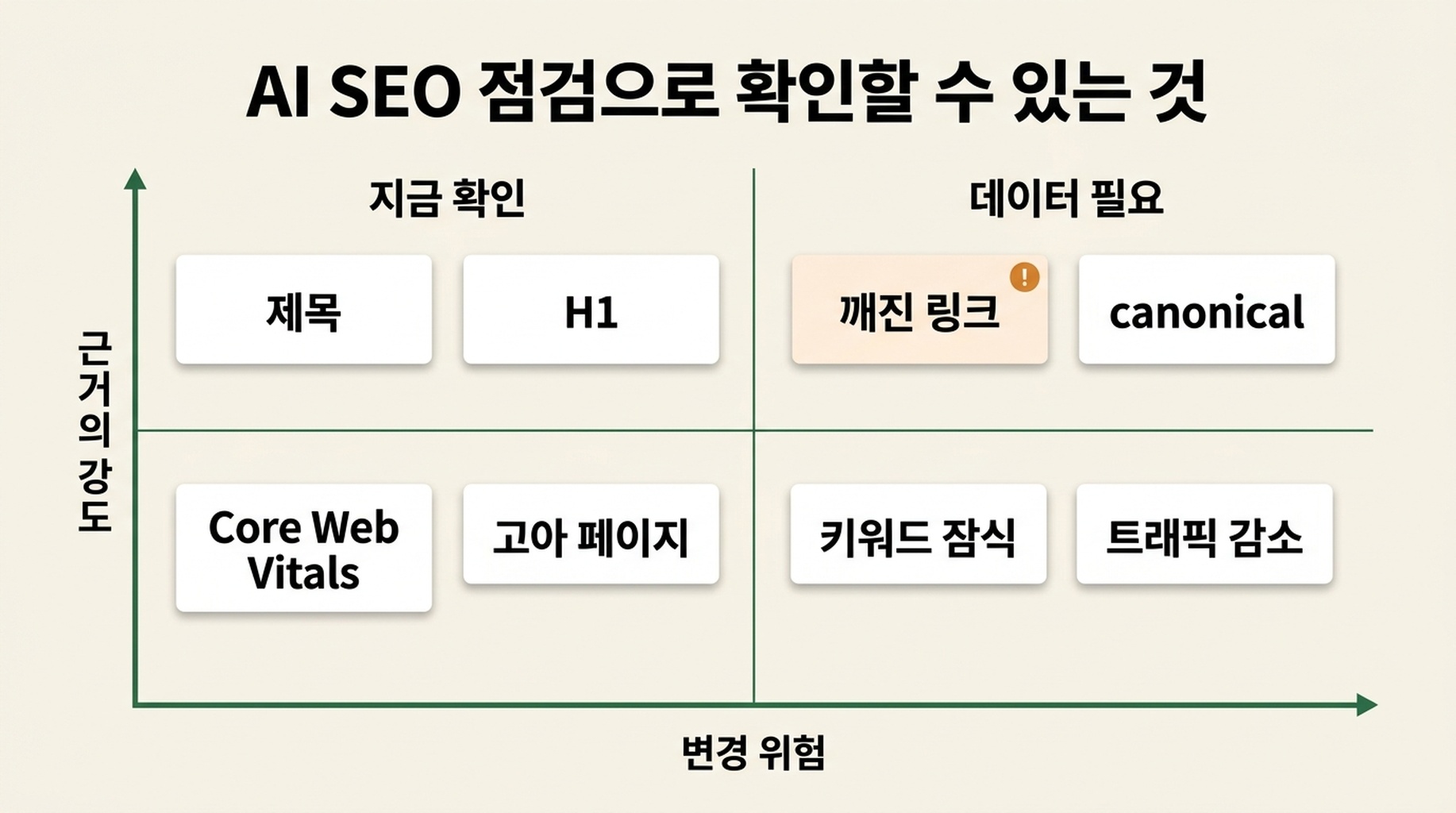
Hermes는 보통 페이지 제목, meta description, 주제목, 이미지 alt 텍스트, 내부 링크, canonical 태그, robots 지시문, 구조화된 데이터, 모바일 viewport, 명백한 깨진 링크처럼 눈에 보이는 신호를 점검할 수 있습니다. 페이지 수준에서 분명한 콘텐츠 공백도 발견할 수 있습니다.
하지만 모든 것을 아는 것처럼 행동해서는 안 됩니다. URL 하나만 보고 사이트 전체를 단정하는 보고서보다 Needs data라고 명시하는 보고서가 더 신뢰할 만한 경우가 많습니다.
SEO 전문가가 아니어도 보고서 읽기
이 스킬은 상태와 우선순위라는 두 가지 간단한 라벨을 사용합니다. 무엇이든 승인하기 전에 둘 다 확인하세요.
라벨 | 의미 | 초보자에게 알맞은 대응 |
|---|---|---|
| 공개 증거상 이 항목은 목적을 충족하는 것으로 보입니다. | 그대로 둡니다. |
| H1 누락이나 잘못된 링크처럼 Hermes가 구체적인 문제를 찾았습니다. | 근거를 검토하고 수정 여부를 판단합니다. |
| 페이지가 깨진 것은 아니지만 더 명확하거나 유용하게 만들 여지가 있습니다. | 선택적 개선 작업으로 다룹니다. |
| 판단하려면 GSC, Bing, 분석 데이터, 로그 또는 전체 크롤링이 필요합니다. | 추측하지 말고 나중에 데이터를 수집합니다. |
우선순위는 무엇을 먼저 살펴봐야 하는지 알려 줍니다.
우선순위 | 쉬운 설명 | 일반적인 예 |
|---|---|---|
| 중요한 페이지가 검색에 표시되지 않거나 정상 작동하지 않을 수 있는 심각한 문제입니다. | 잘못된 |
| 페이지 구조, 의도 또는 기술 설정에 의미 있는 약점이 있습니다. | 누락되거나 충돌하는 title/H1, 잘못된 페이지 의도, 부적절한 관련 schema, 중요한 내부 링크 부족 |
| 가치 있는 개선이지만 긴급하지는 않습니다. | 더 나은 이미지 alt 텍스트, 명확한 FAQ, 작성자 또는 업데이트 정보, title과 description 테스트 |
| 데이터, 다른 팀 또는 지속적인 실험이 필요한 작업입니다. | 링크 획득, 지역 프로필, 순위 모니터링, 키워드 조사 |
보고서에 있다고 해서 모두 승인하지 마세요. 첫 구현은 위험이 낮은 변경 1~3개로 제한해야 합니다. 첫 배포가 작을수록 확인하기 쉽고 되돌리기도 쉽습니다.
안전한 첫 변경을 고르고 위험한 결정은 나중으로 미루기
대부분의 초보자는 명확한 페이지 수준 개선부터 시작할 수 있습니다. 아래 표는 유용한 경계선입니다.
보통 준비하고 검토해도 되는 변경 | 멈추고 기술 또는 SEO 검토를 요청할 변경 |
|---|---|
더 정확한 title 또는 meta description | URL 변경이나 페이지 삭제 |
명확한 H1 하나와 합리적인 H2 구조 |
|
의미 있는 이미지에 대한 구체적인 alt 텍스트 | 리디렉션 규칙 또는 마이그레이션 설정 |
올바른 목적지가 분명한 깨진 내부 링크 | 비슷해 보인다는 이유만으로 페이지 병합 |
보이는 내용과 일치하는 schema | 실제가 아닌 평점, 리뷰, 가격, 작성자, FAQ 추가 |
기존 페이지를 더 명확하게 만드는 짧은 답변 | 키워드를 위해 대량의 AI 생성 페이지 게시 |
예를 들어 canonical 태그는 유사한 페이지 중 어느 버전을 대표 버전으로 보아야 하는지 검색 엔진에 알리는 작은 지시문입니다. 변경이 중요할 수 있지만, Google이 중요한 페이지를 무시하게 만들 수도 있습니다. 변경 전에 Hermes에게 현재 canonical URL과 제안 URL을 보여 달라고 하고 기술 검토를 받으세요.
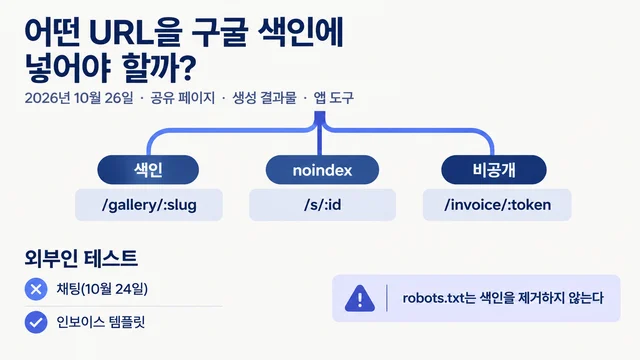
같은 원칙은 robots.txt와 noindex에도 적용됩니다. 감사 페이지, 비공개 미리보기, 필터링된 결과 페이지에서는 이런 설정이 올바를 수 있습니다. 자동으로 오류라고 판단하면 안 됩니다.
갑작스러운 편집 대신 Hermes에게 구현 계획 요청하기
보고서에서 승인한 항목을 복사하여 웹사이트 프로젝트 안에서 다음 프롬프트를 사용하세요. 이 프롬프트는 Hermes에 변경해도 되는 일과, 그만큼 중요한 “손대면 안 되는 일”을 알려 줍니다.
저는 다음 SEO 변경만 승인합니다:
[승인한 항목 붙여 넣기]

로컬 웹사이트 프로젝트를 검토하고 구현 계획을 작성해 주세요.
파일을 편집하기 전에 다음을 보여 주세요:
1. 변경할 모든 파일
2. 각 파일이 영향을 주는 정확한 페이지 또는 컴포넌트
3. 방문자와 검색 엔진에 보이게 될 변경 사항
4. 결과를 테스트할 방법
5. 변경이 잘못되었을 때의 되돌리기 방법

URL을 바꾸거나, 페이지를 삭제하거나, robots.txt를 편집하거나,
noindex 태그를 추가하거나, 리디렉션을 변경하거나, 콘텐츠를 게시하거나,
사이트를 배포하거나, 승인한 목록 밖의 항목을 변경하지 마세요.

계획을 보여 준 뒤 제 승인을 기다려 주세요.
응답하기 전에 파일 목록을 확인하세요. Hermes가 낯선 파일을 건드리려 한다면 이유를 물어보세요. 계획이 “SEO 최적화”라고만 말하고 파일 이름과 예상 결과를 제시하지 못한다면 더 구체적으로 설명해 달라고 하세요.
계획이 적절해 보이면 범위를 좁혀 승인합니다.
승인합니다. 위 계획만 구현해 주세요.

편집 후에는:
- 파일별 간단한 요약을 보여 주세요.
- 관련 diff 또는 변경 전후 텍스트를 보여 주세요.
- 제가 직접 확인해야 할 사항을 설명해 주세요.
- 가능하면 프로젝트에 있는 기존 점검을 실행해 주세요.
- 배포하지 마세요.
이 부분이 자동화를 유용하게 만듭니다. Hermes는 반복적인 편집을 할 수 있지만, 무엇을 바꾸고 언제 공개할지는 내가 결정합니다.
페이지를 공개하기 전에 결과 확인하기
미리보기를 건너뛰지 마세요. 기술적으로 올바른 변경이라도 문장이 어색하거나 레이아웃을 깨거나 페이지의 유용성을 낮출 수 있습니다.
다음 배포 체크리스트를 사용하세요.
점검 항목 | 확인할 내용 |
|---|---|
브라우저 미리보기 | 페이지가 로드되고 변경한 문장이 자연스럽게 읽히는지 |
모바일 미리보기 | 좁은 화면에서 제목, 이미지, 메뉴, 버튼이 정상 동작하는지 |
title과 description | 실제 페이지를 설명하며 방문자가 받지 못할 것을 약속하지 않는지 |
제목 구조 | 명확한 H1이 하나 있고 H2가 실제 섹션을 구성하는지 |
링크 | 수정한 내부 링크가 의도한 운영 또는 스테이징 페이지로 가는지 |
이미지 | 중요한 이미지에 유용한 alt 텍스트가 있고 장식 이미지 alt에 키워드를 억지로 넣지 않았는지 |
소스 또는 SEO 확장 기능 | 예상한 canonical, robots 지시문, 구조화된 데이터가 의도치 않게 바뀌지 않았는지 |
프로젝트 점검 | 기존 build, test, lint 또는 검증 명령이 통과하는지 |
schema를 변경했다면 배포 후 또는 접근 가능한 스테이징 페이지에서 Google Rich Results Test나 Schema Markup Validator를 실행하세요. schema 형식이 유효한 것만으로는 충분하지 않으며 사용자가 페이지에서 보는 내용과도 일치해야 합니다.
점검에 실패했다면 Hermes에게 무작위 추가 편집을 요청하지 마세요. 정확한 오류와 원인이 된 승인된 변경을 알려 주고 가장 작은 수정만 요청하세요. 변경을 설명하거나 검증할 수 없다면 배포 전에 되돌리세요.
페이지 하나만으로는 SEO 자동화가 알 수 없는 것
초보자가 자신감 있어 보이는 AI 출력에 오해하기 쉬운 부분이 바로 여기입니다. 어떤 SEO 질문은 브라우저에서 보이지 않는 데이터를 필요로 합니다.
질문 | Hermes가 책임 있게 답하기 위해 필요한 것 |
|---|---|
트래픽이 왜 줄었나? | 비교 가능한 두 기간의 GSC 및 분석 데이터 |
노출은 많지만 클릭률이 낮은 페이지는 무엇인가? | GSC 쿼리 및 페이지 내보내기 자료 |
두 페이지가 같은 키워드를 놓고 경쟁하나? | GSC의 쿼리별 페이지 데이터와 콘텐츠 비교 |
고아 페이지는 무엇인가? | 전체 사이트 크롤링, 사이트맵, 내부 링크 그래프 |
실제 방문자에게 Core Web Vitals가 나쁜가? | 로컬 테스트뿐 아니라 CrUX 또는 PageSpeed Insights 같은 필드 데이터 |
난이도가 낮은 키워드로 무엇을 노려야 하나? | 키워드와 SERP 조사, 실제 독자와 제공 가치 |
사이트맵을 제출하거나 색인 생성을 요청해야 하나? | GSC 또는 Bing Webmaster Tools 접근 권한과 실행 이유 |
이러한 입력을 수집하고 정리하는 일은 나중에 자동화할 수 있습니다. 첫 페이지에서는 추측을 진단처럼 다루기보다 Hermes가 Needs data로 표시하게 하는 것으로 충분합니다.
꾸준히 이어갈 수 있는 간단한 주간 루틴
첫 페이지를 공개하고 확인한 뒤에는 매주 중요한 페이지 하나에 이 워크플로를 반복하세요.
- 무작위 URL이 아니라 비즈니스 목적이 있는 페이지를 고릅니다.
- 읽기 전용 Hermes 점검을 실행합니다.
- 명확하고 위험이 낮은 업데이트를 몇 개만 승인합니다.
- 구현 계획과 파일 diff를 검토합니다.
- 배포 전에 로컬 또는 스테이징에서 테스트합니다.
- 페이지, 날짜, 변경 사항, 미해결 질문을 간단한 스프레드시트나 Markdown 파일에 기록합니다.
몇 주간의 변경이 쌓이면 GSC 내보내기 자료를 추가하세요. 그러면 Hermes가 실제 노출, 클릭, 쿼리 데이터로 뒷받침되는 다음 개선 대상 페이지를 찾는 데 도움을 줄 수 있습니다. 더 폭넓게 진단하려면 코드 수준 검토와 함께 웹사이트 SEO 점수 검사기를 사용하세요.
자주 묻는 질문
Hermes가 내 웹사이트 SEO를 전부 자동화할 수 있나요?
아니요. Hermes는 공개 페이지 신호 점검, 문제 목록 정리, title과 description 초안 작성, 코드 또는 콘텐츠 변경 준비, 승인된 변경 목록 확인 같은 반복 작업을 자동화할 수 있습니다. 페이지 삭제, 리디렉션, 색인 제어, canonical, 비즈니스 주장, 배포, 성능 데이터와 관련된 결정은 계속 사람의 검토가 필요합니다.
시작하기 전에 SEO 키워드를 알아야 하나요?
아니요. 중요한 페이지부터 시작하고 눈에 보이는 SEO 설정을 쉬운 말로 Hermes가 설명하게 하세요. 키워드 조사는 새 페이지를 만들거나 기존 페이지 중 어디에 더 집중할지 정할 때 유용합니다. 필요한 것은 에이전트가 만든 목록만이 아니라 조사 데이터와 고객에 대한 이해입니다.
Hermes가 WordPress, Webflow 또는 Shopify 페이지를 편집해 줄 수 있나요?
Hermes 환경에 해당 시스템이나 사이트 파일에 대한 승인된 접근 권한이 있을 때만 가능합니다. 첫 워크플로에서는 정확한 텍스트, 코드 또는 파일 단위 변경을 Hermes가 준비하게 하고 CMS 업데이트는 직접 하거나 사이트 소유자의 승인을 받으세요. 신뢰할 수 있는 검토 절차가 생기기 전에는 게시 권한을 주지 마세요.
이런 변경으로 Google 검색 1위를 할 수 있나요?
아니요. SEO 변경은 크롤링 가능성, 관련성, 명확성, 사용자 경험을 개선할 수 있습니다. 순위는 경쟁, 검색 의도, 사이트 품질, 링크, 검색 엔진이 시간이 지나며 페이지를 평가하는 방식에도 좌우됩니다. Hermes는 순위를 보장하는 수단이 아니라 더 나은 안전한 결정을 돕는 수단으로 사용하세요.
작성자: Auspia의 테크니컬 SEO 실무자 Julian Mercer. Julian은 14년간 크롤링 가능성, schema, 렌더링, 사이트 아키텍처, AI가 읽기 쉬운 콘텐츠를 위한 기술적 기반을 다뤄 왔습니다.