검토되지 않은 사이트 변경 없이 Claude Code로 PageSpeed SEO 감사를 실행하는 방법
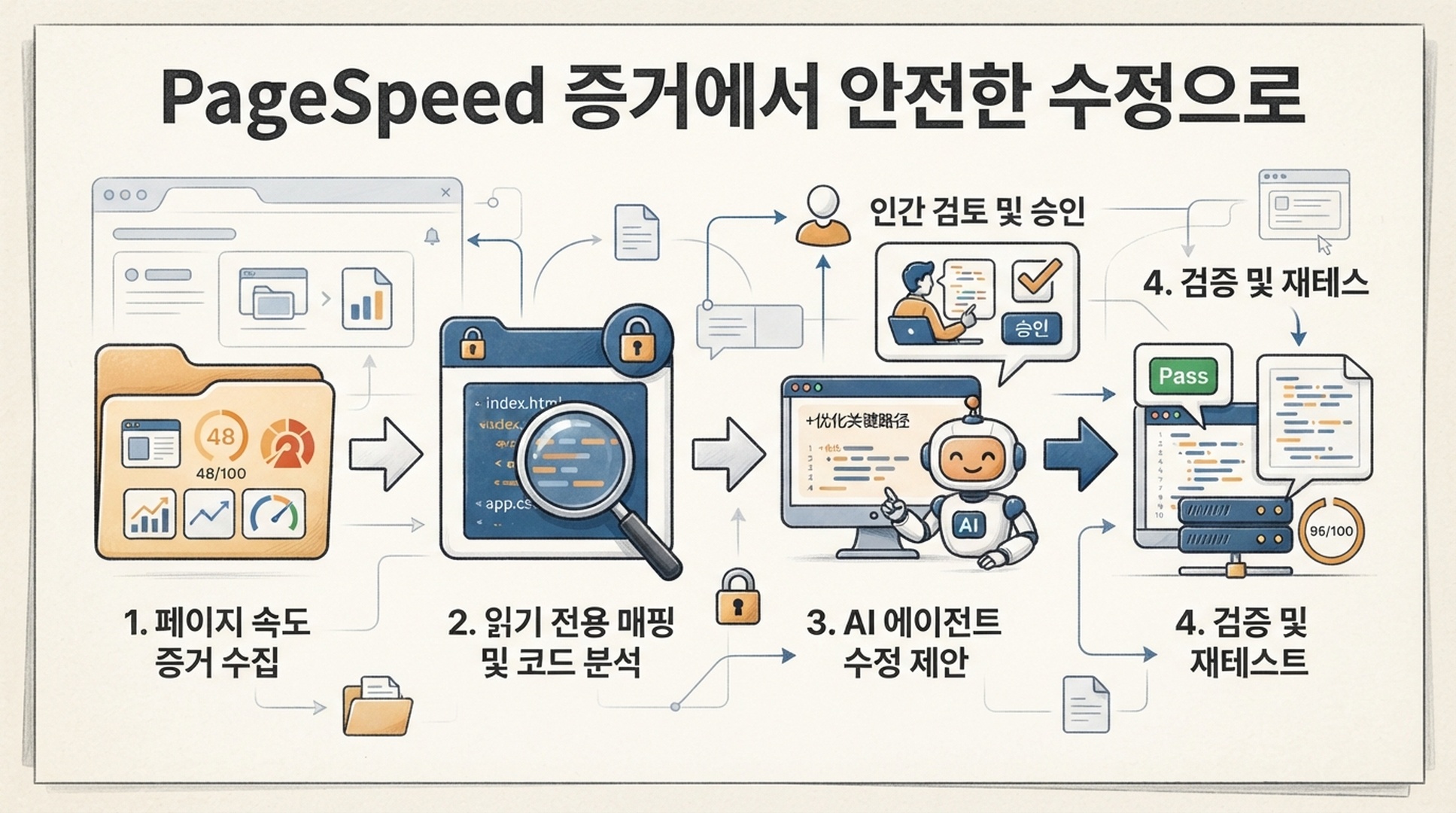
Claude Code는 PageSpeed 결과가 구현에서 확인할 만한 영역을 가리킨 뒤에 특히 유용합니다. 저장소를 살펴보고, 반복되는 감사 결과를 템플릿이나 자산 파이프라인에 연결하며, 테스트 가능한 패치를 준비할 수 있습니다. 그러나 이 기능에는 분명한 관문이 필요합니다. 증거 수집은 읽기 전용으로 하고, 웹사이트 변경은 사람이 범위를 좁힌 계획을 승인한 뒤에만 시작합니다.
이 튜토리얼에서는 저장소에 로컬 Skill, 증거 디렉터리, 짧은 정책을 추가합니다. 목표는 자동 최적화 봇이 아닙니다. PageSpeed Insights 증거에서 승인되고 검토 가능한 diff까지 반복해서 따라갈 수 있는 작업 흐름입니다.
이 글을 Claude Code에 보내 워크플로 설치하기
이 글의 공개 URL이 준비되면 다음 요청을 Claude Code에 붙여 넣으세요. 이 요청은 사이트를 검사하거나 애플리케이션 코드를 바꾸지 않고 작업 흐름만 설치합니다.
Read [THIS ARTICLE URL] and install its project-local PageSpeed audit workflow.

First inspect this repository for CLAUDE.md, CLAUDE.local.md, .claude rules,
and project conventions. Explain where these files will go before writing them:
.claude/skills/pagespeed-evidence/SKILL.md
.claude/skills/pagespeed-evidence/scripts/pagespeed_evidence.py
.claude/rules/page-speed-audits.md

Create each file from the complete code blocks in the article. Do not change
application code, package files, lock files, CI, infrastructure, or deployment
configuration. Do not call PageSpeed Insights or inspect public URLs.

Run a Python syntax check on the runner. Report the paths, confirm audit output
is ignored by Git, and tell me to configure PAGESPEED_API_KEY in my approved
local secret environment without revealing or requesting the value. Stop there.
Claude Code에서는 CLAUDE.md와 .claude 파일을 지속적인 프로젝트 지침으로 사용합니다. 이는 유용한 문맥이지만 그 자체로 보안 경계는 아닙니다. 에이전트의 판단과 관계없이 특정 도구 작업을 반드시 차단해야 하는 팀이라면, 최신 공식 문서에 따라 Claude Code 권한 또는 PreToolUse hook을 사용하세요. 아래 작업 흐름은 감사 명령을 읽기 전용으로 유지하고, 편집 전에 별도의 승인을 요구합니다.
완료 계약과 저장소 경계
항목 | 완료 조건 |
|---|---|
대상 독자 | 웹사이트 저장소에서 작업하는 개발자, SEO 리드 또는 기술 콘텐츠 소유자 |
결과 | 프로젝트 로컬의 |
입력 | 하나의 공개 URL, URL 파일 또는 통제된 sitemap 표본 |
사전 요건 | Claude Code, Python 3.9 이상, PageSpeed Insights API 접근 권한, Git 저장소 |
소요 시간 | 설치와 기준선 생성에 약 35분. 코드 소유자가 수정을 승인할 때만 추가 시간이 필요 |
완료의 의미 | raw response와 |
구분은 간단합니다. reports/pagespeed/에는 API 증거를 저장합니다. 수정 계획은 그 증거를 코드 후보에 연결합니다. Git diff는 구현 작업입니다. 이 상태들을 한 번의 에이전트 요청에 섞지 말고 눈에 보이게 분리하세요.
첫 감사 전에 저장소 경계 준비하기
Git이 무시하는 증거 저장 위치를 만듭니다. 이렇게 하면 Claude Code가 감사 출력을 살펴볼 수 있지만, API 응답을 제품 소스 코드로 취급하거나 실수로 커밋하지 않습니다.
mkdir -p reports/pagespeed
printf 'reports/pagespeed/
' >> .gitignore
예상 결과는 git status --short에 .gitignore 변경만 표시되는 것입니다. 품질 확인으로 임시 경로를 만든 뒤 git check-ignore -v reports/pagespeed/example/report.md를 실행해 새 무시 규칙을 가리키는지 확인하세요. 저장소에 생성 산출물용 승인 규칙이 있다면 그 위치를 사용하고 Skill 정책도 일치시키세요. 기본적으로 보고서를 src/, 배포 디렉터리, 추적되는 docs/ 폴더에 두지 마세요.
다음 규칙을 .claude/rules/page-speed-audits.md로 저장합니다. 저장소가 .claude/rules를 사용하지 않는다면 기존 CLAUDE.md의 정책 섹션에 같은 내용을 넣으세요.
# PageSpeed audit policy

- PageSpeed work starts as read-only evidence collection. Write audit output only under reports/pagespeed/, which must stay ignored by Git.
- Read PAGESPEED_API_KEY only from an approved local environment or secret mechanism. Never print it, add it to a command transcript, write it to a report, or commit it.
- Do not edit application source, content, build files, CI, infrastructure, deployment configuration, or a CMS while collecting or interpreting an audit.
- After an audit, create an implementation brief that names evidence, candidate files, risk, tests, acceptance criteria, and rollback condition. Wait for explicit approval before making a diff.
- Never deploy. After an approved implementation, show the Git diff and run only agreed local validation commands.
이 정책은 프로젝트에서 Claude Code가 어떻게 작업해야 하는지 알려 줍니다. 조직 전체의 권한 정책을 덮어쓰지는 않습니다. 민감한 저장소에서는 팀이 승인한 권한 설정과 hook으로 같은 경계를 강제하세요.
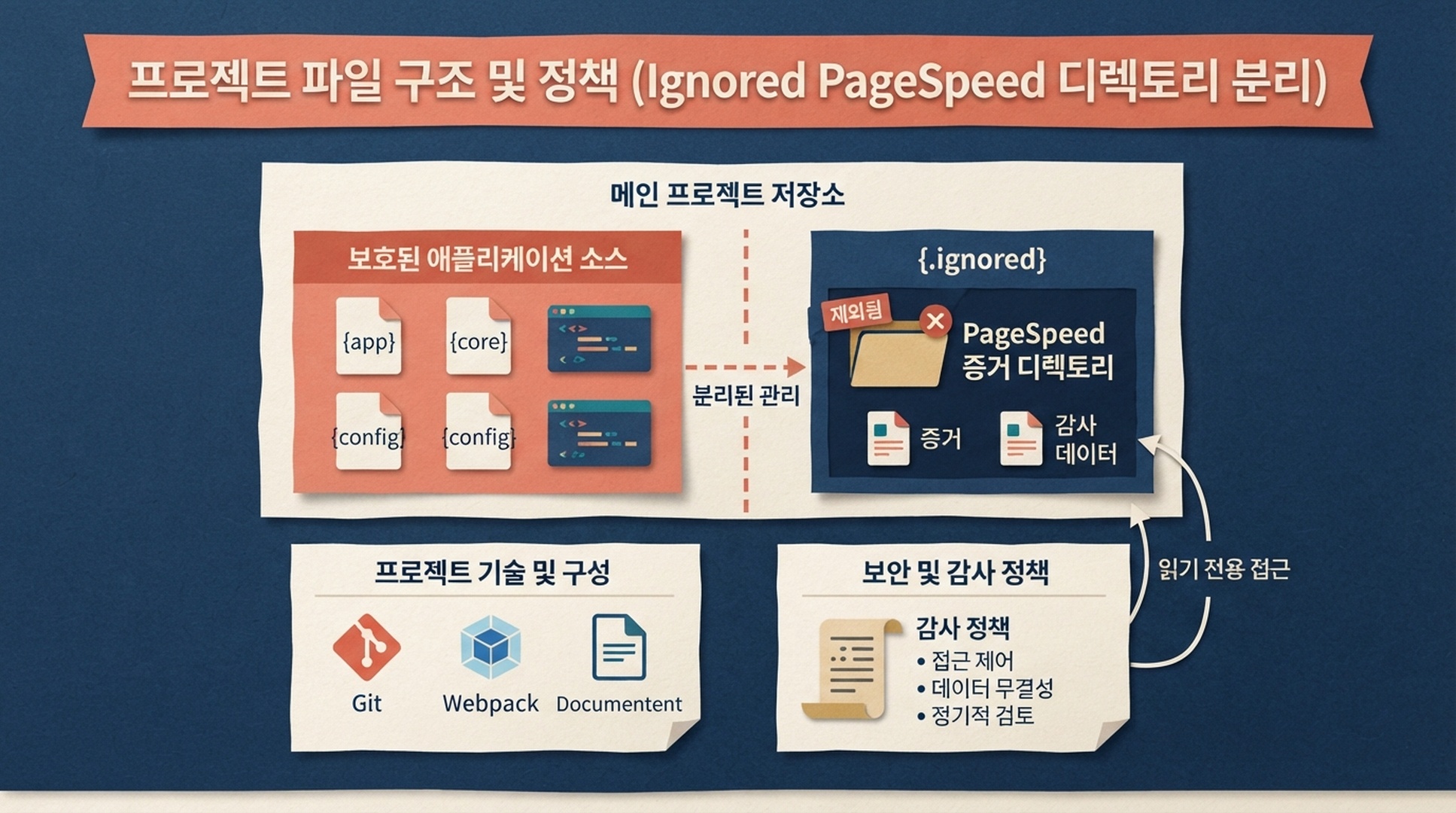
감사는 저장소 안에 증거를 만들지만, 그 증거를 제품 소스 코드나 커밋 대상으로 만들지는 않습니다.
수리 봇이 아니라 증거 스킬 설치하기
.claude/skills/pagespeed-evidence/SKILL.md를 만듭니다.
---
name: pagespeed-evidence
description: Collect PageSpeed Insights evidence for one public URL, a supplied URL list, or a controlled XML sitemap sample. Save raw JSON and a Markdown report under the project's ignored reports/pagespeed directory. Use for page speed, Core Web Vitals, Lighthouse, and performance SEO investigation. Audit work is read-only: do not edit source, content, configuration, or deployments until the user explicitly approves an implementation brief.
---

# PageSpeed Evidence for This Repository

## Guardrails

- Before running, read .claude/rules/page-speed-audits.md or the equivalent project policy. If it conflicts with this skill, follow the stricter rule.
- Read PAGESPEED_API_KEY only from the local environment. Never expose it.
- Make GET requests only to the public PageSpeed Insights endpoint and public sitemap URLs. Write only beneath reports/pagespeed/.
- Test mobile and desktop. Preserve each raw response. Lighthouse is point-in-time lab data; loadingExperience and originLoadingExperience are CrUX field data only when returned, and have different scopes.
- A sitemap sample is not a crawl. State the sample cap and selected URLs. For release-critical pages, use a curated URL file.

## Collect a baseline

    python3 .claude/skills/pagespeed-evidence/scripts/pagespeed_evidence.py \
      --url "https://www.example.com/pricing/" \
      --out reports/pagespeed/pricing-baseline

For a sitemap sample:

    python3 .claude/skills/pagespeed-evidence/scripts/pagespeed_evidence.py \
      --sitemap "https://www.example.com/sitemap.xml" \
      --max-urls 12 \
      --out reports/pagespeed/site-sample

## Interpret before planning

First report scope, final URLs, request failures, and whether field data exists. Then identify repeated opportunities by page template or mechanism. A score alone is not a root cause and does not predict rankings.

## Handoff to an approved implementation task

Do not edit files after reporting. Create a brief with evidence path, affected URLs, laboratory or field-data scope, candidate files and why they are candidates, proposed smallest change, owner, local test, acceptance criteria, and rollback condition. Ask for approval. Once approved, inspect only the named code path, make the smallest diff, show git diff, run agreed tests, and do not deploy.
이어서 Python 표준 라이브러리만 사용하는 다음 runner를 .claude/skills/pagespeed-evidence/scripts/pagespeed_evidence.py로 저장합니다.
#!/usr/bin/env python3
"""Write PageSpeed audit evidence to an ignored repository directory."""
from __future__ import annotations

import argparse
import json
import os
import time
import urllib.error
import urllib.parse
import urllib.request
import xml.etree.ElementTree as ET
from collections import OrderedDict
from datetime import datetime, timezone
from pathlib import Path

API_URL = "https://www.googleapis.com/pagespeedonline/v5/runPagespeed"
STRATEGIES = ("mobile", "desktop")
CATEGORIES = ("performance", "accessibility", "best-practices", "seo")
AUDITS = ("largest-contentful-paint", "interaction-to-next-paint", "cumulative-layout-shift", "total-blocking-time")


def fetch(url: str, timeout: int = 45) -> bytes:
    request = urllib.request.Request(url, headers={"User-Agent": "ClaudeCode-PageSpeed-Evidence/1.0"})
    with urllib.request.urlopen(request, timeout=timeout) as response:
        return response.read()


def sitemap(url: str) -> list[str]:
    try:
        root = ET.fromstring(fetch(url))
    except (urllib.error.URLError, ET.ParseError) as error:
        raise RuntimeError(f"Cannot parse sitemap {url}: {error}") from error
    locations = [node.text.strip() for node in root.findall(".//{*}loc") if node.text and node.text.strip()]
    if root.tag.lower().endswith("sitemapindex"):
        locations = [nested for location in locations for nested in sitemap(location)]
    return list(OrderedDict((url, None) for url in locations if urllib.parse.urlparse(url).scheme in {"http", "https"}))


def sample(urls: list[str], maximum: int) -> list[str]:
    groups: OrderedDict[str, str] = OrderedDict()
    for url in urls:
        segment = next((part for part in urllib.parse.urlparse(url).path.split("/") if part), "root")
        groups.setdefault(segment, url)
    chosen = list(groups.values())
    chosen.extend(url for url in urls if url not in chosen)
    return chosen[:maximum]


def request_result(url: str, strategy: str, key: str) -> dict:
    parameters = [("url", url), ("strategy", strategy), ("key", key)]
    parameters.extend(("category", category) for category in CATEGORIES)
    endpoint = API_URL + "?" + urllib.parse.urlencode(parameters)
    failure = "unknown error"
    for attempt in range(3):
        try:
            return json.loads(fetch(endpoint, timeout=150))
        except urllib.error.HTTPError as error:
            failure = f"HTTP {error.code}: {error.read().decode('utf-8', 'replace')[:200]}"
            if error.code not in {429, 500, 502, 503, 504}:
                break
        except (urllib.error.URLError, TimeoutError, json.JSONDecodeError) as error:
            failure = str(error)
        time.sleep(2 ** attempt)
    raise RuntimeError(failure)


def metric(result: dict, audit_id: str) -> str:
    return result.get("lighthouseResult", {}).get("audits", {}).get(audit_id, {}).get("displayValue", "n/a")


def field_scope(result: dict, name: str) -> str:
    metrics = result.get(name, {}).get("metrics", {})
    fields = ("LARGEST_CONTENTFUL_PAINT_MS", "INTERACTION_TO_NEXT_PAINT", "CUMULATIVE_LAYOUT_SHIFT_SCORE")
    return " / ".join(str(metrics.get(field, {}).get("percentile", "n/a")) for field in fields) if metrics else "not returned"


def make_report(records: list[dict], description: str, selected: int, total: int) -> str:
    header = [
        "# PageSpeed evidence", "",
        f"- Generated (UTC): {datetime.now(timezone.utc).isoformat(timespec='seconds')}",
        f"- Scope: {description}", f"- URLs selected: {selected} of {total}",
        "- Lab data: Lighthouse. Field data: CrUX only when returned by the response.", "",
        "| Requested URL | Final URL | Device | Performance | LCP | INP | CLS | TBT | Page CrUX | Origin CrUX | Status |",
        "| --- | --- | --- | ---: | --- | --- | --- | --- | --- | --- | --- |",
    ]
    for record in records:
        if record["error"]:
            row = [record["url"], "n/a", record["strategy"], "n/a", "n/a", "n/a", "n/a", "n/a", "n/a", "n/a", record["error"]]
        else:
            result = record["result"]
            lighthouse = result.get("lighthouseResult", {})
            perf = lighthouse.get("categories", {}).get("performance", {}).get("score")
            row = [record["url"], lighthouse.get("finalUrl", record["url"]), record["strategy"], "n/a" if perf is None else str(round(perf * 100)), *(metric(result, audit) for audit in AUDITS), field_scope(result, "loadingExperience"), field_scope(result, "originLoadingExperience"), "ok"]
        header.append("| " + " | ".join(str(item).replace("|", "/") for item in row) + " |")
    return "
".join(header) + "
"


def main() -> int:
    parser = argparse.ArgumentParser()
    choice = parser.add_mutually_exclusive_group(required=True)
    choice.add_argument("--url")
    choice.add_argument("--urls-file")
    choice.add_argument("--sitemap")
    parser.add_argument("--max-urls", type=int, default=10)
    parser.add_argument("--out", required=True)
    args = parser.parse_args()
    key = os.environ.get("PAGESPEED_API_KEY")
    if not key:
        parser.error("PAGESPEED_API_KEY is required in the environment")
    output = Path(args.out)
    if Path("reports/pagespeed") not in (output, *output.parents):
        parser.error("--out must be beneath reports/pagespeed/")
    if args.url:
        urls, description, total = [args.url], "single URL", 1
    elif args.urls_file:
        urls = [line.strip() for line in Path(args.urls_file).read_text(encoding="utf-8").splitlines() if line.strip() and not line.startswith("#")]
        description, total = "supplied URL list", len(urls)
    else:
        discovered = sitemap(args.sitemap)
        urls, description, total = sample(discovered, args.max_urls), f"sitemap sample from {args.sitemap}", len(discovered)
    raw = output / "raw"
    raw.mkdir(parents=True, exist_ok=True)
    records = []
    for number, url in enumerate(urls, 1):
        for strategy in STRATEGIES:
            try:
                result = request_result(url, strategy, key)
                (raw / f"{number:03d}-{strategy}.json").write_text(json.dumps(result, indent=2), encoding="utf-8")
                records.append({"url": url, "strategy": strategy, "result": result, "error": ""})
            except RuntimeError as error:
                records.append({"url": url, "strategy": strategy, "result": {}, "error": str(error)})
    (output / "report.md").write_text(make_report(records, description, len(urls), total), encoding="utf-8")
    (output / "summary.json").write_text(json.dumps({"scope": description, "urls": urls, "records": [{key: value for key, value in record.items() if key != "result"} for record in records]}, indent=2), encoding="utf-8")
    print(output / "report.md")
    return 0


if __name__ == "__main__":
    raise SystemExit(main())
증거 패킷을 만든 뒤 중지하기
PAGESPEED_API_KEY는 저장소가 아니라 셸 또는 조직이 승인한 비밀 관리 도구에서 설정합니다. 다음으로 작은 기준선을 실행합니다.
python3 .claude/skills/pagespeed-evidence/scripts/pagespeed_evidence.py \
  --url "https://www.example.com/" \
  --out reports/pagespeed/homepage-baseline
예상 출력은 report.md, summary.json, 모바일 및 데스크톱 raw JSON 파일입니다. 품질 확인으로 git status --short에 보고서 산출물이 나타나지 않는지 확인합니다. Claude Code에 소스 파일을 찾게 하기 전에 먼저 보고서를 읽으세요. 최종 URL이 요청 URL과 다르면 요청 경로가 사용자가 보는 경로라고 가정하지 말고, 그 리디렉션을 구현 브리프에 기록합니다.
복구 방법: 403은 대개 Google API 설정 또는 API 키 제한을 확인해야 한다는 뜻입니다. field data 섹션이 비어 있어도 runner 오류가 아니라 API가 해당 범위에 대해 이용 가능한 CrUX 데이터를 반환하지 않았다는 의미입니다. 429 또는 5xx는 횟수를 제한한 재시도 뒤 기록됩니다. 나중에 같은 범위를 다시 실행하고, 부분 결과를 새 감사 결과와 섞지 말고 같은 조건에서 비교하세요.
보고서를 검토 가능한 구현 브리프로 바꾸기
감사 후 Claude Code에 주는 첫 요청도 읽기 전용으로 유지합니다. 증거 경로를 제공하고, 코드 편집이 아니라 코드 후보를 제시하도록 분명히 요청하세요.
Read reports/pagespeed/homepage-baseline/ as evidence and inspect this repository
read-only. Produce an implementation brief only.

For each prioritized opportunity, cite the relevant report row or raw response,
name candidate templates, components, asset tooling, or configuration files,
and explain why they are candidates. Propose the smallest safe change. Include
expected benefit, risk, local validation, production acceptance criteria, and a
rollback condition. Mark uncertainty clearly.

Do not edit any file, run a formatter, change dependencies, write a test, or
deploy. Wait for my approval of the brief.
기대하는 결정은 어떤 가설을 시험할 가치가 있는지 알려 주는 간결한 계획입니다. 품질 확인으로, render-blocking resources에서 광범위한 프레임워크 재작성으로 곧장 넘어가는 계획은 아직 실행할 준비가 되지 않았습니다. 복구 방법: Claude Code에 한 페이지 템플릿, 한 가지 메커니즘, 한 가지 되돌릴 수 있는 변경으로 계획을 좁히게 하거나, 개발자가 먼저 raw JSON을 검토하게 하세요.
승인 뒤에만 diff 만들기
코드 소유자가 특정 항목을 승인한 뒤 Claude Code에 제약된 요청을 전달합니다.
Approved: implement only item P1 from the PageSpeed brief.

Change only these files: [APPROVED PATHS]. Preserve existing behavior. Before
editing, restate the acceptance criteria and rollback condition. After editing,
show git diff, run [APPROVED LOCAL TEST COMMAND], and report any failure.
Do not commit, push, create a pull request, change infrastructure, or deploy.
품질 확인으로, diff는 계획보다 작아야지 더 커서는 안 됩니다. 또한 로컬 테스트가 성능 가설과 어떻게 연결되는지 설명할 수 있어야 합니다. 단위 테스트가 통과해도 Core Web Vitals 개선을 증명하지는 않습니다. 미리보기 또는 승인된 릴리스 뒤에 같은 PageSpeed 범위를 재측정하고 raw evidence 및 field data의 가용성을 신중하게 비교하세요.
증거에서 변경까지의 연결고리
PageSpeed API response
        |
        v
ignored reports/pagespeed evidence
        |
        v
read-only repository mapping and repair brief
        |
  explicit human approval
        |
        v
small Git diff -> agreed local tests -> preview/retest -> rollback if needed
Claude Code는 코드베이스 가까이에서 작동하므로 스케줄러나 채팅 게이트웨이와 다른 작업 흐름이 필요합니다. 증거, 계획, diff를 각각 별도의 산출물로 유지하면 빠르게 움직이는 에이전트도 검토하기 쉬워집니다.
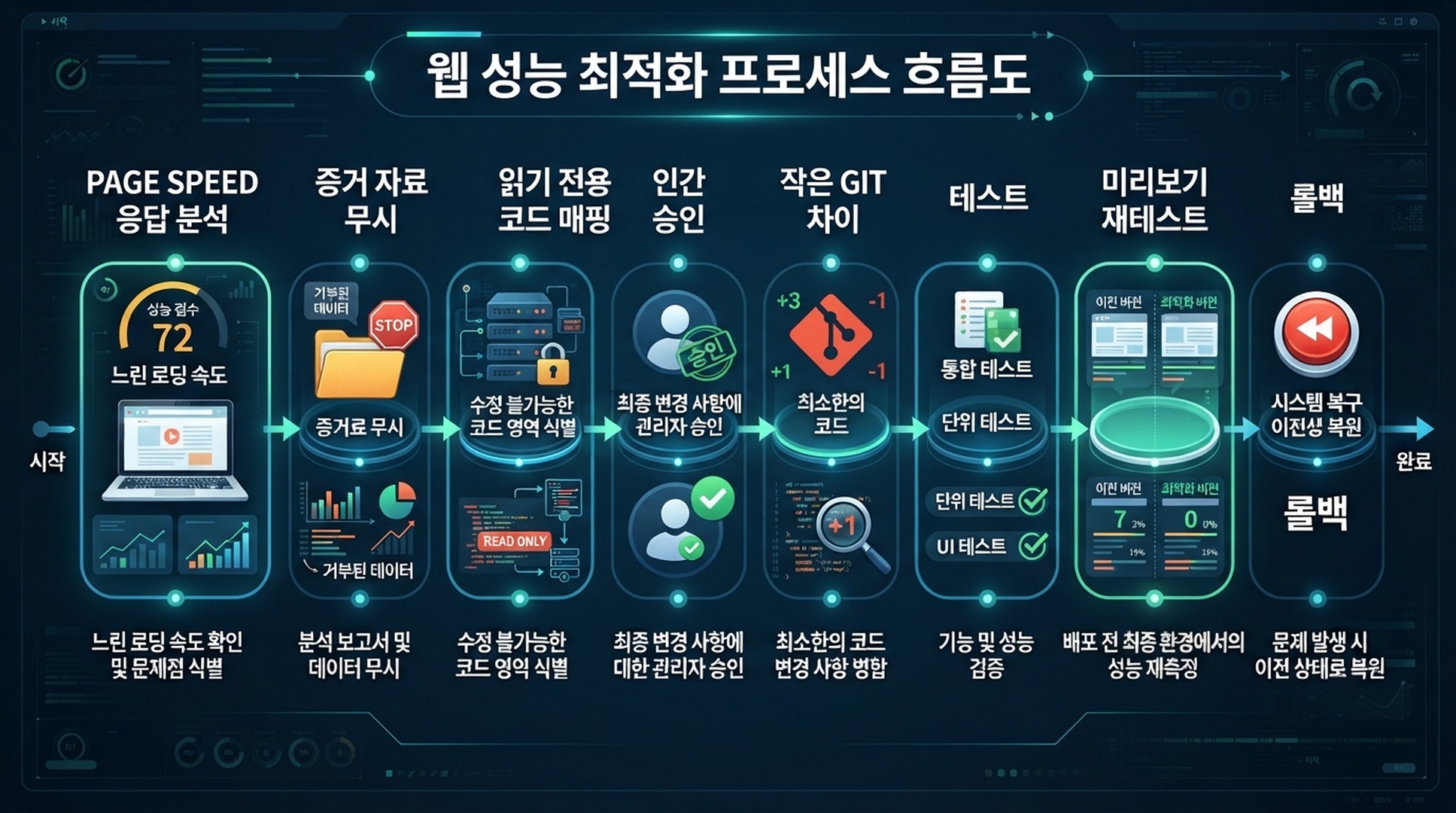
증거, 계획, diff, 재측정은 각각 독립적으로 검토할 수 있는 상태로 다루세요.
검증 체크리스트
- [ ] Skill이 프로젝트 로컬 경로
.claude/skills/pagespeed-evidence/SKILL.md에 있다. - [ ] 저장소에 눈에 보이는 PageSpeed 감사 정책과 Git이 무시하는
reports/pagespeed/위치가 있다. - [ ] API 키는 승인된 로컬 비밀 환경에만 있다.
- [ ] 감사한 각 URL에 모바일 및 데스크톱 결과, raw JSON, 최종 URL, 필요한 실패 기록이 있다.
- [ ] Lighthouse 측정값과 페이지/오리진 CrUX 데이터가 따로 기록되어 있다.
- [ ] Claude Code가 소스 파일을 편집하기 전에 구현 브리프를 만들었다.
- [ ] 승인된 변경에 작은 Git diff, 로컬 테스트 결과, 수용 조건, 롤백 조건이 있다.
- [ ] 감사 또는 구현 요청이 웹사이트를 배포하지 않는다.
FAQ
CLAUDE.md만으로 Claude Code의 파일 변경을 막을 수 있나요?
아닙니다. 이는 가치 있는 지속 지침 문맥이지만 강제 수단은 아닙니다. 어떤 작업을 기술적으로 막아야 한다면 저장소의 권한과 hook을 사용하세요. 그래도 정책을 유지할 가치는 있습니다. 사람과 에이전트 모두에게 의도한 작업 방식을 분명하게 전달하기 때문입니다.
이 Skill로 사이트 전체를 감사할 수 있나요?
더 큰 URL 목록을 사용할 수는 있지만 sitemap의 각 URL에 PageSpeed 테스트를 하는 것이 첫 번째로 적절한 단계인 경우는 드뭅니다. 대표 템플릿, 중요한 전환 경로, 최근 릴리스 화면을 고르세요. 표본 규칙을 밝히고, 결과가 필요하다고 판단될 때만 범위를 넓힙니다.
왜 Claude Code가 모든 Lighthouse 기회를 자동으로 고치게 하면 안 되나요?
많은 Lighthouse 기회는 증상을 설명할 뿐, 보편적으로 안전한 변경을 가리키지 않습니다. script를 지연시키면 결제, 동의 관리, 분석, 개인화 또는 접근성을 망가뜨릴 수 있습니다. 감사가 만들어야 하는 것은 가설입니다. 안전하게 시험할 수 있는 항목은 코드 소유자가 결정합니다.
Lighthouse 점수가 좋아지면 실제 사용자의 경험이 개선됐다는 증거가 되나요?
아닙니다. 통제된 테스트 조건의 증거를 강화할 뿐입니다. 이용 가능한 경우 CrUX field data를 검토하고, 시간에 따라 같은 URL과 같은 릴리스 조건을 비교하세요.
공식 참고 자료
- Claude Code skills
- Claude Code memory and project instructions
- Claude Code permissions
- Google PageSpeed Insights API
- Chrome UX Report documentation
작성자: Julian Mercer, Auspia Technical SEO Practitioner. Julian은 SEO 발견부터 검토된 웹사이트 변경까지 명확한 증거 흐름을 남기는 기술 워크플로를 전문으로 합니다.