如何使用 Claude Code 進行 PageSpeed SEO 稽核,且不做未經審核的網站變更
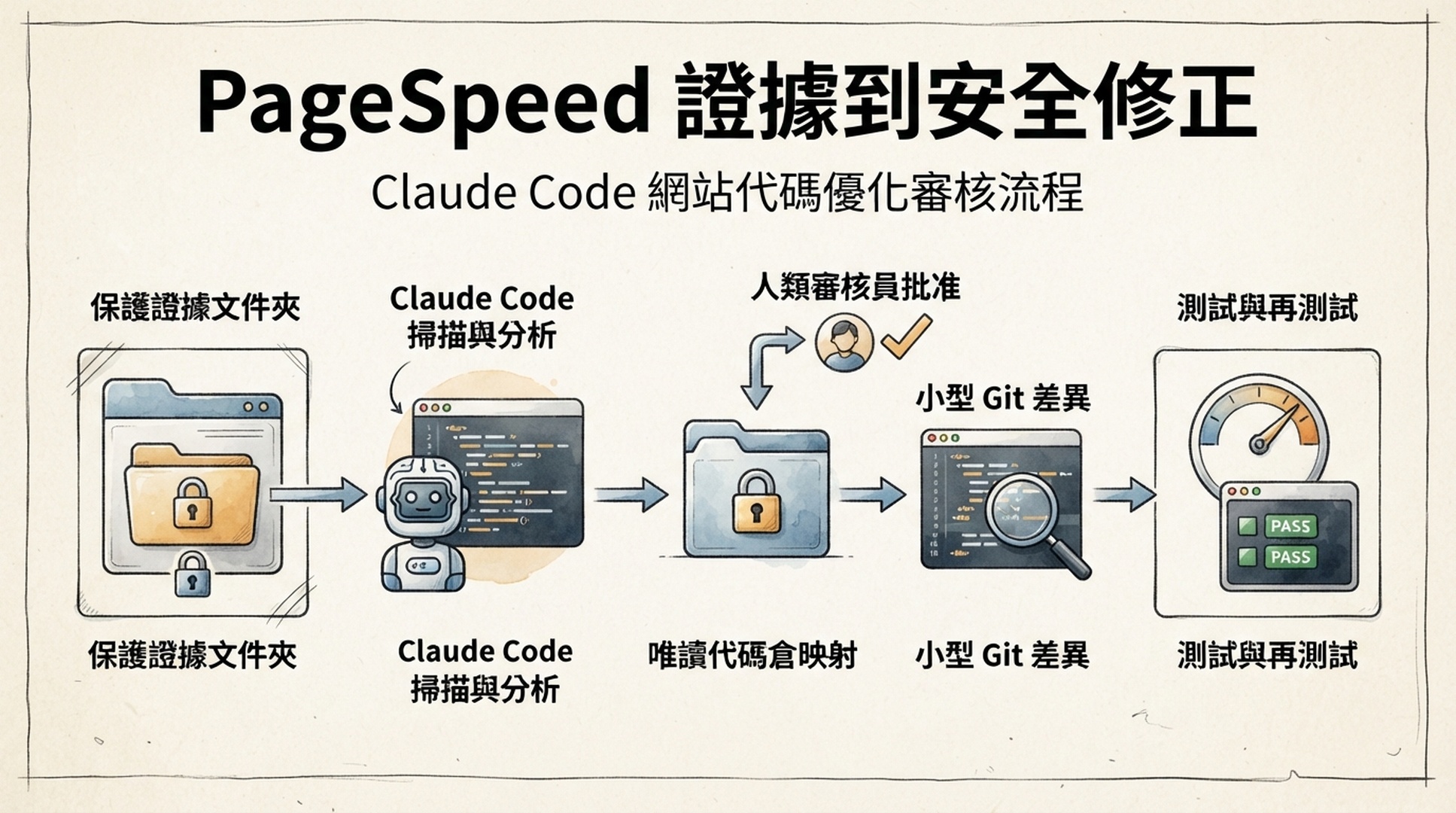
當 PageSpeed 的結果指向可能的實作區域時,Claude Code 最能發揮價值。它可以檢視程式碼庫、把反覆出現的稽核發現對應到頁面範本或資產流程,並準備可測試的修補程式。不過,這項能力必須有一道關卡:蒐集證據時只能唯讀;只有人工核准一份範圍明確的計畫後,才可以開始變更網站。
本教學會為程式碼庫建立一個本機 Skill、一個證據目錄和一份簡短政策。最終成果不是自動最佳化機器人,而是一條能從 PageSpeed Insights 證據走到已核准、可審查 Git diff 的可重複流程。
將本文交給 Claude Code,以安裝這個 Skill
本文取得正式網址後,請將下方要求貼到 Claude Code。它會安裝工作流程,但不會測試網站或變更應用程式碼。
Read [THIS ARTICLE URL] and install its project-local PageSpeed audit workflow.

First inspect this repository for CLAUDE.md, CLAUDE.local.md, .claude rules,
and project conventions. Explain where these files will go before writing them:
.claude/skills/pagespeed-evidence/SKILL.md
.claude/skills/pagespeed-evidence/scripts/pagespeed_evidence.py
.claude/rules/page-speed-audits.md

Create each file from the complete code blocks in the article. Do not change
application code, package files, lock files, CI, infrastructure, or deployment
configuration. Do not call PageSpeed Insights or inspect public URLs.

Run a Python syntax check on the runner. Report the paths, confirm audit output
is ignored by Git, and tell me to configure PAGESPEED_API_KEY in my approved
local secret environment without revealing or requesting the value. Stop there.
Claude Code 會使用 CLAUDE.md 與 .claude 檔案保存專案指引。它們提供很有用的持久上下文,但本身不是安全邊界。如果團隊必須不論 agent 如何判斷,都技術性地禁止某類工具動作,請依目前的官方文件使用 Claude Code permissions 或 PreToolUse hooks。以下流程把稽核命令維持在唯讀狀態,並要求在編輯前另行取得核准。
完成條件
項目 | 完成條件 |
|---|---|
適用讀者 | 在網站程式碼庫中工作的開發者、SEO 負責人或技術內容擁有者 |
最終成果 | 專案本機的 |
輸入 | 一個公開 URL、URL 檔案,或受控的 sitemap 樣本 |
前置條件 | Claude Code、Python 3.9 以上、PageSpeed Insights API 存取權與 Git 程式碼庫 |
所需時間 | 安裝與建立 baseline 約 35 分鐘;只有程式碼擁有者核准修正後才需要更多時間 |
完成的定義 | 已有 raw response 和 |
差別很簡單:reports/pagespeed/ 儲存的是 API 證據;修正計畫會將證據連到候選程式碼;Git diff 則是實作工作。請把這幾種狀態清楚分開,而不是讓它們混在同一次 agent 要求中。
在第一次稽核前,先準備程式碼庫的邊界
先建立一個被忽略的證據位置。這讓 Claude Code 可以讀取稽核輸出,卻不會把它當成產品原始碼或意外提交 API 回應。
mkdir -p reports/pagespeed
printf 'reports/pagespeed/
' >> .gitignore
預期輸出:git status --short 應只顯示 .gitignore 的變更。品質檢查:建立一個暫存路徑後,執行 git check-ignore -v reports/pagespeed/example/report.md;它應指出剛加入的 ignore 規則。復原方式:如果程式碼庫已有核准的產生物目錄規則,請改用那個位置,並同步修改 Skill 政策。預設不要把報告放在 src/、部署目錄,或受追蹤的 docs/ 資料夾。
將下列規則儲存成 .claude/rules/page-speed-audits.md。如果程式碼庫不使用 .claude/rules,請將同樣的文字放進既有 CLAUDE.md 的政策段落。
# PageSpeed audit policy

- PageSpeed work starts as read-only evidence collection. Write audit output only under reports/pagespeed/, which must stay ignored by Git.
- Read PAGESPEED_API_KEY only from an approved local environment or secret mechanism. Never print it, add it to a command transcript, write it to a report, or commit it.
- Do not edit application source, content, build files, CI, infrastructure, deployment configuration, or a CMS while collecting or interpreting an audit.
- After an audit, create an implementation brief that names evidence, candidate files, risk, tests, acceptance criteria, and rollback condition. Wait for explicit approval before making a diff.
- Never deploy. After an approved implementation, show the Git diff and run only agreed local validation commands.
這份政策說明 Claude Code 應如何在專案中工作;它不能覆寫組織層級的權限政策。面對敏感程式碼庫時,應以團隊核准的 permissions 和 hook 控制措施,強制執行相同邊界。
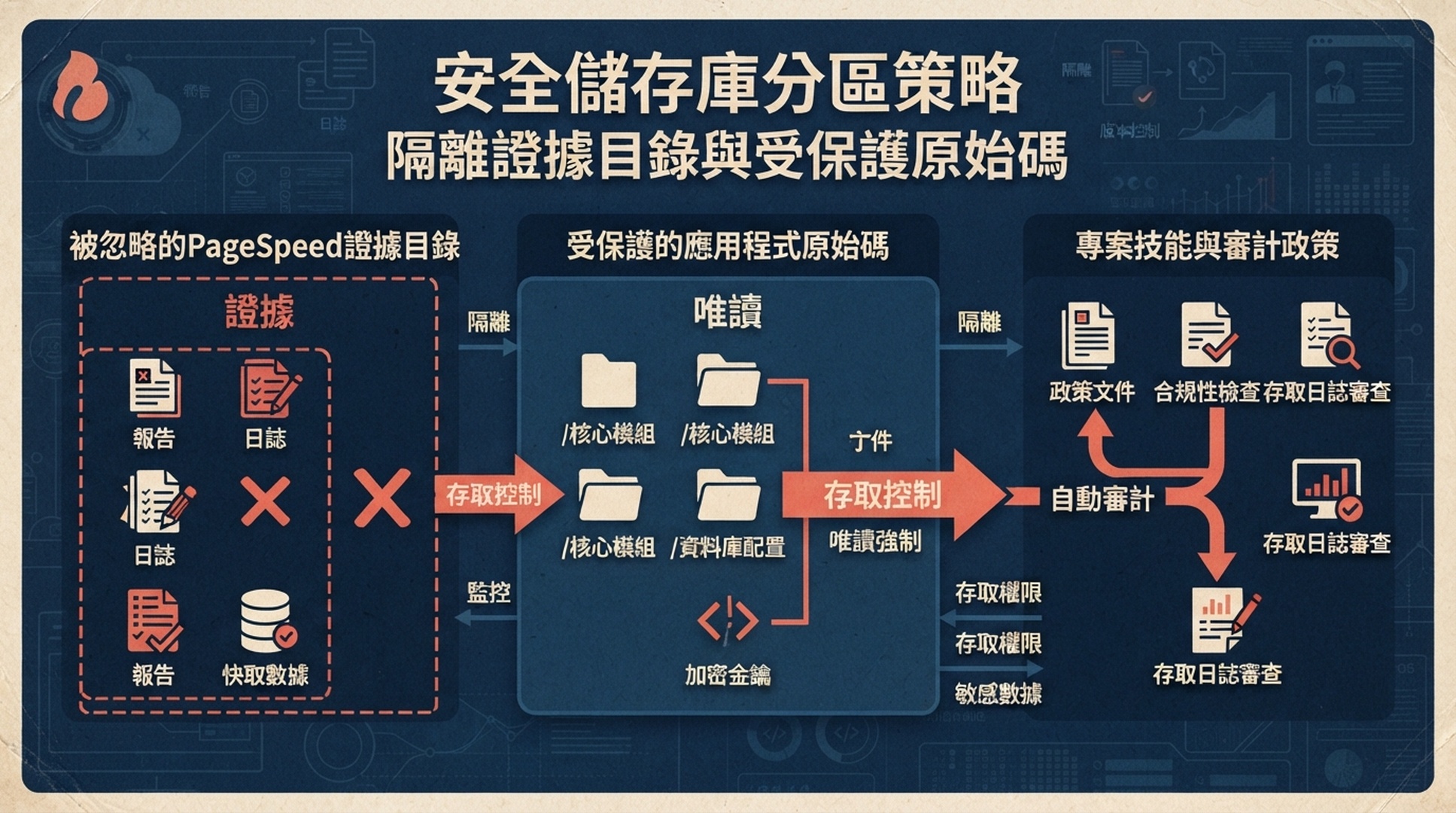
稽核會在程式碼庫內建立證據,但不會把證據變成產品原始碼或提交內容。
安裝證據蒐集 Skill,而不是修復機器人
建立 .claude/skills/pagespeed-evidence/SKILL.md:
---
name: pagespeed-evidence
description: Collect PageSpeed Insights evidence for one public URL, a supplied URL list, or a controlled XML sitemap sample. Save raw JSON and a Markdown report under the project's ignored reports/pagespeed directory. Use for page speed, Core Web Vitals, Lighthouse, and performance SEO investigation. Audit work is read-only: do not edit source, content, configuration, or deployments until the user explicitly approves an implementation brief.
---

# PageSpeed Evidence for This Repository

## Guardrails

- Before running, read .claude/rules/page-speed-audits.md or the equivalent project policy. If it conflicts with this skill, follow the stricter rule.
- Read PAGESPEED_API_KEY only from the local environment. Never expose it.
- Make GET requests only to the public PageSpeed Insights endpoint and public sitemap URLs. Write only beneath reports/pagespeed/.
- Test mobile and desktop. Preserve each raw response. Lighthouse is point-in-time lab data; loadingExperience and originLoadingExperience are CrUX field data only when returned, and have different scopes.
- A sitemap sample is not a crawl. State the sample cap and selected URLs. For release-critical pages, use a curated URL file.

## Collect a baseline

    python3 .claude/skills/pagespeed-evidence/scripts/pagespeed_evidence.py \
      --url "https://www.example.com/pricing/" \
      --out reports/pagespeed/pricing-baseline

For a sitemap sample:

    python3 .claude/skills/pagespeed-evidence/scripts/pagespeed_evidence.py \
      --sitemap "https://www.example.com/sitemap.xml" \
      --max-urls 12 \
      --out reports/pagespeed/site-sample

## Interpret before planning

First report scope, final URLs, request failures, and whether field data exists. Then identify repeated opportunities by page template or mechanism. A score alone is not a root cause and does not predict rankings.

## Handoff to an approved implementation task

Do not edit files after reporting. Create a brief with evidence path, affected URLs, laboratory or field-data scope, candidate files and why they are candidates, proposed smallest change, owner, local test, acceptance criteria, and rollback condition. Ask for approval. Once approved, inspect only the named code path, make the smallest diff, show git diff, run agreed tests, and do not deploy.
接著,將下方這個只使用 Python 標準函式庫的 runner 儲存為 .claude/skills/pagespeed-evidence/scripts/pagespeed_evidence.py:
#!/usr/bin/env python3
"""Write PageSpeed audit evidence to an ignored repository directory."""
from __future__ import annotations

import argparse
import json
import os
import time
import urllib.error
import urllib.parse
import urllib.request
import xml.etree.ElementTree as ET
from collections import OrderedDict
from datetime import datetime, timezone
from pathlib import Path

API_URL = "https://www.googleapis.com/pagespeedonline/v5/runPagespeed"
STRATEGIES = ("mobile", "desktop")
CATEGORIES = ("performance", "accessibility", "best-practices", "seo")
AUDITS = ("largest-contentful-paint", "interaction-to-next-paint", "cumulative-layout-shift", "total-blocking-time")


def fetch(url: str, timeout: int = 45) -> bytes:
    request = urllib.request.Request(url, headers={"User-Agent": "ClaudeCode-PageSpeed-Evidence/1.0"})
    with urllib.request.urlopen(request, timeout=timeout) as response:
        return response.read()


def sitemap(url: str) -> list[str]:
    try:
        root = ET.fromstring(fetch(url))
    except (urllib.error.URLError, ET.ParseError) as error:
        raise RuntimeError(f"Cannot parse sitemap {url}: {error}") from error
    locations = [node.text.strip() for node in root.findall(".//{*}loc") if node.text and node.text.strip()]
    if root.tag.lower().endswith("sitemapindex"):
        locations = [nested for location in locations for nested in sitemap(location)]
    return list(OrderedDict((url, None) for url in locations if urllib.parse.urlparse(url).scheme in {"http", "https"}))


def sample(urls: list[str], maximum: int) -> list[str]:
    groups: OrderedDict[str, str] = OrderedDict()
    for url in urls:
        segment = next((part for part in urllib.parse.urlparse(url).path.split("/") if part), "root")
        groups.setdefault(segment, url)
    chosen = list(groups.values())
    chosen.extend(url for url in urls if url not in chosen)
    return chosen[:maximum]


def request_result(url: str, strategy: str, key: str) -> dict:
    parameters = [("url", url), ("strategy", strategy), ("key", key)]
    parameters.extend(("category", category) for category in CATEGORIES)
    endpoint = API_URL + "?" + urllib.parse.urlencode(parameters)
    failure = "unknown error"
    for attempt in range(3):
        try:
            return json.loads(fetch(endpoint, timeout=150))
        except urllib.error.HTTPError as error:
            failure = f"HTTP {error.code}: {error.read().decode('utf-8', 'replace')[:200]}"
            if error.code not in {429, 500, 502, 503, 504}:
                break
        except (urllib.error.URLError, TimeoutError, json.JSONDecodeError) as error:
            failure = str(error)
        time.sleep(2 ** attempt)
    raise RuntimeError(failure)


def metric(result: dict, audit_id: str) -> str:
    return result.get("lighthouseResult", {}).get("audits", {}).get(audit_id, {}).get("displayValue", "n/a")


def field_scope(result: dict, name: str) -> str:
    metrics = result.get(name, {}).get("metrics", {})
    fields = ("LARGEST_CONTENTFUL_PAINT_MS", "INTERACTION_TO_NEXT_PAINT", "CUMULATIVE_LAYOUT_SHIFT_SCORE")
    return " / ".join(str(metrics.get(field, {}).get("percentile", "n/a")) for field in fields) if metrics else "not returned"


def make_report(records: list[dict], description: str, selected: int, total: int) -> str:
    header = [
        "# PageSpeed evidence", "",
        f"- Generated (UTC): {datetime.now(timezone.utc).isoformat(timespec='seconds')}",
        f"- Scope: {description}", f"- URLs selected: {selected} of {total}",
        "- Lab data: Lighthouse. Field data: CrUX only when returned by the response.", "",
        "| Requested URL | Final URL | Device | Performance | LCP | INP | CLS | TBT | Page CrUX | Origin CrUX | Status |",
        "| --- | --- | --- | ---: | --- | --- | --- | --- | --- | --- | --- |",
    ]
    for record in records:
        if record["error"]:
            row = [record["url"], "n/a", record["strategy"], "n/a", "n/a", "n/a", "n/a", "n/a", "n/a", "n/a", record["error"]]
        else:
            result = record["result"]
            lighthouse = result.get("lighthouseResult", {})
            perf = lighthouse.get("categories", {}).get("performance", {}).get("score")
            row = [record["url"], lighthouse.get("finalUrl", record["url"]), record["strategy"], "n/a" if perf is None else str(round(perf * 100)), *(metric(result, audit) for audit in AUDITS), field_scope(result, "loadingExperience"), field_scope(result, "originLoadingExperience"), "ok"]
        header.append("| " + " | ".join(str(item).replace("|", "/") for item in row) + " |")
    return "
".join(header) + "
"


def main() -> int:
    parser = argparse.ArgumentParser()
    choice = parser.add_mutually_exclusive_group(required=True)
    choice.add_argument("--url")
    choice.add_argument("--urls-file")
    choice.add_argument("--sitemap")
    parser.add_argument("--max-urls", type=int, default=10)
    parser.add_argument("--out", required=True)
    args = parser.parse_args()
    key = os.environ.get("PAGESPEED_API_KEY")
    if not key:
        parser.error("PAGESPEED_API_KEY is required in the environment")
    output = Path(args.out)
    if Path("reports/pagespeed") not in (output, *output.parents):
        parser.error("--out must be beneath reports/pagespeed/")
    if args.url:
        urls, description, total = [args.url], "single URL", 1
    elif args.urls_file:
        urls = [line.strip() for line in Path(args.urls_file).read_text(encoding="utf-8").splitlines() if line.strip() and not line.startswith("#")]
        description, total = "supplied URL list", len(urls)
    else:
        discovered = sitemap(args.sitemap)
        urls, description, total = sample(discovered, args.max_urls), f"sitemap sample from {args.sitemap}", len(discovered)
    raw = output / "raw"
    raw.mkdir(parents=True, exist_ok=True)
    records = []
    for number, url in enumerate(urls, 1):
        for strategy in STRATEGIES:
            try:
                result = request_result(url, strategy, key)
                (raw / f"{number:03d}-{strategy}.json").write_text(json.dumps(result, indent=2), encoding="utf-8")
                records.append({"url": url, "strategy": strategy, "result": result, "error": ""})
            except RuntimeError as error:
                records.append({"url": url, "strategy": strategy, "result": {}, "error": str(error)})
    (output / "report.md").write_text(make_report(records, description, len(urls), total), encoding="utf-8")
    (output / "summary.json").write_text(json.dumps({"scope": description, "urls": urls, "records": [{key: value for key, value in record.items() if key != "result"} for record in records]}, indent=2), encoding="utf-8")
    print(output / "report.md")
    return 0


if __name__ == "__main__":
    raise SystemExit(main())
產生證據包後就停止
只在 shell 或組織核准的祕密管理工具中設定 PAGESPEED_API_KEY,絕不要將它放進程式碼庫。接著執行一個小範圍 baseline:
python3 .claude/skills/pagespeed-evidence/scripts/pagespeed_evidence.py \
  --url "https://www.example.com/" \
  --out reports/pagespeed/homepage-baseline
預期輸出:report.md、summary.json,以及 mobile 和 desktop 的 raw JSON 檔案。品質檢查:git status --short 不應顯示任何報告產物。請先閱讀報告,再要求 Claude Code 尋找原始碼檔案。如果最終 URL 與請求 URL 不同,請在實作簡報中記錄這個重新導向,不要假設使用者實際看到的就是請求路徑。
復原方式:403 通常表示 Google API 設定或 API key 限制需要處理。空白的 field-data 區段不是 runner 錯誤,而是 API 沒有回傳該範圍符合資格的 CrUX 資料。429 或 5xx 會在有限次重試後記錄下來;請稍後重跑,並比較相同範圍的結果,不要把部分結果混進另一輪新稽核。
將報告轉成可審查的實作簡報
稽核結束後,第一次交給 Claude Code 的要求仍應維持唯讀。提供證據路徑,並明確要求它給出程式碼候選位置,而不是直接編輯程式碼:
Read reports/pagespeed/homepage-baseline/ as evidence and inspect this repository
read-only. Produce an implementation brief only.

For each prioritized opportunity, cite the relevant report row or raw response,
name candidate templates, components, asset tooling, or configuration files,
and explain why they are candidates. Propose the smallest safe change. Include
expected benefit, risk, local validation, production acceptance criteria, and a
rollback condition. Mark uncertainty clearly.

Do not edit any file, run a formatter, change dependencies, write a test, or
deploy. Wait for my approval of the brief.
預期決策:一份精簡計畫能指出哪個假設值得測試。品質檢查:如果計畫從 render-blocking resources 直接跳到大範圍框架重寫,它還不能執行。復原方式:要求 Claude Code 把計畫縮小為一個頁面範本、一項機制和一項可回復的變更;或者先請開發者檢視 raw JSON。
只在核准後建立 diff
程式碼擁有者核准特定項目後,再給 Claude Code 一段受限的要求:
Approved: implement only item P1 from the PageSpeed brief.

Change only these files: [APPROVED PATHS]. Preserve existing behavior. Before
editing, restate the acceptance criteria and rollback condition. After editing,
show git diff, run [APPROVED LOCAL TEST COMMAND], and report any failure.
Do not commit, push, create a pull request, change infrastructure, or deploy.
品質檢查:diff 應該比計畫更小,而非更大;它也應說明本機測試與效能假設之間的關係。單元測試亮綠燈,並不代表 Core Web Vitals 已改善;請在 preview 或已核准的發布後,重新測試相同的 PageSpeed 範圍,再謹慎比較 raw 證據和 field-data 的可用性。
從證據到變更的鏈結
PageSpeed API response
        |
        v
ignored reports/pagespeed evidence
        |
        v
read-only repository mapping and repair brief
        |
  explicit human approval
        |
        v
small Git diff -> agreed local tests -> preview/retest -> rollback if needed
這也是 Claude Code 為何需要與排程器或聊天 gateway 不同的工作流程:它非常靠近程式碼庫。將證據、計畫與 diff 維持為獨立產物,會讓快速運作的 agent 更容易審查。
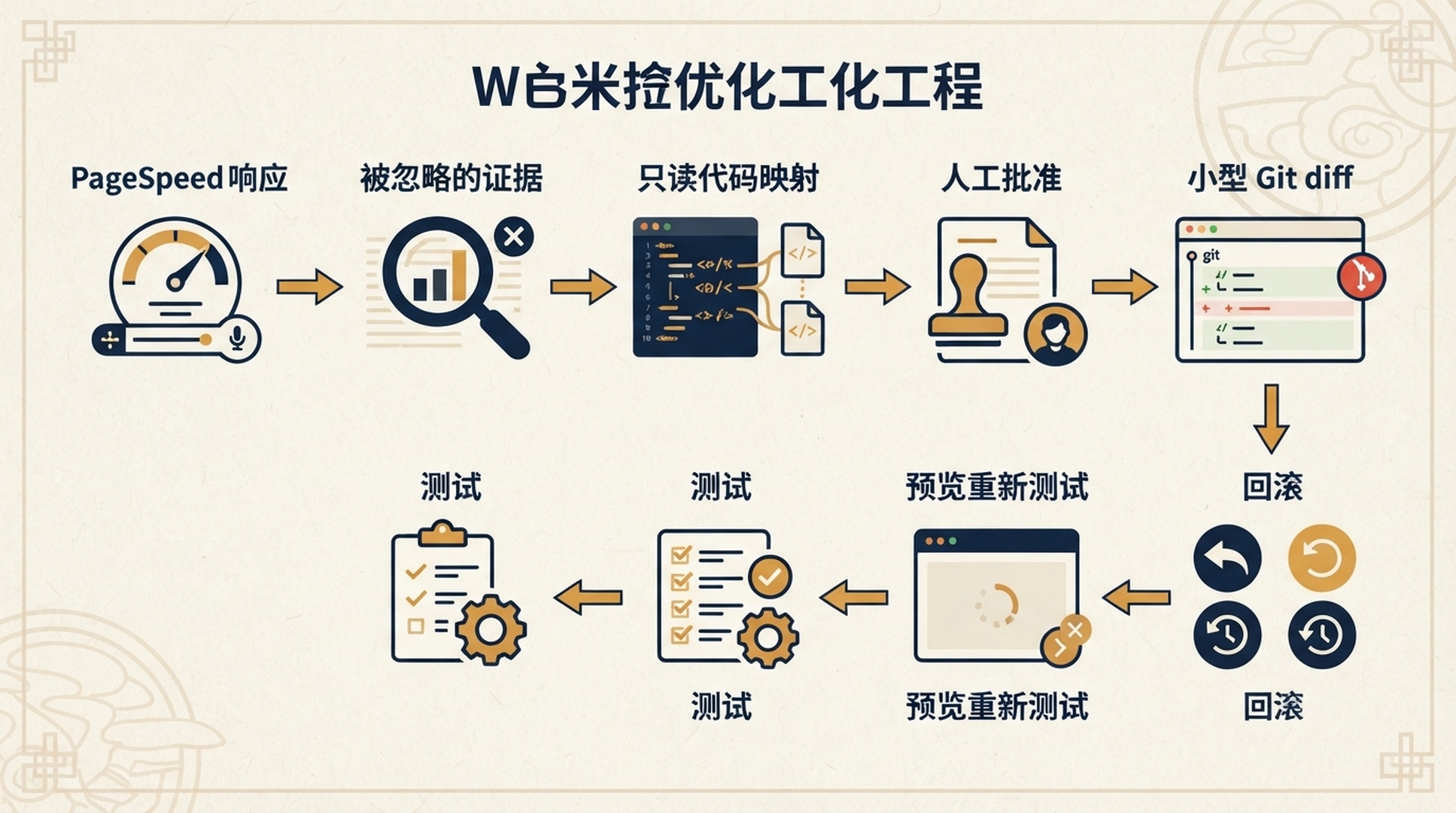
請將證據、計畫、diff 和重新測試視為彼此獨立、都能被審查的狀態。
驗證清單
- [ ] Skill 位於專案本機路徑
.claude/skills/pagespeed-evidence/SKILL.md。 - [ ] 程式碼庫有清楚可見的 PageSpeed 稽核政策,並有被忽略的
reports/pagespeed/位置。 - [ ] API key 只存在於核准的本機祕密環境中。
- [ ] 每個已稽核 URL 都有 mobile 和 desktop 結果、raw JSON、最終 URL,以及可能的失敗紀錄。
- [ ] Lighthouse 測量值與 page/origin CrUX 資料有分別標示。
- [ ] Claude Code 在編輯原始碼前,已先產生實作簡報。
- [ ] 已核准的變更有小型 Git diff、本機測試結果、接受條件和回滾條件。
- [ ] 任何稽核或實作要求都不會部署網站。
常見問題
CLAUDE.md 足以阻止 Claude Code 變更檔案嗎?
不足。它是很有價值的持久指令上下文,但不是強制機制。當某個動作必須在技術上被阻止時,請使用程式碼庫的 permissions 與 hooks。政策仍值得保留,因為它能讓人員與 agent 都清楚理解預期的操作模式。
這個 Skill 能稽核整個網站嗎?
它可以使用更長的 URL 清單,但為 sitemap 的每一個 URL 執行 PageSpeed 測試,很少是正確的第一步。請挑選具代表性的範本、重要轉換路徑和近期發布的介面,寫明取樣規則,只有在結果需要時才擴大範圍。
為什麼不讓 Claude Code 自動修復每個 Lighthouse 機會?
許多 Lighthouse 機會描述的是症狀,而不是普遍安全的變更。延後載入某個 script,可能破壞結帳、同意管理、分析、個人化或無障礙功能。稽核應產生假設;由程式碼擁有者決定哪些變更可以安全測試。
Lighthouse 分數提高,能證明真實使用者的體驗改善嗎?
不能。它只會強化受控測試條件下的證據。可取得時請檢視 CrUX field data,並隨時間比較相同 URL、相同發布條件下的結果。
官方參考資料
- Claude Code skills
- Claude Code memory and project instructions
- Claude Code permissions
- Google PageSpeed Insights API
- Chrome UX Report documentation
作者:Julian Mercer,Auspia 技術 SEO 實務工作者。Julian 專注於建立技術流程,讓 SEO 發現到經審查網站變更之間留下清楚的證據軌跡。