これから作るもの
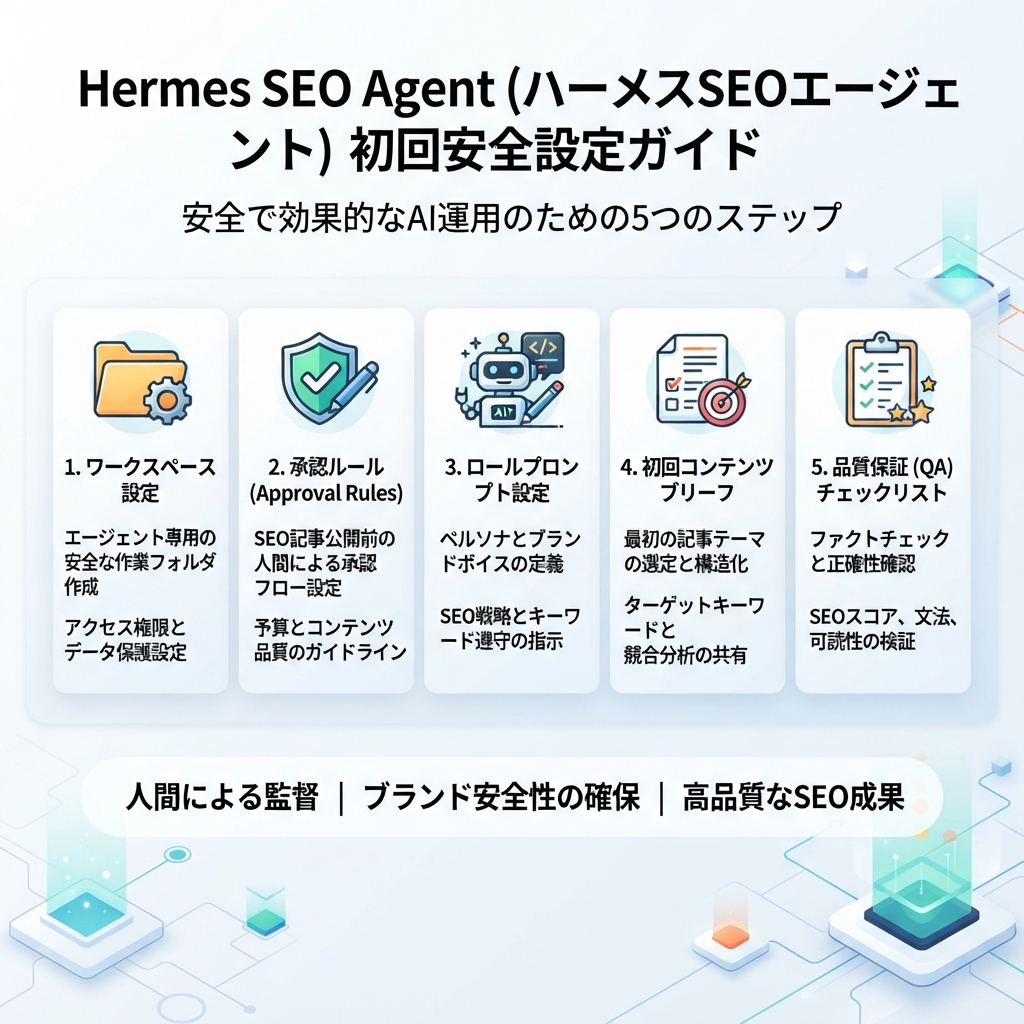
このチュートリアルでは、初心者でも安全に使える最初の Hermes SEO Agent を作ります。この Agent はページを公開せず、Web サイトを変更せず、テクニカル SEO 設定にも触れません。代わりに、Web サイト要約、承認ルール、エージェントの役割、コンテンツブリーフ 1 本、QA チェックリスト 1 つという構造化されたファイルを作ります。
目的は、自動化そのものではありません。Hermes に十分な文脈と境界線を渡し、推測に頼らず実際の SEO 作業を手伝える状態にすることです。最後まで進めると、キーワード調査、コンテンツブリーフ、ページリフレッシュ計画、低 CTR 診断、内部リンク提案、GEO プロンプトマッピングを支えられる小さなワークスペースができます。
小さく始めてください。最初の Agent がきれいなブリーフを書けず、リスクも説明できないなら、公開中のページに触れる準備はまだできていません。
始める前に必要なもの
最初のセットアップに複雑なデータ基盤は不要です。必要なのは、基本的なアクセスといくつかの判断だけです。
必要なもの | 初心者向けの形 | 後で目指す形 |
|---|---|---|
Hermes へのアクセス | インストール済みで、基本タスクを実行できる | ツール、スキル、ファイル、スケジュール、メッセージングに接続済み |
Web サイト文脈 | 短いブランドメモとサイトメモ | プロダクト、ICP、ポジショニング、競合、コンテンツ棚卸しまで整備 |
SEO データ | 任意の CSV エクスポート | GSC、Bing Webmaster、GA4、クロール、順位、AI 可視性データ |
承認ルール | Markdown ファイル 1 つ | 担当者付きの役割別承認ワークフロー |
最初のタスク | コンテンツブリーフ 1 本 | 週次アクションキューとマルチエージェントワークフロー |
セットアップの参照元には、Hermes 公式 quickstart を使います。ローカルで何かを実行する前に、インストール手順、対応ツール、モデルオプション、プラットフォーム別の詳細を確認する場所として、公開ドキュメントが最も安全です。
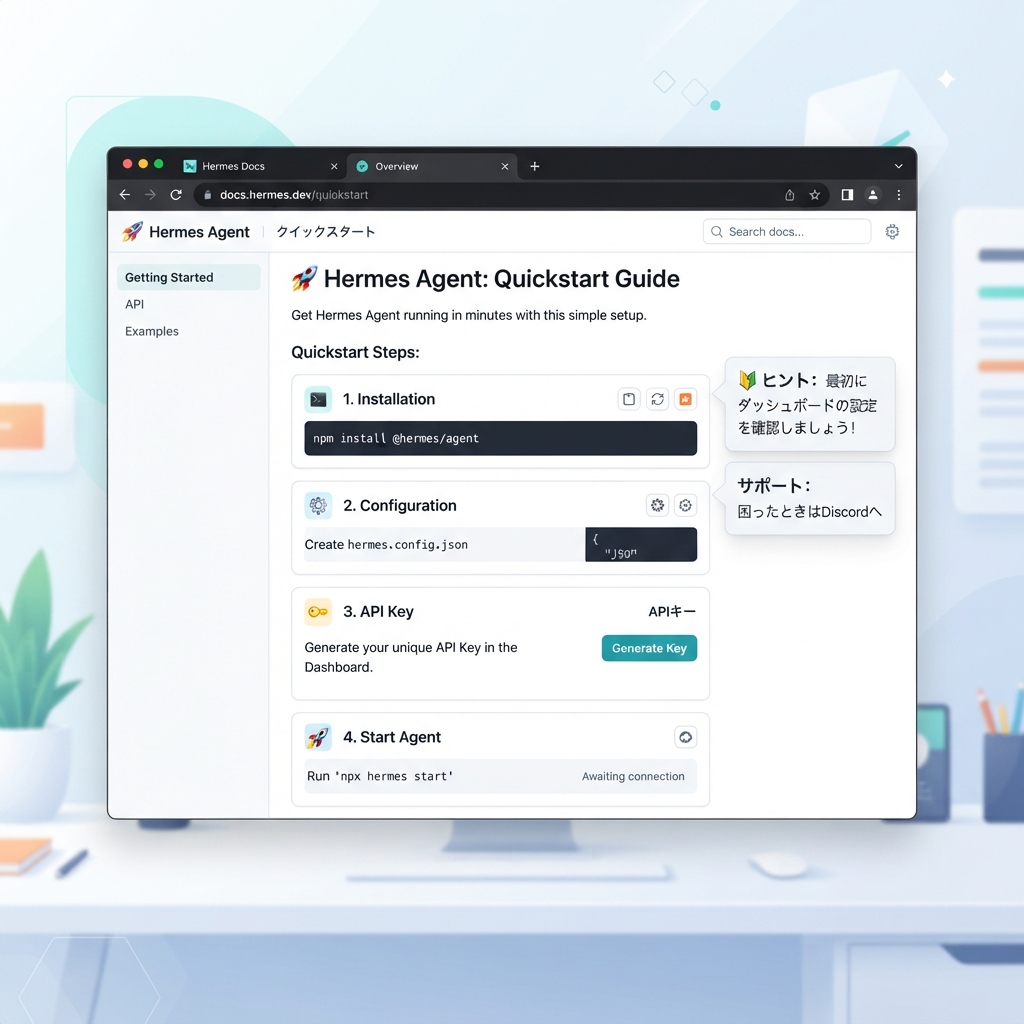
キャプション:まず公式 Hermes quickstart から始め、その後に SEO 用のプロジェクトファイルと承認ルールを追加してから成長施策に進みます。
Step 1:SEO Agent のワークスペースを作る
このプロジェクト専用のフォルダを作ります。ランダムなダウンロード、クライアントファイル、古い下書きと混ぜないでください。
推奨構成は次の通りです。
/hermes-seo-agent
  /context
    brand.md
    website.md
    audience.md
    competitors.md
    content-rules.md
  /data
    README.md
    gsc-export.csv
    bing-webmaster-export.csv
    ga4-landing-pages.csv
    crawl-export.csv
  /briefs
  /drafts
  /qa
    content-quality-gate.md
    technical-risk-gate.md
  /reports
  /prompts
    system-prompt.md
    first-brief-prompt.md
    qa-prompt.md
  approval-rules.md
自社サイトで試すなら、通常のプロジェクトディレクトリ内に作れば十分です。クライアント案件で使うなら、クライアントごとに 1 つのワークスペースを作ります。Hermes に、あるサイトの文脈と別サイトのデータを混ぜさせてはいけません。
後から見ても何を入れる場所か分かるように、短い data/README.md を追加します。
# Data folder

This folder stores exported SEO and analytics files.

Allowed files:
- Google Search Console exports
- Bing Webmaster Tools exports
- GA4 landing page reports
- Crawl exports
- Rank tracking exports
- AI visibility or prompt tracking exports

Rules:
- Do not add private customer data.
- Redact sensitive revenue or lead data if not needed.
- Include export date in file names when possible.
- Hermes must not invent missing metrics.
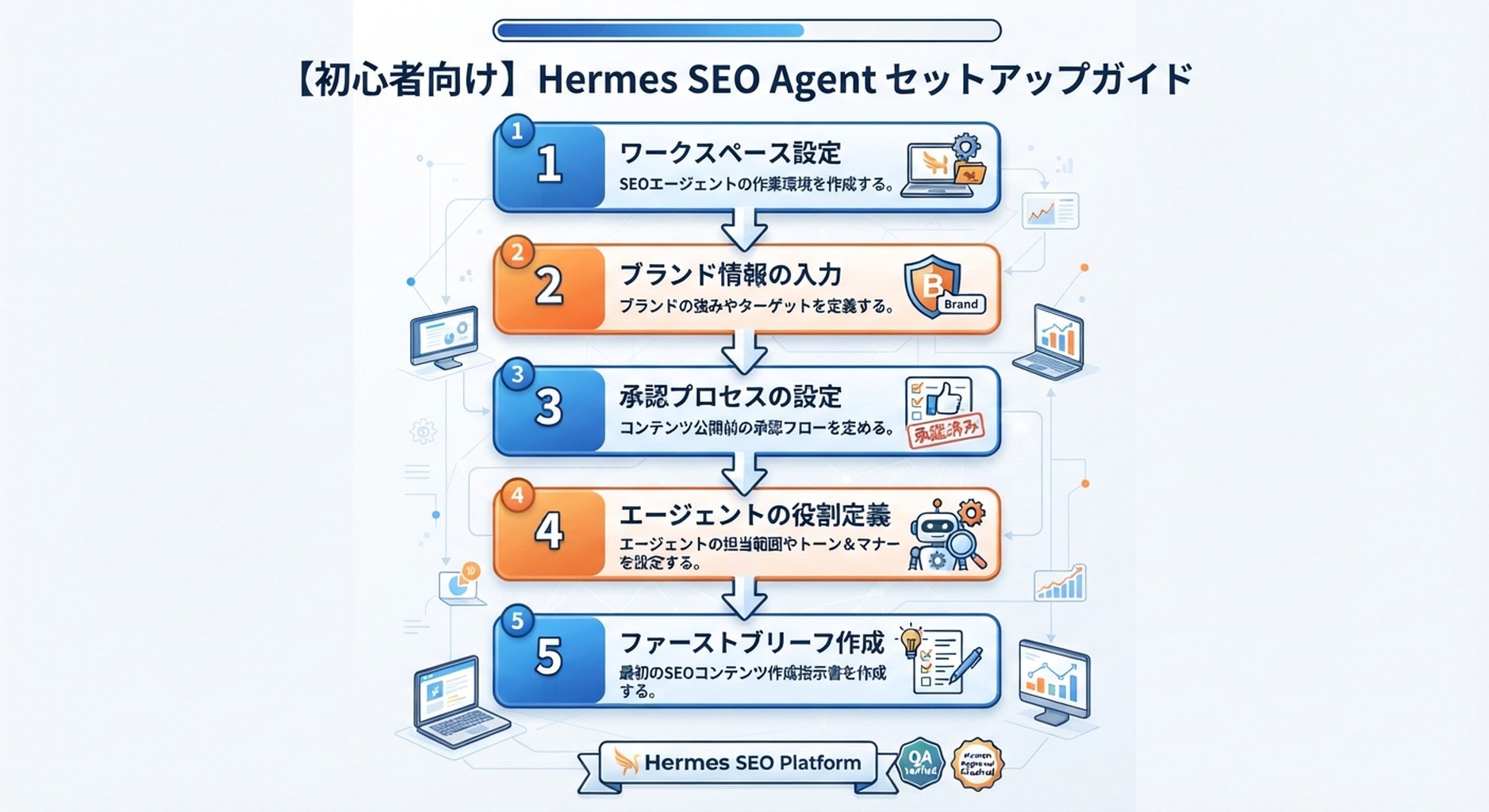
Step 2:ブランド文脈ファイルを書く
Hermes が有用な SEO 判断をするには、先に文脈が必要です。文脈がないと、「高品質なコンテンツを書きましょう」「検索意図に最適化しましょう」のような一般論を返しがちです。それではあまり役に立ちません。
context/brand.md を作成します。
# Brand context

Brand name:
Website:
Primary product or service:
Short description:
Target customers:
Customer pain points:
Main conversion goal:
Secondary conversion goals:
Markets served:
Languages:
Brand tone:
Topics we want to own:
Topics we should avoid:
Proof we can use:
Claims we cannot make:
例:
# Brand context

Brand name: Acme Analytics
Website: https://example.com
Primary product or service: Analytics software for small B2B SaaS teams
Short description: Helps founders monitor product signups, activation, and content-driven pipeline in one dashboard.
Target customers: B2B SaaS founders, growth leads, and content marketers at teams with 5-50 employees.
Customer pain points: They publish content but cannot connect organic traffic to signups and pipeline.
Main conversion goal: Free trial signup
Secondary conversion goals: Demo request, newsletter signup
Markets served: United States, United Kingdom, Canada, Australia
Languages: English
Brand tone: Clear, practical, founder-friendly, not corporate
Topics we want to own: SEO analytics, content attribution, product-led growth reporting
Topics we should avoid: Enterprise BI, paid media attribution, financial forecasting
Proof we can use: Product screenshots, anonymized workflow examples, public help docs
Claims we cannot make: Guaranteed revenue growth, guaranteed ranking improvement
このファイルは事実ベースで保ちます。Hermes にポジショニングを発明させないでください。不明な行は TODO と書きます。
Step 3:Web サイト文脈ファイルを書く
context/website.md を作成します。
# Website context

Homepage:
Main product pages:
Main blog or resource hub:
Important conversion pages:
Existing SEO pages:
Known weak pages:
Known technical issues:
CMS:
Publishing workflow:
Who approves content:
Who approves technical changes:
例:
# Website context

Homepage: https://example.com/
Main product pages:
- https://example.com/product
- https://example.com/pricing
- https://example.com/integrations

Main blog or resource hub:
- https://example.com/blog

Important conversion pages:
- https://example.com/demo
- https://example.com/signup

Existing SEO pages:
- /blog/seo-dashboard-template
- /blog/content-attribution-guide
- /blog/ga4-for-saas-founders

Known weak pages:
- /blog/old-content-roi-guide, outdated examples
- /integrations/google-search-console, thin copy

Known technical issues:
- Some old blog posts have missing meta descriptions
- Several redirects from 2024 migration still need review

CMS: Webflow
Publishing workflow: Draft in Markdown, edit in Google Docs, publish in Webflow
Who approves content: Marketing lead
Who approves technical changes: Developer
このファイルがあると、Hermes はコンテンツ作業と技術作業を分けて考えやすくなります。これは重要です。タイトルの書き換えと canonical の変更は、同じ承認フローで扱うべきではありません。
Step 4:タスクを任せる前に承認ルールを設定する
ルートフォルダに approval-rules.md を作成します。
# Approval rules

Hermes may do these without approval:
- Read project context files.
- Analyze exported SEO data.
- Create content briefs.
- Draft internal reports.
- Suggest title and meta tests.
- Suggest internal link opportunities.
- Flag technical SEO risks.

Hermes needs content approval before:
- Writing a full public article.
- Rewriting a live page.
- Changing title tags or meta descriptions.
- Adding claims, statistics, or comparisons.
- Adding internal links to public pages.

Hermes needs technical approval before:
- Changing robots.txt.
- Changing sitemap files.
- Adding or removing noindex.
- Changing canonicals.
- Adding redirects.
- Editing structured data.
- Submitting URLs for indexing.

Hermes must never:
- Publish directly to the CMS.
- Invent data.
- Invent citations.
- Claim guaranteed rankings or guaranteed AI citations.
- Create bulk pages only to target keywords.
- Use private customer data in public content.
次に、出力ルールも追加します。
# Required recommendation format

Every recommendation must include:
- URL or page name
- Evidence
- Suggested action
- SEO impact
- GEO impact
- Risk level: low, medium, high
- Approval required: yes/no
- Owner suggestion
初心者向けの SEO Agent は、リスクについて曖昧であってはいけません。Hermes がなぜ安全なのかを説明できない提案は、前に進めるべきではありません。
Step 5:最初は 1 つのエージェント役割だけを定義する
最初から 5 つの Agent を作らないでください。まずは 1 つの役割、つまり監督付き SEO オペレーターだけで始めます。
prompts/system-prompt.md を作成します。
You are a supervised SEO/GEO operator for this website.

Your job is to help with SEO, GEO, AEO, AI search visibility, content planning, technical SEO review, and performance diagnosis.

You work from project files. You must read context files before making recommendations.

Operating rules:
- Do not publish or edit live pages.
- Do not invent metrics, facts, citations, or customer results.
- If data is missing, write "missing".
- Separate SEO impact from GEO impact.
- Flag technical changes as high-risk unless a developer approves them.
- Use the approval rules in approval-rules.md.
- Prefer a small, evidence-backed next action over a large vague strategy.

Default output format:
- Summary
- Evidence reviewed
- Recommended actions
- Risks
- Approval needed
- Next file to create
この役割は意図的に狭くしています。後で Researcher、Writer、Editor、Technical QA、Publisher に分けることはできます。最初の 1 週間は、1 つの監督付きオペレーターのほうがデバッグしやすいです。
Step 6:最初のコンテンツブリーフ用プロンプトを追加する
prompts/first-brief-prompt.md を作成します。
Create a beginner-safe SEO/GEO content brief for this topic:
[INSERT TOPIC]

Before writing, read:
- context/brand.md
- context/website.md
- context/audience.md if available
- approval-rules.md

Do not write the full article.
Do not invent data.
If SEO data is missing, mark it as missing.

Return:
1. Working title
2. Target reader
3. Search intent
4. GEO prompt intent
5. Primary keyword
6. Related questions
7. Entities that must be explained clearly
8. Recommended page structure
9. Evidence and sources needed
10. Internal link opportunities
11. Suggested title tag
12. Suggested meta description
13. Risks and approval requirements
14. Next step after approval
次に、安全なトピックで実行します。教育的な記事のように、リスクの低いものを選びます。価格、法律、医療、金融、重大な主張に関わるテーマは避けます。
例のトピック:
How B2B SaaS teams can connect Google Search Console data with GA4 landing page reports
良い出力は具体的です。弱い出力は、読者、ページタイプ、根拠、リスクを示さずに「SEO に最適化する」といった表現で終わります。
Step 7:下書きに進む前に最初のブリーフを確認する
qa/brief-quality-gate.md を作成します。
# Brief quality gate

A content brief is ready only if:

- [ ] Target reader is specific.
- [ ] Search intent is clear.
- [ ] GEO prompt intent is clear.
- [ ] Primary keyword is relevant to the business.
- [ ] Related questions are real reader questions.
- [ ] Page structure matches the intent.
- [ ] Required evidence is listed.
- [ ] Internal links are relevant, not forced.
- [ ] Claims that need verification are marked.
- [ ] Approval requirements are clear.
次に、Hermes に自分のブリーフをレビューさせます。
Review the content brief against qa/brief-quality-gate.md.

Return:
1. Pass/fail for each checklist item.
2. What is too vague.
3. What may be risky.
4. What information is missing.
5. A revised brief only if the first version fails.
ここを飛ばさないでください。初心者はプロンプトから記事にすぐ進みたくなります。しかし、悪い仮定を安く直せるのはブリーフ段階です。
Step 8:ワークフローが機能してからデータを追加する
Hermes が有用なブリーフを 1 本作り、それを QA できるようになったら、エクスポートを追加します。
まずは次のファイルから始めます。
/data/gsc-export-YYYY-MM-DD.csv
/data/bing-webmaster-export-YYYY-MM-DD.csv
/data/ga4-landing-pages-YYYY-MM-DD.csv
/data/crawl-export-YYYY-MM-DD.csv
最低限ほしい列:
データソース | 初心者に有用な列 |
|---|---|
Google Search Console | Query, Page, Clicks, Impressions, CTR, Average position |
Bing Webmaster Tools | Query, Page, Clicks, Impressions, Crawl issue, Indexed status |
GA4 | Landing page, Organic sessions, Engaged sessions, Key events, Conversion rate |
クロールエクスポート | URL, Status code, Title, Meta description, Canonical, Indexability, Word count |
次のプロンプトを使います。
Read the files in /data and create a first SEO opportunity report.

Return:
1. Low-CTR pages from search data.
2. Pages with impressions but weak clicks.
3. Pages with organic traffic but weak engagement or conversions.
4. Pages with crawl or indexability issues.
5. Pages that may need clearer answer blocks for GEO.
6. Top 5 recommended actions for this week.

For each action, include evidence, risk, and approval required.
Do not invent data.
ここから Agent は本当に役立ち始めます。一般論をやめ、どのページを最初に見るべきかを示せるようになります。
Step 9:最初の 3 つの定期出力を設定する
最初の 1 か月は、Hermes に 3 つの定期ファイルだけを作らせます。
/reports/weekly-action-queue.md
/briefs/[topic-or-page].md
/qa/[page-or-draft]-qa.md
運用リズムは次の通りです。
曜日 | Hermes のタスク | 人間のタスク |
|---|---|---|
Monday | データエクスポートを確認し、アクションキューを作る | 1〜3 個のアクションを選ぶ |
Tuesday | ブリーフまたはリフレッシュ計画を作る | 承認または修正する |
Wednesday | Markdown で下書きまたは変更案を準備する | 正確性とトーンを編集する |
Thursday | QA ゲートを実行する | 安全な更新を承認する |
Friday | 変更内容を記録する | 翌週の計測計画を確認する |
完全自動化は必要ありません。最初は手動で十分です。学習中は手動で構いません。自動化は、ワークフローが安定してから追加してください。
Step 10:Agent により大きな権限を与えてよいタイミングを知る
最初の Hermes SEO Agent は、次のチェックを満たして初めて高度なタスクに進めます。
準備状況チェック | 合格条件 |
|---|---|
文脈の扱い | ブランドと Web サイトのファイルを正確に使っている |
データへの正直さ | 不足データを推測せず |
リスク管理 | 技術変更と公開ページ変更を承認対象として明示する |
出力品質 | ブリーフが人間のライターや編集者に渡せる具体性を持つ |
GEO 思考 | キーワードだけでなく、読者の質問を AI プロンプト意図に対応づける |
再現性 | 毎週同じ形式のレポートを作れる |
1 つでも失敗するなら、公開アクセスを追加しないでください。先にワークフローを直します。
コピーして使えるスターターパック
最小構成だけ欲しい場合は、次の 4 ファイルをコピーしてください。
context/brand.md
# Brand context

Brand name:
Website:
Product or service:
Target customer:
Main conversion goal:
Markets:
Languages:
Topics to own:
Topics to avoid:
Allowed claims:
Forbidden claims:
Tone:
approval-rules.md
# Approval rules

Hermes may create briefs, reports, recommendations, and QA checklists.
Hermes may not publish, edit live pages, change technical SEO settings, invent data, or invent citations.

Human approval is required for:
- Live page updates
- Title/meta changes
- Internal link additions
- Structured data changes
- Robots, sitemap, canonical, noindex, or redirect changes
- CMS publishing
- Claims based on external sources or metrics
prompts/system-prompt.md
You are a supervised SEO/GEO operator.
Read context files before making recommendations.
Use approval-rules.md.
Do not publish, edit live pages, or invent data.
Separate SEO impact from GEO impact.
Every recommendation must include evidence, risk, and approval required.
prompts/first-brief-prompt.md
Create an SEO/GEO content brief for: [TOPIC]

Return target reader, search intent, GEO prompt intent, primary keyword, related questions, entities, page structure, evidence needed, internal links, title tag, meta description, risks, and approval requirements.
Do not write the article yet.
Auspia の見解
最初の Hermes SEO Agent は、魔法のコンテンツ生成機ではなく、注意深いジュニアオペレーターのように感じられるべきです。文脈を求め、不足データを明示し、整理されたファイルを作り、承認が必要なタイミングを教えてくれる存在です。
それで 1 週目には十分です。セットアップが機能したら、GSC、Bing Webmaster、GA4、クロールデータ、AI 可視性トラッキングを接続できます。そこから Hermes は、コンテンツブリーフだけでなく、データ監督と週次 SEO/GEO アクションキューへ進めます。
最初のセットアップが制御されているように感じるなら、それは良い状態です。制御されたシステムのほうが信頼しやすく、改善しやすく、後から自動化しやすいからです。
FAQ
Hermes SEO Agent のセットアップに API 連携は必要ですか?
いいえ。最初のセットアップでは Markdown ファイルと CSV エクスポートを使います。API 連携は後で役立ちますが、ブリーフ、QA レポート、承認ルール、簡単な機会レポートを作るために必須ではありません。
最初の Hermes SEO タスクは何にすべきですか?
コンテンツブリーフか小さな機会レポートから始めます。公開、テクニカル SEO 変更、サイト全体の書き換えから始めてはいけません。
1 つの Hermes Agent で SEO と GEO を一緒に扱えますか?
はい。ただし指示の中で 2 つを分ける必要があります。SEO impact と GEO impact を別々にラベル付けさせてください。SEO は通常、クエリ、ページ、クロール可能性、スニペット、リンク、パフォーマンスを見ます。GEO は、プロンプト、エンティティ、明確な回答、根拠、AI 検索での可視性を見ます。
いつ Agent を増やしたり swarm ワークフローに進めたりすべきですか?
単一の監督付きオペレーターが、信頼できるブリーフと QA レポートを作れるようになってからです。基本ワークフローが乱れている状態で Researcher、Writer、Editor、QA、Publisher の役割を追加しても、混乱をデバッグしにくくなるだけです。
初心者セットアップで絶対に自動化してはいけないことは何ですか?
公開、リダイレクト、noindex 変更、canonical 変更、robots.txt 編集、構造化データ変更、URL 送信は自動化しないでください。これらはインデックス、トラフィック、CV に影響するため、人間のレビューが必要です。
セットアップがうまくいっているかどうかはどう判断しますか?
Hermes が文脈を読み、具体的なブリーフを作り、不足データを説明し、リスクを示し、人間が承認または却下できる次のアクションを作れるなら、セットアップは機能しています。
Hermes SEO/GEO シリーズを続けて読む
- 最初に読む:Hermes SEO/GEO オペレーターガイド
- 前のガイド:Hermes Agent を SEO/GEO オペレーターとして使う方法
- 次のガイド:Hermes を GSC、Bing Webmaster、GA4 につないでデータを監視する方法
- 関連ガイド:Hermes SEO/GEO swarm ワークフローを構築する方法、Hermes でテクニカル SEO/GEO 監査を行う方法
Author: Clara Bennett, Auspia の 10 年経験コンテンツ戦略プラクティショナー。Clara は編集システム、トピックマップ、再現可能なコンテンツ運用、SEO/GEO 制作ワークフローについて執筆しています。