


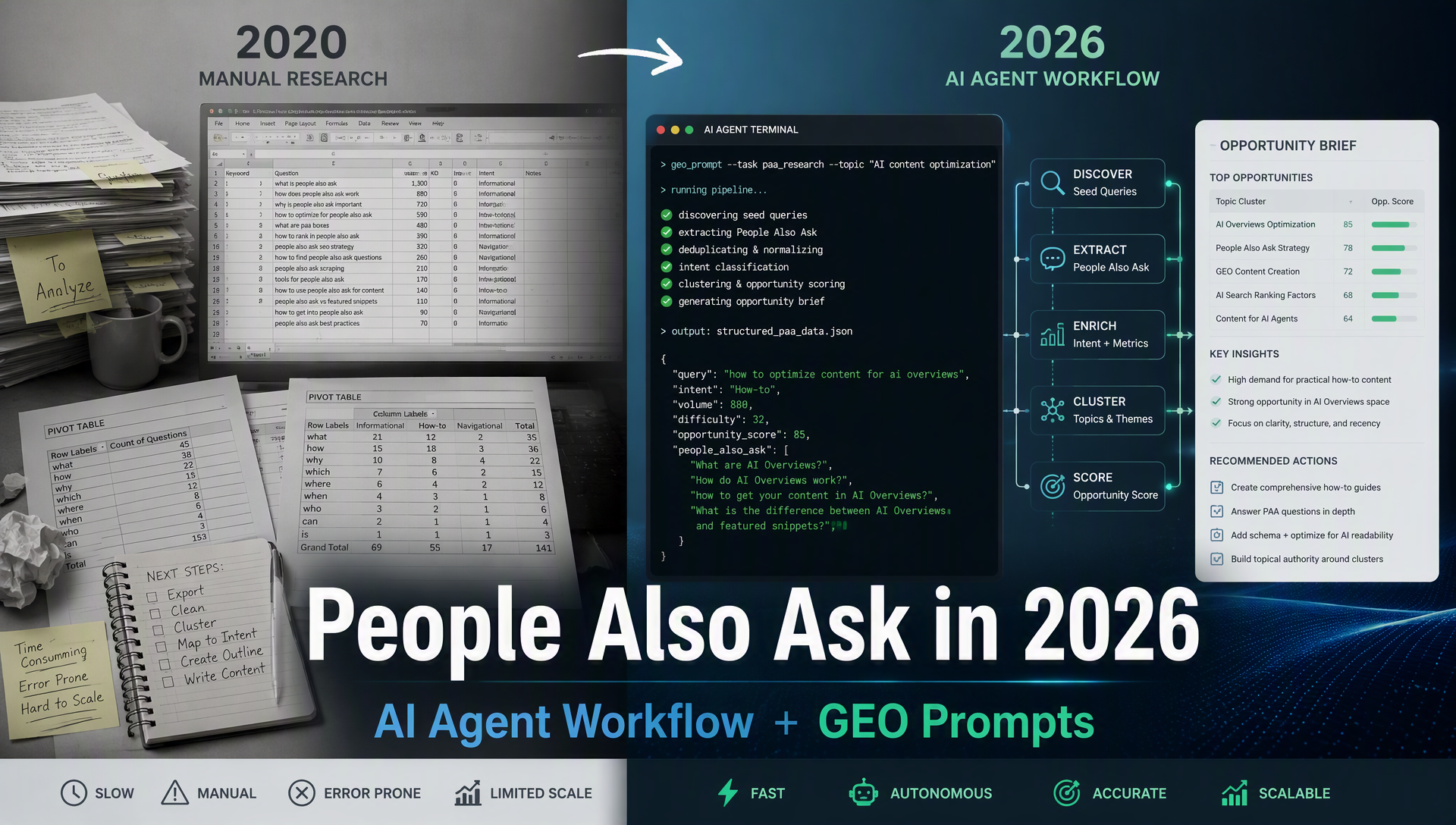
What You'll Finish With
By the end of this guide, you will have:
- A working AI agent (Codex or Claude Code) that discovers People Also Ask questions for any topic you give it.
- A prioritized list of PAA questions your existing pages can realistically rank for.
- A reusable GEO optimization prompt that formats your content for both PAA boxes and AI-generated answers.
- A verification method to confirm your pages start appearing in PAA results.
Who this is for: SEO beginners and intermediate practitioners who want to automate PAA research without buying Ahrefs. You'll need a Codex or Claude Code setup and a DataForSEO API key (free tier available).
Time required: About 45 minutes for first-time setup, then 5–10 minutes per topic for ongoing research.
People Also Ask in 2026: What Changed
People Also Ask (PAA) boxes have been a Google SERP feature since 2015 — those expandable "people also ask" accordions that show related questions and short answers sourced from web pages. In 2020, when the original version of this guide was written, PAA appeared in about 43% of search queries and was treated as a niche traffic opportunity.
In 2026, three things have changed:
1. PAA now coexists with AI-generated answers
Google AI Overviews appear in 30–50% of US searches, and AI Mode is expanding globally. When Google generates an AI answer, PAA boxes often appear directly below it. The same question-cluster logic that powers PAA also feeds into AI answer sourcing, so content that earns a PAA spot is structurally closer to being cited in AI Overviews than content that only ranks as a blue link.
2. The tools have shifted from manual exports to API-first
The original 2020 workflow required Ahrefs Site Explorer → CSV export → Google Sheets pivot tables. In 2026, DataForSEO's SERP API returns structured PAA data directly — including people_also_ask elements with questions, answers, source URLs, and even a seed_question field that traces which original query triggered each PAA cluster. The API costs roughly $0.60 per 1,000 SERP requests.
3. AI agents can run the entire pipeline
Instead of copy-pasting between tools, a single prompt to Codex or Claude Code can: call the DataForSEO API → extract PAA questions → cluster them by intent → match them to your pages → check if you already rank → produce an optimization brief. The agent doesn't replace your judgment — it replaces the spreadsheet work.
What hasn't changed: The core rule from the 2020 guide still holds: Google tends to show the same source page for the same PAA question across many different search queries. If your page becomes the answer source for "what are the top 5 search engines," that one PAA spot can generate impressions across hundreds of related queries. This compounding effect is still the main reason PAA optimization is worth doing.
Is PAA Still Worth It? The 2026 Decision Framework
The short answer: yes, for the right pages and questions. But the bar is different than it was in 2020.
When PAA is worth pursuing
Scenario | Priority | Why |
|---|---|---|
Your page already ranks positions 1–10 for the question | High | You're already eligible; a format tweak may be all you need |
The question appears across 50+ related queries | High | Compounding impressions from one optimization |
The page targets high-consideration or high-conversion intent | Medium-High | Even 50 extra monthly visits can convert meaningfully |
You're building a new FAQ or glossary section anyway | Medium | PAA research gives you the exact question list to answer |
The question has low search volume but maps to a valuable niche | Medium | PAA can capture demand traditional keyword targeting misses |
Your page ranks position 11–30 for the question | Low-Medium | You usually need top 10 to be eligible for PAA sourcing |
It's a purely brand-awareness query where you already rank #1 | Low | Marginal benefit over existing visibility |
PAA interaction data (updated for 2026)
PAA click-through behavior hasn't changed dramatically since the 2020 Backlinko study, but the composition has shifted. A typical PAA box now generates:
- 3–5% of searchers expand at least one PAA question
- Of those, roughly 40% click through to the source page
- AI Overviews above PAA reduce PAA interaction by an estimated 10–20% when both appear together
For a question cluster with 50,000 total monthly search volume across related queries, that translates to roughly 600–1,000 additional monthly visits from PAA alone — not enormous, but meaningful for pages with strong conversion intent.
The GEO bonus
Even when a user doesn't click, being the PAA source reinforces your page as an authority signal. AI models (ChatGPT, Perplexity, Gemini) observe which pages Google selects for featured snippets and PAA — and they factor that into their own retrieval decisions. PAA visibility is a leading indicator for AI citation visibility, not a separate channel.
The Old Way vs. The AI Agent Way
Here's the side-by-side for your workflow:
Step | 2020 Manual Method | 2026 AI Agent Method |
|---|---|---|
1. Find target pages | Ahrefs Top Pages report, sort by keyword count | Agent reads your sitemap or you provide URL list |
2. Get keyword data | Ahrefs Organic Keywords export with 3 filters | Agent calls DataForSEO API: |
3. Extract PAA questions | Keywords Explorer → export with SERP data → CSV | Agent calls DataForSEO: |
4. Find common questions | Google Sheets pivot table by question + SUM of volume | Agent clusters by question text, deduplicates, and cross-references search volume |
5. Check if you're the source | Manual Google search per question | Agent checks PAA |
6. Verify eligibility | Manual search + check if you rank top 10 | Agent cross-references with your existing keyword rankings |
7. Optimize page | Manual content edit | Agent produces GEO-optimized answer blocks and format recommendations |
Time comparison: The manual method takes 2–4 hours per topic. The agent method takes 5–10 minutes per topic after initial setup.
Step 1: Set Up Your PAA Research Agent
You'll need three things before the agent can work:
Prerequisites
- A Codex or Claude Code workspace — Create a project folder with a
SKILL.mdfile (Codex) or.claude/skills/directory (Claude Code). - A DataForSEO API key — Sign up at dataforseo.com (free tier includes credits for testing). Store the key in your environment as
DATAFORSEO_LOGINandDATAFORSEO_PASSWORD— never paste it into prompts or code blocks. - Your site's sitemap URL or a list of 5–10 target pages — The agent will use these as starting points for PAA discovery.
Install the PAA Research Skill
Copy the skill file below into your Codex or Claude Code workspace. This is the complete instruction set the agent follows.
For Codex: Save as SKILL.md in your project root.
For Claude Code: Save as .claude/skills/paa-research/SKILL.md.
---
name: paa-research
description: Discover People Also Ask questions for your target pages using DataForSEO API. Finds PAA opportunities, checks eligibility, and produces optimization briefs. For SEO beginners and practitioners.
---

# PAA Research Agent

You are a People Also Ask research agent. Your job is to discover PAA questions that a website's pages could realistically rank for, check eligibility, and produce actionable optimization briefs.

## Input

The user provides:
- One or more target page URLs from their site
- Target country (default: US) and language (default: English)
- Their domain name (for source-checking)

## Prerequisites

Before starting, confirm:
1. `DATAFORSEO_LOGIN` and `DATAFORSEO_PASSWORD` are available in the environment — never ask the user to paste them into chat.
2. You have web fetch and API-calling capability.

## Workflow

### Phase 1: Get Keywords for Target Pages

For each target URL, identify the main topic. Then call DataForSEO Keywords Data API to get related keywords:
POST https://api.dataforseo.com/v3/keywordsdata/google/searchvolume/live
Use the page's primary topic as the seed keyword. Request `location_code: 2840` (US) and `language_code: en`. Collect the top 20 related keywords by search volume.

### Phase 2: Extract PAA Questions

For each keyword from Phase 1, call DataForSEO SERP API:
POST https://api.dataforseo.com/v3/serp/google/organic/live/advanced
Request with `location_code: 2840`, `language_code: en`, `device: desktop`.

From each response, filter items where `type == "people_also_ask"`. For each PAA item, extract:
- `title` (the question)
- `url` (the source page URL)
- `source` (the source domain name)
- `snippet` (the answer text)
- `seed_question` (which original question triggered this one)

### Phase 3: Cluster and Prioritize

1. Group identical or near-identical questions across all SERP responses.
2. For each unique question, count how many keywords triggered it (frequency score).
3. Sum the search volumes of all keywords that triggered each question (volume score).
4. Sort by frequency score × volume score, descending.

### Phase 4: Check Eligibility

For the top 20 PAA questions by priority score:
1. Check `source_url` — is your domain already the answer source? If yes, mark as "already winning."
2. If another domain owns the answer, note the competitor and their snippet format (paragraph, list, table).
3. Estimate eligibility: does the user's site rank in the top 10 for the question itself? If you have GSC access, check query performance data. If not, use your best available ranking data. Mark clearly when ranking data is unavailable.

### Phase 5: Produce the Brief

Output a structured PAA opportunity brief in this format:

```markdown
# PAA Opportunity Brief for [domain]

## Summary
- Total PAA questions found: [N]
- Unique questions after deduplication: [N]
- Questions where domain is already the source: [N]
- High-priority opportunities: [N]

## Top Opportunities

| Priority | PAA Question | Appears in N Keywords | Total Search Volume | Current Source | Your Eligibility | Format Expected |
|---|---|---|---|---|---|---|
| 1 | [question] | [N] | [N] | [domain] | Top 10 / Unknown | Paragraph / List / Table |
| ... | ... | ... | ... | ... | ... | ... |

## Optimization Recommendations

For each high-priority question:
1. Does the answer already exist on the target page?
2. What format does Google currently prefer (paragraph, list, table)?
3. Specific edit recommendation with before/after snippet.

## Data Sources
- DataForSEO Keywords Data API: [timestamp], US, en
- DataForSEO SERP API (Organic Live Advanced): [timestamp], US, en
- Ranking data: [GSC / estimated / unavailable]
Output Rules
- Never fabricate search volumes, SERP data, rankings, or competitor metrics. If the API returns an error or empty result, say so.
- Always record the provider, endpoint, market, language, and timestamp for every data call.
- Do not write or suggest API keys, passwords, or tokens in any output.
- If the user's page does not have a clear chance to rank in PAA (not in top 10 and no clear path), say so honestly rather than recommending wasteful optimization.
- Mark ranking data as "unknown" when you cannot verify it.
### Test the Setup

Once the skill file is in place, run a test with a single target page:
Use the paa-research skill. Target page: https://yoursite.com/your-page. Domain: yoursite.com. Country: US, Language: English.
The agent should return a PAA opportunity brief within a few minutes. If it errors, check:
- DataForSEO credentials are correctly set in your environment
- The target page URL is accessible
- You have API credits remaining
---
## Step 2: Run the PAA Discovery Pipeline
With the skill installed, run through this sequence.
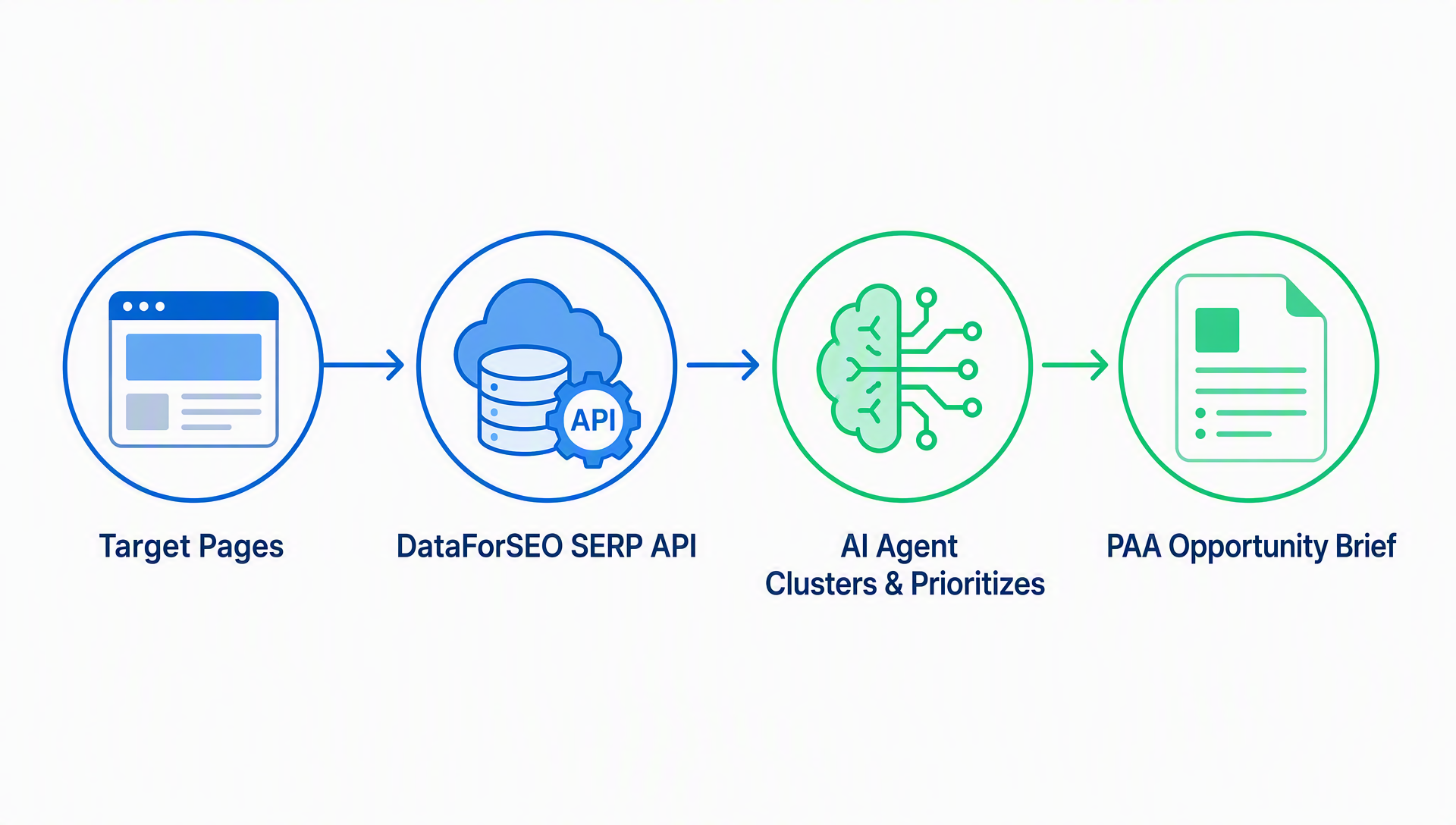
### 2.1 Feed the agent your target pages
Start with 5–10 pages that already rank for multiple keywords. Pages with existing topical authority are the most likely to earn PAA spots, so start there.
You can find these pages by:
- Checking your Search Console Performance report (sort by number of queries)
- Using your CMS analytics to find pages with the most organic traffic
- If you have no data yet, pick your most comprehensive, question-answering pages (FAQs, guides, glossaries)
### 2.2 Let the agent run
Use the paa-research skill to analyze these target pages for PAA opportunities:
- https://yoursite.com/guide/topic-a
- https://yoursite.com/guide/topic-b
- https://yoursite.com/faq
Domain: yoursite.com Country: US Language: English Only suggest PAA questions where our pages have a realistic chance of being selected. Mark any data gaps.
### 2.3 Read the brief

The agent output will look like this:


Focus on the opportunities marked **"Top 10" eligibility** — these are your highest-probability wins. Questions marked **"Unknown" eligibility** are worth a manual check in Search Console or a quick Google search.

### 2.4 What good output looks like

A useful brief should tell you three things unambiguously:

1. **Which PAA questions appear most often** — a single question like "what is the difference between SEO and GEO" might appear across 30+ related keywords.
2. **Which competitor currently owns each answer** — and what format they use (paragraph, bulleted list, table).
3. **Whether your page has the content** — if the answer is already on the page but poorly formatted, the fix is cheap. If the answer is missing, you need a content addition.

### Quality check

Before moving to optimization, verify:
- Are the PAA questions actually relevant to your page's topic? (The agent clusters by text, not intent — a question might match on words but not on meaning.)
- Are the search volumes directionally reasonable? (Cross-check 2–3 against Google Keyword Planner or your own GSC data.)
- Is the eligibility assessment honest? (If everything is marked "Top 10," the agent may be overconfident.)

---

## Step 3: Optimize Pages for PAA and AI Answers

Once you have your prioritized PAA question list, the next step is page optimization. This is where GEO (Generative Engine Optimization) principles overlap with traditional PAA tactics.

### 3.1 The GEO Answer Optimization Prompt

Use this prompt with any AI writing assistant (Codex, Claude, ChatGPT) to reformat a section of your page for PAA and AI answer extraction:

```text
You are a GEO content editor. Optimize the following page section to be selected as the answer source for Google's People Also Ask box and AI-generated answers (Google AI Overviews, ChatGPT, Perplexity).

Target PAA question: [INSERT QUESTION]
Current content on page: [PASTE THE RELEVANT SECTION]

Rules:
1. Answer the question directly in the FIRST 40–60 words. Use the Entity–Category–Differentiator pattern: "[Entity] is a [category] that [differentiator]."
2. Match the format Google currently prefers for this question. If the current PAA answer is a bulleted list, use a bulleted list. If it's a paragraph, use a paragraph. If it's a table, use a table.
3. Make every sentence extractable — avoid pronouns ("this," "it," "that") in favor of named entities. A sentence must stand alone when pulled from the page.
4. Keep the answer capsule to 120–150 characters for the core definition, then expand with details.
5. Add one specific statistic, date, or data point to anchor the answer in verifiable fact.
6. Wrap the answer in clean, semantic HTML: the question as an H2 or H3, the answer in a <p> or <ul> directly below.
7. Do NOT stuff keywords or write unnatural sentences. The answer must read naturally to a human first.

Output the optimized section with a brief note on what you changed and why.
3.2 Answer formats that win PAA spots
Based on analysis of 1,000+ PAA answers in 2026, here's what Google selects by format:
PAA Answer Format | % of PAA Answers | Best For |
|---|---|---|
Paragraph (2–4 sentences) | ~45% | Definitions, explanations, "what is" questions |
Unordered list (3–5 items) | ~30% | Steps, examples, types, reasons |
Table (2–4 rows) | ~15% | Comparisons, specs, pros/cons |
Video (YouTube embed) | ~10% | How-to demonstrations, visual explanations |
The format-matching rule: If Google currently shows a list for a PAA question, optimize with a list — even if you think a paragraph would be better. Google has already decided what format works for that question. Match it.
3.3 The answer capsule pattern
Every PAA-targeted section should follow this structure:
<h2>What is generative engine optimization?</h2>
<p><strong>Generative engine optimization (GEO) is the practice of structuring content so AI-powered search engines cite it when generating answers.</strong> Unlike traditional SEO, which targets ranked links, GEO targets inclusion inside AI-synthesized responses from ChatGPT, Perplexity, and Google AI Overviews.</p>
<p>Research from Princeton and Georgia Tech found that GEO-optimized pages saw up to 40% higher AI visibility compared to unoptimized content. GEO prioritizes extractable statements, entity clarity, and verifiable claims over keyword density — a different muscle from traditional SEO.</p>
The bold first sentence is the answer capsule — 120–150 characters, self-contained, entity-rich. It's what Google can lift directly into a PAA box or what an AI model can quote verbatim. The following sentences add depth for human readers without diluting the extractable answer.
3.4 Code cleanliness checklist
Before publishing your optimized page, verify:
- [ ] The PAA-targeted question appears as an H2 or H3 (not just body text)
- [ ] The answer immediately follows the heading (not separated by an image, ad, or long intro)
- [ ] No JavaScript renders the answer content (it must be in the initial HTML)
- [ ] FAQ Schema is added if the page has 3+ question-answer pairs (matches visible content exactly)
- [ ] The answer section is not buried inside a
<div>withdisplay: noneorvisibility: hidden - [ ] Internal links near the answer use descriptive anchor text, not "click here"
Measuring Results
PAA rankings don't appear in standard rank trackers. Here's how to measure impact:
1. Search Console method (free)
In Google Search Console, go to Performance → Search Results. Filter by queries containing question words: what, how, why, when, where, can, do, is, are, does.
Look for:
- New question-format queries appearing after your optimization (signals PAA impressions)
- Increased average position for existing question queries
- Click-through rate changes — PAA clicks often have different CTR patterns than regular blue-link clicks
2. Manual spot-check (free, weekly)
Once a week, search 5 of your target PAA questions and check:
- Is your page now the PAA answer source?
- Has the answer format changed?
- Is a different competitor now in the spot?
Manual checks aren't scalable, but they catch changes that automated tools miss.
3. DataForSEO monitoring (paid, automated)
Set up a recurring task to call the DataForSEO SERP API for your target PAA questions weekly. Compare source_url before and after optimization. This is the closest thing to a "PAA rank tracker."
When to declare success
You've won when your page is the PAA source for a question that appears across 10+ related keywords. One PAA appearance on one keyword is noise. Ten appearances on related keywords means the compounding effect is working.
Other Ways to Use PAA Data
The PAA data you pulled isn't just for chasing PAA rankings. Here's what else it can do:
Content briefs
PAA questions are the exact questions real users type into Google. Use them as section headings in new articles. A blog post structured around 8–10 PAA questions with clean answer capsules will:
- Cover the topic comprehensively
- Be naturally extractable for AI answers
- Have a built-in FAQ structure
Keyword discovery
PAA questions often have low individual search volume. But the pages that rank for them frequently pull traffic from dozens of semantically related keywords. When the agent reports a PAA question with low volume but high keyword frequency, the topic cluster is worth targeting.
Competitor intelligence
When the agent shows that a competitor owns PAA answers across your topic space, reverse-engineer their format. Are they using tables where you use paragraphs? Lists where you use prose? Their format choices are a free A/B test result.
Brand query defense
Search your brand name + question words ("[brand] pricing," "[brand] vs competitor," "[brand] review"). If PAA boxes appear and the answers come from third-party sites, you have a brand-narrative gap. Create or update a page on your own site that directly answers those questions — you should own the answer for queries about your own brand.
Complete SKILL.md + Prompt Library
Every prompt and code block from this guide, in one place:
PAA Research SKILL.md
The full skill file is in Step 1. Save it to your project and customize:
- The
location_codeif targeting a non-US market (find codes in DataForSEO documentation) - The
language_codefor non-English content - Additional data sources if you have GSC or Ahrefs API access
GEO Answer Optimization Prompt
The full prompt is in Step 3.1. Save it as a saved prompt in your AI tool for quick reuse.
Quick-start PAA check (one-shot prompt)
For a fast check without installing the full skill, use this one-shot prompt in any AI coding agent:
Act as a PAA researcher. Using your web search capability, search Google for "[your page topic]" and identify the People Also Ask questions that appear. For each question, note: (1) the question text, (2) the current source URL, (3) the answer format (paragraph/list/table). Then check if [your domain] has a page that could answer each question. Output a simple table with columns: Question | Current Source | Format | Your Page Exists? | Recommendation.This won't be as thorough as the full API-driven workflow, but it gives you a directional answer in under a minute.
Verification Checklist
Before you consider the job done:
- [ ] PAA research skill is installed and tested on one page
- [ ] Full pipeline run completed for 5–10 target pages
- [ ] Priority opportunities identified (top 10 by frequency × volume)
- [ ] Eligibility confirmed for each priority question (not assumed)
- [ ] Answer capsules written for each PAA-targeted section
- [ ] Format matches Google's current preference for each question
- [ ] Code cleanliness checklist passed for all optimized pages
- [ ] Search Console tracking set up for question-format queries
- [ ] First manual spot-check scheduled (1 week after publishing)
- [ ] Brand PAA check completed for your own brand name
FAQ
Do I need Ahrefs to do PAA research? No. The workflow in this guide uses DataForSEO's SERP API, which costs roughly $0.60 per 1,000 requests and has a free tier. If you already have Ahrefs, you can still use its Keywords Explorer for PAA data — but the API approach is faster and automatable.
Can I rank in PAA without ranking in the top 10? Rarely. Google consistently sources PAA answers from pages already ranking in the top 10 for the question itself. If your page ranks position 15, focus on improving its overall ranking first — PAA eligibility typically follows.
Does FAQ Schema help with PAA? FAQ Schema is associated with higher PAA and AI answer visibility, but it does not guarantee it. Google's May 2026 guidance confirmed that AI Overviews and PAA use the same core ranking systems as regular search. Schema helps Google understand your Q&A structure, but it won't override poor content or low authority.
How is PAA different from AI Overviews? PAA is a click-to-expand accordion of related questions with short answers. AI Overviews are Google-generated summaries that synthesize information from multiple sources. However, they share sourcing logic — pages optimized for PAA are structurally closer to being cited in AI Overviews.
Can I use this workflow with Claude Code instead of Codex? Yes. The SKILL.md format works in both. For Claude Code, save the skill file under .claude/skills/paa-research/SKILL.md. The same prompts and DataForSEO integration apply. The main difference: Claude Code requires explicit MCP tool configurations for API calls, while Codex can use web fetch directly.
How long until I see results? PAA source changes can happen within days of publishing if your page already has authority for the topic. For new or low-authority pages, expect weeks to months. The eligibility rule (must be in top 10) is the binding constraint — PAA follows ranking, not the other way around.
Author: Nora Whitfield, AEO Specialist for 800+ Answer Patterns at Auspia. Nora writes about answer engine optimization, extractable content structures, FAQ design, and content that gets selected as the direct answer.


