


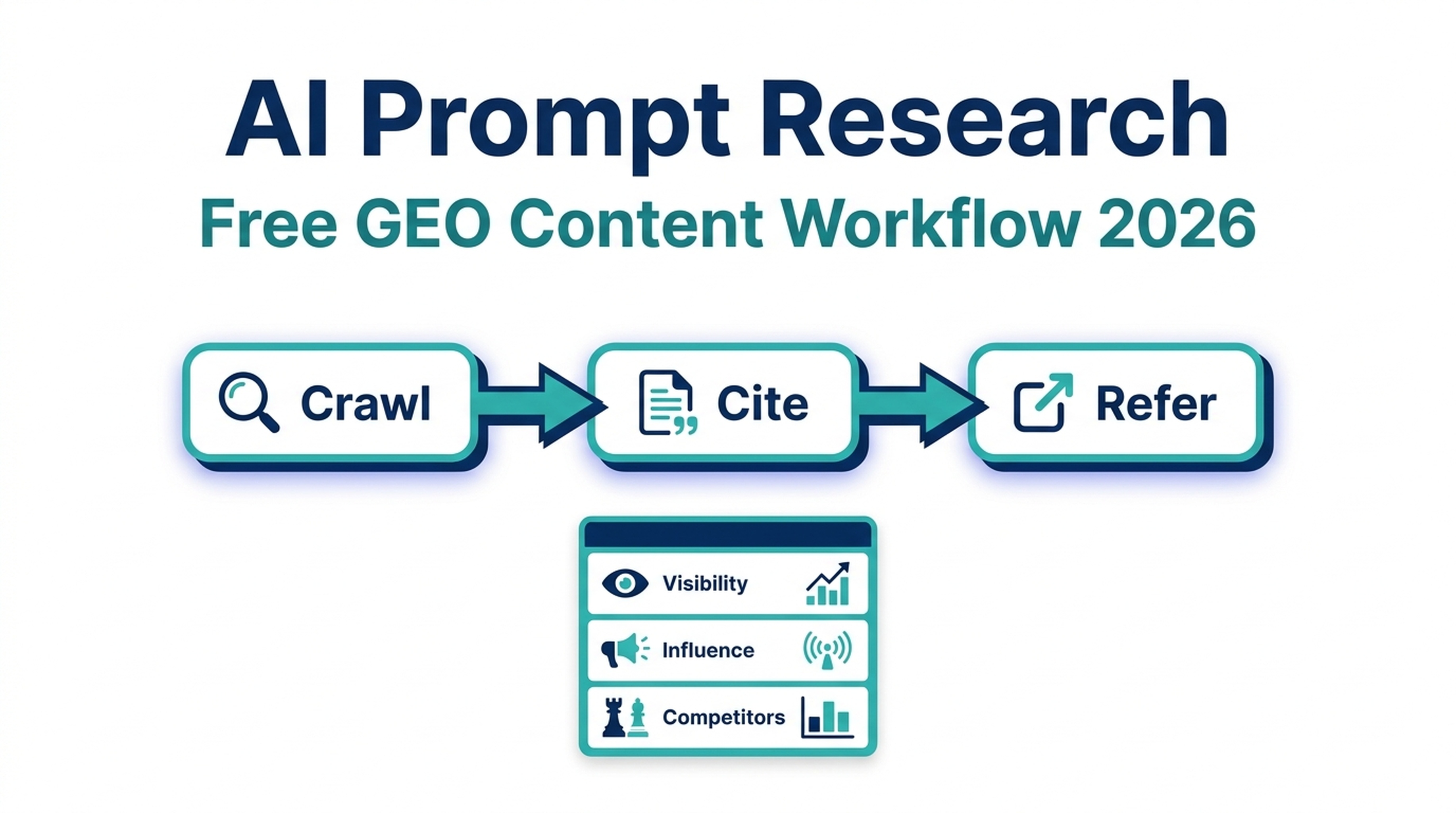
Microsoft Clarity's AI Prompt Research Tool, built into the Topic Insights dashboard, lets you test 10–15 prompts against AI answers, see which domains get cited, and turn those gaps into a content roadmap — all for free. The shift that matters is not the feature itself but the workflow it enables: moving GEO research from guessing at "AI keywords" to observing real prompts, real citations, and real competitive gaps in one place.
Below is a practical breakdown of what the tool does, how it fits into the broader AI visibility funnel, and a five-step workflow that pairs Clarity's prompt data with cross-engine measurement so you are not optimizing for a single AI surface.
What the AI Prompt Research Tool Actually Does
On July 9, 2026, Microsoft Clarity shipped Topic Insights, an extension of its Citations dashboard. Citations already told you whether your content appeared in AI-generated answers. Topic Insights goes further: it groups the grounding queries behind those citations into topic-level themes, adds competitive analysis, and lets you actively research prompts rather than passively wait for citation data.
Three metrics anchor every report:
Metric | What it tells you | Why it matters for GEO |
|---|---|---|
Visibility | How often your domain is cited across AI responses and your share of authority among all citations | Shows whether you exist in the AI answer at all |
Influence | How much of an AI answer is supported by your content — key contributor vs. minor reference | Distinguishes a passing mention from a load-bearing citation |
Competitive landscape | Which topics help competitors win citations while you miss out | Points directly at content gaps worth closing |
To build a report, you define a set of representative prompts — a minimum of 10 and a maximum of 15 per report. These prompts should reflect how real users actually phrase questions to AI assistants. Clarity then evaluates how AI systems respond, identifies which domains and pages get cited, measures each source's contribution to the answer, and aggregates the results at the topic level. Reports regenerate on a recurring basis automatically, each one logged with the date, the AI model used, and a link back to the prompt set behind it.
When you first access the feature, Clarity offers three AI-generated topic suggestions to jump-start your report — for example, "Technical SEO strategies," "Search analytics reporting," or "Structured data implementation." You can use these or skip them and build a topic from scratch, which becomes more useful once you know what you want to track.
The Shift From Search Terms to AI Prompts
Traditional keyword research answers one question: what are people typing into a search box? AI prompt research answers a different one: what are people asking an AI assistant, and which sources does the assistant trust enough to cite?
The two are related but not identical. AI prompts tend to be longer, more conversational, and more intent-specific than classic search queries. A user who types "robots.txt AI crawler" into Google might ask an AI assistant, "Should I block GPTBot in my robots.txt if I still want to appear in ChatGPT citations?" The first is a topic; the second is a prompt with a decision attached.
This is why the AI Prompt Research tool matters beyond Microsoft's own surfaces. Even though Clarity only reports citations from Copilot and Bing generative search, the prompt patterns you observe there are transferable. If users are asking AI assistants about the trade-off between blocking training crawlers and preserving answer citations, that question shape repeats across ChatGPT, Perplexity, and Gemini. You can use Clarity's prompt data to model demand, then validate your visibility on other engines separately.
Where Clarity Sits in the AI Visibility Funnel
Microsoft has shipped AI visibility measurement in three stages. Understanding this funnel prevents the most common mistake: treating citation data as the whole picture when it is only the middle layer.
Stage 1 — Crawl (Bot Activity dashboard). Launched January 21, 2026, Bot Activity shows which AI crawlers access your site before any citation or referral happens. If a crawler is not reaching your content, no amount of passage optimization will earn you a citation. This is the top of the funnel.
Stage 2 — Grounding and citation (Citations + Topic Insights). This is where the AI Prompt Research tool lives. It tells you whether crawled content actually gets grounded into an answer and cited. A site can be crawled heavily and cited rarely — that gap signals a content-quality or structure problem, not an access problem.
Stage 3 — AI referral traffic. When a citation converts into a click, the user lands on your site. Clarity's AI referral tracking closes the loop. If you have citations but low referral traffic, the issue is usually that your cited passage is complete enough that users do not feel the need to click — or that the citation is buried among many sources.
The practical implication: diagnose your bottleneck by stage before acting. Low crawl coverage is a robots.txt and server problem. Low citation rate is a content and structure problem. Low referral traffic is a citation prominence and snippet problem.
A Five-Step GEO Workflow Using AI Prompt Research
Here is how to turn the tool from a dashboard into a content-production input.
1. Verify your domain and enable Citations
Topic Insights requires domain verification, a one-time setup done by a project administrator. You can verify through Bing Webmaster Tools or Google Search Console. Once verified, the Citations dashboard activates and Topic Insights becomes available under the AI Visibility section.
2. Build your first prompt set around a topic cluster, not a single keyword
Resist the urge to pack all 15 prompts around one narrow term. Instead, cluster prompts around a topic that maps to a content cluster you already own or want to own. For a GEO tool company, a cluster might be "measuring AI search visibility," with prompts like:
- "How do I check if my site appears in ChatGPT answers?"
- "What is the difference between GEO and traditional SEO?"
- "Which free tools measure AI citations?"
- "How do I track my brand's visibility in Perplexity?"
- "What does Google Search Console's AI report show?"
The goal is breadth within a topic so the competitive landscape view is meaningful. If all 15 prompts are variations of one phrase, Topic Insights will show you one narrow gap instead of the surrounding opportunity surface.
3. Read the competitive landscape before your own visibility
The fastest path to actionable insight is the competitor view. Look for topics where a competitor has a high share of authority and your visibility is low or zero. That is a content gap with proof of demand — someone is already winning citations for prompts that should logically include your perspective.
Cross-reference with the page-level view in Citations. If a topic shows low visibility for your site, check which of your pages, if any, are cited. No pages cited means a content creation opportunity. Pages cited but with low frequency means a content optimization opportunity — usually a passage-structure or entity-clarity problem.
4. Map prompt data to a content action
Each gap you identify should resolve to one of three actions:
Signal in Topic Insights | Likely cause | Content action |
|---|---|---|
Topic exists, you are not cited at all | No page covers the topic, or your page is not crawlable by AI bots | Create a new page; verify Bot Activity shows the crawler reaching it |
You are cited but with low influence | Your passage is weak, buried, or lacks entity clarity | Restructure the page: lead with a direct answer, use clean passages, define entities explicitly |
Competitor cited heavily, you are absent | Competitor has topical authority you lack | Build a cluster of supporting content to establish authority before competing head-on |
The structural lesson from Clarity's own documentation is consistent: AI systems cite specific passages, not entire pages. Strong introductions that state the main point upfront, clean well-defined passages that answer specific queries directly, and explicit entity references are what make content citeable. This is passage-level optimization, not page-level SEO.
5. Validate across engines with a separate measurement layer
This is the step most teams skip, and it is where the tool's limitation becomes a strategic decision rather than a defect.
Clarity reports citations across Microsoft AI surfaces — Copilot and Bing generative search. It does not directly report citations from ChatGPT, Gemini, or Perplexity. If you treat Clarity's data as your entire GEO picture, you are optimizing for one engine and blind to three others.
The solution is a two-layer measurement stack:
- Clarity (prompt discovery + Microsoft-surface measurement). Use it to find which prompts matter, model demand, and track Copilot/Bing citations over time.
- A cross-engine GEO checker (like Auspia's). Run the same prompt set against ChatGPT, Perplexity, Gemini, and Google AI Overviews to see whether the content changes you make based on Clarity data actually move your citation rate on non-Microsoft engines.
This pairing solves the core limitation without duplicating effort. Clarity tells you what prompts to care about; a cross-engine checker tells you whether your optimization is working everywhere that matters. You can run a prompt set through Clarity, note the gaps, make content changes, then re-run the same prompts through a tool that covers all major engines to confirm the lift.
Limitations Worth Naming
A tool is only as useful as your honest understanding of its edges. The AI Prompt Research tool has four limitations that shape how you should use it:
- Microsoft-surface only. Citations are reported for Copilot and Bing generative search, not ChatGPT, Gemini, or Perplexity. Optimization patterns transfer across engines, but citation counts do not.
- Prompt ceiling of 15 per report. The 10–15 prompt range is fine for focused topic research but forces prioritization. You cannot dump an entire keyword universe into one report.
- Requires domain verification. You must prove ownership through Bing Webmaster Tools or GSC. Agencies managing client sites need admin access to set this up, which can slow deployment.
- Recurring, not real-time. Reports regenerate on a schedule, not on demand. If you publish a content change today, you wait for the next report cycle to see the citation impact — then you wait for the cross-engine checker to confirm it elsewhere.
None of these are reasons to skip the tool. They are reasons to pair it with a complementary measurement layer rather than treating it as a standalone GEO solution.
Frequently Asked Questions
Is the Microsoft Clarity AI Prompt Research Tool free? Yes. Topic Insights and the underlying Citations dashboard are available to every Clarity user at no cost, unlike most AI visibility products that reserve this kind of analysis for paying customers. You do need domain verification through Bing Webmaster Tools or Google Search Console.
How many prompts can I use in one report? A minimum of 10 and a maximum of 15 prompts per report. Reports regenerate automatically on a recurring basis, each logged with the date and AI model used.
Does Clarity show citations from ChatGPT and Perplexity? No. Clarity reports citations across Microsoft AI surfaces — Copilot and Bing generative search. To measure visibility on ChatGPT, Perplexity, Gemini, and Google AI Overviews, pair Clarity with a cross-engine GEO checker.
How is AI prompt research different from keyword research? Keyword research maps what people type into a search box. AI prompt research maps what people ask an AI assistant and which sources the assistant cites. Prompts are longer, more conversational, and more intent-specific. The demand patterns you observe in Clarity transfer across AI engines even when the citation data does not.
Can I use Clarity's prompt data to improve Perplexity and ChatGPT visibility? Indirectly, yes. Clarity shows you which prompt shapes and topics drive citations on Microsoft surfaces. Because AI systems broadly reward the same content qualities — clear passages, upfront answers, explicit entities — the content changes you make based on Clarity data tend to lift visibility across engines. Validate the lift with a cross-engine measurement tool rather than assuming it.
Author: Dana Reyes, AI Search Visibility Analyst at Auspia. Dana writes about free and low-cost GEO measurement workflows, turning AI citation data into content decisions that hold up across every major answer engine.


