


The Short Answer
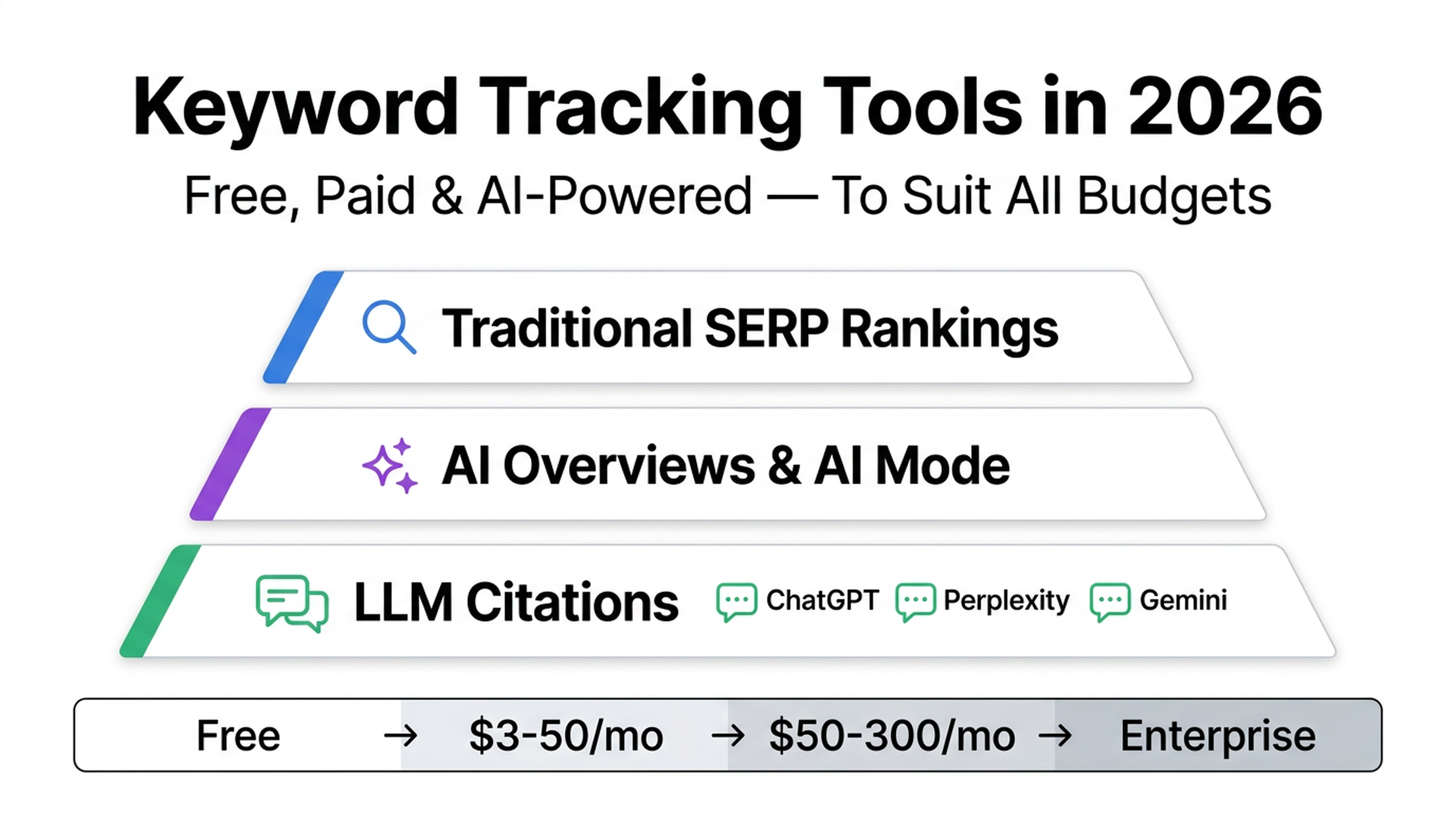
Keyword tracking in 2026 isn't just about checking where your page sits on Google's blue links anymore.
Google now layers AI Overviews, AI Mode, and generative answers on top of traditional results. Meanwhile, ChatGPT, Perplexity, and Gemini have become real search surfaces. Your brand either shows up in their answers or it doesn't.
This means the tools you need depend on what you're tracking:
- Just want to know if your pages rank? Free tools (Google Search Console + a browser extension) cover the basics.
- Need daily updates, competitor data, and local tracking? Budget trackers like Nightwatch or SE Ranking start around $30/month.
- Want AI visibility — are you cited in ChatGPT, Perplexity, or Google AI Overviews? You'll need tools that track LLM citations, or you can build your own with an AI agent and a free MCP server.
This guide covers every tier. At the end, you'll have a complete, copy-paste skill that turns Claude Code or Codex into your personal rank tracker.
What Changed: Keyword Tracking from 2023 to 2026
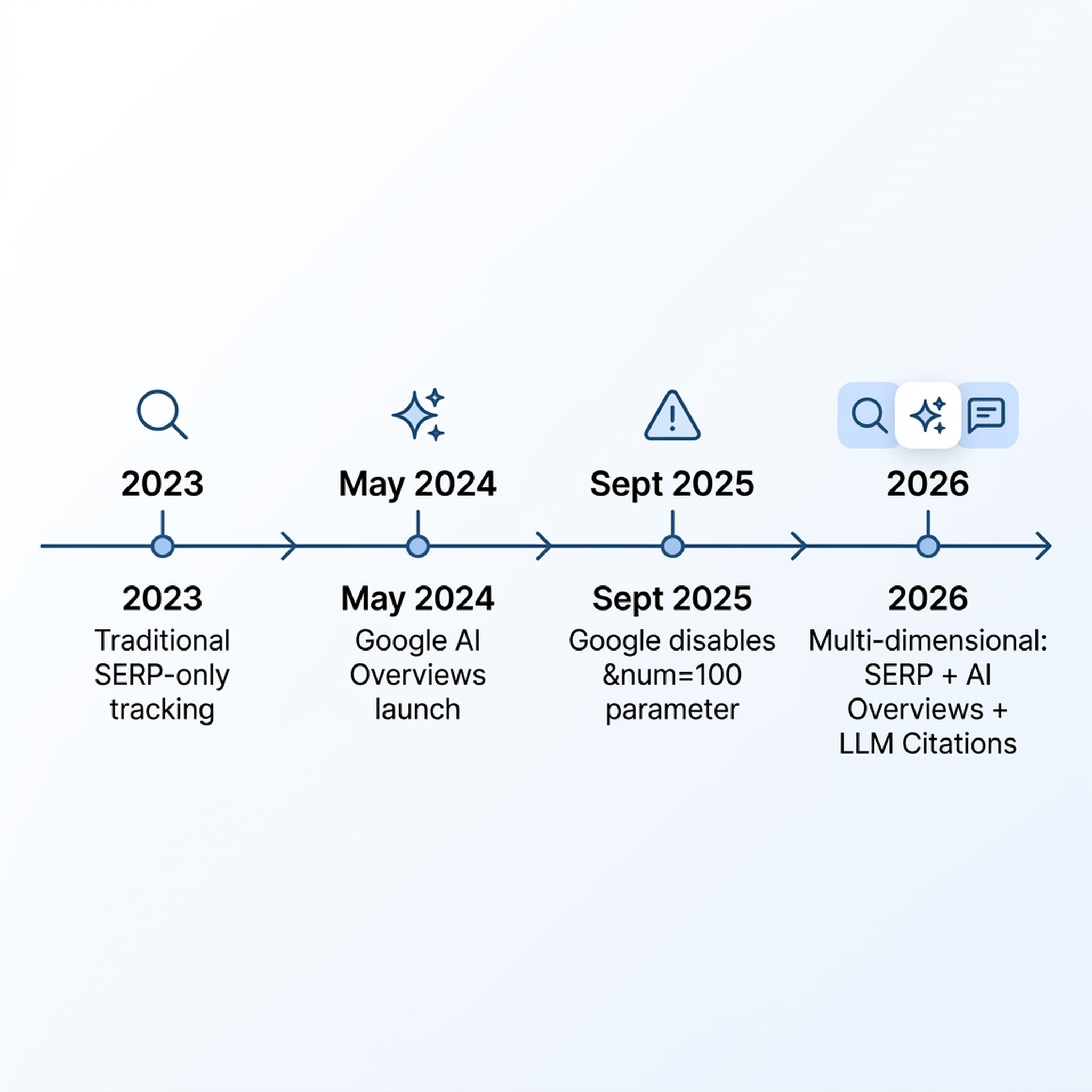
If you last looked at rank tracking tools three years ago, four things changed that actually matter.
1. Google killed the &num=100 parameter (September 2025)
For years, budget rank trackers relied on Google's &num=100 URL parameter to scrape the top 100 results in one request. Google turned it off in September 2025. Overnight, scraping-based tools faced 10× higher data costs and shallower result coverage. Some tools went offline temporarily. If you're still using a tool that hasn't adapted, your position data past the top 10 or 20 may be incomplete.
2. AI Overviews and AI Mode changed what "ranking" means
Google launched AI Overviews in May 2024 and AI Mode in March 2025. These generative answers now sit above or alongside traditional results. In some queries, the AI answer occupies the entire above-the-fold space. A position #1 blue link ranking can still get zero clicks if an AI Overview answers the question directly.
3. Google Search Console's average position became unreliable
Here's a concrete problem: GSC now counts AI Overview appearances the same way it counts traditional blue-link positions. If your page appears in an AI Overview at what GSC considers "position 1" and also ranks at position 4 in blue links, your average position reads ~2.5 — suggesting solid page-one visibility, even though most of your traffic comes from position 4.
The fix: use GSC's query-level data, segment by search type, and track clicks and CTR alongside position.
4. LLM visibility became a standalone tracking category
ChatGPT, Perplexity, Gemini, and Claude now cite sources in their answers. Brands that get cited earn referral traffic and brand reinforcement. Brands that don't get cited are invisible on these surfaces. Tracking whether your brand appears in AI answers — and in what context — is a new discipline that didn't exist when the original keyword tracking tools list was written in 2023.
What this means for you: you now need to track at least two things — where you rank on traditional SERPs, and whether AI engines cite your brand. The tools below cover one or both.
Free Tools: Start Here (Zero Budget)
If you're a solo entrepreneur, affiliate marketer, or small business owner with no SEO budget, you can track keyword rankings at zero cost. Here's what works in 2026.
Google Search Console (2026 Edition)
Google Search Console remains the only source of first-party Google ranking data, and it's completely free. The Performance tab shows exactly which queries drive clicks and impressions to your site, along with average position and CTR.
What's new in 2026:
- Custom annotations (launched November 2025): right-click any point on the performance chart to add a 120-character note. Use this to mark algorithm updates, site changes, or content refreshes — so when traffic shifts, you know why.
- Query Groups (October 2025): Google automatically clusters similar queries. Instead of seeing 50 variations of "best keyword tracker," you see one grouped topic with aggregate metrics.
- 24-hour comparison mode (July 2025): compare the last 24 hours against the previous period or the same day last week. Useful for catching ranking drops fast.
- Insights report (June 2025): a built-in dashboard that surfaces top-performing pages, trending queries, and milestone achievements — designed for people who find the main Performance tab overwhelming.
How to use GSC for rank tracking:
- Verify your site in Search Console (if you haven't already).
- Open the Performance tab.
- Set the date range to the last 28 days.
- Click + New and add both "Query" and "Page" dimensions.
- Sort by clicks (descending) to see your highest-traffic queries first.
- For any query, click through to see which page ranks, its average position, CTR, and impression count.
- Use Compare mode to see how rankings changed period-over-period.
Limitations: GSC only shows data for queries where your site already gets impressions. It won't show you keywords you're not ranking for, and it won't show competitor positions.
FatRank (Browser Extension)
FatRank is a free Chrome extension that checks Google rankings in seconds. Visit any website, click the extension icon, type a keyword, and it shows exactly where that domain ranks — down to position 100. It also supports CSV export for basic reporting.
Best for: quick spot checks when you're browsing a competitor's site and want to know what they rank for.
Limitation: Google may temporarily block searches if you check too many keywords in rapid succession. This is a manual checker, not an automated tracker.
FreeSERP.com
A free, no-registration SERP checker. Enter a keyword and a domain, and it returns the ranking position. No login, no API key, no limits for occasional manual use.
AIO.com.ai Website Ranking Checker
A Chrome extension that checks rankings and surfaces basic SEO issues — all running locally in your browser. No external API calls, no account required, and all features are free.
The Free-Only Stack
Combine these four for a solid zero-cost setup:
Tool | Use it for |
|---|---|
Google Search Console | Your actual ranking data, clicks, impressions, CTR |
FatRank | Quick competitor spot checks |
FreeSERP.com | Checking a keyword you don't rank for yet |
AIO.com.ai extension | On-page SEO issues that might affect rankings |
This stack covers basic monitoring. The blind spots: no automated daily tracking, no competitor rank history, no AI visibility data, and no alerts when rankings drop. If any of those matter, you'll need a paid tool.
Budget-Friendly Trackers ($3–$50/month)
When you're ready to move beyond manual checks, these tools add automation, competitor tracking, and local precision — without the $100+/month price tag of all-in-one suites.
Keyword.com — from $3–4/month
Keyword.com is the cheapest automated rank tracker that still delivers real value. It provides live SERP verification (it actually loads Google and shows you a screenshot of the result), white-label dashboards, and basic AI visibility tracking across ChatGPT, Gemini, Claude, and Perplexity.
Standout: the entry plan costs less than a coffee, making it the lowest-risk way to start automated tracking.
Best for: freelancers and tiny agencies who need to share rankings with clients.
Nightwatch — from $32/month (€79/month annual)
Nightwatch has evolved from a local-SEO specialist into a hybrid tracker that covers both traditional SERPs and AI/LLM visibility in one dashboard. It tracks Google, Bing, Yahoo, DuckDuckGo, and YouTube — plus ChatGPT, Claude, Gemini, Perplexity, and Google AI Overviews.
Standout features:
- Hyper-local tracking down to ZIP-code level across 107,000+ locations
- Dual-layer AI tracking: monitors both the LLM's final answer and the real-time web searches the AI ran to build that answer
- Citation Intelligence: maps AI citations back to the specific URLs that got cited
- Prompt Research: discovers which prompts trigger brand mentions
- Daily updates, Looker Studio integration, and white-label reports (Professional plan and up)
Limitation: the Starter plan includes only 50 AI prompts per month — enough to test the waters but tight for agencies monitoring multiple clients across AI surfaces.
Best for: location-dependent businesses, multi-location brands, and agencies that need local precision plus baseline AI visibility.
Mangools SERPWatcher — from $30/month
SERPWatcher remains the simplest rank tracker on the market. Its standout metric is the Performance Index — a single score that combines your rankings across all tracked keywords into one number, weighted by search volume and position. If the number goes up, your overall visibility improved.
Daily updates, desktop and mobile tracking, keyword tags, and location-specific tracking are included. The clean interface is designed for people who find most SEO tools overwhelming.
Best for: solo entrepreneurs and affiliate marketers who want to know "is my SEO working?" without drowning in data.
Wincher — from $15/month
The cheapest full-featured rank tracker. Daily position updates, competitor tracking, and basic reporting. All for roughly the price of a streaming subscription. Fewer bells and whistles than Nightwatch or Mangools, but it does the core job reliably.
Best for: anyone who needs automated daily tracking at the lowest possible monthly cost.
Mid-Range Suites ($50–$300/month)
These are the everyday platforms. Each tracks rankings plus does several other things — keyword research, backlink analysis, site audits, or content optimization — making them the right choice when SEO is central to your business.
SE Ranking — from $52/month (annual billing)
SE Ranking is the best value in mainstream SEO software in 2026. For roughly half the price of Ahrefs or Semrush, you get:
- Daily rank tracking with 100% accuracy guarantee
- AI Results Tracker: monitors brand visibility across Google AI Overviews, AI Mode, ChatGPT, Gemini, and Perplexity — including brand mentions, citations, and competitor share of voice
- Keyword research, competitor analysis, technical site audits, backlink monitoring
- City-level geo tracking, any device
- GA4, Looker Studio, GSC integration
- MCP support (connects to Claude, ChatGPT, Gemini, Cursor)
Catch: the AI Search tracking is an add-on (~$71/month annual) on top of the base plan, and extra seats and keywords cost extra. A 4-person agency on the Growth plan with the AI add-on and Agency Pack can reach ~$360/month. But the base plan at $52/month (Core, annual) covers a solo operator's needs well.
Best for: small teams and agencies who want near-enterprise capability at mid-market pricing — and specifically anyone who needs AI visibility tracking without buying a separate tool.
Ahrefs — from $29/month (Lite)
Ahrefs remains the best all-around SEO suite for most websites. In 2026, it has folded AI Overview citation data directly into both Rank Tracker and Site Explorer — so you can see whether AI Overviews cite your pages or your competitors'.
Standout rank tracking features:
- Tracks 19 SERP feature types (featured snippets, sitelinks, image packs, video carousels, local packs, People Also Ask, and more)
- 190+ locations
- Tags for grouping keywords (e.g., by content cluster or product category)
- Share of voice, average position, organic traffic, and SERP feature tracking per campaign
- Competitor comparison at both page and domain level
Free tier: the Ahrefs Webmaster Tools (AWT) plan is free for verified site owners and includes basic rank tracking alongside Site Explorer and Site Audit access.
Limitation: the Lite plan at $29/month is limited in tracked keywords. Full rank tracking capability starts at the Standard plan (~$99/month). AI Overview data is included at all paid tiers.
Best for: SEOs and businesses who want the strongest backlink data alongside their rank tracking — and anyone who already uses Ahrefs for other SEO tasks.
Semrush — from $140/month
Semrush's Position Tracking covers daily ranking updates with competitor comparison, SERP feature detection, and a new AI Visibility Index that tracks brand mentions across ChatGPT, Gemini, and Perplexity. Its "Share of Voice 2.0" metric measures the percentage of pixel space your brand occupies on the SERP — a more nuanced metric than position alone.
Best for: teams who need an all-in-one platform covering SEO, PPC, social, and content alongside rank tracking. The AI Toolkit add-on (from $99/month) unlocks full AI visibility features.
AccuRanker — from $109/month
AccuRanker is the fastest dedicated rank tracker — on-demand position checks return in ~10 seconds. Its 2026 feature set includes:
- Pixel Tracking: measures how far down the page your result actually appears in pixels, not just the position number. Two results both at "position 5" might be hundreds of pixels apart depending on ads, image packs, and AI Overviews.
- AccuLLM (add-on): tracks brand visibility across ChatGPT, Perplexity, Google AI Overviews, and AI Mode — with sentiment monitoring and competitor benchmarking.
- GPS-level local tracking, 50+ SERP features, and unlimited users and domains on every plan.
Limitation: pricing scales steeply by keyword volume. 1,000 keywords costs $109/month, but 10,000 keywords jumps to $579–$764/month. AccuLLM pricing is not publicly listed.
Best for: agencies and in-house SEOs who need the fastest possible ranking updates and pixel-level precision.
Moz Pro / Serpstat
- Moz Pro (from $49/month): clean, beginner-friendly interface with solid rank tracking, site audits, and keyword research. Less feature-dense than Ahrefs or Semrush, but easier to learn.
- Serpstat (from $69/month): mid-market SEO toolkit with automated keyword clustering, rank tracking, and backlink analysis. Strong for teams in non-English markets.
Enterprise and Specialized Tools
Pi Datametrics — Enterprise E-Commerce
Pi Datametrics is built for large e-commerce teams and agencies that need to build a business case for SEO investment. It integrates with Google Analytics and Adobe Analytics, identifies keyword cannibalization, supports unlimited competitors and locations, and provides industry benchmark data across 650 business categories.
Best for: enterprise e-commerce brands and agencies pitching SEO strategy to non-SEO stakeholders.
seoClarity — from ~$2,500/month
Enterprise-scale platform with continuous AI visibility monitoring, unlimited keyword tracking, and deep content optimization. Built for large organizations where SEO is a core revenue channel.
AI-Native Visibility Tools (New Category)
These tools didn't exist when the 2023 article was written. Each focuses specifically on tracking how brands appear in AI-generated answers:
Tool | Starts at | What it tracks | Best for |
|---|---|---|---|
Profound | $99/month (ChatGPT only); $399/month (full) | ChatGPT, Perplexity, and more; deep citation and prompt analysis | Enterprise AI search intelligence |
Peec AI | $89/month | AI visibility with unlimited seats; prompt and citation tracking | Lean teams that need dedicated AI monitoring |
Otterly.ai | Low-cost tiers | ChatGPT, Perplexity, Google AI Overviews | Simple AI answer monitoring without complexity |
Rankability | Contact for pricing | Entity association, Generative Engine Optimization (GEO), llms.txt generator | Teams building a GEO program, not just tracking keywords |
When to add an AI-native tool: when your SEO tool's built-in AI tracking (Ahrefs AI Overview data, Semrush AI Visibility Index, Nightwatch AI dashboard) isn't deep enough — typically when you need to monitor which specific prompts trigger your brand, analyze citation sentiment, or track visibility across 10+ AI platforms.
New: AI Agent-Powered Rank Tracking (For Beginners)
Here's the part that didn't exist in 2023. You can now use Claude Code or OpenAI Codex (the terminal-based AI coding agents) to check your keyword rankings, monitor for drops, and generate reports — without writing code or paying for an SEO tool.
How It Works (The 30-Second Version)
AI coding agents like Claude Code connect to external services through something called MCP (Model Context Protocol). An MCP server is essentially a bridge that lets the agent talk to a data source — in this case, a rank tracking service.
Three MCP servers provide rank tracking data to AI agents in 2026:
- Scavio MCP — Lightweight, conversational rank monitoring. Free tier: 50 credits. You ask natural-language questions like "Check the ranking for mysite.com on these 10 keywords" and it returns positions, top competitors, and improvement suggestions. Works with Claude Code via one terminal command.
- OpenSEO MCP — A pay-as-you-go SEO data platform that exposes an MCP server covering keyword research, SERP inspection, and rank tracking across desktop and mobile, plus AI brand visibility. Setup is a single CLI command.
- SEOMCP — AI-native SEO service with structured tools for keyword research, site audits, and rank tracking, all accessible through MCP.
Build Your Own Rank Tracker: Complete SKILL.md
Below is a complete, copy-paste skill file. Save it as .claude/skills/rank-tracker/SKILL.md in any project folder, and Claude Code will be able to check your keyword rankings on demand. The skill uses Scavio MCP (free tier available), but you can swap in OpenSEO or SEOMCP by changing the MCP reference.
<pre><code>--- name: rank-tracker description: Check Google keyword rankings for any domain, monitor ranking changes, and generate weekly ranking reports. Uses Scavio MCP for live SERP data. Designed for SEO beginners.
Rank Tracker Skill
You are an SEO rank tracking assistant. Your job is to check keyword rankings, detect changes, and produce clear reports — using only authorized, connected data sources.
What You Can Do
- Check rankings: given a domain and a list of keywords, return the current Google ranking position for each keyword.
- Monitor for drops: compare current rankings against a saved baseline and flag keywords that dropped more than a threshold.
- Generate a weekly report: summarize ranking changes, new top-10 entries, and keywords that fell off page one.
Data Rules (Non-Negotiable)
- You may only pull ranking data through the Scavio MCP server configured in this environment. Never guess, invent, or estimate a ranking position.
- Record the date, time, keyword, domain, position, and target market for every data point.
- If Scavio returns an error or no data for a keyword, report it as "data unavailable" — do not fill in a fake number.
- Never expose API keys, tokens, or credentials in any output.
Workflow: Check Rankings
When the user asks you to check rankings:
- Ask for: the domain to check, the list of keywords, and the target country/market (default: US).
- For each keyword, call Scavio MCP to get the current Google ranking.
- Present results in a table:
| Keyword | Position | URL Ranking | SERP Features Present | Checked At |
|---|---|---|---|---|
| example keyword | 4 | https://example.com/page | AI Overview, Featured Snippet | 2026-07-31 14:00 UTC |- If a keyword doesn't rank in the top 100, show "Not in top 100."
- Add a one-sentence summary: "X of Y keywords rank in the top 10."
Workflow: Monitor for Drops
When the user asks you to monitor for ranking drops:
- Ask for: the domain, the keyword list, the threshold (e.g., "alert me if any keyword drops more than 5 positions"), and whether to compare against the last check or a saved baseline.
- Pull current rankings for all keywords.
- Compare against the baseline. Flag every keyword where the position dropped more than the threshold.
- Present flagged keywords in a table with: keyword, previous position, current position, drop amount, and the URL that currently ranks.
- For any keyword that dropped to "Not in top 100," flag it as critical.
Workflow: Weekly Report
When the user asks for a weekly ranking report:
- Pull current rankings for all tracked keywords.
- Compare against the previous week's data (or the most recent saved baseline).
- Structure the report in four sections:
Summary: "X keywords improved, Y declined, Z unchanged this week."
Winners (improved 3+ positions):
| Keyword | Previous | Current | Change |Losers (dropped 3+ positions):
| Keyword | Previous | Current | Change |New in Top 10 / Fell off Page One — list keywords that entered or left the first page of results.
- End with: "Check these pages first:" — list one or two specific URLs that lost the most ground, so the user knows where to start investigating.
Setup Required (One Time)
Before using this skill, you need Scavio MCP connected to your AI agent:
For Claude Code:
claude mcp add scavio https://mcp.scavio.dev/mcpFor Codex: Add this to your Codex MCP configuration (typically ~/.codex/mcp.json):
{
  "mcpServers": {
    "scavio": {
      "url": "https://mcp.scavio.dev/mcp"
    }
  }
}
Scavio provides 50 free credits on signup. Each keyword check uses approximately 0.1 credits, so the free tier covers ~500 keyword checks.
Limitations
- This skill checks Google organic rankings only. It does not track Google Ads, Google Maps, or shopping results unless the MCP server explicitly supports those surfaces.
- AI visibility (ChatGPT, Perplexity, Gemini citations) is not covered by Scavio's free tier. For AI visibility tracking, consider upgrading to a paid MCP plan or using a dedicated AI visibility tool.
- Ranking positions are snapshots at check time. They fluctuate throughout the day and vary by location, device, and personalization.
</code></pre>
How to Use the Skill (Step-by-Step for Complete Beginners)
Step 1: Install Claude Code or Codex on your computer. Claude Code runs in your terminal; Codex runs in VS Code or the terminal.
Step 2: Open your terminal and connect Scavio MCP with one command (shown in the SKILL.md above).
Step 3: Save the SKILL.md file to .claude/skills/rank-tracker/SKILL.md in your project folder.
Step 4: In Claude Code or Codex, type a natural-language request like:
"Check the Google US ranking for auspia.ai on these keywords: SEO tools, AI search visibility checker, keyword rank tracker."
The agent will call Scavio, pull live ranking data, and return a table with positions — no code required.
Step 5 (optional): Save your first check as a baseline, then run it again next week and ask the agent to compare and flag drops.
This costs you: $0 for the agent (Claude Code and Codex are free for terminal use with your own API key), plus whatever Scavio credits you use beyond the free 50-credit tier. Total: roughly $0.05 per weekly check of 10 keywords.
How to Choose: Decision Framework
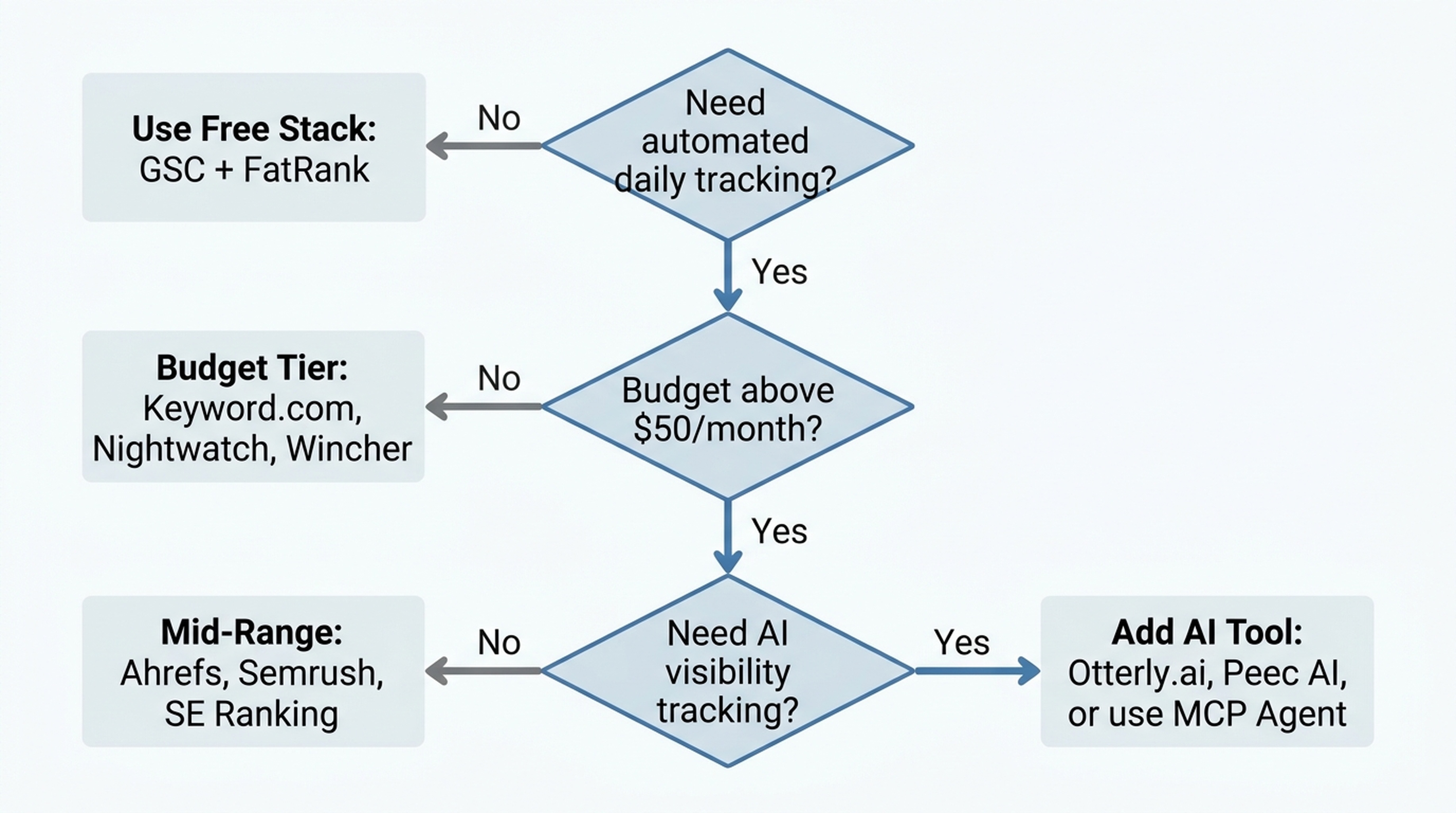
With 15+ tools covered, here's a framework to pick the right one in under two minutes.
Step 1: Answer Three Questions
Question | If Yes | If No |
|---|---|---|
Do you need automated daily tracking? | Go to Step 2 | Use the free stack (GSC + FatRank) |
Is your budget above $50/month? | Go to Step 3 | Choose from budget tier ($3–$50/month) |
Do you need AI/LLM visibility tracking? | Prioritize tools with AI tracking | Traditional rank tracking is sufficient |
Step 2: Choose Your Tier
Your Situation | Recommended Tool | Starting Price |
|---|---|---|
Zero budget, just getting started | Free stack: GSC + FatRank + FreeSERP | $0 |
Smallest possible paid plan | Keyword.com | ~$3–4/month |
Need daily tracking, lowest price | Wincher | ~$15/month |
Solo entrepreneur, simple dashboard | Mangools SERPWatcher | ~$30/month |
Local business, multi-location | Nightwatch | ~$32/month |
Best value all-in-one | SE Ranking | ~$52/month |
Strongest backlink + rank data | Ahrefs | ~$29–$99/month |
All-in-one marketing + SEO | Semrush | ~$140/month |
Fastest updates, pixel precision | AccuRanker | ~$109/month |
Enterprise e-commerce | Pi Datametrics | Custom |
AI visibility only (add-on to free stack) | Otterly.ai or Peec AI | ~$89–$99/month |
DIY with AI agent | Scavio MCP + Claude Code/Codex | ~$0.05/week |
Recommended Stacks
Beginner Stack (total: $0): GSC + FatRank + FreeSERP
Growing Stack (total: ~$30–$52/month): Nightwatch (traditional + local + AI) or SE Ranking Core (all-in-one value)
Professional Stack (total: ~$100–$200/month): Ahrefs Standard + Otterly.ai (or Peec AI) for dedicated AI visibility
DIY & Learn Stack (total: $0 + API costs): GSC + Scavio MCP + Claude Code with the SKILL.md above
FAQ
Is Google Search Console enough on its own?
For basic monitoring — yes. GSC shows you exactly which queries drive traffic and where you rank for them, using Google's own data. What it can't do: show competitor rankings, track keywords you don't rank for yet, provide daily automated updates, or monitor AI/LLM visibility. If any of those matter, add a paid tool or an MCP-based agent.
How many keywords should I track?
Start with 10–30 keywords that directly relate to your product, service, or core content. Track too many and you'll drown in data without gaining useful insight. Add more keywords as you expand into new topic areas or product categories. Quality over quantity.
Which matters more in 2026 — traditional rankings or AI visibility?
Both matter, but for different reasons. Traditional rankings drive the majority of organic clicks today. AI visibility is growing fast and represents tomorrow's search volume — especially for informational and research-oriented queries. If your site depends on informational traffic (blogs, guides, comparisons), start tracking AI visibility now. If you're primarily e-commerce or local services, traditional rankings still dominate, but monitor AI Overview presence for your top product and service queries.
Can I replace paid tools entirely with an AI agent and MCP?
Partially. An AI agent + Scavio MCP (or OpenSEO MCP) can handle on-demand rank checks, drop monitoring, and weekly reports at near-zero cost. What it won't replace: historical rank data going back months or years, competitor discovery (finding new competitors you didn't know existed), backlink analysis, and the polished dashboards paid tools provide. Think of the agent approach as a lightweight, customizable supplement — not a full replacement for a dedicated platform.
What should I do when my rankings drop?
Don't panic. First, check whether it's a site-wide drop or just a few keywords. Use GSC's Compare mode to see if the drop correlates with a Google algorithm update (check the Google Search Status Dashboard). If it's page-specific, inspect the page: did someone change the content, remove internal links, or slow it down? If it's site-wide and not linked to an update, check for technical issues (indexing problems, page speed regression, manual actions). Fix the root cause, not the symptom.
Do I need to track Bing or other search engines?
If your audience uses Bing (common in the US, UK, and some enterprise markets) or you're targeting markets where Google isn't dominant (China, Russia, South Korea), yes. Nightwatch, AccuRanker, and SEO PowerSuite all support multi-engine tracking. For most English-language sites, Google covers 85%+ of search traffic, so start there and expand if your data shows meaningful traffic from other engines.
Final Thoughts
Keyword tracking in 2026 is both simpler and more complicated than it was three years ago.
The simple part: free tools have gotten genuinely good. Google Search Console with annotations, Query Groups, and the Insights report gives you more actionable data than many paid tools did in 2023. And you can now deploy an AI agent to do rank checks for you at the cost of a few API credits — something that would have needed a developer three years ago.
The complicated part: "ranking" now means at least three different things. Your blue-link position. Your AI Overview presence. Your visibility in ChatGPT and other LLMs. A single position number no longer tells the full story.
Start with the free stack. When you outgrow it, add a budget tracker that covers the dimension you're missing — local precision with Nightwatch, all-in-one value with SE Ranking, or AI visibility with a dedicated tool. And if you're curious about AI agents, copy that SKILL.md and try your first automated rank check this week.
Author: Alice Monroe, AI SEO Tools Analyst Covering 150+ Tools at Auspia. Alice writes about SEO and AI search tools, tool comparisons, and practical software workflows for growth teams.


