What This Workflow Gets You
You have a page that used to rank in the top 10 for a keyword you care about, and now it sits at position 34. You search the same phrase and two of your own URLs show up in the results. Or your content team shipped 40 new posts last month and you suspect a few of them are quietly fighting each other.
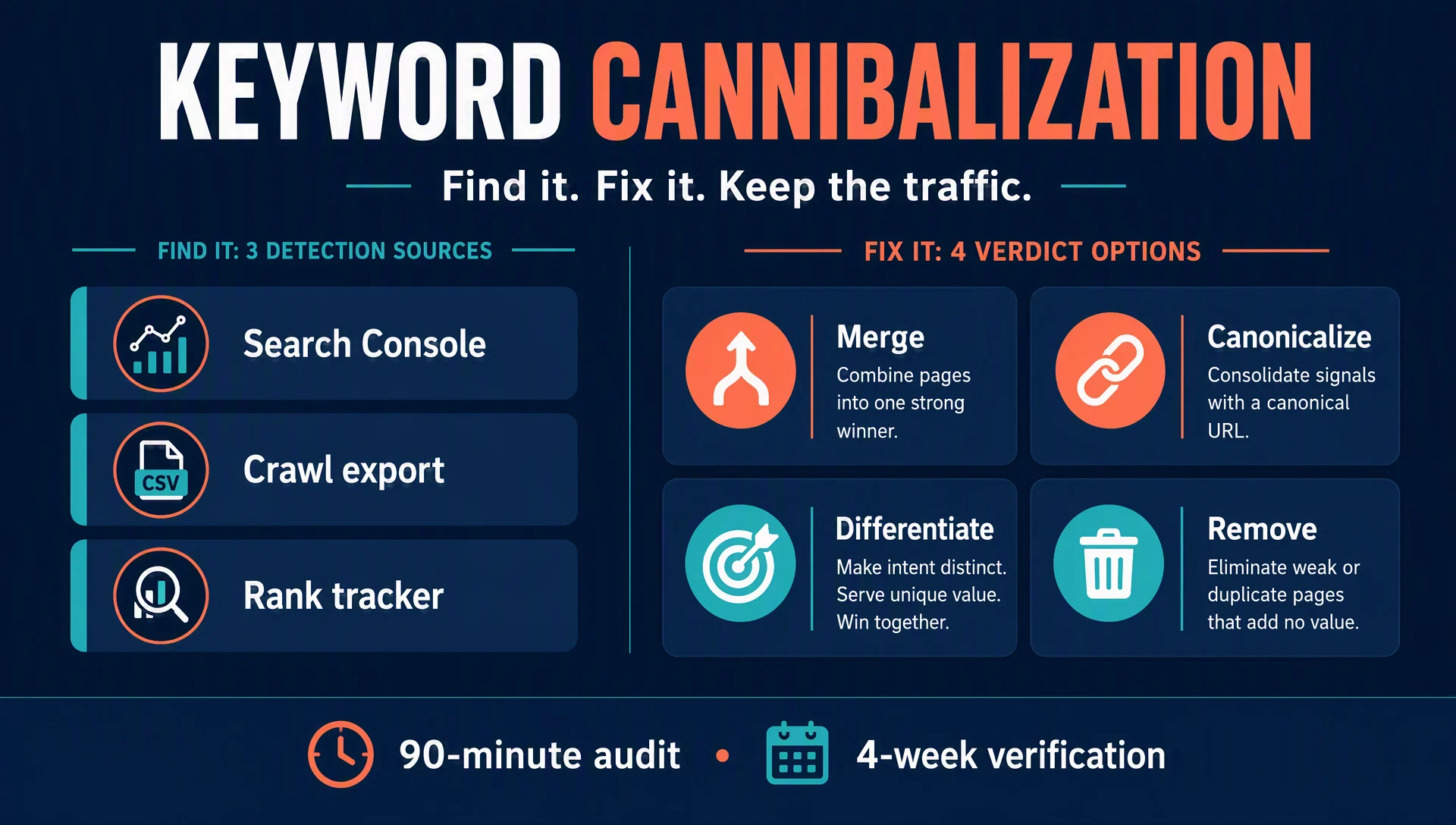
This workflow turns that suspicion into a confirmed list and a fix plan. When you finish, you will have: every query where two or more of your URLs compete, a verdict for each cluster (merge, canonicalize, differentiate, or remove), and a four-week verification plan that tells you whether the fix held.
- Who it's for: SEOs and content teams on sites with more than a few hundred pages, and anyone who publishes fast.
- Time: about 90 minutes for the first audit on a typical mid-size site; half that once you have a routine.
- Prerequisites: Google Search Console read access, a crawl export (Screaming Frog, Sitebulb, or equivalent), and a rank tracker if you subscribe to one.
- Definition of done: every competing cluster on your list has exactly one of the four verdicts above, the fixes are applied, and you have a date on the calendar to re-check positions and impressions.
One reality check before you start, because it saves you from fixing things that are not broken: seeing multiple URLs for one query is normal. A category page, a blog post, and a product page can all rank for the same phrase — if they serve different intents (someone researching vs. someone ready to buy), that is a healthy SERP, not cannibalization. Only pages competing for the same job at the same stage get flagged in this workflow.
This matters more in 2026 than it did five years ago for one reason: AI briefs and AI-generated drafts produce lookalike pages at a pace that manual review cannot keep up with, so cannibalization now shows up at scale. It hits Google rankings and AI search citations at the same time.
The 3-Minute Symptom Check
Run through this before you dig into data. If two or more of these sound familiar, run the full audit.
Symptom | What it looks like | Most likely cause |
|---|---|---|
Stuck rankings | A page held the top 10 for months, then slid to positions 25-50 after a new page launched | The new page competes for the same query |
Split impressions | Two URLs share impressions for the same query almost 50/50 | Neither page earns clear relevance |
Title tag twins | Two pages with the same or near-identical H1 and title | A writer created a variant, not a complement |
Switching rankings | The ranking URL for a phrase alternates between your pages week to week | Search engines cannot pick the authoritative page |
AI answers flip-flop | An AI assistant cites different URLs of yours for the same question on different runs | The same dilution, on a different surface |
Before You Start: Data You Need
Gather these three things:
- Search Console with at least 6 months of history. Ninety days is enough for a quick pass, but the longer window shows you when a ranking slid relative to a page launch.
- A fresh crawl with title and H1 extracted. Screaming Frog does this out of the box; Sitebulb and Botify do too. If you have none of these, a
site:search plus your CMS page list covers the most obvious cases. - A rank tracker export (Semrush, Ahrefs, Authority Labs). This step is optional — the Search Console pass alone finds the majority of cases.
Export two things from Search Console before you start: the query report (query, impressions, clicks, position) and the same report with the Pages dimension (URLs). Both live under Performance, in the full report.
Step 1: Find Competing URLs in Search Console
This is the free pass and the highest-signal one.
- Open Search Console → Performance → full report.
- Use the query filter and type your first priority keyword.
- Look at the URLs below the chart. Note any query that shows two or more of your own pages getting impressions.
You are looking for two patterns: pages splitting impressions roughly evenly over the same period, and pages stuck between positions 20 and 50 that used to be in the top 10 — especially if the slide started around the launch of a lookalike page.
Start with your 10-15 highest-value keywords. If you find clusters on half of them, the problem is sitewide and worth a full sweep of every query above, say, 50 impressions in the last six months. If it shows up on only a handful, the problem is isolated — fix those and move on.
Expected output: a list of queries, each with two or more of your URLs and their impression split. Quality check: the pages must actually share rankings for the same query. If they only sound similar, they are neighbors, not competitors — remove them. Recovery: nothing found? Widen the window to 3 months and include longer-tail variants of your keywords. Also check branded vs. non-branded splits — those hide duplicates on multi-version sites such as language pairs or wholesale-vs-consumer setups.
Step 2: Spot Duplicate Titles and H1s in Your Crawl
Cannibalization is often a content-production accident: a writer is asked to "write about X," does not check what already exists, and produces a page with the same title as the one already ranking.
Open your crawl export, sort by title, then by H1, and flag duplicates and near-duplicates. "Near" counts — two pages do not need identical titles to compete. "Best CRM software" and "Best CRM tools" aimed at the same audience are candidates; "Best CRM for real estate" is a different page and should not be in the list.
While you are in the crawl data, check the technical suspects: canonical tags pointing somewhere other than the page itself, meta robots noindex rules that changed when variants were added, and robots.txt blocks that started or stopped. As the Search Engine Journal guide on this topic puts it: when you change how you instruct search engines to crawl, index, and ignore, you create cannibalization problems. A product variant page that inherited the old product's canonical is the classic example.
Expected output: page pairs with duplicate or competing titles and H1s, plus any technical flags. Quality check: for each pair, answer one question — did one page exist and rank before the other launched? If yes, note it; that is the strongest signal of a real problem. Recovery: if your CMS makes exports painful, generate the list from the crawl CSV with the Codex skill at the end of this article. Treat its output as a candidate list, not a verdict.
Step 3: Confirm With a Rank Tracker
Search Console tells you what Google reports; a rank tracker tells you where your URLs sit over time, which is what actually exposes stuck pages.
Open each candidate query in your tracker. The pattern that confirms cannibalization: the keyword is stuck in the mid-20s to lower-50s, or the URL holding position X keeps changing between your pages. Semrush shows which of your pages appeared for the phrase over the past year; Authority Labs lists every URL per keyword. If two or more of your URLs appear in the year of history and neither has touched the top 10, you have a confirmation.
Read the direction while you are there. If your original page ranked fine until the new page was published and both now hover below the fold, the newcomer did not "steal" the rankings. The two pages diluted each other. That changes the fix: merge the newcomer into the original, not the other way around.
Expected output: a confirmed status for each candidate cluster — "confirmed" or "unconfirmed, review manually." Quality check: the confirmation needs at least two independent signals. Search Console + crawl counts as two; rank tracker alone is a weak single. Recovery: if your tracker shows only one URL per keyword, skip this step. The Search Console and crawl passes are sufficient to run the full workflow.
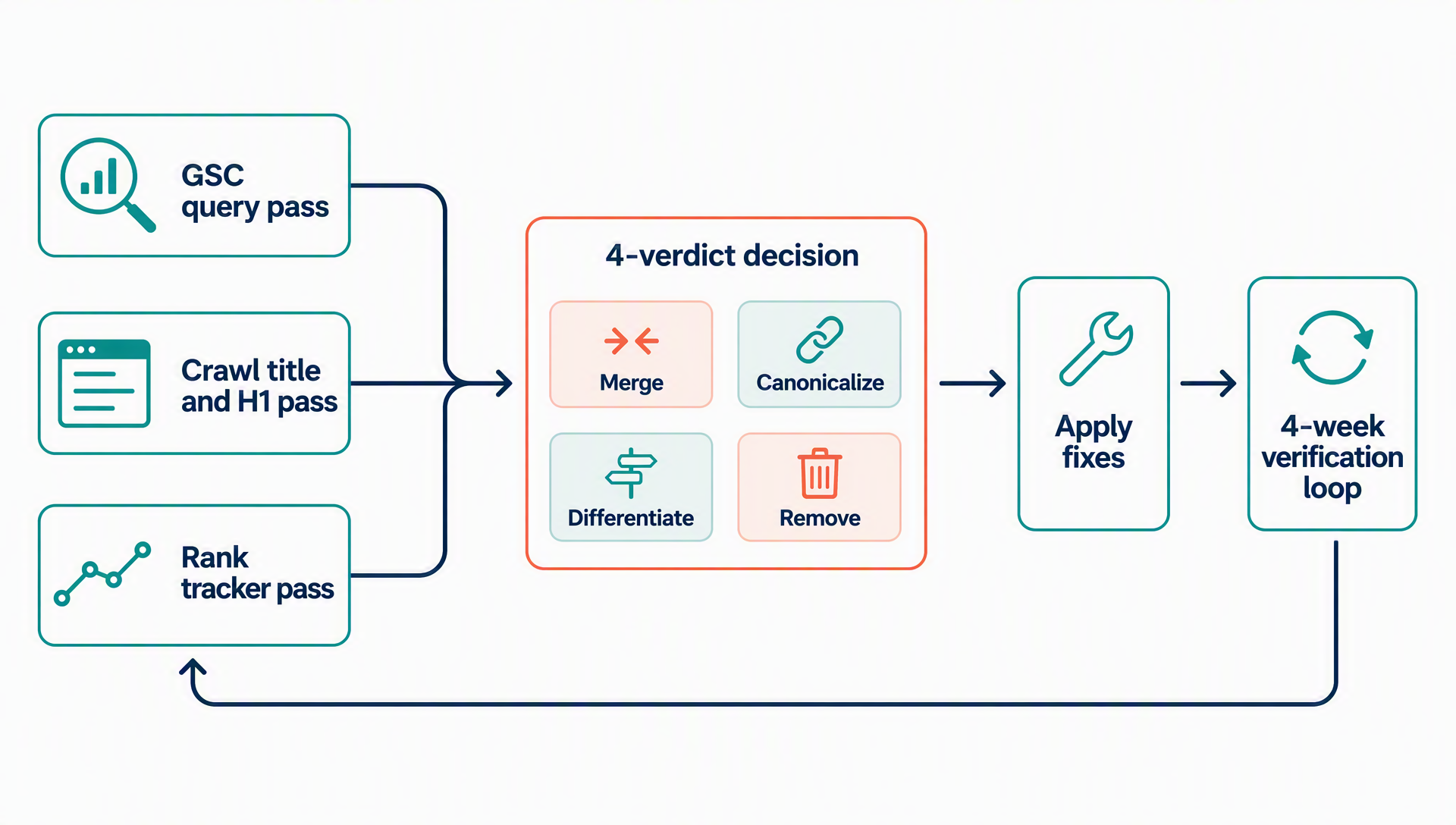
The audit pipeline: three detection passes, one decision matrix, one verification loop.
Step 4: Decide the Fix
For each confirmed cluster, pick exactly one of four verdicts. This table is the whole decision:
Verdict | Use when | The move |
|---|---|---|
Merge | Pages serve the same intent and one is clearly more complete | Fold the weaker page's unique talking points into the stronger one, then remove or 301 the weaker URL |
Canonicalize | Near-identical variants that must exist (product variants, parameters, campaign pages) | Pick the official URL, add a self-referencing canonical there, canonical the variants to it |
Differentiate | Same topic, different intent you want to keep (e.g., how-to vs. product page) | Rewrite one page so it serves a clearly different query or funnel stage; make sure titles and H1s no longer overlap |
Remove | The page is thin, duplicated, or exists only for a phrase that is already covered | Delete it after folding any unique value into the surviving page |
Two cases that are not cannibalization, so leave them alone: a how-to guide and a conversion page targeting the same keyword at different funnel stages — Google understands which page serves what purpose — and separate locale versions of the same page with hreflang in place.
One question to check your verdict: after this change, could a user searching the phrase land on one page and get everything the other page offered? If yes, merge or remove. If no, canonicalize or differentiate.
Step 5: Apply the Fixes Without Losing Visibility
Fix A: Consolidate the content (the merge verdict). Work from the surviving page. Copy every unique section from the losing page into it — the FAQ answers, the examples, the section that gets cited, the internal links that pointed at it. Reorder if needed so the strongest content sits near the top. When the losing page has external backlinks or real rankings of its own, 301 it to the survivor instead of letting it 404; when it has neither, removal is fine. The Search Engine Journal guide deliberately avoids 301s — it prefers folding content and deleting the newer page — and 301s become necessary only when the removed URL carries its own link equity. Update internal links that used the losing page's anchor text to point at the survivor.
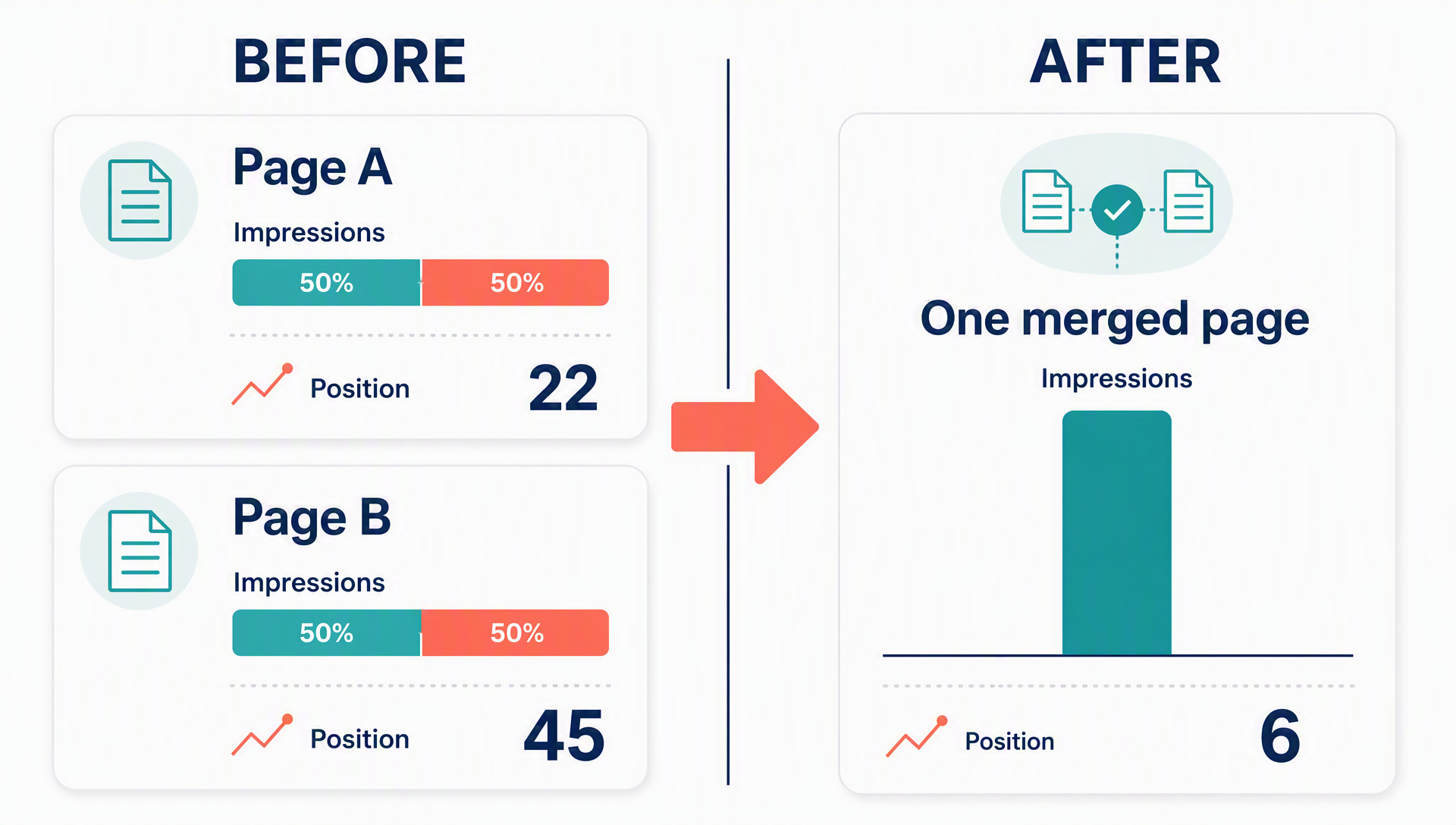
Merging two competing pages into one URL turns a 50/50 impression split into a single winner.
Fix B: Canonicalize (the canonical verdict). Put a self-referencing canonical on the official page and canonical the variants to it. This is the right tool for duplicate-ish pages that must exist: product variants, parameterized URLs, campaign pages. It is not a substitute for consolidation. If two pages both carry meaningful content, a canonical alone leaves both in your crawl and splits your editorial focus — do the content work first, then point the canonical.
Fix C: Block indexing programmatically (the remove-adjacent verdict). When the duplicates are structural — parameter pages, filter combinations, regional variants that do not need indexing — apply noindex at the folder or template level, not page by page. This is the case where one line of code beats 200 manual edits.
Fix D: Fix internal links by intent (the differentiate verdict). When two pages legitimately serve different intents, make your internal links say so. The rule from the source guide: if the text around the word "apples" is about buying apples, link to the conversion page; if it is about where apples come from, link to the informational page. Every internal link is a vote. When your links consistently point at the page that should win, you remove the ambiguity search engines would otherwise resolve on their own, often in the wrong direction.
Step 6: Verify the Fix Held
Wait two to four weeks after the fixes, then re-run the checks.
- Search Console: the query should now show one dominant URL instead of a split, and the surviving page's impressions should rise. Aggregate impressions for the cluster can dip for a week or two during re-ranking — that is normal, not a failure.
- Rank tracker: the keyword should stop oscillating between URLs.
- AI surfaces: ask your key phrase in an AI assistant or AI search engine and confirm the surviving URL is the one cited — not the removed one. Split pages split AI citations too. Consolidation is one of the few fixes that helps Google rankings and AI search visibility at the same time.
If a cluster still splits after four weeks, you either missed a page (check again for variants you did not know about) or the pages genuinely serve different intents and should have been differentiated, not merged. Re-verify and re-decide.
Keep It From Coming Back
The audit is the easy part. Staying clean is a publishing rule. Three practices, in order of importance:
- Maintain a topic list your content team checks before writing. The fastest way to create cannibalization is a writer who does not know the page already exists.
- Make overlap a conversation, not a wall. Instead of banning a topic, help the writer find the complementary angle — the how-to, the comparison, the vertical-specific version.
- Watch AI-generated pipelines specifically. AI-generated output is the fastest cannibalization factory there is: it produces repetitive, thin pages that compete with each other regardless of prompt quality. Every page that was generated or AI-briefed should hit the topic list check before it is scheduled, and the quarterly audit should prioritize it.
Run the full audit quarterly, and again after any launch that added more than a handful of pages to the same area of the site.
Automate the Audit: A Codex Skill
The steps above are manual so you understand what the data means. Once you do, hand the repeatable parts to an AI coding agent. This is a complete skill file for Codex: it reads your Search Console export, flags competing clusters, and produces a verdict sheet without touching your site.
---
name: keyword-cannibalization-audit
description: Find and classify keyword cannibalization clusters from Google Search Console, crawl, and rank-tracker exports. Use when a query shows multiple URLs, rankings dropped after a new page launch, or you need a cannibalization verdict sheet. Read-only: produces a report, never edits pages.
---

# Keyword Cannibalization Audit

## Inputs (required)
- `gsc-queries.csv` — Search Console query export (query, impressions, clicks, position)
- `gsc-pages.csv` — Search Console page export (page, impressions, clicks, position)
- `crawl-titles.csv` — crawl export with URL, title, H1, canonical
- `rank-history.csv` — optional rank tracker export with per-keyword URL history

## Procedure

1. Load the CSVs. Normalize URLs (lowercase host, strip trailing slash and tracking parameters).
2. Join `gsc-queries.csv` and `gsc-pages.csv` on query to build query-to-URL mappings.
3. Flag queries where 2+ URLs each received at least 10% of the query's impressions in the last 90 days.
4. Flag queries where a URL sits between positions 20-50 and a second URL for the same query was created later (compare crawl or tracker history).
5. From `crawl-titles.csv`, flag pairs whose titles or H1s are identical or share 80%+ of their significant tokens.
6. From `rank-history.csv`, flag queries whose ranking URL changed more than twice in 6 months.
7. Cross-check every flag. Keep only clusters confirmed by at least two signals (Search Console + crawl counts as two).
8. Classify each surviving cluster as MERGE, CANONICALIZE, DIFFERENTIATE, or REMOVE:
   - Same intent + one page clearly more complete → MERGE (fold unique sections into the survivor; note a 301 only if the removed URL has external backlinks)
   - Near-identical variants that must exist (parameters, variants) → CANONICALIZE
   - Same topic, genuinely different intent you want to keep → DIFFERENTIATE (rewrite one page, no title overlap)
   - Thin or fully duplicated page with no unique value → REMOVE
   - Complementary intent (how-to vs. product for the same keyword) → NOT CANNIBALIZATION, skip
9. Output `cannibalization-verdicts.md`: a table of query | competing URLs | signals found | verdict | action, ordered by query impressions. Include for each cluster the exact URLs, the evidence rows (dates, positions, impressions), and fix text ready to paste into a CMS task.

## Rules
- Read-only. Never edit pages, robots.txt, or canonicals. Output the report and a proposed action plan only.
- Never merge a URL into a survivor whose content is not equal to or better than the merged output.
- Do not classify locale variants (hreflang) or genuinely different intents as cannibalization.
- Clusters with fewer than two confirming signals get marked "unconfirmed — review manually," never dropped.
- When the rank tracker export is missing, run with Search Console + crawl only and say so in the report header.
Save that as keyword-cannibalization-audit/SKILL.md in your Codex skills folder, drop the four CSVs into a workspace folder, and run it. A typical run over a few thousand pages takes a couple of minutes and returns the verdict sheet.
Two smaller prompts, for when you do not want a full skill:
- Triage the export: "Here is my Search Console query export. Find every query where two or more of my URLs each get at least 10% of impressions. Output a table with query, URLs, impression split, and position per URL. Do not make recommendations."
- Decide a cluster: "Two of my pages both rank for [query]: [URL A] at position [X] and [URL B] at position [Y]. [URL B] launched [date]. Compare their content and tell me which of these four verdicts applies — merge, canonicalize, differentiate, remove — and why, in two sentences."
FAQ
Multiple pages rank for my keyword — is that automatically cannibalization?
No. If the pages serve different intents (research vs. buying) or different locales, search engines handle them fine. Only pages competing for the same job at the same funnel stage need a verdict.
Canonical or noindex — which should I use?
Canonical when the variant must stay accessible (product variants, parameters) and its signals should pass to the official page. Noindex, applied programmatically, when the pages are pure duplicates that serve no user need. Neither replaces content consolidation when the duplicate actually contains useful content.
Should I 301 the losing page?
Only if it has external backlinks or meaningful rankings of its own. Otherwise fold its unique content into the survivor and remove it. A 301 to a page that is not a genuine replacement wastes the redirect's equity and confuses users.
Traffic dipped after I merged pages — did I break it?
A short dip while Google re-evaluates the cluster is common. Measure at four weeks: if the survivor ranks for the query and cluster impressions recovered, the fix held. If a different page is winning, you merged in the wrong direction. Reverse it before you compound the problem.
Does cannibalization affect AI search citations?
Yes. When two of your URLs compete, AI answers pick between them and can cite either — or neither. Consolidation gives you one strong, citation-ready URL instead of two diluted ones.
How often should I run the audit?
Quarterly as a baseline, plus after any wave of new pages. Sites that generate content with AI should treat the audit as part of the publishing pipeline, not a periodic chore.
Author: Clara Bennett, 10-Year Content Strategy Practitioner at Auspia. Clara writes about editorial systems, topic maps, and repeatable content operations that keep publishing programs from colliding with themselves.