


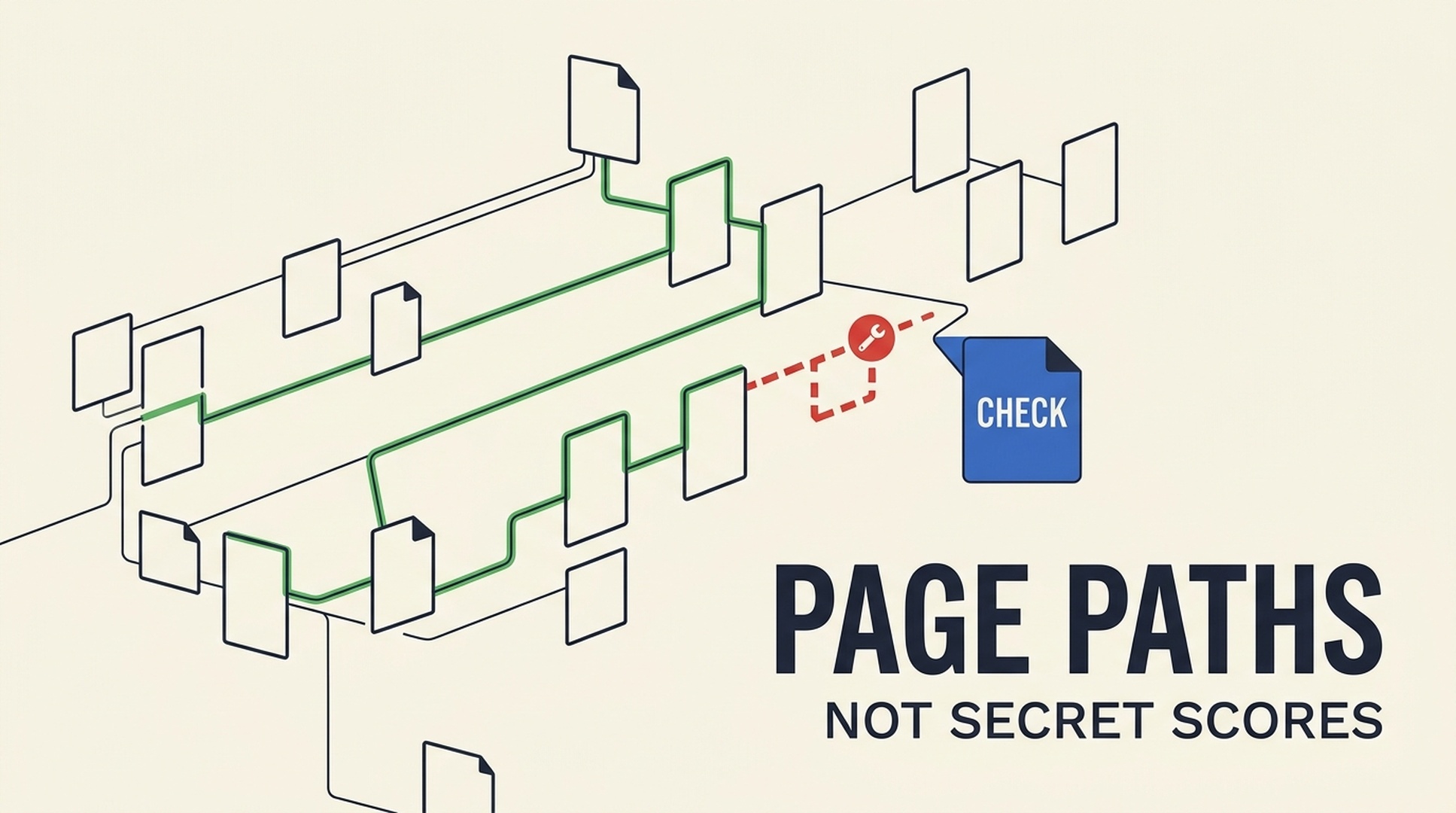
If you are new to SEO, treat PageRank as a useful idea about how links connect pages, not as a number you can look up and push higher. Google does not expose a live PageRank score for your pages. What you can do is make it easier for people and search engines to find the pages that matter, repair clearly broken paths, and keep old URLs pointing to genuinely relevant replacements.
This guide shows a practical way to do that with Codex. It does not promise rankings, fabricate link metrics, or make live changes to your site. It turns data you are allowed to use into a short, review-ready worklist.
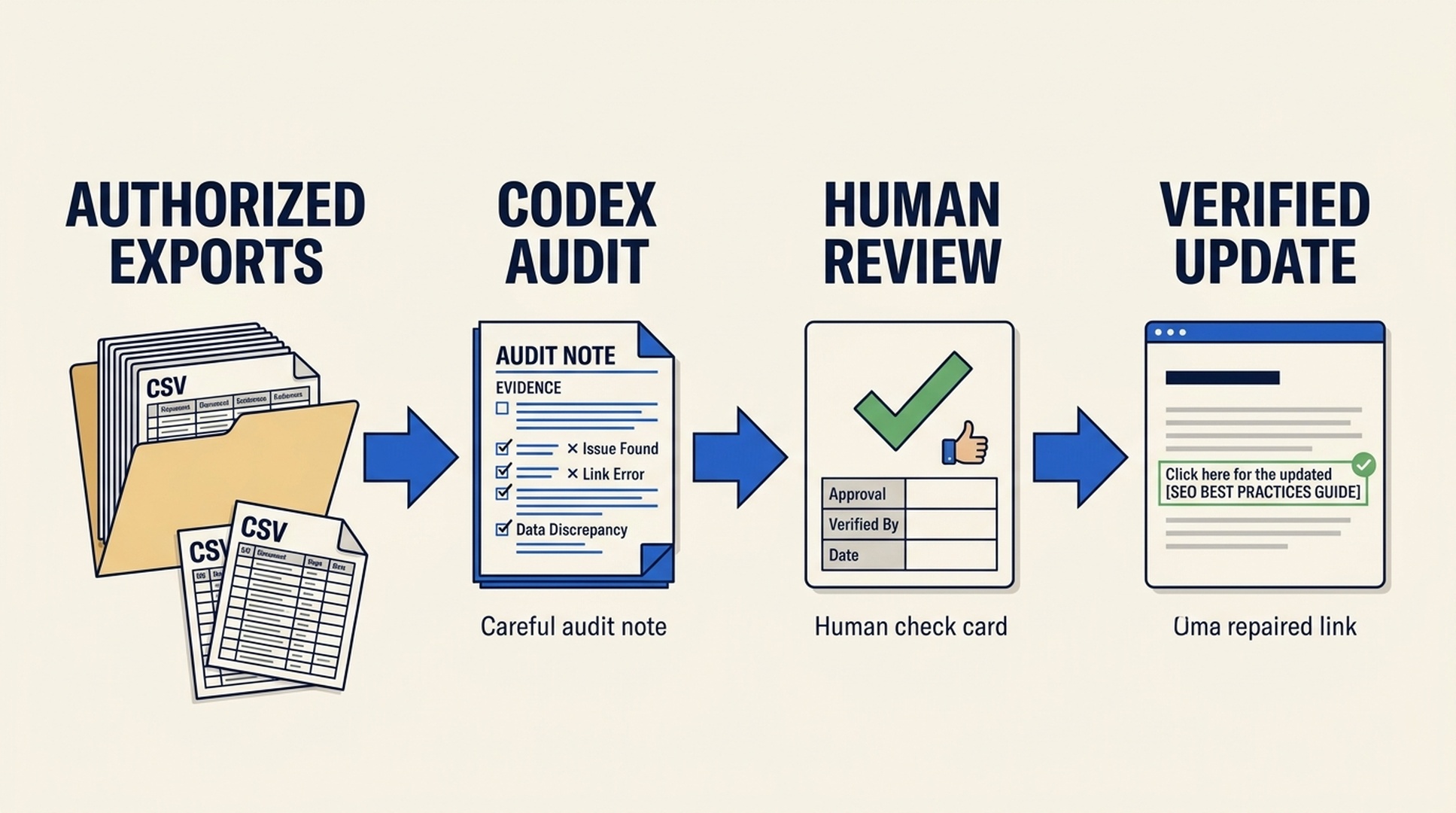
Codex prepares an evidence-backed worklist. A person remains responsible for approving and verifying every website change.
What you will finish with
This is a beginner workflow for a site owner, marketer, or junior SEO who has access to a crawl export, an internal-link export, a redirect list, or a small Search Console export.
By the end, you will have:
- a list of verified broken internal-link candidates;
- redirect candidates that need a human to confirm the replacement page;
- contextual internal-link ideas for pages you care about; and
- a CSV that records the evidence, confidence, and review check for every proposed change.
You do not need an SEO subscription to understand the workflow. You do need permission to use the data and someone who can review changes before they reach the website.
The short version of PageRank
PageRank began as a way to use the web's links as evidence when ordering pages. The original idea was elegant: a link could be a signal that another page was worth considering. But it was never a simple public vote counter, and it is not a current ranking dashboard.
Modern Google Search uses many signals and systems. Google also explains that it generally finds new pages through links and sitemaps, and its documentation recommends crawlable <a> links when you want Google to discover another page. That makes internal linking useful for site navigation and discovery even though it does not give you a visible PageRank score to chase.
The practical question is not, "How do I increase PageRank?" Ask this instead:
Can a visitor and a crawler reach this important page through a clear, relevant path?
That question leads to work you can inspect and improve.
What PageRank does not give you permission to do
The mythology around PageRank is where beginner SEO often goes sideways.
Tempting shortcut | More useful rule |
|---|---|
Buy a link because a third-party score looks high | Evaluate whether the link is editorially relevant, useful to a reader, and acquired within Google's spam policies. |
Add links everywhere to a sales page | Add a link only where it helps the reader continue their task. |
Redirect every old URL to the homepage | Redirect only when the old and new pages have a close, honest match; otherwise review the URL's purpose first. |
Treat an SEO-tool metric as Google's PageRank | Treat it as that tool's estimate. It can help triage work, but it is not Google's private calculation. |
Ask an AI agent to "fix all links" | Ask it to find evidence-backed candidates, then have a person approve the changes. |
This caution matters because a bad redirect can send people to the wrong content, and a forced internal link can make a guide worse. A link is good SEO when it also improves the route through the site.
The page paths worth checking first
Do not start with every URL on a large site. Start with a small set of pages where a clearer path has an obvious reader benefit.
1. Links that lead to an error page
If a current page points to a supplied 4xx URL, the visitor has hit a dead end. That is usually the cleanest first fix. Check whether the original destination has a current equivalent. If it does, update the source link. If it does not, remove or replace the link with the next helpful resource.
2. Retired pages that still have a real successor
Old product pages, moved guides, and changed URL structures often leave references behind. A redirect can be sensible if the new destination fulfills substantially the same need. A page about a discontinued pricing plan should not automatically redirect to your homepage just because both pages are on your domain.
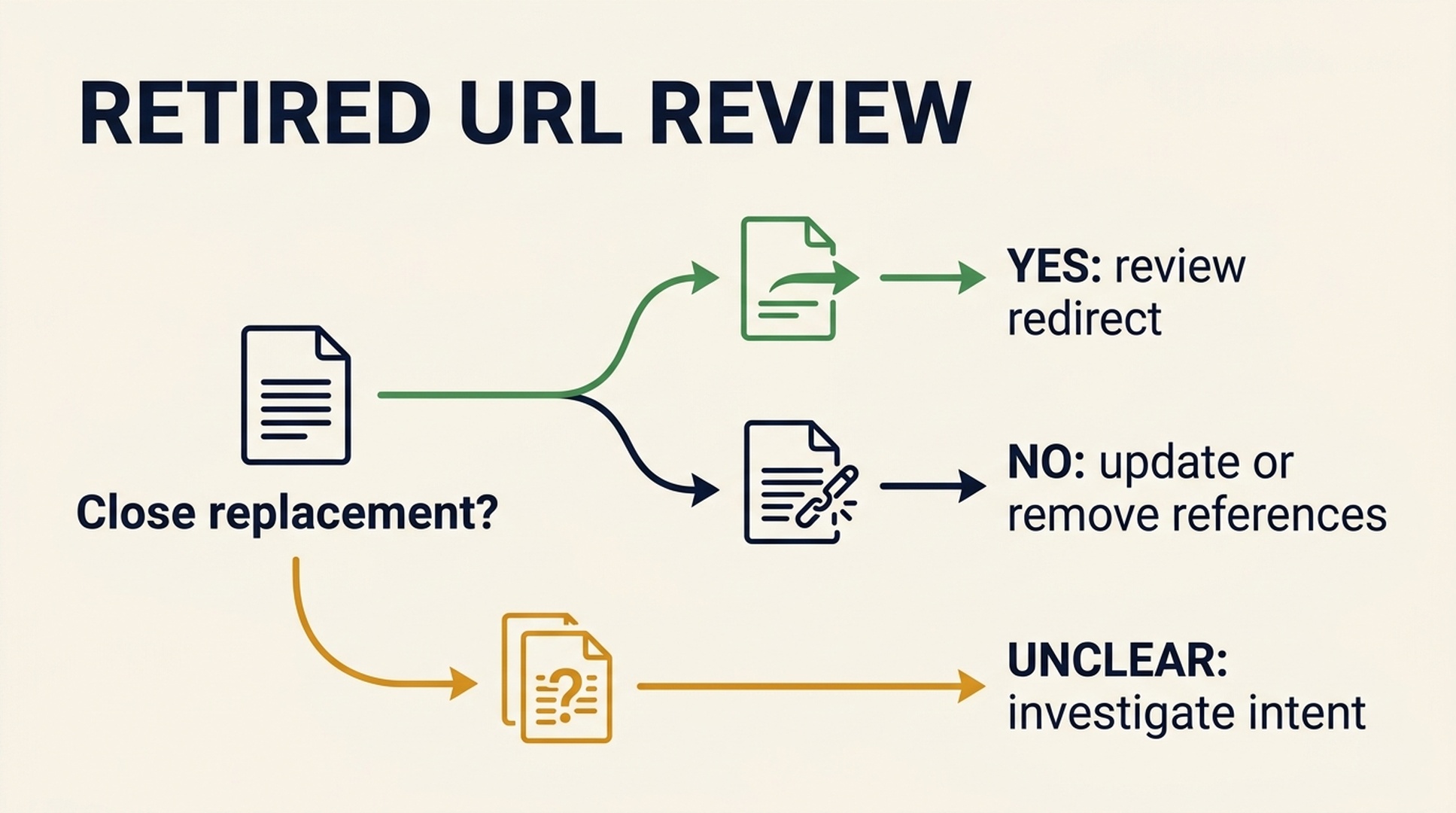
A redirect is a destination decision. It is not an automatic answer to every retired URL.
3. Important pages that are hard to reach
An important guide may technically be indexed but receive very few internal links. If a related article already answers the earlier step in the reader's journey, a plain contextual link can make that page easier to find. Look for topical fit before link counts.
4. Navigation that hides the real destination
Google's link guidance emphasizes normal crawlable links. If a key page is reachable only through a fragile script interaction, a form submission, or a search box, ask a developer to review the path. This is not a reason to rebuild the site from scratch. It is a reason to make important destinations reachable through ordinary links where that makes sense.
Before you ask Codex to help
Codex can organize an audit. It cannot know your website's state without inputs, and it should not guess.
Give it the smallest useful export set you are authorized to share:
Input | Helpful columns | What it can support |
|---|---|---|
Crawl export | URL, status code, canonical, indexability, inlinks, outlinks, title | Broken pages, canonical conflicts, underlinked-page investigation |
Internal-link export | Source URL, destination URL, anchor text, link type | Broken internal links and contextual-link review |
Redirect or old-URL export | Old URL, final URL, status, references | Redirect candidates and redirect-chain review |
Search Console pages export | Page, clicks, impressions, CTR, position, date range | A business-priority conversation, not a PageRank calculation |
Your short priority list | URL, page purpose, priority | A way to focus the audit on pages that matter |
Remove sensitive query terms, customer data, and credentials before sharing. State the date range and scope of each export. A partial crawl can produce a partial answer.
Use Codex as an auditor, not an autopilot
The safest role for Codex is to prepare a worklist. Here is the sequence.
Step 1: Put copies of the exports in one folder
Make a working folder such as site-link-audit/. Keep the originals unchanged. Put only authorized CSV or XLSX exports there, along with a short priorities.csv if you have one.
Expected result: Codex can read the file names and headers without seeing private logins or API keys.
Quality check: Open each file and confirm that the export scope and date make sense. If your crawl was limited to one subfolder, say so.
If you do not have exports: Create a simple manual inventory with url, page_title, content_type, priority, known_replacement_url, and notes. This supports a planning pass only. It cannot prove that a link is broken or that a page lacks internal links.
Step 2: Run the audit Skill
Save the following as SKILL.md in a local or repository Skill folder using your team's normal Codex setup, then ask Codex to audit the folder. OpenAI's Build skills guide describes the local and repository locations Codex can scan. If you do not use Skills, the shorter prompt in the next section gives you the same operating rules for one session.
---
name: codex-link-equity-audit
description: Audit authorized crawl, internal-link, redirect, and Search Console exports for review-ready link-equity opportunities. Use when an SEO beginner needs to find broken internal links, underlinked important pages, redirect candidates, or a safe internal-link action plan from supplied CSV or XLSX data.
---

# Codex Link Equity Audit

Create a conservative, human-reviewable SEO worklist from data the user is allowed to provide. This is an audit and planning workflow, not an automated site-editing workflow.

## Safety boundary

- Use only files, URLs, and data sources the user explicitly provides or authorizes.
- Never request, print, store, or expose API keys, cookies, passwords, or tokens.
- Never invent Google PageRank, rankings, backlinks, traffic, search volume, crawl results, or tool metrics.
- Do not log in, call paid APIs, modify a website, publish redirects, add links, or submit URLs unless the user separately authorizes that exact action.
- Mark every recommendation as proposed until a human verifies relevance, the canonical target, user value, and implementation.

## Inspect inputs first

Read the supplied file names and actual headers. Do not assume any crawler, SEO tool, CMS, or Search Console export uses a standard schema. State what each file can support and what is missing.

Ask for the smallest useful set: a crawl export, internal-link export, redirect or broken-URL export, Search Console page export with a stated date range, and a priority-page list. If none are available, ask for a manual URL inventory and state that it supports planning only.

## Produce evidence-backed candidates

1. Preserve raw URLs and normalize only for comparison. Flag protocol, host, trailing-slash, parameter, fragment, redirect, and canonical differences instead of silently merging them.
2. Record the scope, date range, row counts, relevant columns, and data gaps.
3. Propose only these actions when supplied evidence supports them:
   - `fix_internal_link` for a supplied source page linking to a supplied 4xx destination;
   - `review_redirect` for a retired URL with supplied reference evidence and a meaningfully equivalent live destination;
   - `suggest_internal_link` when the supplied source and priority destination have clear, reader-helpful topical fit;
   - `investigate_underlinked_page` only when comparable internal-link counts or graph data exist;
   - `investigate_canonical_or_redirect` only when relevant supplied fields establish a conflict.
4. Assign `high`, `medium`, or `low` priority from business importance, broken-path evidence, supplied reference count, and topical fit. Do not call any priority a PageRank score or predict a ranking change.

## Write deliverables

Create `link-equity-audit.md` and `link-equity-actions.csv` in the user-selected output folder. Preserve all inputs.

Use these CSV columns:

```csv
action_id,action_type,source_url,proposed_destination_url,anchor_or_change,evidence,evidence_source,confidence,implementation_priority,human_review_check,evidence_gap,status
Use proposed as the default status. The Markdown report must contain: scope and authorization statement; a plain-English answer; limitations; fix-now actions; review-next actions; questions needing more data; and an implementation checklist with rollback notes.
Quality gate
Remove a recommendation if it has no evidence, if the target is merely similar rather than a true replacement, if the internal link would not help a reader, or if a redirect/canonical change could affect another URL without a human review. End by listing the inputs used, the limitations, the files created, and the next review step.
**Expected result:** Two new files, `link-equity-audit.md` and `link-equity-actions.csv`. Each row says why it exists and what a person must check.

**Quality check:** Scan the CSV. A good row has an evidence source, a specific proposed change, a confidence level, and a human-review check. Delete any row that says only "improve SEO" or proposes a target without explaining why.

### Step 3: Review the worklist in this order

Start with verified broken internal links. They are usually easy to understand and reverse if needed.

Next, review redirect candidates. Ask, "Would someone who wanted the old page feel that the new page is the honest next destination?" If the answer is unclear, do not publish the redirect just to preserve a signal.

Last, review suggested contextual links. Read the sentence around the proposed source. The anchor text should describe the destination naturally, and the linked page should genuinely help at that moment.

**Expected result:** A small approved set, not a huge list of mechanical changes.

**Quality check:** Every approved action has a named owner and a rollback plan. For a new internal link, rollback means removing it if it makes the copy worse. For a redirect, rollback means restoring the previous behavior if monitoring shows an incorrect match.

### Step 4: Implement and verify

Make changes in the normal CMS, code-review, or deployment process. Do not ask an AI agent to silently edit production pages.

After release, test the changed source URLs in a browser. For redirects, test the old URL and confirm the final destination, HTTP behavior, and page relevance. For internal links, confirm that the anchor works, the destination loads, and the surrounding copy still reads naturally.

Google's documentation on [redirects](https://developers.google.com/search/docs/crawling-indexing/301-redirects) and [link best practices](https://developers.google.com/search/docs/crawling-indexing/links-crawlable) is a good reference when your implementation becomes technical.

## A one-session prompt if you do not install a Skill

Paste this prompt after you have placed your authorized exports in the current working folder:

```text
Act as a cautious SEO audit assistant. First inspect the supplied filenames and real headers. Use only this authorized local data. Do not request or print credentials, call paid APIs, browse private systems, modify files outside the output folder, or claim to know Google PageRank, rankings, traffic, backlinks, or crawl results that are not in the inputs.

Explain the data scope, dates, row counts, missing fields, and what each file can support. Then create a human-reviewable `link-equity-audit.md` and `link-equity-actions.csv` in `./output/`.

Propose only evidence-backed actions: fix a supplied internal link to a supplied 4xx URL; review a redirect where a supplied retired URL has reference evidence and a genuinely equivalent live target; suggest a contextual internal link where the supplied pages have clear topical fit; investigate a priority page with unusually few supplied internal links; or investigate an established canonical/redirect conflict.

Use CSV columns: action_id, action_type, source_url, proposed_destination_url, anchor_or_change, evidence, evidence_source, confidence, implementation_priority, human_review_check, evidence_gap, status. Set status to `proposed`. Never predict a ranking improvement. Remove recommendations that lack evidence or could mislead users. Finish with the next human review step.
What a good output looks like
Here is a fictional example. The URLs and evidence are invented to show the shape of a review item, not to claim a result for any website.
Field | Example |
|---|---|
Action type |
|
Source URL |
|
Proposed destination |
|
Change | Replace the obsolete destination in the "find search terms" sentence |
Evidence | Supplied link export shows source points to a 404 URL; crawl export shows the proposed destination is a live guide |
Human review | Confirm the live guide still answers the sentence's promise |
Status |
|
The example is deliberately boring. That is the point. A useful audit makes a clear case for a small change; it does not produce a mystical score or a promise that page one is around the corner.
How to measure whether the workflow helped
Do not judge the project by a PageRank number. Track the things you actually changed and can verify:
- number of approved broken internal links fixed;
- number of retired URLs mapped to a reviewed equivalent page;
- number of priority pages with a new, contextually useful internal path; and
- whether the changed URLs work as intended after release.
If you also use Search Console, compare its reports over a sensible period and annotate the dates of material changes. Search data can be noisy, and a difference after an edit is not proof that the edit caused it. Keep a change log so you can learn rather than guess.
FAQ
Can I see my Google PageRank in 2026?
No public PageRank score is available to site owners. Third-party authority or URL metrics can help prioritize research, but they are not Google's internal score and should not be presented as one.
Will adding internal links make a page rank higher?
It may make an important page easier to discover and reach, but no single change guarantees a ranking result. Add links when they improve the reader's path and are supported by the page context.
Should I redirect every 404 URL?
No. Redirect a retired URL only when you have a close replacement that satisfies the same intent. Review unclear cases individually. A generic redirect can be a poor experience for visitors.
Can Codex use Ahrefs or Search Console automatically?
Only if you explicitly authorize an integration and it is configured in your environment. This Skill is designed to work first with exports you provide. It must not assume access or invent missing data.
Is PageRank the same thing as "link equity"?
No. "Link equity" is informal SEO shorthand for the idea that links can carry value or signals between pages. It is useful language for an audit, but it is not a published Google metric or a promise of outcome.
Keep the work human
PageRank's lasting lesson is not that SEO needs a cleverer score. It is that the web is connected. Your job is to make those connections clear and useful for people. Codex can reduce the spreadsheet work, preserve the evidence, and flag gaps. A human still decides whether a page is the right destination.
Author: Julian Mercer, 14-Year Technical SEO Practitioner at Auspia. Julian writes about crawlability, site architecture, and practical search foundations.


