What you will finish with
Shopify merchants got a shortcut. Shopify Catalog standardizes product data, keeps pricing and inventory in sync, and syndicates it to AI surfaces automatically. If you sell on Shopify, most of the plumbing is done for you.
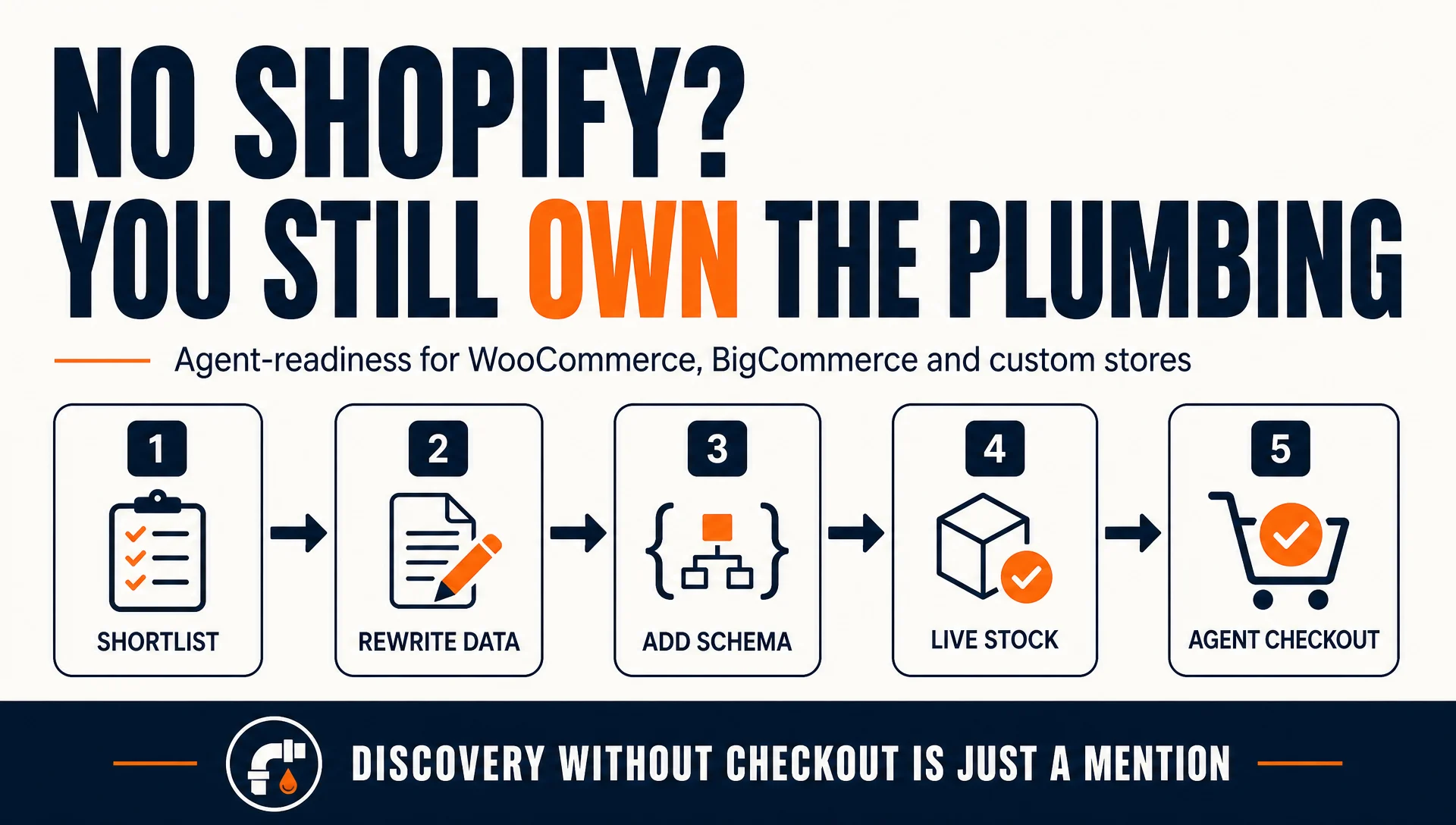
If you sell on WooCommerce, BigCommerce, Magento, or a custom storefront, none of that exists. You own the plumbing. That is more work, and it is also more control, because you decide exactly what data every agent reads.
By the end of this workflow you will have:
- A shortlist of 10 to 20 products worth winning in an AI conversation
- Product pages with machine-readable titles, attributes, price, and availability
- Structured data an agent can parse without guessing
- An agent-access policy in robots.txt that does not accidentally block buyers
- At least one agent-capable checkout path
- A verification pass that shows what an agent actually sees
- A monthly maintenance cadence
Who this is for: an ecommerce operator or developer on a non-Shopify platform who can edit product data, templates, and robots.txt. Some steps need a developer or a theme editor; they are marked.
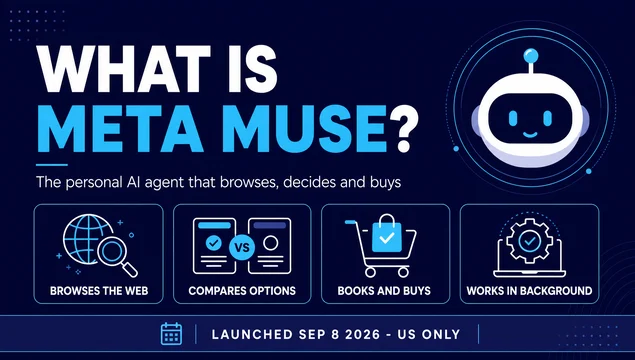
Prerequisites: admin access to your store, ability to edit your product templates or theme, and access to your robots.txt. A US-shipping catalog is required for Muse eligibility today, because Muse is US-only at launch.
Time: about four hours for a first pass on 20 products, plus a 45-minute monthly review. The structured-data step adds developer time if you have never done it.
Done means: you can open a product page, view its source, and point to the exact fields an agent would read to answer "what is this, who is it for, what does it cost, and can I buy it right now." If you have to explain it in prose, it is not done.
Auspia's view: the merchants who lose here will not lose to a better product. They will lose to a competitor whose data was complete enough for the agent to act on. Agentic commerce rewards data hygiene more than copywriting.
Before you start: what actually decides whether Muse picks you
Three things determine whether your product has a chance. Two of them are not fully in your control, and knowing which is which prevents wasted effort.
Eligibility is platform-dependent. On Shopify, eligible products enter Shopify Catalog by default. On other platforms, there is no equivalent automatic path. You are responsible for making your data available in a form agents can read. Meta has not published a merchant onboarding process for non-Shopify stores, so the practical approach is to make your site maximally agent-readable and reachable rather than waiting for a program.
Ranking is not published. Meta has not said how Muse orders recommendations. Shopify says ranking factors vary by platform and may include data quality, relevance, availability, pricing, and engagement signals. Anyone selling you a "Muse ranking formula" is guessing.
Checkout reachability is separate from discovery. Even a perfectly structured product page fails if the agent cannot complete a purchase. Muse checks out through Stripe Link, PayPal, and Shop Pay. If your store accepts none of those, an agent can research you and still not buy from you.
What is left is the part you control: accurate, specific, current product data on a page an agent can parse. That is the job.
Step 1: Pick the products worth optimizing
Do not start with your full catalog. Start with the products an agent is most likely to be asked for.
Pull your last 90 days of orders and rank by revenue. Then mark the products that fit a conversational request rather than a brand-name search. "Find me a waterproof carry-on under $250 that fits under an airline seat" is a Muse-style prompt. "Buy the Acme Model 400" is not.
A product belongs on the shortlist if it meets at least two of these:
- It sells consistently and has margin to absorb a new channel
- It solves a problem a buyer would describe in a sentence, not a part number
- It has variants a buyer would need explained (size, scent, compatibility, color)
- It has enough stock to survive a demand spike
- It has reviews or a track record that supports a recommendation
Expected output: a list of 10 to 20 product IDs in a sheet, each with a one-line note on the buyer question it should answer.
Quality check: read each note aloud. If it sounds like a keyword, rewrite it as a question a person would actually say.
Recovery path: if you cannot name a buyer question for a product, it is a poor fit for this pass. Move it to a later batch rather than forcing it.
Step 2: Rewrite the data an agent reads first
An agent does not browse your storefront the way a person does. It reads structured fields and decides from those. On a non-Shopify platform, you are responsible for making those fields exist and agree with each other.
The order of impact runs roughly like this:
Field | Why the agent depends on it | Common failure on non-Shopify stores |
|---|---|---|
Title | Primary match against the buyer's request | Brand name first, product type buried or missing |
Product type / category | Places you in the taxonomy the agent searches | Left as the theme default or blank |
Description | Supplies fit, use case, and differentiators | Marketing copy with no concrete attributes |
Variants | Determines whether the right option is even offered | Sizes or colors only in the image, not as options |
Price and inventory | Confirms the product is buyable right now | Cached or manually updated, drifts from reality |
Images | Supports identification and reduces mismatch | Low resolution, wrong variant, missing alt text |
Rewrite titles so the product type comes before the brand. "Merino Wool Crew Socks, 3-Pack, Unisex, Charcoal" beats "ACME Signature Series." Keep the brand in the title, just not as the first thing an agent has to parse past.
Then write the description for matching, not for mood. Name the material, dimensions, use case, compatibility, and who it is for. If a buyer would need to know it to make a decision, it belongs in a field, not in a lifestyle paragraph.
Expected output: every shortlisted product has a title led by product type, a filled product type field, and a description containing at least five concrete attributes.
Quality check: cover the product image and read only the title and description. Can you tell what it is, who it is for, and what makes it different? If not, the agent cannot either.
Recovery path: if you do not know a real attribute, do not invent one. Pull it from the supplier spec sheet or leave the field empty. A wrong attribute produces a wrong recommendation and a return.
Step 3: Make the page machine-readable (developer step)
This is the step Shopify merchants skip, and the one that matters most for you. You need structured data on the page, not just well-written prose.
Add Product schema to every shortlisted product page. At minimum, include:
name— the product title, matching your visible title exactlydescription— the same description a buyer seesskuandbrand— so the agent can identify the exact itemofferswithprice,priceCurrency, andavailability— so the agent knows it is buyableaggregateRatingandreview— only if you have real reviews you can substantiateimage— the primary product image URL
The critical rule is that the schema must match what is visible on the page. If your schema says a product is in stock and the page says out of stock, an agent will surface it and fail at checkout. That is worse than never surfacing it.
Most platforms have a route to this. WooCommerce has schema plugins and theme hooks. BigCommerce and Magento support template-level JSON-LD. Custom storefronts need it written directly into the product template.
Expected output: every shortlisted product page returns valid Product JSON-LD when you view its source.
Quality check: run two or three product URLs through a structured-data validator and confirm zero errors on the fields above. Warnings about optional fields are acceptable; errors are not.
Recovery path: if your platform injects conflicting schema from a plugin, remove the duplicate rather than layering a second block on top. Conflicting price or availability signals are worse than missing ones.
Step 4: Confirm variants, stock, and price are live
This is where most non-Shopify catalogs quietly fail, because there is no Catalog service keeping things in sync.
An agent asked for a size 10 in navy needs that exact variant to exist as a purchasable option. If navy lives only in a swatch image and size 10 is out of stock, the agent surfaces the product and then fails at checkout.
Work through the shortlist and confirm:
- Every variant that exists in reality exists as a purchasable option with its own price and stock
- Out-of-stock variants are marked as such rather than showing as available
- Inventory syncs from your actual source of truth, not a manual number someone updates weekly
- The price in your schema matches the price in your cart, including active discounts
- Shipping speed and destination rules are accurate, since US eligibility is part of what makes you reachable
Expected output: a variant-level check on the shortlist showing price, stock, and schema agreement.
Quality check: add a variant to cart and compare the cart price to the schema price. They must match.
Recovery path: if your inventory sync is manual, fix the sync before optimizing anything else. Stale stock data will produce failed checkouts that damage your agent reputation faster than missing data would.
Step 5: Do not block the agents you want
Your robots.txt is an access policy, and most sites wrote it years before agents existed. Check it before you assume you are reachable.
Open your live robots.txt and read what you are telling automated agents. Look specifically for:
- A blanket
Disallow: /for user-agents you do not recognize - Rules that block AI crawlers by name
- Missing or contradictory directives for the major agent user-agents
If you blocked broadly to stop scrapers, you may also be blocking the agents that would otherwise send you buyers. Decide deliberately which automated visitors you want, and write the policy to match. If you want to allow agent access while limiting aggressive scrapers, target the specific user-agents you object to rather than blocking everything.
Expected output: a robots.txt you can explain line by line, with a deliberate decision for each agent class.
Quality check: fetch your robots.txt from a clean session and confirm the rules match your intent.
Recovery path: if you are unsure whether a user-agent belongs to a buyer-sending agent or a scraper, allow it and monitor. Blocking a buyer channel is more expensive than tolerating some scraping.
Step 6: Make checkout reachable
Discovery without checkout is a mention, not a sale. Muse completes purchases through Stripe Link, PayPal, and Shop Pay. If your store accepts none of these, an agent can research you and still be unable to buy.
Check what your store currently accepts and whether it is agent-capable:
Payment path | Agent-capable today | What you need to do |
|---|---|---|
Stripe Link | Yes | Enable Link in your Stripe settings |
PayPal | Yes | Standard PayPal merchant integration |
Shop Pay | Yes, Shopify only | Not available outside Shopify |
One-time virtual card | Yes, via Muse | No action; Muse generates it for approved purchases |
Adding at least one agent-capable payment method is the difference between being recommendable and being purchasable. For most non-Shopify stores, enabling Stripe Link or PayPal is the fastest path.
Stripe Link is one of the payment rails Muse uses to complete a purchase. Enabling it is the fastest way for a non-Shopify store to become agent-purchasable.
Expected output: at least one agent-capable payment method live on your store.
Quality check: place a real test order through that method and confirm it completes end to end.
Recovery path: if your platform restricts which payment providers you can enable, document the constraint and prioritize a platform migration or a custom checkout integration. This is the highest-leverage blocker to remove.
Step 7: Verify what the agent actually sees
Do not trust your own eyes on a rendered page. Verify the machine view.
Run these checks on two or three shortlisted products:
- Fetch the page source and confirm the Product JSON-LD is present and complete
- Confirm the title, price, and availability in the schema match the visible page
- Confirm variant options appear as structured options, not just images
- Confirm your robots.txt allows the agent user-agents you intend to allow
- Confirm an agent-capable payment method is available at checkout
Expected output: a short verification note per product listing what passed and what failed.
Quality check: have someone who did not do the work run the checks. Fresh eyes catch mismatches the author stopped seeing.
Recovery path: fix failures in priority order: checkout reachability first, then price and availability accuracy, then schema completeness, then copy quality. A beautiful description on an unbuyable product is worthless to an agent.
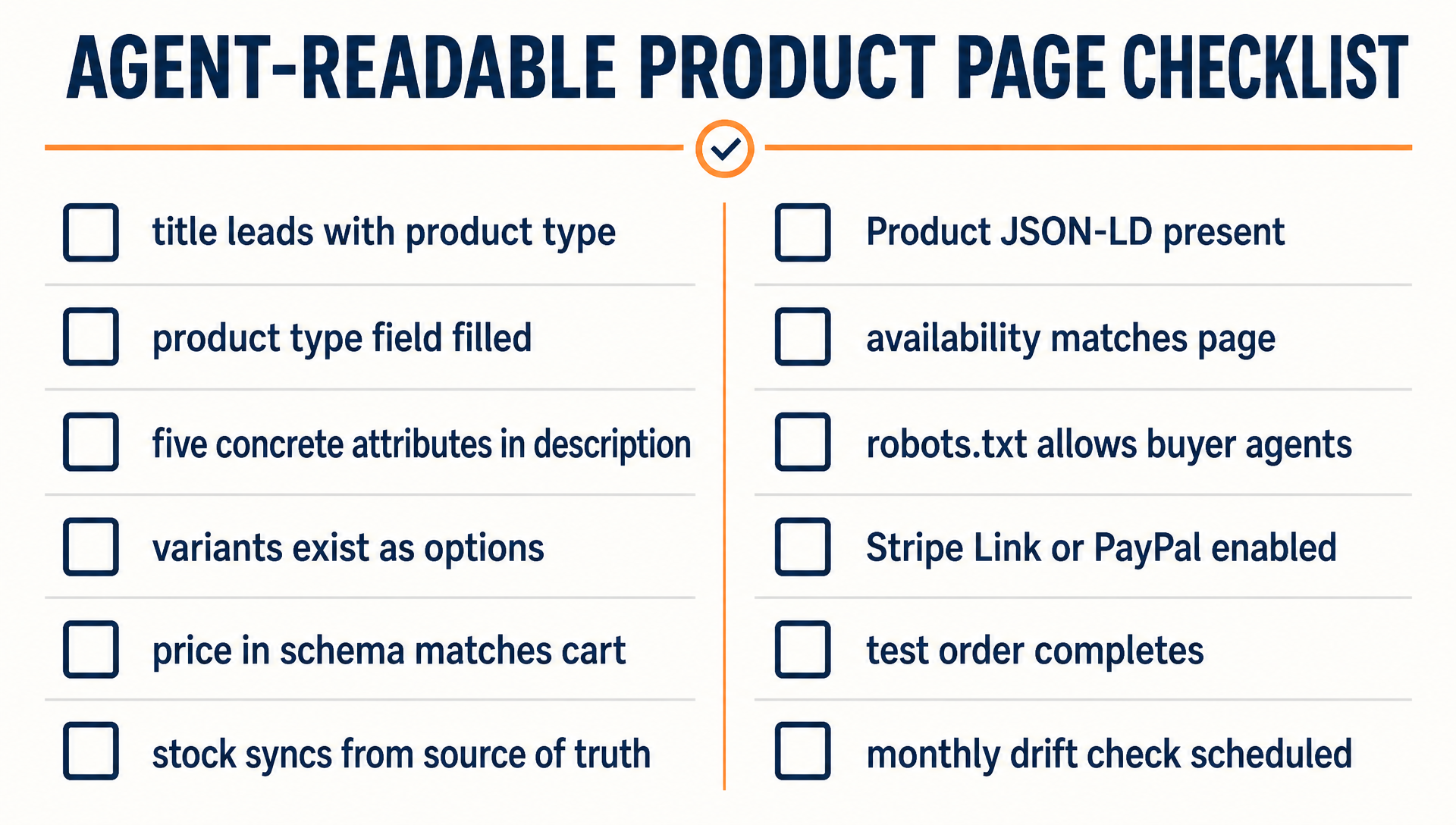
The twelve checks that separate a product page an agent can act on from one it can only read.
Maintain it monthly
Set a recurring 45-minute review:
- Re-run the variant and price check on two products to catch drift
- Confirm no new robots.txt rules have blocked an agent class
- Confirm your agent-capable payment method is still live
- Log agent-originated orders and any pattern you notice
- Re-read your platform's terms for automated-access changes
Keep the log even when the numbers are small. In a year, the merchants who can show a trend will be the ones who know which attributes actually correlate with agent recommendations. Nobody has that data yet.
FAQ
Can I get into Muse without Shopify at all? Meta has not published a merchant onboarding process for non-Shopify stores. The practical approach is to make your site agent-readable and agent-purchasable so that any agent researching your category can find and act on you. Do not wait for a program that has not been announced.
Is this the same as regular SEO? It overlaps but it is not the same. SEO targets ranking in a results list. This workflow targets whether an agent can identify your product, verify its attributes, and complete a purchase. Clean titles and descriptions help both. Structured data and checkout reachability matter more for agents.
Do I need a developer? For Step 3, probably yes, unless your platform has a schema plugin that covers Product data properly. Steps 1, 2, 4, 5, 6, and 7 are operator work.
Will this hurt my regular storefront SEO? No. You are filling in structured fields and making titles more specific, which is the same work that helps traditional search and every other AI surface. The main risk is over-stuffing titles until they become unreadable to humans. Keep titles natural.
How long until I see orders? Unknown, and anyone who gives you a number is guessing. Muse launched in September 2026 and is US-only. You are building the foundation now so you are not retrofitting it when volume arrives.
What if my platform cannot do any of this? Then the constraint is your platform, not your content. Document the gap and weigh it against the cost of migrating. A channel you cannot be purchased through is a channel you are not really in.
Author: Martin Hayes, GEO Playbook Builder for 200+ Execution Checklists at Auspia. Martin writes step-by-step workflows and operating checklists for SEO, GEO, and agent-readiness work.