


What you will finish with
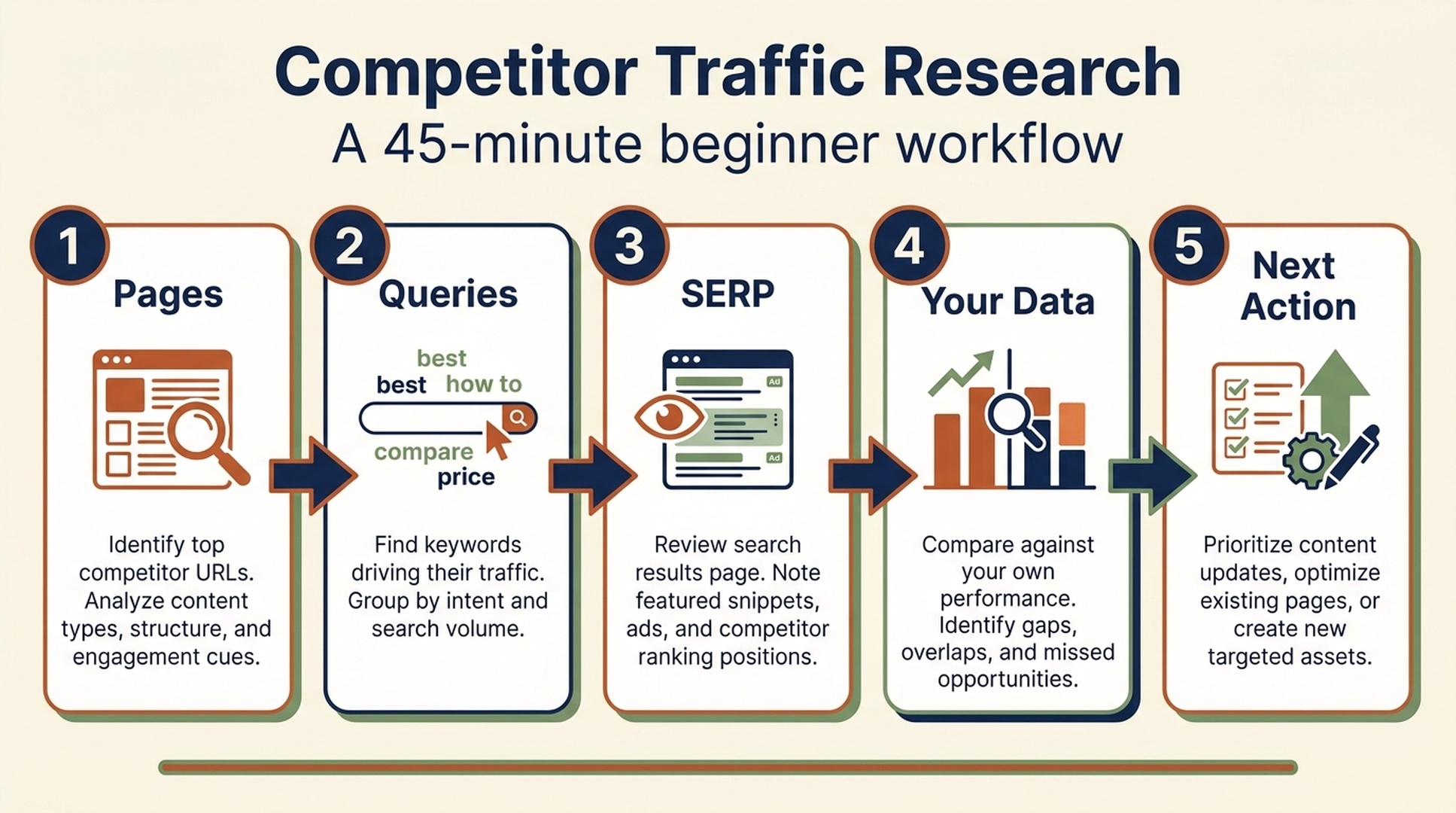
You do not need a giant spreadsheet or an expensive tool stack to learn from a competitor's traffic. In 45 minutes, you can produce a small, useful brief: three search competitors, a record of the pages and topics that appear to work for them, a shortlist of opportunities worth checking, and one action for next week.
This tutorial is for a site owner, marketer, or new SEO who wants to answer a practical question: what seems to bring a competitor visitors from search, and what should I investigate on my own site? It is not a method for discovering a rival's exact visitor count. Only the site owner can see actual analytics and Search Console data. Third-party tools model and estimate public signals, so two tools can produce different figures for the same domain.
You will need:
- Your website's domain and a clear product, service, or topic.
- A spreadsheet or note with five columns.
- One traffic-research tool. Ahrefs, Semrush, Similarweb, SE Ranking, and SpyFu all support different parts of this job. A free checker is enough for the first pass.
- Access to Google Search Console for your own site, if possible. It is how you validate whether an apparent competitor opportunity matters to you.
Definition of done: you have a one-page competitor brief and a content or optimization task that a real person could begin next week. You are done when you have a decision, not when you have collected the most metrics.
The rule that keeps this useful: treat competitor-traffic numbers as directional estimates. Use them to ask better questions, then use your own verified data and a manual SERP review before you invest in content or ads.
Choose the kind of competitor before you choose a tool
Beginners often search for a familiar business name, see a large traffic estimate, and stop there. That can be misleading. The site that competes for your customers may not be the site that competes for your Google rankings.
Make three short lists first:
Competitor type | What it means | Example | What you want to learn |
|---|---|---|---|
Business competitor | Sells a similar solution to the same buyers | Another project-management app | Positioning, pricing pages, category pages, paid-search activity |
Search competitor | Ranks for queries you want to win | A review site or industry publication | Topics, pages, formats, search intent |
Attention competitor | Takes time from your audience but may not rank for your core queries | A YouTube channel, community, or newsletter | Referrals, audience language, useful formats |
For this workflow, prioritize search competitors. A software company can lose rankings to a publisher, a comparison site, a template library, or a free calculator. Those are valuable competitors even if they never sell the same thing as you.
Write three domains in your worksheet. If you do not know them yet, search Google for three buyer or problem-focused phrases. Record the non-ad results that repeatedly appear. Do not include Wikipedia, major news sites, or huge directories unless they genuinely appear across your target searches; they can swamp a beginner comparison without giving you a usable model.
Expected output: three domains that overlap with the search results your audience sees.
Quality check: for each domain, write one sentence beginning, "This site competes with us in search because..." If you cannot finish that sentence, replace it.
Recovery path: use the competitor-discovery or organic-competitor report in Ahrefs, Semrush, or SE Ranking after entering your own domain. These reports are a starting list, not a verdict. Remove domains that share incidental keywords but serve a different audience.
Pick the tool that answers your next question
There is no single best competitor-traffic tool. Each provider has its own data collection and modeling approach, coverage, update schedule, filters, and plan limits. The sensible choice is the one that answers the next decision in your workflow.
If you need to answer... | Start with | Why it fits | Do not assume |
|---|---|---|---|
Which search competitors, pages, keywords, and backlinks should I inspect? | Ahrefs presents organic, paid, backlink, page, and competitor research in one product area. | Its traffic figure is the competitor's analytics total. | |
Which organic keywords or keyword gaps should I compare, and how is a site performing beyond search? | Semrush combines organic research, keyword-gap workflows, and Traffic Analytics. | Keyword estimates and web-traffic estimates are interchangeable measures. | |
Which channels appear to send a website visits, and how do engagement patterns compare? | Similarweb is commonly used for website-traffic and channel-level comparison. | A modeled visit estimate proves conversions, revenue, or individual user behavior. | |
Can I run a straightforward SEO and PPC competitor review with rank tracking? | SE Ranking's competitor-research product covers competitor traffic, keywords, ads, and visibility. | The same keyword counts mean the same thing as another provider's counts. | |
What can I learn about a competitor's Google Ads and SEO keyword history? | SpyFu focuses on competitor keyword and PPC research, including ad-history views. | A historical ad record tells you the competitor's current budget or results. | |
Is this domain worth a deeper look at all? | A free website traffic checker or public search results | It gives you a low-commitment first screen. | A free snapshot is enough evidence to set a content strategy. |
This article uses Ahrefs in the walkthrough because it closely matches the source intent, but every step has an equivalent in the other tools. Do not subscribe to five platforms to run one beginner analysis. Run the same small workflow in the tool you already have access to, then add another provider only when its extra view would change a decision.
A quick translation between tool menus
Tool labels change, but the underlying questions stay remarkably consistent:
The question | Ahrefs-style label | Common equivalent elsewhere |
|---|---|---|
Who ranks for similar terms? | Organic competitors | Competitors, competitors discovery, organic rivals |
Which pages appear to attract search visits? | Top pages | Top pages, pages, organic landing pages |
Which terms does a domain rank or advertise for? | Organic keywords / Paid keywords | Organic research, keyword research, PPC research |
Where might my content coverage be missing? | Content Gap / Competitive Analysis | Keyword Gap, gap analysis, missing keywords |
How has visibility changed over time? | Overview / history charts | Trend, historical data, visibility history |
Where might all website visits come from? | Site Explorer views and reports | Traffic Analytics, Website Analysis, traffic channels |
Use menu labels as navigation hints, not as a reason to force an apples-to-apples comparison. Before exporting anything, confirm the country, language, device, subdomain or root-domain scope, date range, and metric definition displayed by the tool.
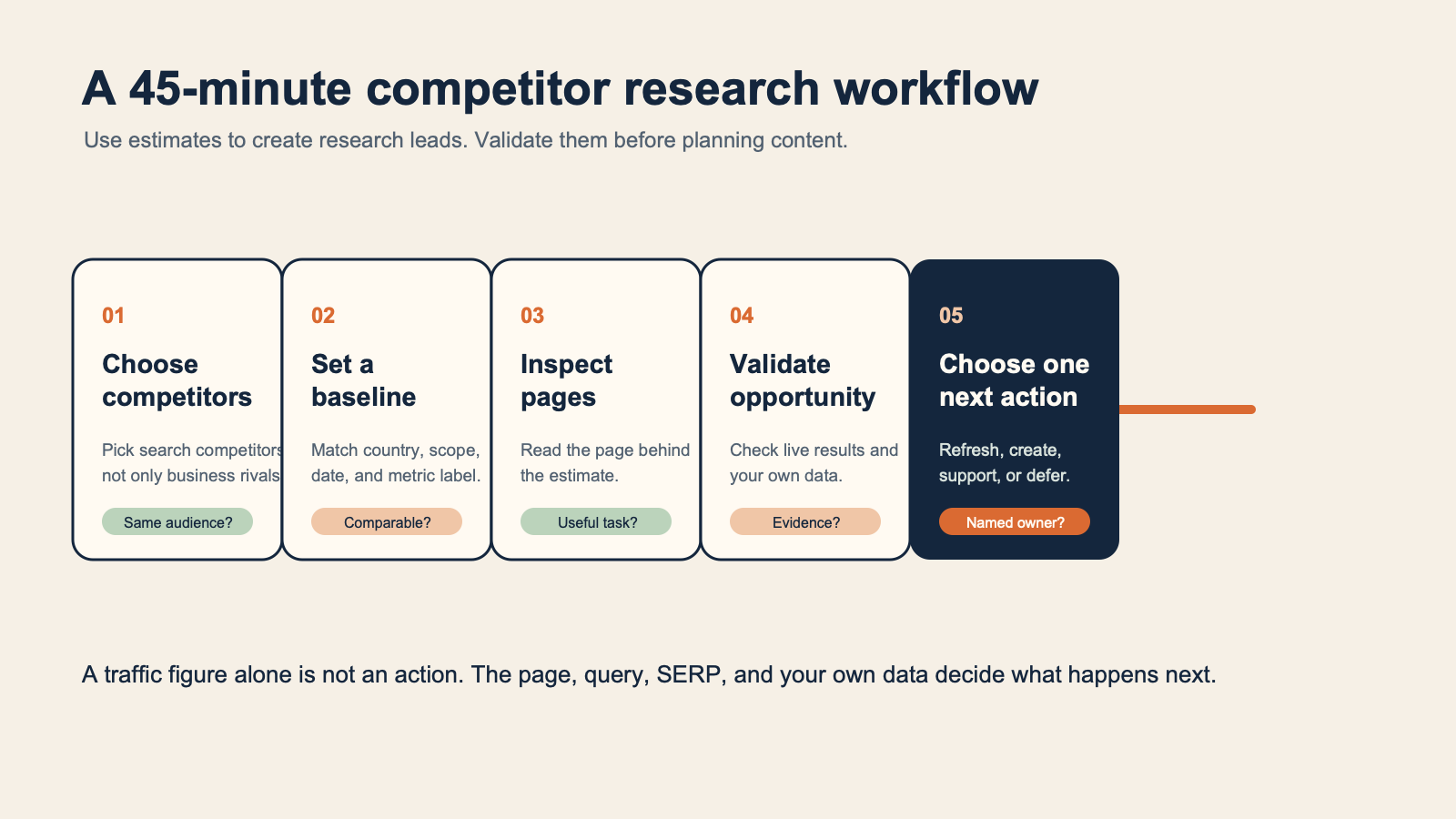
A traffic estimate is the start of an investigation, not the conclusion.
Set a clean baseline in five minutes
Open your chosen tool and enter the first competitor's root domain. If the tool lets you choose a country, select the market you actually serve. A US result set is not a proxy for a UK, Japanese, German, or global market. Also note whether you are looking at the whole domain, a subdomain, a subfolder, or a single URL.
Create this worksheet before you explore the dashboards:
Domain | Market and scope | Estimated search traffic or visits | Trend direction | Three notable pages or topics | One source note |
|---|---|---|---|---|---|
example.com | US, root domain, desktop and mobile if available | Record the tool's label and date | Rising, flat, or falling over the chosen period | Add after the next step | Tool, report name, date checked |
Repeat for all three competitors. Do not try to reconcile every metric yet. You are looking for rough patterns: a site that seems to be growing, one category that appears to generate many entry pages, or a competitor whose model does not match yours.
Expected output: three baseline rows with the same market, scope, and time window.
Quality check: every number in your sheet has a label. Write "estimated organic traffic," "estimated visits," or the exact metric name, rather than a vague heading such as "traffic." This prevents a common mistake: comparing an SEO traffic estimate from one tool with total visits from another.
Recovery path: if a tool gives no useful estimate for a small site, do not invent precision by switching tools until one produces a large number. Record "insufficient estimate" and move to the visible evidence: the site's indexed pages, search rankings, content format, links, and public audience activity.
Find the pages behind the estimate
Traffic totals are hard to act on. Pages are where the useful clues live.
In Ahrefs, start with Site Explorer and open its Top pages and Organic keywords views. In Semrush, look for Organic Research and Top Pages; for broader visit and channel questions, use Traffic Analytics. Similarweb is useful when you need to compare apparent channel mix and engagement alongside search. SE Ranking and SpyFu can take you from a domain to its keywords, pages, ads, and competitors.
For each competitor, write down only three pages that meet at least one of these tests:
- The page addresses a problem your customers genuinely have.
- It appears across multiple relevant searches or has a clear topic cluster around it.
- It has a format you could improve on responsibly: a tutorial, template, comparison, tool, glossary, category, or data resource.
- It suggests a content type missing from your site, such as a calculator, documentation page, integration guide, or buyer's guide.
Then inspect the actual page in a browser. Ask questions a traffic graph cannot answer:
- What task does the page help a visitor finish?
- Is it an information page, a comparison, a product page, a free tool, or something else?
- What evidence makes it useful: examples, original data, templates, screenshots, product knowledge, or a simple explanation?
- What does the visitor see next: a related guide, a product trial, a template download, or nothing helpful?
Do not copy the page's copy, outline, screenshots, examples, or distinctive presentation. You are learning the content function, not borrowing the asset. A competitor's successful calculator is a signal that people want a calculation; it is not permission to clone the calculator's interface or content.
Expected output: nine pages total, with one sentence explaining why each earns attention.
Quality check: each selected page must connect to a customer problem or a realistic business goal. Delete pages that are merely impressive because their reported traffic is large.
Recovery path: if the top pages are irrelevant, narrow the analysis to a subfolder, a category, or a set of keywords closer to your offer. A domain-wide report can make an unrelated viral article look like a strategic lesson.
Turn keyword gaps into an opportunity list, not a publishing list
A keyword-gap report compares terms a competitor appears to rank for with terms your site does not. Ahrefs calls this a Content Gap within its Competitive Analysis workflow; Semrush offers Keyword Gap; other tools use similar language. It is one of the fastest ways to create ideas, and one of the easiest ways to create a bad content backlog.
Add your domain and two or three search competitors. Keep the same target country and language as your baseline. Export or record a small set of candidate queries, then score each one with this four-question filter:
Filter | The question to ask | Keep it when | Remove or defer it when |
|---|---|---|---|
Relevance | Would the right visitor associate this query with our offer or expertise? | You can explain the connection in a sentence. | It attracts a different audience or a one-off curiosity seeker. |
Intent | What does the searcher want to do? | Your site can honestly satisfy that job. | The competitor wins with a format you cannot or should not provide. |
Proof | What would make our version more useful? | You have original expertise, a clearer process, current sources, a tool, or a legitimate comparison. | Your plan is to paraphrase a page already ranking. |
Feasibility | Can we produce and maintain it? | There is a named owner and a plausible source of evidence. | The required data, product access, or legal approval does not exist. |
Do not select a topic just because it has a high estimated volume or a low difficulty score. Those metrics are modeled inputs, not guarantees. A query with modest demand and a strong buyer connection can be a better first project than a broad query that sends the wrong visitors.
For your first pass, choose no more than five opportunities. Give each a next step: create a brief, improve an existing URL, ask sales what buyers call the problem, collect first-party examples, or decide not to pursue it.
Expected output: a five-item opportunity list with relevance, intent, proof, feasibility, and an owner.
Quality check: no item should say only "write article." A usable next step is specific, such as "compare our existing integration guide with the search results for [query], then decide whether to expand it or create a new page."
Recovery path: if the gap is enormous, filter to one topic, one competitor, or a keyword modifier that describes your buyer. A smaller list you can evaluate is more valuable than 10,000 exported terms.
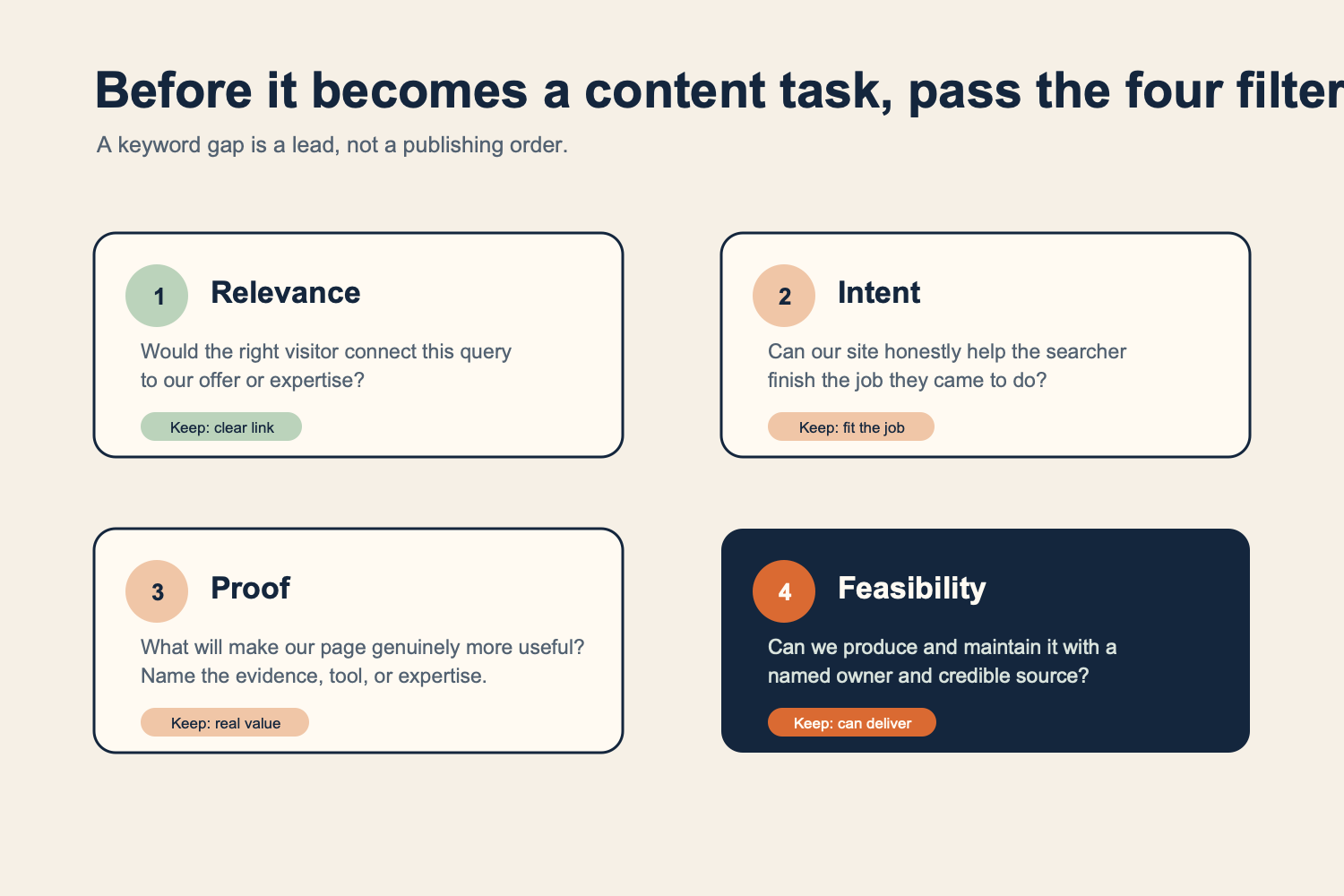
Use the four filters before adding a gap keyword to a content calendar.
Check the trend before you copy the lesson
Trend charts are useful, but they invite overconfident stories. A rise in estimated organic traffic might reflect new rankings, seasonality, a changing keyword database, a broader index, or a change in the tool's model. A decline may reflect the same kinds of factors. You usually cannot know the whole cause from a graph alone.
Use a trend as a prompt for a page-level review:
- Pick one period of visible change.
- Identify the pages or keyword groups associated with that period in your tool, if available.
- Visit archived or current versions only where you can do so lawfully and openly; compare the page's purpose and visible evidence, not its wording.
- Search the main query yourself and inspect the current results. Did the search intent or result type change?
- Write the conclusion with uncertainty: "This page family appears to have gained visibility after..." rather than "They grew because..."
This is where the tools differ in helpful ways. Ahrefs is strong for connecting domains, pages, keywords, links, and ranking research. Semrush gives you organic and gap research plus a separate traffic-analysis view. Similarweb can add a view of estimated visit sources and engagement. SE Ranking offers a combined SEO/PPC competitor lens. SpyFu can be particularly useful when the question is about keywords and Google Ads history.
The important part is not collecting five graphs. It is checking whether the story survives a manual review.
Expected output: one evidence-backed observation per competitor, each labeled as an estimate or an observation.
Quality check: use words such as "appears," "estimated," and "worth investigating" for third-party data. Reserve definitive language for facts you can verify on the page or in your own accounts.
Recovery path: if you cannot connect the trend to a credible page or query change, leave it as an untested hypothesis. There is no prize for explaining every line on a chart.
Use a second source only where it could change the decision
You may notice that Ahrefs, Semrush, Similarweb, SE Ranking, and SpyFu disagree. That is normal. They use different data sets and methods, and their labels may refer to different things.
Use a second provider to test a decision, not to hunt for the number you like best.
Your first observation | Useful second check | Decision it helps with |
|---|---|---|
A competitor seems to have strong organic visibility | Check the live SERP and another SEO tool's keyword or page view | Is this a real topic cluster worth adding to our research queue? |
A domain seems to receive substantial non-search traffic | Check Similarweb's channel view and the site's public referral or social presence | Should we study the content distribution channel, not just its SEO? |
A competitor ranks for many paid terms | Review SpyFu or a PPC-oriented report, then search a sample of terms | Is paid search a meaningful part of the market, and should our PPC owner inspect it? |
A gap report reveals a large content set | Check your own Search Console queries and existing URLs | Do we already have a page that can be improved instead of creating another URL? |
For your own site, Google Search Console and your consented web analytics are the source of truth for actual performance within their respective scopes. They cannot reveal a competitor's private data, but they can tell you whether an apparent opportunity overlaps with impressions, clicks, pages, and queries you already own.
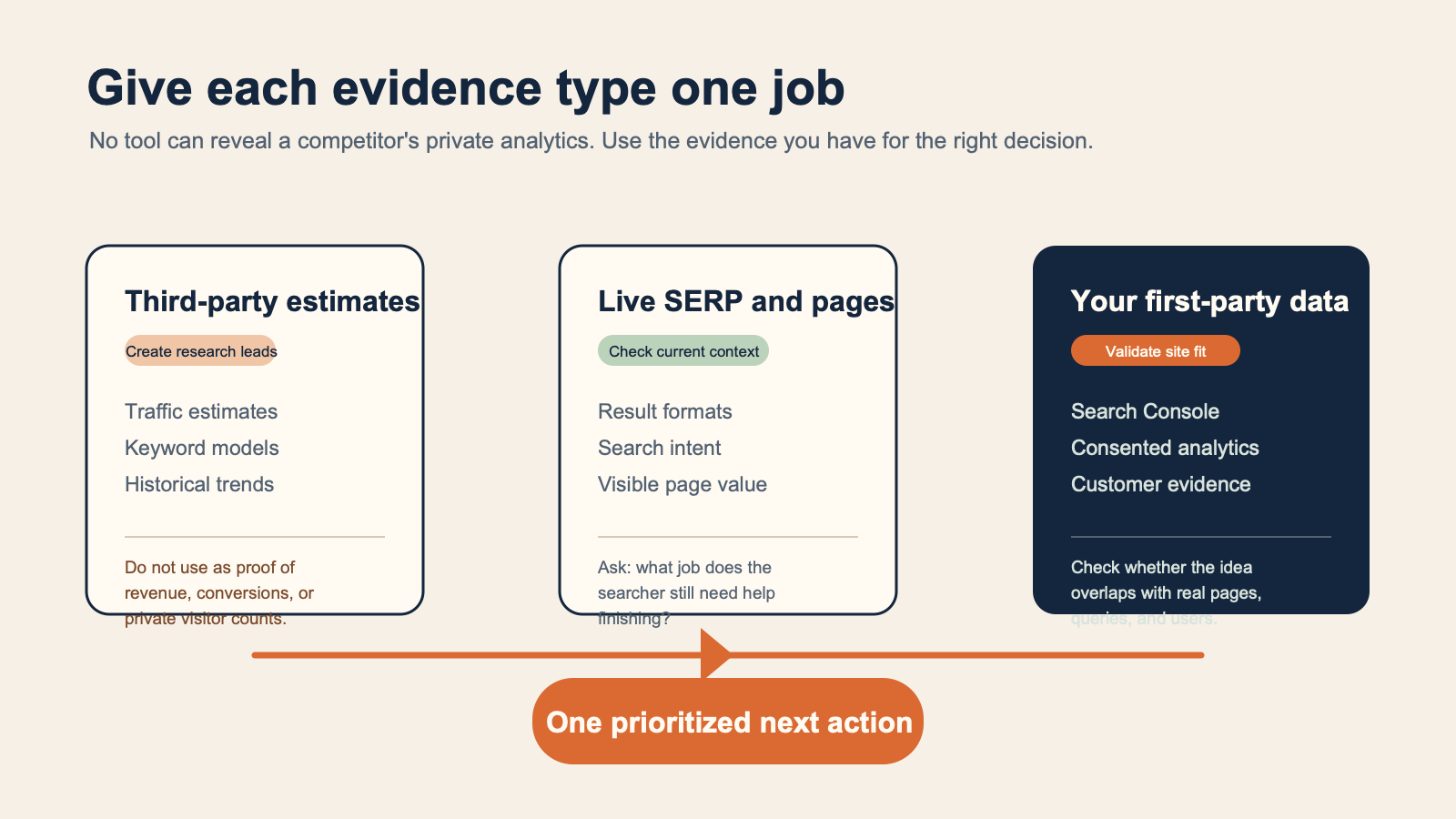
Each evidence type has a different job: estimates create leads, live results show the current search context, and your own data checks whether the opportunity fits your site.
Make one next-week decision
End the session by choosing one small move. Not a 50-page content plan. One move.
Here are four good first decisions:
- Refresh: An existing page already matches the query but lacks a clear answer, current evidence, or the format searchers need.
- Create: A customer-relevant topic is absent, and you can produce a page with a distinct source of value.
- Build a supporting asset: A competitor wins because it offers a template, calculator, example library, or documentation that your audience would actually use.
- Do not pursue: The opportunity attracts the wrong audience, needs evidence you do not have, or belongs to a competitor's business model rather than yours.
Use this compact brief:
Opportunity:
Customer problem:
Evidence observed: (tool, report, market, date, plus a live SERP/page observation)
What our existing site has:
What we can add that is genuinely useful:
Decision: refresh / create / supporting asset / do not pursue
Owner:
First verification step:
Example, using fictional businesses:
Opportunity: onboarding checklist for small remote teams
Customer problem: A new team lead needs a repeatable first-week setup.
Evidence observed: A competitor's template page appears for several relevant searches;
the live results favor downloadable or copyable checklists.
What our existing site has: A broad remote-work guide with a short onboarding section.
What we can add: An editable checklist based on our documented product setup steps,
reviewed by customer support.
Decision: refresh the guide and create a linked checklist only after support review.
Owner: Content lead and customer-support reviewer.
First verification step: Confirm the checklist solves the steps customers actually ask about.
Notice what the example does not claim: that a competitor receives an exact number of visits, that a keyword score predicts rankings, or that a new checklist will win traffic. It turns an observed demand pattern into a testable piece of work.
Verify your work after publishing
Competitor research is useful only if it leads to a better page and then teaches you something.
After you publish or improve a page, document the release date, target topic, supporting evidence, and the intended visitor task. Review your own Search Console and analytics at a sensible interval for the topic and your site's scale. Look beyond a single position or traffic number:
- Are impressions and clicks appearing for relevant queries?
- Does the page receive visitors who take the next helpful action?
- Are people finding the answer, or do support tickets and session behavior reveal a gap?
- Did the page accidentally overlap with another URL you own?
- Does the content still contain current, supportable claims?
The result might be "continue," "improve," "consolidate," or "stop." That is a healthy loop. Competitor intelligence should reduce blind guessing, not replace judgment.
Common beginner mistakes
Treating an estimate as a competitor's actual analytics
Avoid phrases such as "our competitor gets exactly 50,000 visits." Say "Tool X estimates... for the selected market and date" if the estimate is needed at all. Never use a third-party estimate as proof of revenue, conversions, ad spend, or customer count.
Comparing different scopes
One tool may show a root domain, another a subdomain, one country versus global data, organic traffic versus all visits, or a different device set. Match scope before you compare. If you cannot match it, write the discrepancy down instead of averaging the numbers.
Copying a winning page
Search visibility does not give you permission to reuse another publisher's language, screenshots, layout, examples, or proprietary data. Identify the searcher task and create a version that draws on your own expertise and sources.
Publishing every keyword-gap export
Gaps are leads. Many are irrelevant, impossible to support, or better served by improving a page you already have. Filter before you brief, and brief before you publish.
Ignoring the SERP
The query itself decides the format you are competing with. A tool can suggest a keyword, but a live search shows whether people are being offered product pages, videos, local results, forum answers, templates, or in-depth guides.
FAQ
What is the most accurate competitor traffic tool?
No third-party tool has access to another site's private analytics. Ahrefs, Semrush, Similarweb, SE Ranking, and SpyFu each provide useful estimates and research views, but results can differ because their data and methods differ. Pick the tool that best answers your current question, retain the source and date, and validate decisions with live SERP research and your own first-party data.
Can I analyze competitor traffic for free?
Yes, for a basic first pass. Use a free traffic checker, public search results, and manual page review to choose a few competitors and identify visible content patterns. Paid tools become useful when you need deeper keyword gaps, historical views, exports, rank tracking, paid-search research, or larger-scale comparisons. Check each provider's current access rules before relying on a free tier.
Should I use Ahrefs, Semrush, or Similarweb?
Use Ahrefs when your immediate job is SEO competitor research across pages, keywords, links, and organic visibility. Use Semrush when you want organic/gap research alongside its traffic-analysis products. Use Similarweb when an estimated channel and engagement view is central to the question. A small team should start with one tool, learn its definitions, and add another only for a decision the first cannot answer.
Why do traffic estimates differ between tools?
Providers use different underlying data, modeling methods, coverage, filters, and definitions. They may also be showing different scopes, such as organic search estimates versus all website visits. Treat disagreement as a reason to inspect the metric definition and the live search evidence, not as a reason to select the highest number.
How often should I analyze competitors?
For most small teams, a monthly or quarterly review is enough, plus a focused check when you launch a major page, enter a new market, or see a meaningful change in your own Search Console data. Daily monitoring tends to create noise unless you have a specific campaign or incident to investigate.
Author: Alice Monroe, AI SEO Tools Analyst at Auspia. Alice writes about choosing research tools carefully and turning their reports into practical, verifiable work.


