


Speed work gets muddled when "the site is slow" means everything and nothing. A homepage score from one Lighthouse run can be useful, but it does not describe every template, every device, or how real visitors experienced the site over the last month.
The practical use of Codex is to make the first pass repeatable. Give it a skill with clear limits, let it test one URL or a controlled sitemap sample through Google's PageSpeed Insights API, and ask for a report that separates lab measurements from field data. Then a developer and SEO lead can decide what to fix, with evidence in hand.
Let Codex install this skill from the article
Once this article is published, you can send its URL straight to Codex instead of manually creating the files. Replace [ARTICLE URL] in the prompt below with this article's live URL. Codex should read the instructions, create the skill, and stop before it audits a website.
Read this article and install the pagespeed-seo-audit skill exactly as instructed:
[ARTICLE URL]

I want only the skill installation and verification. First inspect this
workspace for AGENTS.md, .codex configuration, or other project guidance that
defines the correct skills directory. Tell me the full destination path before
writing any files.

Then find the complete SKILL.md code block and the complete
scripts/pagespeed_audit.py code block in the article. Create the
pagespeed-seo-audit folder and both files exactly as the article specifies.

After writing them:
1. Show the two project-relative file paths.
2. Confirm the skill name is pagespeed-seo-audit.
3. Run a safe Python syntax check on scripts/pagespeed_audit.py.
4. Tell me which environment variable I must set, without asking for or
   printing its value.

Do not run an audit, call the PageSpeed API, inspect my website, edit website
code, change settings, deploy anything, or create a Google Cloud API key.
Only install and verify the local skill.
If Codex cannot open the published URL, copy the two code blocks from this article into the chat after the prompt. The installation belongs in Codex's configured skills directory, not in the website codebase unless that project explicitly keeps skills there.
What you will finish with
This workflow is for an SEO, developer, or site owner who can use Codex and run a local command. In about 30 to 45 minutes, you will create a read-only pagespeed-seo-audit skill that can:
- audit one public page, a supplied URL list, or a sitemap sample;
- run both mobile and desktop PageSpeed Insights checks;
- save original API responses as JSON;
- produce a Markdown report with scores, Core Web Vitals, key opportunities, and run failures; and
- give Codex a reliable evidence file for a repair plan without editing or deploying website code.
You need a Google Cloud project with the PageSpeed Insights API enabled, an API key stored in an environment variable, Python 3.9 or newer, and public URLs. The definition of done is modest and useful: you have a dated report, you can identify the final URL tested for each request, and you know which findings are lab-only, which have CrUX field evidence, and which pages were actually sampled.
This does not promise a ranking gain or certify an entire site. PageSpeed Insights returns a Lighthouse run for the requested page and can return Chrome UX Report (CrUX) data when that page or origin qualifies. CrUX is based on eligible real Chrome-user sessions, but many low-traffic URLs have no page-level field data. Google's CrUX documentation explains that page and origin data have separate eligibility requirements.
Before you create the skill
Open Google Cloud Console, create or select a project, enable the PageSpeed Insights API, and create an API key. Google documents the endpoint as https://www.googleapis.com/pagespeedonline/v5/runPagespeed; it accepts a target URL, a strategy of mobile or desktop, and optional Lighthouse categories. Restrict the key to the PageSpeed Insights API before using it in an automated workflow.
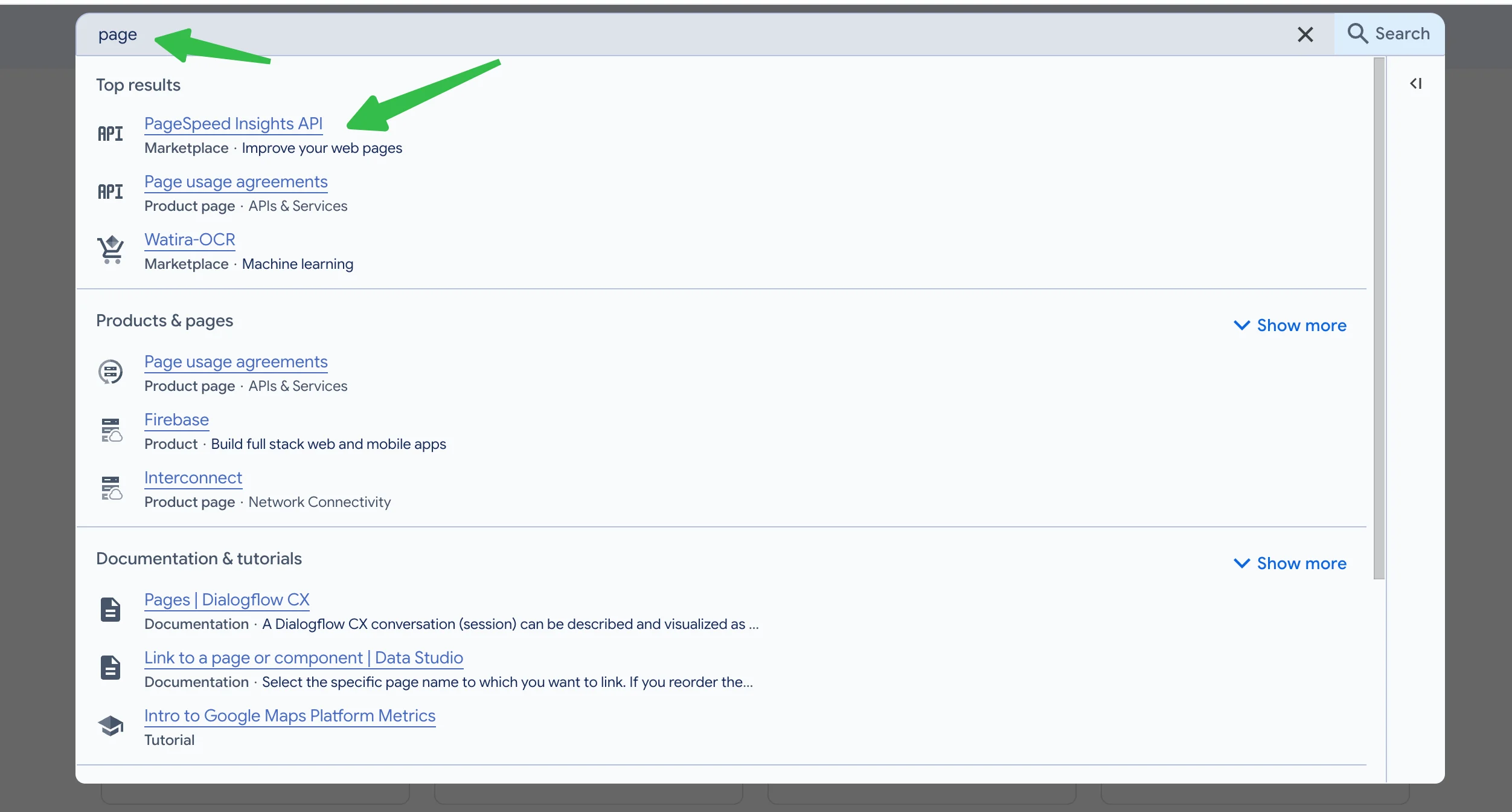
Keep the value out of SKILL.md, Git, shell history, screenshots, and reports. Set it only in the shell where you will run the audit:
export PAGESPEED_API_KEY="replace-with-your-key"
For a longer-lived local setup, use your operating system's secret-management approach or a local, ignored environment file that your team has approved. Never put a production API key into an article, a repository, or a Codex prompt.
The API can be called without an API key for occasional manual experiments, but a key is the sensible path for repeated checks. Quotas and policy details can change, so confirm the current limits in your Google Cloud project rather than building a workflow around a quoted daily number.
Install a Codex skill that keeps the audit honest
Create this folder in your personal Codex skills directory:
~/.codex/skills/pagespeed-seo-audit/
  SKILL.md
  scripts/
    pagespeed_audit.py
If your repository has a project-specific skills location or AGENTS.md instructions, use that location instead. The folder name and the YAML name must match, so Codex can invoke $pagespeed-seo-audit.
Save the following as SKILL.md. It tells Codex what the tool measures, how to choose URLs, and what it must not claim from the data.
---
name: pagespeed-seo-audit
description: Run a read-only PageSpeed Insights audit for one public URL, a supplied URL list, or a controlled XML sitemap sample. Compare mobile and desktop Lighthouse results, preserve raw JSON, and create a report that separates lab results from CrUX field data. Use when asked to check page speed, Core Web Vitals, Lighthouse performance, performance-related SEO risks, or PageSpeed Insights results. Never edit a site, deploy code, or expose API secrets.
---

# PageSpeed SEO Audit

Use this skill to create evidence for an SEO performance diagnosis. It is an audit and reporting workflow, not an automatic optimization or deployment tool.

## Safety and data rules

- Read PAGESPEED_API_KEY only from the environment. Never print it, write it to a report, add it to a command transcript, or commit it.
- Make only GET requests to Google's PageSpeed Insights API and public sitemap URLs. Do not authenticate to a CMS, change site settings, or modify repository files unless the user separately approves an implementation task.
- State that a Lighthouse result is a point-in-time lab measurement under Google's test conditions. Do not call it a real-user result.
- Treat loadingExperience and originLoadingExperience as CrUX field data only when the API returns them. loadingExperience describes the requested page or a URL pattern; originLoadingExperience is origin-level and can hide template-level problems.
- Do not claim that a score predicts rankings, conversions, or all-site performance. Describe the sample, strategies, run time, response errors, and pages excluded from the test.

## Inputs

Accept one of these scopes:

1. --url: one public canonical URL.
2. --urls-file: a UTF-8 text file with one URL per line.
3. --sitemap: an XML sitemap or sitemap index. Use --max-urls to cap the sample.

Before a sitemap run, explain the sample rule. The bundled script favors coverage across URL path groups, then fills the remaining slots in sitemap order. It does not crawl the site, discover orphan URLs, validate canonicals, or prove that every XML entry is indexable. Ask for a curated URL list when the important pages cannot be represented by the sitemap.

## Run commands

From the skill folder, use Python 3.9 or newer:
python3 scripts/pagespeed_audit.py \ --url "https://www.example.com/pricing/" \ --out "reports/pricing-baseline"
For a controlled sitemap sample:
python3 scripts/pagespeed_audit.py \ --sitemap "https://www.example.com/sitemap.xml" \ --max-urls 12 \ --out "reports/site-sample"
The script tests both mobile and desktop, requests performance, accessibility, best-practices, and SEO categories, writes raw API results under raw/, and writes report.md plus summary.json under the output directory. It retries transient 429 and 5xx responses with a short bounded backoff, then records failures without discarding completed pages.

## How to read the result

1. Confirm scope, sample size, excluded URLs, timestamp, and failed requests.
2. Read mobile results first. Compare the performance score with LCP, INP, CLS, and TBT rather than treating the score as a diagnosis.
3. Mark whether each Core Web Vital comes from a Lighthouse lab run, page-level CrUX, or origin-level CrUX. Never mix their thresholds or claim that one substitutes for the other.
4. Group repeat opportunities by template or mechanism, such as oversized hero images, render-blocking CSS, unused JavaScript, third-party scripts, or missing image dimensions.
5. Create a separate repair plan. Ask for implementation evidence before changing image pipelines, script loading, fonts, caching, server rendering, or third-party tags.

## Required deliverable after an audit

Return a concise diagnosis with scope and coverage; a table of mobile and desktop results; field-data availability and its scope; three to seven repeated or highest-impact opportunities tied to source pages; and a repair hypothesis, owner, risk, and verification method for each proposed change.

Do not modify site code until the user explicitly approves a narrowed implementation plan.
The skill alone describes behavior, but it needs a small runner. Save this next block as scripts/pagespeed_audit.py. It uses only Python's standard library, which makes the first install easier to inspect and run.
#!/usr/bin/env python3
"""Create a bounded PageSpeed Insights audit report without third-party packages."""

from __future__ import annotations
import argparse, json, os, sys, time
import urllib.error, urllib.parse, urllib.request
import xml.etree.ElementTree as ET
from collections import OrderedDict
from datetime import datetime, timezone
from pathlib import Path

API_URL = "https://www.googleapis.com/pagespeedonline/v5/runPagespeed"
CATEGORIES = ("performance", "accessibility", "best-practices", "seo")
STRATEGIES = ("mobile", "desktop")
AUDITS = {
    "first-contentful-paint": "FCP",
    "largest-contentful-paint": "LCP",
    "interaction-to-next-paint": "INP",
    "cumulative-layout-shift": "CLS",
    "total-blocking-time": "TBT",
    "speed-index": "Speed Index",
}

def fetch_bytes(url):
    request = urllib.request.Request(url, headers={"User-Agent": "Codex-PageSpeed-SEO-Audit/1.0"})
    with urllib.request.urlopen(request, timeout=30) as response:
        return response.read()

def sitemap_urls(url):
    """Expand an XML sitemap index and return distinct HTTP(S) loc values."""
    try:
        root = ET.fromstring(fetch_bytes(url))
    except (urllib.error.URLError, ET.ParseError) as error:
        raise RuntimeError(f"Could not read sitemap {url}: {error}") from error
    locs = [node.text.strip() for node in root.findall(".//{*}loc") if node.text and node.text.strip()]
    if root.tag.endswith("sitemapindex"):
        nested = []
        for loc in locs:
            try:
                nested.extend(sitemap_urls(loc))
            except RuntimeError as error:
                print(f"Warning: {error}", file=sys.stderr)
        locs = nested
    unique = OrderedDict()
    for loc in locs:
        if urllib.parse.urlparse(loc).scheme in ("http", "https"):
            unique[loc] = None
    return list(unique)

def sample_urls(urls, max_urls):
    """Take one URL per first path segment before filling the remaining slots."""
    groups = OrderedDict()
    for url in urls:
        parts = [part for part in urllib.parse.urlparse(url).path.split("/") if part]
        groups.setdefault(parts[0] if parts else "root", []).append(url)
    selected = [group[0] for group in groups.values()]
    for url in urls:
        if len(selected) >= max_urls:
            break
        if url not in selected:
            selected.append(url)
    return selected[:max_urls]

def api_result(url, strategy, api_key):
    params = [("url", url), ("strategy", strategy), ("key", api_key)]
    params.extend(("category", category) for category in CATEGORIES)
    endpoint = API_URL + "?" + urllib.parse.urlencode(params)
    last_error = None
    for attempt in range(3):
        try:
            request = urllib.request.Request(endpoint, headers={"User-Agent": "Codex-PageSpeed-SEO-Audit/1.0"})
            with urllib.request.urlopen(request, timeout=120) as response:
                return json.load(response)
        except urllib.error.HTTPError as error:
            last_error = f"HTTP {error.code}: {error.read().decode('utf-8', 'replace')[:300]}"
            if error.code not in (429, 500, 502, 503, 504):
                break
        except (urllib.error.URLError, TimeoutError, json.JSONDecodeError) as error:
            last_error = str(error)
        time.sleep(2 ** attempt)
    raise RuntimeError(last_error or "Unknown PageSpeed Insights error")

def lighthouse(result):
    return result.get("lighthouseResult", {})

def score(result, category):
    value = lighthouse(result).get("categories", {}).get(category, {}).get("score")
    return "n/a" if value is None else str(round(value * 100))

def audit(result, audit_id):
    return lighthouse(result).get("audits", {}).get(audit_id, {}).get("displayValue", "n/a")

def field_metric(result, scope, metric):
    value = result.get(scope, {}).get("metrics", {}).get(metric, {})
    return "n/a" if not value else f"{value.get('percentile', 'n/a')} ({value.get('category', 'n/a')})"

def opportunities(result):
    items = []
    for value in lighthouse(result).get("audits", {}).values():
        savings = value.get("details", {}).get("overallSavingsMs", 0)
        if savings and value.get("score") is not None and value["score"] < 1:
            items.append((savings, value.get("title", value.get("id", "Unnamed audit")), value.get("displayValue", "")))
    return [f"{title}: {display}" if display else title for _, title, display in sorted(items, reverse=True)[:5]]

def build_report(records, scope, selected, total):
    lines = [
        "# PageSpeed SEO audit", "",
        f"- Generated (UTC): {datetime.now(timezone.utc).isoformat(timespec='seconds')}",
        f"- Scope: {scope}", f"- URLs selected: {selected} of {total}",
        "- Strategies: mobile and desktop",
        "- Note: Lighthouse values are point-in-time lab measurements. CrUX values appear only when Google returned field data for a page or origin.", "",
        "## Results", "",
        "| Requested URL | Final URL | Strategy | Perf | A11y | Best practices | SEO | FCP | LCP | INP | CLS | TBT | Speed Index | Page CrUX LCP / INP / CLS | Origin CrUX LCP / INP / CLS | Status |",
        "| --- | --- | --- | ---: | ---: | ---: | ---: | --- | --- | --- | --- | --- | --- | --- | --- | --- |",
    ]
    for record in records:
        if record["error"]:
            values = [record["url"], record["url"], record["strategy"]] + ["n/a"] * 12 + [record["error"]]
        else:
            result = record["result"]
            values = [record["url"], result.get("id", record["url"]), record["strategy"], score(result, "performance"), score(result, "accessibility"),
                      score(result, "best-practices"), score(result, "seo"),
                      *[audit(result, item) for item in AUDITS],
                      " / ".join(field_metric(result, "loadingExperience", metric) for metric in ("LARGEST_CONTENTFUL_PAINT_MS", "INTERACTION_TO_NEXT_PAINT", "CUMULATIVE_LAYOUT_SHIFT_SCORE")),
                      " / ".join(field_metric(result, "originLoadingExperience", metric) for metric in ("LARGEST_CONTENTFUL_PAINT_MS", "INTERACTION_TO_NEXT_PAINT", "CUMULATIVE_LAYOUT_SHIFT_SCORE")), "ok"]
        lines.append("| " + " | ".join(str(value).replace("|", "\|").replace("
", " ") for value in values) + " |")
    lines.extend(["", "## Mobile opportunity notes", ""])
    for record in records:
        if record["error"] or record["strategy"] != "mobile":
            continue
        lines.append(f"### {record['url']}")
        lines.extend(f"- {item}" for item in opportunities(record["result"]) or ["No savings-based Lighthouse opportunities were returned."])
        lines.append("")
    lines.extend([
        "## Interpretation limits", "",
        "- A score is a diagnostic signal, not a ranking or conversion forecast.",
        "- Field data may be unavailable, page-level, URL-pattern-level, or origin-level. Do not substitute origin data for a page diagnosis without saying so.",
        "- A sitemap sample improves template coverage but does not discover orphan URLs, validate indexing, or describe every page on the domain.",
        "- Re-run the same scope after a deployment and compare the report plus raw JSON. Avoid declaring a win from one fluctuating lab run.",
    ])
    return "
".join(lines) + "
"

def main():
    parser = argparse.ArgumentParser(description="Run a bounded mobile and desktop PageSpeed Insights audit.")
    group = parser.add_mutually_exclusive_group(required=True)
    group.add_argument("--url")
    group.add_argument("--urls-file")
    group.add_argument("--sitemap")
    parser.add_argument("--max-urls", type=int, default=12)
    parser.add_argument("--out", required=True)
    args = parser.parse_args()
    api_key = os.environ.get("PAGESPEED_API_KEY")
    if not api_key:
        parser.error("PAGESPEED_API_KEY is not set in the environment.")
    if args.max_urls < 1:
        parser.error("--max-urls must be at least 1.")
    if args.url:
        candidates, selected, scope = [args.url], [args.url], "single URL"
    elif args.urls_file:
        candidates = [line.strip() for line in Path(args.urls_file).read_text(encoding="utf-8").splitlines() if line.strip() and not line.lstrip().startswith("#")]
        selected, scope = candidates, f"URL list: {args.urls_file}"
    else:
        candidates = sitemap_urls(args.sitemap)
        selected, scope = sample_urls(candidates, args.max_urls), f"sitemap sample: {args.sitemap}"
    if not selected:
        parser.error("No valid HTTP(S) URLs were selected.")
    output, raw = Path(args.out), Path(args.out) / "raw"
    raw.mkdir(parents=True, exist_ok=True)
    records = []
    for url_number, url in enumerate(selected, start=1):
        for strategy in STRATEGIES:
            print(f"[{url_number}/{len(selected)}] {strategy}: {url}", file=sys.stderr)
            record = {"url": url, "strategy": strategy, "result": None, "error": None}
            try:
                record["result"] = api_result(url, strategy, api_key)
                (raw / f"{url_number:03d}-{strategy}.json").write_text(json.dumps(record["result"], indent=2), encoding="utf-8")
            except RuntimeError as error:
                record["error"] = str(error)
            records.append(record)
    output.mkdir(parents=True, exist_ok=True)
    (output / "summary.json").write_text(json.dumps({"scope": scope, "selected_urls": selected, "total_candidate_urls": len(candidates), "records": records}, indent=2), encoding="utf-8")
    (output / "report.md").write_text(build_report(records, scope, len(selected), len(candidates)), encoding="utf-8")
    print(f"Wrote {output / 'report.md'}", file=sys.stderr)

if __name__ == "__main__":
    main()
Run a first page baseline before asking Codex for fixes
Start with a page that represents an important template: your home page, one service page, a product page, a category page, or a high-traffic article. Avoid testing an unpublished staging URL unless it is publicly reachable; PageSpeed Insights needs to fetch the page itself.
python3 scripts/pagespeed_audit.py \
  --url "https://www.example.com/services/technical-seo/" \
  --out "reports/technical-seo-before"
Expected output:
reports/technical-seo-before/
  raw/
    001-mobile.json
    001-desktop.json
  report.md
  summary.json
Open report.md first. It should name the tested URL and show two rows, one for each strategy. The output also records a failed request in the table rather than silently skipping it. If the script stops before it creates the report, check that PAGESPEEDAPIKEY is set in the same shell and that the URL is public.
Now let Codex read the evidence:
Use $pagespeed-seo-audit to review reports/technical-seo-before/report.md
and the raw JSON files in reports/technical-seo-before/raw/.

Do not edit website code. First provide:
1. The exact page and strategies that were tested.
2. Which findings are Lighthouse lab data and whether page-level or origin-level CrUX data exists.
3. The three most plausible performance mechanisms, with the audit evidence behind each.
4. A repair hypothesis, likely owner, risk, and how to verify each change.

Do not promise a score, rankings, traffic, or conversions. If a conclusion needs
rendered-page inspection, source code, analytics, or another test, label it as
the next evidence needed.
The quality check is simple: Codex should cite the report and raw audit names, not turn generic Lighthouse advice into certainty. "Properly size images" is a clue; it becomes a recommendation only after someone finds the images, their delivery path, and their place in the LCP sequence.
Audit a site without pretending every URL was tested
A full sitemap may contain thousands of URLs and several unrelated templates. Running PageSpeed on every entry is expensive, slow, and often less useful than testing representative pages. The sitemap mode takes a capped sample. It picks one URL from each first path segment before using remaining slots in sitemap order.
python3 scripts/pagespeed_audit.py \
  --sitemap "https://www.example.com/sitemap.xml" \
  --max-urls 12 \
  --out "reports/site-sample-before"
The report will say 12 of 420 rather than imply 420 checks ran. That wording matters. A sitemap can contain redirects, parameter URLs, duplicates, discontinued pages, or pages with little business value. It also cannot reveal orphan pages that never appear in a sitemap.
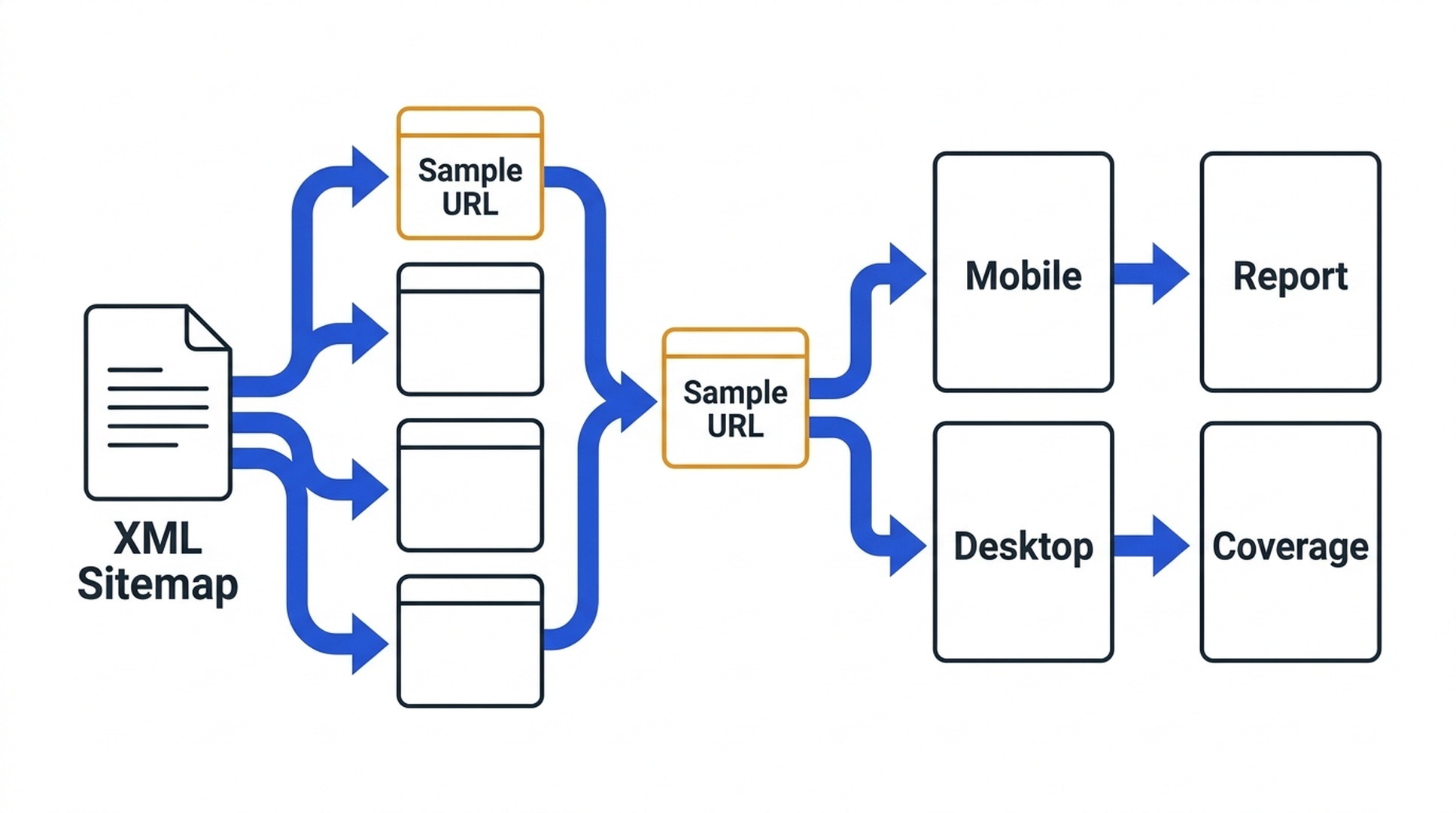
A representative sample makes template coverage visible, but it is not a complete crawl.
Use this decision table before accepting the sample:
If your site looks like this | Better input | Why |
|---|---|---|
Five core templates and a small sitemap | Sitemap sample | One representative page per path group is a reasonable first baseline. |
Ecommerce with many category, product, and filtered URLs | Curated URL list | Pick home, category types, product variants, search or filter pages, and high-revenue templates deliberately. |
Content site with dated archives | Curated list plus one sitemap sample | Important evergreen, current, and archive templates can behave differently. |
International site | Separate lists by locale and template | A global origin result can hide a slow localized route or a regional dependency. |
For a curated list, create important-urls.txt with one canonical public URL per line, then run --urls-file. Keep a copy of the list next to the report so the next audit uses the same scope.
Read PageSpeed data without collapsing it into one number
The report retains two kinds of evidence. They answer different questions.
Evidence | What it tells you | What it cannot tell you alone |
|---|---|---|
Lighthouse lab audits | What a controlled PageSpeed run observed at that moment, including diagnostic opportunities and simulated loading metrics. | How your full visitor population experienced the page over time. |
Page-level CrUX | Aggregated field performance for the requested page or Google-defined URL pattern, when returned. | What happened on a different template, a low-traffic page, or every device/user context. |
Origin-level CrUX | An overall domain baseline when returned. | Whether the particular page that concerns you is fast; a good origin average can conceal a poor template. |
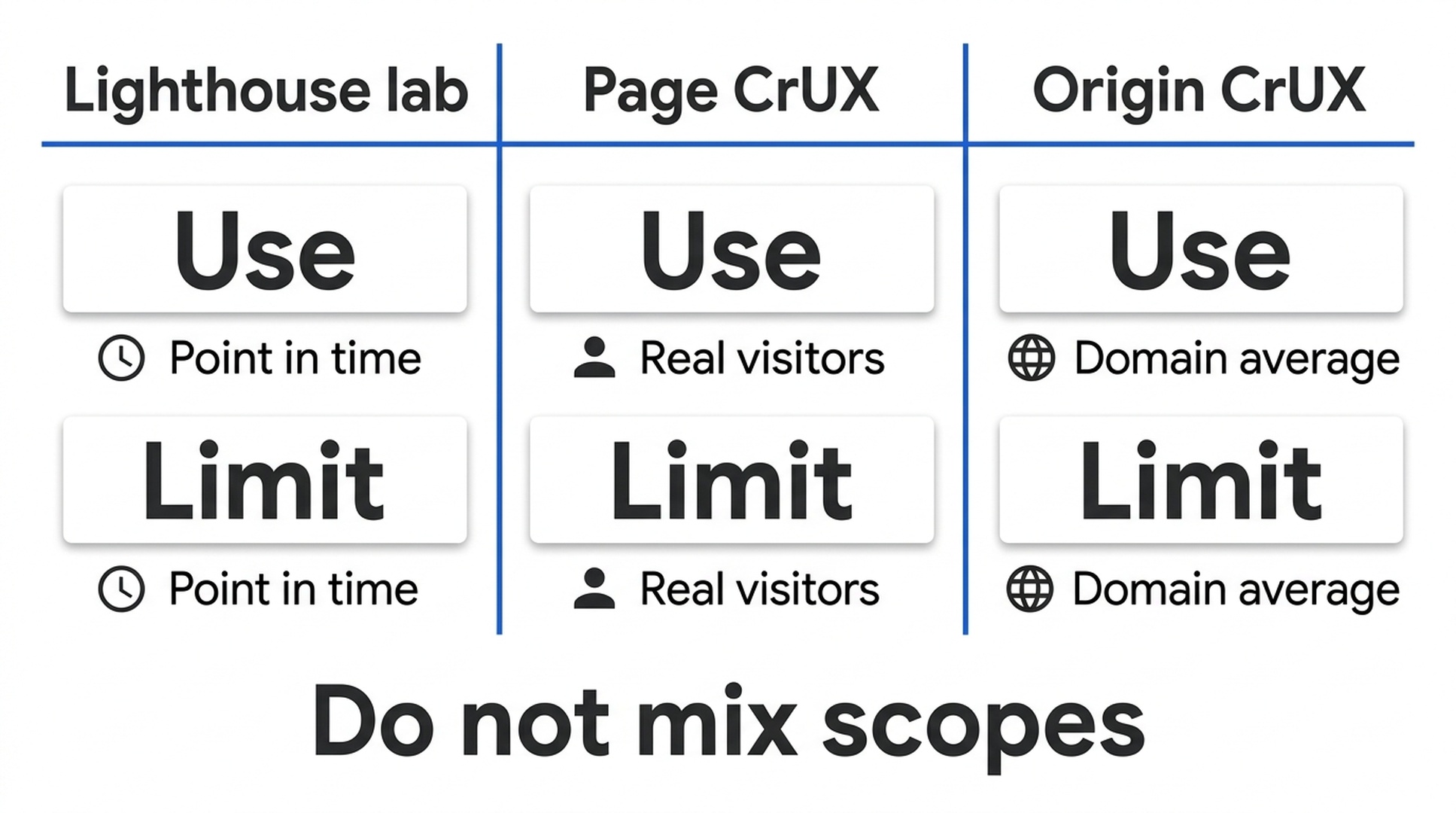
Use each measurement for the question it can actually answer.
For SEO triage, read mobile first because it exposes more fragile loading paths. Then inspect desktop to find whether the issue is universal or more pronounced under mobile emulation. A desktop 95 and mobile 45 is not a request to optimize for a score. It is a prompt to inspect the mobile critical rendering path: large image payloads, font behavior, JavaScript work, third-party tags, layout shifts, and server response behavior.
Total Blocking Time appears in Lighthouse lab data, while Interaction to Next Paint is the user-centric responsiveness Core Web Vital. If a report shows high TBT and no page-level INP field data, write the conclusion carefully: the lab run indicates JavaScript work worth investigating; it does not prove visitors have poor INP.
Turn the report into a repair plan, then retest the same scope
Do not give Codex a broad instruction such as "make the site faster." It tends to produce a long list of plausible changes with no release order. Give it evidence and a boundary instead:
I approve a read-only implementation plan for the repeated opportunities in
reports/site-sample-before/report.md.

Inspect the website project and map each recommended change to the exact
template, asset pipeline, tag manager setting, or server configuration it would
affect. Do not edit files yet.

For each proposal, include:
- evidence URL(s) and PageSpeed audit(s);
- likely performance mechanism;
- exact files or system owner;
- user and release risk;
- acceptance test; and
- rollback condition.

Prioritize a change that occurs on multiple important templates. Do not change
image formats, script loading, cache headers, fonts, redirects, or third-party
tools without explaining why the evidence supports it.
After the team approves a small change, use the same URL list and rerun the command into a new folder such as reports/site-sample-after-hero-image. Compare the report and raw JSON. Lab metrics naturally vary between runs, so look for a mechanism-consistent change across representative URLs rather than declaring victory because one score moved by a few points.
For field performance, allow enough real-user data to accumulate and monitor the appropriate Search Console Core Web Vitals report or CrUX source. Do not use a next-day Lighthouse retest as proof that field data has changed.
Troubleshooting the workflow
Symptom | Likely cause | Recovery path |
|---|---|---|
PAGESPEEDAPIKEY is not set | The key was exported in another shell or not exported. | Export it in the current shell. Do not add it to the script or skill. |
HTTP 403 | API key restriction, API enablement, or project configuration problem. | Confirm the PageSpeed Insights API is enabled and the key is restricted to that API. Check the Google Cloud error message without sharing the key. |
HTTP 429 or 5xx | Temporary quota or service issue. | The runner retries three times. Wait, lower the sample size, and rerun unfinished URLs into a new report folder. |
No page-level CrUX values | The URL may not meet CrUX eligibility or data may be associated with a pattern. | Keep the Lighthouse baseline, inspect origin data only as origin data, and use your own RUM if page-level measurement is required. |
Sitemap parsing fails | The sitemap is inaccessible, malformed, compressed, blocked, or points to an unsupported nested feed. | Use a public XML sitemap or switch to --urls-file for the first audit. |
A result names a different final URL | Redirects, canonical routing, or localization changed the address PageSpeed fetched. | Treat the final URL as evidence, then decide whether the redirect behavior is intentional before comparing results. |
Verification checklist
- [ ] The API key is in PAGESPEEDAPIKEY, not in a repository, report, or prompt.
- [ ] Each report identifies whether it tested one URL, a curated list, or a sitemap sample.
- [ ] Sitemap reports record selected URL count versus total candidates.
- [ ] Mobile and desktop results are both present, or failures are visible.
- [ ] Raw JSON is retained for every successful request.
- [ ] Lighthouse lab metrics are not described as real-user measurements.
- [ ] CrUX values are labeled page/pattern or origin scope and marked unavailable when absent.
- [ ] Every proposed fix names evidence, an owner, a risk, and a retest method.
- [ ] The after-test uses the same representative URLs before a release is credited with improvement.
Frequently asked questions
Can Codex check every page on my site?
It can request PageSpeed data for many public URLs, but that is not automatically the best audit. A careful URL inventory and template sample usually finds systemic problems faster. Use a full crawl for indexation, internal links, and canonical analysis; use PageSpeed testing to inspect representative performance paths.
Does a PageSpeed score directly improve Google rankings?
No. Google uses many signals, and a Lighthouse score is not a ranking score. Page experience information can be useful for diagnosing user-facing performance problems, but the right goal is a healthier experience and a technically sound site, not chasing a number.
Why does the report show no INP?
The script reads the current Lighthouse audit response when it is present and reads field metrics only if Google returns them. A low-traffic URL may have no page-level CrUX data, and some metrics may be unavailable in a particular API response. The report should say n/a, not invent a value.
What should I do after I find a performance issue?
Ask Codex for a read-only implementation plan tied to affected templates or assets. Test the smallest approved change in a staging or preview environment, deploy through your normal review process, and rerun the same audit scope. Keep production changes outside the auditing skill.
Official references
- Google: Get started with the PageSpeed Insights API
- Google: runPagespeed API reference
- Chrome for Developers: Chrome UX Report overview
- web.dev: Web Vitals
Author: Julian Mercer, 14-Year Technical SEO Practitioner at Auspia. Julian writes about crawlability, rendering, site architecture, and technical workflows that teams can test before they deploy.


