


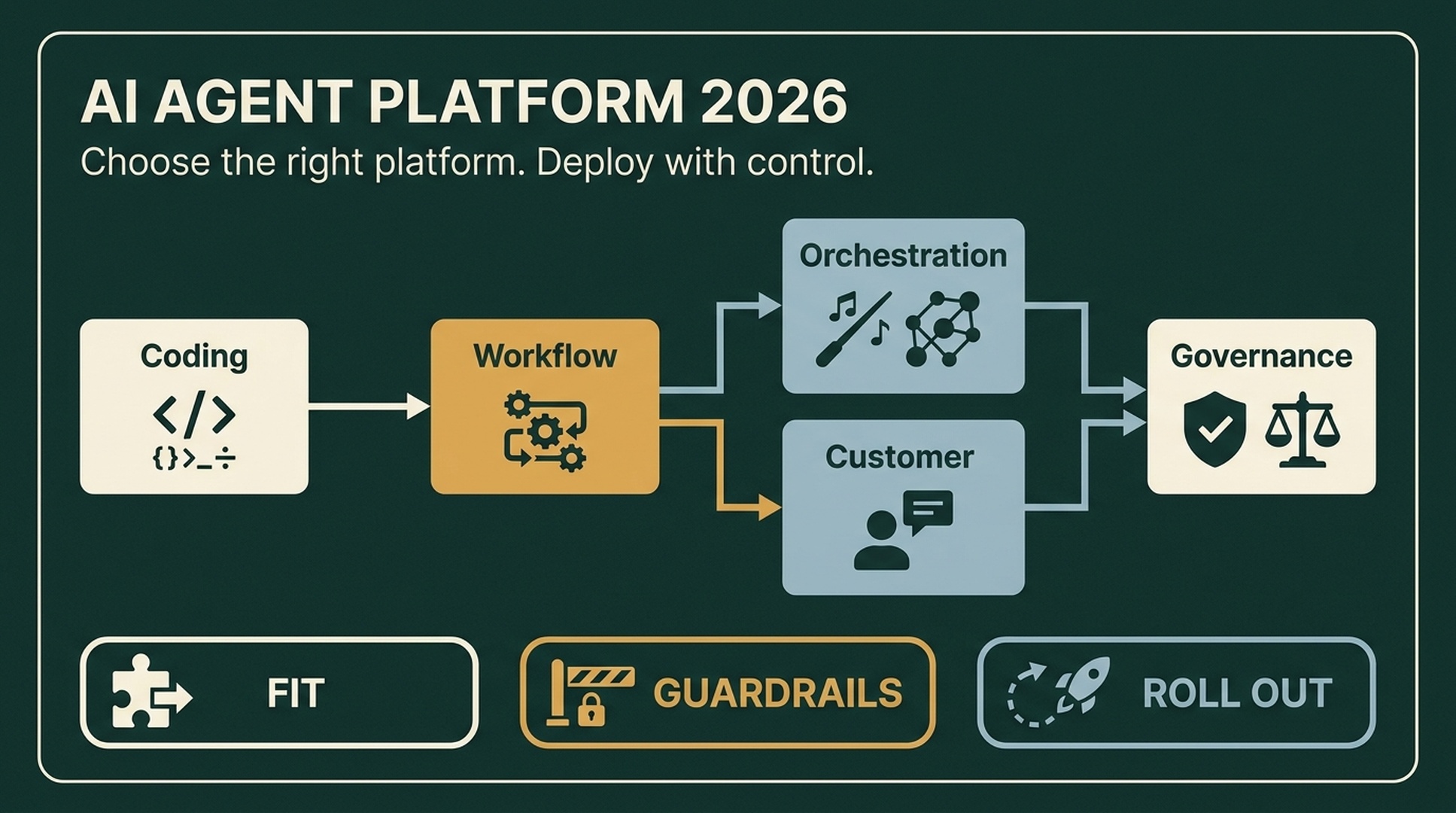
The phrase "AI autonomous agent platform" gets used for very different products in 2026: coding agents, enterprise workflow systems, orchestration frameworks, customer-service specialists, and compliance-focused platforms. Buying across the wrong category can waste months. This guide cuts through the noise with a practical selection framework, a head-to-head platform comparison, and a deployment playbook you can execute in four to eight weeks.
What Is an AI Autonomous Agent Platform?
An AI autonomous agent platform is a system that lets you build, deploy, and operate software agents capable of perceiving their environment, making multi-step decisions, using tools, and completing tasks with limited human intervention. Unlike a chatbot that answers a single prompt or a copilot that suggests the next line of code, an autonomous agent:
- Plans a sequence of actions to achieve a goal
- Uses tools (APIs, databases, file systems, browsers) to act on the real world
- Maintains state across turns, sessions, and failures
- Recovers from errors by retrying, branching, or escalating to a human
The distinction matters because many products marketed as "agent platforms" are actually LLM wrappers with a chat interface. A true autonomous agent platform provides the infrastructure around the model—tool registries, memory, checkpointing, observability, governance, and deployment pipelines—that turns a prototype into a production system.
Autonomous Agents vs. LLM Chatbots vs. Copilots
Dimension | LLM Chatbot | AI Copilot | Autonomous Agent |
|---|---|---|---|
Initiative | Reactive (waits for prompt) | Reactive (suggests within context) | Proactive (pursues goals autonomously) |
Tool use | None or minimal | Limited to host app APIs | Full tool orchestration (APIs, browsers, databases) |
Memory | Session-only | Session + limited history | Persistent memory with checkpointing |
Error handling | Fails and asks user | Fails and asks user | Retries, branches, escalates |
Deployment complexity | Low | Medium | High (requires observability, governance) |
The 2026 Platform Landscape: Five Categories You Must Understand
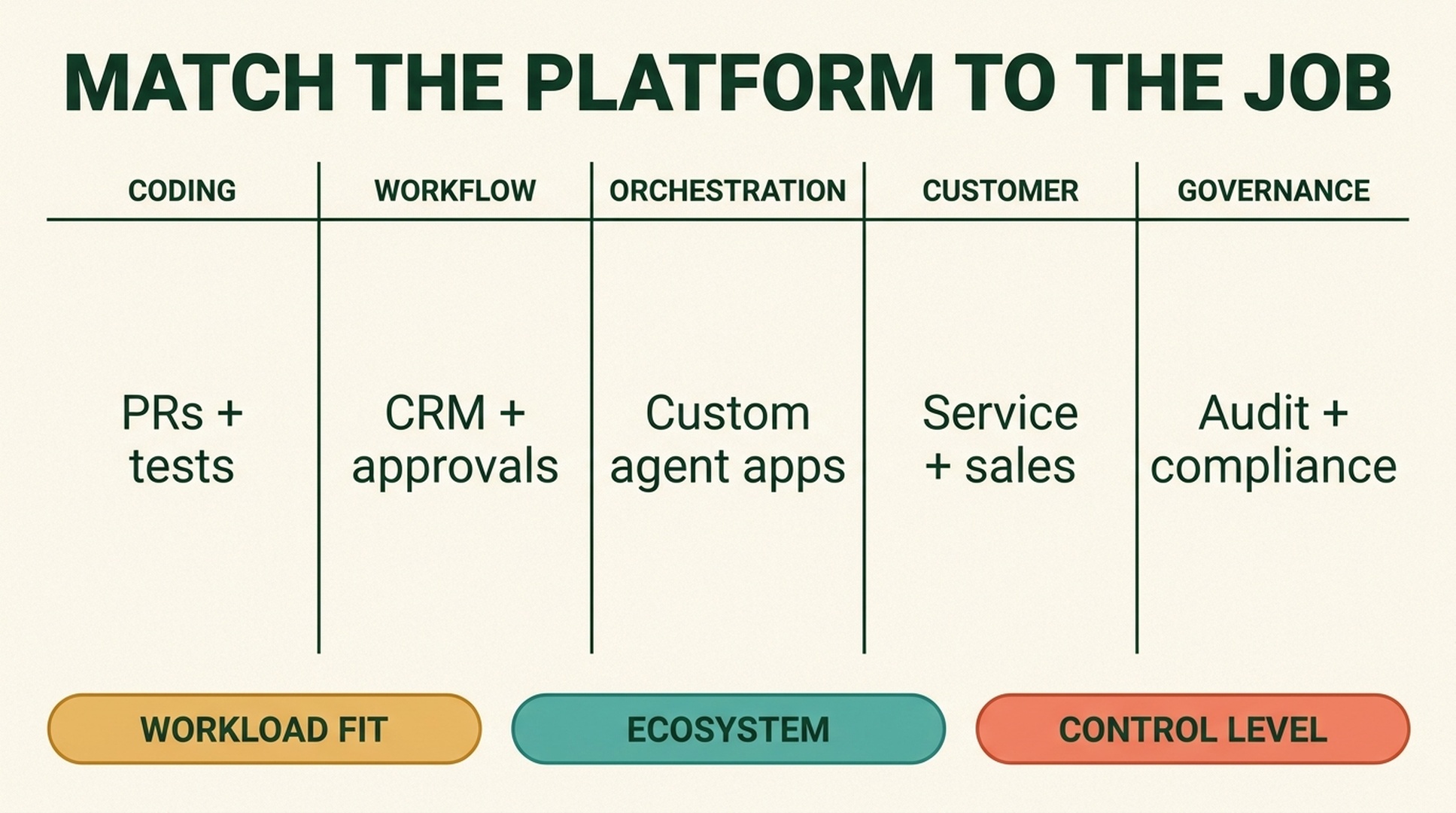
The biggest mistake teams make is comparing platforms across categories. A coding agent and a customer-service agent solve fundamentally different problems. Here are the five categories that matter in 2026:
1. Coding and Engineering Agents
Best for: Software teams that want agents to open pull requests, run tests, and respond to review feedback.
Leading platforms: OpenAI Codex, GitHub Copilot Workspace, Cursor Agent Mode, Devin.
Key consideration: Coding agents can introduce subtle security flaws or governance incidents if not properly sandboxed. Always require human review of agent-generated code and run automated security scanning on every PR.
2. Enterprise Workflow Agents
Best for: Organizations that want to agent-enable existing business processes (HR triage, CRM updates, expense approvals).
Leading platforms: Microsoft Copilot Studio, Salesforce Agentforce, Google Gemini Enterprise Agent Platform (formerly Vertex AI Agents), ServiceNow AI Agents.
Key consideration: These platforms shine within their native ecosystems (Microsoft 365, Salesforce, Google Cloud) but lose flexibility outside them. Choose based on where your workflows already live.
3. Developer Orchestration Frameworks
Best for: Engineering teams building custom agent products with full control over decision paths, branching logic, and state management.
Leading platforms: LangGraph, CrewAI, AutoGen, LlamaIndex Agents.
Key consideration: LangGraph's graph-based, state-machine architecture gives you explicit control and auditability—critical for regulated industries. CrewAI's role-based metaphor is intuitive for multi-agent collaboration but can propagate errors if agents inherit bad assumptions. Both require significant engineering expertise.
4. Customer-Facing Conversational Agents
Best for: Customer service, sales qualification, and branded conversational experiences.
Leading platforms: Sierra, Voiceflow, Rasa, Ada.
Key consideration: These platforms are narrower in scope, which is a virtue. They optimize for brand consistency, conversation quality, and escalation to human agents. Don't try to use them for internal workflow automation.
5. Governance and Compliance Platforms
Best for: Regulated industries (finance, healthcare, government) where data movement, audit trails, and compliance controls are the first barrier to deployment.
Leading platforms: Sema4.ai, IBM watsonx.ai, AWS Bedrock AgentCore.
Key consideration: For these platforms, governance is not a feature—it is the core product. If your compliance team needs to answer "What did the agent access? Which identity did it use? What did it change? Who approved the action?" then this category is non-negotiable.
Platform Comparison: At a Glance
Platform | Category | Best For | Deployment Model | Governance Level |
|---|---|---|---|---|
OpenAI Codex / AgentKit | Coding + framework | Engineering teams | Cloud | Medium |
Microsoft Copilot Studio | Enterprise workflow | Microsoft 365 shops | Cloud (Azure) | High |
Google Gemini Enterprise Agent Platform | Enterprise workflow + framework | Google Cloud users | Cloud (GCP) | High |
LangGraph | Orchestration framework | Custom agent products | Self-hosted or cloud | Developer-managed |
CrewAI | Orchestration framework | Multi-agent prototyping | Self-hosted | Developer-managed |
Salesforce Agentforce | Enterprise workflow | CRM-centric orgs | Cloud (Salesforce) | High |
AWS Bedrock AgentCore | Governance + framework | AWS-native enterprises | Cloud (AWS) | High |
Sierra | Conversational | Customer service | Cloud | Medium |
n8n | Workflow automation | Self-hosted automation | Self-hosted or cloud | Developer-managed |
How to Choose: A Five-Step Selection Framework
Step 1: Define the Workload Before the Vendor
Mature agent adoption starts with a workflow that is repetitive, valuable, measurable, and bounded. Do not start with the model brand or a product ranking. Write down the specific tasks the agent will perform, the systems it will touch, the data it will access, and the decisions it is allowed to make autonomously.
Step 2: Match the Platform Category to the Workload
If you are automating software development, choose a coding agent. If you are automating CRM updates inside Salesforce, choose Agentforce. If you are building a custom agent product, choose an orchestration framework. Mixing categories leads to integration debt.
Step 3: Evaluate Production Readiness
The gap between a prototype and a production system is infrastructure, not model quality. Ask every vendor:
- Checkpointing: Can the agent save and resume state at every major decision point?
- Observability: Do you get full traces, cost tracking, and degradation alerts?
- Resumability: Can the agent pick up where it left off after a failure?
- Human-in-the-loop: Can you insert approval gates at any step?
- Versioning: Can you roll back to a previous agent configuration?
Step 4: Assess Governance and Security
Once agents can act across systems, identity and auditability become foundational. Ensure the platform supports:
- Per-agent identity with scoped permissions (not a shared API key)
- Full audit logs of every tool call, data access, and state change
- Data residency controls for regulated industries
- Rate limiting and cost caps to prevent runaway spending
Step 5: Plan the Deployment Timeline
A Stage 1 deployment—manual invocation with human review—can be operational within four to eight weeks for a well-scoped use case. This builds confidence before moving to Stage 2 (scheduled autonomous runs with monitoring) or Stage 3 (fully autonomous with exception-based human review). Do not skip Stage 1.
Deployment Best Practices: From Prototype to Production
Design for Production from Day One
The infrastructure around the agent matters more than the model. Build checkpointing at every major decision point, make state inspectable for operations teams, and design for resumability. A prototype that cannot recover from a failed API call is not production-ready.
Implement Multi-Level Observability
Level | What to Monitor | Tools |
|---|---|---|
Development | Decision paths, tool call sequences, prompt quality | LangGraph Studio, LangSmith |
Staging | Full traces, automated evaluations, regression tests | LangSmith, Azure Monitor, Arize |
Production | Degradation alerts, cost spikes, safety violations | Datadog, Grafana, vendor-native dashboards |
Start Small, Then Iterate
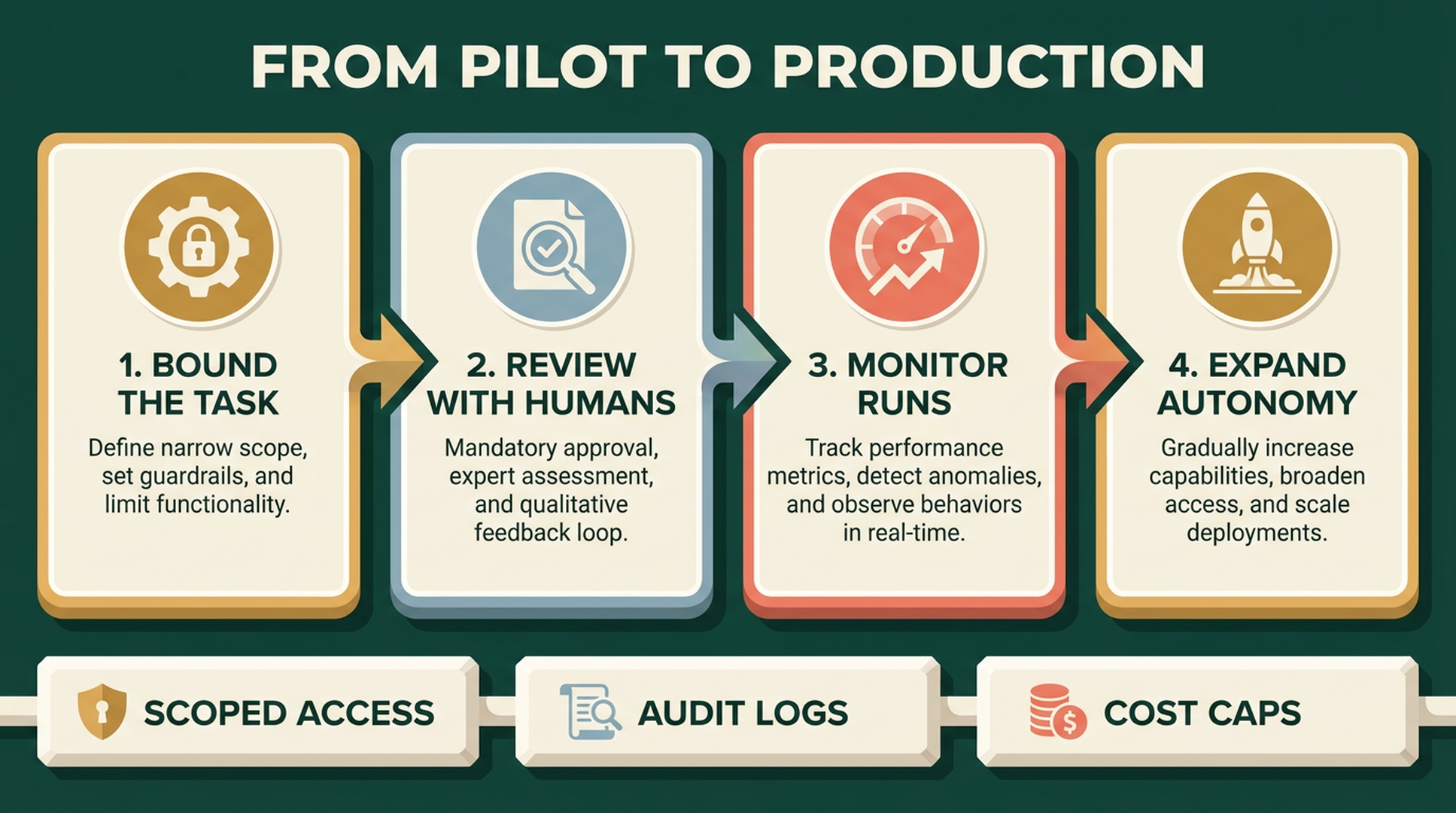
AI agent deployment is not a final stage but an iterative process. Regularly refine prompts, expand integrations, adjust workflows, and reevaluate performance as business requirements evolve. The teams that succeed treat their agent like a new employee: onboarded gradually, monitored closely, and given increasing autonomy as trust builds.
Build a Deliberate Tooling Strategy
Agents are only as good as their tools. Curate a focused set of well-documented, well-tested APIs rather than giving the agent access to everything. Each tool should have clear input/output schemas, error handling, and rate limits. Overly broad tool access leads to unpredictable behavior and security risks.
Collect User Feedback Continuously
Set up your measurement infrastructure before you need it. Capture user satisfaction signals, interaction patterns, and failure modes from day one. This data feeds back into prompt refinement, tool selection, and workflow design—closing the loop between deployment and improvement.
Common Pitfalls and How to Avoid Them
Pitfall 1: Choosing a Platform Before Defining the Use Case
Vendors pitch impressive demos, but a demo is not your workflow. Always start with a written use case definition before evaluating platforms.
Pitfall 2: Skipping the Human-in-the-Loop Stage
Teams that jump to full autonomy without a Stage 1 manual-review period invariably face trust-eroding failures. The four-to-eight-week investment in human review pays for itself in reduced incident response costs.
Pitfall 3: Ignoring Cost Controls
Autonomous agents can make hundreds of API calls per task. Without rate limiting and cost caps, a single runaway agent can generate thousands of dollars in model inference costs overnight. Set hard limits on tokens, tool calls, and execution time.
Pitfall 4: Treating Governance as an Afterthought
Once an agent has access to production systems, "What did it do?" becomes a compliance question, not a debugging question. Implement audit logging from day one—retrofitting it later is painful and risky.
Pitfall 5: Assuming Agent Teams Eliminate Errors
Multi-agent systems (like CrewAI) can multiply errors if each agent inherits bad assumptions from the previous one. The value comes from constrained responsibility, not from pretending the system is a digital office. Limit each agent's scope and validate outputs between stages.
The Missing Layer: Is Your Website Ready for Autonomous Agents?
As autonomous agent platforms proliferate, a new question emerges that most selection guides ignore: is your own website ready to be used by autonomous agents? As more AI products and agent workflows use public web content, a site that blocks relevant crawlers or exposes no machine-readable information can be harder for those systems to understand or use. MCP (Model Context Protocol) and A2A (Agent-to-Agent) are emerging integration standards, not universal website requirements, so assess them against your actual use case.
This is where Agent Readiness becomes a prerequisite for participating in the agent economy. Before you deploy your own autonomous agent platform, audit your digital presence:
- Robots.txt: Are the AI crawlers you intend to permit, such as GPTBot, ClaudeBot, PerplexityBot, or Google-Extended, allowed or blocked? Confirm each crawler's policy and behavior before changing access.
- Structured data: Does your site use schema.org markup so agents can parse your products, services, and content programmatically?
- MCP and A2A support: If your product needs agent-to-system actions, does it expose suitable machine-readable endpoints and authentication?
- Authentication: Can agents authenticate via OAuth or API keys rather than relying on session cookies designed for human browsers?
You can start with Auspia's free Agent Readiness Score Checker to review public signals such as robots.txt, structured data, and selected agent-integration indicators. Treat the result as an audit starting point, then verify the controls that matter for your use case.
Summary: Your Action Plan
- Define your workload in writing—repetitive, valuable, measurable, bounded.
- Match the platform category to the workload (coding, enterprise workflow, orchestration, conversational, or governance).
- Evaluate production readiness—checkpointing, observability, resumability, human-in-the-loop, versioning.
- Implement governance from day one—per-agent identity, audit logs, data residency, cost caps.
- Deploy in stages—Stage 1 manual review (4–8 weeks), then expand autonomy as trust builds.
- Audit your agent readiness—check that public content, structured data, and any agent-facing integration meet the needs of your actual use case.
The 2026 agent market is not converging on one universal platform. A realistic organization may use Codex for engineering, Copilot Studio for Microsoft 365 workflows, LangGraph for custom product features, and a specialized vendor for customer service. The key is to match the platform to the specific job—and to build the operational and governance infrastructure needed to run agents reliably in production.
FAQ
What is an AI autonomous agent platform?
An AI autonomous agent platform is a system for building, deploying, and operating software agents that plan multi-step tasks, use tools, maintain state, and recover from errors with limited human intervention. It includes the infrastructure around the LLM—tool registries, memory, checkpointing, observability, and governance—that turns a prototype into a production system.
How is an autonomous agent different from an AI copilot?
An AI copilot reacts to user context within a host application and suggests actions. An autonomous agent proactively pursues a goal, uses external tools (APIs, browsers, databases), maintains persistent memory, and recovers from errors independently. Copilots assist; autonomous agents act.
How long does it take to deploy an AI agent in production?
A Stage 1 deployment (manual invocation with human review) can be operational in four to eight weeks for a well-scoped use case. Full autonomous deployment typically requires several additional months of monitoring, refinement, and trust-building.
What should I look for when choosing an agent platform?
Prioritize: (1) workload fit, (2) production readiness (checkpointing, observability, resumability), (3) governance and security (per-agent identity, audit logs, cost caps), and (4) ecosystem alignment (does it integrate with your existing tools and cloud provider).
How do I know if my website is ready for AI agents?
Check whether your site allows the crawlers you intend to permit, uses structured data, and exposes appropriate authentication where agents must interact with a system. MCP and A2A are emerging standards, so adopt them only when they fit the product use case. Use Auspia's Agent Readiness Score Checker as a starting point, then verify the controls relevant to your environment.
Author: Camille Rhodes, Architect of 300+ AI Content Workflows at Auspia. Camille writes about AI-assisted workflows, automation, publishing systems, and editorial quality control.


