


Is Wix good for SEO in 2026?
Short answer: yes, for beginners, small businesses, and most local sites, Wix is now a genuinely good SEO platform. The old reputation ("Wix is bad for SEO") is outdated. Google's Search Liaison John Mueller has said Wix sites can rank well, and modern Wix sites outperform most self-managed sites on speed out of the box because Wix controls the whole stack: server-side rendering, a global CDN, automatic SSL, mobile responsiveness, image compression, and security updates.
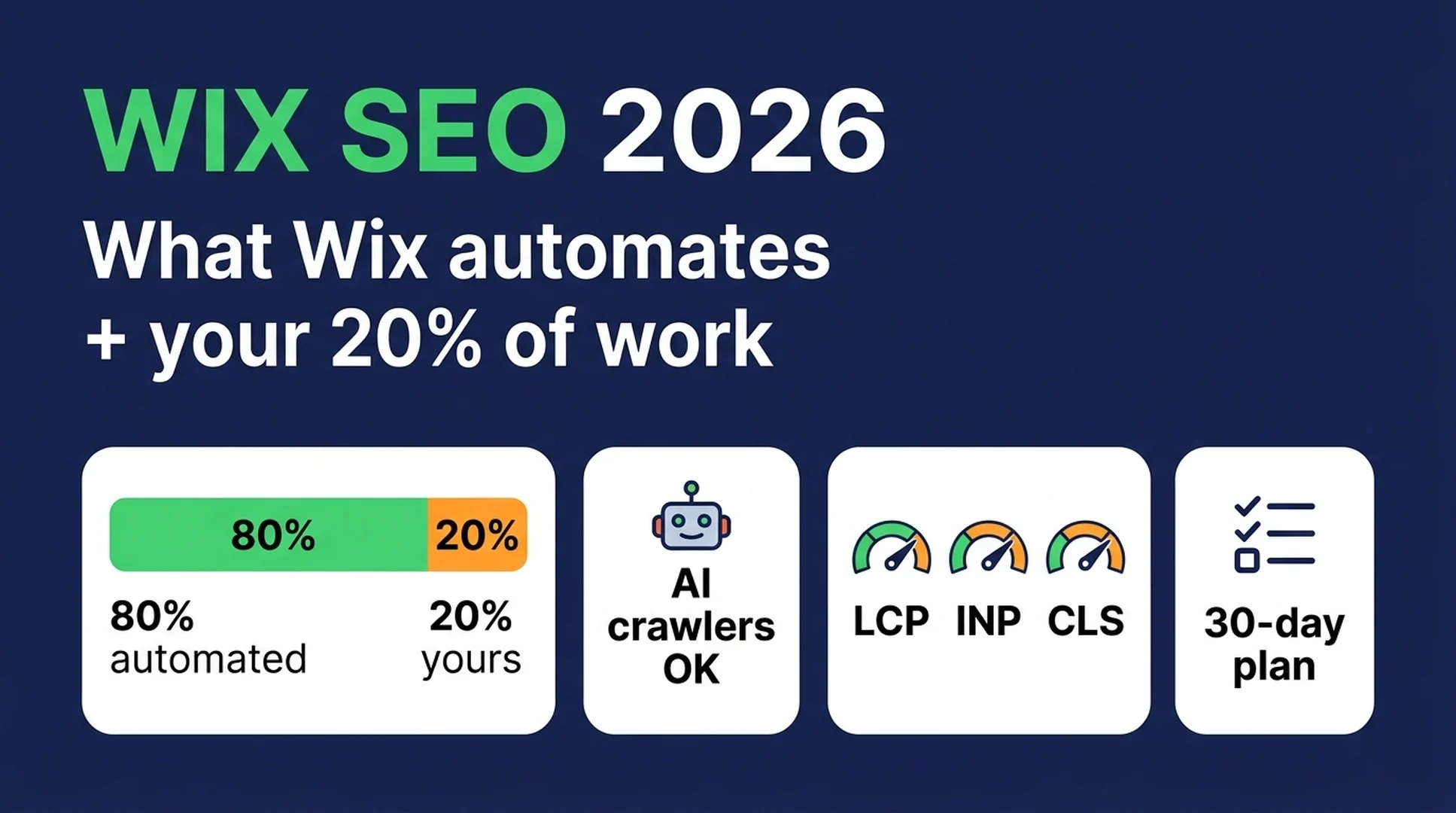
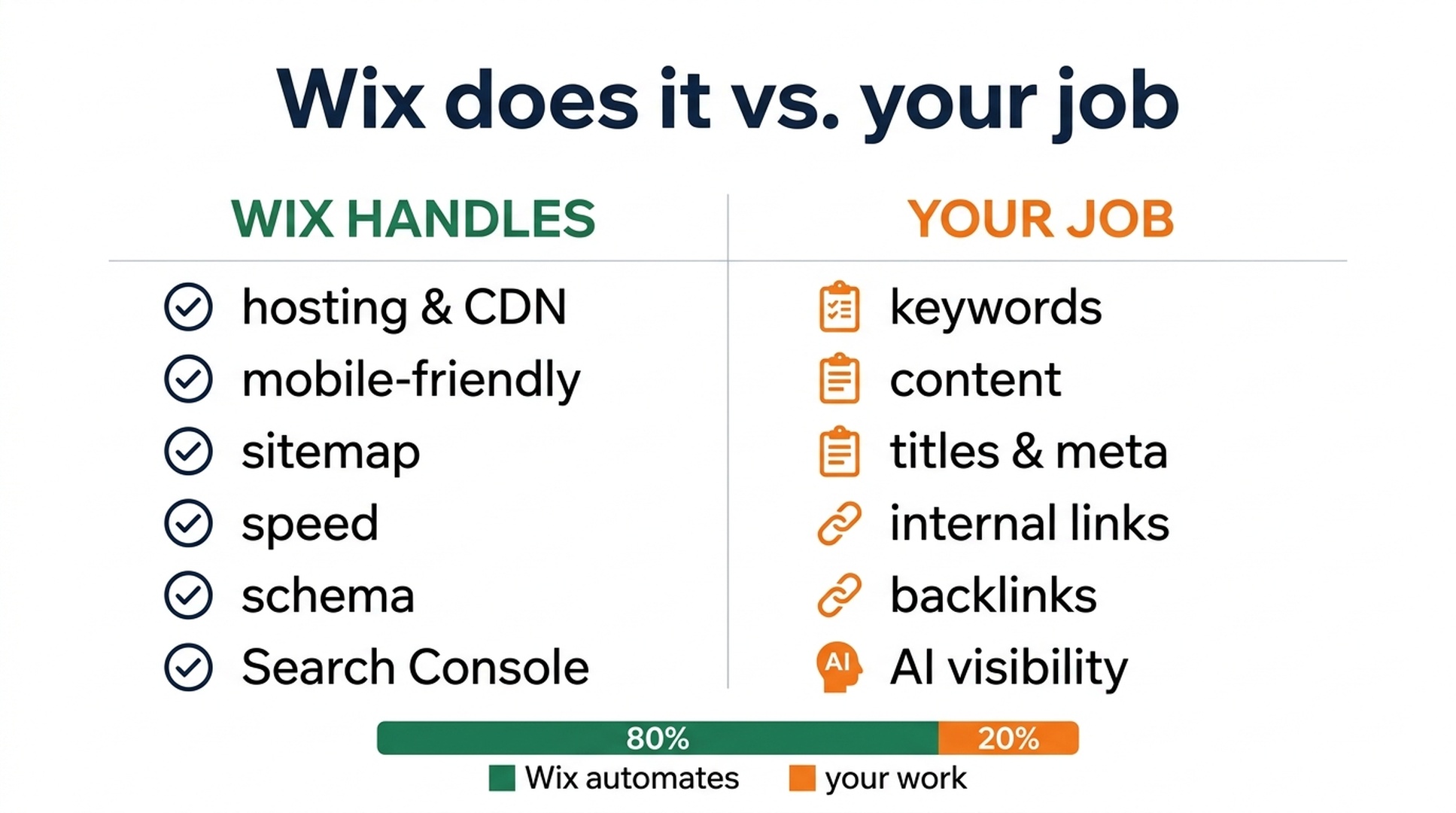
What changed is where the work lives. Wix in 2026 automates roughly 80% of the technical half of SEO. Your job narrows to the part a platform can't do for you: choosing the right keywords, writing content people actually want, linking pages together, earning backlinks, and making your site visible to AI search. That is a much smaller, more human job than it was a few years ago, and it is a job you can hand to a tool like Codex.
Here is the honest scorecard:
What beginners care about | Wix, 2026 | Notes |
|---|---|---|
Ease of setup | ★★★★★ | SEO checklist is built into the editor |
Built-in technical SEO | ★★★★★ | SSR, sitemap, structured data, IndexNow, GSC integration |
Speed out of the box | ★★★★☆ | 70–75% of Wix sites pass Core Web Vitals by default |
Control (URLs, schema, code) | ★★☆☆☆ | You can now customize URLs; deep control still needs code |
Content at scale | ★★★☆☆ | Fine for a blog; WordPress wins for big content sites |
AI search features | ★★★★☆ | Native LLM mention tracking, AI crawler controls |
Two caveats before you invest hours: Wix is a subscription, not an owned asset, and its ceiling on advanced technical control is lower than WordPress. Neither matters for the beginner case this guide covers.
What changed for Wix SEO in 2026
Three 2026 changes should shape how you think about Wix SEO:
1. Wix Harmony (January 2026) replaced the "pick a template, forever" model. The old advice, "choose your template carefully because you can never change it," is obsolete. Harmony pairs AI-assisted site creation with a drag-and-drop editor, and it ships a built-in SEO checklist panel that walks beginners through business info, 3–5 core SEO topics, per-page focus keywords, and connecting to search engines. Its AI agent, Aria, can draft keyword ideas, meta titles, and descriptions from your site's own content; you approve or edit every field.
2. Wix opened up to AI coding agents (July 2026). Wix Headless now connects directly to tools like Codex, Claude Code, and Claude Design through Wix Skills and an MCP plugin. That means the agent you already use for other work can audit your Wix site, fix settings, and even build and deploy a Wix front end. This is the reason the rest of this guide gives you executable prompts instead of just advice.
3. Wix added native AI-search visibility. The dashboard can now track whether your brand appears in answers from ChatGPT, Gemini, and other LLM surfaces. A few years ago nobody measured this; in 2026 it is a first-class Wix feature, and it belongs in your workflow.
The technical details behind these (full URL customization, editable robots.txt, per-page canonicals, and a real indexation tool) are what the rest of the guide walks through.
The 80/20 handoff: what Wix does vs. what's still your job
Before touching anything, know the division of labor. It determines where you spend your time.
Area | Wix already does for you | Still your job |
|---|---|---|
Hosting & delivery | Global CDN, SSL, server-side rendering | Nothing |
Mobile | Auto-responsive, mobile editor | Double-check key pages in the mobile preview |
Sitemap | Auto-generated | Submit to GSC once; check it after big changes |
robots.txt | Editable editor (not manual file) | Decide AI-crawler policy |
URL handling | Customizable slugs and bulk URL structures | Choose short, keyword-aware slugs; set up redirects |
Redirects | URL Redirect Manager (301 only) | Create redirects when you change URLs |
Canonicals | Auto self-referencing canonicals | Override only for real duplicate-content cases |
Structured data | Auto schema for blog, products, events, local business | Add custom JSON-LD only when a type is missing |
Speed | Auto image compression, lazy loading, Wix Turbo | Remove heavy apps/fonts; fix obvious bloat |
Indexation | Site Inspection tool (up to ~2,000 pages), noindex controls | Decide which thin pages to noindex |
Keywords | Aria suggestions | Choose your real keywords and intent |
Content | AI drafts | Write original, useful content |
Links | Auto-suggested internal links | Build topic clusters and check for orphans |
Backlinks & mentions | Nothing | Earn them |
Local visibility | Google Business Profile integration | Verify and maintain the profile |
Read that table once and you get the whole strategy of this guide: do the "your job" column well, and let the platform handle the left column. The rest of the article is a beginner path through the right column.
Foundation setup: your Week 0
Do this once, right when you build or take over the site. It takes about an hour and creates the base everything else builds on.
Run the built-in SEO checklist. In the Wix editor, open the SEO panel (it appears in the Harmony checklist or under SEO & GEO in the dashboard). Complete every item it lists: business name, description, default social image, and connecting to search engines. This is Wix's own 20-point setup, and it catches 90% of beginner mistakes.
Connect Google Search Console (GSC). One click in the dashboard connects your site to GSC. This is non-negotiable: it is the only free, first-party view of what Google actually thinks about your site, from which pages are indexed to what queries bring clicks. Wix reports that sites connected to GSC see more organic traffic over time, and every task in this guide assumes you can check GSC afterward.
Set up a clean structure. Before content: make sure the menu reflects how a customer thinks, every page has a real purpose, and no page is unreachable from another page (an "orphan"). Use exactly one H1 per page (Wix assigns it from the page title), H2s for main sections, and H3s below that. Keep a thank-you page and privacy pages linked, not stranded.
Check mobile. Open the mobile editor and check the home page, your top product or service page, and your contact page. Wix is mobile-responsive by default, but mobile editing is separate; a change made on desktop doesn't always carry to mobile.
Done looks like: GSC shows your domain verified and receiving sitemap submissions; the SEO checklist is 100% complete; the menu has no orphans.
Technical tasks you still own
These are the "your job" items from the technical half. None require code, and each has an exact Wix menu path.
URLs and redirects
Wix now lets you do far more than the old slug-only editing:
- Individual pages: in Menus & Pages, select the page → More Actions → SEO Basics → edit the URL slug. Keep slugs short, lowercase, hyphen-separated, and keyword-aware:
/hiking-bootsbeats/product-page/hiking-boots-2024-v2. - Bulk structures: for blog posts and product pages, SEO & GEO → SEO Settings → Edit by page type → Page URL lets you change the whole URL pattern at once (for example adding the category to every product URL). Wix requires at least one dynamic variable so pages don't collide, and it creates automatic 301 redirects from the old URLs when you save. Leave that toggle on.
- Manual redirects: for one-off moves, use the URL Redirect Manager (301 only, which is the right kind). It supports bulk CSV uploads if you ever migrate a set of pages.
Quality check: after any URL change, confirm the old URL still resolves to the new page (the auto-redirect did its job) and update any internal links you control.
Canonicals
Wix adds a self-referencing canonical to every page automatically: the page telling Google "I am the official version of myself." You should rarely touch this. Override it only for genuine duplicate-content cases, like the same product reachable at two URLs. The path is SEO Basics → Advanced SEO → Additional Tags → canonical.
Indexation
Google only ranks pages it has indexed, so decide what deserves indexing:
- Use Site Inspection (under SEO & GEO) to check whether specific pages are indexed and see Google's stated reason if they're not. Wix's tool automates checks for up to a couple thousand pages.
- Use noindex on thin, utility pages that add no search value (thank-you pages, tag archives, internal promo pages) via page settings.
- After publishing new pages, submit the sitemap once in GSC rather than hammering the "Request indexing" button.
The trap beginners fall into: optimizing the homepage and ignoring everything else. Every page is a potential landing page.
Sitemap, robots.txt, and AI crawlers
Wix generates and updates sitemap.xml for you; you can't edit it manually, and you don't need to. Check it at /sitemap.xml occasionally to confirm new pages appear.
robots.txt is editable through the dashboard (SEO & GEO → Tools and Settings → Robots.txt Editor). In 2026 this matters for a second reason beyond classic search: AI crawlers. Different AI products behave differently, and the beginner-safe policy is:
- Allow search and answer bots that can send you traffic: Google's Google-Extended, OpenAI's OAI-SearchBot (search) and ChatGPT-User (user fetch), Anthropic's Claude-SearchBot, PerplexityBot, and Applebot.
- Decide on training bots (GPTBot, ClaudeBot), which fetch your content for training rather than search. Many small sites block them, but blocking is a choice about your content, not a requirement. Start by allowing them and reviewing the Bot Log if you're curious about who's crawling.
A starter robots.txt that implements this:
User-agent: *
Allow: /
Disallow: /checkout

User-agent: GPTBot
Allow: /

User-agent: OAI-SearchBot
Allow: /

User-agent: ChatGPT-User
Allow: /

User-agent: Claude-SearchBot
Allow: /
(If you use Wix's editor, it manages this format for you; check that the allow/block lines match this intent. A free robots.txt AI-crawler checker will tell you which bots you currently allow or block.)
Speed and Core Web Vitals
Google's March 2026 Core Update folded Core Web Vitals into a composite performance score that now sits alongside content quality in ranking decisions: a fast site no longer beats a better answer, but among equally good pages, speed separates page one from page two. The 2026 thresholds are unchanged from when INP replaced FID: LCP ≤ 2.5s, INP ≤ 200ms, CLS ≤ 0.1, measured from real Chrome users at the 75th percentile.
Wix sites pass these at a high rate by default, but the usual offenders are the ones you add: heavy images, too many fonts, and third-party apps. Beginner quick wins, in order:
- LCP: let Wix compress images to WebP/AVIF, lazy-load below-the-fold images, and add explicit width/height so the layout doesn't jump.
- INP (hardest): remove apps you don't use and scripts that slow interaction. Fewer apps is the beginner lever.
- CLS: set image dimensions, avoid popping banners, and load fonts with
font-display: swap. Cap custom fonts at two.
Check it: open GSC → Performance, and use Chrome's own report (or a free CWV checker) rather than trusting a desktop-only test. CrUX field data is the number that counts.
Structured data (schema)
Wix auto-adds schema markup for common page types (blog posts, products, events, local business, bookings), so you don't hand-write it for normal pages. You add custom JSON-LD only when a type is genuinely missing, via SEO Basics → Advanced SEO → Structured Data Markup → Add New Markup. Use Google's free Structured Data Markup Helper to build valid JSON-LD, and always test with Google's Rich Results Test before saving.
One honest warning: structured data helps Google understand a page and can enable rich results, but it does not guarantee AI Overviews, AI Mode, or any rich result. Anyone who promises that is overselling.
On-page tasks you still own
This is where most of your remaining time goes, and it's where a bad platform reputation for SEO actually comes from: content that was published once and never thought about again.
Keywords and search intent
Forget "the one keyword." Beginners should think in questions:
- Start from what you already have. In GSC, look at queries you already appear on page 2-5 for; those are your fastest wins.
- Steal the question, not the traffic. Type your topic into Google and note the "People also ask" questions and the AI Overviews that appear. Those are the questions real searchers ask.
- Classify intent before writing. Buying keywords go on product pages, comparing keywords go on comparison/blog pages, learning keywords go on educational posts. Don't write one page that tries to do all three.
- Don't invent volume. If you don't have a keyword tool, use GSC data, autocomplete, and competitor pages. Never fabricate search volumes or difficulty.
Titles and meta descriptions
Every page gets a unique title tag and meta description. The formulas that work for Wix sites:
- Title: primary keyword near the front, under 60 characters, with one honest reason to click — a number, a year, or a concrete outcome. "Hiking Boots: 2026 Guide to Choosing the Right Fit" beats "Hiking Boots | Great Products".
- Meta description: under 155 characters, written like an ad: what the page answers, and why the reader should click it. Duplicate descriptions across pages are the classic beginner mistake.
Content that earns its rank
Google and AI systems both rank pages that answer a question better than anyone else. The beginner bar is simple and high:
- Every page answers one clear question in the first paragraph.
- Use
##headings that match how people ask ("How do I clean wool boots?"), so both skimmers and AI answer systems can pull the answer. - Write content unique to the page; never paste a manufacturer description or copy a competitor.
- Add one table, checklist, or concrete example per article; content that structures an answer gets cited more often.
Internal links
Link related pages with descriptive anchor text: "our sizing guide" instead of "click here." Build small topic clusters: a pillar page (your core service) linking to supporting posts, and supporting posts linking back. Every page should be reachable, and the anchor text should tell both the reader and search engines what the target page is about.
Image alt text
Describe what the image actually shows, in a sentence, including the product or page subject, not "image" or "picture." Alt text serves accessibility first and search second, and keyword stuffing it is a smell. In the Wix editor: select the image → Settings → the "What's in the image? Tell Google" field.
Off-page tasks you still own
On-site work is table stakes; visibility outside your site is where rankings compound.
Backlinks
Links from other sites are still one of the strongest signals that your page deserves to rank. The beginner-safe playbook is quality over volume:
- Start with real relationships: supplier pages, local business directories, partner sites, and customer case-study mentions.
- Write something linkable: a genuinely useful guide, a free checklist, or a data point people want to reference.
- Recover mentions: find mentions of your business that don't link to you, and ask for the link.
Avoid anything sold as "buy 100 links." Low-quality links hurt more than no links.
Local visibility
If you serve a place, set up and verify a Google Business Profile, and keep name, address, and phone consistent across every listing (NAP consistency). Wix integrates with GBP from the dashboard, so hours, service areas, and review management live in one place. Reviews matter here more than keywords.
Brand mentions
In 2026, being mentioned matters almost as much as being linked: LLMs build answers from mentions they can verify. Consistent brand name, a clear about page, and appearances in trusted places all feed that.
AI search visibility: the new layer
Google AI Overviews, AI Mode, ChatGPT, Gemini, and Perplexity now sit between searchers and your site. Beginners don't need a whole new discipline; they need four moves:
- Allow AI crawlers (the robots.txt policy above). If a bot can't fetch the page, your content can't be cited. This is the single most common blocker.
- Structure for answers. AI systems favor pages where the answer is findable: direct answer near the top,
##question headings, and supporting tables or lists. The on-page section above is also your AI-visibility plan. - Keep structured data current. Clean, valid schema makes your products, events, and business facts easier for AI systems to pull accurately.
- Monitor. Use Wix's native AI Visibility tracking (and a free AI-search visibility checker) to see whether your brand shows up in AI answers, and treat a "brand found but not cited" result as a content problem, not a mystery.
Optional advanced step: publish an llms.txt file describing your site for AI agents, if you're comfortable with the format. It's not required for ranking; treat it as a nicety for agent-facing pages.
Hand your Wix SEO to Codex
Everything above is a repeatable workflow, which makes it a perfect job for an AI agent. Here's why this is safe for a beginner:
- The agent plans before it edits. Codex shows you what it found and what it will change, and you approve the plan. Nothing changes without your say-so.
- The audit is read-only. Checking a public site and a robots.txt is harmless.
- You keep the human decisions. Keywords, content, and which URLs to change stay yours; the agent drafts and organizes.
You can run the whole workflow by giving Codex one file. Copy the SKILL.md below, save it as wix-seo/SKILL.md inside the project folder Codex works from (for example ~/.codex/skills/), then run: You have the wix-seo skill. Run it on https://mysite.com — I sell hiking gear in the US.
---
name: wix-seo-2026
description: Audit and improve a Wix site's SEO using Wix's built-in tools plus Google Search Console, for owners with little SEO experience. Use when the user wants their Wix site to rank better on Google and in AI search.
---

# Wix SEO Skill

## Inputs
- Website URL of the Wix site
- What the site sells or is about
- Target market/country and language
- Authorized data sources (Google Search Console export, Google autocomplete, competitor pages)

## Prerequisites
- The user owns or manages the Wix site and can access the Wix dashboard and Search Console.
- Never ask for or print API keys, passwords, cookies, or tokens. Use only data the user has already authorized.

## Workflow
1. Fetch the public site and inspect Wix's auto-generated sitemap.xml and robots.txt.
2. Audit in this order: indexation -> URLs -> redirects -> canonicals -> speed signals -> on-page (titles, meta, headings, content, images) -> internal links -> AI crawler access -> verifiable off-page signals.
3. For each finding, report: what's wrong, why it matters in plain English, the exact fix in Wix (menu path), and a priority (P0/P1/P2).
4. Do not invent issues, metrics, search volumes, rankings, or traffic. Mark anything unverifiable as "check manually."
5. Present a prioritized plan and wait for approval before changing anything.
6. When approved, apply the changes Wix allows without custom code. For custom JSON-LD or code, output the exact code plus the exact Wix menu path, and wait for the user to confirm.

## Output
- A report card per area (pass / warning / fail)
- A prioritized fix list with exact Wix steps
- Confirmation of every change made, with before/after
- A list of what could not be verified

## Constraints
- Never promise rankings, traffic, or AI Overview features.
- Never paste API keys or private data into files, logs, or output.
- Do not change Wix content, pricing, or business data unless the user explicitly asks.
If you'd rather work prompt by prompt, these three cover the highest-value chapters; paste them into Codex one at a time:
Technical audit:
Audit the Wix site at [URL] for technical SEO: URLs, redirects, canonicals, indexation, speed, schema, and robots.txt for AI crawlers. For each issue give me: what's wrong, why it matters in plain English, the exact Wix menu path to fix it, and a P0/P1/P2 priority. Show me the plan first; don't change anything yet.
On-page pass:
For the page [URL] on my Wix site, improve the SEO basics: propose a unique title tag (under 60 characters), meta description (under 155), and a rewritten first paragraph that answers the page's main question directly. Show before/after for each. Don't publish; just show me the plan.
AI visibility check:
Check whether [brand] appears in AI search results for [3 core topics]. For each topic, tell me: which AI products mention the brand, whether they cite our site, and one content fix that would make us easier to cite. Use only real, verifiable checks. Don't guess at answers.
Wix vs. WordPress, decided quickly
The internet loves this fight; here's the honest version:
Choose Wix | Choose WordPress | |
|---|---|---|
Your situation | Total beginner, small site, limited budget/time | SEO is your main growth channel, or you need control |
Speed setup | Hours, no maintenance | Weeks, ongoing upkeep |
Technical ceiling | Good built-ins, less fine control | Nearly unlimited, via plugins/code |
Content at scale | Fine for a blog | Better for big content systems |
Ownership | Subscription, no full export | You own the site and data |
Rule of thumb: if your website is a digital business card, Wix is enough, and done well it outperforms an abandoned WordPress site. If your website is your salesperson, start on WordPress or plan to migrate when you outgrow Wix. Google ranks pages, not platforms; the difference between "Wix ranks" and "WordPress ranks" is smaller than the difference between "content is maintained" and "content is abandoned."
Your 30-day Wix SEO checklist
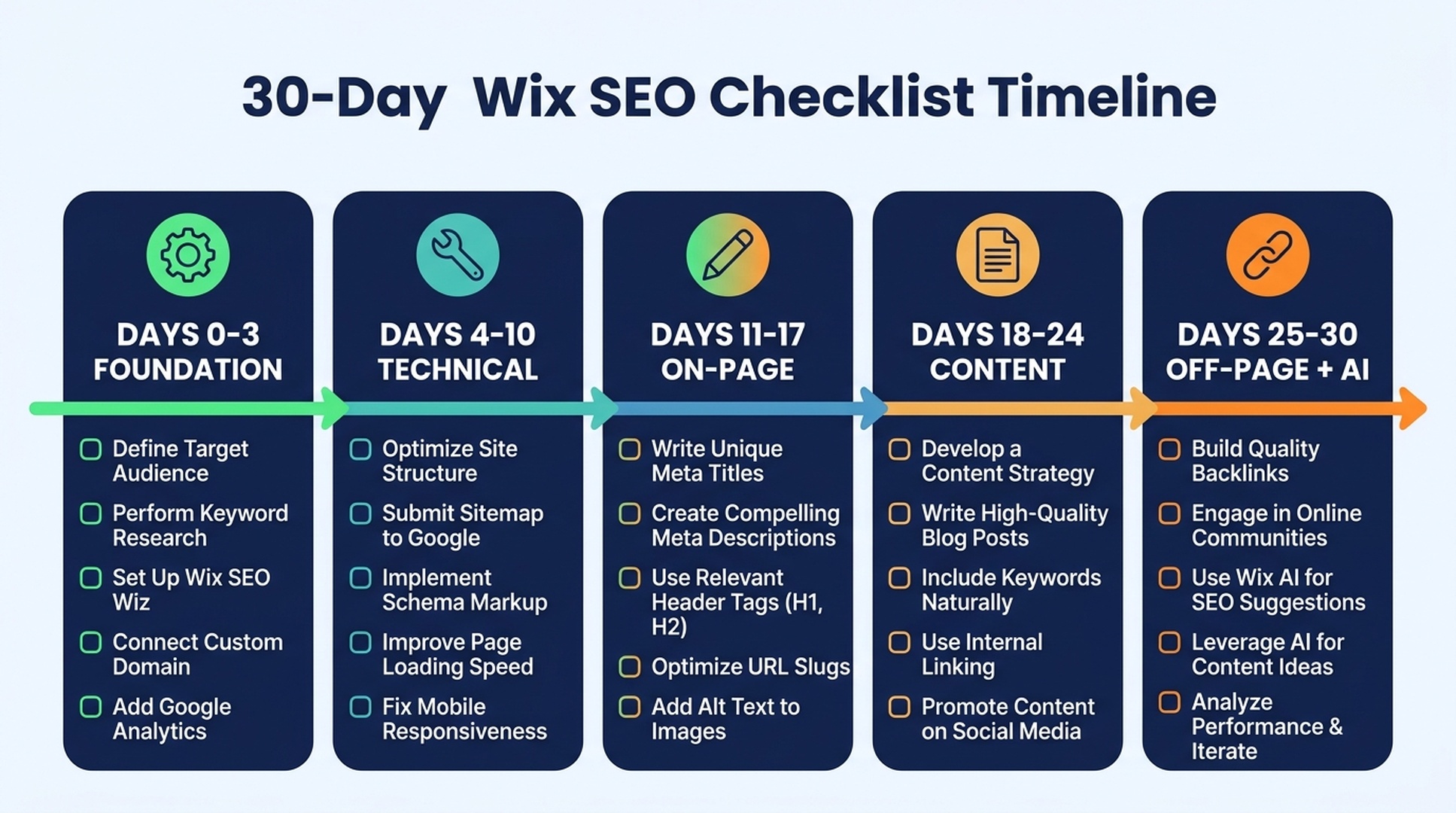
Days | Focus | Done when |
|---|---|---|
0–3 | Foundation | SEO checklist complete, GSC connected, mobile checked, GBP verified |
4–10 | Technical | URLs cleaned, redirects set, canonicals sane, thin pages noindexed, robots.txt AI policy set |
11–17 | On-page | 5 pages get real titles/meta, first paragraph answers the question, internal links added, alt text fixed |
18–24 | Content & keywords | 1 pillar page + 2 supporting posts published, keyword-intent map for next 10 topics |
25–30 | Off-page + AI | 3 backlinks earned, GBP profile polished, AI visibility baseline recorded |
Then the maintenance rhythm is monthly: check GSC for new query opportunities, refresh the page that's decaying, and re-run the technical audit every quarter.
FAQ
Is Wix good for SEO in 2026? Yes for beginners and small business sites. Wix handles the technical foundation automatically (rendering, sitemap, speed, schema, GSC integration), and the work that's left (keywords, content, links, AI visibility) is the same work you'd do on any platform. It's a weaker choice only for large content sites or advanced technical control, where WordPress wins.
Does Wix handle SEO automatically? A large part of it. Wix generates the sitemap, server-renders pages, compresses images, adds baseline schema, provides a robots.txt editor, and integrates with Search Console. But it can't choose your keywords, write your content, or earn your backlinks. That's your part.
Can I edit full URLs on Wix now? Yes. Individual page slugs are editable in page settings, and you can customize the URL structure for all blog posts or product pages at once in SEO Settings. Wix creates automatic 301 redirects when you change them.
Is Wix or WordPress better for SEO? WordPress offers more control and a higher ceiling; Wix offers better out-of-the-box SEO fundamentals and far less maintenance. For a beginner, Wix done well beats an abandoned WordPress site. Move to WordPress when you outgrow Wix's limits, not because of reputation.
Do I need SEO apps for Wix? No. Everything a beginner needs is built in. If you later want keyword research or reporting at scale, add tools then; don't install a pile of apps on day one (apps also slow the site down).
Can Codex really do my Wix SEO? It can do the repeatable parts: audit, draft titles and meta, check robots.txt for AI crawlers, map keywords, and produce a prioritized fix list you approve before it edits. The human decisions (your keywords, your content, your URL choices) stay yours.
How do I know my Wix SEO is working? Watch GSC, not rankings alone: queries you appear for, clicks, indexed pages, and Core Web Vitals pass rate. Add a baseline AI-visibility check for brand mentions in ChatGPT/Gemini. Decide on one business metric (inquiries, sales) and look at whether search traffic to it grows.
Do I need to allow AI crawlers? If you want your content cited in AI answers, yes: allow the search/user-fetch bots in robots.txt. Allowing or blocking training bots is a choice about your content, not a requirement.
How long does Wix SEO take? The foundation is an hour. Meaningful results typically appear in 2-6 months of consistent content and link work; nothing in this guide is a quick ranking hack, and anyone promising one is overselling.
Do I need schema markup on Wix? For standard page types, Wix adds it automatically; check that the auto markup is valid rather than adding more. Add custom JSON-LD only when a needed type is missing, and remember structured data enables rich results but guarantees nothing.
Author: Elise Morgan, 15-Year Editorial SEO Strategist at Auspia. Elise writes about beginner-friendly SEO foundations, content refreshes, and the work platforms can't automate.


