


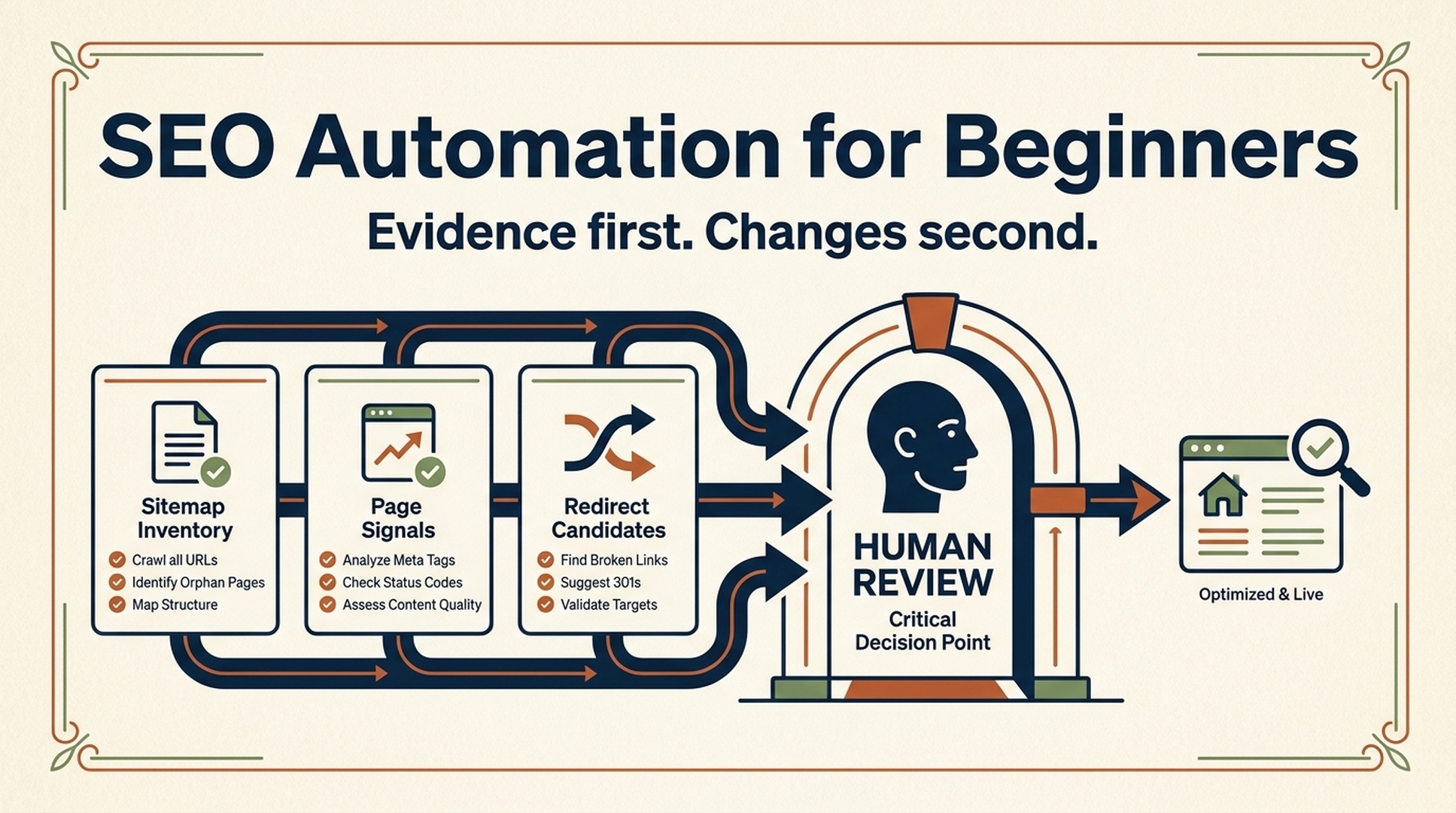
You do not need to become a Python developer before you automate useful SEO work. You do need a repeatable process, a small input file, and a firm rule: the agent can inspect and prepare recommendations, but a person approves changes that affect a live site.
That is where Codex is useful. It can read a sitemap or crawl export, write a local report, explain what it found in plain English, and help you turn that report into a short review queue. Python still matters when you need a durable script, scheduled job, or a custom data transformation. For a beginner's first SEO automation, though, asking Codex to create a reviewable artifact is usually a better starting point than debugging a notebook.
The outcome: three small jobs you can verify
This guide is for an SEO generalist, marketer, or site owner who can access a public sitemap, a CSV export, or a folder for a website project. You do not need an API key. You do need permission to inspect the site or files.
By the end, you will have a Codex workspace that can produce three local deliverables:
Job | Input | What Codex produces | What you check yourself |
|---|---|---|---|
URL inventory | Sitemap or URL list | A normalized list of discovered URLs | That the count and URL rules make sense |
Page-signal review | Up to 25 public URLs | A CSV of observed titles, H1s, descriptions, and page notes | The rendered pages and any technical claim |
Redirect candidates | Old and new URL lists | A proposed mapping with match reasons and confidence | Every destination and its searcher intent |
Definition of done: you have a report another person can review without having to rerun the investigation. You have not changed the live site, submitted a sitemap, or deployed a redirect.
Why this approach replaces a lot of beginner Python work
The original appeal of Python for SEO is real: it can turn repetitive checking into a process. The hard part for a new practitioner is rarely the for loop. It is deciding what the output means, where the data came from, and whether an automated recommendation is safe to act on.
Codex changes the front door to that work. Instead of starting with libraries and syntax, you state the goal, supply the files, ask for an evidence-led report, and inspect the result. If the workflow becomes valuable enough to repeat every week, Codex can then help you design and test a small Python script. The order matters. Build a good manual decision first; automate it second.
Use Codex for bounded work such as comparing lists, collecting visible page signals, cleaning an export, or drafting a repair brief. Do not treat it as a search-console replacement, a rank tracker, or an unattended deployment tool. It cannot infer data it was not given, and a well-written report cannot guarantee crawling, indexing, traffic, rankings, AI answers, or conversions.
Set up a workspace that makes mistakes visible
Create a project folder before asking Codex to investigate anything. The folder is your audit trail, and it keeps raw inputs away from generated outputs.
seo-checks/
  input/
    sitemap.xml
    old-urls.csv
    new-urls.csv
  reports/
  notes/
  AGENTS.md
Put only copies of exports in input/. Keep credentials, browser cookies, and client data out of the workspace. If you later connect an authorized data provider, configure it in the approved environment; never paste a key into a prompt, a spreadsheet, or a report.
Now add this plain-language AGENTS.md file. It gives your SEO work a stable safety policy without making every request sound like a legal memo.
# SEO workspace rules

- Read local inputs and public pages; create reports in `reports/`.
- Preserve files in `input/` unchanged.
- Do not publish, deploy, submit a sitemap, change redirects, edit robots.txt,
  or alter production configuration unless I explicitly approve the exact change.
- Do not request, print, or save passwords, cookies, API keys, or tokens.
- Use `not_checked` for data that cannot be observed. Do not guess rankings,
  traffic, indexing, canonical behavior, or search volume.
- For each recommendation, give evidence, confidence, and a human verification step.
This follows a simple operating model: allow safe local inspection, put risky actions behind explicit approval, and capture uncertainty instead of filling it with confident-sounding guesses.
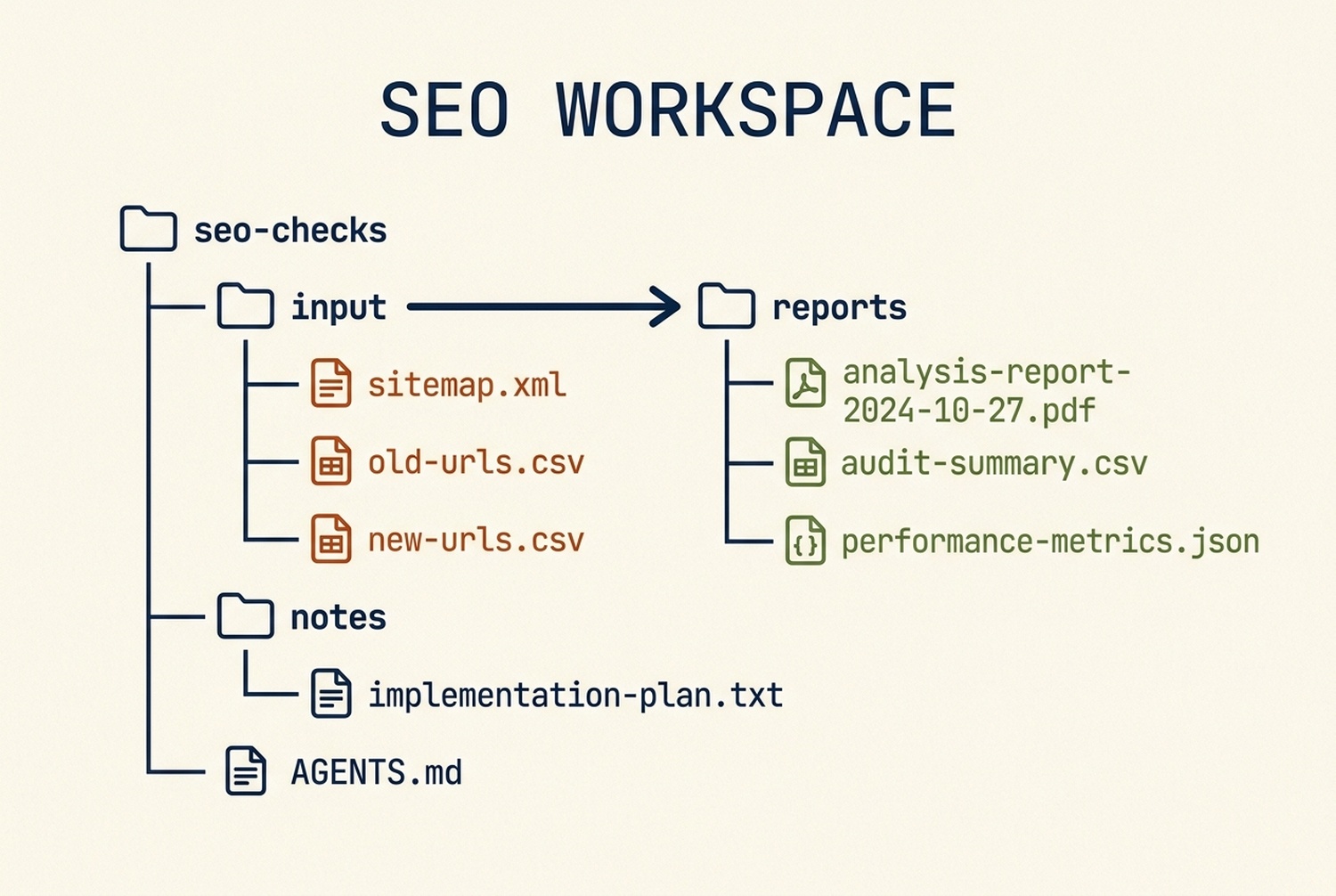
Keep source files in `input/` and let Codex write its findings to `reports/`, so the review trail remains easy to follow.
Install the SEO beginner skill
The starter skill below gives Codex an operating checklist for the first three jobs in this article. It is intentionally narrow. The later GSC, GA4, and Bing sections add their own data and approval rules. It does not retrieve keyword metrics, and it does not have permission to push a change live.
Create a folder named seo-beginner-automation in your Codex skills directory, then save the following content as SKILL.md inside it. Restart or refresh Codex if your installation requires that before it discovers new local skills.
---
name: seo-beginner-automation
description: Run a safe, beginner-friendly Codex workflow for repeatable SEO checks from a sitemap, crawl export, URL list, or page folder. Use when a user wants to inventory URLs, check visible page signals, prepare redirect candidates, or turn approved SEO data into a reviewable action list without publishing, deploying, changing robots, or guessing metrics.
---

# SEO Beginner Automation

Turn one small SEO question into a reviewable file, not an unattended change. Prefer public URLs, exports, and local project files. Explain terms briefly and keep the first pass small.

## Boundaries

- Read, inspect, summarize, create local reports, and make in-scope draft edits when requested.
- Never publish, deploy, change redirects, alter `robots.txt`, submit a sitemap, or edit production configuration without explicit confirmation after showing the proposed change.
- Do not request, print, store, or expose API keys, cookies, passwords, or tokens. Use only a user-authorized export or an already configured integration.
- Do not invent search volume, rankings, traffic, canonical status, crawl access, or HTTP results. Mark unavailable evidence as `not_checked`.
- Treat every redirect match, duplicate decision, and content recommendation as a candidate for human review.

## Pick one workflow

| User goal | Input | Output |
| --- | --- | --- |
| Understand the site inventory | Sitemap URL, XML file, or URL CSV | `url-inventory.csv` and a short summary |
| Check page basics | Up to 25 public URLs or a crawl export | `page-signal-review.csv` |
| Prepare a migration | Old and new URL CSV files | `redirect-candidates.csv` with confidence and reasons |
| Triage content work | GSC export or user-authorized keyword export | `seo-action-list.md` with evidence columns |

If the user gives multiple goals, complete the inventory first and ask before proceeding to a larger crawl or a write action.

## Operating method

1. Restate the target market, language, URL scope, source files, and definition of done.
2. Inspect the input format and create a dated `reports/` folder. Preserve original files.
3. Normalize URLs without silently deleting query parameters, `www` variants, or trailing slashes. Record the normalization rule.
4. Run the requested checks. For web requests, capture the check time, requested URL, final URL when observed, and any failure state.
5. Produce a CSV plus a short Markdown summary. Include evidence, a recommendation, confidence, and the next human action for every nontrivial row.
6. Run a sanity pass: sample records, totals, duplicate URLs, blank required cells, and any claim that lacks evidence.
7. Stop before any external write. Present proposed changes as a diff, mapping, or checklist and request approval.

## Output schemas

For a URL inventory, use:

```csv
source_url,normalized_url,source_type,discovered_at,notes
For a page-signal review, use:
url,checked_at,http_status_observed,final_url_observed,title,h1,meta_description,canonical_observed,robots_observed,issue,evidence,recommended_next_action,confidenceUse not_checked when a signal could not be observed. A missing field in fetched HTML is a lead to investigate, not proof that a search engine cannot process the page.
For redirect candidates, use:
old_url,proposed_new_url,match_basis,confidence,review_required,notesAllowed match_basis values: exact_slug, same_normalized_path, manual_topic_match, no_safe_match. Use review_required=yes for every row. Never create a blanket redirect to a home page or a category page merely to remove 404s.
For an SEO action list, use:
| Priority | Page or cluster | Evidence source | Observation | Proposed action | Owner | Verify after release |
| --- | --- | --- | --- | --- | --- | --- |
When data comes from an authorized provider, record provider, report or endpoint, retrieval time, market, language, date range, and metric definition. If any of these are absent, say so rather than inferring them.
Starter prompt
Use $seo-beginner-automation. Inspect [INPUT] for [SITE OR PROJECT].
Target market: [COUNTRY OR MARKET]. Language: [LANGUAGE].
Goal: [ONE GOAL].
Create only a local report in reports/. Do not publish, change redirects,
modify robots.txt, submit anything, or use credentials. Show the evidence and
confidence for every recommendation, and label unknown values as not_checked.
Verification
- Keep original input unchanged.
- Give every output row a source or
not_checkedstate. - Reconcile URL totals with the source after documented normalization.
- Do not claim ranking, indexing, or traffic outcomes.
- Do not include secrets or personal data in outputs.
- Do not perform an external write.
### A shorter prompt, if you do not want to install a skill

Use this in a Codex session from inside your `seo-checks/` folder:

```text
I am new to SEO automation. Inspect input/sitemap.xml and create a local URL
inventory in reports/. Explain the normalization rules and show URL totals.
Do not edit input files, browse behind a login, publish anything, submit the
sitemap, or make recommendations about rankings. Mark anything you cannot
verify as not_checked.
The narrower you make the first request, the easier it is to spot an error. Once this report is right, ask for the next report. Do not begin with "audit my whole site and fix it."
Project one: turn a sitemap into a URL inventory
A sitemap is an input list, not a guarantee that every URL is indexed or that every URL should rank. Your immediate question is simpler: what URLs are represented in the file, and do the patterns look intentional?
Place sitemap.xml in input/, then use the starter prompt with the goal "create a URL inventory." Ask Codex to write reports/url-inventory.csv and reports/url-inventory-summary.md.
Expected output: one row per discovered URL, the source file, the normalized form, and a note for duplicates or parsing failures.
Quality check: compare the source's URL count with the report. If Codex has removed query strings, trailing slashes, or international paths, make sure that was an explicit rule and not an accidental cleanup. A URL variant can be a meaningful implementation detail.
Recovery path: when the source is too large, begin with one sitemap child file or the first few hundred rows. The aim is to establish a trustworthy method, not to create a gigantic spreadsheet nobody will open.
Google's sitemap overview is a useful reference when you need to decide what belongs in a sitemap. Use it alongside your own CMS, canonical, and site-architecture rules; a generated URL list does not settle those decisions by itself.
Project two: review visible page signals without pretending to be a crawler
Pick 10 to 25 URLs from the inventory. Public pages only. Your goal is not to give the pages a score. It is to find obvious mismatches between a page's intended task and what a visitor or fetched HTML can actually see.
Use $seo-beginner-automation. Review these 20 public URLs from
input/sample-urls.csv for a UK English site. Create
reports/page-signal-review.csv. Capture only observed page signals: requested
URL, observed status when available, final URL when observed, title, H1, meta
description, canonical when visible, and robots directives when visible.

For each issue, include the exact evidence, a cautious proposed next action,
and a confidence label. Do not claim the URL is indexed, crawled, ranking, or
blocked unless the supplied evidence directly proves it. Do not make website changes.
Expected output: a sheet with traceable observations. A useful row might say that the fetched page has no visible H1, then recommend checking the rendered template. It should not say "Google cannot understand this page" because that conclusion requires more evidence.
Observation | Safe interpretation | Next human check |
|---|---|---|
| The response did not expose a title tag | Open the public page and inspect the rendered document; then inspect the template if needed |
Canonical URL differs from the requested URL | A canonical element was observed | Check whether the relationship matches your preferred version and the CMS configuration |
Meta description repeats across several sampled pages | The sampled responses expose identical content | Decide whether the pages have distinct purposes before rewriting anything |
A fetch returns an error | This check did not obtain the expected response | Retry manually, record the time, then escalate to the owner if the public page fails |
Quality check: select five rows at random and compare every claim to the page or source. The evidence column should make this fast. If it does not, the report is too vague to guide work.
Project three: make redirect candidates, never automatic redirects
Migrations are where automatic SEO advice can become expensive. A string-similar slug is not necessarily a match in intent. A discontinued product page, a help article, and an editorial guide may share a phrase while serving completely different users.
Provide two CSVs: old-urls.csv and new-urls.csv. Then ask for candidates, not implementation.
Use $seo-beginner-automation. Compare input/old-urls.csv with input/new-urls.csv
for a planned site migration. Create reports/redirect-candidates.csv only.
Propose a destination only when the old and new pages appear to have the same
user intent. For each row explain the match basis, set review_required=yes,
and use no_safe_match when the evidence is weak. Do not change server rules,
CMS settings, or deployment files.
Expected output: a table you can sort by confidence. Review the high-confidence matches first, then investigate the uncertain rows with the content owner. "No safe match" is a useful result. It protects users from being sent to an unrelated page just to avoid a 404.
Google's redirect guidance is the right primary reference when you are ready to implement an approved mapping. At that point, test the redirects in a staging or controlled release process, record the final destinations, and re-check the live site after deployment. None of that is a job for an unreviewed agent output.
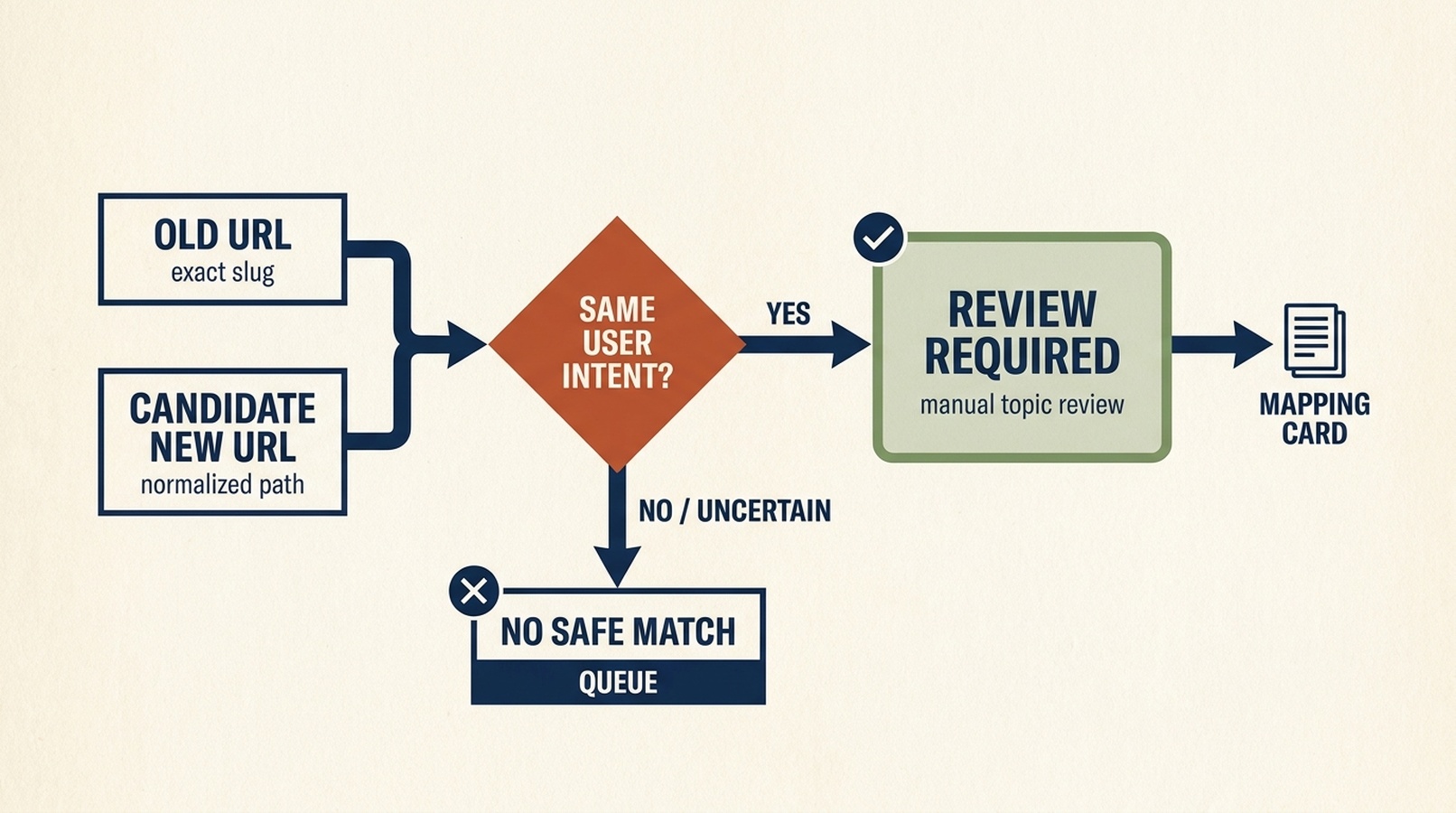
A proposed redirect is a review item, not an instruction to send every old URL somewhere convenient.
When Python becomes the right next step
Keep using the prompt-and-report workflow until it feels boring. That is a compliment: you have identified the stable input, the decision rules, and the useful output columns.
Then consider Python when one of these is true:
- You run the same transformation often enough that a script would save meaningful time.
- You need reproducible parsing or matching rules that deserve tests and version control.
- The source data is too large for an interactive review workflow.
- A team needs a scheduled internal report, with clear logging and safe failure behavior.
Ask Codex to create the script in a new branch or folder, add a small fixture file, explain dependencies, and run it on a copy of your data. Do not jump directly from a successful prompt to a scheduled script with production credentials. The report gives you the specification your future Python code should meet.
Four common Python jobs once your process is stable
Python earns its place when it handles a known input, produces a repeatable output, and leaves a review trail. These are common next projects for an SEO team. They are different jobs, so do not put them in one script just because all four involve a website.
Job | Typical source | Safe first output | Boundary to keep |
|---|---|---|---|
Search performance review | Google Search Console Search Analytics data or an authorized export | A dated page-and-query CSV with clicks, impressions, CTR, and average position | Read-only; do not call a report a ranking truth or an index-status check |
Landing-page behavior review | GA4 Data API or an authorized export | A page-level report of chosen sessions, engaged sessions, conversions, and date range | Define every metric and exclude personal data from the report |
Bing recrawl request | Verified Bing Webmaster Tools property | A one-URL submission log with the canonical URL, time, and response | External write; require explicit approval immediately before the request |
Google recrawl request | Search Console UI for a verified property | A human-completed request record with the inspected canonical URL and time | Treat it as a request, not an indexing guarantee; do not misuse the Indexing API for ordinary pages |
Pull Search Console data, then let Codex explain the shape
The useful Python task is a small, parameterized pull, not an endless dashboard rebuild. Define the property, date range, dimensions, filters, and metric definitions first. For example, pull the last 28 complete days by page and query, save the unedited response as an internal raw file, and create a separate CSV that records the report settings alongside the rows.
Use Codex to create a read-only Python report from my already authorized
Search Console connection. Property: [PROPERTY]. Date range: [START] to [END].
Dimensions: page, query. Export clicks, impressions, CTR, and average position
to reports/gsc-page-query-[DATE].csv. Also write reports/gsc-run-[DATE].md
with the property, dates, dimensions, filters, retrieval time, and the exact
meaning of each metric. Do not inspect URLs, submit sitemaps, publish changes,
or modify the Search Console property. Flag suppressed, missing, or aggregated
data as limitations rather than guessing.
Codex can then group a copy of that CSV into themes, identify pages with enough observed impressions to merit a human review, or prepare a content brief. A fall in clicks may be a query mix change, seasonality, tracking scope, or a page problem. The report should describe the observation, not manufacture a cause.
Google documents Search Analytics as a reporting capability and URL Inspection separately. Keep those two questions apart: performance data does not prove the current index state of an individual URL.
Pull GA4 data without losing the definition of a conversion
GA4 answers a different question from Search Console: what happens after a visitor reaches the site. The GA4 Data API can return reports for a property, but the metric names and business definitions must come from your measurement plan. "Conversion" is not a universal number you can safely merge with clicks without explaining how the property defines it.
Start with a small page-level report for one date range. Choose only metrics your team already trusts, such as sessions, engaged sessions, key events, or a named lead event. Ask Codex to preserve the GA4 property ID as a private configuration value, not a value to print in a public article or share in a prompt.
Use Codex to draft and test a read-only Python GA4 report in this workspace.
Use the authorized GA4 connection already configured on this machine. For the
date range [START] to [END], group by landing page and export only [METRICS]
to reports/ga4-landing-pages-[DATE].csv. Write a companion Markdown file that
defines each metric, notes sampling, thresholding, or missing data when the
API reports it, and records the property, date range, dimensions, filters,
retrieval time, and timezone privately. Do not alter GA4 settings, create
events, change conversions, or expose credentials or user-level data.
Compare the GSC and GA4 exports only after checking that their dates, URL handling, and metric definitions are compatible. Search clicks and GA4 sessions are collected by different systems, so they will not necessarily match one for one.
Submit a URL to Bing only after a person approves it
Bing Webmaster Tools supports a single-URL submission for a verified site. That makes it a legitimate automation target, but it is still an external write. Your workflow should prepare a bing-submission-candidates.csv first, then stop. The final submission command happens only after a responsible person has approved the exact canonical URLs and the account scope.
Use Codex to review input/bing-submission-candidates.csv. Validate URL format,
deduplicate rows, and create reports/bing-submission-review-[DATE].csv with
the canonical URL, evidence that it is live, reason for submission, and
review_required=yes. Do not submit any URLs.

After I explicitly approve the reviewed file and confirm the verified Bing
property, submit only the approved URLs one at a time using the already
configured Bing Webmaster Tools connection. Log the requested URL, property,
time, response, and any failure. Do not retry automatically or submit URLs
outside the approved file.
A successful submission asks Bing to consider crawling the URL. It does not guarantee crawling, indexing, ranking, or a particular refresh time. Keep the submission log so you can distinguish what you asked Bing to do from what later appears in reporting.
For Google, use the proper request path instead of inventing an API call
For ordinary web pages, Google exposes a Request Indexing flow in Search Console after URL inspection for an eligible verified property. That is a human, UI-mediated request. Keep it as a checklist item in the report: confirm the canonical live URL, complete the request in Search Console, and record the time and page owner.
Do not write a general-purpose "submit any URL to Google" Python script. Google's Indexing API has a limited supported use case, such as pages with JobPosting or BroadcastEvent in a VideoObject; it is not the general submission channel for routine content pages. As with Bing, a request is not a promise of indexing or ranking.
A practical data rule for keyword work
Codex can cluster a keyword export, classify likely intent, and identify gaps for a human to review. It cannot truthfully supply keyword volume, difficulty, CPC, SERP features, or competitor data unless you provide an authorized export or configure an approved data source.
When you do have data, tell it exactly what each column means and preserve provenance in the output:
Provider: [provider name]
Report or endpoint: [report name]
Retrieved: [date and time]
Market: [country or market]
Language: [language]
Date range: [range]
Metric definitions: [definitions from provider]
This protects a beginner from a common failure: treating an AI-generated list of plausible words as keyword research. Plausible is not measured.
Your first-hour checklist
- Create the workspace and add the rules file.
- Choose one input: a sitemap, a small URL list, or a pair of migration exports.
- Run one narrow report with no site changes allowed.
- Inspect a random sample against the original source.
- Turn only verified findings into a small human-owned action list.
- Repeat the report after a real release to confirm the evidence changed as expected.
The useful mental shift is small but important: automation is not a machine that makes SEO decisions for you. It is a way to make evidence easier to collect, inspect, and hand to the right person.
Frequently asked questions
Do I need Python to use Codex for SEO?
No. Start with structured inputs and local reports. Learn Python when you have a repeated, well-defined job worth turning into tested code.
Can this workflow tell me whether a page is indexed?
Not from a sitemap or a basic page fetch alone. Treat indexing as a separate question that needs appropriate evidence, such as your Search Console data and technical investigation.
Should I let Codex fix titles, redirects, or robots directives automatically?
No. Let it draft a proposed change with evidence and a diff. A site owner or responsible developer should approve the exact change, then verify it after release.
Can I use an SEO API with this skill?
Only when you have explicit authorization and a securely configured provider. Record the provider, report or endpoint, retrieval time, market, language, and metric definitions. Never put a key or token in the prompt, the skill, or the report.
Can Codex submit every new page to Google and Bing automatically?
No. Bing URL submission is an external write and should run only for URLs in an explicitly approved file. For ordinary Google web pages, use the Request Indexing path in Search Console after inspection; do not use the limited Indexing API as a general page-submission shortcut. Neither request guarantees crawling, indexing, or rankings.
Author: Julian Mercer, 14-Year Technical SEO Practitioner at Auspia. Julian writes about crawlability, structured data, and practical page-level fixes that teams can verify.


