The short answer
Programmatic SEO is a way to publish many pages from a shared system: the same page architecture, a structured data model, and rules for turning each record into a genuinely useful answer or task. It is not a license to swap a city, product, or keyword into the same paragraph hundreds of times.
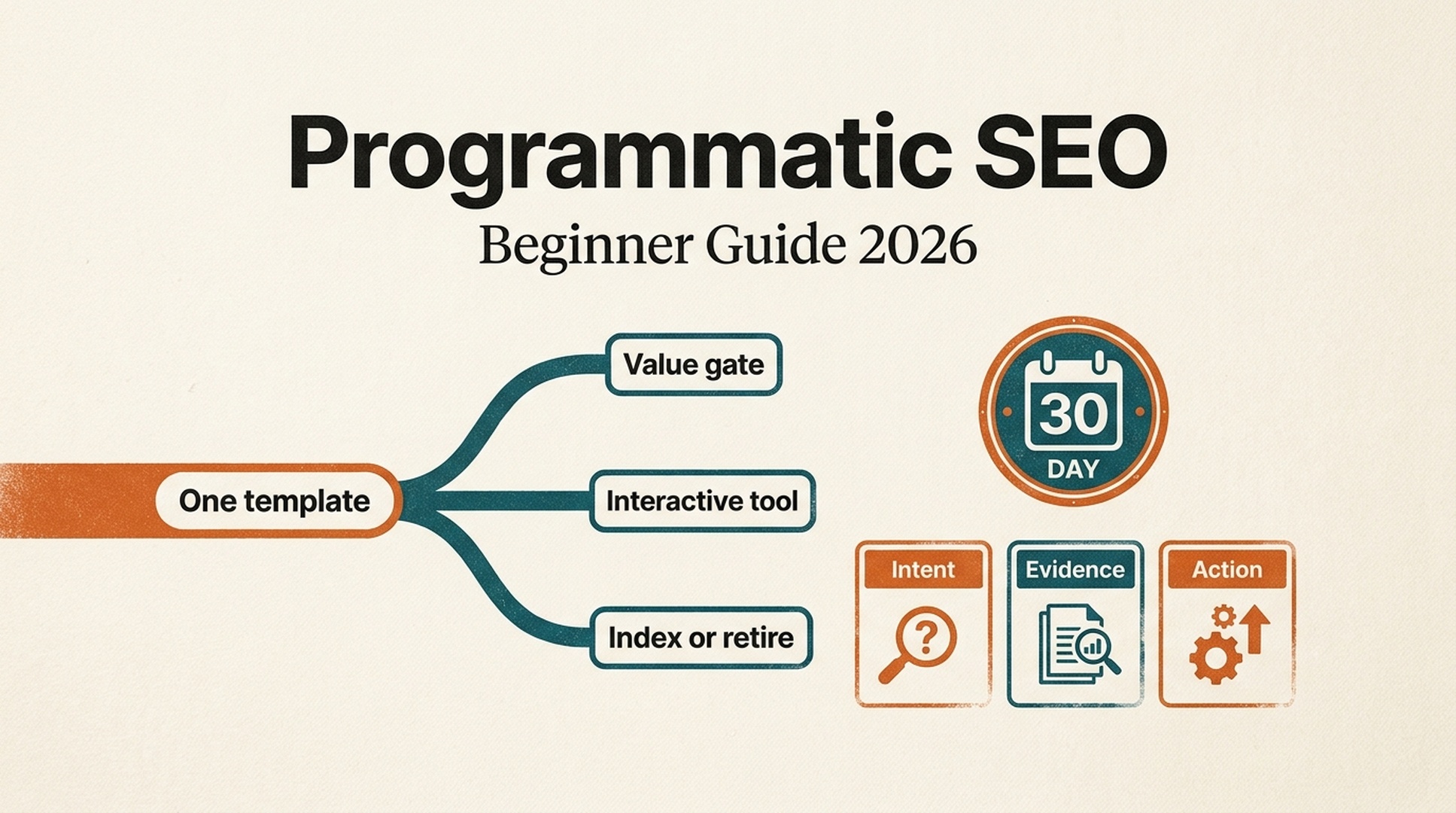
The 2026 version starts smaller than most beginners expect. Build one template, prove that it helps a person do something, publish a small cohort, and then decide which variants deserve more investment. An interactive tool page is often a better starting point than a large directory because the page can produce a result, not merely describe one.
Who this is for: a small SEO, product, or content team with a repeatable query pattern and access to reliable data. What "done" looks like: you have one indexable template, a governed dataset, a clear URL rule, and a 30-day decision to expand, improve, consolidate, or stop.

A programmatic SEO system should scale decisions and evidence, not repetitive prose.
What programmatic SEO means in practice
Traditional editorial SEO usually begins with a question and creates one page at a time. Programmatic SEO begins with a repeatable question pattern, then designs a page system that can answer each valid variation.
For example, a team might build pages around these patterns:
Query pattern | What changes by page | What stays consistent | Useful outcome |
|---|---|---|---|
| Supported triggers, actions, setup steps | Integration page layout | A visitor can find or start a workflow |
| Submitted URL and scan findings | Tool interface and result logic | A visitor receives a site-specific diagnosis |
| Requirements, evidence, comparisons | Evaluation framework | A visitor can narrow a choice |
| Service availability, hours, local proof | Service-page hierarchy | A visitor can take a local action |
The formula is simple: one repeated intent + one trusted data model + one page action = a candidate programmatic system. If any of those is missing, the project is usually content production disguised as programmatic SEO.
There is a practical reason to draw that line. Google's spam policy describes scaled content abuse as generating many pages primarily to manipulate rankings rather than help people, including large quantities of unoriginal pages with little or no user value. Automation is not the prohibited part; the absence of value is the problem.
First, decide whether your idea deserves a template
Do not begin by asking how many URLs you can create. Begin with five hard questions.
Test | A good answer | A warning sign |
|---|---|---|
Is the intent repeated? | Each query asks for the same kind of decision or task. | The queries only share words, not a user need. |
Does each row have meaningful evidence? | Fresh facts, a valid calculation, supported options, or local proof change by row. | Only the title and first sentence change. |
Can the visitor act? | Compare, calculate, filter, start, verify, save, or contact. | The page only repeats a generic explanation. |
Is the data governable? | You know its owner, source, update cadence, and license. | It is copied from search results or scraped without a use right. |
Is there a business path? | The useful action naturally connects to the product or service. | The CTA is unrelated to the query. |
If you answer "no" to two or more, keep the work editorial. A few carefully written pages will be easier to maintain and more useful than a thin catalogue.
A small-team starting point: one tool, not a thousand landing pages
For a small team, a narrow tool page often has the cleanest proof loop. Consider a hypothetical "robots.txt AI crawler check". The first version needs only a valid URL input, a transparent parsing rule, a result that names the blocked or allowed agents, plain-language next steps, and links to deeper documentation. It does not need a city page, an industry page, and 300 AI-written variations on day one.
Once the tool has real usage data, the team can ask whether distinct supporting pages are warranted: a crawler-specific explainer, an implementation guide for a platform, or a comparison of two configuration choices. The template grows outward from demonstrated tasks, not from an empty keyword spreadsheet.
The 2026 opportunity: pages that do work
Searchers increasingly expect a result, not just an explanation. The strongest scaled pages combine structured information with a useful interaction: a converter, compatibility check, filter, route builder, availability lookup, or diagnostic.
Zapier's public Google Sheets and Notion integration page is a practical example of the pattern. Its value is not simply that it names two applications. The page presents workflow templates associated with that pair, so the visitor can move from a specific integration question toward a setup action. That is the bar: the page must earn its existence before the visitor thinks about a search engine.
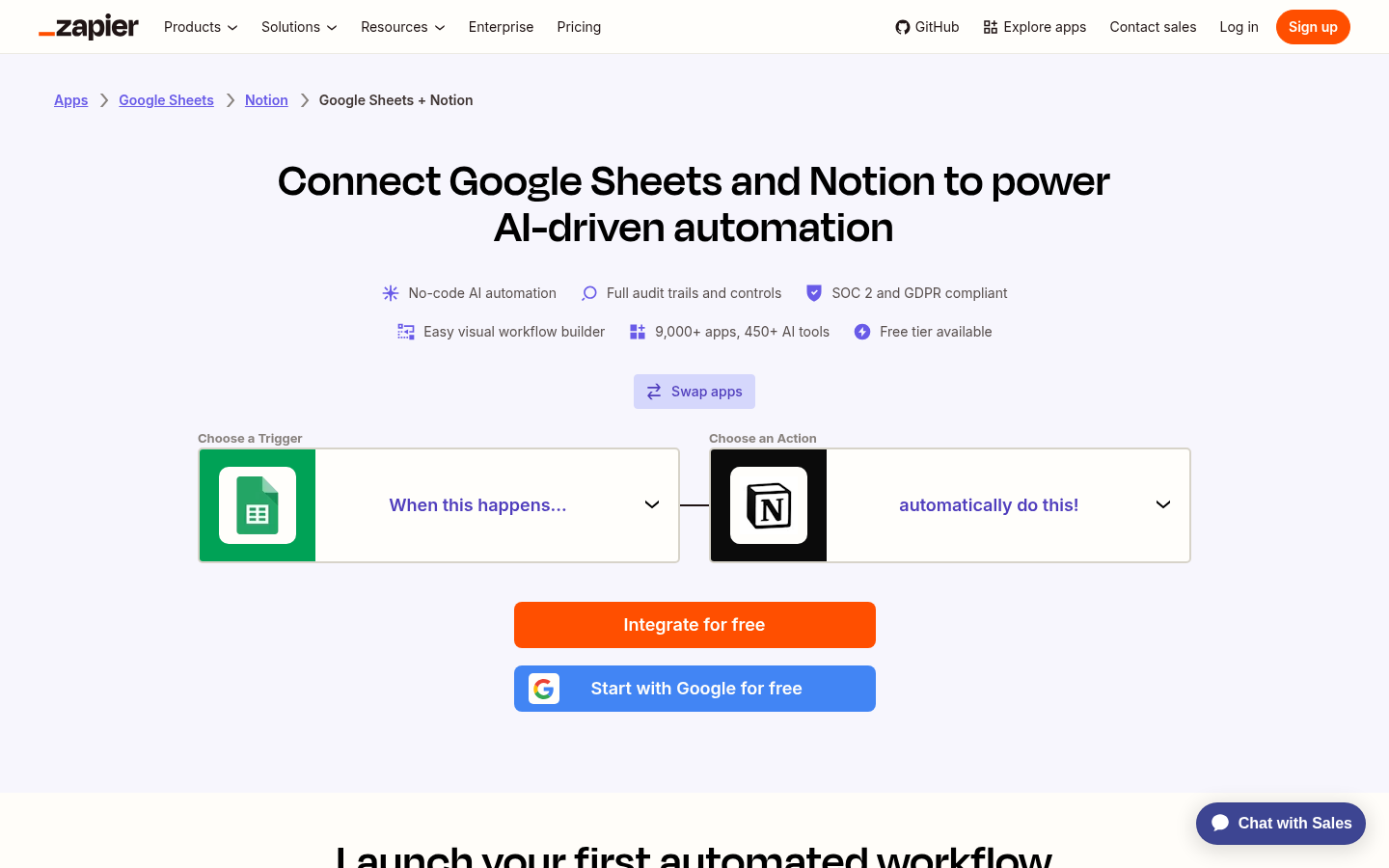
Official Zapier capture, July 2026: the repeated page format carries product-specific workflow choices, not a keyword-swapped article.
An interactive result does not have to be complicated. It can be a one-field check with honest limits. Auspia's public AI Search Visibility Checker is another useful pattern to study: it asks for a site URL and frames the result around crawl access, discovery, readability, bot rules, and citation blockers. For a programmatic tool family, the key lesson is the page architecture: clear input, bounded promise, result area, interpretation, and a next step.
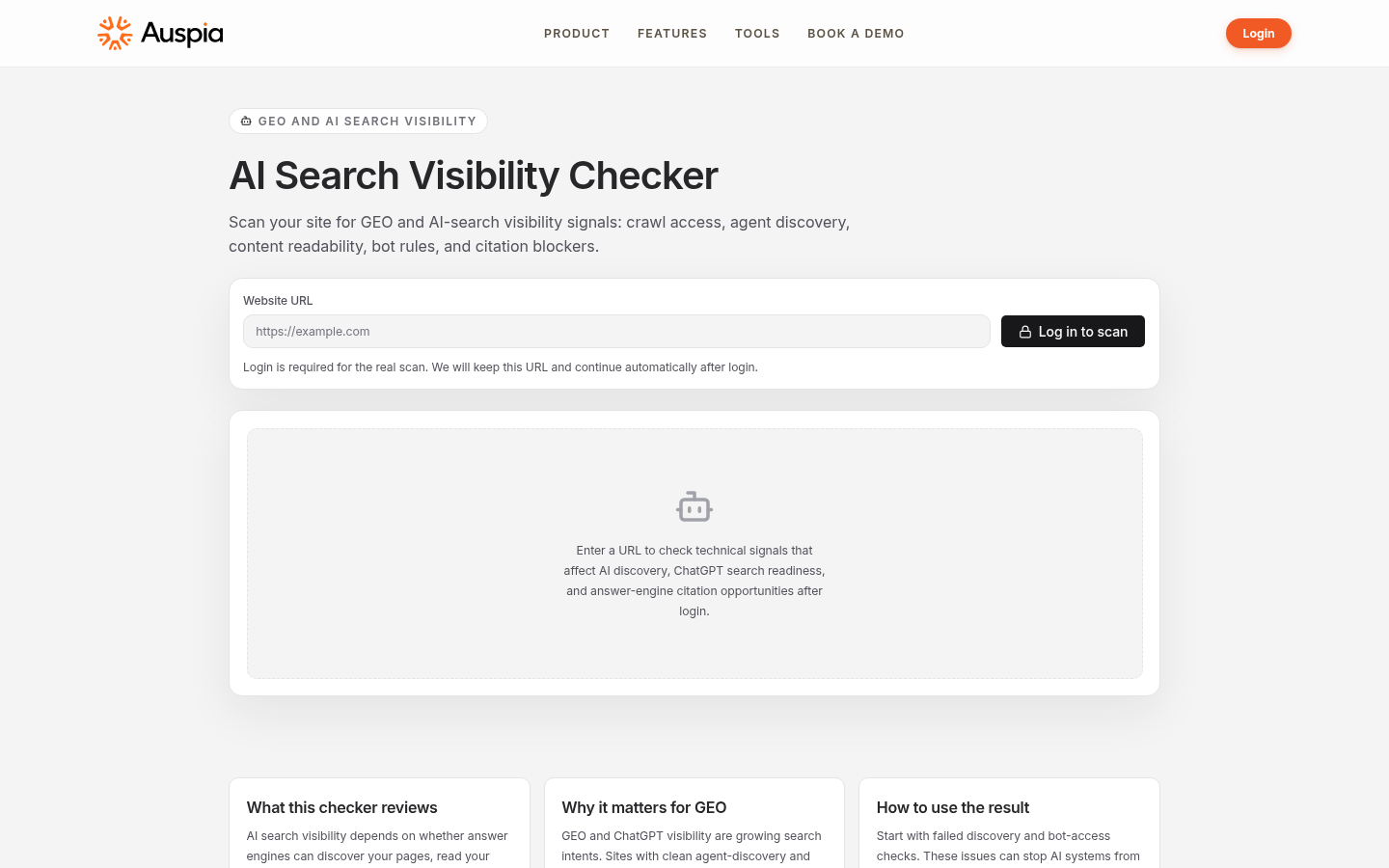
Auspia's public checker illustrates an interaction-led page: a visitor brings a URL and receives a defined class of diagnostic, rather than a generic SEO article.
An observed Auspia tool-page workflow, without invented results
The public checker shows a compact workflow a small team can copy at the level of product design: one URL input, an explicit scan scope, a logged-out explanation of what the checker reviews, and a result path after authentication. It does not make a traffic, ranking, or citation guarantee. That distinction is useful. When a tool page cannot prove an outcome yet, state the checks it performs and the limits of the result instead of manufacturing a success story.
Subdomain vs. subdirectory: make the architecture decision before scaling
There is no universal winner. The right choice follows ownership, technical needs, and whether the pages are part of the same user journey as the main site.
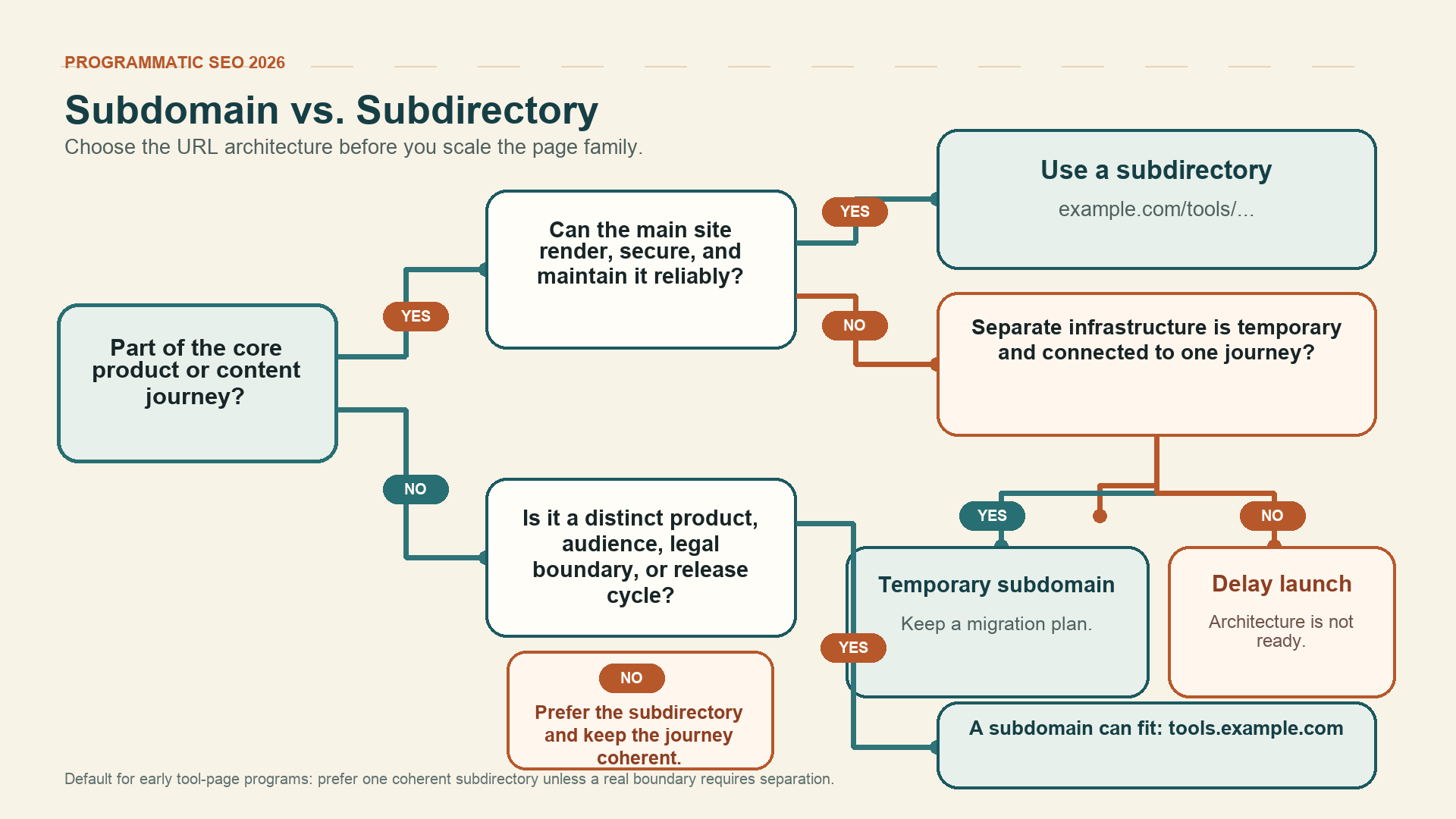
Use a subdirectory by default when the tool belongs to the main journey. Use a subdomain only for a real technical or product boundary, and give a temporary separation a migration plan.
For most early tool-page programs, a subdirectory is simpler: shared navigation, design, analytics, content governance, and internal linking are easier to manage. A subdomain can make sense for a technically separate application or a genuinely separate product boundary. It should not be used to hide a low-value page farm.
Whichever route you choose, avoid creating multiple near-identical URLs for the same intent. Google's canonicalization guidance notes that redirects and rel="canonical" are strong canonical signals, while sitemap inclusion is weaker. Use a consistent preferred URL, internal links, and sitemap entries; do not treat robots.txt as a canonicalization device.
The reusable tool-page data model
A template only works when the content fields are explicit. Do not give a generator one blob called body_copy and hope it produces distinct pages. Define the data, its source, and the condition under which the page should not exist.
Field | Example purpose | Quality rule |
|---|---|---|
| Tool, location, product, or configuration being evaluated | Canonical label and stable ID required |
| The exact job the page serves | One intent per URL |
| URL, pair of apps, product attributes, or location | Validate format before use |
| Score bands, matched workflows, calculation result, or eligibility state | Define all result states, including errors and empty results |
| API results, first-party data, documented capabilities, dated facts | Store source, license, and freshness timestamp |
| Calculation, eligibility rule, compatibility match, or filter | Testable and versioned |
| Limits, exceptions, expert note, or relevant local detail | Must change the decision, not fill space |
| A safe worked input/output example that explains the tool | Clearly label it as an example; never present synthetic output as a customer result |
| Record-specific questions about inputs, results, limits, or eligibility | Use only questions the page can answer accurately |
| Run check, start workflow, compare options, request access | Must match query intent |
| The next useful product or support path after the result | Must be relevant even if the visitor does not convert |
| SoftwareApplication, WebApplication, Product, FAQPage, or none | Match visible content and Google's current structured-data rules |
| Index, noindex, canonical target, or hold | Chosen before publication |
| Next data and quality review | Required for volatile data |
A practical page structure
Use this as a starting template, then remove modules that do not add value:
- A precise title and one-sentence answer. State what the page evaluates or enables.
- The interactive input and output. Put the calculator, checker, filter, or matching interface above the fold when possible, and define success, error, and empty states.
- A worked example. Show what one valid input produces without pretending the example is a customer result.
- Why this result is different. Show the relevant inputs, method, freshness, or limitation.
- Decision support and FAQ. Include a comparison, interpretation, exception, or record-specific answer tied to this page.
- A relevant CTA. Offer the next useful task, documentation path, or product action without interrupting the answer.
- Trust, schema, and maintenance details. Show sources where appropriate, update date, error handling, the matching structured-data type, and a contact/support path.
- Related paths. Link only to genuinely adjacent records or guides, not a wall of mechanically generated links.
Tool Page Quality Gate: a page must pass all five checks
Before a URL enters an XML sitemap, review it as a product surface. The gate below is deliberately strict. A noindex page can be a perfectly useful private, early, or narrow variant; indexation is not the same thing as publication.
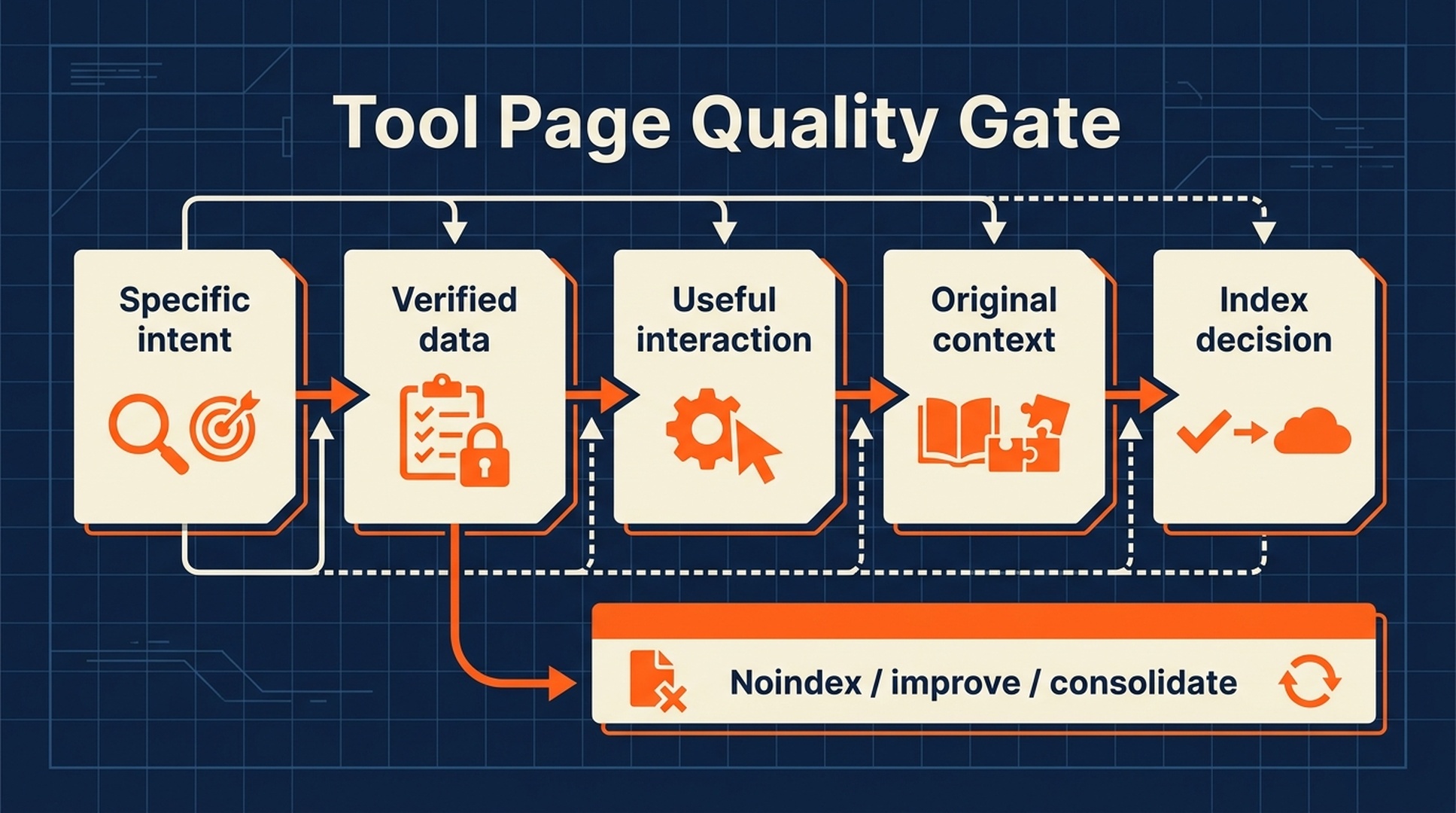
Gate | Pass condition | If it fails |
|---|---|---|
Specific intent | You can state the visitor's task in one sentence. | Merge with a broader page or do not create it. |
Verified data | Inputs have a documented source, owner, and freshness rule. | Hold the page until the data is reliable. |
Useful interaction | The visitor can get a relevant result or make a better decision. | Add utility or turn it into a single editorial guide. |
Original context | The page includes a record-specific explanation, exception, or evidence. | Remove duplicated prose and add meaningful differentiation. |
Index decision | The URL has a deliberate canonical, robots, sitemap, and internal-linking state. | Keep it out of the index while the technical decision is unresolved. |
This gate is also a guardrail for generative AI. AI can help format a table, identify missing metadata, or draft an explanation from approved facts. It should not invent the evidence, local experience, product compatibility, or calculation that makes the page worth visiting.
Programmatic SEO Page Publishing Decision Matrix
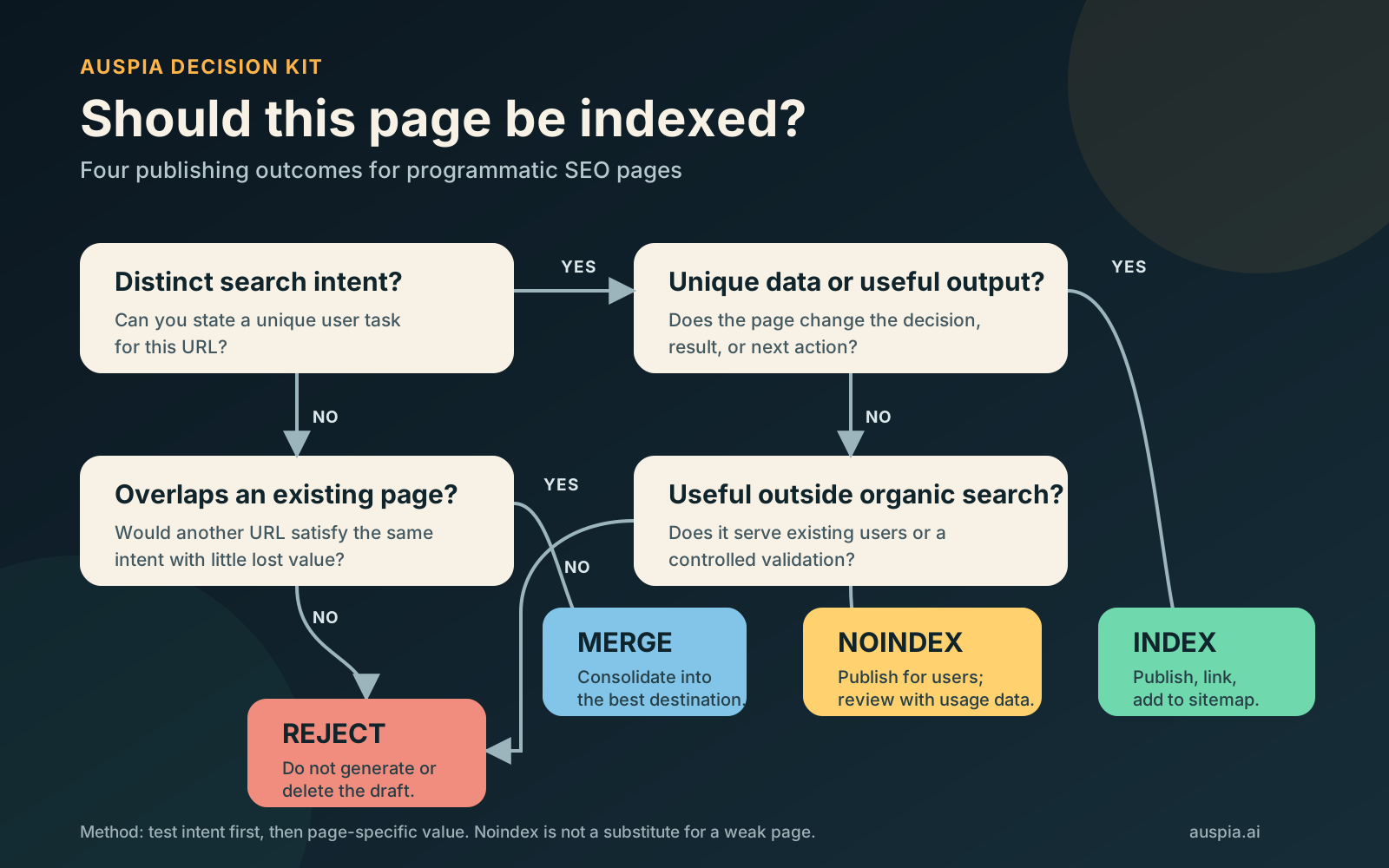
A valid template record is not automatically an indexable page. Give every candidate one explicit outcome before it enters production: Index, Noindex, Merge, or Reject. The decision should follow the page's search intent and user value, not the team's ability to generate the URL.
Outcome | Use it when | Required action |
|---|---|---|
Index | The page serves distinct search intent, passes all five quality gates, and contains page-specific data, evidence, or a useful output. | Publish the canonical URL, link to it internally, include it in the XML sitemap, and allow indexing. |
Noindex | The page has a valid use for existing users or a controlled validation, but its standalone search value is uncertain. | Publish only where users need it, apply |
Merge | Another page already satisfies substantially the same intent and the differences do not change the answer or action. | Consolidate the strongest evidence into one destination. Redirect only if a redundant URL was already published; otherwise merge the draft before launch. |
Reject | The page has no defensible data, output, context, or user need beyond swapping a city, product, or keyword. | Do not generate the URL, or delete the unpublished draft. |
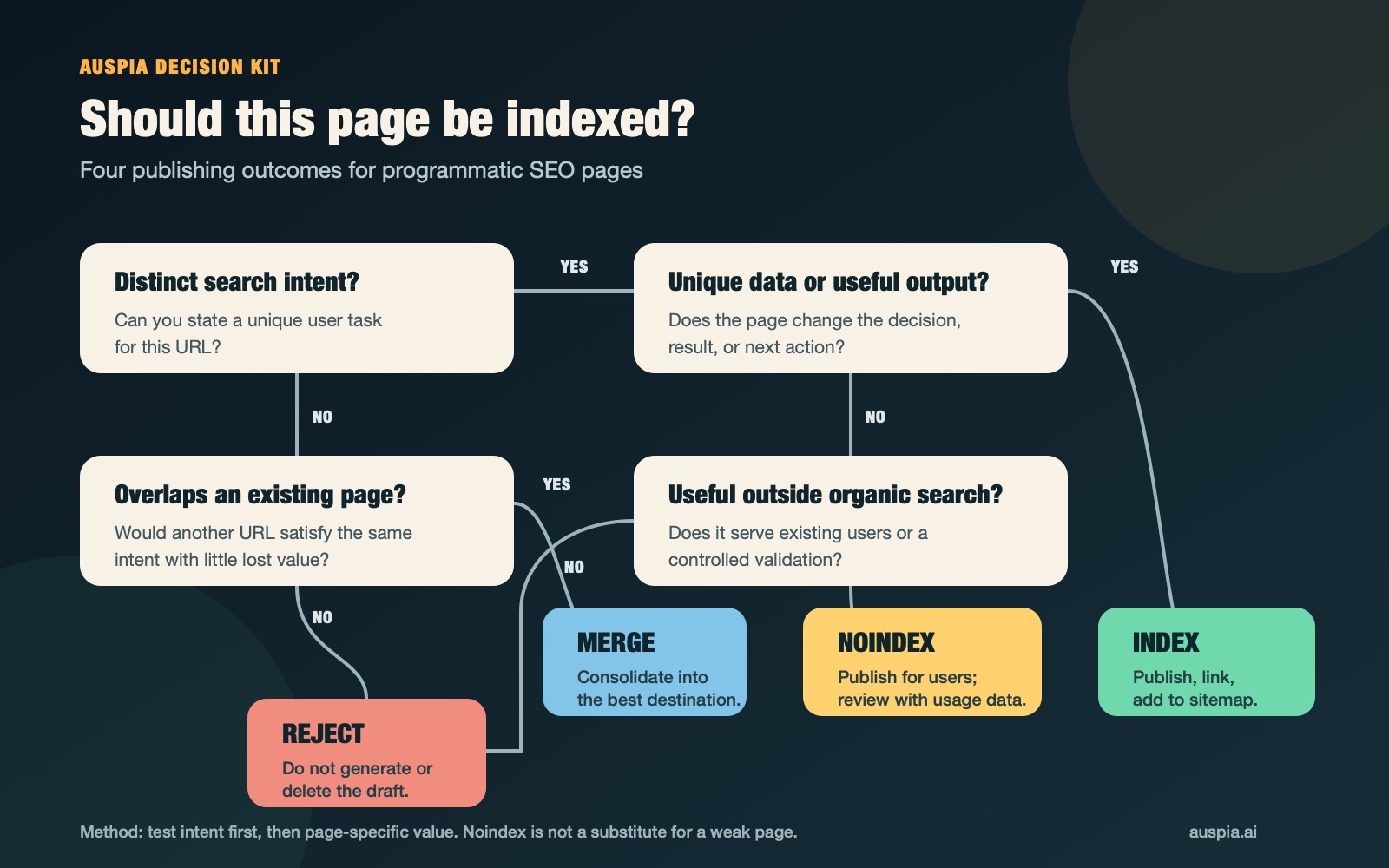
Test intent first, then page-specific value. Open the full-size PNG or open the editable SVG.
The flowchart separates distinct search intent from page-specific value, then reserves Noindex for useful pages that still need validation.
Suggested citation: Auspia Programmatic SEO Page Publishing Decision Matrix, updated August 2026.
Copy the decision framework
Does the page serve distinct search intent?
|-- No: Does it substantially overlap an existing page?
|   |-- Yes: MERGE
|   `-- No: REJECT
`-- Yes: Does it contain unique data, a useful output, or defensible page-specific value?
    |-- Yes: INDEX
    `-- No: Is it useful to existing users or a controlled validation?
        |-- Yes: NOINDEX
        `-- No: REJECT
Noindex is not a waiting room for weak pages. Keep a page noindexed only when someone still has a valid reason to use it. If neither searchers nor existing users need the page, reject it.
Set up the page audit sheet
Use one row per generated URL. The columns below are tab-separated, so you can copy the line and paste it into the first row of Excel or Google Sheets.
Copy the Auspia Programmatic SEO Page Publishing Audit Template
Generated URL Page family / template Target query Search intent Distinct intent confirmed Unique data present Useful output present User value evidence Content similarity Canonical or merge target Initial decision Decision reason Index status Sitemap status Published date Review date 30-day impressions 30-day clicks Direct sessions Useful actions Conversions Final decision OwnerSearch Console impressions and clicks apply only to pages that are allowed to appear in search. Review noindexed pages with direct sessions, completed tasks, support demand, or conversions instead. A fixed 30-day window is a useful first-cohort review point, not a universal deadline for proving search demand.
Method updated: August 2026. This framework is a publishing control, not a promise of rankings, traffic, links, or AI citations.
A 30-day rollout that gives you permission to stop
The point of a first cohort is not to prove that you can publish quickly. It is to learn whether a template creates useful pages without accumulating a cleanup problem.
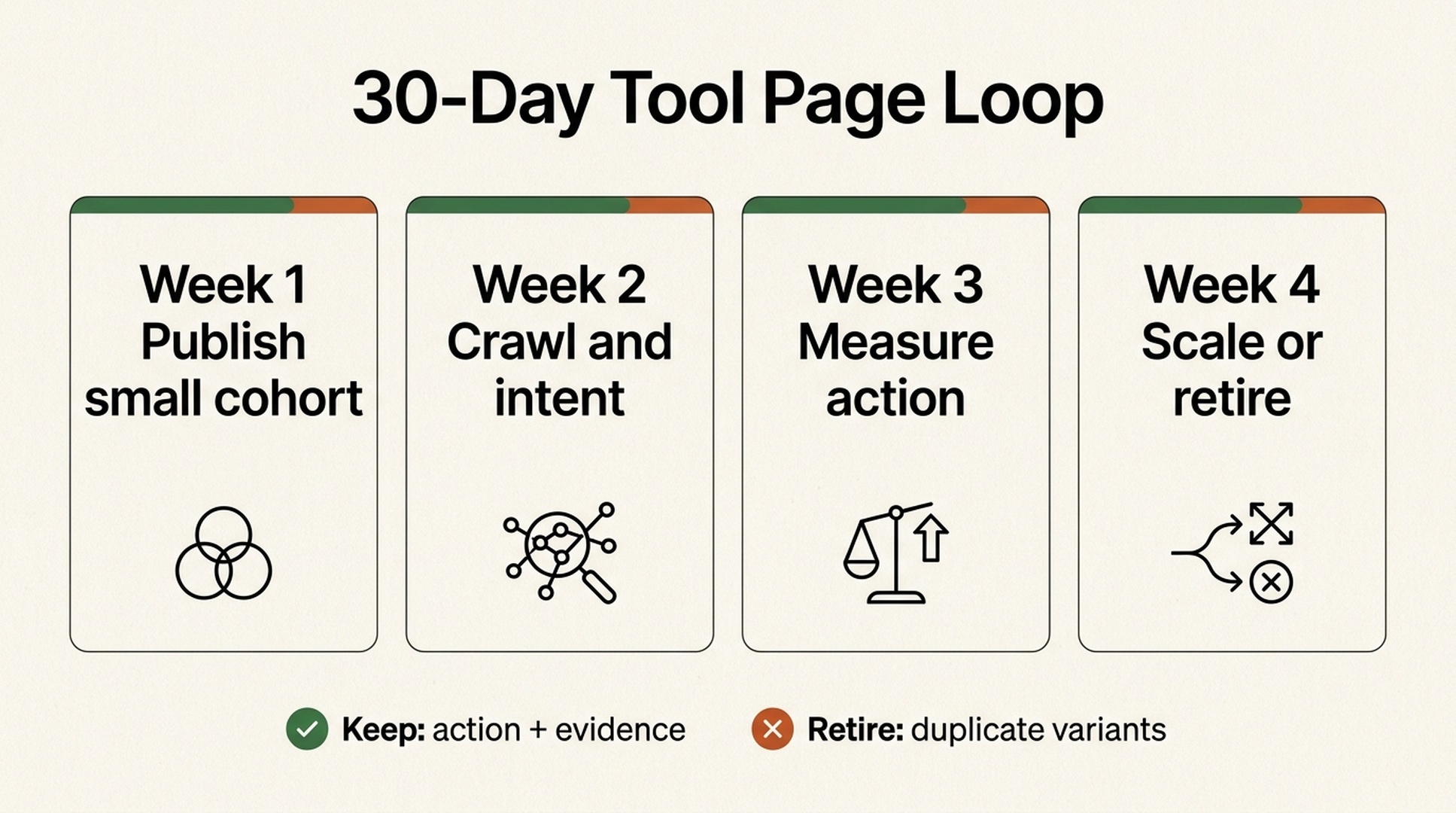
Days 1-7: publish a deliberately small cohort
Release 10-25 variants, not 1,000. Give each an owner, index rule, source record, internal-link path, and a measurable action. Manually inspect the first and last record in every important data state. If the product has a free interaction, test it with valid, invalid, and edge-case inputs.
Days 8-14: check crawlability and intent alignment
Use Google Search Console to review indexing and search-performance signals, then compare a sample of visible queries with the page's intended job. Its public product page describes a role in measuring search traffic and performance and helping site owners fix issues. That makes it a feedback tool, not a guarantee that every URL will be indexed.
Official Google capture, July 2026. Use property data and URL inspection to investigate a cohort; do not interpret early non-indexation as proof that a page needs more copy.
Fix broken canonicals, accidental noindex, rendering failures, empty result states, and pages that clearly target the wrong query. Do not respond to a weak page by adding generic paragraphs.
Days 15-21: measure whether the page earns attention
Track the cohort at the template level as well as the URL level: impressions, clicks, query mix, result completion, CTA use, assisted conversions, error rate, and data freshness. In GA4, group the cohort by page path or content group and verify that a useful interaction emits a named event such as tool_result_view, tool_complete, or cta_click; map only the event that represents a real business outcome as a conversion. A page with modest traffic but frequent useful actions may be a better scale candidate than a high-impression page with immediate exits and no completed task.
Days 22-30: expand, improve, consolidate, or retire
Use a written decision for every family:
Decision | Use it when | Next move |
|---|---|---|
Expand | Pages pass the quality gate and show a credible task or conversion signal. | Add the next small data segment, then repeat the loop. |
Improve | The intent is sound but evidence, interaction, or explanation is weak. | Fix the failing module before adding variants. |
Consolidate | Several URLs answer the same task with marginal differences. | Select a preferred page, redirect where appropriate, and update internal links. |
Retire or noindex | A variation has no standalone value, untrustworthy data, or an unsupportable maintenance cost. | Remove from discovery paths and preserve only what users genuinely need. |
The beginner's technical checklist
- Render meaningful primary content and the core interaction reliably for users and crawlers; do not hide the useful result behind an unexplained login wall.
- Generate unique title tags and descriptions from meaningful fields, then sample them for repetition and truncation.
- Add relevant structured data only when the visible page actually supports it. Schema is clarification, not a substitute for utility.
- Provide a self-referencing canonical only when the page is the preferred version. Point duplicates to the one page that best serves the task.
- Build internal links from hub pages and related entities based on user paths, not simply every possible combination.
- Record data source, license, update job, last-successful refresh, and fallback behavior for each record type.
- Monitor template-level errors: missing fields, empty cards, invalid calculations, stale records, and unexpected URL growth.
When programmatic SEO is the wrong move
Do not use a page factory for a subject that requires fresh judgment on every page: sensitive medical decisions, legal outcomes, original investigative reporting, nuanced product reviews you have not actually conducted, or location guidance with no trustworthy local evidence.
Likewise, do not create tool pages that only imitate usefulness. A button that produces a generic AI paragraph, a calculator with undisclosed assumptions, or a comparison table built from copied vendor claims may look polished but will not create a defensible content asset.
The best test is blunt: if the keyword vanished, would someone still use this page? If the answer is no, build less.
Frequently asked questions
Is programmatic SEO only for large companies?
No. Large sites can support huge databases and many templates, but a small team can start with one narrow, data-backed page system. The key is a repeatable job and a maintenance plan, not page count.
Are interactive tool pages automatically good for SEO?
No. An interaction helps when it solves the searcher's task and the page explains inputs, results, limits, and next steps. A thin tool wrapper with no reliable result can still be low value.
Should every programmatic page be indexed?
No. Index only variants with a distinct search need and enough standalone value. Use noindex, canonicalization, consolidation, or retirement for duplicates, experiments, private states, and weak variants.
Can AI write programmatic SEO pages?
AI can assist with controlled tasks such as metadata drafts, approved-data summaries, quality checks, and content operations. It cannot replace verified evidence, actual tool behavior, or human review of whether a page deserves to exist.
Author: Daniel Cross, Programmatic SEO Architect for 50k+ Page Systems at Auspia. Daniel writes about data-led templates, scalable page governance, and technical systems that preserve user value. Last reviewed: August 5, 2026.