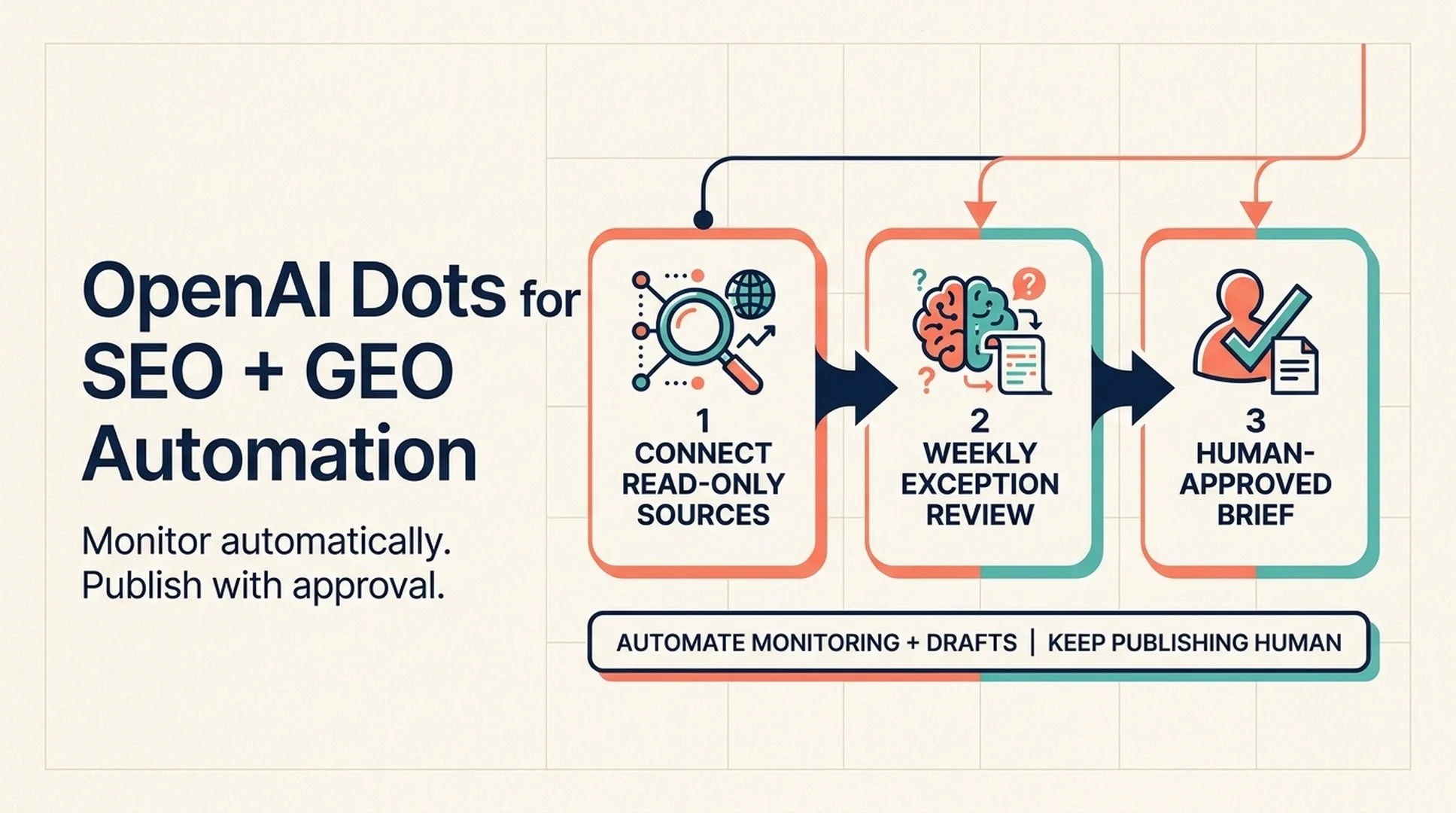
OpenAI Dots can take over a meaningful slice of SEO and GEO operations, but not the part most people want to automate first. The useful work is monitoring, evidence gathering, brief production, internal-link checks, and reporting. The risky work is publishing, changing live pages, and sending anything to customers or partners.
That split matters because of what Dots actually are. OpenAI describes them as always-on agents with their own cloud computer, their own browser, and access to the apps you connect. They can keep working toward a goal between conversations, run scheduled tasks, and carry context across ChatGPT, Slack, and Teams. They also operate under approval rules and an action review layer that checks consequential steps before they run.
For a growth team, that combination is more interesting than another content generator. A Dot can keep SEO and GEO work moving when nobody has time to open six dashboards. It needs a narrow job, clean inputs, and a clear boundary around what it may do without asking.
What you will finish with
By the end of this workflow, you will have one Dot running a repeatable SEO and GEO operating loop:
- A written scope that says what the Dot owns, what it may only recommend, and what it must never touch.
- Connected data sources for search performance, AI answer observations, content inventory, and team communication.
- A weekly monitoring run that produces a short exception report instead of a wall of dashboards.
- A brief pipeline that turns confirmed opportunities into evidence-backed outlines with source links and relevant page-to-page link recommendations.
- A verification routine that checks the Dot's work before a human publishes or changes anything.
This is designed for a small SEO, content, or growth team that already has a website, some search data, and at least one person who can review the output. You need access to ChatGPT with Dots available, the desktop app for setup, and permission to connect the relevant accounts. Budget two to three hours for the first setup, then 30 to 60 minutes per week for review.
Done means a reviewer can open the Dot's activity, see why each item was flagged, trace every claim to a source, and approve or reject the next action without redoing the research.
Before you start: access, inputs, and assumptions
Dots are rolling out gradually. At launch, OpenAI says they are available to Pro users in markets outside the European Economic Area, Switzerland, and the UK, and to Business Premium users across supported regions. Enterprise, Edu, and Healthcare workspaces can try the beta after an admin enables it. If your workspace does not have access yet, build the prompts and data contracts now and run them manually until it does.
You will need four kinds of input:
Input | What the Dot uses it for | Minimum viable version |
|---|---|---|
Search performance data | Find pages losing impressions, queries with weak CTR, and new query clusters | Google Search Console access, or a weekly CSV export |
AI answer observations | Track whether your brand and pages appear in AI-generated answers | A fixed prompt set run in your target platforms, recorded in a sheet |
Content inventory | Match opportunities to existing pages before anyone writes something new | A sitemap plus a spreadsheet with URL, title, target query, owner, and last update |
Team channel | Receive exceptions, approve drafts, and keep a review trail | Slack, Teams, or email connected to the Dot |
Two assumptions keep this workflow honest. First, the Dot is not a ranking factor. It does not make Google or an AI assistant trust your site. It helps your team find and act on signals faster. Second, AI answer observations are samples, not a complete measurement of visibility. Treat them as directional evidence that needs repeated checks.
If you are not sure which AI visibility signals are worth tracking, start with the AI Search Visibility Checker to establish a baseline before you automate the reporting.
Set the Dot's job description before you connect anything
The most common failure mode with an always-on agent is a broad mandate. "Improve our SEO" is not a job. It is a wish. A Dot needs a scope it can follow when you are not in the room.
Write the job description in a document the Dot can read, then paste the same rules into its Custom Rules. Keep it short enough that you can check it in one screen.
A workable scope looks like this:
Area | Allowed without asking | Requires approval | Never |
|---|---|---|---|
Research | Read connected data, browse public pages, summarize findings | Contact a third party or request gated data | Buy links, scrape behind a login, or bypass a paywall |
Content | Draft briefs, outlines, metadata, and page-to-page link recommendations | Publish, update a live page, or change a canonical | Invent statistics, quotes, or first-party results |
Technical | Flag broken links, redirect chains, and missing metadata | Edit templates, robots.txt, sitemap files, or structured data | Change analytics, DNS, or server configuration |
Reporting | Post a weekly exception report in Slack or Teams | Email clients, partners, or external stakeholders | Share private performance data outside the workspace |
Then add a short operating brief:
You are the SEO/GEO operations Dot for [company].

Your job:
1. Monitor the connected search, content, and AI-answer sources.
2. Surface only changes that need a human decision.
3. Prepare evidence-backed briefs for approved opportunities.
4. Never publish, edit a live page, or contact anyone outside the team.

Every finding must include:
- What changed
- The source and date
- Why it matters
- The recommended next action
- A confidence label: confirmed, likely, or needs verification

If a source is unavailable, say so. Do not fill gaps with assumptions.
That last instruction is doing real work. Agents are good at sounding confident with incomplete data. A confidence label forces the Dot to separate what it observed from what it inferred.
Connect only the sources that change a decision
OpenAI says Dots can connect to apps through plugins, and that proactive background research is restricted to read-only tools. That is the right default for SEO and GEO work. Give the Dot read access first. Add write access only when a specific workflow has earned it.
For a first version, connect four sources:
- Search Console or a search data export. This is the closest thing to first-party demand data. Use it to find query and page changes, not to prove causation.
- Your content inventory. A sitemap plus a spreadsheet is enough. The Dot needs to know what already exists before it recommends a new page.
- An AI answer log. Keep it simple: prompt, platform, date, whether the brand appeared, which URLs were cited, and a short note on accuracy. A spreadsheet works better than a complicated dashboard at this stage.
- A team channel. Slack or Teams gives the Dot a place to post exceptions and receive approvals. It also creates a record of what was reviewed.
Do not connect everything on day one. Every connection adds context, permissions, and another way for stale or conflicting data to enter the workflow. If a source does not change a decision, leave it out.
One practical constraint: at launch, a Dot can use your personal email account, but it cannot have its own standalone email address. If your workflow depends on sending from a shared inbox or a dedicated SEO address, keep that step with a human until the product supports it.
Run a weekly exception review, not a weekly report
A weekly report that restates every metric trains people to ignore it. A weekly exception review does the opposite: it surfaces only the changes that cross a threshold you defined in advance.
Ask the Dot to run this check every Monday morning:
Check | Trigger | What the Dot returns |
|---|---|---|
Search demand shift | A tracked query or page moves beyond your normal range | The change, the comparison period, and the affected URL |
CTR gap | A page ranks in the top 10 but underperforms the site's average CTR for that position | The query, the page, and two title or snippet hypotheses |
Content decay | A previously stable page loses impressions for three consecutive weeks | The page, the trend, and whether the content is outdated or outranked |
AI answer gap | A tracked prompt stops citing your brand or starts citing a competitor | The prompt, the platform, the cited sources, and the observed answer |
Technical drift | A monitored URL returns an error, gains a redirect, or loses a canonical | The URL, the change, and the likely owner |
The output should fit on one screen. For each exception, require the same five fields: what changed, the source, why it matters, the recommended action, and the confidence label.
This is the part a Dot handles well. It can check the same sources every week, and it can bring context from last month's review into this month's decision. It should not decide that a traffic dip is a content problem without checking seasonality, tracking changes, and whether the page was updated.
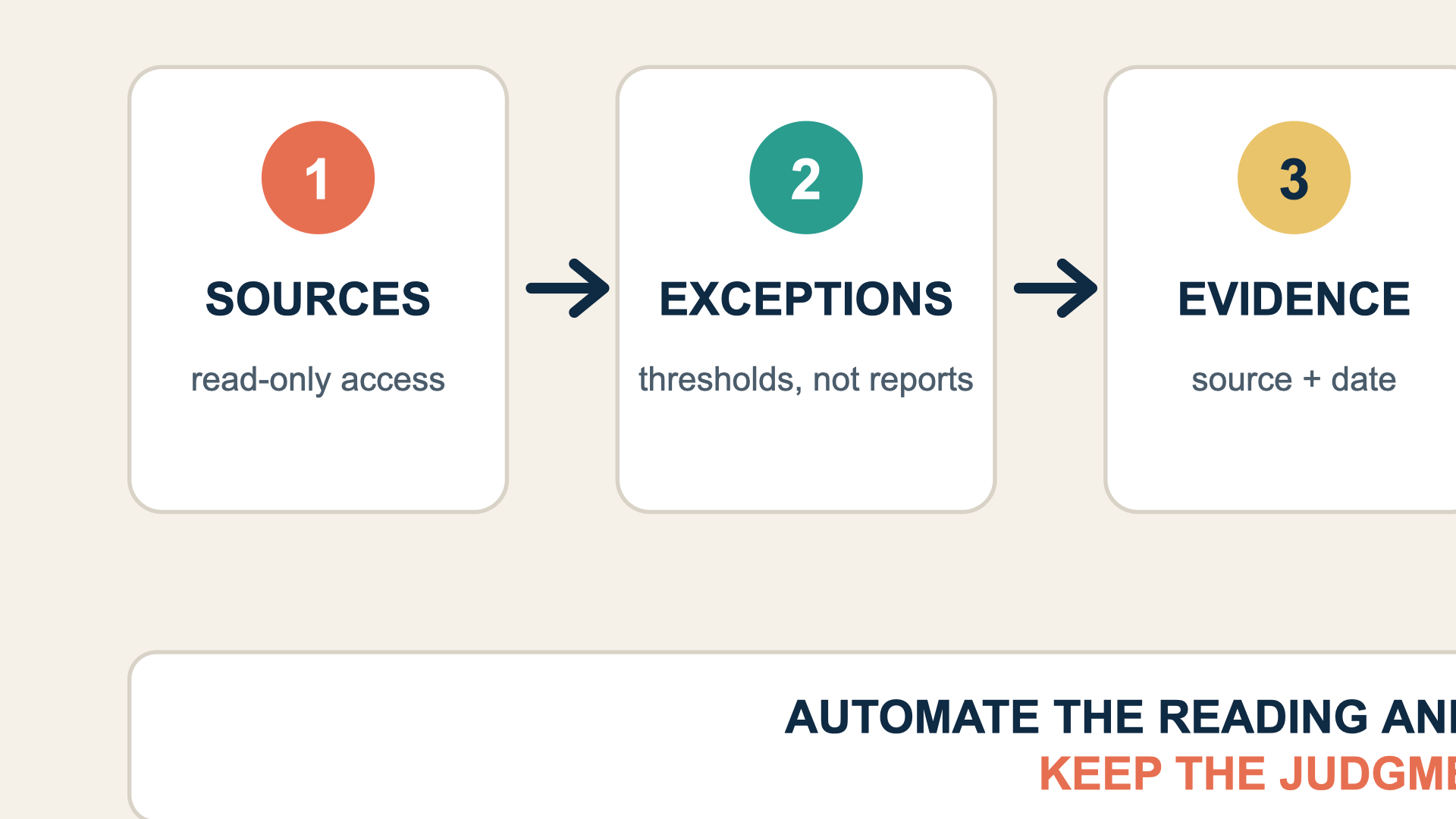
The weekly loop ends with a human decision. The Dot handles the reading, checking, and preparation between reviews.
Turn confirmed exceptions into evidence-backed briefs
Once a human approves an exception, the Dot can move into production support. This is the part most teams try to automate too early. The brief comes before the draft, and the evidence comes before the brief.
A useful brief has six parts:
- The opportunity. One sentence on the query, page, or prompt that needs attention.
- The evidence. Links to the source data, the date range, and the specific change that triggered the work.
- The reader intent. What the searcher or AI user is trying to accomplish, with the query variants you expect.
- The existing coverage. Which pages already answer part of the question, and whether this should be an update or a new page.
- The answer shape. The direct answer, the supporting sections, and the table, checklist, or example that makes the page extractable.
- The link path. The most relevant existing page to link from, with a reason. Do not force a link if the connection is weak.
Ask the Dot to produce the brief in a fixed format and attach the source links. Then review three things before anyone writes:
- Does the evidence actually support the opportunity, or is the Dot pattern-matching on a single data point?
- Does an existing page already cover this intent well enough to update instead of creating a new URL?
- Is the recommended answer shape useful to a person, or is it just a collection of keywords?
If the brief passes, hand it to a writer. If it fails, correct the brief and tell the Dot why. That feedback is how the Dot learns your standards over time.
Verify the Dot's work before anything goes live
Dots can make mistakes. OpenAI says this directly, and the safety documentation notes that agents can be misled by malicious instructions in webpages, emails, or documents. That is not a reason to avoid the workflow. It is a reason to keep a human check on anything that leaves your workspace.
Use a three-pass verification:
Pass 1: Source check. Open every source the Dot cited. Confirm the date, the number, and the context. If a claim cannot be traced, remove it.
Pass 2: Fact check. Compare names, dates, prices, product claims, and statistics against a primary source. This matters more for GEO work because AI systems often reuse whatever is easiest to extract, including a confident mistake.
Pass 3: Action check. Before publishing or changing a live page, confirm what will change, who owns the change, and how you will roll it back. For technical changes, keep a copy of the previous state.
The approval rule should match the risk. Drafting a brief is low risk. Posting it in a private team channel is low risk. Publishing a page, changing a canonical, editing robots.txt, or emailing a partner is not. Keep those behind an explicit approval every time, even if the Dot has done the task correctly before.
What to automate first, and what to leave alone
If you are starting from zero, automate in this order:
- Recurring monitoring. This is the highest-value, lowest-risk use case. The Dot reads data you already have and tells you what changed.
- Exception summaries. A short, consistent summary is easy to review and easy to improve with feedback.
- Brief production. Once the Dot understands your format and evidence standard, it can save real time on the first draft of a brief.
- Page-to-page link recommendations. Useful, but only after the Dot can see your content inventory and understand page intent.
- Reporting. Let the Dot assemble the numbers, but keep the interpretation and the client-facing narrative with a human.
Leave these alone for now:
- Publishing without review.
- Changing technical SEO settings.
- Sending outreach or partnership emails.
- Making claims about rankings, traffic, or AI citations that the data does not support.
- Giving the Dot access to systems it does not need for the current job.
Automate the reading, the organizing, and the first draft. Keep judgment, publishing, and external communication with a person.
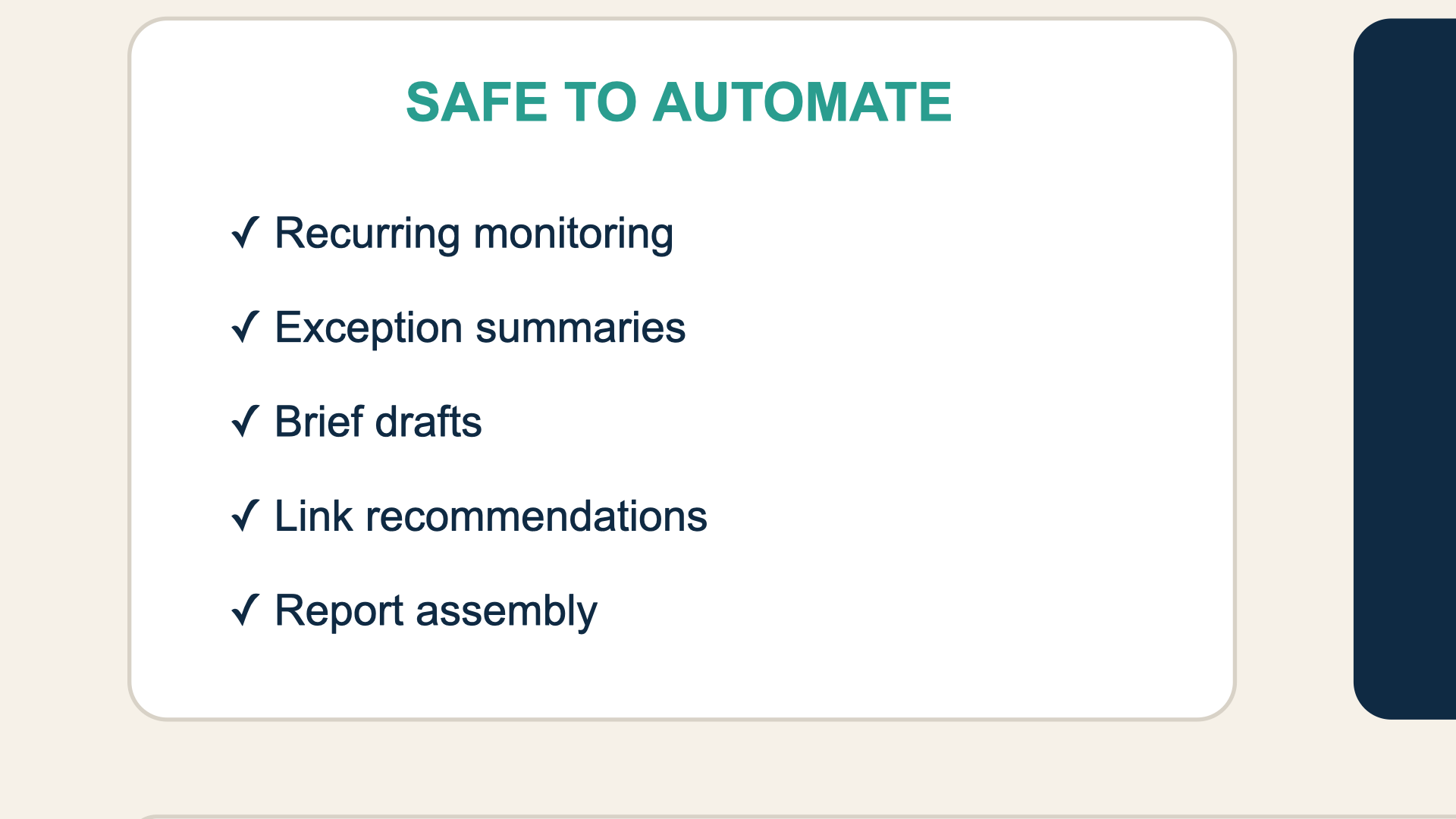
Use the boundary as a permission rule, not a suggestion. Publishing, technical changes, outreach, and final claims stay with a person.
Measure whether the workflow is actually working
Do not measure the Dot by how much content it produces. Measure the operating loop.
Metric | What it tells you | Healthy direction |
|---|---|---|
Exceptions reviewed per week | Whether the Dot is finding useful signals or creating noise | Stable or slightly down as thresholds improve |
Brief acceptance rate | Whether the Dot understands your standards | Up over the first month |
Time from signal to approved brief | Whether the workflow removes delay | Down |
Rework rate | Whether the Dot's evidence and format are reliable | Down |
Published changes with a traceable source | Whether the team is acting on evidence | Up |
AI answer accuracy checks passed | Whether the brand facts in AI answers are correct | Up |
Review the workflow after 30 days. If the Dot is producing too many low-value exceptions, tighten the thresholds. If it is missing real changes, widen them. If the briefs need heavy rewriting, improve the brief template before you add more sources.
FAQ
Can OpenAI Dots publish SEO content automatically?
They can help produce drafts, briefs, and metadata, but publishing should stay behind a human approval. A Dot can be wrong, and a live page can affect customers, search systems, and brand trust. Keep the publish action with a person.
Are Dots available on every ChatGPT plan?
No. At launch, OpenAI says Dots are rolling out to Pro users in eligible markets and to Business Premium users across supported regions. Enterprise, Edu, and Healthcare workspaces can try the beta after an admin enables it. Access is gradual, so your account may not have it yet.
Can a Dot replace an SEO tool?
Not yet. A Dot can connect to tools, read data, and coordinate work, but it still needs reliable sources. Search Console, a rank tracker, a crawler, and an AI visibility log all provide inputs the Dot cannot invent.
How many Dots does a team need?
Start with one. Give it a narrow SEO and GEO operations job, run it for a month, and fix the workflow before you add another Dot. A second Dot only makes sense when the first one has a stable scope and a clear handoff.
What is the biggest risk?
Treating the Dot like an autonomous employee instead of a supervised operator. The risk is not that it will do nothing. The risk is that it will do something plausible, confident, and wrong while nobody is watching.
Author: Camille Rhodes, Architect of 300+ AI Content Workflows at Auspia. Camille writes about AI-assisted content workflows, automation, publishing systems, and editorial quality control.