


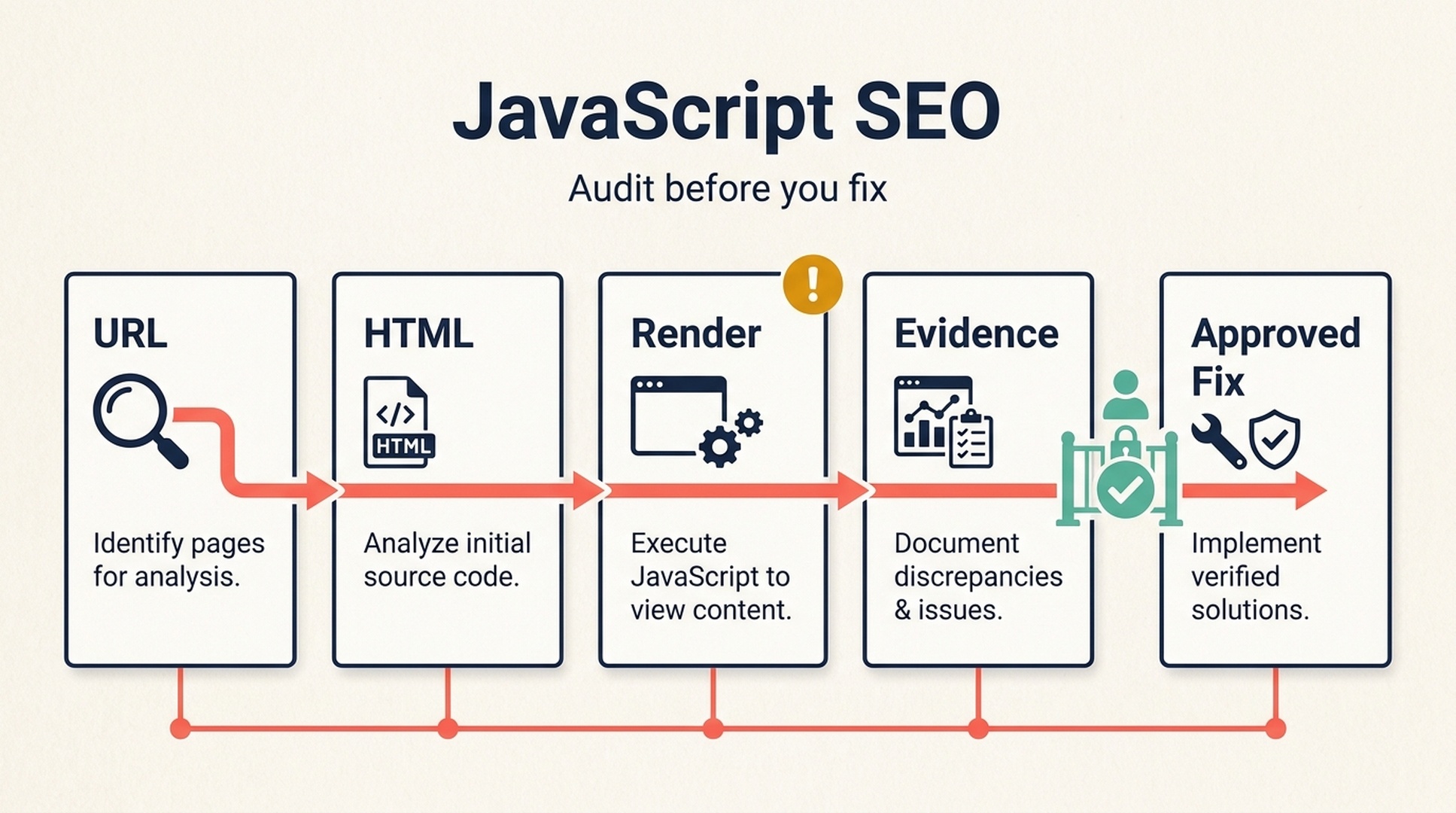
JavaScript SEO is not about making a site use less JavaScript. It is about making sure search engines can discover the important URLs, retrieve the important page information, and interpret the rendered page reliably. A website can look perfect in your browser and still make those jobs harder than they need to be.
This guide starts with the plain-English fundamentals. Then it gives you a cautious way to use Codex as an SEO assistant: first to gather evidence, later--and only with your approval--to prepare a small, testable fix. You do not need to become a developer to use the workflow, but you should involve one whenever a change affects rendering, routing, servers, or production releases.
The completion goal is modest and useful: you will have a documented audit of one page, a prioritized list of risks, and a safe next action for each one. It is not a guarantee of indexing, rankings, rich results, traffic, or inclusion in an AI answer.
Part 1: JavaScript SEO, explained without the developer vocabulary
The short version
Every webpage begins as a request for a URL. On a simple HTML page, the server returns most of the headline, text, links, and metadata straight away. On a JavaScript-heavy page, the initial response may contain a small shell while the browser runs scripts to fetch and show the useful parts.
People can wait for that work to finish. Search systems also process JavaScript, but the route from URL to usable search information has more stages and more places for an implementation to fail. The practical question is not, "Does this page use JavaScript?" It is, "Can a search engine consistently discover the page and its important information?"
Search system discovers a URL
           |
           v
Fetches the HTML response and allowed resources
           |
           v
Processes and, where needed, renders JavaScript
           |
           v
Finds content, links, metadata, and structured data
           |
           v
Uses those signals in its indexing and serving systems
This is deliberately simplified. Search engines do not publish every implementation detail, and their handling can change. Google's current JavaScript SEO documentation is the right primary reference when you need platform-specific guidance.
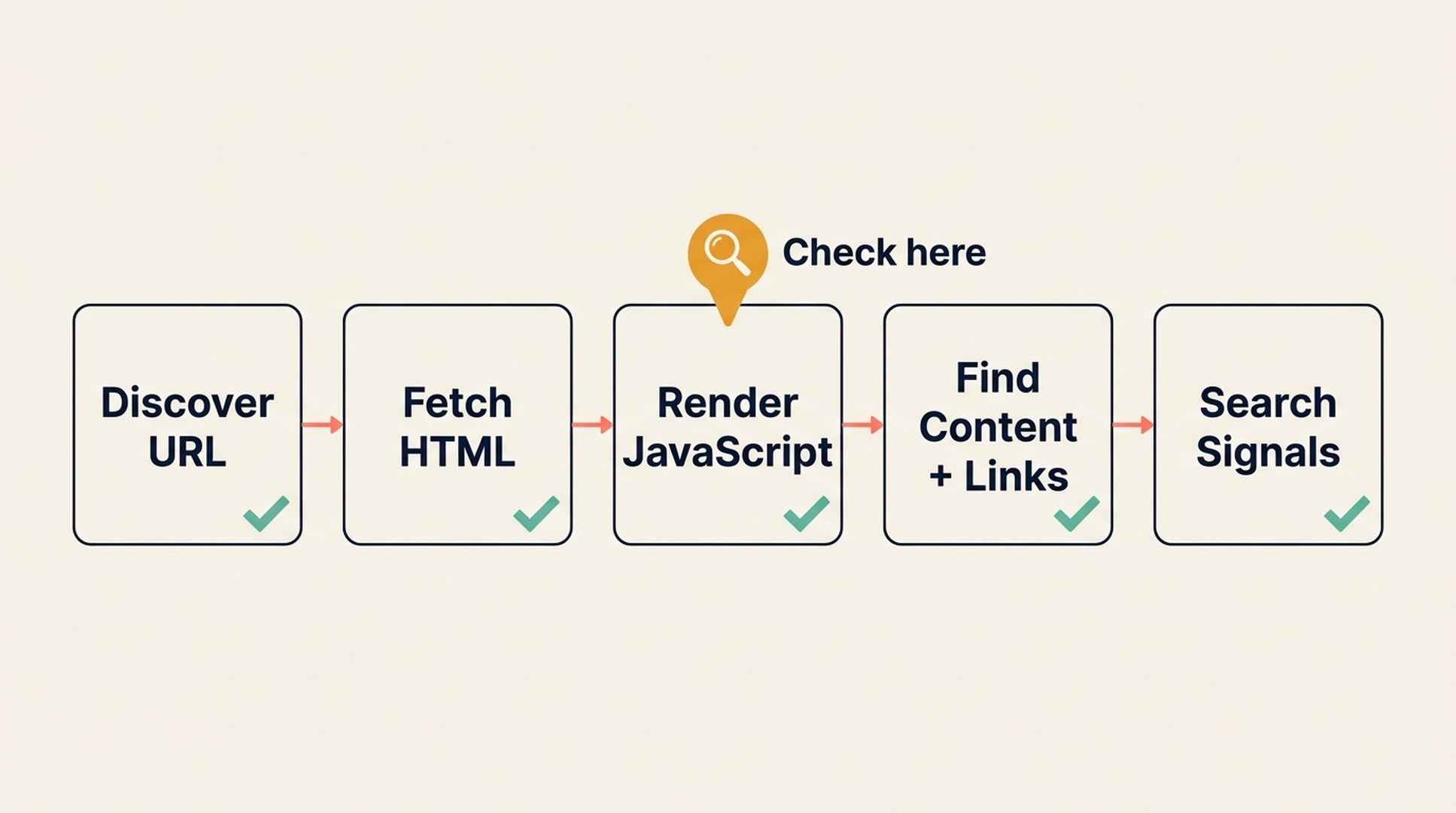
The handoff from HTML to rendered JavaScript is where a page can look fine to a visitor yet still need closer inspection.
Why a page that works for you can still need SEO attention
Your browser may have a fast connection, a full JavaScript engine, an existing session, cached files, and a person ready to click through the interface. A crawler or renderer sees a different situation. It needs to reach the URL, receive a valid response, load permitted resources, execute compatible code, and find standard paths to other pages.
That difference creates familiar failures:
What a visitor sees | What can still be wrong for SEO | A useful first check |
|---|---|---|
A product grid appears after a moment | Important product links exist only after an interaction or an API request fails during rendering | Compare the initial HTML and the rendered page; inspect whether product URLs are ordinary links |
A headline is visible | The title tag, canonical URL, or robots directives point somewhere else | Inspect the response and rendered |
More articles load on scroll | Items beyond the first screen have no crawlable URL or paginated path | Look for a real URL path to every important item or page |
An image looks correct | The image has no meaningful | Inspect the rendered image element and its attributes |
Navigation works after clicking | Navigation uses non-standard elements or fragments instead of destination URLs | Check whether the navigation exposes normal |
None of these checks prove that Google has or has not indexed a page. They identify implementation risks worth verifying with the relevant search tools and your development team.
The six JavaScript SEO signals to understand first
You can postpone the rest of the technical vocabulary until these six signals are clear.
- Important content is available. Your main answer, product details, category items, and helpful copy should be available in a form that can be reliably rendered. If the page needs a login, a click, or a fragile API call before its primary content appears, document the risk.
- Important links are normal links. A link that search systems can discover is usually an HTML anchor with a usable
hrefdestination. A click handler on adiv, an arbitrary button, or only a#fragmentis not an equivalent discovery path. - The URL signals agree. HTTP status, redirect behavior, canonical tags, and robots directives should tell a consistent story. A page that says it is indexable while canonically pointing to a different URL needs an owner decision.
- Metadata matches the page. Title tags, meta descriptions, headings, language declarations, and structured data should describe the page a visitor can see. Do not use client-side code to create conflicting versions of these signals.
- Progressive loading does not hide the site. Lazy loading is not automatically bad. It becomes a problem when crucial content or links require scrolling, clicking, or an unsupported interaction and have no equivalent discoverable route.
- The page remains usable. Large JavaScript bundles, blocking work, shifting layouts, and slow client-side rendering can hurt people first. They can also make the site harder to diagnose. Treat field performance data and lab tests as different evidence, not interchangeable scores.
What JavaScript SEO does not mean
It does not mean that every website needs server-side rendering, prerendering, or a rebuild. Those are implementation choices, not SEO magic words. A suitable approach depends on the framework, content model, hosting, user experience, and engineering constraints.
It also does not mean disabling JavaScript in your own browser to "test like Google." That can produce a page state no real crawler uses. Instead, inspect the page source and rendered DOM, use official search testing and inspection tools where you have access, and ask a developer to help interpret framework-specific behavior.
Part 2: Turn the basics into a safe Codex workflow
Codex is useful here because it can keep an audit structured: it can inspect a repository or a supplied URL, map observations to likely code paths, and turn a vague concern into a reviewable checklist. It must not be treated as proof of what Google indexed or as permission to make broad production changes.
The operating rule is simple:
Audit first. Explain the evidence. Ask for approval. Change one bounded thing. Verify the result.
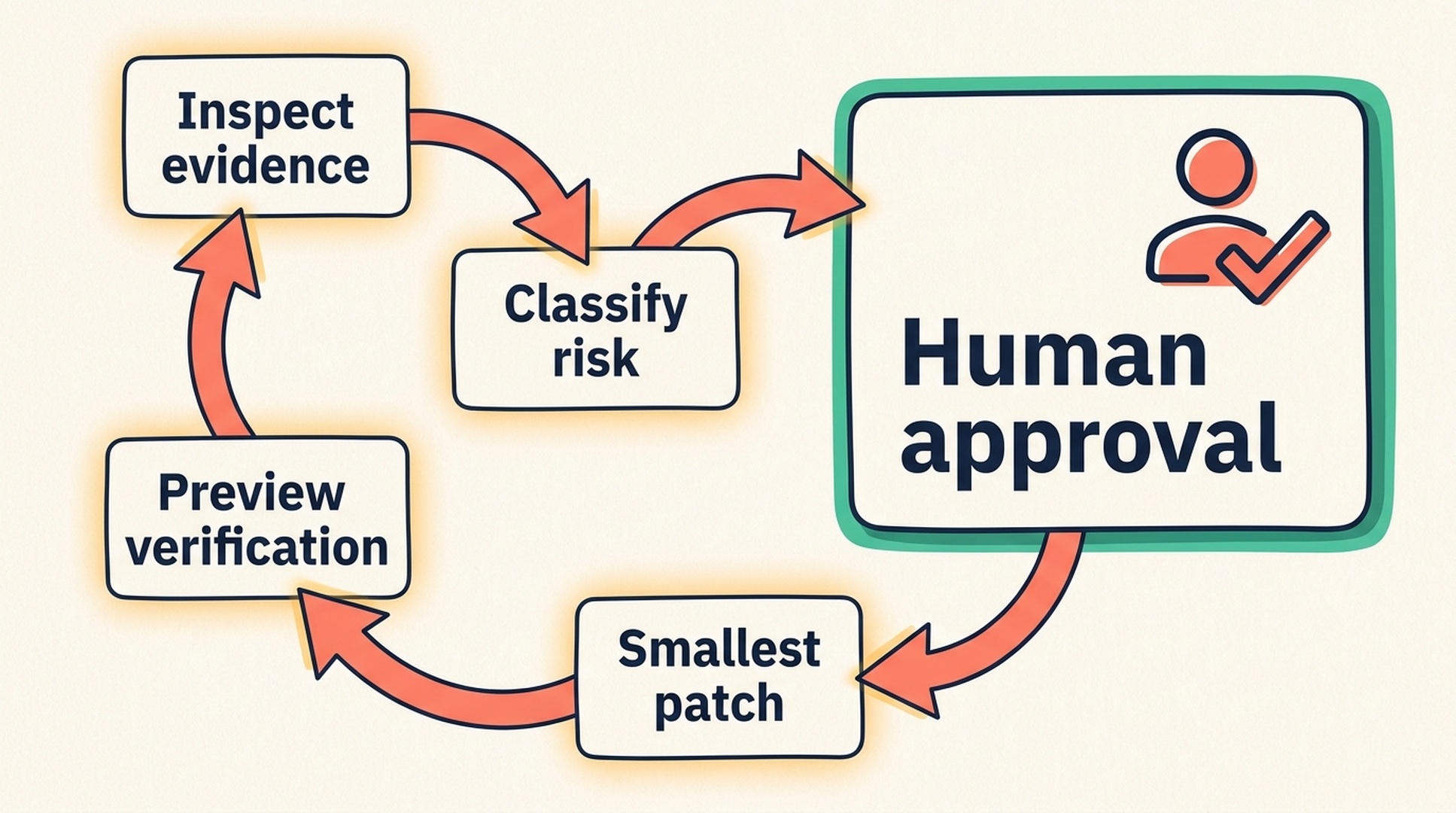
The approval gate is intentional: evidence collection and code changes are different jobs.
What to prepare before the first audit
Choose one meaningful URL: a product page, a category page, an article template, or an important landing page. Do not begin with the whole site.
Have these four things ready:
- The exact public or staging URL, or a local repository that contains the page.
- A clear business purpose for the page, such as "show a service," "list products," or "answer a customer question."
- A safe place to test changes, ideally a preview environment and a version-controlled project.
- A route to the person who can approve technical changes.
Google Search Console, server logs, a crawl export, and field performance data are valuable later. If you have not supplied them, Codex should say Needs data; it must not manufacture an indexing state, crawl history, ranking, or Core Web Vitals result.
Start with a read-only audit prompt
If you only want to test the workflow once, paste the prompt below into Codex. Replace the bracketed text. The request intentionally forbids edits.
Act as a cautious JavaScript SEO reviewer for a beginner.

Inspect [PAGE URL OR PROJECT] without editing files, deploying changes, accessing
accounts, or submitting anything to a search engine. Check the page's rendering
risks, primary content, standard crawlable links, HTTP status, redirects, robots
directives, canonical tags, metadata, structured data, lazy loading, infinite
scroll, client-side redirects, and obvious performance risks.

For every finding, return:
- Status: Pass, Issue, Needs data, or Needs developer decision
- Evidence: what you observed and where
- SEO impact: in plain English
- Smallest safe next action
- How a person can verify it

Do not invent Google Search Console, server-log, crawl, ranking, or performance
data. Do not expose credentials, cookies, tokens, private URLs, or absolute local
paths. Finish with a P0-P3 action plan. Ask for my explicit approval before making
any change.
The prompt gives you a report, not a fix. That separation is valuable: it lets you discuss a risk before anyone edits a template shared by hundreds of pages.
Read the report without becoming an SEO expert
Ask Codex to label each check using these four states. A clean report should include evidence, not merely a list of best practices.
Status | What it means | What you do next |
|---|---|---|
| The supplied evidence supports the check. | Keep the note as a baseline; do not keep changing it. |
| Codex found a specific mismatch or risk. | Read the evidence and ask for the smallest repair plan. |
| The answer depends on a source Codex has not been authorized to use. | Collect a permitted export or check the relevant tool yourself. |
| Several technical choices could work, or the change carries architecture risk. | Bring the evidence and options to the code owner. |
Then use priority to decide what deserves attention:
Priority | Meaning | Typical example |
|---|---|---|
| A critical page may be inaccessible, blocked, or materially broken. | Accidental |
| A significant issue affects a key template or a major user journey. | Product links require JavaScript clicks and have no ordinary URL path. |
| A real improvement is useful but can be planned. | Incomplete image alt text or a non-critical lazy-loading behavior. |
| A polish item or a question needing more evidence. | A minor metadata inconsistency or a performance hypothesis without field data. |
Fix P0 items first. Do not turn every Needs data item into a defect just to produce a longer task list.
Ask for a plan before a patch
When an issue is worth pursuing, give Codex a new, narrow request. This is where you retain control.
Using the JavaScript SEO audit report, prepare a plan for only this finding:
[PASTE ONE FINDING]

Do not edit files yet. Identify the likely affected page or component, explain the
smallest possible change, name the technical risks, list the local tests and the
preview checks, and state a rollback condition. Mark any architecture choice that
needs the developer owner to decide. Wait for my approval.
For example, suppose a category template renders cards that look clickable but the destination URLs exist only in JavaScript event handlers. A good plan might recommend replacing or supplementing the interaction with ordinary anchors, then testing keyboard use, navigation, the rendered DOM, and the preview page. It should not silently rewrite your routing system or declare that a framework change is necessary.
Copy this JavaScript SEO Codex Skill (SKILL.md)
If this is a workflow you will repeat, save the following file as SKILL.md inside the skills directory your Codex project already uses. Ask Codex to inspect your repository's existing instructions or configuration first; do not assume a personal machine path from an article. The skill is a procedure, not a credential or an integration with Google Search Console.
---
name: javascript-seo-audit
description: Audit, explain, and safely implement approved JavaScript SEO fixes for website pages and repositories. Use for rendering, crawlability, indexability, canonical, robots, metadata, links, lazy loading, infinite scroll, client-side routing, and JavaScript performance investigations. Start read-only and require explicit human approval before any code, content, configuration, or deployment change.
---

# JavaScript SEO Audit

## Non-negotiable boundaries

- Start every new request in read-only mode. Do not edit files, change a CMS, deploy, submit URLs, alter robots rules, or call write-capable APIs until the user explicitly approves a named implementation plan.
- Never claim to know what Google or another search engine indexed, rendered, ranked, or reported unless the user supplies authorized evidence from the relevant tool or export.
- Never invent crawl results, Search Console data, log data, field performance data, rankings, traffic, structured-data eligibility, or business facts.
- Never print or copy credentials, API keys, cookies, passwords, tokens, private URLs, customer data, usernames, environment-variable values, or absolute local paths into output, code, logs, or commits.
- Follow repository instructions and the stricter of any local policy, user instruction, or security restriction. Ask before a potentially destructive action.

## Inputs to establish

Identify the target URL, template, repository area, or supplied evidence. Confirm the page's primary visitor purpose. Record the inspection date and whether the evidence is from a public URL, preview, local source, rendered DOM, crawl export, logs, or an authorized search-tool export.

If a needed input is absent, mark the check `Needs data` and state the minimum data or human decision needed. Do not guess.

## Read-only audit workflow

1. Inspect before recommending. Record the final URL, HTTP status, redirect chain when available, initial HTML, rendered DOM when available, title, meta description, canonical, robots directives, `html` language, primary heading, visible main content, images, structured data, and internal links.
2. Check whether primary content and important destinations can be discovered without an arbitrary user interaction. Prefer normal `<a href>` links with real destinations for crawlable navigation.
3. Inspect JavaScript-specific risks: client-only content, failed or delayed API data, hydration errors, client-side redirects, fragment-only navigation, lazy-loaded content, infinite scroll, pagination alternatives, blocked scripts or resources, and render-blocking work.
4. Check consistency among HTTP response, redirects, canonical, robots, title, visible content, and structured data. Treat conflicting signals as an issue or a developer decision, not a certainty about indexation.
5. Separate laboratory observations from field data. Without an authorized field-data source, describe performance only as an observed implementation risk, not a user-experience metric or ranking result.

## Required report format

Return these sections in this order:

1. `Scope and evidence` - target, date, evidence sources, and limitations.
2. `Executive summary` - three plain-English sentences or fewer.
3. `Findings` - one row per check with `Pass`, `Issue`, `Needs data`, or `Needs developer decision`; evidence; SEO impact; smallest next action; and verification method.
4. `Prioritized action plan` - `P0` through `P3`, with the affected page or template and owner type.
5. `Questions and missing data` - exact items needed from the user, developer, or authorized tool.
6. `Approval gate` - state that no edits have been made and ask whether the user approves one named action.

## Implementation gate

Only after explicit approval of one named action:

1. Restate the approved scope, target files or system area, expected behavior, risks, tests, acceptance criteria, and rollback condition.
2. Inspect only the necessary code or content path. Make the smallest scoped change that implements the approved plan.
3. Preserve valid existing metadata, URLs, and structured data unless the approved plan says otherwise. Do not add fake reviews, ratings, dates, prices, FAQ content, or other unsupported page facts.
4. Run agreed local validation. Show the diff and any test results. Do not deploy or submit URLs unless the user separately authorizes that action.
5. Provide a verification checklist for the preview or live page: status, redirects, source and rendered DOM, main content, links, metadata, canonical, robots, structured data when relevant, and functional visitor flows.

## JavaScript SEO decision rules

- A browser-visible page is not by itself proof that important content or links are reliably available to search systems.
- Do not recommend disabling JavaScript as a search-engine test. Compare source, rendered DOM, server response, and authorized inspection tools instead.
- Do not prescribe SSR, prerendering, hydration changes, framework migrations, or edge rendering by default. Explain them as alternatives only after the project's architecture and constraints are known.
- Do not treat valid structured data as a ranking, rich-result, AI-answer, or indexing guarantee.
- Treat infinite scroll, lazy loading, and client-side routing as implementation patterns to examine, not automatic defects. Confirm whether important content and URLs have crawlable, stable alternatives.

## Completion standard

The task is complete only when the report or approved diff records its evidence, limitations, validation status, unresolved decisions, and next owner. Never convert uncertainty into a positive finding.
Use the skill with a clear approval gate
Once the skill is available in your project, this is a safer first request than "fix my JavaScript SEO":
Use the JavaScript SEO Audit skill on [URL OR PAGE AREA].

This is an audit only. Do not edit files, access accounts, deploy, or submit a URL.
My page's main purpose is: [PURPOSE].
First give me the required report, including the evidence limits. I will choose one
finding for an implementation plan after I review it.
Verify the change in layers
An approved code change is not the finish line. Validate the exact thing that changed before you start watching rankings.
Layer | Check | Why it matters |
|---|---|---|
Local or preview | The page builds, the expected user flow works, and the relevant code tests pass. | Prevents a proposed SEO repair from breaking the product. |
HTTP and source | Status, redirects, initial HTML, canonical, robots, and metadata match the plan. | Confirms the response-level signals did not regress. |
Rendered page | Main content, critical links, images, and structured data appear as expected after the page runs. | Confirms the visible implementation matches the audit target. |
Authorized search tools | Use URL Inspection and relevant Search Console reports if you have access. | Adds platform evidence; it is not a same-day ranking promise. |
Write down the URL, date, change, evidence, and rollback owner. That record makes the next audit easier and stops a later team member from repeating an already-settled investigation.
Four mistakes that make this workflow less safe
Asking for a site-wide repair from one URL. One page can reveal a pattern, but it cannot prove that every template has the same problem. Begin with a representative page and ask for scope evidence before expanding the work.
Treating a client-side router as a problem by definition. Modern routing can work well. The useful question is whether important destinations have stable URLs, discoverable links, and consistent page signals.
Pasting account secrets into a prompt. Codex does not need your passwords, cookies, or API keys to write a report. Give it authorized exports or use your approved secret-handling mechanism when a task truly requires access.
Confusing a technical check with a ranking guarantee. A valid canonical, a clean rendered DOM, or a passing structured-data test removes a possible obstacle. It does not decide relevance, competition, quality, or when a search engine recrawls a URL.
A small weekly routine
Each week, audit one high-value page or one representative template. Keep the scope intentionally small:
- Run the read-only audit and save the evidence summary.
- Choose no more than one approved repair.
- Test the repair on preview, then record the post-change checks.
- Review authorized search data later, with enough time for crawling and normal reporting delays.
This routine is more sustainable than a one-time "fix all SEO" request. It gives the team a trail of evidence, cautious improvements, and decisions that a non-developer can follow.
FAQ
Can Google index JavaScript websites?
Google documents support for JavaScript processing, but support does not remove the need for good implementation. Important content, crawlable links, and consistent URL signals still need to be available reliably. Use Google's JavaScript SEO documentation and authorized URL inspection data for the current platform guidance and a specific URL.
Does Codex know what Google indexed?
No. Codex can inspect supplied code, a URL response, a rendered page, and authorized exports. It should label the absence of Search Console, URL Inspection, log, or crawl evidence as Needs data, rather than guessing what Google did.
Should every JavaScript site use server-side rendering?
No. Server-side rendering, prerendering, and client rendering solve different product and engineering problems. Select an approach after examining the site's content, framework, deployment constraints, and the exact issue. Do not change rendering architecture merely because an audit mentions JavaScript.
Can Codex fix JavaScript SEO automatically?
It can prepare and, after explicit approval, implement a scoped repair in a codebase it can access. It cannot safely decide business facts, architecture trade-offs, production-release timing, or search-engine outcomes on its own.
Will a clean audit improve rankings immediately?
No. A clean audit means the checked implementation has fewer obvious technical risks under the available evidence. Rankings also depend on relevance, competition, content quality, links, user satisfaction, and search engines' own recrawling and evaluation processes.
Author: Julian Mercer, 14-Year Technical SEO Practitioner at Auspia. Julian writes about crawlability, schema, rendering, site architecture, and technical foundations for AI-readable content.


