


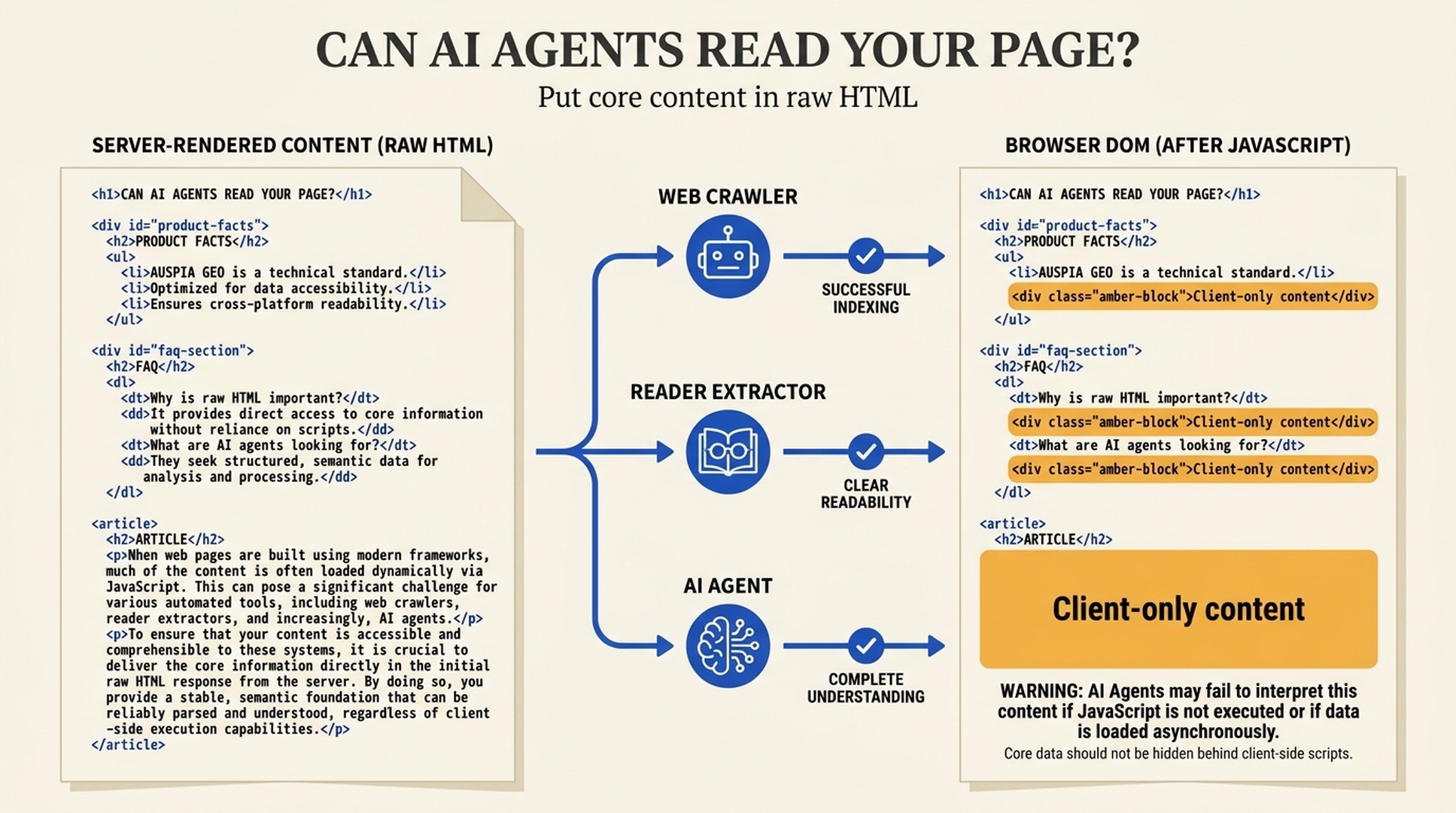
The GEO rule that comes before citation strategy
If a fact appears only after JavaScript runs, an AI agent may never receive it.
That includes product capabilities, comparison conclusions, pricing conditions, documentation answers, author details, and the evidence you hope an AI system will cite. A person can see a complete page in Chrome. That does not prove a crawler, reader extractor, or browser agent has obtained the same content.
A recent practitioner test compared each template's raw HTML with its rendered page. Across articles, tutorials, shop pages, courses, landing pages, and category pages, most visible content was already present in the HTML; only a small portion appeared after JavaScript. The useful lesson is not the precise percentage. It is the question behind it: does the initial HTML already contain the answer you want an agent to understand?
For GEO, that is an eligibility check. Before a system can assess your evidence or decide whether to cite you, it must be able to retrieve the page's core facts.
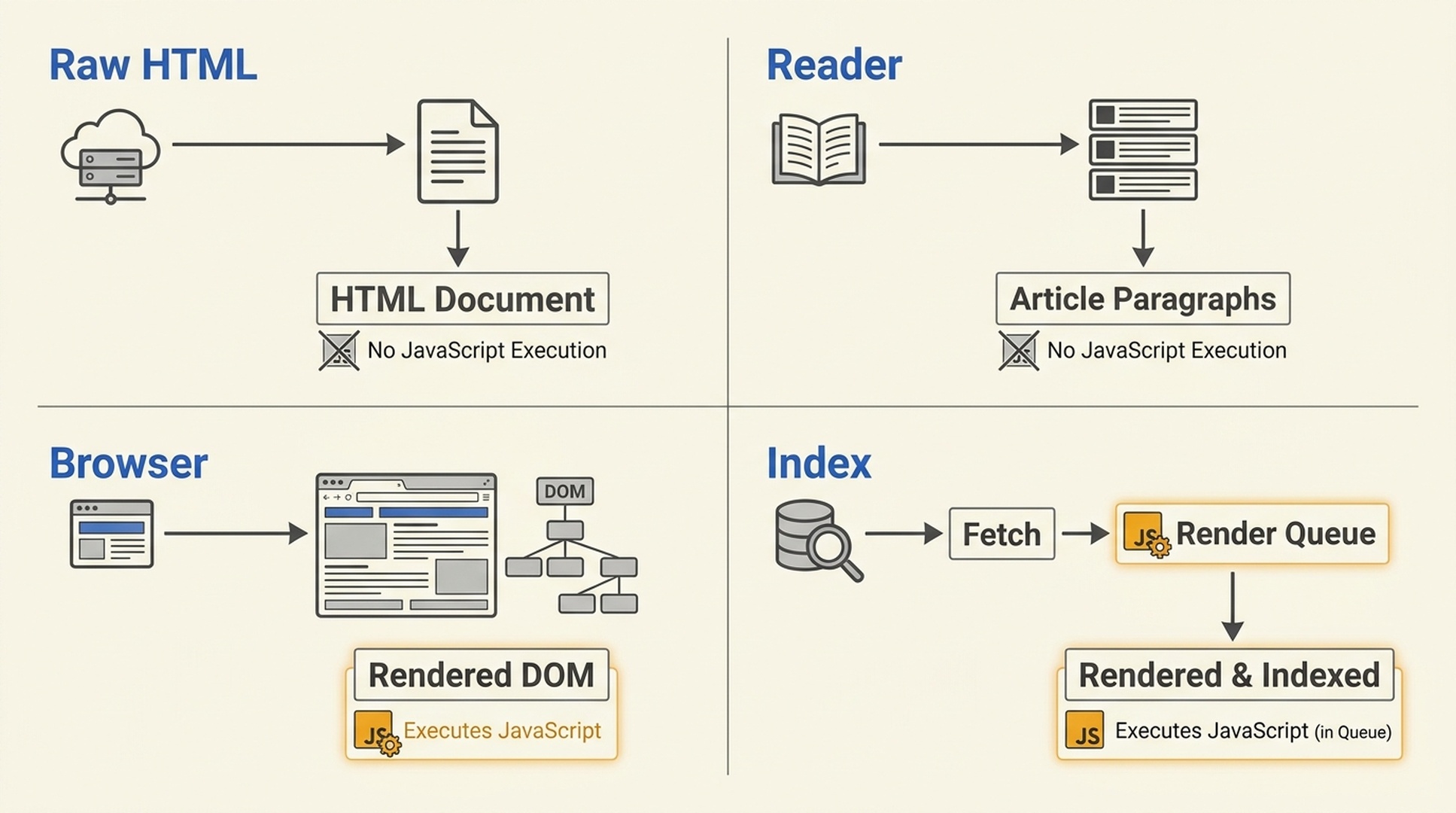
Different page-access paths have different JavaScript budgets. Raw fetches and reader extractors often rely on the HTML response alone.
Google rendering is not a promise made by every agent
"Google can render JavaScript" is true, but it is often stretched into a risky assumption: that every AI search product and agent will see the final browser page.
In practice, a URL can be reached through several paths:
Access path | What it receives | JavaScript dependency |
|---|---|---|
Raw HTTP fetch | The initial HTML response | No execution |
Reader or article extractor | Text selected from HTML | Usually no execution |
Browser automation | A rendered DOM | May execute, subject to timeouts and policy |
Search indexing pipeline | Fetch, queue, then possible rendering | Platform-specific |
Tool-using agent | Output from its chosen web-fetch tool | Often close to raw fetching |
Google's rendering system is capable, but it is not a portable guarantee. Other answer engines, internal enterprise retrieval systems, browsing agents, and web extraction tools may fetch only HTML or stop before slow client data loads. Treating one platform's ability as your architecture is a gamble.
The safer rule is straightforward: public facts that matter for discovery and citation should be readable in the first response.
Audit where the facts appear, not which framework you use
SSR versus CSR is not a GEO scorecard. A React, Vue, or Next.js site can be agent-friendly; a traditional server-rendered site can still hide its important facts behind a client API call.
Audit the layer where each important block becomes available.
Content layer | Typical example | GEO risk |
|---|---|---|
Initial HTML | Title, body copy, specifications, FAQ, author, date | Low |
Server-fetched HTML | Current price or regional availability | Low to medium |
Client API request | Product benefits, comparison table, documentation body | High |
User interaction | Tabs, accordions, filters, infinite-scroll results | High |
Login-only view | Dashboard or private knowledge base | Do not expect public citation |
Any fact you expect an AI system to repeat in a public answer should not depend on a click, a successful client request, or a long JavaScript task. Keep interaction where it adds value, but move the explanatory layer forward.
The most common failures are product pages that ship a loading shell, comparison pages whose tables appear after hydration, documentation bodies loaded by client routing, category pages with only infinite scroll, and visual modules where the conclusion exists only in an image or canvas.
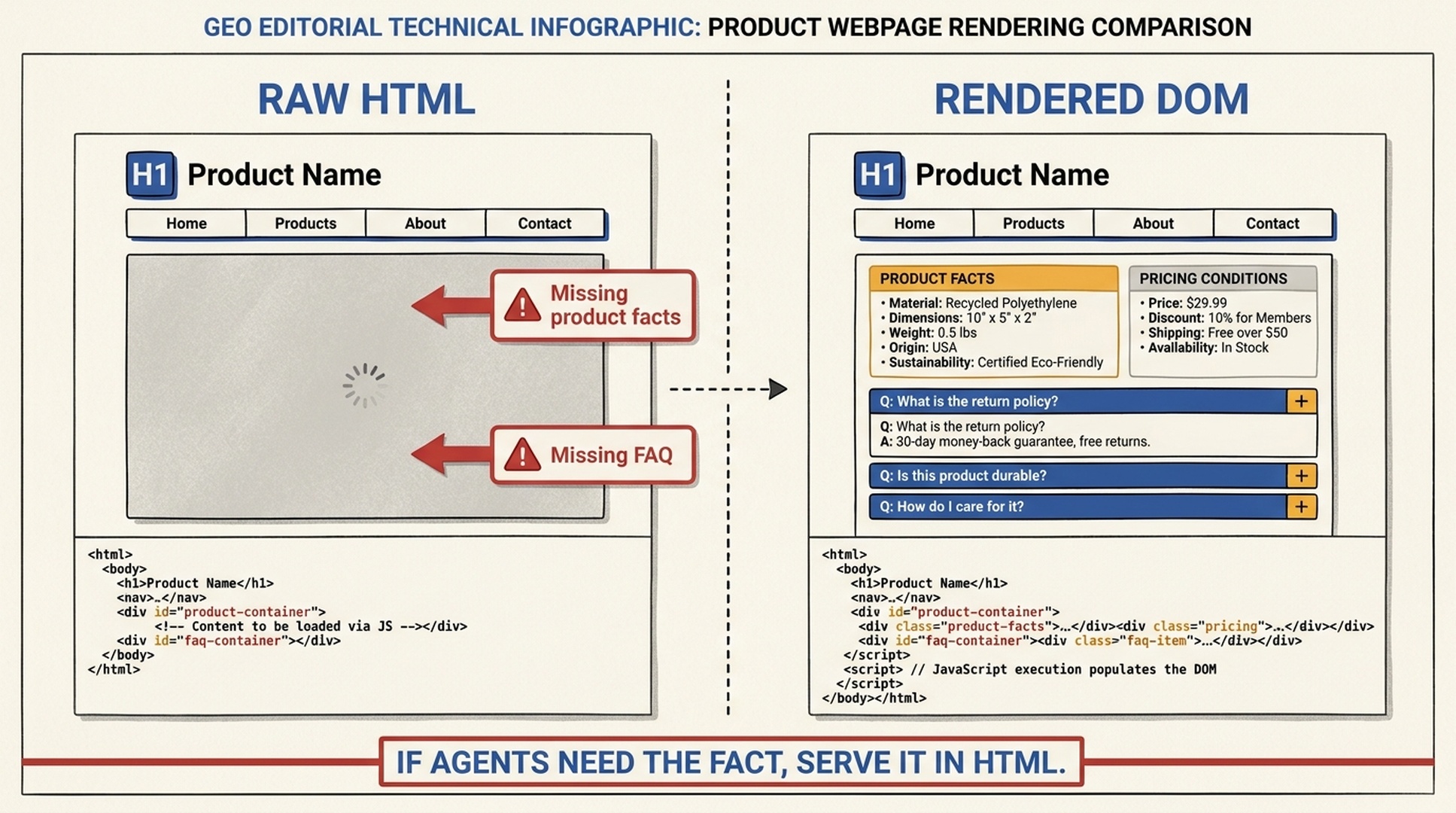
A polished rendered page can still expose too little meaning in its first HTML response.
Use a two-view content check
Do not ask whether a site "uses React." Save two versions of the same URL instead:
- Fetch the raw HTML without JavaScript.
- Open the page in a browser, wait for the main content, and export the rendered
maintext.
Start with a basic fetch:
curl -sL "https://example.com/product" -o raw.html
Then compare semantic blocks, not the header, cookie banner, and footer:
- H1 and short answer
- First explanatory paragraph
- Product facts and limitations
- Comparison tables
- FAQ answers
- Author and update details
- Internal links and canonical URL
Avoid treating networkidle as the only browser condition. Analytics, chat widgets, and long-lived connections may keep a page busy forever. Wait for the main content selector or the specific data source that supplies the page's core facts.
You can turn the comparison into a release metric:
core-content exposure = key blocks present in raw HTML / key blocks required on the page
The goal is not to force every pixel into HTML. The goal is to make the evidence needed to understand the page available without a successful client runtime.
Repair the content path before rebuilding the front end
Most teams do not need a site-wide rewrite. Move stable public information into the initial response, while retaining JavaScript for filters, saved preferences, maps, animations, and personalization.
Situation | Better delivery pattern |
|---|---|
Stable articles, tutorials, and glossary pages | Static generation or build-time prerendering |
Frequently changing prices, stock, or regional details | Server rendering with caching and explicit invalidation |
Interactive page with a stable explanation | Render the explanation, facts, and FAQ on the server; hydrate the interaction |
Public documentation inside a large application | Pre-render public routes and remove login dependence from the core answer |
Several internal API dependencies | Aggregate critical data in a server or BFF layer shared by HTML and the app |
JSON-LD is useful, but it is not a substitute for readable page content. Use structured data to describe facts that visitors and extractors can also find in the document.
A two-week rollout for GEO teams
Days 1-2: List the templates that drive organic discovery, AI citations, sales enablement, or support. Articles, product pages, docs, comparison pages, and category pages are usually enough.
Days 3-5: Sample URLs from every template. Save raw HTML and rendered content. Mark missing H1s, explanations, product facts, FAQ answers, and internal links.
Days 6-9: Repair the highest-value stable pages first. Move definitions, facts, comparison conclusions, and FAQ content to the server or build output.
Days 10-14: Repeat the same tests and add a release gate. A template should not ship when the initial HTML lacks its H1, main answer, key facts, or canonical links.
This cannot guarantee a citation from every AI product. It does remove a needless failure mode: publishing public information that a potential agent cannot reliably read.
Auspia view
GEO conversations often begin with brand mentions, source quality, entity clarity, and answer structure. All of those assume the system has obtained the page in the first place.
JavaScript itself is not the problem. Treating your public explanation as a side effect of the client runtime is. Let HTML carry the content responsibility; let JavaScript carry the experience responsibility. That division tends to improve testing and technical SEO as well as agent accessibility.
FAQ
If Google renders JavaScript, do I still need a raw HTML audit?
Yes. Google's ability does not mean other crawlers, reader tools, and agents follow the same path. A raw HTML check also exposes rendering delays and client-request failures that make technical debugging harder.
Is SSR always better than CSR for GEO?
No. Static generation, server rendering, and prerendering can all work. Client rendering can remain for high-interaction elements. The test is whether the public page's core facts are readable in the initial HTML response.
Should every part of a page avoid JavaScript?
No. Keep JavaScript for filters, animation, maps, saved settings, personalization, and authenticated experiences. Prioritize the content that explains the page topic and supplies citable facts.
Can llms.txt solve JavaScript-only content?
No. Even if a system reads llms.txt, it does not automatically obtain the complete article body or client-side API data. The public page must still make its core content accessible.
Source note
This article was prompted by an SSR-versus-CSR visibility post from Adrian Skowron. The chart in that post reflects the author's own template measurements, not an industry-wide benchmark.
Author: Julian Mercer, 14-Year Technical SEO Practitioner at Auspia. Julian writes about crawlability, rendering, schema, and the technical foundations that make content understandable to search and AI systems.


