


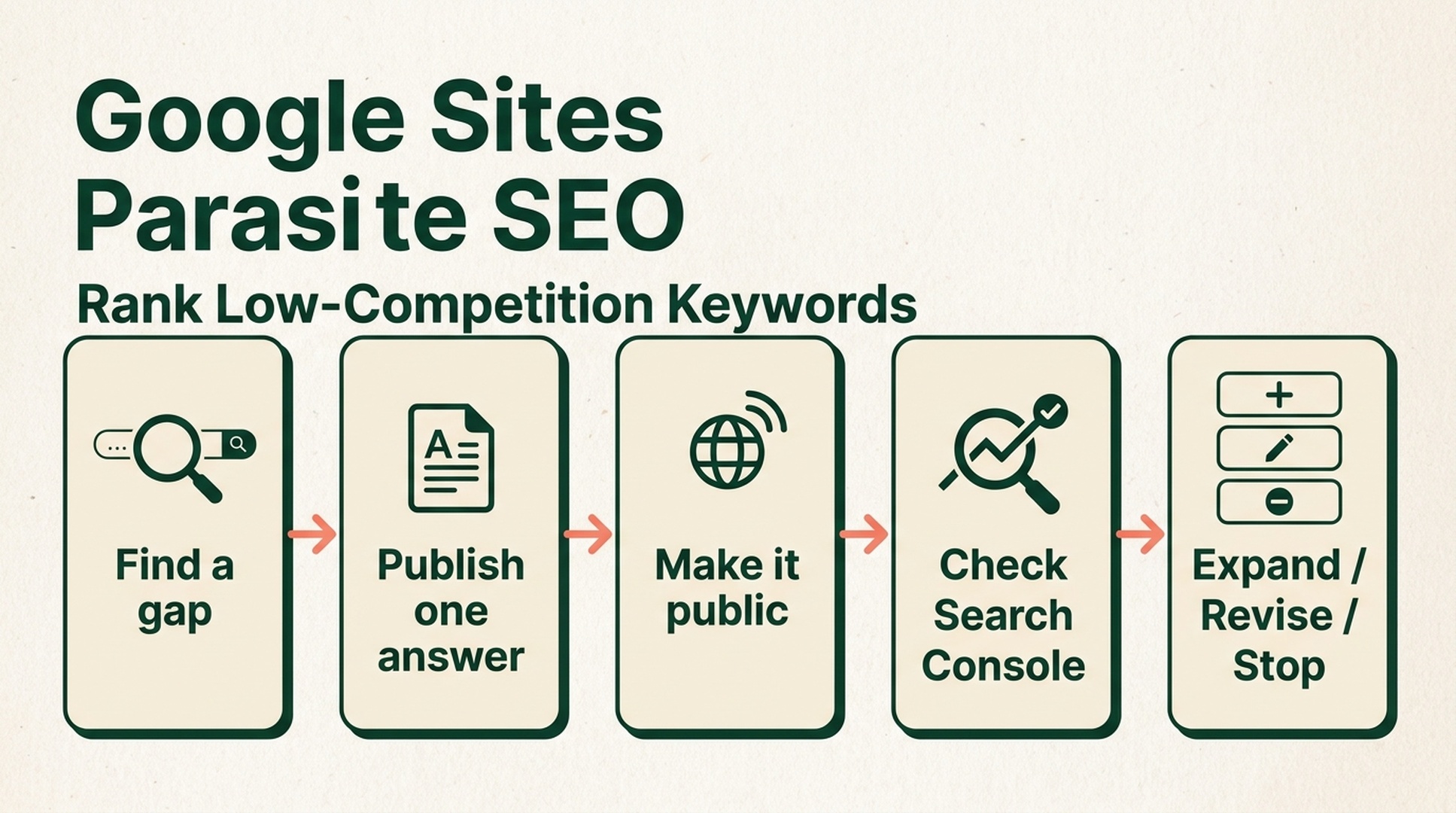
The short answer: use Google Sites to compete for a query, not to manufacture backlinks
The idea is simple: find a low-competition keyword, publish a tightly focused answer on Google Sites, make the page public, and see whether it earns a place in the search results.
That can work as a small keyword-competition play. Google Sites pages can be indexed, and the platform removes the usual delay of setting up a new CMS. It does not, however, guarantee a first-page ranking. Google has never offered a platform-level ranking shortcut, and thin pages built only to pass links are not a durable strategy.
The useful version of Google Sites parasite SEO is narrower: use one genuinely helpful page to test a specific search opportunity. If it starts appearing for the right queries, build the durable, fuller version on your own site.
Best for | What you finish with | You need | Done means |
|---|---|---|---|
A small team or solo operator validating a new topic | One public, useful Google Sites page and a recorded keyword test | A Google account, a target query, and access to Search Console where available | The page is public, discoverable, and has enough data to expand, revise, or stop |
Set aside about an hour for the first version. Give search systems and readers time after publishing. A page that is not on page one on day one has not failed; a page that flashes in the results once has not won either.
Pick the kind of low-competition keyword that a small page can actually win
Do not start with a broad head term. Start with a task, a context, and a constraint. The query should have a clear answer that a short specialist page can give better than the current results.
Check before you build | A strong candidate | A weak candidate |
|---|---|---|
Is there a clear task? | "customer onboarding checklist for a 10-person SaaS team" | "SEO tips" |
Can you add something specific? | A process, template, screenshots, or firsthand limitation | A reworded version of existing articles |
Does the topic connect to your site? | A CRM company covering lead-routing rules | A marketing tool publishing celebrity news |
Is there an honest next step? | A deeper guide or downloadable template on your site | A forced exact-match link to a homepage |
Search the phrase before you build. If the first page is dominated by official documentation, entrenched brands, or pages that already answer the question well, make the query more specific. Add a use case, audience, country, format, tool, or constraint. The point is not to find a keyword with a low difficulty score. It is to find an answer gap.
Quality check: write the searcher's question in one sentence. If you cannot explain why your page would be more useful than the existing results, choose another query before creating the site.
Build a one-page answer that deserves to rank
Create a new Google Site and keep the first version to one page. Give it a plain, descriptive name. Then write for the question, not for an imagined authority signal.
Use this page shape:
- Put the exact problem in the title.
- Answer it in the first two or three sentences.
- Give the reader three to five steps they can follow.
- Include one concrete example, checklist, template, or screenshot.
- Explain one limitation or case where the advice does not apply.
- Link once to your own site only when that resource helps the reader finish the task.
For example, a page targeting "free trial onboarding email sequence for B2B SaaS" should contain the send schedule, the job of each email, an editable example, and a note about when a product-led sequence is the wrong choice. It should not be 500 generic words followed by ten commercial links.
Quality check: remove every link temporarily. Does the page still solve the reader's problem? If not, the page is not ready to publish.
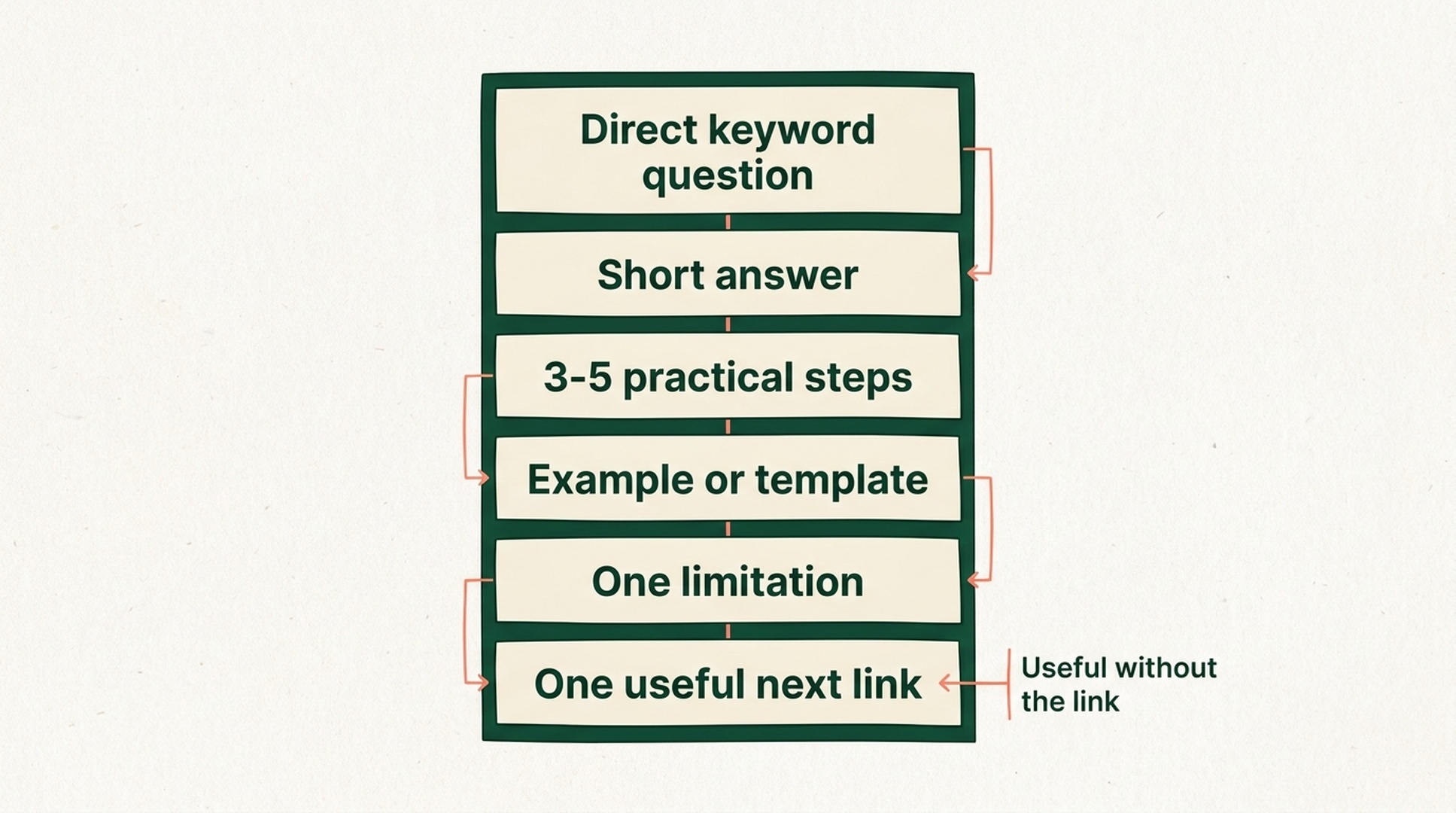
A useful page gives the searcher an answer before it asks them to click elsewhere.
Treat the Google Sites domain as a distribution surface, not a ranking cheat code
Google Sites may give a new page a simpler publishing path than a brand-new domain, but the page still has to compete on usefulness and relevance. Do not confuse being hosted on a Google-owned service with being endorsed by Google Search.
Use the page as a focused asset. One query cluster. One clear answer. One real reason for a reader to continue to your main site.
Avoid the patterns that turn a quick test into spam:
- creating many near-identical Google Sites for the same commercial term;
- spinning the same article with city names, product names, or minor wording changes;
- using exact-match commercial anchors repeatedly;
- publishing pages that exist only to funnel visitors elsewhere;
- treating a self-created link as a substitute for relevant third-party mentions.
If the tactic only works when you scale it into a network, it is probably the wrong tactic. Keep the experiment useful enough to stand on its own.
Publish it publicly, then make indexing observable
Click Publish in Google Sites and use a short, readable URL. Confirm the site is public and has not been opted out of search engines. Check the final URL in a private browser window before you share it.
Then make the test measurable. Add the site or a verified custom domain to Google Search Console when the ownership setup allows it. Use URL Inspection to see whether Google has discovered the page, then watch the Page Indexing and Search results reports.
What you see | What it usually means | What to do next |
|---|---|---|
The page cannot be opened without signing in | The publishing setting is wrong | Make the site public and republish |
Google has not found the URL | The page is new or lacks a crawl path | Recheck the URL and public access; share it where relevant, then wait |
The URL is found but not indexed | The page may be too thin, duplicate, or unhelpful | Add a distinct example, clearer answer, or original resource |
The page is indexed but gets irrelevant impressions | The content and intended query do not align | Rewrite the title, opening answer, and example around the actual task |
The page gets relevant impressions | The query has early potential | Plan a fuller, owned version on your main site |
Sharing the page on a relevant social account or community can put it in front of real people and reveal whether the topic gets a response. It is not a ranking button. Use distribution to learn, not to simulate engagement.
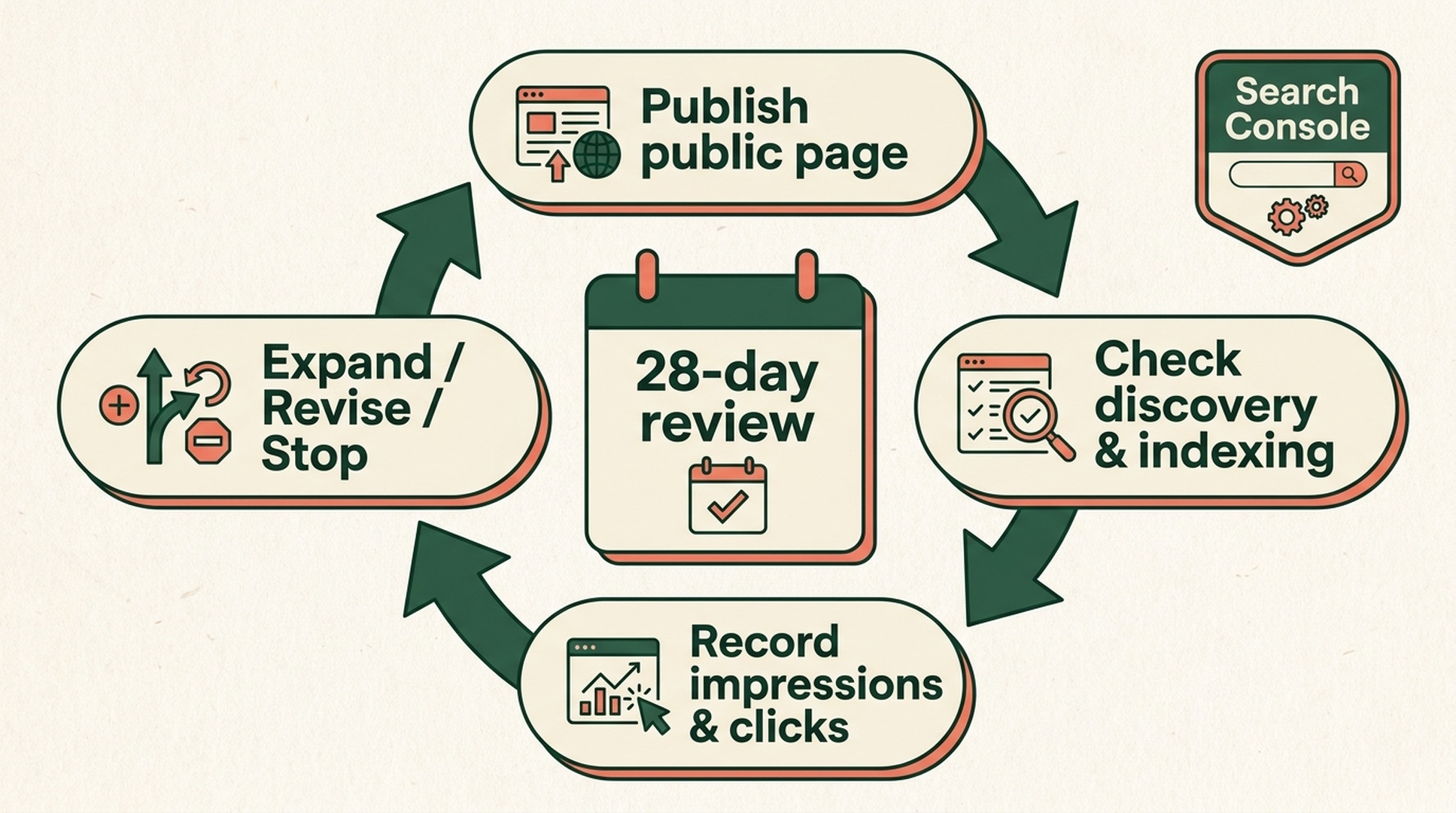
The test becomes useful when it ends in a decision, not when it merely creates another URL.
Make a decision after 28 days
Record the target query, publish date, page promise, first discovery date, impressions, clicks, and the queries that actually triggered the page. Review that record after 28 days instead of reacting to daily rank swings.
Result | The sensible move |
|---|---|
The page is indexed and earns relevant impressions or clicks | Build a more complete, maintained version on your own domain; keep the Google Site as a complementary resource if it still helps readers |
The page appears for the wrong queries | Tighten the title, answer block, examples, and boundaries, then observe one more cycle |
The page is repeatedly not indexed or has no meaningful visibility | Stop adding links. Reassess demand and originality, or move on |
The page earns referral visits but little search visibility | Treat it as a distribution asset, not a ranking asset |
This is where the tactic earns its keep. It gives you a relatively cheap way to test whether a search demand is real before you commit a full landing page, topic cluster, or product resource to your main site.
The practical limit of Google Sites parasite SEO
Google Sites can help you enter a low-competition SERP with a useful page. It cannot replace topical depth, editorial quality, useful products, or a site you own and can improve over time.
Treat it as a test surface, not your SEO foundation. The durable asset belongs on your main domain, where it can earn internal links, accumulate updates, support conversion, and connect to the rest of your content. If you need help choosing which query deserves that investment, Auspia's SEO tools can help compare search results and uncover content gaps.
Quick checklist before you publish
- The keyword represents one clear task, not a broad topic.
- The page answers that task without relying on links.
- The example or template adds something the existing results do not.
- The site is public and eligible to be discovered by search engines.
- You have a 28-day review point and a plan to expand, revise, or stop.
FAQ
Can a Google Sites page rank on the first page of Google?
It can, especially where the query is specific and the competing pages are weak or incomplete. It is never guaranteed. Ranking depends on the query, competing results, content quality, relevance, and other signals.
Is Google Sites parasite SEO the same as Google site reputation abuse?
No. The phrase "parasite SEO" is used loosely in the industry. This workflow describes publishing one original, useful page on a third-party platform to test a query. Publishing unrelated or low-value third-party content at scale to exploit a host's ranking signals carries much more risk and may violate platform or search policies.
Should I add a backlink from every Google Sites page to my main site?
No. Add a link only when it gives the reader the next resource they need. The primary outcome is a useful page that competes for a query, not a self-made link network.
Author: Simon Vale, 11-Year Search Intent Researcher at Auspia. He studies real search questions, SERP patterns, and the work that turns a keyword hypothesis into a page worth building.


