


The practical answer
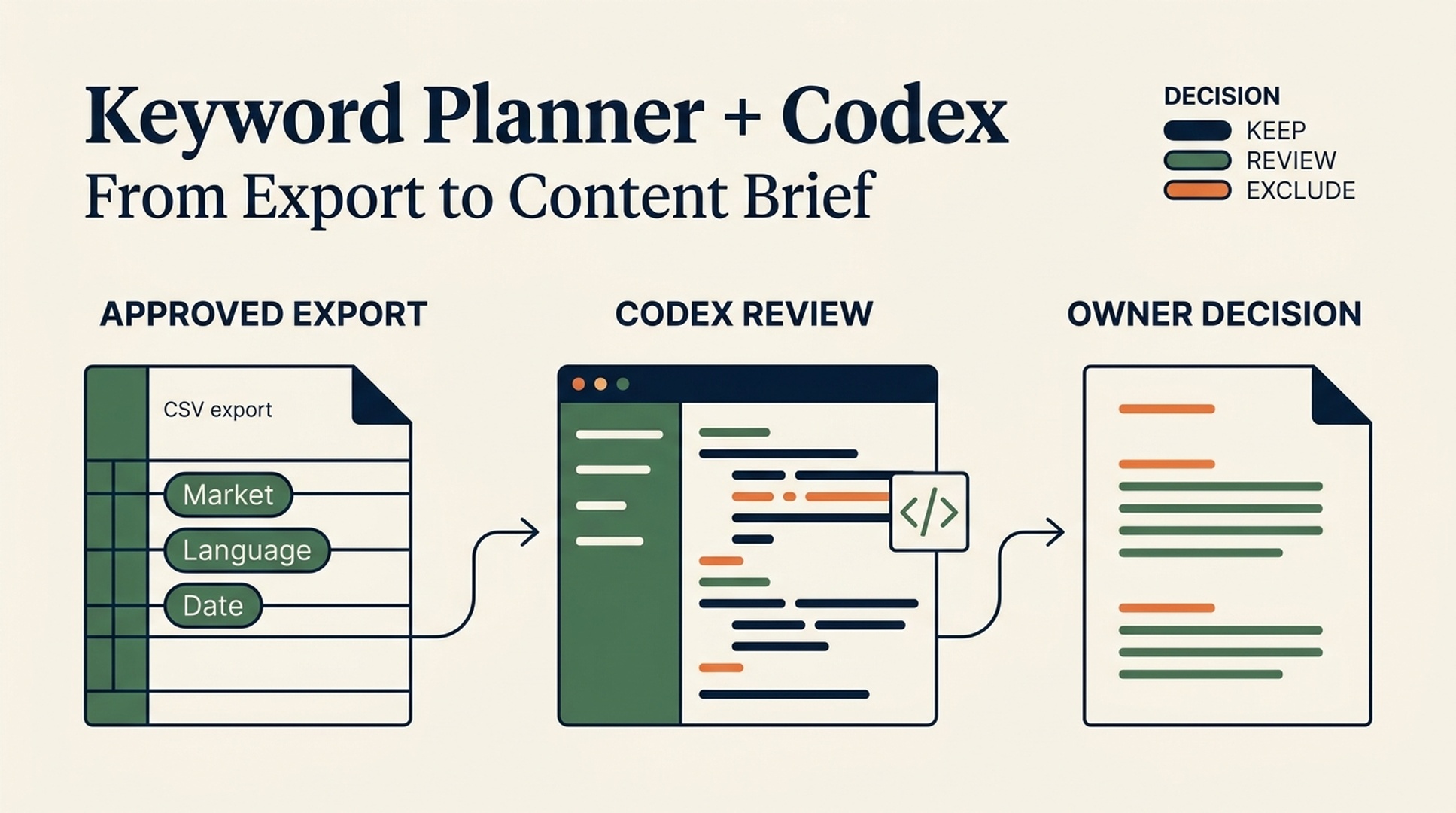
You can use Google Keyword Planner with Codex without giving an agent your Google Ads password or asking it to guess which keyword will rank. Run the research in Keyword Planner, export the results, and let Codex do the slow, error-prone desk work: tidy the file, group related queries, label likely intent, flag questionable rows, and turn the shortlist into a content brief.
That division of labor matters. Google Ads is the data source. Codex is the assistant that helps you inspect and use the data. It should not fabricate search volume, competition, CPC, rankings, or SERP features when they are missing.
This workflow is for | You will finish with | What you need first | Definition of done |
|---|---|---|---|
A beginner planning a page, article, or small topic cluster | A reviewed keyword brief and a CSV with clear decisions | A Google Ads account that can access Keyword Planner, a spreadsheet app, and Codex | Every retained keyword has a source, market, language, intent label, and an owner-approved next action |
Allow 45 to 90 minutes for a first run. The first half is data collection and the second half is judgment. The agent can make the second half much less tedious, but it cannot remove it.
Google Ads describes Keyword Planner as a tool for discovering keyword ideas and viewing search volume and forecast information. Its interface, access requirements, and metric presentation can change, so confirm the current options in Google Ads Keyword Planner before you rely on a particular field or export.
Choose a small research question before opening Google Ads
The easiest way to get unusable output is to type a giant category into Keyword Planner and export everything. Start with one decision instead.
Here is a fictional example for a small accounting software company. The team wants to decide whether its next guide should help independent consultants send invoices, manage expenses, or prepare tax records. Its research note might look like this:
Business goal: attract English-speaking independent consultants who need bookkeeping software.
Decision needed: choose one guide topic for the next editorial cycle.
Target market: United States.
Language: English.
Seed ideas: invoice template for consultants; freelance expense tracking; quarterly tax checklist.
Audience: independent consultants, not accounting firms.
Out of scope: tax advice, country-specific legal claims, and keywords that only fit enterprise buyers.
This note gives Codex enough context to spot mismatches later. Without it, a keyword such as "invoice software" might appear promising even when the searcher wants an enterprise accounts-payable platform.
Quality check
Your question is narrow enough that a content owner could make one decision after reading the final brief. If the real answer is "we need a complete annual SEO strategy," split the work into several research jobs.
If you get stuck
Do not start with a product name only. Try a customer task, a problem, and a comparison phrase. Those usually expose different parts of the search demand.
Export data from Keyword Planner, then preserve its context
In Keyword Planner, use the discovery and planning paths that are available in your account. Enter your seeds, set the market and language deliberately, review the suggestions, and export the table you are permitted to use. Keep the unedited export as your source file.
Before uploading anything to an agent workspace, record the context beside the file:
Field to record | Why it changes the interpretation |
|---|---|
Provider and report | Separates Keyword Planner data from a later spreadsheet edit or another provider's estimates |
Export date and time zone | Keyword demand and platform reporting can change |
Target country or market | A query can mean something different in the US, UK, Australia, or a global setting |
Language | Prevents a mixed-language list from becoming one content brief |
Seeds used | Lets another person reproduce the discovery path |
Metric labels as exported | Avoids silently converting Google's labels into claims the report did not make |
Filters and exclusions | Explains why rows did or did not appear |
Do not paste API keys, Google Ads cookies, account IDs, client exports, or personal-search data into a prompt. A plain CSV with the columns you need is enough for this workflow. If a client file contains sensitive notes, remove them before sharing it.
Quality check
Open the raw file in a spreadsheet. Confirm that the column headings and values are visible, that the market and language are written down, and that you can identify the original export after Codex produces a cleaned version.
Recovery path
If Keyword Planner only gives broad ranges or a field you expected is absent, keep that limitation in the brief. Do not ask Codex to fill in the blanks. You can collect a different approved data source later, but it must remain clearly labeled as a different source.
Give Codex a bounded research job
Create a project folder such as keyword-research/. Put the raw export in input/, keep agent output in output/, and add the following SKILL.md to the project. Replace the bracketed values before you run it.
---
name: keyword-planner-research-review
description: Turn an approved Google Keyword Planner export into a reviewable keyword opportunity brief. Do not access Google Ads, browse for private data, or invent metrics.
---

# Keyword Planner Research Review

## Objective

Analyze only the approved file at `input/[export-file-name].csv` for this research question:

- Business goal: [business goal]
- Decision needed: [one decision]
- Target market/country: [market]
- Language: [language]
- Audience: [audience]
- Seeds used in Keyword Planner: [seed list]
- Exported at: [ISO 8601 date and time with time zone]
- Provider/report: Google Ads Keyword Planner export

## Permissions and limits

- Read only the approved input file and this instruction file.
- Do not log in to Google Ads or request passwords, cookies, tokens, API keys, or account identifiers.
- Do not call a keyword, SERP, competitor, or traffic API unless the user adds a separate written authorization that names the provider, endpoint or report, market, language, and allowed fields.
- Treat all numeric fields as provider-reported estimates or labels. Do not turn them into ranking, traffic, conversion, CPC, or revenue promises.
- If a field is absent, ambiguous, malformed, or not comparable, write `unavailable` or `needs human review`. Never estimate it.
- Do not invent SERP features, competitor lists, search intent, business results, or product capabilities. Intent labels are hypotheses for human review.

## Required work

1. Inspect the CSV headers and report the original column names exactly.
2. Preserve every input row in `output/keyword-planner-reviewed.csv`; add columns without overwriting source values.
3. Normalize obvious whitespace and duplicate rows. Keep a `dedupe_reason` column when rows are consolidated or excluded from the shortlist.
4. Add these columns: `topic_cluster`, `intent_hypothesis`, `intent_confidence`, `audience_fit`, `decision`, `decision_reason`, `source_provider`, `source_report`, `market`, `language`, `retrieved_at`, `data_limit`, and `human_review_question`.
5. Use only these decisions: `keep`, `review`, or `exclude`. Explain each decision in plain language.
6. Build `output/keyword-brief.md` with:
   - the research question and scope;
   - file provenance and all known limitations;
   - a table of the highest-priority `keep` and `review` rows;
   - a proposed primary page topic and up to three supporting-topic ideas;
   - a list of assumptions the owner must verify manually;
   - a list of rows or metrics that were unavailable or ambiguous.
7. Add `output/research-log.md` recording the input filename, provider/report, export time, market, language, seed list, original metric labels, and every transformation performed.

## Decision rules

- Favor relevance to the stated audience and decision over a large-looking number.
- Mark a query `review` when intent is mixed, the audience is unclear, the metric is missing, or a live SERP check would change the content decision.
- Mark a query `exclude` when it is off-topic, clearly targets the wrong audience, is a duplicate, or conflicts with the stated scope.
- A `keep` decision means "worth owner review for this brief," not "guaranteed to rank."

## Final response format

State the files created, the number of rows in each decision group, the most important data limits, and the first human decision required. Do not print raw secrets or full sensitive rows in the chat response.
The most important lines are the permission limits and the final output fields. They turn a vague instruction like "find good keywords" into a job you can inspect later.
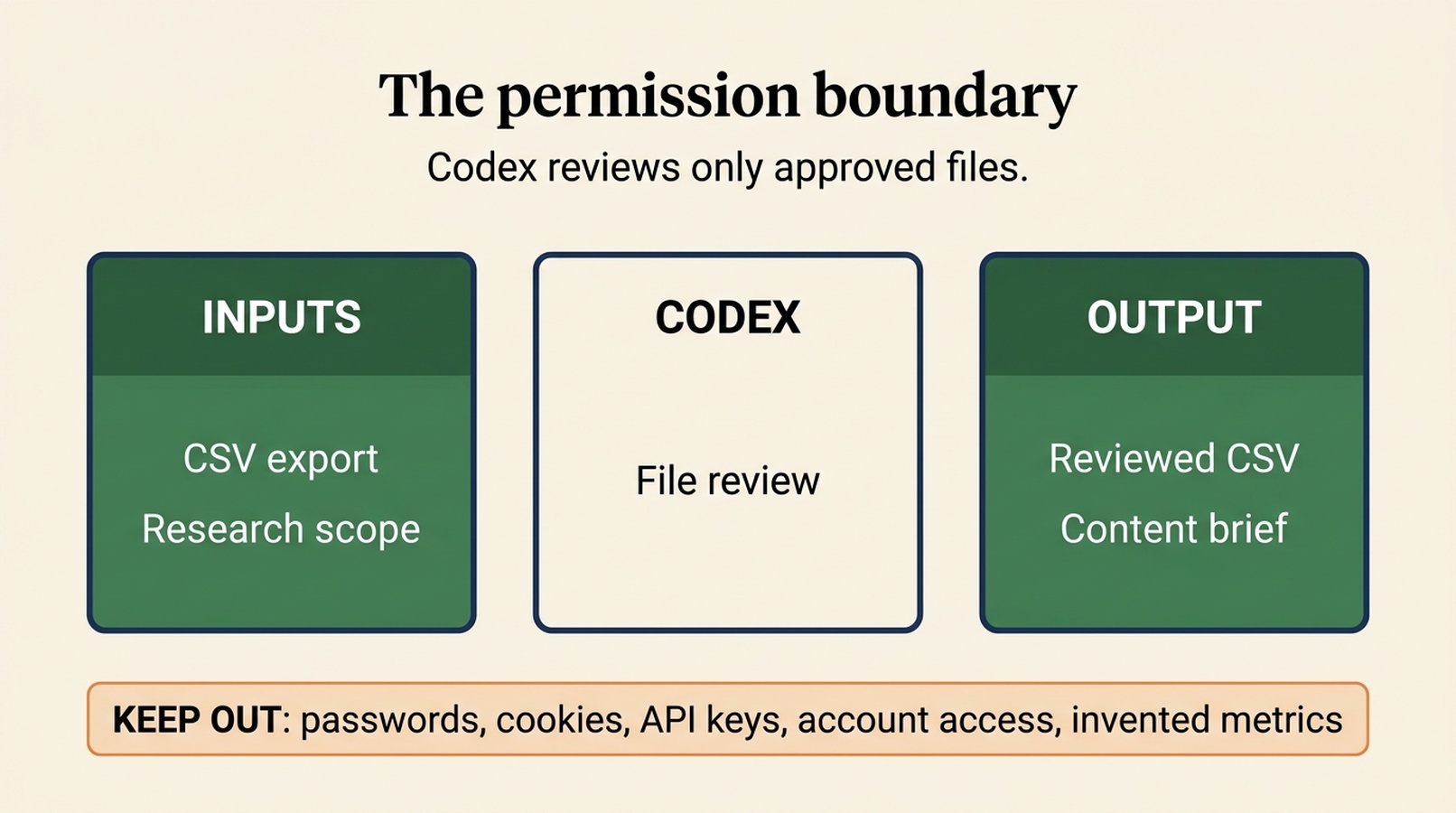
A file-based permission boundary: approved inputs in, transparent research outputs out.
Run the first pass and read the output like an editor
Open Codex in the project folder and give it a short instruction that points to the approved files:
Read SKILL.md and input/[export-file-name].csv. Complete the keyword review exactly as instructed. Before creating output files, tell me the CSV headers you found and flag any missing context.That last sentence is deliberate. It creates a pause before the agent starts organizing data. If it finds a missing country, language, or export date, add the correct value instead of letting it assume.
When the first pass finishes, review these four things before treating the list as useful:
- Provenance: Does each decision still name Google Ads Keyword Planner, the correct market, language, and export date?
- Duplicates: Did the agent explain which duplicate was retained and why? Similar-looking phrases can have different intent.
- Intent labels: Read the low-confidence and
reviewrows first. Intent is an interpretation, not an exported Google Ads fact. - Exclusions: Scan a sample of excluded queries. This catches overly aggressive filtering and vocabulary that the agent misunderstood.
If the agent has changed an original metric column, stop and rerun with a clean source export. A usable analysis adds columns; it does not rewrite the evidence.
Turn a keyword list into a page decision
At this point, do not choose a primary keyword solely because it has the largest reported range. A first-time researcher needs a page decision, not a spreadsheet trophy.
Use this review table for each candidate topic:
Question | What to look for | Result if the answer is weak |
|---|---|---|
Does it match the business goal? | The searcher could plausibly use the page, product, or next step you offer | Exclude it or move it to a future topic |
Is the audience clear? | A specific person with a specific problem, not a catch-all phrase | Mark it for review |
Can one page answer the need well? | A coherent task, comparison, or explanation | Split the cluster or choose a different primary topic |
Does the suggested intent make sense? | A quick manual search shows pages that broadly match the proposed format | Revise the intent label and brief |
Are the metrics usable for this decision? | The export context and field labels are known | State the limitation; do not make a numeric claim |
For the fictional consultant example, the final decision might be: build a practical "freelance expense tracking" guide, keep invoice-template terms as a supporting section, and hold tax-checklist terms for a separate brief. That is an illustrative editorial decision, not a claim about current search demand.
A manual search is still worth the few minutes it takes. Look at the visible result types, recurring questions, and obvious audience mismatch. Record what you observed and the date. Do not tell Codex that it "confirmed" a SERP unless you supplied that evidence or gave it explicit, authorized browsing instructions.
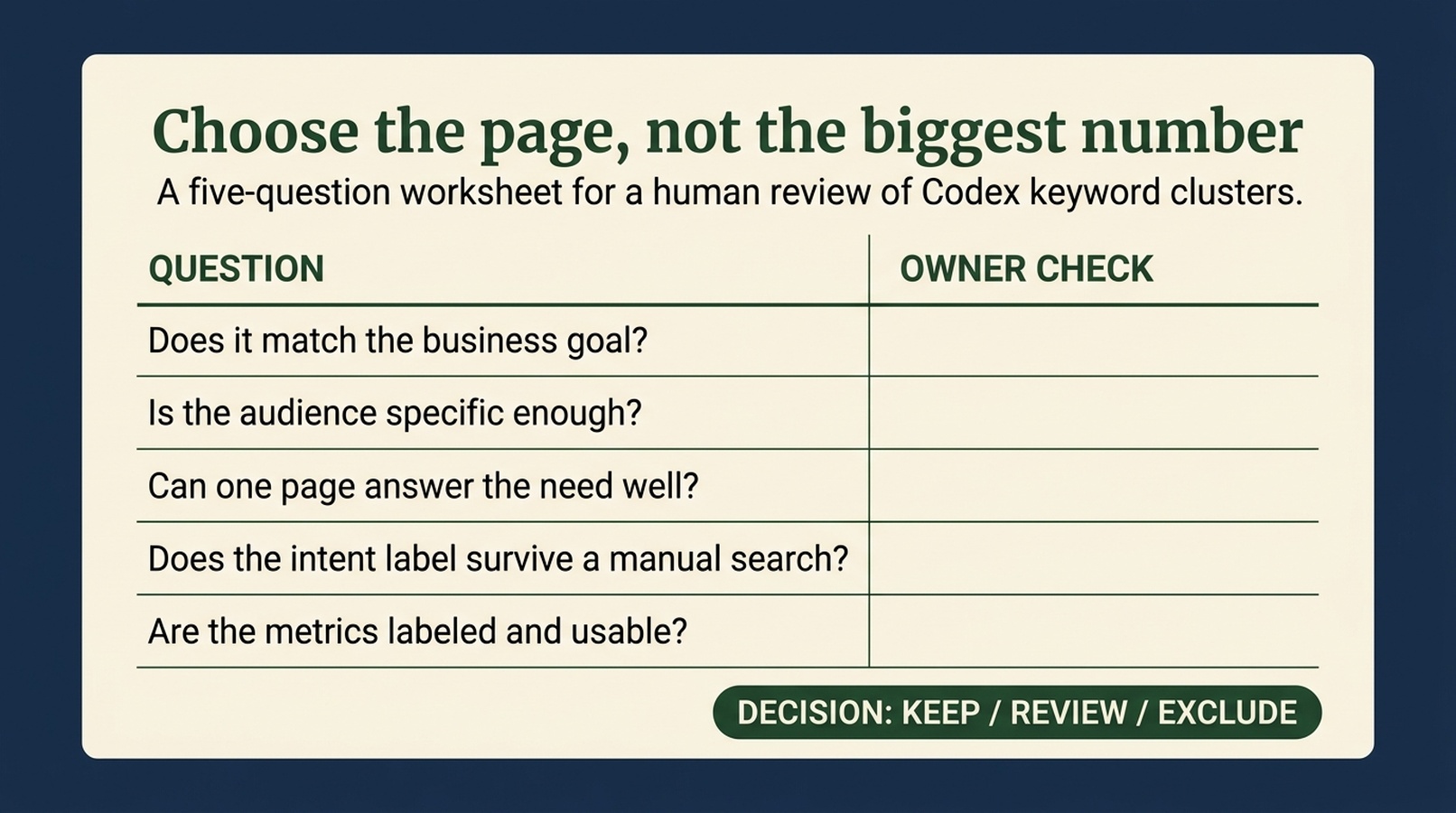
Use this worksheet after Codex clusters the export, before an owner approves the page topic.
Verify the completed research pack
You are done when you can answer yes to every item:
- The raw Keyword Planner export remains unchanged in
input/. - The reviewed CSV preserves source columns and adds transparent decision fields.
- The brief states the market, language, seeds, provider/report, and export time.
- Every number still has its original label or is marked unavailable.
- Every
keepkeyword has an audience-fit explanation and a human-approved next action. - Mixed-intent queries are marked for review rather than quietly forced into a cluster.
- You have one page decision, not a promise that the page will rank.
For a broader on-page check once a draft exists, use an appropriate SEO tool to identify technical and content issues. Treat that as a separate review from keyword discovery; no checker can validate the business judgment behind a keyword choice.
Common mistakes when using Codex for keyword research
Asking for "the best keywords" without a decision
There is no universal best keyword. Give the agent the page or business decision you need to make. Otherwise it will optimize for surface signals and return a long list that nobody can use.
Giving it account access when an export will do
An export is usually safer and easier to audit. Use a direct integration only when the user has explicitly approved it, the scope is documented, and the workflow records the provider, report, time, market, language, and fields returned.
Treating a range as a forecast
Provider-reported volume is not a traffic promise. It says nothing by itself about ranking difficulty, fit, conversion, or whether one page can satisfy the searcher. Keep the label intact and use it as one input among several.
Letting the agent make invisible editorial calls
Keyword clustering is useful precisely because it exposes decisions. Ask Codex to show its cluster labels, decision reasons, and questions. A clean-looking report with hidden assumptions is not a research asset.
FAQ
Can Codex use Google Keyword Planner directly?
Only if you deliberately configure and authorize a connection. In the beginner workflow above, Codex reads an export you provide. It should never ask you to paste passwords, cookies, or API keys into a chat or article prompt.
Does Codex know current search volume without my file?
No. It should report current volume only when an approved data source returned it and the output records the provider, report, market, language, retrieval time, and metric label. Otherwise the value is unavailable.
Can I use this process for a local market?
Yes. Make the country, language, city or service-area constraint, and audience explicit. Local terms frequently carry ambiguous intent, so mark uncertain rows for human review and check the live results yourself.
Will this workflow tell me which keyword will rank first?
No. It creates a reviewable shortlist and a better content decision. Rankings depend on the query, the page, competing results, technical quality, and many other factors that a Keyword Planner export cannot settle.
What should I save after the research session?
Keep the original export, reviewed CSV, brief, research log, and a short note explaining the final owner decision. That record is more useful than a one-off list when you revisit the topic later.
Author: Simon Vale, 11-Year Search Intent Researcher at Auspia. Simon writes about query mapping, buyer intent, and practical research workflows for growth teams.


