


The short answer
When Google has not indexed a page, do not begin by submitting the URL repeatedly. First establish whether the page is meant to appear in search, whether Google can reach it, and whether your website gives Google conflicting signals. Codex can turn that investigation into a short, reviewable job: it can inspect public and local evidence, explain the technical parts, and prepare a repair plan for approval.
Codex cannot force Google to index a page. An XML sitemap, canonical tag, internal link, and the Search Console Request indexing control can help in the right situation, but none guarantees indexing, rankings, traffic, rich results, or an appearance in Google AI features.
This workflow is for | You will finish with | What you need | Done means |
|---|---|---|---|
A site owner with one important missing URL | Evidence, a scoped repair plan, and a verification checklist | The exact URL; ideally URL Inspection evidence and local site files | You can explain the intended state, approved change, and next verification step |
Start with one URL: a product page, guide, service page, or location page. A sitewide project may eventually need crawl data and server logs, but a single URL gives you the discipline to identify evidence before making broad changes.
Indexing is not ranking
An indexed URL is eligible to appear in Google Search. It may still not rank for a useful query. And a URL may be correctly excluded because it is a thank-you page, a search-results page, a duplicate print view, a staging route, or an internal tool.
Write down one decision before inspecting any code: Should this exact URL be searchable? If the answer is no, non-indexing may be working as intended. If the answer is yes, you have a clear expected state to test.
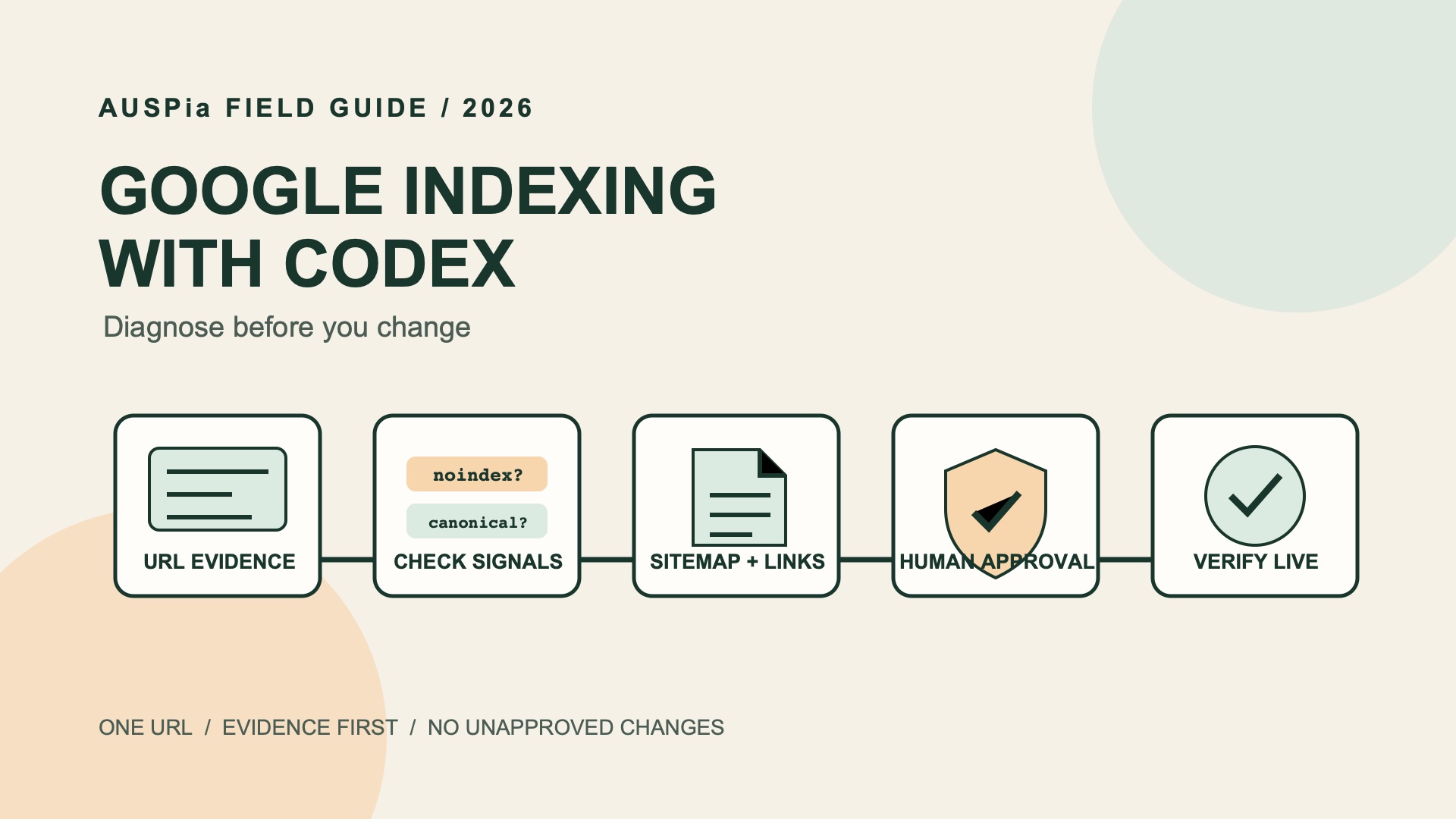
Expected state -> Search Console evidence -> Site evidence -> Approved repair -> Live verification -> Optional human recrawl requestThe useful part of an AI-assisted workflow is not that it lets you change many things quickly. It is that it leaves an evidence trail before it changes one thing.
Collect an evidence packet first
Open Google Search Console's URL Inspection tool and inspect the exact URL, including the protocol, subdomain, trailing slash, and path. Copy the status into a note. If available, also record the live-test result, Google-selected canonical, and last crawl information.
You do not need to give Codex access to Search Console. Copied status text or a user-authorized export is enough for a first pass. Never paste a password, cookie, API key, or token into an AI prompt.
Evidence | Why it matters | If unavailable |
|---|---|---|
Exact URL Inspection result | Separates Google's URL-level evidence from a generic site check | Mark it |
Intended canonical URL | Clarifies which URL should own the topic | Ask the page owner before changing canonicalization |
Page purpose | Stops a filter or duplicate from being treated as a broken landing page | Write a one-sentence description |
Local project, CMS export, or page source | Lets Codex locate a directive or template behind the page | Create a public-evidence report only |
Sitemap or crawl export | Helps spot discovery and duplicate patterns | Keep the first pass URL-level |
For a large site with many similarly generated URLs, request a representative crawl or log sample. Do not diagnose "crawl budget" from one unindexed page.
Give Codex a safe role
This prompt asks Codex to investigate first and wait for approval. Replace the bracketed text but do not add sensitive credentials.
Investigate why this URL may not be indexed by Google:
[EXACT URL]

The page should appear in Google Search: [yes / no / unknown]
Intended canonical URL: [URL or unknown]
Page purpose: [one sentence]
Target market and language: [for example, United States / English]

Here is the URL Inspection evidence I can share:
[paste text or say "not checked"]

Inspect only public same-domain evidence and the local website project if it is present.
First return an evidence table and a proposed plan. Do not edit files, change directives, submit a sitemap, request indexing, deploy, or operate any account until I explicitly approve the named actions.
A valuable answer sometimes says, "I cannot tell yet." HTML may show no noindex, while URL Inspection is still needed to know what Google last saw and what canonical it selected. Unknowns are a to-do list, not proof that the page is broken.
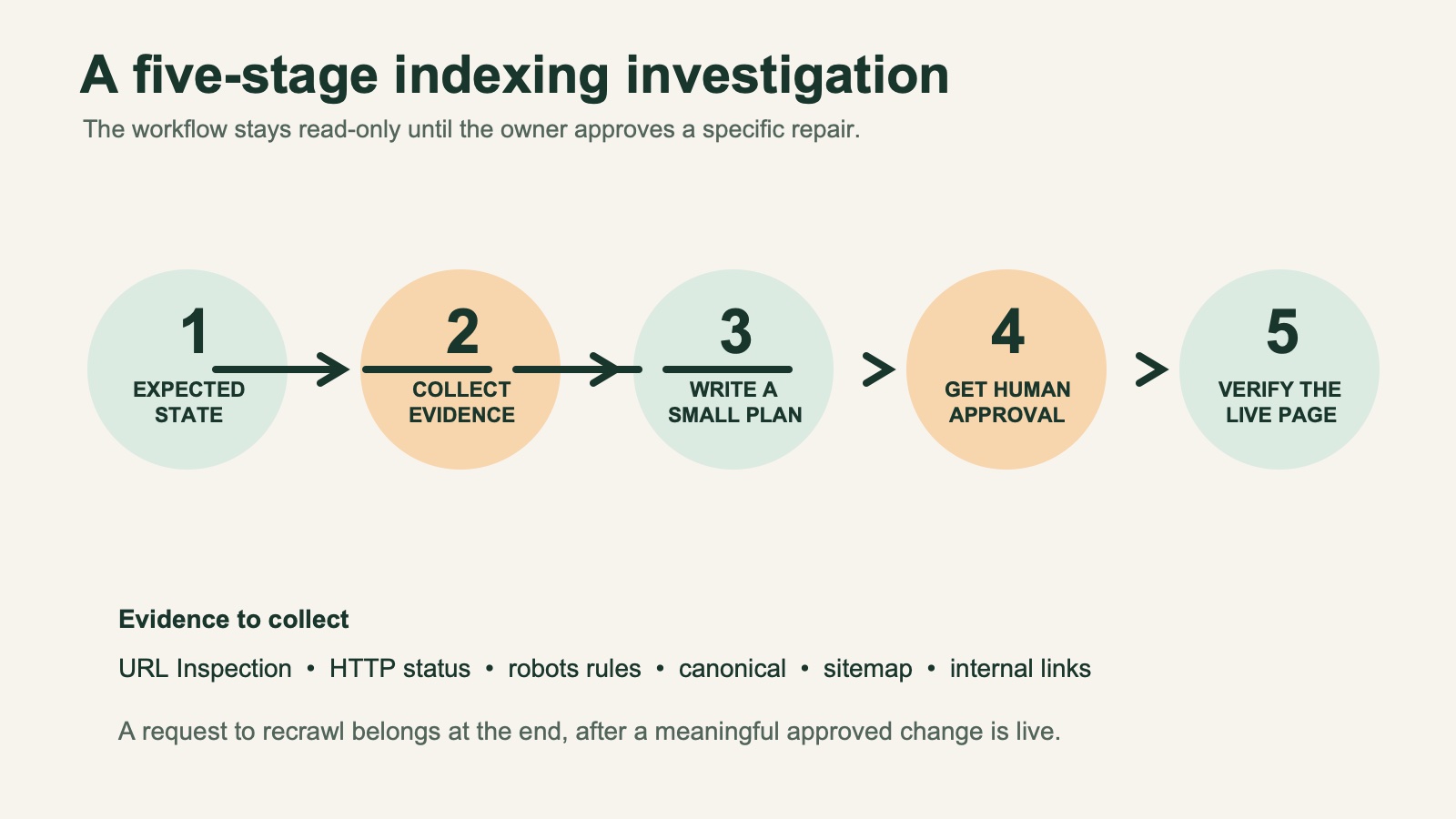
A safe indexing investigation moves from intended state and evidence to an approved repair, a live check, and only then an optional human recrawl request.
Install the reusable Codex Skill
For repeated work, save the Skill in the project where you run Codex:
your-project/
  .agents/
    skills/
      google-indexing-codex/
        SKILL.md
Current Codex documentation uses .agents/skills/ for repo-specific Skills shared with a team and ~/.agents/skills/ for personal Skills used across repositories. If your project has AGENTS.md with a different convention, follow that project guidance. This workspace's installed Skill is at .agents/skills/google-indexing-codex/SKILL.md.
Copy the complete file below rather than a shortened prompt. The frontmatter name and the folder name must both remain google-indexing-codex.
---
name: google-indexing-codex
description: Diagnose why a URL may not be indexed by Google and prepare a beginner-friendly, evidence-based repair plan. Use for Google indexing, URL Inspection, noindex, robots.txt, canonical, sitemap, internal-link, duplicate-page, and crawl-discovery investigations. The skill is read-only by default and never submits, deploys, or changes a site without explicit approval.
---

# Google Indexing With Codex

Turn one URL and its evidence into a small, reviewable indexing investigation. Explain technical terms in plain English. Treat Search Console as user-supplied evidence, not an account Codex can assume it can operate.

## Safety Boundary

- Begin in read-only mode. Inspect only local project files, user-authorized exports, and public URLs in scope.
- Never submit a sitemap, request indexing, change Search Console, deploy, alter production configuration, or edit `robots.txt`, canonical tags, redirects, or `noindex` without an explicit approval after a written plan.
- Never ask for or print passwords, cookies, API keys, tokens, or private exports. Use a user-authorized export or an already configured integration only.
- Do not say a URL is indexed, blocked, canonicalized, crawled, or excluded unless evidence supports that specific status. Use `not_checked` when evidence is unavailable.
- A request for indexing asks Google to recrawl a meaningfully changed URL. It is not a guarantee of indexing, ranking, traffic, rich results, or AI-feature inclusion.
- Repeating a request for the same unchanged URL does not make Google crawl it faster. Google documents a quota for individual URL requests.

## Inputs

A first pass needs the target URL. Ask for optional inputs only when useful: the exact URL Inspection result or copied screenshot text; intended canonical URL and searchable state; page purpose, market, and language; and a local project, sitemap, crawl export, or known internal links. Do not block when data is missing. Start with available evidence and state the smallest next step to check each unknown.

## Workflow

### 1. Define the expected state

Record:

```text
Target URL:
Intended canonical URL:
Should this page appear in Google Search? yes / no / unknown
Page purpose:
Evidence supplied:
Inspection date:
```

If the page should not appear in Search, confirm that the exclusion is intentional instead of treating non-indexing as an error.

### 2. Build an evidence packet

Inspect only the relevant URL and directly related same-domain assets. Capture the source for every observation.

| Check | Evidence | What it can tell you |
| --- | --- | --- |
| URL Inspection | User-provided status, selected canonical, last crawl, robots result, live test | Google's URL-level evidence, if supplied |
| HTTP request | Requested URL, final URL, status, redirect hops | Whether the intended page is reachable |
| HTML or source project | `meta robots`, `X-Robots-Tag`, canonical, main content, internal links | Page directives and where an approved repair may live |
| `robots.txt` | Relevant `User-agent` and `Disallow` rules | Whether a public crawl rule appears relevant; whether Google can read page-level robots rules |
| Sitemap | Discovery source and matching canonical URL | Discovery hint, not an indexing command |
| Local project | Template, route, CMS data, headers, middleware | Safe local repair location |

For unavailable evidence, write `not_checked` and state the smallest next step. Do not infer a Search Console status from HTML alone. A URL blocked in `robots.txt` cannot expose its page-level `noindex` or `X-Robots-Tag` to Google; flag that conflict rather than treating the directive as a confirmed fix.

### 3. Classify the reason

Separate confirmed evidence from hypotheses. Use one or more of these categories: `intentional_exclusion`, `access_or_redirect`, `indexing_directive`, `canonical_or_duplicate`, `discovery_or_internal_linking`, `quality_or_value`, `scale_or_crawl_management`, or `insufficient_evidence`. For `indexing_directive`, first confirm Google can crawl the URL and read the rule.

Do not blame crawl budget for a small-site, single-URL case without evidence. Do not use a `site:` query as a definitive indexing test.

### 4. Plan before changing files

Return, in this order:

1. **Plain-English diagnosis:** what is known, likely, and unknown.
2. **Evidence table:** check, result, source, confidence (`high`, `medium`, `low`).
3. **Smallest safe fix plan:** owner, exact file or interface, expected change, risk, rollback, and acceptance check.
4. **Human decisions needed:** especially canonical ownership, duplicate consolidation, and page value.
5. **Verification checklist:** local or staging checks first, then the exact Search Console action a human may choose.

Use `P0` for an accidental `noindex`, bad canonical, inaccessible page, or directive conflict on a page that should be searchable. Use `P1` for wrong redirects, missing crawlable paths, sitemap mismatches, or a clear duplicate-owner decision. Use `P2` for page-quality work and relevant internal links. Use `Needs evidence` for anything requiring Search Console, crawl data, logs, or a business decision.

### 5. Wait for explicit approval

After the plan, stop. Do not edit files or take external actions until the user explicitly approves named actions. If approved to edit local files, make the smallest scoped change, show a diff, run relevant local checks, and state the staging and Search Console checks a human must do. Do not deploy, submit a sitemap, or request indexing unless the user separately approves that external action.

## Report Template

```markdown
# Indexing investigation: [target URL]

## What we know
- Intended state: [searchable / intentionally excluded / unknown]
- Current evidence: [one-sentence summary]
- Confidence: [high / medium / low]

## Evidence
| Check | Result | Source | Confidence |
| --- | --- | --- | --- |

## Diagnosis
- Confirmed: ...
- Likely: ...
- Not checked: ...

## Proposed plan (no changes made)
| Priority | Action | Owner | Why | Risk / rollback | Acceptance check |
| --- | --- | --- | --- | --- | --- |

## Human decisions and data needed
- ...

## Verify after an approved release
1. ...
```

## Guardrails For Common Fixes

- **Remove `noindex`** only for a public, useful page intended for Search, not a duplicate placeholder, internal result page, or thin filter URL.
- **Change a canonical** only after comparing duplicates and agreeing which URL owns the intent. For duplicate URLs, redirects and `rel="canonical"` are strong canonicalization signals; sitemap inclusion is weaker. Do not use `robots.txt` or `noindex` as canonicalization tools.
- **Add a sitemap entry** only for an intended canonical that returns the target page and is eligible for indexing. Use fully qualified URLs. A sitemap helps discovery and is a weak canonicalization signal; it does not force Google to fetch, crawl, or include a URL.
- **Add internal links** from relevant, useful pages with natural anchors. Do not manufacture sitewide footer links or mass keyword anchors.
- **Request indexing** only after an approved, meaningful change is live and a human has verified the live URL. Record the date; individual requests have a quota, and repeatedly requesting an unchanged URL does not make it faster.
- **Improve content** with a documented reader need, distinct information, evidence, and a clear page purpose. Do not expand a page merely to make it longer.

## Official References

- https://developers.google.com/search/docs/crawling-indexing/ask-google-to-recrawl
- https://developers.google.com/search/docs/crawling-indexing/block-indexing
- https://developers.google.com/search/docs/crawling-indexing/robots-meta-tag
- https://developers.google.com/search/docs/crawling-indexing/consolidate-duplicate-urls
- https://developers.google.com/search/docs/crawling-indexing/sitemaps/build-sitemap
- https://developers.google.com/search/docs/crawling-indexing/links-crawlable
The Skill has four hard boundaries:
- it treats Search Console as supplied evidence rather than assumed access;
- it labels unavailable data
not_checkedrather than guessing; - it provides a plan, risk, rollback, and acceptance check before edits; and
- it needs a separate approval for a local edit, deployment, sitemap submission, or indexing request.
Use it with:
Use $google-indexing-codex to investigate [EXACT URL].
The page should be searchable: [yes/no/unknown].
Here is my URL Inspection evidence: [paste it or say not_checked].
Return the evidence table and proposed plan only. Do not make changes.
Read the five common findings correctly
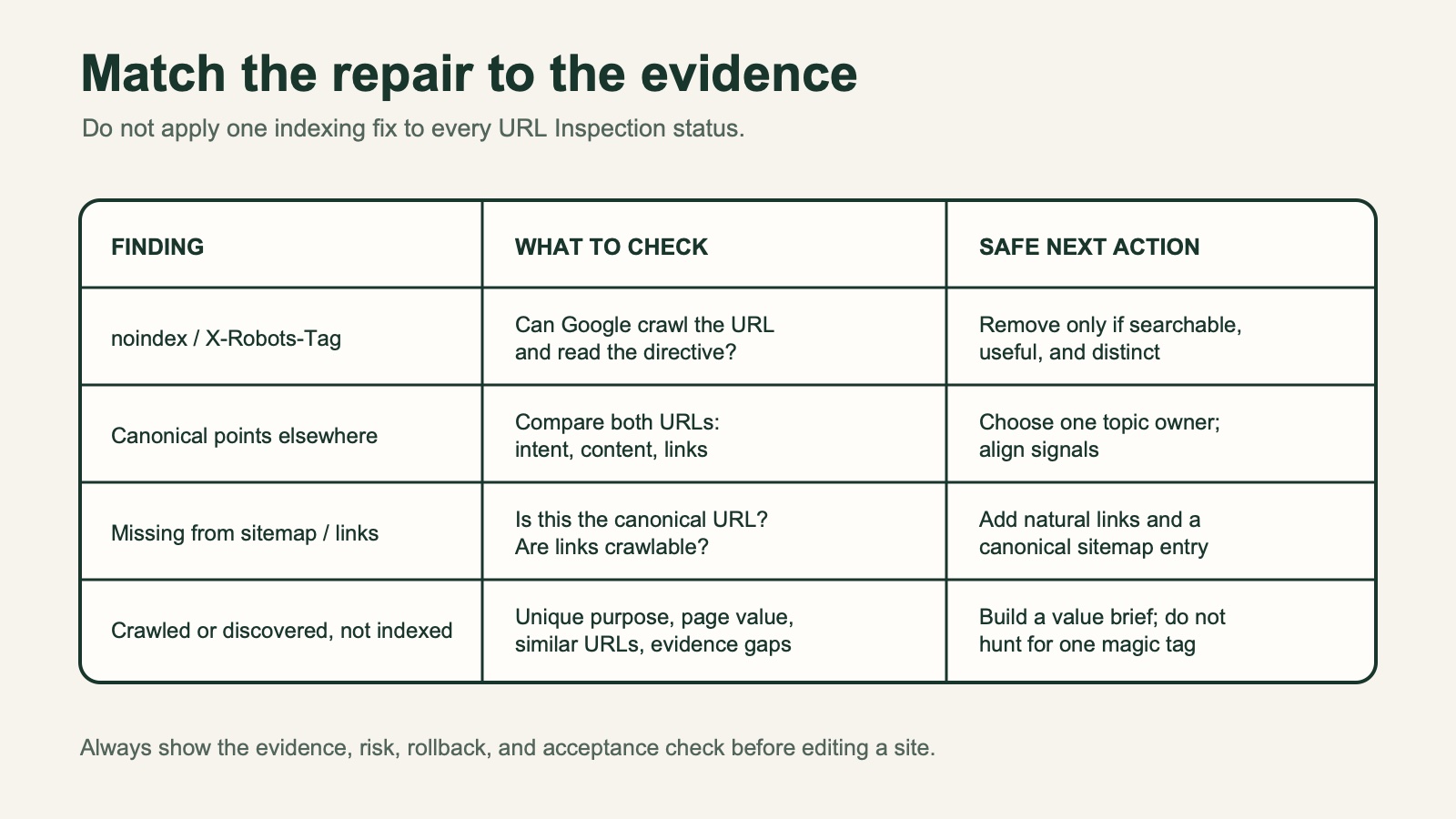
Use the evidence in front of you to choose the smallest safe next action rather than applying the same fix to every indexing status.
An accidental noindex or X-Robots-Tag
noindex tells search engines not to show a page in search. It can be in a meta robots tag or an X-Robots-Tag HTTP header. Ask Codex to show the exact directive and identify the source file, CMS setting, middleware, or hosting rule that produces it.
Do not remove it automatically. Confirm that the page is public, useful, distinct, and intended for search. Many pages should stay excluded: internal search results, carts, logged-in views, test routes, and thin filter pages.
A canonical points to another URL
A canonical tells Google which similar URL you prefer. It does not redirect visitors, and it is not a magic command. Before changing one, compare the target and preferred pages: intent, visible content, status, internal links, and sitemap entries.
The key human decision is: which URL should own this topic? Once that is clear, you can approve a coordinated canonical, redirect, sitemap, or internal-link change if it is warranted.
A robots rule or access problem
robots.txt influences crawling. noindex influences whether a crawled page should appear in search. They are related but not interchangeable. A page can also fail to reach the expected state because it has a redirect chain, error response, login barrier, cache problem, or fragile client-side rendering.
There is an easy-to-miss trap here: Google must crawl a URL to see its page-level noindex meta tag or X-Robots-Tag header. If robots.txt blocks Google from crawling that URL, Google cannot read those page-level instructions. Do not combine a crawl block with noindex and assume the noindex will be applied; ask Codex to flag the conflict, then agree on the intended outcome.
Ask Codex to identify the exact rule, header, redirect hop, or build setting. A broad robots.txt edit is high risk because it can affect many URLs. Keep a rollback plan and test the exact URL in staging before release.
Weak discovery signals
An XML sitemap lists URLs you want search engines to discover. It helps discovery; it does not force inclusion. Normally, list only the canonical URL that returns the page visitors should see, not redirects, errors, intentionally excluded pages, or URL variants.
Relevant internal links help readers navigate and can help crawlers find a page. Codex can search a local project for reasonable places to link to the target. Approve a link because it makes the journey clearer, not because you want to repeat the same keyword anchor sitewide.
A page without enough distinct value
No command can make Google include a generic page. When the technical signals are consistent, ask whether the URL has a clear job, distinctive information, and a useful answer for a real searcher.
Ask Codex for a content brief instead of automatic filler. The brief should state the reader question, page purpose, facts needed for claims, distinct examples or product detail, and related internal pages. Use a separate audit such as the Auspia SEO tools only when you need a broader page review.
Approve the smallest possible change
If the plan is sound, approve specific actions by name. That keeps a narrow indexing repair from turning into a surprise sitewide rewrite.
I approve only these local changes:
1. [exact directive, link, template, or sitemap change]
2. [second exact change, if any]

Do not edit other files. Do not deploy, submit a sitemap, request indexing,
change Search Console, or alter redirects. Show the diff, run the project's
relevant checks, and tell me the exact live-page and Search Console checks I
need to complete afterward.
Review the diff with one question: does every change match the page's intended state? If Codex cannot find the source of a header or robots rule, do not let it guess. Involve whoever owns the CDN, hosting, CMS, or deployment configuration.
Verify after an approved release
Verification has two layers. First, confirm that the public page returns the expected URL, status, canonical, robots directive, and visible content. Then use URL Inspection to check the live URL. A human may choose Request indexing after a meaningful change is publicly available. Google says crawling can take from a few days to a few weeks, and repeatedly requesting the same URL does not accelerate it.
Check | Good result | If it differs |
|---|---|---|
Browser and source | Intended URL loads the intended page | Check cache, environment, routing, and release version |
HTTP response | Expected status with no surprise redirect | Repair or revert before asking Google to recrawl |
Canonical and robots | Match the agreed searchable/non-searchable state | Re-open the plan; do not hide the conflict |
Links and sitemap | Point to the agreed canonical | Correct the ownership decision across related assets |
URL Inspection | Live test can access the page as expected | Resolve the reported issue or collect more evidence |
Indexing can take time, and Google makes the final inclusion decision. Keep a dated record of the URL, what changed, and the verification result. It is invaluable when the page is reviewed months later.
Mistakes to avoid
- Treating a sitemap as a command rather than a discovery signal.
- Removing every
noindexwithout checking whether a page should be private or excluded. - Changing canonical tags without comparing the competing pages.
- Using a
site:search as the final indexing diagnosis. - Requesting indexing before the meaningful change is live.
- Asking Codex to "fix indexing everywhere" instead of starting with one URL and one approved repair.
FAQ
Can Codex submit my sitemap or click Request indexing?
Not by default. Those are external account actions. Let Codex prepare the evidence and human checklist; approve each external action separately after the live page is correct.
Should every page be in my XML sitemap?
No. Include canonical URLs that you want search engines to discover and that are eligible to be indexed. Do not use it as a dump for redirects, error pages, non-canonical variants, or intentionally excluded URLs.
Will removing noindex get a page into Google immediately?
No. It removes one exclusion signal when the page should be searchable. Google still needs to crawl and evaluate the URL and may choose not to index it.
Does a canonical tag redirect visitors?
No. A canonical is an indexing preference for substantially similar URLs. A redirect sends visitors and crawlers elsewhere. Use each only when its purpose fits the situation.
What if a URL is crawled or discovered but not indexed?
Gather more evidence rather than hunting for one tag to change. Compare the page's purpose, distinct value, links, canonical selection, and neighboring similar URLs before making a change.
Author: Julian Mercer, 14-Year Technical SEO Practitioner at Auspia. Julian writes about crawlability, site architecture, and small technical changes that can be reviewed before release.


