


The short version
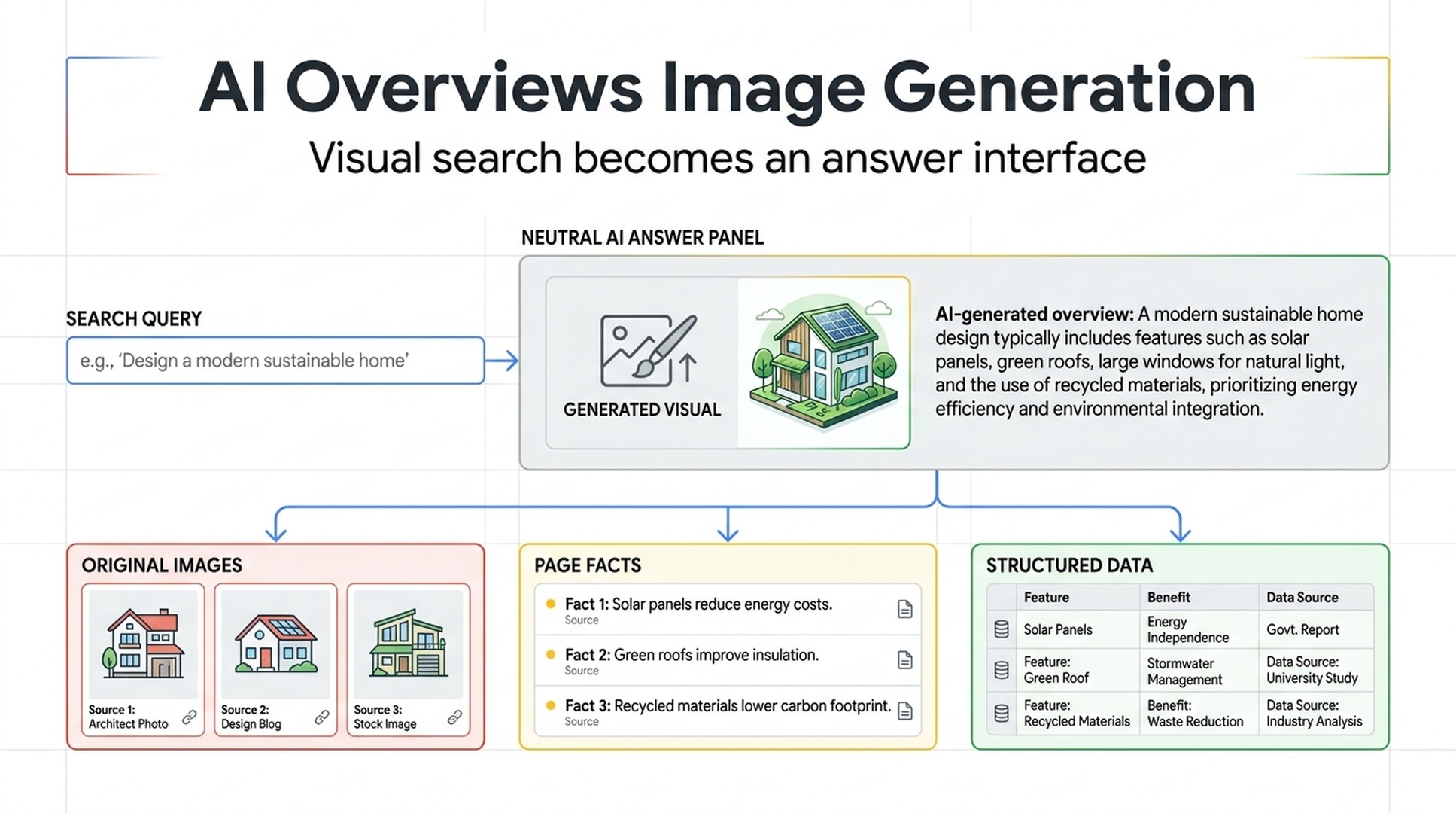
Google is starting to bring image generation into AI Overviews in Search. That does not mean image traffic disappears overnight. It does mean visual content is taking on a different role in search.
Users will not only search across web pages for an existing image. In some cases, they will get a custom visual directly within the answer interface.
In its July 14, 2026 official blog post, Google said image generation in AI Overviews will use its latest Nano Banana model and begin rolling out in English over the coming weeks. The rollout applies to regions that already support image creation in AI Mode.
Google Search Help also confirms that people can create and edit images in AI Mode, including through Lens and Circle to Search. Search is moving closer to a continuous visual workflow: discover an image, ask about it, edit it, or generate something new from the same context.
For publishers, the practical change is simple: image SEO cannot stop at ranking a thumbnail. Your images need to function as clear, verifiable visual evidence connected to useful page-level information.
What Google has officially confirmed
Google's official materials establish three important points.
Official fact | What Google says | What it means for content teams |
|---|---|---|
Image generation is coming to AI Overviews | Google says it is bringing image generation directly into AI Overviews in Search | Some visual search tasks may now be completed within the answer interface |
AI Mode supports creating and editing images | Users can create images from prompts, upload images for editing, and use Lens or Circle to Search as inputs | Images are becoming both search inputs and search outputs |
Google Images continues to evolve as a visual discovery product | Google introduced a new Google Images browsing home and outlined its visual search history | Finding images, querying images, and creating images are becoming one connected experience |
Google also notes that AI responses can include mistakes. Image generation has daily usage limits, and feature availability depends on region, account type, language, and subscription level. Do not build a publishing strategy around an assumed interface behavior that you have not verified.
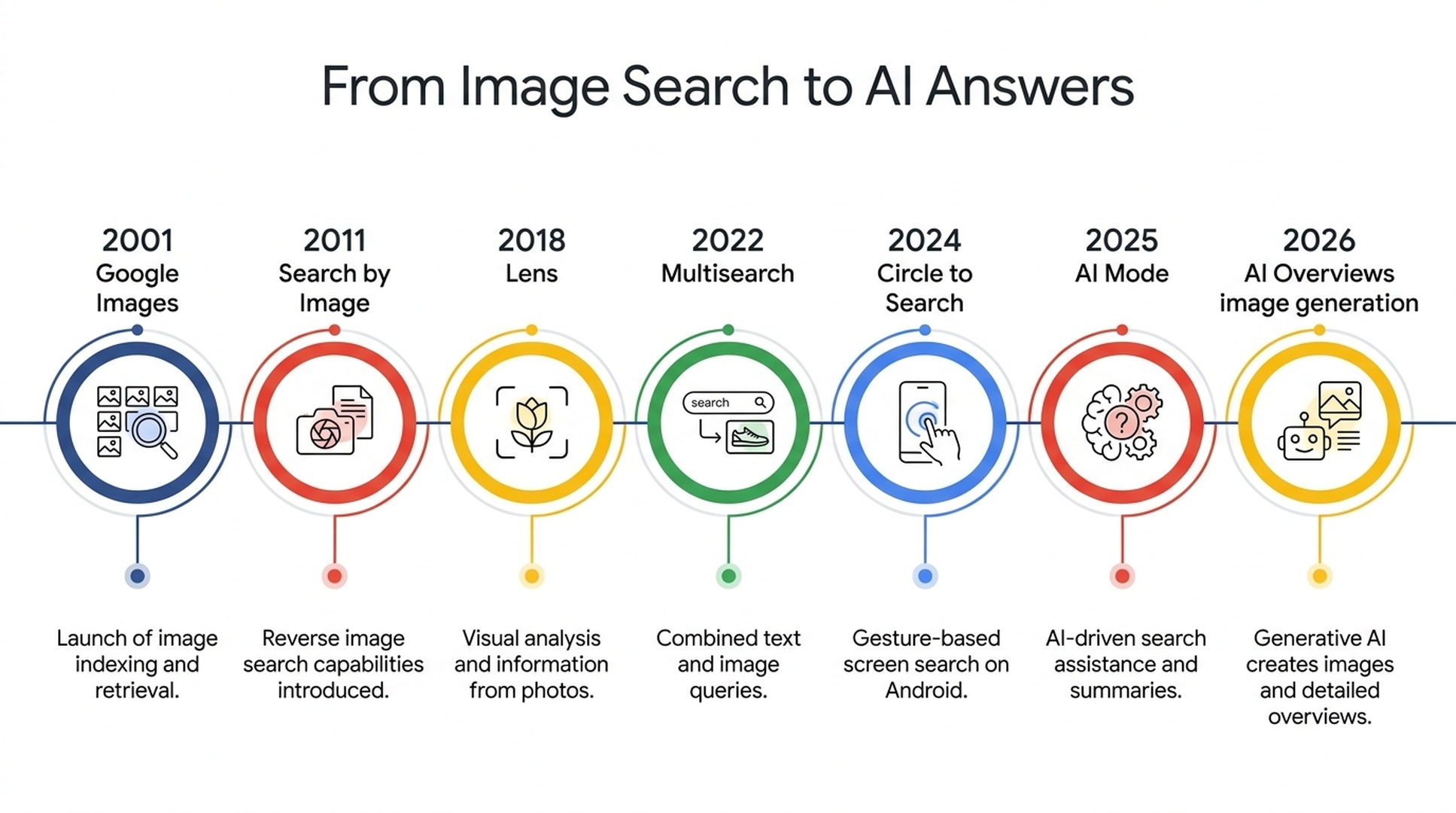
Google's official product timeline shows how image discovery, visual input, and AI-assisted exploration have converged in Search.
Why this changes image SEO
Traditional image SEO focused heavily on helping Google understand an image and sending users from image search to a page. That work still matters. It is no longer the whole job.
When Search can display visual web content and generate a new visual for a user's prompt, the competitive question changes.
Old image SEO question | More useful AI search question |
|---|---|
Does the filename and alt text include the target term? | Does the image accurately explain a product, claim, process, or real-world scenario? |
Can this image earn a Google Images click? | Does the surrounding page provide facts that an AI answer can use and verify? |
Do we have enough stock imagery? | Do we have original diagrams, product visuals, screenshots, and comparison assets? |
Does the image look good? | Can a person and a system understand what it shows, why it matters, and where the information came from? |
Alt text, crawlability, image performance, responsive delivery, and image sitemaps remain foundational. The new requirement is a visual evidence layer: every important image should be connected to facts that a reader can check.
The publisher risk is not generated images alone
If a user can quickly get a concept image, a mood board, or a rough illustration in Search, generic visual content becomes less distinctive.
A search such as "modern home office inspiration," "blue running shoe poster," or "coffee corner styling ideas" may not require a person to visit several pages before they get a usable starting point.
Some visual content is much harder to replace:
- Real product details, materials, measurements, and use cases
- Original research charts with methods and source boundaries
- Tutorial screenshots that show actual steps and failure states
- Service diagrams that explain how work is performed or evaluated
- Original photos with time, place, event, and subject context
This is where publishers should spend more of their effort. Producing a larger volume of interchangeable illustrations is unlikely to build a durable advantage. Original visual assets that document something real can.
A one-week visual asset audit
Start with the ten pages that matter most for organic traffic, lead generation, or revenue. Do not attempt a site-wide overhaul before you know where the gaps are.
- Identify images that carry the main explanatory burden on each page. Prioritize product details, comparison graphics, process visuals, data charts, and instructional screenshots over decorative artwork.
- Check whether the page states the facts behind each image. A reader and a search system should be able to tell what the image shows, who it is for, when it applies, and where the underlying data came from.
- Preserve source context for original visuals. Include dates, testing conditions, product versions, sample sizes, or methodological notes where relevant. Do not hide essential context inside the pixels alone.
- Replace low-information stock images with original explanatory assets. For product features, industry comparisons, and workflows, one clear diagram often does more than several decorative images.
- Recheck the technical foundation. Important images should be crawlable, load reliably, use accurate alt text, and not depend on a fragile script-only rendering path.
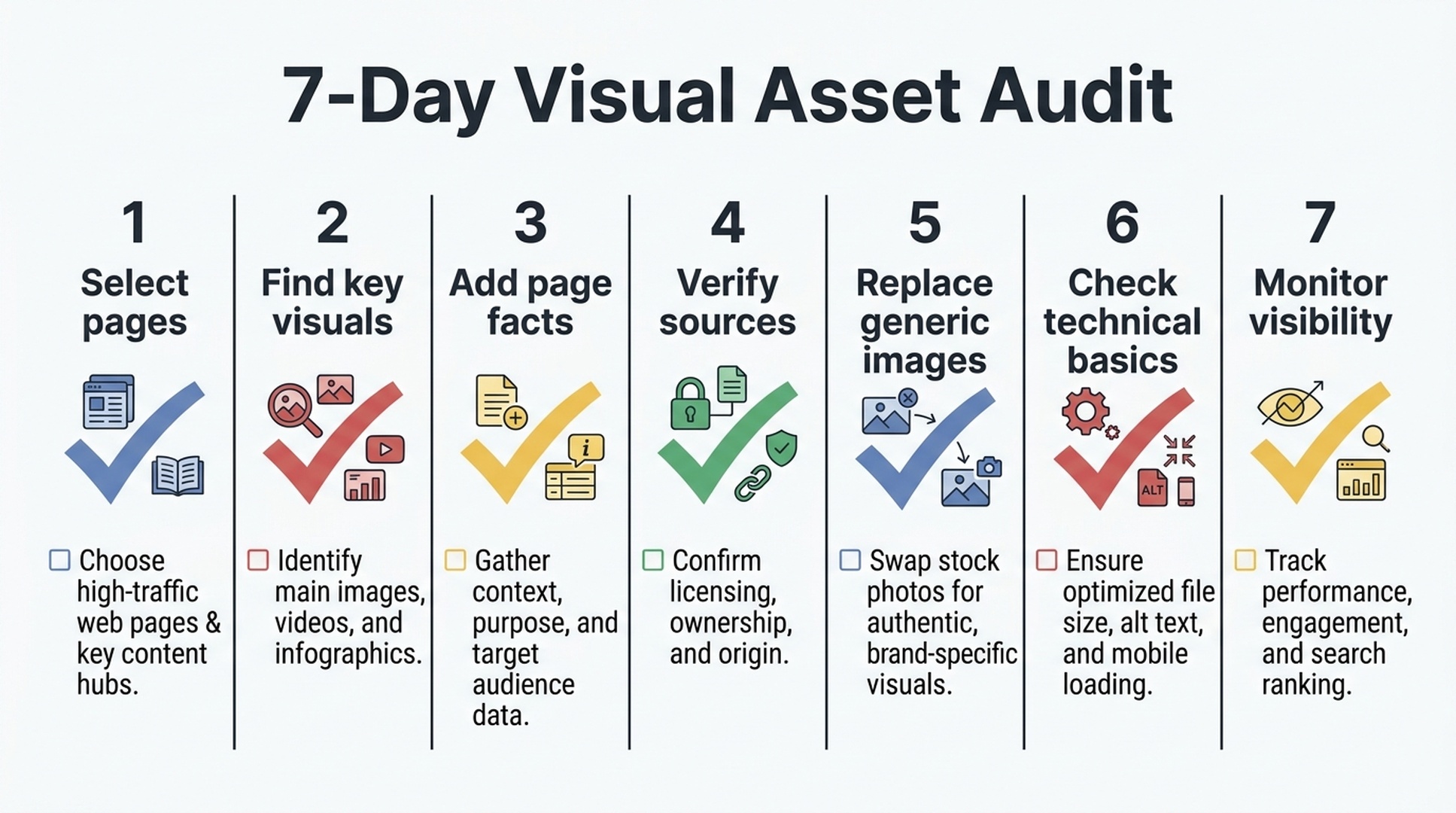
A seven-day sequence for moving from high-value pages to repeatable visual asset checks.
Teams that track AI search as a channel can include these priority pages in an ongoing AI Search Visibility Checker workflow. The goal is to monitor where your brand and topics appear in answer-oriented search experiences, not only where traditional image search sends clicks.
Auspia's view: visual content is becoming answer inventory
Google's own timeline is fairly consistent. Google Images made web images searchable. Search by Image made an image into a query. Lens, Multisearch, and Circle to Search expanded that idea to the physical world and to content already on a screen. AI Mode combines images, text, and reasoning in one search session.
Image generation in AI Overviews is the next extension of that path.
More users may stay in the answer interface for early-stage visual tasks. That makes it more important for websites to offer something the interface cannot casually reproduce: specific evidence, original reporting, authentic product context, and visual materials that help a user make a better decision.
Do not make your planning assumption "generated images will take all the clicks." Make it: "Which visual assets on our site are hard to substitute because they prove something?"
Frequently asked questions
Has Google confirmed that AI Overviews can generate images?
Yes. In its July 14, 2026 official Google Blog post, Google said it is bringing image generation directly into AI Overviews in Search. The feature will begin rolling out in English over the coming weeks in regions that currently support image creation in AI Mode.
Does this make Google Images less important?
No. Google announced the AI Overviews change alongside a new Google Images browsing home and a broader update on visual search. Google Images, Lens, AI Mode, and AI Overviews are becoming more connected, rather than replacing one another.
Should publishers stop investing in image SEO?
No. Crawlability, accurate alt text, page context, and image performance still matter. The investment should shift toward original product imagery, diagrams, research visuals, and explanatory assets with strong factual context.
Should we publish more AI-generated images?
Not as a volume target. Prioritize visuals that add understanding, evidence, or decision-making value. If an image does not make the page more useful or more specific, it is unlikely to become a meaningful visibility asset.
Official sources
- Google Blog: Google Images: 25 years of visual search innovation
- Google Search Help: Create and edit images in AI Mode
Author: Owen Hartwell, Google AI Overview Tracker Across 40+ Verticals at Auspia. He writes about Google AI search features, answer interfaces, and the visibility signals brands can control.


