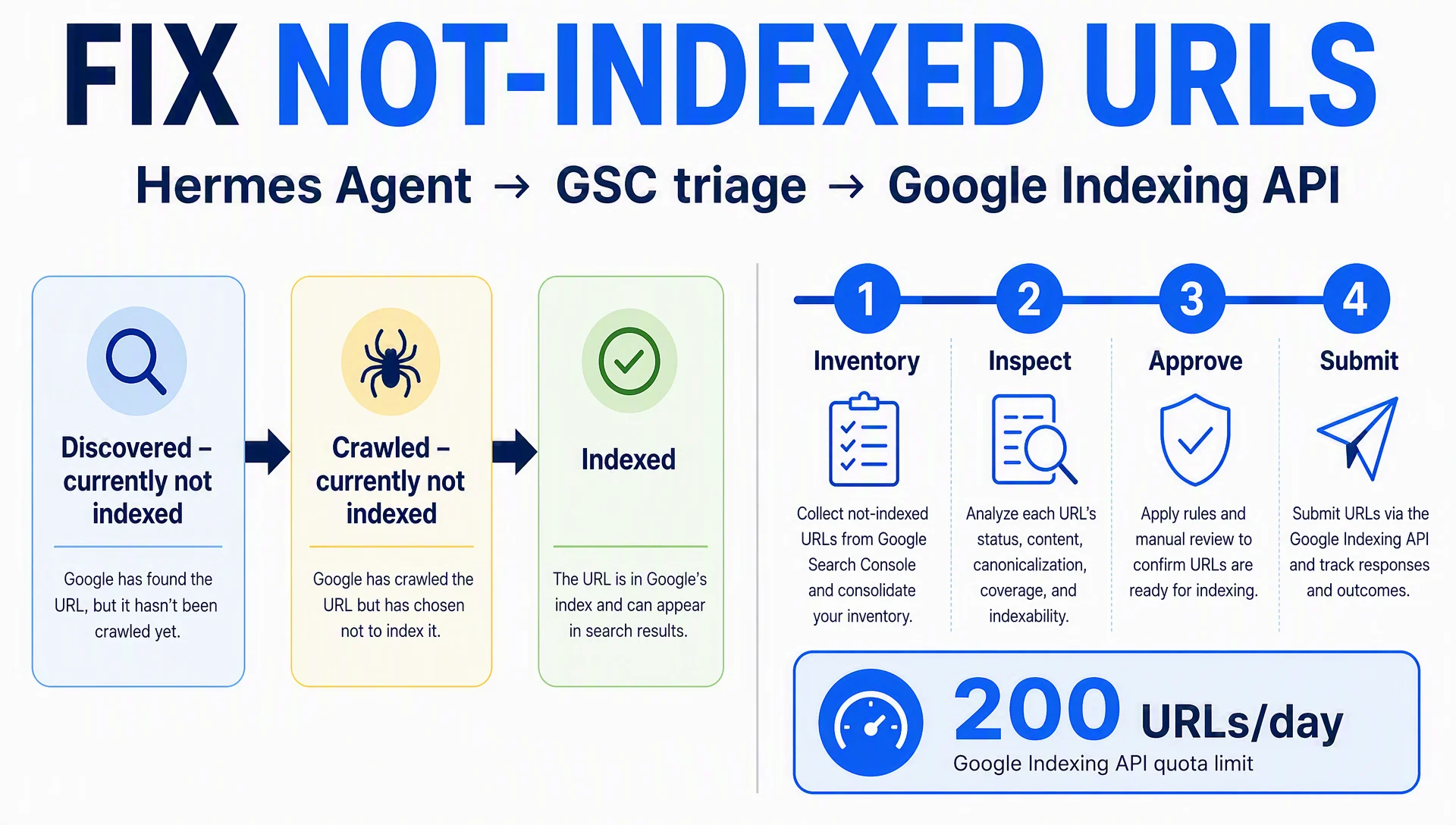
"Discovered – currently not indexed" and "Crawled – currently not indexed" are the two most common rows in the Search Console Page indexing report, and the two most misunderstood. They look like technical failures, but they are usually priority and quality decisions Google made about your pages. Submitting them harder won't change that. Fixing the reason will.
This guide is the full loop you can hand to Hermes Agent: pull the URL list, inspect each page, triage the real cause, approve a fix queue, and submit only the pages that deserve indexing through Google's Indexing API. By the end you'll have a repeatable weekly pipeline instead of a one-time button-clicking session.
What you will finish with
- A classified inventory: which URLs are stuck at discovered, which at crawled-but-not-indexed, and which should never have been submitted
- An approved submission list sent to the Indexing API, plus a skipped list with reasons
- A verification pass that shows whether your submissions actually moved the needle
You need: Hermes Agent installed and working (hermes chat starts a session; see the official docs at hermes-agent.nousresearch.com/docs for the current install steps), owner access to a Search Console property, and two sets of Google credentials (one for reading GSC, one for the Indexing API). Plan for 60–90 minutes on setup the first time, then about 15 minutes per weekly run. "Done" means your submitted URLs show real status movement in the inspection API within a couple of weeks, or you have clear evidence of why they won't.
The two statuses, read correctly
Google is not stuck on your site. It made a decision, and the status tells you which decision.
Status | What it actually means | Common causes | When to submit |
|---|---|---|---|
Discovered – currently not indexed | Google knows the URL exists (from your sitemap or from links) but hasn't crawled it yet | Low crawl priority, weak or no internal links, crawl-budget pressure on large sites, a brand-new site, slow or expensive JS rendering, sitemap churn | After you improve the priority signals (mostly internal links), then once |
Crawled – currently not indexed | Google fetched the URL and chose not to add it to the index | Duplicate or near-duplicate content, thin content, canonical pointing to another URL, noindex present at crawl time, soft 404, low perceived value | Only after you changed something: content, canonical, or noindex |
Indexed | It's in the index | — | Never |
Excluded | Crawled and deliberately left out (noindex, canonical, duplicate chosen, blocked) | — | Never; check whether the exclusion is intentional |
The one-sentence rule: only submit URLs you actually changed or that deserve a second look. The Indexing API is a notification channel, not a ranking override. Sending a thin page through it 10 times produces the same decision 10 times.
Why run this in an agent at all
The GSC "Request indexing" button has no public API, so there is no official scripted way to press it. The closest automation is Google's Indexing API, which accepts URL notifications directly. An agent earns its place here for three reasons:
- The loop is mechanical and long: inventory → inspect → classify → fix → submit → verify. It repeats weekly.
- It needs an audit trail: you want a file that says which URLs were submitted, when, and why.
- It needs an approval gate: the part that writes to Google should be reviewed by a human. Hermes is built around that split, with skills, project folders, and approval rules.
Before you start: what you need
- Hermes Agent installed. Confirm with
hermes chatbefore going further. - A GSC property you own, referenced in the
sc-domain:example.comformat (not the full URL). - Read access: a Google Cloud OAuth client for the Search Console API (client ID + secret). The GSC skill scripts use this to list sitemaps, run search analytics, and inspect URLs.
- Write access: a Google Cloud project with the Indexing API enabled and a service account JSON key. Add the service account email as an Owner under GSC → Settings → Users and permissions. If submission returns 403, this is the step that was missed.
- Python 3 with
pip install google-auth google-api-python-client. - A project folder, for example
/hermes-seo-project, withcontext/,data/,qa/, and anapproval-rules.mdthat states the submit step always requires human sign-off.
Step 1: Build the URL inventory
Copy the two GSC skills into Hermes' skills directory (~/.hermes/skills): the read skill (sitemaps, search analytics, URL inspection) and the indexing skill (submission scripts). Hermes can also load them via skill_view if the harness already catalogs them.
Then ask Hermes, in a chat session from the project folder:
List all sitemaps for sc-domain:example.com, fetch every URL with its lastmod date, and write the result to data/url-inventory.csv. Flag any sitemap that has failed to fetch.
Hermes runs the sitemap command through its terminal tool and writes the CSV. What good output looks like: a de-duplicated CSV with URL, lastmod, and source sitemap. Quality check: spot-check five rows and compare the total count against the GSC sitemap report. If the list is empty or auth fails, re-run the GSC auth flow; the read scripts need a fresh OAuth token.
Step 2: Inspect and classify
Now the agent batch-inspects the inventory through the URL Inspection API, which returns each page's current coverage state. Ask for the next stage:
Inspect every URL in data/url-inventory.csv. Split them into three files: data/to-submit.txt (not indexed, worth requesting), data/skip.txt (with a one-line reason per URL), and data/needs-fix.txt (not indexed and blocked by something we can change).
The inspection API is rate-limited per property (check your current quota in Google Cloud Console; it is thousands of requests per day but not unlimited). For large sites, restrict this pass to URLs with the newest lastmod dates, the ones you actually changed this quarter. Quality check: sample the skip list. Most of it should be noindex, canonicals pointing elsewhere, and duplicates, not pages you care about. If the agent produced an empty needs-fix list on a site with thousands of URLs, the inventory step probably missed pages. Widen the input.
Step 3: Triage before you submit
This is the step people skip. Map each stuck URL to a cause and a fix, in this order:
Cause | Fix | Submit after fix? |
|---|---|---|
No internal links point to the page | Add contextual links from related, indexed pages | Yes |
Brand-new site or page | Nothing to fix; submit once and wait 1–2 weeks | Yes, once |
Blocked by robots.txt | Unblock the path | Yes |
Crawled but duplicate or thin | Rewrite, merge, or remove the page | Only after a real content change |
Canonical points to another URL | Fix the canonical if wrong; if intentional, stop submitting this URL | Only if you fixed it |
noindex present at crawl time | Remove noindex and let Google re-crawl | Yes, after removal |
Soft 404 or pagination/archive without value | Fix the page or remove it | No — skip permanently |
Ask Hermes to draft the fix queue as a table: URL, suspected cause, evidence (the inspection result or a content check), proposed action, risk level. Approve each row in chat. Your approval-rules.md should make this mandatory: the agent prepares, you approve, nothing above low risk is submitted without sign-off.
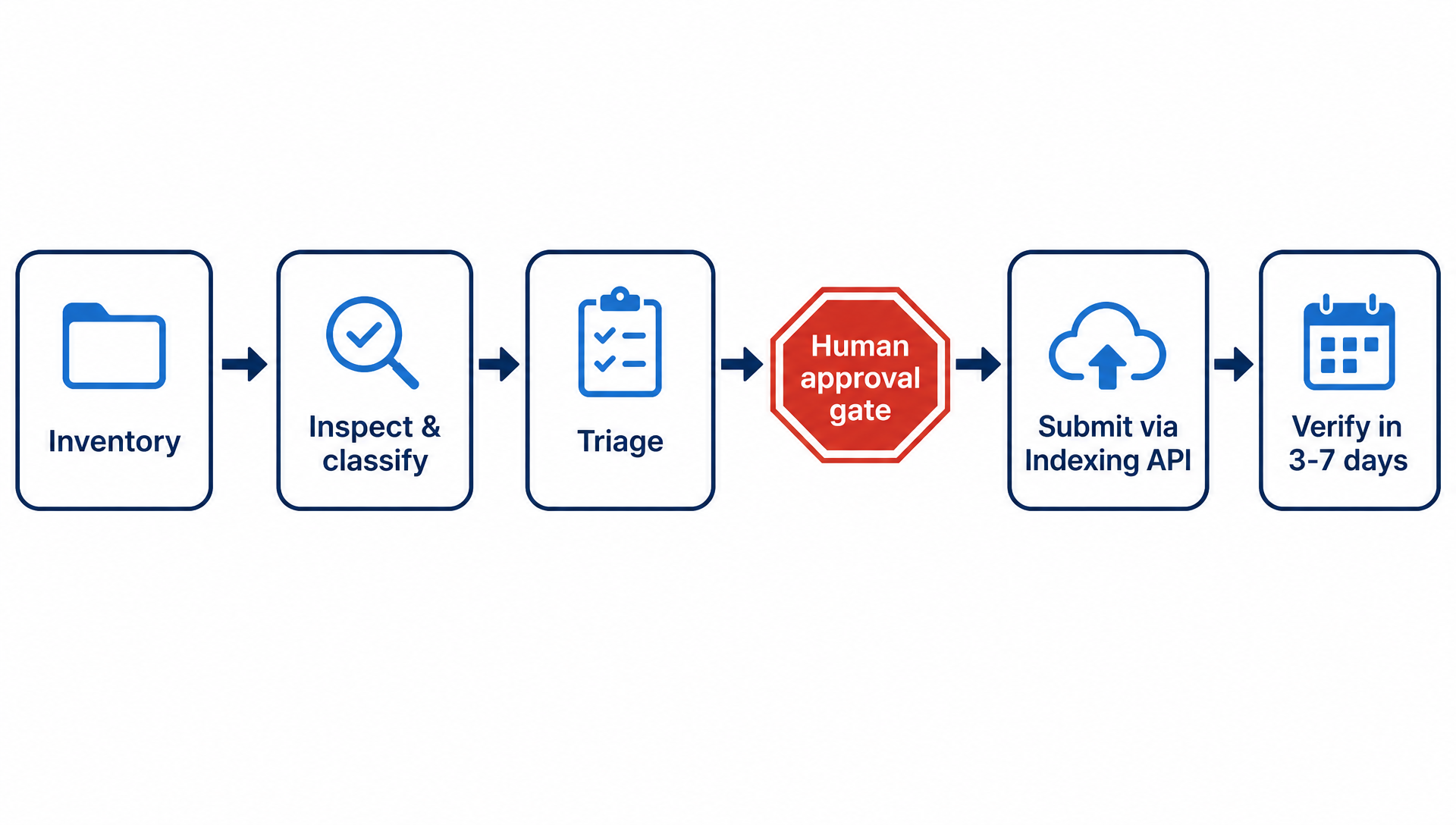
The approval gate separates the agent's preparation from the write step.
The fixes themselves are regular SEO work: content rewrites, canonical cleanup, internal linking. This pipeline covers the submission half; the audit and refresh articles in the Hermes series cover the fix half.
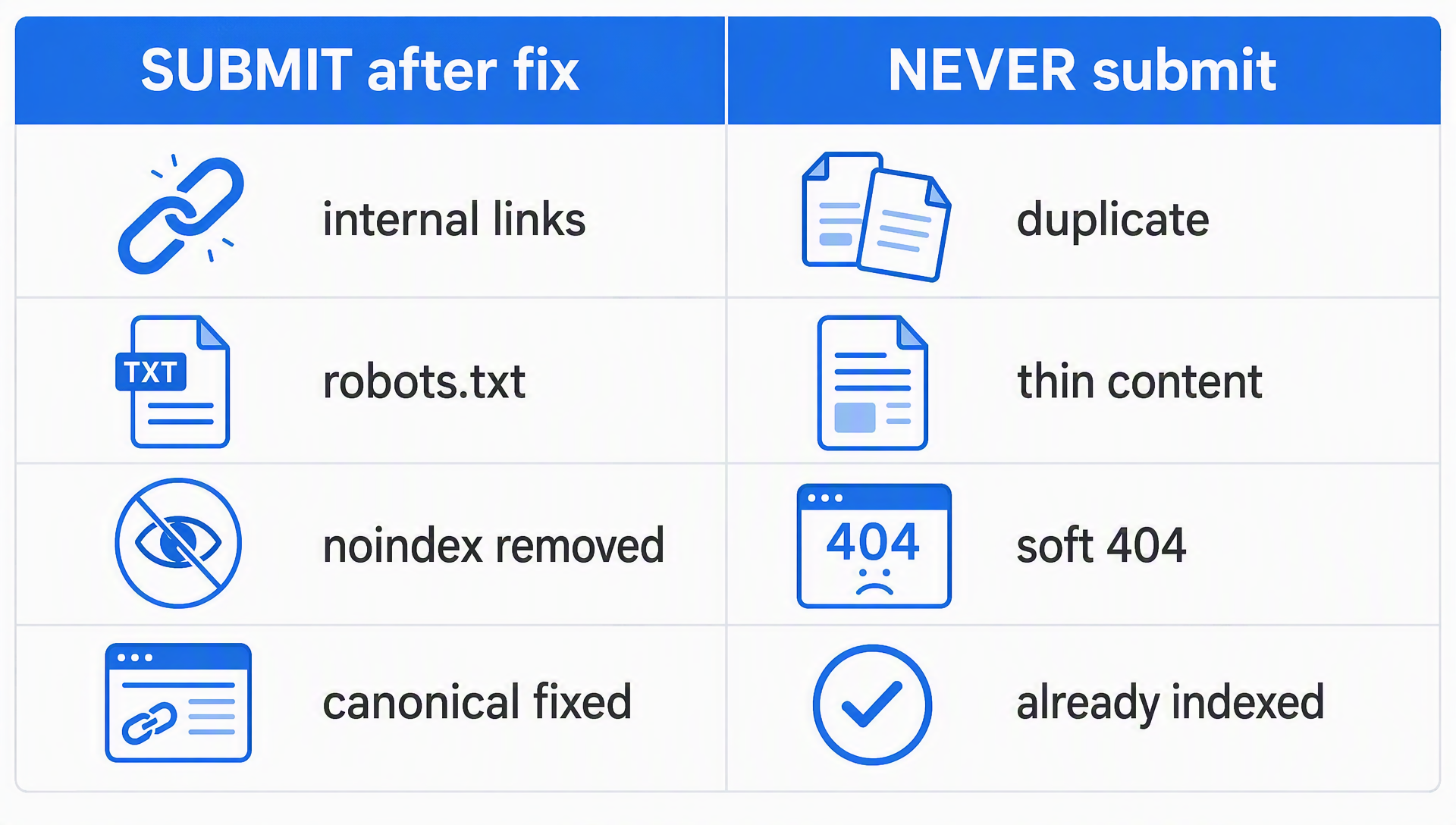
The submission list is the intersection of "fixable" and "worth indexing."
Step 4: Submit through the Indexing API
Once the queue is approved, put the URLs in data/approved-urls.txt and let Hermes run the indexing skill:
python3 ~/.hermes/skills/gsc-indexing/scripts/index_submit.py check-auth
python3 ~/.hermes/skills/gsc-indexing/scripts/index_submit.py submit --urls-file data/approved-urls.txt
The default notification type is URL_UPDATED, which is what you want for new or changed pages. Three numbers matter: the default quota is 200 URLs per day and 600 requests per minute; and a 403 means the service account is not an Owner of the property. If your approved list exceeds 200, split it across days; Hermes can schedule the remaining batches.
Never submit pages that are already indexed, and never submit the skip list. Wasted notifications do nothing but burn quota and noise.
Step 5: Verify, then wait
Right after submission, status only tells you whether Google has metadata for your notification, not whether the page is indexed. The real check comes days later.
Ask Hermes, 3–7 days after the batch:
Inspect the URLs in data/approved-urls.txt again and report status changes compared to the last run.
Healthy movement is discovered → crawled → indexed. What that looks like over a couple of weeks: a shrinking not-indexed list, with the fixes you actually made (new internal links, rewritten copy) showing up in the index. Remember GSC data lags by a few days, and Google re-crawls on its own schedule. A URL that stays "Crawled – currently not indexed" for 10–14 days after a real fix is a quality signal, not a submission problem. Escalate it back to content work.
Keep the loop running
Turn the pipeline into a weekly routine: new and updated URLs since the last run → inspect → classify → triage → approve → submit → log. Hermes can run the read-only parts (inventory, inspection, classification) unattended on a schedule and present you a queue each Monday. Keep the submit step gated on your approval, and keep a running log in qa/indexing-log.md: submitted date, URL, notification type, result. Six months of that log is the only honest way to measure whether the pipeline is working.
Honest limits
- Google documents the Indexing API for pages with
JobPostingorBroadcastEventstructured data. Using it for regular pages is a widespread SEO practice, but Google does not guarantee indexing or support for every page type. - There is no public API for the "Request Indexing" button. The Indexing API is the closest automation, not the same button.
- Submission does not create priority. If a page stays not-indexed after you fixed it, submitted it, and waited, the next answer is content quality, not another notification.
FAQ
Does the Indexing API work for ordinary pages? It accepts any URL you send it. Google's official documentation scopes it to JobPosting and BroadcastEvent pages, so treat regular-page submissions as best-effort: helpful, common, and never guaranteed.
Why did my URL stay "Discovered – currently not indexed" after I submitted it? That status usually means crawl priority, not failure. Check internal links pointing to the page, whether robots.txt blocks the path, and whether the page is JavaScript-heavy. Then wait: discovery-to-crawl can take a week or two on new sites.
Is 200 URLs a day enough? For most sites, yes, because you should only be submitting URLs you actually changed. If you regularly have more, prioritize by business value and request a quota increase in Google Cloud Console.
Will the Indexing API rank pages faster? No. It notifies Google that a URL changed. Ranking decisions are separate, and they are made by Google's systems, not by your notification volume.
How is this different from clicking "Request indexing" in Search Console? Same intent, different mechanism. The button is UI-only with no public API; the Indexing API is the scriptable channel. Neither one overrides Google's judgment about whether a page belongs in the index.
Author: Julian Mercer, 14-Year Technical SEO Practitioner at Auspia. Julian writes about crawlability, indexing, schema, and the technical foundations that let both Google and AI systems read a site properly.