


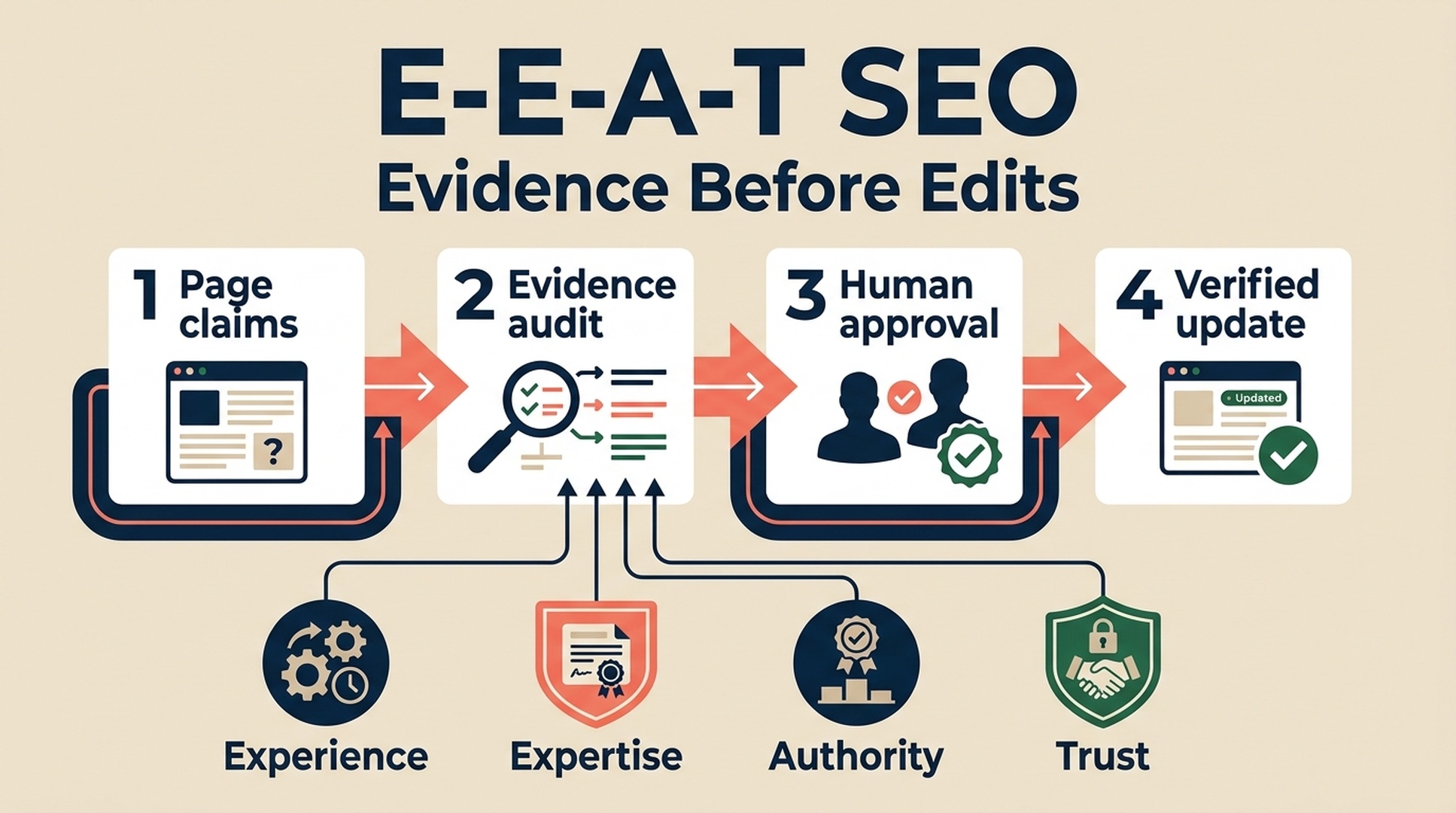
E-E-A-T in SEO means Experience, Expertise, Authoritativeness, and Trust. It is a useful way to ask whether a page gives people enough reason to rely on what it says. It is not a visible Google score, a meta tag, or a promise that adding an author bio will improve rankings.
For beginners, the practical question is simpler: what can a visitor verify on this page, and what needs a real person to prove or approve? Codex can make that review much faster. It can inventory claims, flag missing evidence, and draft bounded improvements. It cannot create real experience, credentials, reputation, or trust on your behalf.
What you will finish with
Use this workflow when you have one existing page or a draft that needs a credibility review. It works especially well for guides, service pages, product pages, comparison pages, and any topic where a wrong claim could mislead a reader.
Item | This guide's convention |
|---|---|
Who it is for | A beginner with one page or content brief, not a full-site audit |
Finished output | An E-E-A-T evidence inventory, an unknowns log, and a five-item repair brief |
Minimum input | A public URL or local draft; the page's audience and visitor task |
Helpful extra input | Sources, approved author facts, original workflow notes, policies, or product documentation the owner can substantiate |
Codex's role | Inspect, organize, identify gaps, and draft reviewable suggestions |
Human role | Provide proof, verify claims, approve edits, and publish through the normal process |
Definition of done | Every new factual claim has evidence or is removed; remaining unknowns have an owner and next step |
Google's guidance asks site owners to create helpful, reliable, people-first content and to consider clear sourcing, evidence of expertise, and background about the author or site. Treat those questions as a quality-review framework, not a checklist that guarantees a search outcome. A page can become clearer and more accurate without moving immediately in search results.
The boundary that keeps this workflow honest: Ask Codex to find evidence and improve clarity. Do not ask it to "make the page look experienced" or invent proof that does not exist.

A sound E-E-A-T workflow begins with what the page can prove, then makes changes only after human review.
E-E-A-T in plain English
The letters overlap. A well-documented first-hand test can help readers see both experience and expertise; transparent sourcing can support trust and authority. You do not need to manufacture four separate blocks on every page. You need enough relevant, truthful evidence for the visitor's decision.
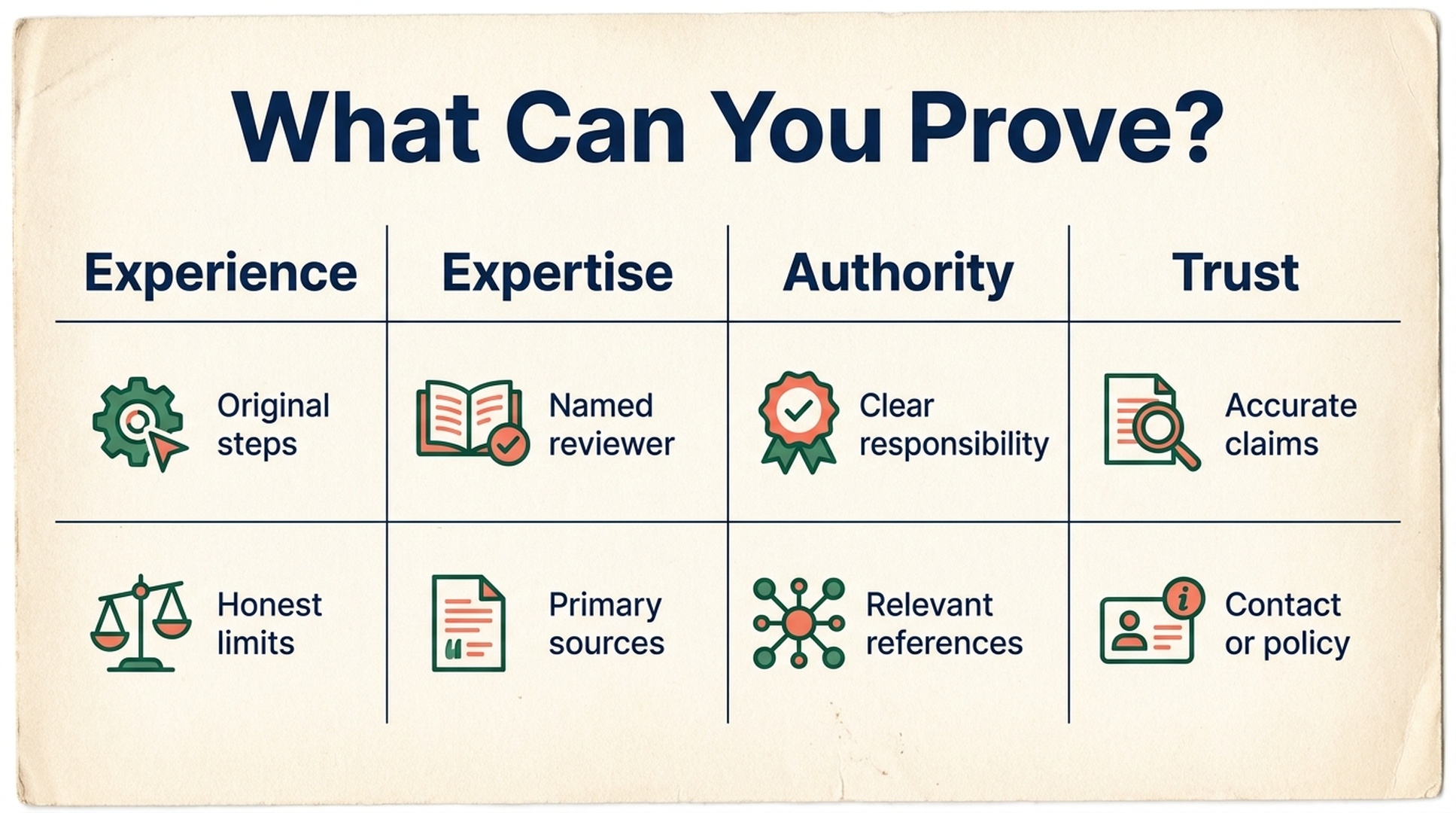
The useful question is not how many E-E-A-T signals a page has. It is whether every material claim has evidence a reader can check.
Lens | A beginner-friendly question | Evidence that can be real | What it is not |
|---|---|---|---|
Experience | Has someone actually done, used, tested, or observed the thing being described? | Original steps, dated testing notes, photos with context, and an honest account of limits | A generic sentence such as "we have extensive experience" |
Expertise | Was the information prepared or checked by someone qualified for this topic? | An approved bio, documented review process, primary sources, or an expert's contribution | A credential generated from a job title or writing style |
Authoritativeness | Why should a reader see this person or organization as a relevant source? | Named responsibility, relevant references, clear organization information, and consistent useful coverage | A claim to be an "industry leader" without support |
Trust | Can a visitor identify what is known, where it came from, who is responsible, and how to correct a problem? | Accurate claims, source links, contact or policy information where relevant, and a usable secure page | A badge, schema block, or a promise that a page is trustworthy |
Google's Search Quality Rater Guidelines use E-E-A-T as part of a framework for evaluating page quality. They are useful context for understanding quality, but they are not a public formula for calculating a ranking score. Do not ask a tool to assign your page "82/100 E-E-A-T" and then optimize the number.
Example: a useful claim versus an unsupported one
Imagine a small accounting firm writing a guide about choosing bookkeeping software. These are illustrative examples, not instructions to make either claim.
Weak approach | Better evidence-led approach |
|---|---|
"We tested every major bookkeeping platform and found the winner." | "This guide compares the features listed in each vendor's public documentation as checked on [date]. Our accountant reviewed the criteria. We have not independently tested every workflow." |
"Trusted by thousands of local businesses." | Publish the number only if the firm can substantiate it and the wording fits its privacy and legal review; otherwise, describe the service without the claim. |
An author name with no context | Use a real, approved byline and a short, accurate description of the author's role or review contribution. |
The stronger version may be less dramatic. That is a feature. Readers can see what was reviewed, what was not, and who is accountable.
Choose the right Codex path
Start with the short prompt if this is your first E-E-A-T review. Move to the skill if you review pages regularly and want Codex to follow the same evidence rules each time.
Option | Choose it when | What you do |
|---|---|---|
One-time prompt | You have one page and want a quick, guided review | Paste the prompt below into Codex with your URL or file path |
| You want repeatable local reports and the same safety checks for future pages | Copy the included |
Both approaches are read-only by default. They create a plan before they create a change.
Before you ask Codex: gather proof, not marketing phrases
Give Codex the smallest useful evidence set. A public page is enough to begin, but owner-approved supporting material makes the recommendations more useful.
Bring this | Why it matters | If you do not have it |
|---|---|---|
The canonical public URL or a local draft | Defines the exact claim set to inspect | Start with one page, not a homepage or whole domain |
One sentence about the visitor's job | Stops the audit from becoming generic keyword advice | Write: "This page helps [audience] decide or do [task]." |
Named sources or documentation | Lets Codex trace a factual statement | Mark the claim as needing verification or remove it |
Approved author/reviewer facts | Helps distinguish a real role from invented authority | Do not add a bio until the person approves the wording |
First-hand notes or original assets | Can support a real experience claim | Explain the method and limitations instead of implying hands-on testing |
Relevant contact, correction, return, or editorial policy | Lets visitors see accountability when it matters | Do not add a policy link that does not exist |
Do not paste passwords, API keys, customer spreadsheets, private analytics, or unapproved testimonials into your prompt. Codex does not need them to identify which public claims need human verification.
Use this one-time E-E-A-T audit prompt
Replace the bracketed text before you send this to Codex. Keep the first run small: one URL or one draft. The result should be a review document, not an automatic rewrite.
Review one page for evidence-backed E-E-A-T. Do not publish, change a live
site, update Schema, or make external write actions.

Input: [PUBLIC URL OR LOCAL FILE PATH]
Audience: [WHO THE PAGE IS FOR]
Visitor task: [WHAT THE VISITOR NEEDS TO DECIDE OR DO]
Topic and market: [TOPIC, COUNTRY/MARKET, LANGUAGE]
Approved evidence I can provide: [SOURCES, AUTHOR FACTS, PROCESS NOTES,
POLICIES, ORIGINAL ASSETS - OR "none yet"]

First, build a fact inventory. For every material claim or credibility signal,
label it as visible, owner-supplied, needs_human_verification, or not_provided.
Then organize the evidence under Experience, Expertise, Authoritativeness, and
Trust. Keep unknowns visible.

Return only:
1. a concise scope statement;
2. an E-E-A-T evidence table with source locations;
3. the three most material gaps or risks;
4. no more than five recommended changes, each with evidence, owner, risk, and
   a way to verify it after release; and
5. a claim-by-claim human approval checklist.

Do not assign an E-E-A-T score. Do not invent experience, credentials, reviews,
citations, traffic, rankings, customer results, product capabilities, policies,
or author details. If proof is missing, say so and propose a safe next step.
Do not include credentials, tokens, cookies, passwords, or private customer data
in the output.
What a good first response looks like
Codex should identify things a person can check. For example: "The page says 'clinically proven' but no source is provided in the supplied materials" is a useful finding. "Add a doctor bio and more reviews" is not useful unless you have a real, approved doctor contribution and real reviews that can be shown accurately.
If Codex returns a rewrite immediately, stop and ask it to produce the fact inventory and approval checklist first. That short pause protects you from turning an unverified suggestion into a live claim.
Install a repeatable E-E-A-T skill for Codex
A skill is a reusable folder that gives Codex a consistent workflow. In a project you control, create this folder:
mkdir -p .agents/skills/eeat-evidence-auditThen save the following file as .agents/skills/eeat-evidence-audit/SKILL.md. Restart Codex or start a new session if it does not discover the new skill, then invoke it with $eeat-evidence-audit.
---
name: eeat-evidence-audit
description: Audit a page, content brief, or local content files for substantiated Experience, Expertise, Authoritativeness, and Trust evidence. Use when a user asks to improve E-E-A-T, assess content credibility, prepare an author/source review, or create an evidence-backed SEO revision plan. Do not use to fabricate credentials, reviews, citations, results, or a ranking score.
---

# E-E-A-T Evidence Audit

Turn a vague request to "improve E-E-A-T" into a small, reviewable evidence
brief. E-E-A-T is not a page score and this skill does not predict rankings.
Its job is to separate supported facts, editorial opportunities, and unknowns.

## Boundary

- Inspect public URLs, user-provided exports, and local files; create local
  reports and draft copy only.
- Do not publish, deploy, edit a live CMS, change Schema, or make external
  write actions unless the user explicitly approves the exact proposed change
  after reviewing it.
- Never invent first-hand use, qualifications, author identity, reviews,
  awards, partnerships, citations, traffic, rankings, revenue, test results,
  product capabilities, or legal, medical, or financial advice.
- Do not request, print, save, or expose passwords, cookies, API keys, tokens,
  private customer data, or unpublished analytics.
- Mark unavailable evidence as `not_provided` or `needs_human_verification`.
  Do not turn an absence of evidence into a negative factual claim.

## Inputs

Ask only for missing essentials:

1. One public URL, local file, or content brief.
2. The page's intended audience, topic, and visitor decision or task.
3. Any approved evidence the owner can substantiate, such as named sources,
   author-approved biography facts, product documentation, original photos,
   firsthand notes, policies, or support/contact details.

Optional inputs are target market/language, page type, author identity that is
approved for publication, and the user's preferred output folder. Default to
English and a local `reports/eeat-evidence-audit-YYYY-MM-DD/` folder. State
defaults in the report.

## Workflow

1. **Define scope.** Record the input, target audience, topic, visitor task,
   page type, market/language, check time, and definition of done.
2. **Build a fact inventory.** Capture only facts visible in the supplied page
   or supported by owner-provided evidence. Give each item an evidence location
   and a publication status: `visible`, `owner_supplied`, `needs_verification`,
   or `not_provided`.
3. **Classify evidence.** Use the four columns below. One item may support more
   than one column, but do not force every page to have every kind of evidence.
4. **Identify gaps.** Distinguish an editorial clarity gap from a factual gap.
   Recommend a claim only when its source is supplied or visible. For a factual
   gap, ask for proof, remove the unsupported statement, or leave it out.
5. **Prioritize revisions.** Recommend no more than five changes. For each,
   give the evidence, proposed action, owner, risk, and an after-release check.
6. **Apply an approval gate.** Show the fact inventory and revision plan before
   any website, CMS, Schema, or source-code edit. Make only approved changes.
7. **Verify.** After an approved edit, compare the rendered page to the evidence
   inventory. Confirm that new claims are visible, accurate, and sourced where
   appropriate. Do not call a change a ranking improvement.

## Evidence Lens

| Lens | Look for | Safe recommendation | Do not infer |
| --- | --- | --- | --- |
| Experience | First-hand process notes, original photos/video, tested steps, limits, dates | Add an owner-approved first-hand example or clarify the method | That the author used a product or had a customer outcome |
| Expertise | Named and approved qualifications, review process, primary sources, technical accuracy | Attribute verified expertise and add a subject-matter review | Credentials, licenses, or expertise from writing style alone |
| Authoritativeness | Relevant independent references, organization details, consistent topic coverage | Link to a real source or clarify who is responsible for the content | Reputation, industry recognition, or endorsements |
| Trust | Clear sourcing, correction/contact/policy information, accurate claims, secure and usable page behavior | Fix contradictions, cite primary sources, or expose an approved policy | That a page is safe, compliant, or trustworthy without evidence |

## Report

Create `eeat-evidence-brief.md` and, if useful, `eeat-evidence-inventory.csv`.
Keep original input files unchanged. Use this minimum inventory schema:

```csv
lens,claim_or_signal,evidence_location,publication_status,confidence,owner_or_source,action_needed
```

The brief must include:

1. Scope and the page's visitor task.
2. A four-column evidence inventory with unknowns kept visible.
3. The three most material credibility risks or gaps.
4. Up to five prioritized, evidence-backed recommendations.
5. A claim-by-claim human verification checklist.
6. A before/after approval gate and an after-release verification checklist.

## Screenshot Rule

Use a product screenshot only when it gives the reader evidence that prose
cannot. Capture only an authentic, public, logged-out page with explicit
permission. Record the URL, capture date, page state, viewport, purpose,
caption, and descriptive alt text. Do not capture a logged-in dashboard,
include customer data, generate a fake product interface, or imply that a
screenshot proves a result it does not show.

## Quality Gates

Before finishing, verify:

- Each factual statement has a visible or owner-supplied source, or is marked
  for human verification.
- The output does not call E-E-A-T a score or promise rankings, rich results,
  AI Overviews, AI citations, traffic, or conversions.
- No recommendation adds an author, testimonial, review, structured-data field,
  date, image, policy, or credential that the page owner cannot substantiate.
- The report separates observation, interpretation, proposed action, and
  unknowns.
- No secrets, private data, or unauthorized screenshots are in the artifacts.
- No external write occurred without an explicit user approval after review.

## Final Response

State the input reviewed, the page task, the strongest supported evidence, the
most important unknown, generated artifact paths, and the one approval or proof
needed before any live-page change.
The skill's description tells Codex when it applies; the body defines its method and guardrails. Keeping the skill in the project folder makes it useful to other people working in the same workspace. For a personal workflow that should apply across projects, use your personal skills folder instead.
Run the skill: evidence first, edits second
Start with a request that states the task and the stopping point.
Use $eeat-evidence-audit to review https://www.example.com/guides/choosing-a-bookkeeper.

Audience: owners of small businesses in the United Kingdom.
Visitor task: compare options before booking an introductory call.
Approved evidence: our current pricing page, our accountant's approved role
description, and the primary sources listed in this brief. We have no approved
customer testimonials for this page.

Create the evidence brief only. Do not edit copy, add Schema, publish, or make
external changes until I approve the claim inventory and recommendations.
Expected output: a local report that labels what the page currently supports, what needs a person's confirmation, and which five changes matter most.
Quality check: a reviewer can find the source for every proposed factual claim. They can also reject a claim without losing the rest of the audit.
Recovery path: if you do not have evidence for a claim, do not replace it with more persuasive wording. Ask the page owner for proof, narrow the statement, or remove it from the page.
Turn the inventory into a small repair brief
Once someone has approved the facts, make the smallest change that helps a visitor understand the page. These are different kinds of work and should not be mixed together.
Finding type | Example recommendation | Who must approve it | How to verify it |
|---|---|---|---|
Editorial clarity | Explain the comparison method in the opening section | Content owner | Read the rendered opening and confirm it matches the actual method |
Missing source | Add the relevant public primary source beside a material claim | Subject-matter owner | Open the source and confirm it supports the exact wording |
Unapproved author fact | Remove the claim or request approved bio language | Named author or responsible editor | Compare the live bio against the approval record |
Unsupported social proof | Remove it until a real, publishable source is available | Legal, customer, or brand owner as applicable | Confirm the public page no longer makes the claim |
Schema mismatch | Do not add a field until the visible page and a reliable data source support it | Content and technical owner | Check the rendered page, then validate the markup against it |
This is also a good moment to use a focused on-page SEO audit. It can help you inspect the page's visible and HTML signals after a release. It is not an E-E-A-T score and cannot confirm that a search engine trusts, ranks, or indexes the page.
Screenshot checklist: use real product evidence or none
A product screenshot can help a new reader understand a workflow, but it is easy to misuse. The rule is simple: a screenshot should document a real, relevant page state, not decorate an unsupported claim.
Check before capture | Requirement |
|---|---|
Page access | Capture only a public, logged-out page unless the user explicitly authorizes access to a private environment |
Authenticity | Use the real product or webpage; never generate a dashboard lookalike |
Privacy | Exclude customer names, email addresses, account data, tokens, and internal notes |
Context | Save the URL, capture date, viewport, page state, intended article section, caption, and alt text |
Claim boundary | Describe what is visibly shown, not an unseen performance result or endorsement |
For this article, a future visual asset could show a public, logged-out content review interface or a simple evidence matrix. It should be captured only after the exact product URL and public state are approved. A screenshot of an authenticated SEO dashboard would not be appropriate for this beginner guide.
Verify the finished page before you publish
Run this check after approved changes are visible in a staging or public page.
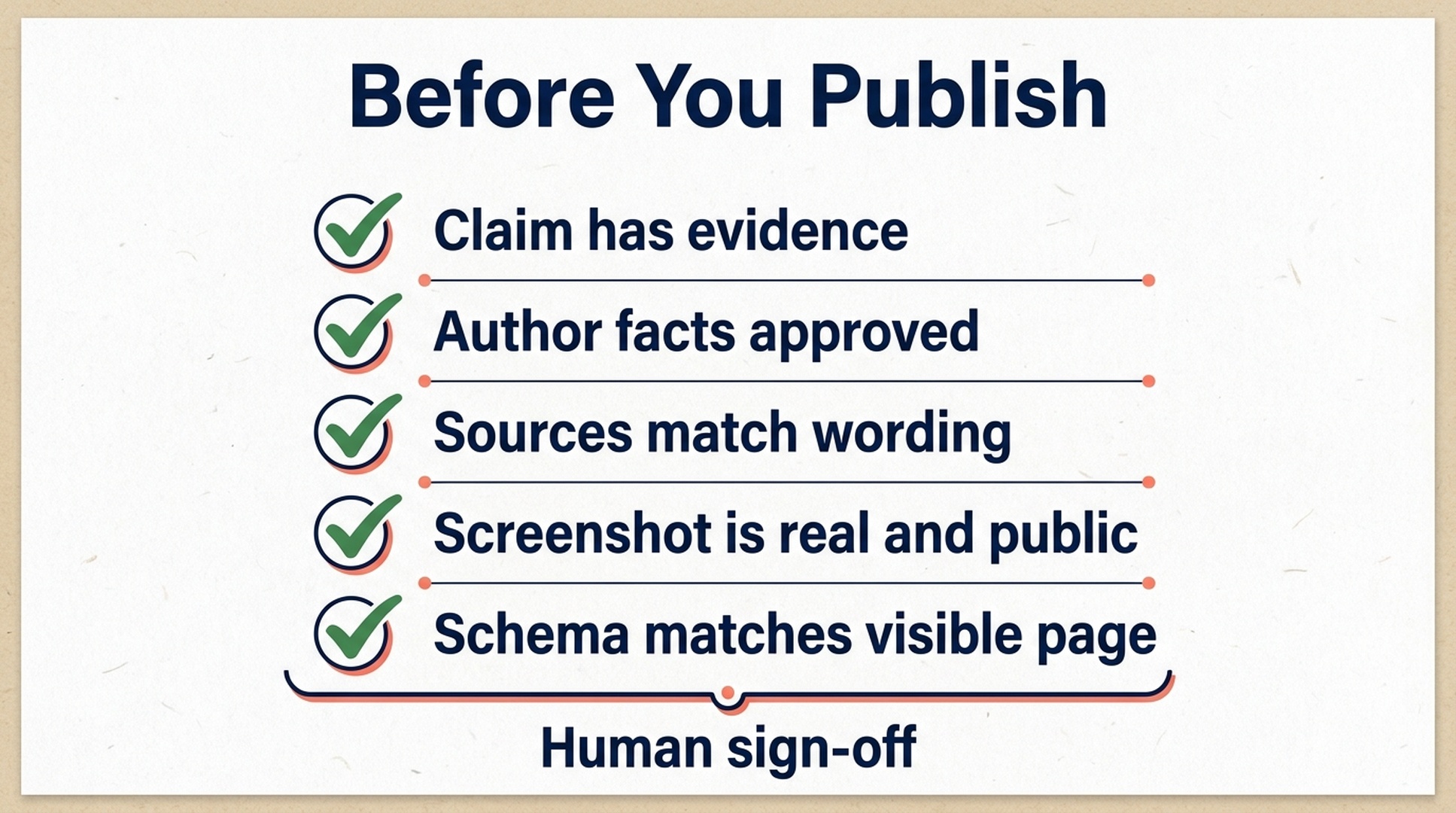
A human sign-off catches the category of errors that no general-purpose content prompt can responsibly approve on its own.
- Does each material factual statement have a page-visible or approved source?
- Does the byline describe a real person's approved role, rather than a generic authority claim?
- Does the page distinguish first-hand testing from research based on public documentation?
- Are sources, policy links, contact details, testimonials, and screenshots accurate and relevant to the page's decision?
- Does any Schema describe content that is actually visible on the page?
- Has a human reviewed claims that affect health, finances, safety, legal decisions, or another high-stakes topic?
- Did you remove claims that could not be verified instead of asking Codex to make them sound safer?
The workflow is complete when a reader can see who is responsible, what was actually reviewed, where the key facts came from, and where uncertainty remains. Search performance is something to monitor over time, not a result you can honestly promise from a credibility cleanup.
Frequently asked questions
Is E-E-A-T a Google ranking factor with a score?
Google's public guidance does not provide a page-level E-E-A-T score or a formula you can optimize. Use the concept to improve helpfulness, accuracy, source transparency, and accountability. Do not treat it as a guaranteed path to a ranking change.
Can Codex write an E-E-A-T author bio for me?
Codex can edit an approved bio for clarity. It should not invent qualifications, employment history, licenses, awards, or experience. Ask the named author or a responsible editor for the factual inputs first.
Do I need an author bio and FAQ Schema on every page?
No. Add information only when it is accurate, relevant, visible to readers, and maintainable. Structured data describes supported page facts; it is not a way to create missing trust signals or guarantee a special search appearance.
Can I use AI-generated screenshots to demonstrate a product feature?
Not if a reader could mistake the image for a real product interface or proof of a result. Use an authentic public-page capture with context, or use a clearly labeled explanatory diagram that does not impersonate a product.
What should I do if I cannot verify an important claim?
Pause the claim. Obtain a source, ask an authorized expert or owner to review it, narrow the wording to what you can prove, or remove it. A smaller accurate page is safer than a persuasive page built on unsupported statements.
Author: Elise Morgan, 15-Year Editorial SEO Strategist at Auspia. Elise writes about content refreshes, evidence-led editing, and durable editorial quality systems.


