


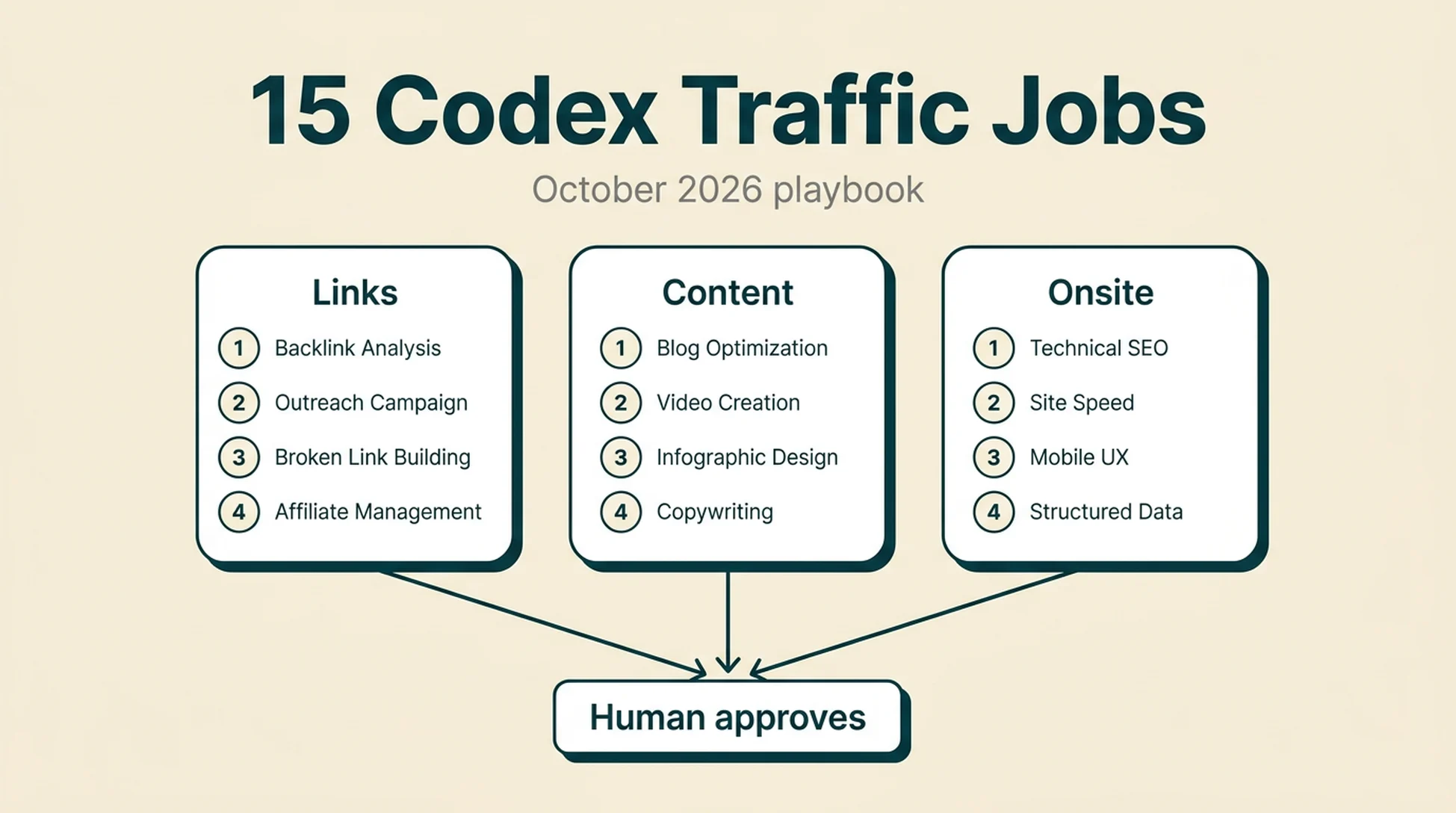
Most SEO advice in 2026 still arrives as a list of tactics. The tactics are usually fine. The problem is that a human has to remember them, schedule them, and repeat them every month.
That is the part Codex changes. A tactic becomes useful when it turns into a job with an input, a schedule, and a check that tells you whether the output is real. This playbook takes fifteen traffic tactics that work today and rewrites each one as something an agent can actually run in October 2026.
What you will finish with
A traffic-jobs/ folder in your repo, one markdown file per job, and a weekly loop that produces reviewable output instead of a to-do list you never get to.
Who this is for: a solo operator or a small growth team that already has a site, a sitemap, and some Search Console history. You do not need a data team.
Prerequisites:
- Codex running in a repo that contains your site content, or a repo that can read your CMS export
- Read access to Google Search Console and Bing Webmaster Tools (CSV exports are enough)
- One paid or free data source for keyword and SERP data. Free tiers work for a pilot; a real run needs volume
- An outreach email address on your own domain, with SPF and DKIM configured
What "done" looks like: each job has produced a file you can read in under ten minutes, every claim in that file points at a source, and a human has approved or rejected it before anything goes live.
Time: about three hours to set up the first three jobs. After that, roughly 30 to 60 minutes a week to review output.
One boundary up front. Codex is good at reading, structuring, drafting, and checking. It is not a substitute for a human decision about who you contact, what you publish under your name, or which link you accept. Every job below keeps that decision with you.
Set up the workspace before you automate anything
Do not start with prompts. Start with a folder and a rule file.
Create this structure:
traffic-jobs/
  _policy.md          # what the agent may and may not do
  _ledger.md          # one row per job run
  links/
  content/
  onsite/
  data/
Then write _policy.md with four lines that matter more than any prompt:
- Never send an email, submit a form, or publish a page. Produce a draft file only.
- Every row in an output file must carry a source URL and the date you read it.
- If a required input file is missing, stop and say so. Do not estimate.
- Never edit a page in this repo without a plan file approved by a human.
The third line is the one people skip. An agent that quietly fills gaps with plausible numbers will hand you a report that looks complete and is wrong. Make stopping the default.
Quality check: ask Codex to summarize _policy.md back to you in three sentences. If the summary includes anything you did not write, your policy is ambiguous.
Recovery: if Codex ignores a rule, the rule is probably too abstract. Rewrite it as a prohibition with a named file, not a value like "be careful."
Job 1: Build the outreach target list for paid guest posts
Paid guest post programs tend to build link portfolios in the dozens rather than the single digits, because the work gets repeatable once the target list exists. That list is the bottleneck, and it is exactly the kind of thing an agent can assemble.
The job: find sites in your niche that publish contributed posts, capture the contact path for each, and score them.
Give Codex this instruction:
Read traffic-jobs/links/targets.csv if it exists; otherwise create it.
Find 50 sites that publish guest or contributed posts in [NICHE].
For each site record: domain, page URL where guest posts are described,
contact method (form URL or email), whether the page states a fee,
last published guest post date if visible, and a source URL for every field.
Do not guess an email address. If none is published, write "not published".
Output targets.csv and a short note listing any site you could not verify.
Expected output: a CSV with one row per site and a source URL per row.
Quality check: open five random rows. If any email address is not visible on the page you cited, the run failed. Re-run with the instruction "only record contact details that appear on the cited page."
Recovery: if the list is thin, widen from "guest post" to "write for us," "contribute," and "submit an article" as separate searches rather than lowering your standards.
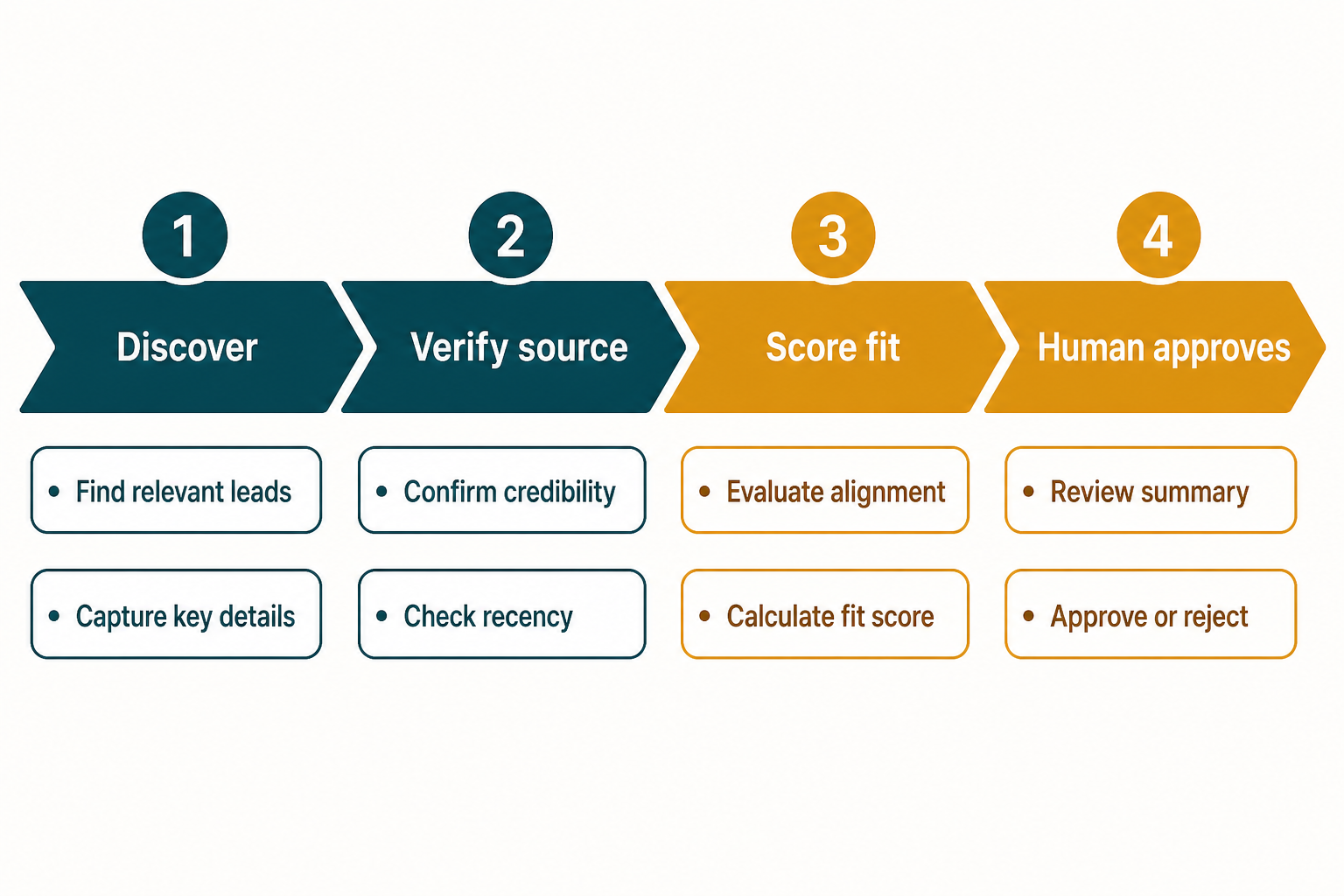
The pipeline only earns its keep if the verification stage is real. Discovery is cheap; a verified contact route is the part that converts.
Job 2: Find "best of" pages that should include you
Roundup pages are a different job from guest posts. The work is finding lists that already rank, working out who maintains them, and writing a short note that gives the editor a reason to add you.
The job: produce a ranked list of roundup pages, plus a one-paragraph pitch per page.
Using [PRIMARY KEYWORD] and five close variants, find pages titled
"best", "top", or "alternatives to" that list products or services like ours.
For each page record: URL, title, the section where a new entry would fit,
who is credited as the author or editor, and the visible contact route.
Rank the list by how closely the page matches our category.
Then draft a three-sentence pitch for the top 10 that names the specific
section and one concrete reason we belong there.
Do not claim awards, user counts, or results we have not documented.
Expected output: roundups.csv plus pitches.md.
Quality check: the pitch must name something only visible on that page. If a pitch could be sent to any site on the list, it is generic and will be ignored.
Recovery: if you cannot find a contact route, mark the page as "no route" and move on. Do not send to a generic info@ address and count it as outreach.
Job 3: Prepare a podcast or interview pitch
Founder interviews and community podcasts still hand out strong editorial links, and the pitch is a writing task, not a research task. That is a good split: Codex drafts, you choose.
The job: turn your own background into three pitch variants.
Read traffic-jobs/links/profile.md, which contains our company facts and
founder background. Then find 20 podcasts or interview series that cover
[NICHE] and published an episode in the last 90 days.
For each, record the show, the host, the last episode date, the format
(solo, interview, panel), and the submission route.
Then write three pitch variants: a 60-word cold pitch, a 120-word pitch
with three talking points, and a one-line follow-up.
Use only facts that appear in profile.md.
Expected output: shows.csv and pitches.md with three variants.
Quality check: every factual claim in the pitches must trace back to profile.md. If Codex invented a metric, delete the metric rather than softening it.
Recovery: if shows are stale, add "published in the last 90 days" as a hard filter and re-run. A list of dead podcasts wastes more time than an empty list.
Job 4: Set up a journalist request workflow
The pitch-to-journalist route works on speed, which makes it a scheduling problem more than a writing problem.
The job: triage incoming journalist requests and draft a response for the ones that fit.
Read traffic-jobs/links/requests/ (one file per journalist request).
For each request, decide fit: strong, weak, or no fit, based on whether
we can supply a named expert and a specific, verifiable answer.
For strong fits, draft a 150-word response with one quotable sentence,
one concrete example, and a short credential line.
For weak fits, say why in one sentence and stop.
Sort the output by deadline, nearest first.
Expected output: triage.md, sorted by deadline.
Quality check: a strong-fit draft must contain a claim only your team could make. Generic commentary that any agency could send is a weak fit even when the topic matches.
Recovery: if the deadline has already passed, mark the request as expired and keep it in the file. Recurring misses usually mean your triage runs too late in the day, not that the requests are wrong.
Job 5: Reformat one post for syndication
Syndicating existing posts to platforms that accept outside writers can bring a meaningful traffic bump, and the cost is mostly formatting. That is agent work.
The job: convert a published post into a platform-ready draft without losing the canonical signal.
Read content/[POST].md.
Check whether the post has a canonical tag pointing to our domain.
If it does not, stop and report that the post is not ready to syndicate.
If it does, produce a syndication draft that:
- keeps the first two paragraphs unchanged,
- adds a "Originally published at [URL]" line in the first 100 words,
- converts internal links to plain text,
- keeps external source links intact,
- shortens any section longer than 300 words by 30 percent.
Output content/syndication/[POST]-draft.md and list every change you made.
Expected output: a draft file plus a change list.
Quality check: the canonical line must appear before the first subheading. If it appears at the bottom, the platform version competes with your own page.
Recovery: if the source post has no canonical tag, fix that first. Syndicating an unprotected post is a self-inflicted duplicate.
Job 6: Build a comparison page brief from a "versus" keyword
Comparison keywords are usually lower competition than head terms because they attract fewer buyers per query and fewer writers per topic. The trade is real: less volume, easier entry.
The job: turn one versus query into a page brief with a decision structure.
Target query: [PRODUCT A] vs [PRODUCT B].
Read the current top 10 results and record, for each: whether it is a
vendor page, an aggregator, or an independent review, and the sections it covers.
Then produce a brief for a page that answers the query in the first
100 words, includes a comparison table with at least six criteria,
names one situation where the competitor is the better choice,
and ends with a short "who should pick which" section.
List every claim in the brief that needs a source before publication.
Expected output: content/briefs/[a]-vs-[b].md.
Quality check: the brief must include a case where the competitor wins. A comparison page that only concludes in your favor reads as marketing and earns fewer links.
Recovery: if the top 10 is dominated by vendor pages with no independent coverage, the query may be too commercial to win on content alone. Check whether a free tool or calculator is a better fit for that query before writing.
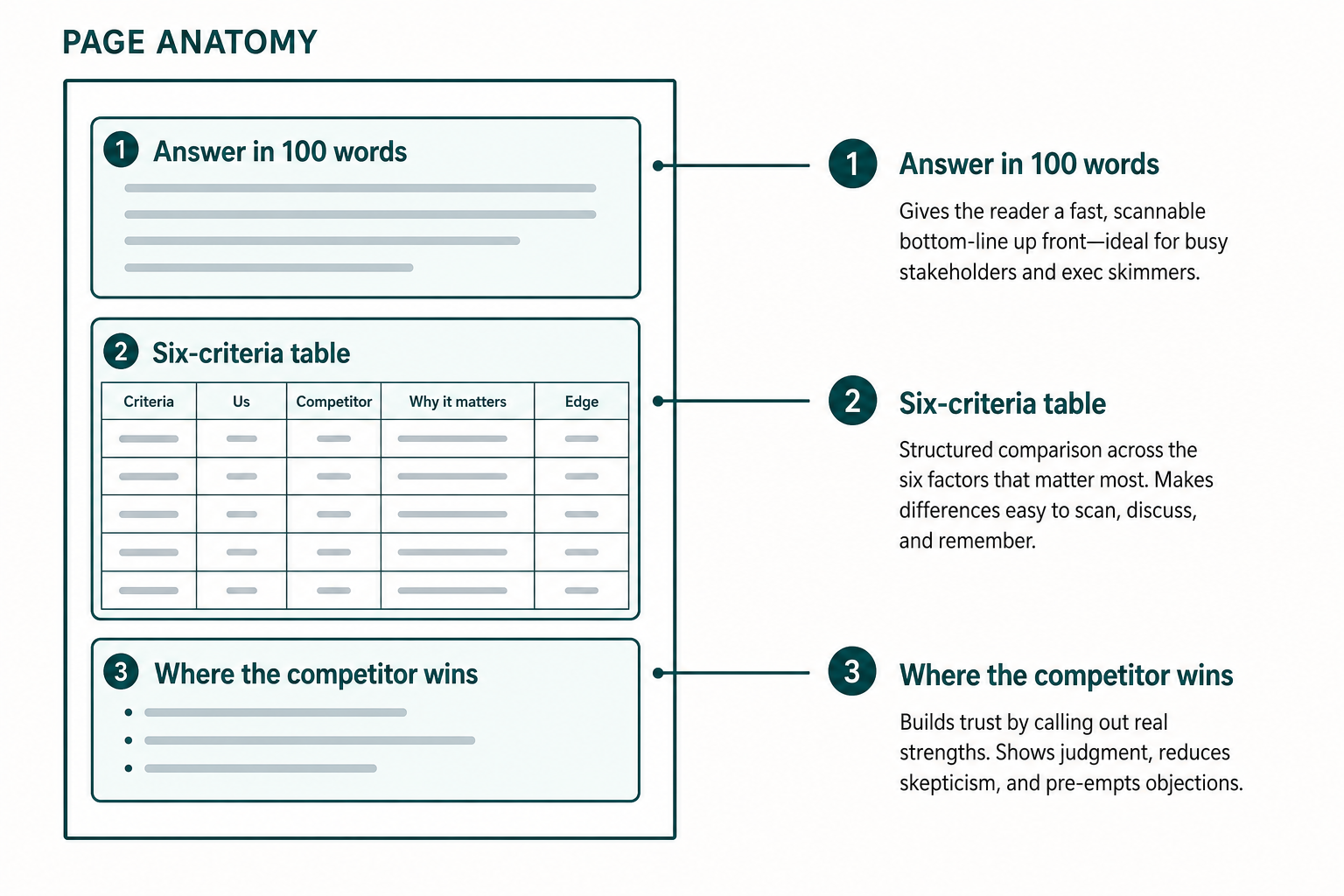
The competitor-wins block is the one most teams cut. It is also the block that makes the page quotable by AI answer systems and linkable by humans.
Job 7: Turn one keyword into a free tool spec
A free tool page can outrank a blog post on the same query because it satisfies the task instead of describing it. The agent's job is the spec, not the build.
The job: convert a keyword into a one-page tool specification.
Keyword: [KEYWORD].
Produce a spec for a single-page free tool that answers this query.
Include: the input fields, the output the user sees, the formula or rule
behind each output, the three most common user mistakes the tool should
prevent, and the exact page title and H1.
The tool must work without login and produce a result in one click.
Then list what a developer needs to build it, in order.
Expected output: onsite/tool-specs/[keyword].md.
Quality check: a stranger should be able to build the tool from the spec without asking you a question. If they cannot, the output section is underspecified.
Recovery: if the spec keeps growing past one page, the query is too broad. Split it into two tools and pick the narrower one first.
Job 8: Draft the affiliate program fit analysis
Sites that earn meaningful affiliate revenue often do it by covering one high-value program well rather than many programs badly. The agent can do the comparison work; you make the bet.
The job: compare programs on the terms that actually decide revenue.
Read traffic-jobs/data/programs.csv with columns: program, commission,
cookie window, average order value if published, payout threshold.
Calculate expected revenue per 1,000 referred visitors for each program
using the published terms only. Where a value is missing, write "unknown"
and exclude it from the ranking rather than assuming a number.
Rank the programs and explain in two sentences why the top one wins.
Expected output: data/program-fit.md with the ranking and the arithmetic shown.
Quality check: every input must be traceable to a published program page with a date. Affiliate terms change; an undated table is a liability.
Recovery: if most rows are "unknown," the analysis is not ready. Collect the missing terms manually before ranking anything.
Job 9: Mine marketplaces for validated demand
Marketplaces that list businesses or sites for sale publish revenue and traffic claims. Those listings are a demand signal: someone is already earning from that problem.
The job: extract listing patterns into a shortlist of niches worth testing.
Read traffic-jobs/data/listings.csv, exported from a marketplace.
Group listings by niche and record for each niche: number of listings,
the median stated monthly revenue, and the channels the sellers say
they use. Flag any niche where more than half the listings cite paid
traffic as the main channel, because that niche is harder to enter
with content alone.
Output the top 10 niches by listing count, with the channel mix shown.
Expected output: data/niche-shortlist.md.
Quality check: treat every revenue figure as a seller claim, not a fact. The output file must say so in its first line.
Recovery: if a niche looks attractive but is entirely paid-traffic driven, the content entry point is probably a comparison or pricing page rather than a blog.
Job 10: Turn behavior data into a fix queue
Session recordings and heatmaps tell you what visitors actually did. The useful output is not a dashboard, it is a ranked list of fixes.
The job: convert exported behavior data into a prioritized repair list.
Read traffic-jobs/data/behavior-export.csv containing page, sessions,
rage clicks, dead clicks, and exit rate.
Rank pages by session volume multiplied by the combined friction rate.
For the top 10 pages, list the three most likely causes of friction
based on the metric pattern, and one specific change to test for each.
Do not claim to know why users behaved a certain way. Label each cause
as a hypothesis.
Expected output: onsite/fix-queue.md.
Quality check: every row must name a page and a specific element. "Improve the CTA" is not a fix.
Recovery: if friction is spread evenly across all pages, the problem is probably sitewide, such as page speed or navigation, not page-level copy.
Job 11: Find internal links from your strongest pages
Internal linking is the cheapest traffic work available and the most consistently skipped. The reason is mechanical: nobody wants to read forty pages looking for link opportunities.
The job: match strong pages to pages that need authority.
Read traffic-jobs/data/pages.csv with columns: URL, sessions last 28 days,
top query, and primary topic.
Identify the 20 pages with the most sessions and the 30 pages with
the fewest, in the same topic area.
For each weak page, find up to three strong pages where a link would
be genuinely useful to a reader, and write the suggested anchor text
using words that already appear in the strong page's text.
Output a table: source URL, target URL, suggested anchor, and the
sentence in the source page where the link fits.
Expected output: onsite/internal-links.csv.
Quality check: the anchor text must already exist on the source page, or the sentence must be one you would actually write. Forced anchors read badly and get ignored.
Recovery: if a weak page has no natural source, it may be a page that should be merged or removed rather than linked to. Add a "no natural source" column and use it.
Job 12: Rebuild the internal links on one page
This is the single-page version of the previous job, and it is the one to run when a page has traffic but no conversions.
The job: propose a link edit for one page and show the diff.
Read content/[PAGE].md and traffic-jobs/data/pages.csv.
Propose up to five internal links to add to this page.
For each, show the exact sentence before and after the change.
Then propose up to three links to remove, with a reason for each.
Output a unified diff. Do not apply it.
Expected output: a diff file.
Quality check: read the "after" sentences aloud. If any sentence now exists only to carry a link, cut it.
Recovery: if the page has no room for links, the page is too short for its target query. Expand the content first, then link.
Job 13: Audit your technical SEO tool coverage
Tool lists are only useful when they map to work you actually do. Turn the list into a coverage check.
The job: compare your current stack against the jobs you need done.
Read traffic-jobs/data/tool-stack.csv with columns: tool, job it covers,
monthly cost, and who uses it.
List the technical SEO jobs we need: crawl and index monitoring,
structured data validation, log or render checks, internal link analysis,
and site speed tracking.
For each job, state which tool covers it, or "uncovered."
Flag any tool that covers no job on the list.
Expected output: data/tool-coverage.md.
Quality check: an "uncovered" row is more valuable than a covered one. If every job is covered, the list of jobs is probably too short.
Recovery: before buying anything for an uncovered job, check whether an existing tool has the feature switched off or on a lower plan tier.
Job 14: Check local listing consistency
For local businesses, inconsistent name, address, and phone data across listings is a common and fixable visibility problem. The check is tedious and the fix is obvious, which makes it a good agent job.
The job: compare your canonical business data against every listing you can find.
Read traffic-jobs/data/business-facts.md, which is the canonical source.
Find listings for this business across directories and maps.
For each listing record: URL, name as shown, address as shown,
phone as shown, and whether it matches the canonical source.
Do not correct anything. Output a mismatch table only.
Expected output: onsite/local-mismatches.csv.
Quality check: the canonical file must be right before you run this. Fixing listings against a wrong source creates more work.
Recovery: if a directory has no self-service edit route, record the support URL and the last time you tried. Do not send credentials to any third-party tool.
Job 15: Write the monthly carry report
The last job is the one that keeps the other fourteen honest. Without it, you have a folder of files and no idea what changed.
The job: produce a one-page report from the ledger.
Read traffic-jobs/_ledger.md and every output file created this month.
Write a one-page report with four sections:
what ran, what changed as a result, what is blocked, and what to run next month.
Every claim must cite the file it came from.
Do not include a metric that is not in a source file.
End with the three jobs you recommend stopping, with a reason for each.
Expected output: reports/[YYYY-MM]-carry.md.
Quality check: the "what changed as a result" section should be shorter than the other three. If it is the longest, you are reporting activity instead of outcomes.
Recovery: if the report cannot name a change for a job, that job is not producing anything yet. Either fix its input or stop running it.
Verify the loop before you trust it
Run these four checks after the first month. They take about twenty minutes in total and they catch most of the ways an automated workflow goes quietly wrong.
Check | How to run it | Passing result |
|---|---|---|
Source coverage | Pick 10 rows at random across all output files | Every row has a source URL and a read date |
Claim accuracy | Pick 5 factual claims and open the cited source | All 5 match the source |
Human decision rate | Count approvals and rejections in the ledger | At least one rejection this month |
Duplicate protection | Check that syndicated posts carry a canonical line | No syndicated draft is missing it |
That third row surprises people. A month with zero rejections usually means you are approving without reading, not that the agent is perfect.
Where the automation stops
Four things should stay manual in October 2026, and none of them are about capability.
Sending. An agent can draft a hundred pitches. A person should press send, because your domain reputation and your name are on the line.
Accepting links. Paid placements, link exchanges, and directory listings carry risk that depends on context an agent cannot fully see. Review the page, not the metric.
Publishing claims. Anything about your product, your customers, or your results needs a human who can be held to it.
Deciding to stop. The most valuable output of the monthly report is the list of jobs to kill. That is a judgment call, and it should be yours.
FAQ
Does this work without a paid SEO data source? For a pilot, yes. Search Console exports plus manual SERP checks cover jobs 11 and 12 well. Jobs 1, 2, and 6 need real SERP and backlink data at volume, so budget for a data source before scaling those.
How often should each job run? Link jobs monthly, onsite jobs every two weeks, and the carry report monthly. Running link prospecting weekly produces more targets than you can contact, which wastes the advantage.
What if Codex produces confident but wrong numbers? That is the expected failure mode. Keep the "stop if input is missing" rule in _policy.md, and run the source coverage check in the verification table. Wrong numbers usually trace back to a missing input file, not a reasoning error.
Can I run all fifteen jobs in the first month? You can, but the reports will be thin. Start with jobs 11, 12, and 15. They need the least external data and they produce visible changes fastest.
Do I need to give Codex access to my CMS? No. Export content to files and let the agent work on files. Publishing access adds risk without adding much speed, since a human should review before anything goes live anyway.
Author: Camille Rhodes, Architect of 300+ AI Content Workflows at Auspia. Camille writes about AI-assisted content workflows, publishing systems, and editorial quality control for growth teams.


