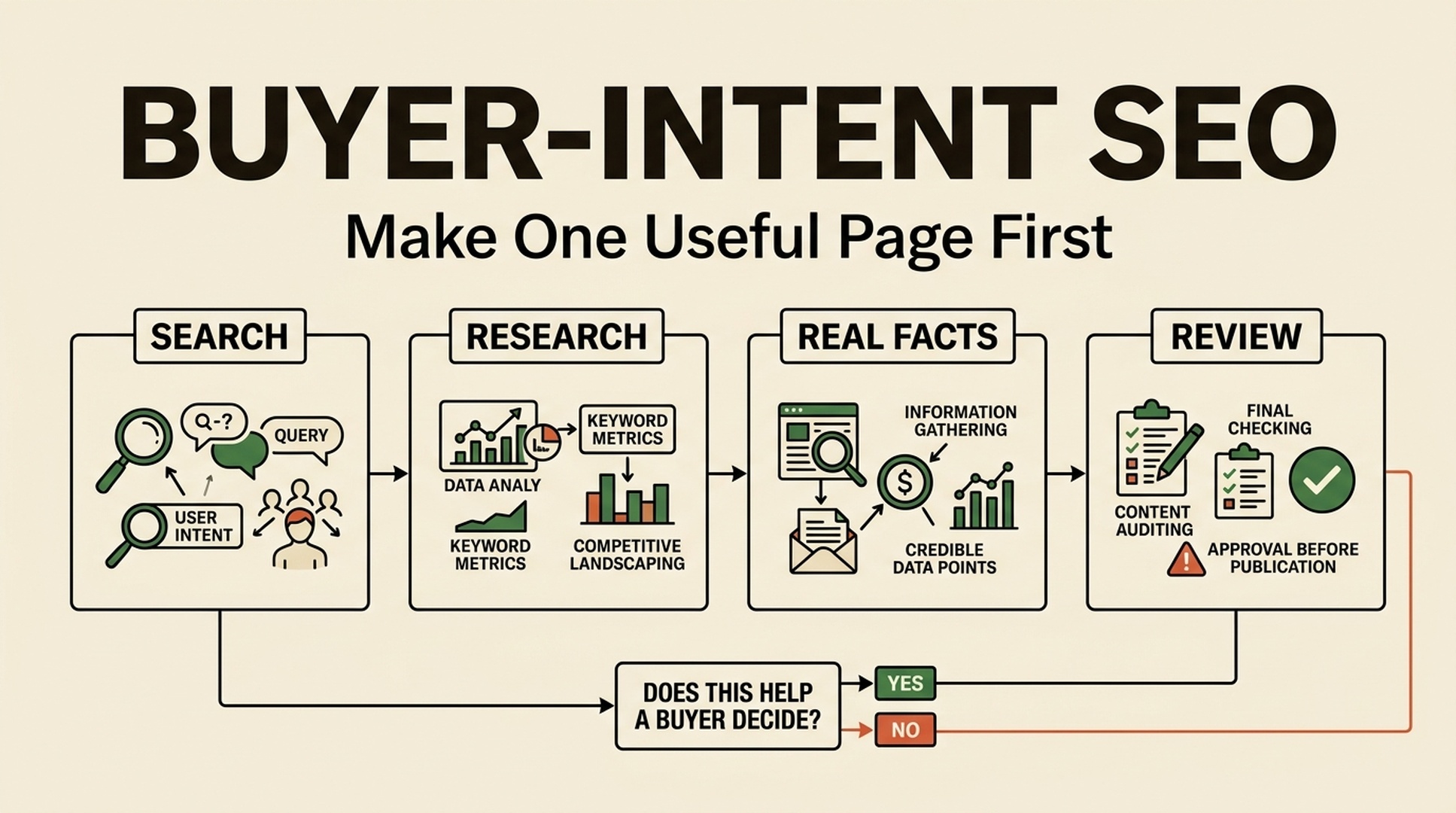
The workflow in one sentence
Pick a high-demand search where someone is close to buying, make Claude Code or Codex research the pages already ranking, give it facts it cannot invent, ask it to write one page, check the page, and then repeat the same process for the next keyword.
A practitioner reported 20,319,728 organic clicks and 670,133,194 impressions across 397 Google Search Console properties using a buy-intent SEO agent. Those numbers are self-reported and do not promise the same result for another site. The useful part is the repeatable workflow below.
Do not start with 100 pages. Finish Steps 1 to 6 for one keyword. Only then move to the next keyword.
Before you start
Open these three things:
- Claude Code or Codex.
- Google Search.
- A blank spreadsheet called
SEO Workflow.
Create these five spreadsheet columns: keyword, what the buyer wants, what current pages cover, your extra fact, and page status.
For this guide, use the example keyword best email marketing software for Shopify stores.
Step 1: find a keyword with buying intent
Do this: Find a keyword that has demand and shows that the person is close to choosing something. Good words to look for are best, vs, alternative, review, pricing, for [a specific user], and for [a specific problem].
Put this in your spreadsheet:
keyword | what the buyer wants |
|---|---|
best email marketing software for Shopify stores | They want to choose an email tool that works with Shopify. |
Do not choose: what is email marketing. The searcher is learning, not choosing.
If you need ideas, paste this into Claude Code or Codex:
My website helps [customer type] choose or buy [product category].
Give me 20 Google keywords with clear buying intent.
Use only keywords that include a comparison, alternative, review, pricing,
specific audience, or specific use case.
For each keyword, say in one short sentence what the buyer wants to decide.
You are done with Step 1 when: you have one keyword and one plain-English sentence explaining what the buyer wants.
Step 2: look at what already ranks
Do this: Search the keyword in Google. Open the first three non-ad results. Also open one relevant YouTube video if there is one. You are not copying them. You are making a list of what a buyer expects to find.
Write only these four things in the spreadsheet:
What to look for | Example note |
|---|---|
Who the product is for | One page says Tool A is best for large stores. |
What people compare | Price, Shopify integration, automation, support. |
What people complain about | Tool B becomes expensive as the list grows. |
What is missing | None of the pages explains setup time for a small store. |
You are done with Step 2 when: you can finish this sentence: "The existing pages explain ____. My page will also explain ____."
Step 3: collect facts that only you can provide
Do this: Write down three true facts that AI cannot find by rewriting search results. Use product documentation, a real test, an internal expert, a customer-support pattern, or a screenshot you are allowed to use.
For the Shopify email-tool example, your three facts could be:
- Setup takes about 20 minutes for a store that already has a product feed.
- The free plan includes one Shopify integration but not advanced automation.
- Stores with fewer than 500 subscribers usually need one welcome flow before they need complex segmentation.
If you do not know whether a fact is true, do not use it. Write [VERIFY] beside it and check it first.
You are done with Step 3 when: you have three facts you would be comfortable showing to a customer.
Step 4: tell Claude Code or Codex exactly what to do
Do this: Paste this prompt into Claude Code or Codex. Replace every item in square brackets.
Create one helpful SEO page for this Google keyword:
[keyword]

The buyer wants to decide:
[one plain-English buyer sentence]

The current Google results cover:
[your short notes from Step 2]

My page must add this missing answer:
[what is missing]

Use only these verified facts:
1. [fact one]
2. [fact two]
3. [fact three]

Write the page in plain English.
Start with a direct answer in two sentences.
Then explain: who this is for, what to compare, one limitation, and what to do next.
Do not invent prices, reviews, test results, customer stories, or product features.
If something is unknown, write [VERIFY].
You are done with Step 4 when: you have a draft that answers the buyer's question and contains no invented facts.
Step 5: check the draft before publishing
Read the draft once. Answer these five yes-or-no questions:
Check | Pass when the answer is yes |
|---|---|
Does the first paragraph answer the keyword? | A reader sees the answer without scrolling. |
Does the page help a buyer choose? | It gives a fit, comparison point, or limitation. |
Are all facts true? | You can point to a source, test, or approved internal fact. |
Does the page say something the top results do not? | It includes the extra answer from Step 2. |
Is there a next step? | The reader can compare, try, buy, contact, or read the next useful page. |
If any answer is no, fix the draft before publishing. If all five answers are yes, publish the page.
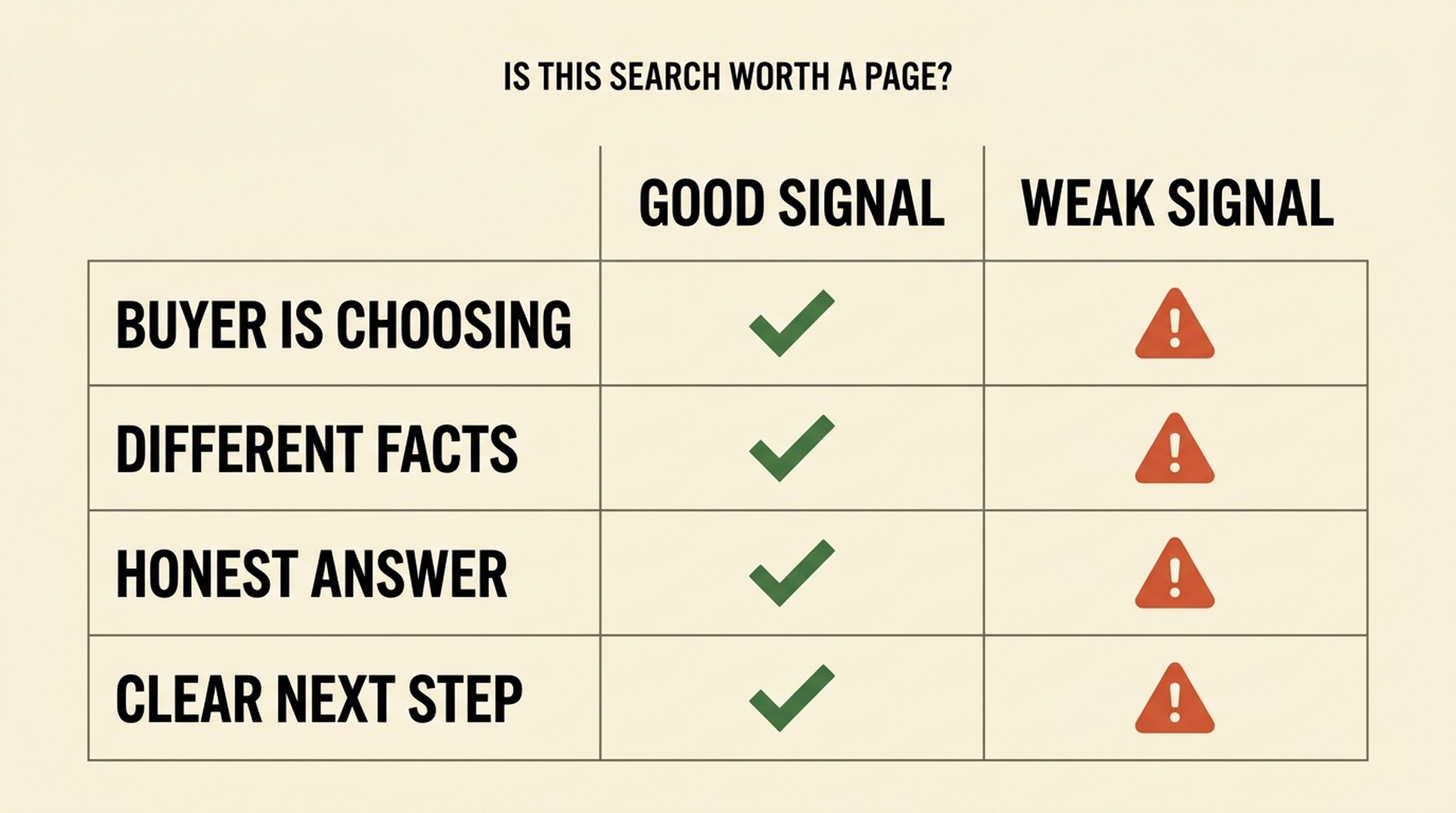
A new page is worth making only when it helps someone choose, uses different facts, gives an honest answer, and points to a useful next step.
Step 6: record the result and repeat
After publishing, change the spreadsheet status to published. Add the page URL. Wait for it to be indexed, then record impressions, clicks, and any conversions.
Do not write a new page by changing only one word in the old page. Use the same six steps for the next keyword. The next page needs a different buyer question or different facts.
For example:
New keyword | Why it needs a separate page |
|---|---|
best email marketing software for Shopify stores | Buyer needs a Shopify-specific tool choice. |
Klaviyo alternative for small Shopify stores | Buyer wants a cheaper or simpler replacement. |
email marketing software for Shopify stores under 500 subscribers | Buyer has a different budget and setup need. |
Step 7: turn the six steps into your repeatable agent workflow
After you have completed the workflow manually for five keywords, save the Step 4 prompt as your Claude Code or Codex instruction. For each new keyword, give the tool the same five inputs:
- The keyword.
- What the buyer wants.
- Notes from the top results and video.
- The missing answer.
- Your verified facts.
The AI can organize research and create a first draft. You still check the facts and decide whether the page should be published. That is the workflow: keyword -> research -> your facts -> draft -> human check -> publish -> measure.
The only rules you need to remember
- Start with one buyer keyword, not a large batch.
- Research the current results before asking AI to write.
- Give AI real facts; do not ask it to guess.
- Publish only when the page gives the buyer a useful answer that other pages miss.
- Repeat the same process. Scale the workflow, not thin pages.
Author: Martin Hayes, GEO Playbook Builder for 200+ Execution Checklists at Auspia. Martin writes step-by-step workflows for turning search research into practical, reviewable growth systems.