The short version
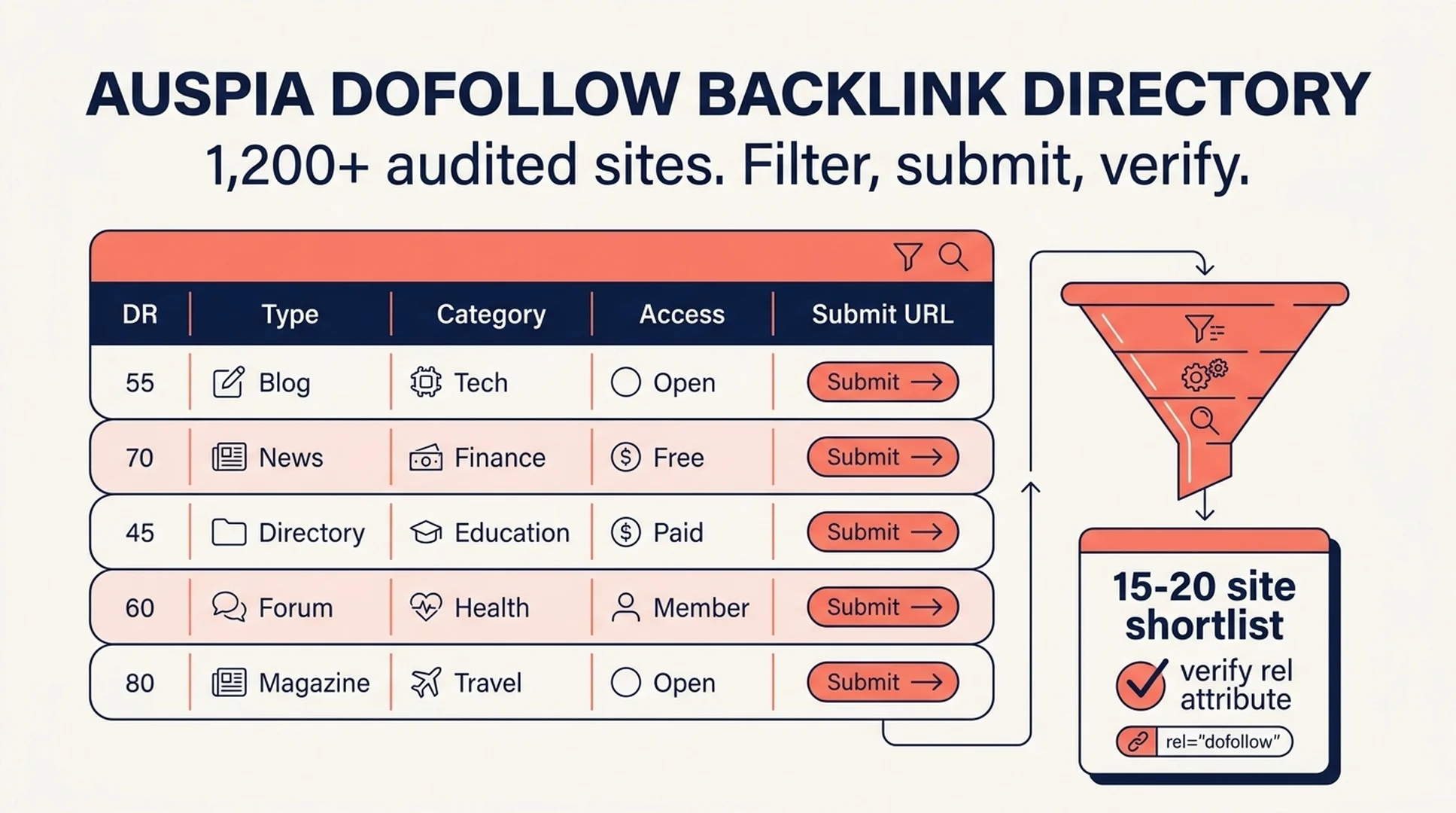
Auspia's dofollow backlink directory is a free, filterable list of 1,200+ sites where you can build a dofollow link without paying for a placement. Every row carries a Domain Rating, a site type, a category, an access note, and a direct submit URL. You sign in to unlock the full table; the list itself stays free.
That is the whole pitch. The rest of this article is about the part that actually decides whether a directory is useful: whether the sites still accept submissions, whether the link is still dofollow, and whether the row tells you that before you spend twenty minutes filling in a form.
Why most free backlink lists fail
Search for "free dofollow backlink sites" and you get hundreds of results. Most of them fail in the same three ways.
The links are dead. Directories close, submission forms break, and platforms quietly switch new user links to nofollow or rel="ugc". A list compiled two years ago can be half wrong and still rank.
There is no quality signal. A page that mixes DR 8 link farms with DR 90 platforms gives you no way to decide where to spend your first hour. The number next to the site is often the only information you get, and it is the least useful one on its own.
The submit URL is missing. You get a homepage and a promise. Then you spend ten minutes hunting for the actual submission page, which is usually three clicks deep and sometimes behind a login.
Auspia's directory is built to answer those three problems in the table itself.
What is in the directory
The list covers 1,200+ sites across the categories people actually use for link building:
- Web 2.0 and publishing platforms
- Developer and tech profiles
- Design and creative portfolios
- Audio, video, and document hosting
- SaaS and startup directories
- Business directories and local citations
- Press release and article submission sites
- SEO and marketing forums
- Social bookmarking and curation
- Blog directories and professional profiles
- Vertical directories for home services, legal, real estate, health, fitness, restaurants, e-commerce, education, and B2B
Each row gives you six fields: name, Domain Rating, type, category, price, and the URL. When you sign in, the submit URL and the audit note unlock too.

The directory is a working table, not a blog post. Filter first, then submit.
The four filters that matter
The directory lets you narrow by Domain Rating, category, type, and access. Used together, those four filters turn a 1,200-row list into a shortlist you can finish in one sitting.
Filter | What it removes | When to use it |
|---|---|---|
Domain Rating | Low-authority sites you will not prioritize this month | When you want a first pass at the strongest referring domains |
Category | Sites that have nothing to do with your market | Before you read any row in detail |
Type | Formats you will not produce (video, design portfolio, press release) | As soon as you know what asset you can actually make |
Access | Sites that need a paid plan, a reciprocal badge, or a captcha | Before you commit time to a submission |
The access filter is the one most lists skip and the one that saves the most time. A site that requires a reciprocal link or a paid tier is not a free backlink, even if it appears on a free list. Knowing that before you click is the difference between a useful afternoon and a wasted one.
How to work the list in 90 minutes
Here is a workflow that fits a single sitting. It assumes you have one site to promote and no paid link budget.
1. Set your floor. Sort by Domain Rating and set a floor that matches your site's current profile. A new site does not need to start at DR 90; it needs sites that will actually accept it. DR 30–70 is a realistic starting band for most small sites.
2. Filter by category and type. Pick the two categories closest to your market and the one or two submission types you can complete today. If you cannot produce a video, filter video platforms out now rather than later.
3. Read the access notes. Mark every row that needs a paid plan, a reciprocal link, or manual approval. Move those to a separate list. They are not necessarily bad, but they are not part of today's free sprint.
4. Build a shortlist of 15–20 sites. More than that and you will not finish. Fewer and you will run out when a few forms fail.
5. Submit, then verify. After each submission, check the live page for the link attribute. A link that renders as nofollow or rel="ugc" is not a dofollow backlink, regardless of what the directory row said when it was audited.
6. Log what you did. One row per site: URL, date, link attribute, and status. This is the only way to know which sources are worth returning to next month.

Four filters, one shortlist, one verification step. The verification step is not optional.
Verify the link, not just the row
A directory audit is a snapshot. Link attributes change, platforms update their policies, and a site that passed a dofollow check last quarter may not pass it today. Treat every row as a lead, not a confirmed link.
Three checks catch most problems:
Check | How to run it | What it tells you |
|---|---|---|
Link attribute | Inspect the live page or use a browser extension that shows | Whether the link is dofollow, |
Indexation | Search | Whether the platform lets your page into the index |
Referral traffic | Check analytics for sessions from the domain after 30 days | Whether real people click, which is the benefit that cannot be faked |
Run these on your first five submissions before you scale to the rest. The results usually change your priority order, and they take an afternoon rather than a month.
Where this fits in a link-building plan
A free directory list is a starting point, not a strategy. The sites in Auspia's directory are useful for three jobs:
- Building a first link profile for a new site that has almost no referring domains
- Filling category gaps where your existing profile is thin
- Creating consistent brand profiles across the platforms that AI answer engines read when they describe a company
What it will not do is replace editorial links, original research, or partnerships. Directory and profile links are easy to get, which is exactly why they carry less weight on their own. Use them to establish a baseline, then spend the rest of your effort on links that require someone to decide your work is worth citing.
If you want to check how your current link profile and on-page signals look before you start submitting, run the Website SEO Score Checker first. It gives you a baseline to compare against after a month of directory work.
What to do next
Open the dofollow backlink directory, sign in to unlock the full table, and run the 90-minute workflow above. Start with 15 sites, verify every link, and log the results. Then come back next month with data instead of guesses.
The list is free. The discipline is what makes it worth your time.
FAQ
Is the dofollow backlink directory really free? Yes. Signing in unlocks the full list of 1,200+ sites, and there is no credit card or trial. The sites themselves may have their own account requirements, which the access notes flag.
How often is the list updated? Auspia says the list is reviewed regularly and Domain Rating values are refreshed at least once per quarter using Ahrefs-style bands. Treat DR as a snapshot, not a live metric.
Do free directory backlinks still work in 2026? They can help a new or thin link profile, especially when the sites are relevant and the links are genuinely dofollow. They are weaker than editorial links and should not be your only link-building activity.
How many should I submit per month? There is no universal number. A pace of 10–30 relevant links per month is a reasonable starting range for a small site, with variety across domains mattering more than raw volume.
What if a link turns out to be nofollow? Log it and move on. Do not count it as a dofollow backlink. If the platform changed its policy, that is useful information for your next review of the list.
Author: Alice Monroe, AI SEO Tools Analyst Covering 150+ Tools at Auspia. Alice writes about AI SEO tools, tooling comparisons, and software workflows that turn search data into decisions.