


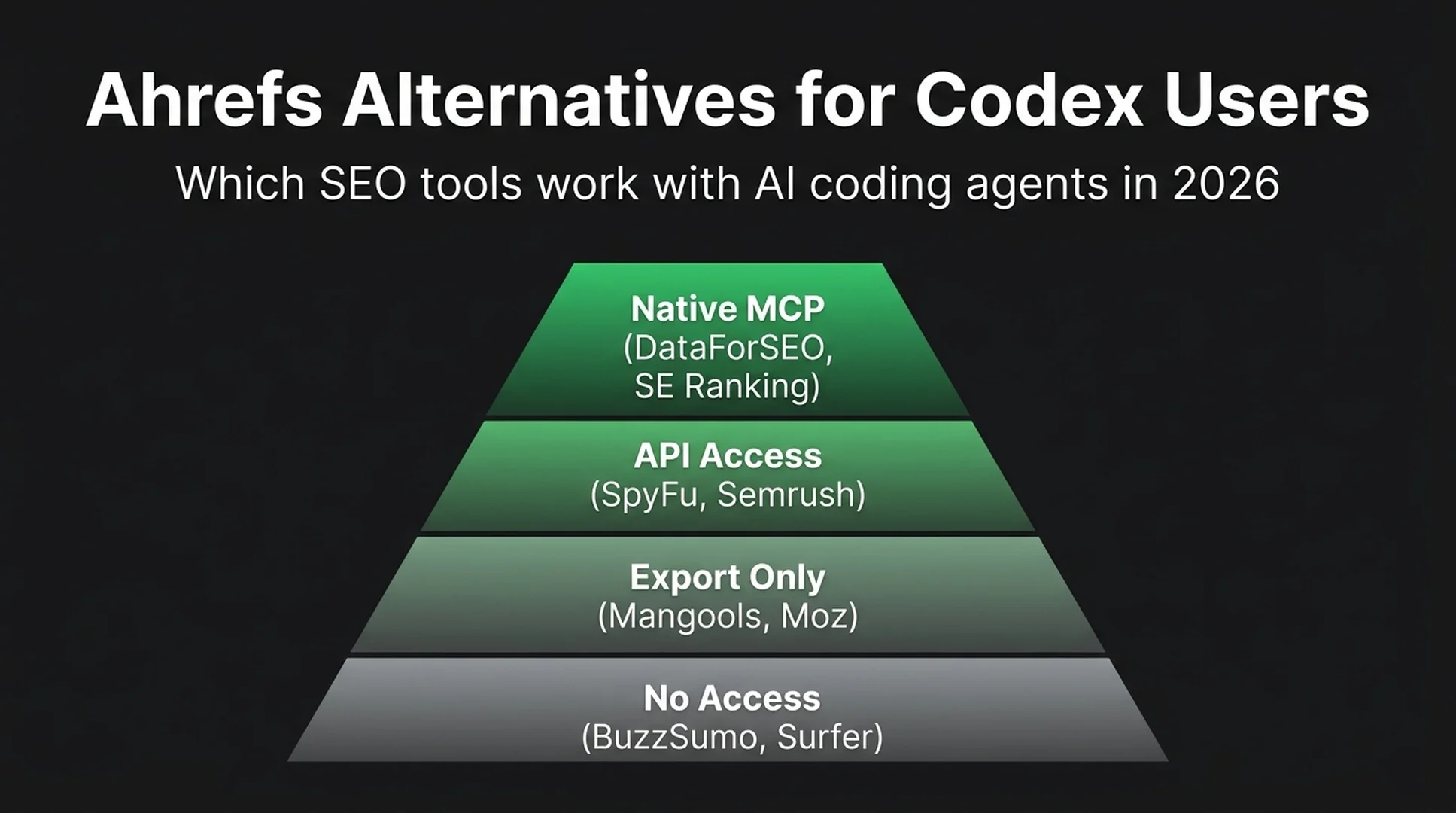
The Short Answer
The right Ahrefs alternative depends on what you need Codex to do. Here is where each tool fits:
- Keyword research and SERP analysis: DataForSEO. It has an official MCP server, a free community skill, and costs pennies per API call.
- All-in-one SEO suite: SE Ranking. The $129/mo Core plan includes an MCP server, 180+ tools, and pre-built AI agent skills compatible with Codex.
- Competitor PPC and SEO on a budget: SpyFu. API access starts at $79/mo.
- Completely free: Google Search Console plus Google Keyword Planner, connected through DataForSEO's MCP tools.
Here is the thing about picking an SEO tool in 2026: API and MCP support now matters as much as the dashboard. If Codex can query your tool directly, you get answers in seconds instead of clicking through dropdowns.
Watch the Video Summary (92 seconds)
▶ Play: Ahrefs Alternatives That Work With Codex — 92-Second Summary
A narrated walkthrough of the four-tier Codex readiness framework, top tool picks by budget, and how to start for free — all in under two minutes.
Why Codex Changes How You Choose an SEO Tool
New to SEO? Here is the quick version. Codex is a terminal-based AI coding agent. You tell it what you need in plain English, and it researches, analyzes, and writes for you. It can also query SEO tools directly if they have an API or MCP connection.
This changes how you should think about tool budgets:
- MCP access beats a pretty dashboard. Codex can query 50 keywords, analyze SERP features, and return a ranked opportunity list while you would still be opening dropdowns in a traditional UI.
- You do not need the "full suite." DataForSEO for SERP data, Google Search Console for your own site, and Codex to connect the dots. That trio can replace a $299/mo all-in-one subscription.
- Free tools get a second life. Google Keyword Planner is a pain to use manually. Hook it up through DataForSEO's MCP and it turns into a structured research engine that writes briefs.
The table below rates every major Ahrefs alternative by how well it works with AI coding agents, not just by how many features they list on their pricing page.
What Makes an SEO Tool "Codex-Ready"
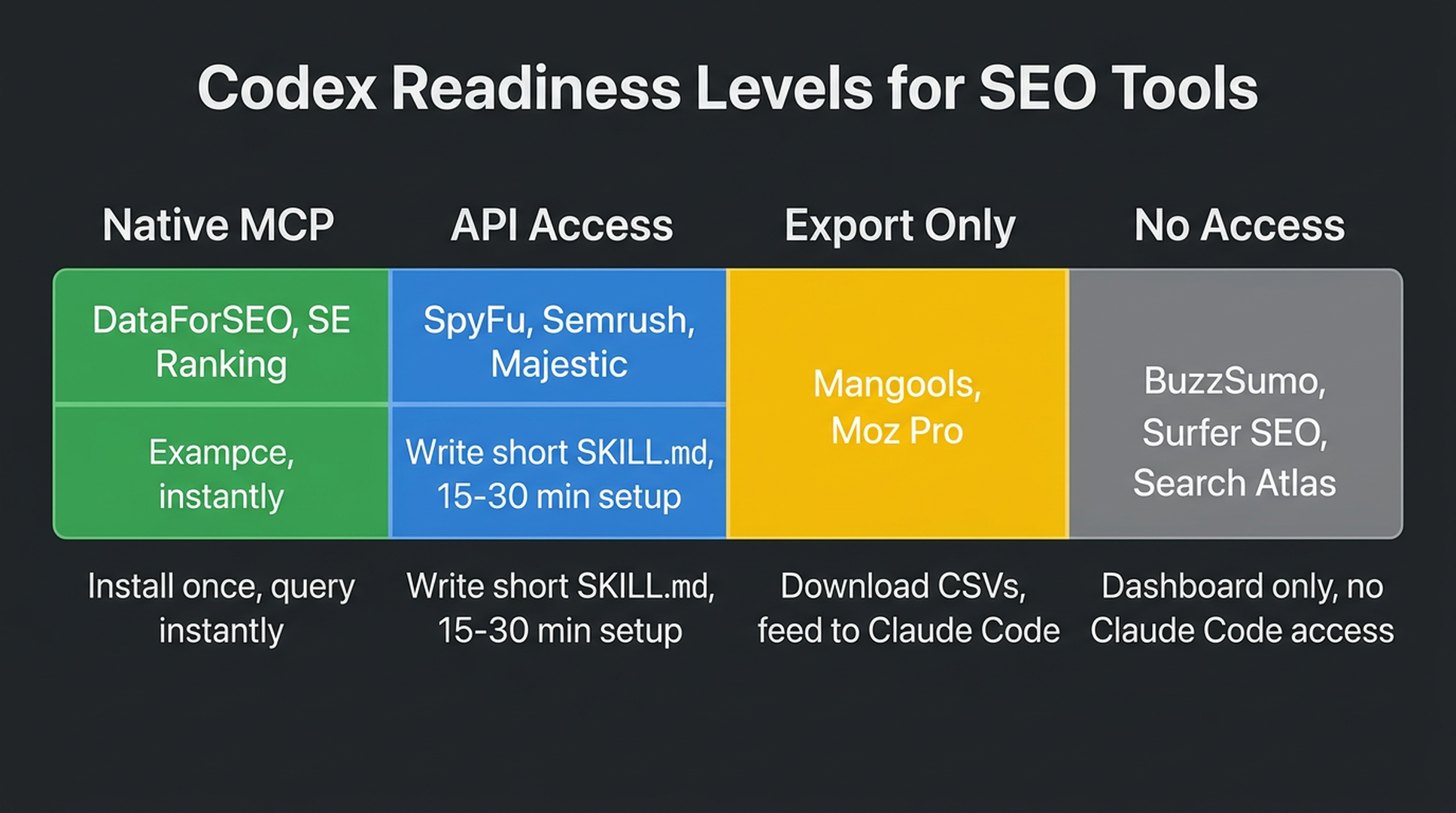
Before we compare tools, here are the four levels of Codex readiness:
Level | What it means | Example |
|---|---|---|
Native MCP | Official MCP server or Codex skill available. Install one command, start querying. | DataForSEO, SE Ranking |
API with docs | REST API exists, you can write a script or SKILL.md to use it. Takes 15–30 minutes to set up. | SpyFu, Semrush, Majestic |
Export-only | You can download CSV reports and feed them to Codex. Manual but functional. | Mangools, Moz Pro |
No programmatic access | Dashboard-only. Codex cannot query it directly. | BuzzSumo, Surfer SEO (except Enterprise) |
A tool does not need native MCP to be useful. If you only run SEO research once a week, CSV exports are fine. But if you want Codex to run research while you sleep, native MCP is what separates "it works" from "it works every day without me thinking about it."
Tool Comparison: Codex-Ready Ahrefs Alternatives
Tool | Min. Price | Codex Access | Best For | Free Trial |
|---|---|---|---|---|
DataForSEO | Pay-per-call (~$0.001/req) | ⭐⭐⭐⭐⭐ Native MCP + community skill | SERP, keywords, backlinks via Codex | Free tier available |
SE Ranking | $129/mo | ⭐⭐⭐⭐⭐ Native MCP, pre-built Codex Skills | All-in-one SEO + AI visibility | 14 days |
SpyFu | $39/mo | ⭐⭐⭐ API access (Pro+ plans) | Competitor PPC + historical data | 30-day money-back |
Semrush | $139.95/mo | ⭐⭐⭐ API available, no MCP | Enterprise marketing suite | 7 days |
Majestic | $49.99/mo | ⭐⭐ API (Business plan only, $399.99/mo) | Backlink analysis specialist | Limited free |
Mangools | $30.50/mo | ⭐ Export-only (CSV) | Beginner-friendly keyword research | Limited free |
Moz Pro | $49/mo | ⭐ Export-only (CSV) | Entry-level SEO suite | 7 days |
Similarweb | $199/mo | ⭐⭐ API (enterprise plans) | Market intelligence & traffic estimates | 7 days |
Search Atlas | $99/mo | ⭐ No API/MCP | AI-powered SEO automation | 7 days |
BuzzSumo | $199/mo | ⭐ No API for core features | Content research & influencer discovery | 7 days |
Surfer SEO | $59/mo | ⭐ API (Enterprise only) | Content optimization | None |
Google Tools | Free | ⭐⭐⭐ Via DataForSEO MCP or GSC API | Essential baseline data | Free |
Screaming Frog | Free (500 URLs) | ⭐⭐ CSV export + Codex | Technical SEO crawls | Free tier |
The star rating is about one thing only: how easily a beginner can connect the tool to Codex today. It is not a verdict on the tool's overall SEO quality.
Tier 1: Tools With Native MCP or Skill Access
These tools connect to Codex with one install command. You do not need to write any code.
DataForSEO: The Most Flexible Option for Codex Users
DataForSEO is not a dashboard you log into. It is an API-first data provider. Many of the tools on this list actually use DataForSEO behind the scenes for their own data. For Codex users, it is the best-connected option on the market and the cheapest per query.
What it provides: Live SERP data (Google, Bing, Yahoo, YouTube), keyword search volume and trends, backlink profiles, domain analytics, on-page audits, and AI visibility tracking across ChatGPT, Gemini, and Perplexity.
Codex access: Official MCP server with three installation methods, plus a community-maintained zero-dependency Python skill (dataforseo-skill by codykingham) and the MIT-licensed claude-seo skill (also works with Codex) with 22 commands.
How to install the community skill (easiest for beginners):
git clone https://github.com/codykingham/dataforseo-skill.git
cd dataforseo-skill
./install.sh
Then add your DataForSEO credentials to ~/.zshrc:
export DATAFORSEO_USERNAME="your_login"
export DATAFORSEO_PASSWORD="your_api_password"
After restarting Codex, you can ask questions like "What are the top 10 ranking pages for 'best running shoes' in the US?" and Codex queries DataForSEO automatically.
Pricing: Pay-per-call, roughly $0.001 to $0.01 per API request. A keyword research session with 50 keywords costs under a dollar. There is a free tier you can test with. No monthly subscription. You only pay for what you use.
Best for: Beginners who want flexibility and the lowest possible cost. Also the right pick if you switch between AI coding agents, since DataForSEO works with Codex, ChatGPT, Gemini, and any MCP-compatible client.
Limitations: No dashboard. You interact with it entirely through API calls or Codex. If you want something visual to browse manually, pair it with Google Search Console (free). The backlink index is smaller than Ahrefs for very niche domains, so if you are in a tiny market, double-check critical backlink counts.
The DataForSEO SKILL.md You Can Copy Today
If you want Codex to handle keyword research, SERP analysis, and backlink checks as a repeatable workflow, create this file at .codex/skills/seo-research/SKILL.md in your project:
---
name: seo-research
description: Keyword research, SERP analysis, and backlink checks via DataForSEO. Use when the user asks about keyword opportunities, search competition, ranking pages, or backlink profiles.
---

You have access to the DataForSEO skill installed at `~/.codex/skills/dataforseo/`. Use it for all live SEO data.

## When to Use This Skill

Invoke when the user asks to:
- Research keywords (search volume, competition, CPC, trends)
- Analyze SERPs (who ranks, what features appear, what intent)
- Check backlinks (who links to a domain, anchor text, referring domains)
- Compare competitors (domain rankings, keyword overlap, content gaps)

## Rules

1. Always confirm the target market (country), language, and seed keyword before querying.
2. For keyword research: return search volume, competition, CPC, and DataForSEO Trends for every keyword. Flag keywords with zero search volume instead of dropping them.
3. For SERP analysis: return the top 10 organic results with URL, title, and estimated traffic. Note SERP features (featured snippets, AI Overviews, People Also Ask, etc.).
4. For backlink checks: return total referring domains, total backlinks, domain rank, and the top 5 anchor texts. Never fabricate link counts.
5. If the API returns an error or empty results, report exactly what failed. Do not guess.
6. Always include the date and data source (DataForSEO endpoint used) in your report.
7. Save all research results to `seo-research/` before presenting them.
8. Never include API credentials in any output.

## Output Format

For keyword research, use this table:

| Keyword | Search Volume | Competition | CPC | Trend | Intent |
|---|---|---|---|---|---|
| ... | ... | ... | ... | ... | ... |

For SERP analysis, list top 10 with URL, title, and key observations.

For backlinks, summarize totals first, then highlight the top referring domains.
To use it, type in Codex: "Research 10 keywords related to [your topic] in the US market and recommend the 3 best opportunities for a new blog post."
SE Ranking: The All-in-One Suite With Native Codex MCP
SE Ranking is the only traditional SEO suite on this list that includes a native MCP server in its standard plans. If you want a visual dashboard and Codex access in one product, this is your pick.
What it provides: Rank tracking, keyword research, technical site audits, backlink monitoring, competitor research, local SEO, and AI visibility tracking across Google AI Overviews, ChatGPT, Gemini, and Perplexity. The MCP server exposes 180+ tools to Codex.
Codex access: MCP server included from the Core plan ($129/mo). Comes with pre-built AI agent skills covering content audits, backlink gap analysis, AI share of voice, and keyword clustering. No custom code. Add the MCP server to your Codex config and start asking questions.
How to connect (from SE Ranking's documentation):
# Add the SE Ranking MCP server to your Codex config
# Check SE Ranking's help center for the latest MCP setup instructions
codex mcp add seranking --env SERANKING_API_KEY="your_key"Pricing: Core $129/mo (1 seat, 10 projects); Growth $279/mo; Enterprise custom. Annual billing saves 20%. Extra seats $20/month. The MCP server is included in all paid plans — you do not need an enterprise add-on.
Best for: Teams and agencies who want a visual dashboard for manual work plus Codex for automation. Traditional rank tracking and AI visibility in one MCP-connected platform is hard to find at this price.
Limitations: Steeper learning curve than single-purpose tools. The backlink index is smaller than Ahrefs for very niche domains. Advanced agency features like white-label reporting cost extra.
Tier 2: Tools With API Access (Manual Setup Required)
These tools have REST APIs but no official MCP server. You can connect them to Codex by writing a short SKILL.md that calls their API. It takes 15 to 30 minutes and some basic config work, but no real coding.
SpyFu: Best Budget Option With API
SpyFu is built around competitor intelligence. What keywords do your competitors rank for? What ads are they running? How has their SEO strategy shifted over time? It has been collecting this data since 2005, so the history goes deep.
Codex access: REST API included in Pro ($79/mo) and Team ($249/mo) plans. No MCP server, but the API is well-documented. You can write a Codex skill that pulls keyword research, competitor domain comparisons, and PPC ad history through the API.
Best for: SEO beginners who also run Google Ads. SpyFu's ad history feature shows you every ad a competitor has ever run. That is useful for both SEO content ideas and paid search strategy.
Limitations: No site audit or on-page tools. Backlink data lags behind Ahrefs. Data freshness varies, so verify anything critical against Google Search Console before making big decisions.
Semrush: The Enterprise Suite (API Available, No MCP)
Semrush has the widest toolset in SEO: 55+ tools across keyword research, content optimization, PPC, social media, and competitive intelligence. Its API is comprehensive. Integrating it with Codex takes work.
Codex access: REST API available. No official MCP server as of August 2026. You can write custom API calls in a SKILL.md, but expect more setup time than DataForSEO or SE Ranking. The API docs are thorough, so a developer can get it running in an afternoon.
Pricing: Pro $139.95/mo (5 projects, 500 keywords); Guru $249.95/mo; Business $499.95/mo. The AI Visibility Toolkit costs an extra $99+/mo per domain.
Best for: Teams already paying for Semrush who want to layer Codex on top. If you are a beginner picking your first SEO tool, the cost and setup complexity are hard to justify compared to DataForSEO plus GSC.
Tier 3: Free Tools That Work With Codex
You do not need a paid subscription to start doing SEO research with Codex. These free tools, combined with DataForSEO's affordable API, cover the basics.
Google Search Console + DataForSEO MCP
Google Search Console (GSC) tells you exactly which queries bring traffic to your site, which pages rank, and whether Google found crawl issues. It is free. The data comes straight from Google, so it is as authoritative as SEO data gets.
How to use with Codex: Export GSC data as CSV, or connect it through a GSC MCP server. The community has built several GSC MCP wrappers. DataForSEO's API can also pull GSC-connected data programmatically.
Beginner workflow:
- Export your top 1,000 queries from GSC (Performance → Export)
- Feed the CSV to Codex: "Analyze this GSC export. Find queries where I rank positions 8–15 with more than 100 impressions — these are my best quick-win opportunities."
- Codex can then use DataForSEO to check the SERP competition for those queries and recommend which ones to target first.
Google Keyword Planner + Codex
Google Keyword Planner (inside Google Ads) gives you search volume and CPC data straight from Google. Free, but the interface feels like it was designed in 2010. Codex fixes that.
Beginner workflow:
- Export keyword ideas from Keyword Planner as CSV
- Feed to Codex with: "Group these keywords by search intent (informational, commercial, transactional), remove brand names, and rank the top 20 by volume-to-competition ratio."
Tier 4: Dashboard-Only Tools (No Codex Access)
These are solid SEO products. But as of August 2026, none of them offer API or MCP access that a beginner can realistically use with Codex:
- Mangools ($30.50/mo): The best beginner UI on this list and the cheapest paid option. Tracks AI search visibility across 6 platforms (ChatGPT, Claude, Grok, Gemini, Mistral, Llama). You can export CSV data and feed it to Codex manually.
- Moz Pro ($49/mo): Established brand with a large backlink index (40.7T links). The interface feels dated and ranking updates are weekly, not daily. AI Overviews tracking is Google-only.
- Similarweb ($199/mo): Strong market intelligence and traffic estimates. API access is locked behind enterprise plans with custom pricing. Not accessible for individual users.
- Search Atlas ($99/mo): AI-powered automation with their OTTO SEO agent. But the AI works inside their dashboard, not yours. No API or MCP.
- BuzzSumo ($199/mo): Great for content trend discovery and finding influencers. No technical SEO tools. No API for the core research features you would actually want to automate.
- Surfer SEO ($59/mo): Excellent real-time content optimization scoring. The API is enterprise-only. No free trial, so you cannot test before committing.
I am not saying these are bad tools. If you prefer clicking dashboards to typing prompts, Mangools and Moz Pro are perfectly fine. But if you want Codex to do the heavy lifting, every one of these adds manual steps to your workflow.
How to Set Up Your First Codex SEO Workspace
If you are new to both SEO and Codex, here is the fastest path to a working research setup:
Step 1: Install Codex and a Data Source
Make sure Codex is installed and add the DataForSEO skill:
# Install the DataForSEO community skill (works with any MCP-compatible agent)
git clone https://github.com/codykingham/dataforseo-skill.git
cd dataforseo-skill
./install.sh
Add your DataForSEO credentials to ~/.zshrc (or ~/.bashrc):
export DATAFORSEO_USERNAME="your_dataforseo_login"
export DATAFORSEO_PASSWORD="your_dataforseo_password"
Step 2: Create a Project Folder
mkdir my-seo-project
cd my-seo-project
Create a AGENTS.md file that tells Codex what you are working on:
# SEO Research Project

We are researching keywords and competitors for [YOUR WEBSITE TOPIC].

Target market: United States
Target language: English
Primary competitors: [LIST 2-3 COMPETITOR DOMAINS]

## Rules
- Never invent keyword data. Only use DataForSEO or uploaded CSV data.
- Save all research outputs to the `research/` folder.
- Flag data gaps instead of guessing.
Step 3: Run Your First Research Session
Start Codex in the project folder and try these prompts:
- Keyword discovery: "Find 20 keywords related to [your topic] in the US. Show search volume, competition, and CPC. Save to research/keywords.md."
- Competitor check: "Check the backlink profile for [competitor.com]. How many referring domains do they have? What are their top 5 anchor texts?"
- SERP analysis: "Analyze the top 10 results for '[your main keyword]' in the US. What type of content ranks (guides, product pages, listicles)? Are there AI Overviews or featured snippets?"
- Opportunity report: "Based on the keyword and SERP data, recommend the 5 best content opportunities for a new site. Order by ease of ranking."
Step 4: Review and Refine
Codex will save findings to your research/ folder. Review the reports, verify a few data points against Google manually (to catch any API oddities), then ask follow-up questions.
This four-step setup takes about 15 minutes and gives you a working SEO research cockpit without a monthly subscription beyond DataForSEO's pay-per-call pricing.
Which Tool Should You Choose?
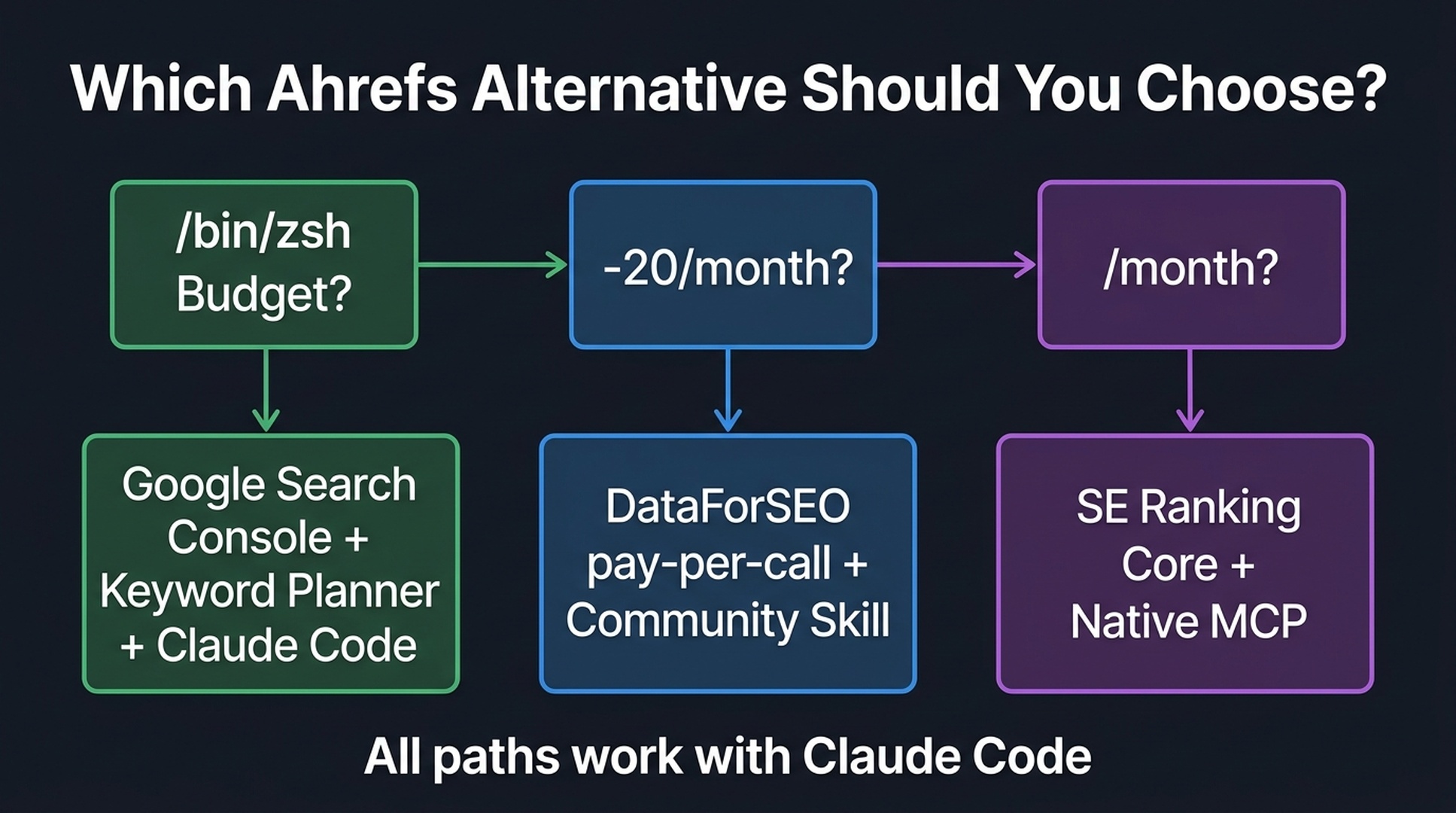
Here is the decision path for SEO beginners, based on budget:
Start with $0: Google Search Console (free) plus Google Keyword Planner (free) plus Codex. Export CSV data from both tools and let Codex analyze the files. This covers the basics for your own site.
Upgrade for $5–20/month: Add DataForSEO pay-per-call. At roughly $0.001 to $0.01 per request, you can run full keyword and SERP research for the price of a coffee. Install the community skill and ask Codex anything.
Go all-in for $129/month: SE Ranking Core plan. The MCP server with pre-built AI agent skills gives you the smoothest experience if you also want a visual dashboard alongside Codex access.
Skip for now if Codex is your priority: Semrush, Similarweb, and Surfer SEO. They are powerful tools, but their Codex integration is either missing or gated behind enterprise plans that cost more than the tools themselves. If you mostly work through Codex, DataForSEO plus GSC gives you more for less.
Skip entirely for Codex workflows: Tools without API access. BuzzSumo and Search Atlas will pull you back into manual dashboard work for every task. They still do specific jobs well (BuzzSumo for content trends, Search Atlas for automated technical fixes), but they cannot be your primary data pipe in a Codex-driven workflow.
What About Ahrefs Itself?
Ahrefs has an API. But as of August 2026, it has no MCP server and no Codex skill. Pricing starts at $29/mo for a limited Starter plan. The main Lite plan is $129/mo and Advanced is $449/mo. The AI visibility feature (Brand Radar) costs $199/mo per AI system. If you want to track all six AI platforms Ahrefs covers, that is $1,194/mo on top of your plan.
For Codex users, DataForSEO gives you comparable backlink and keyword data at a fraction of the cost, with much better programmatic access. Ahrefs is still an excellent manual research tool. But if Codex integration is a priority for you, your budget goes further elsewhere in 2026.
FAQ
Q: Do I need to know how to code to use SEO tools with Codex?
No. Every setup in this guide uses pre-built skills and MCP servers. You copy one install command, paste your API credentials, and talk to Codex in plain English. The SKILL.md files are copy-paste too. You do not write them from scratch.
Q: Is DataForSEO data as good as Ahrefs?
For keyword research and SERP analysis, yes. DataForSEO pulls live Google results, so the SERP data is current. For backlinks, Ahrefs still has the larger index, especially outside the US and for very small niches. For most beginner work (keyword discovery, SERP analysis, competitor checks), DataForSEO is more than enough.
Q: Can I use these tools with ChatGPT or Gemini instead of Codex?
DataForSEO's MCP server works with any MCP-compatible client, including ChatGPT and Gemini. SE Ranking's MCP server also supports multiple AI platforms. The SKILL.md files in this guide are written for Codex specifically, but the underlying API access works everywhere.
Q: What is the cheapest way to get started?
Google Search Console (free) plus Google Keyword Planner (free) plus Codex. Export CSVs from both tools and let Codex analyze them. Add DataForSEO pay-per-call when you need competitive SERP data. Most beginners spend $5 to $20 a month on DataForSEO API calls.
Q: How long does it take to set everything up?
Installing the DataForSEO skill: 5 minutes. Connecting SE Ranking MCP: 5 minutes. Creating your first AGENTS.md project file: 5 minutes. Running your first keyword research session: 30 seconds. Total: under 15 minutes to a working SEO research cockpit.
Q: Does Codex replace an SEO specialist?
No. Codex automates data gathering and basic analysis. It does not replace strategy, editorial judgment, or the experience of someone who has fixed broken sites before. Think of it as a research assistant that saves you hours of clicking through dashboards. The decisions stay with you.
Author: Alice Monroe, AI SEO Tools Analyst Covering 150+ Tools at Auspia. Alice writes about SEO software, tooling comparisons, and practical AI-assisted workflows for growth teams.


