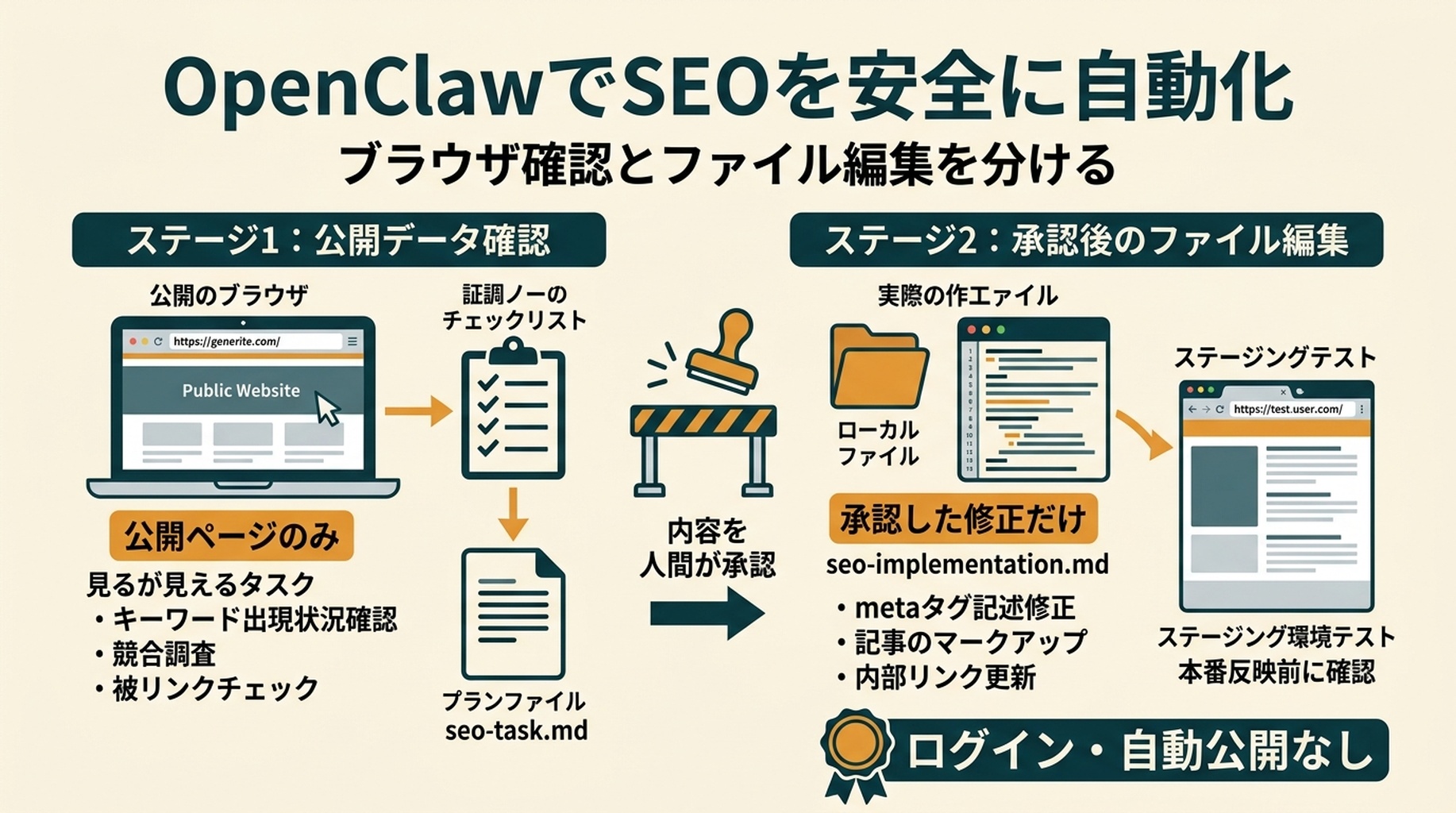

OpenClawでページを改善する前に、canonicalタグの意味を知っている必要はありません。必要なのは公開ページURLを1つ、後で使うサイトプロジェクトのローカルコピー、そして「まずOpenClawがブラウザ上の根拠を集め、何かを編集する前にあなたが狭いタスクを承認する」という明確なルールです。
このガイドでは、OpenClawとseo-auto-optimizerスキルを使い、繰り返し発生するSEO作業を初心者でも安全に自動化する方法を説明します。OpenClawにページを調べてもらい、結果を平易な言葉で説明させ、承認した更新をサイトファイルに用意させ、公開前に結果をテストします。
OpenClawは、ブラウザ作業とファイル作業を分けると最も役立ちます。まず公開ページだけを訪問させ、根拠を記録させます。小さな修正を選んだ後にだけ、ローカルのサイトプロジェクトへのアクセスを与えます。この分離により、ブラウザを操作できるエージェントが短い確認を広範囲かつ未レビューの操作へ変えてしまうことを防げます。
この手順を終えるとできること
最初のワークフローを終える頃には、次の状態になります。
- 重要なURLを1つ、画面から確認できるSEO上の問題について調査できている
- OpenClawが支援できる変更を、優先順位付きの短いリストで持っている
- 各提案について、平易な説明を読める
- 実装を選んだ場合は、ローカルのサイトプロジェクト内にレビュー済みの変更セットがある
- 公開前に使うテスト用チェックリストがある
初回は30〜60分を見込みましょう。ホームページ、製品ページ、サービスページ、すでに多少のアクセスがあるブログ記事など、事業にとって意味のあるページを1つ選びます。いきなりサイト全体から始めないでください。
ここでいう「完了」とは、そのページを示し、何をなぜ変えたか説明でき、更新後も正しく動くことを確認できる状態です。順位上昇の保証ではありません。検索エンジンが再クロールし、ページを評価するには時間がかかります。
始める前に用意する4つのもの
Google Search Consoleや技術的な知識がまだなくても始められます。最初の確認では公開ページから得られるシグナルを使います。次のものを手元に置いてください。
用意するもの | 必要な理由 | まだない場合 |
|---|---|---|
公開中のページURL | OpenClawは確認対象となる具体的なページを必要とします。 | ホームページまたはサービスページから始めます。 |
サイトプロジェクトのファイル | OpenClawが実際のソースファイル内に、承認済みの変更を用意できます。 | サイト管理者にコピーまたはリポジトリへのアクセスを依頼します。本番ファイルを手探りで編集しないでください。 |
ローカルプレビューまたはステージング環境 | 公開前にページを見る必要があります。 | 利用中のプラットフォームのプレビュー機能を使うか、開発者にステージングURLを依頼します。 |
変更をデプロイする手段 | Git、CMS、ホスティング管理画面などです。 | 初回は手動デプロイにしてください。 |
Google Search Console、Bing Webmaster Tools、クローラーのエクスポートは後で役に立ちます。ページのクリックが減っているか、別URLと競合しているか、サイト規模でインデックスを妨げられているかなど、1ページだけでは答えられない質問に答えるためです。
OpenClawワークスペースにSEO Auto Optimizerスキルを作成する
スキルファイルは自分で作成します。この記事から何かをダウンロードする必要はありません。
最短の方法:この記事をOpenClawに渡す
この記事が公開済みなら、URLをOpenClawに渡してスキル設定を依頼できます。次のプロンプトをコピーし、[ARTICLE URL]をこの記事の公開URLに置き換えてOpenClawへ送ってください。
この記事を読み、指示どおりにseo-auto-optimizerスキルをインストールしてください:
[ARTICLE URL]

私は初心者です。記事内にある完全なSKILL.mdコードブロックを見つけてください。まずアクティブなOpenClawワークスペース設定を確認し、設定済みのスキルディレクトリを特定してください。次にそこで必要なseo-auto-optimizer/SKILL.mdファイルを作成し、そのコードブロックを正確にコピーしてください。

ファイルを書き込む前に、使用するフルパスを教えてください。書き込み後は最初の10行を表示し、スキル名がseo-auto-optimizerであることを確認してください。

まだ私のWebサイトを調べたり、サイトファイルを編集したり、設定を変更したり、デプロイしたり、SEO監査を実行したりしないでください。このスキルのインストールと確認だけを行ってください。
OpenClawが記事URLを開けない場合は、下記の手動手順に従ってください。必要なら、このプロンプトの後に完全なコードブロックをチャットへ貼り付けられます。ローカルスキルをインストールするだけのために、ブラウザ、CMS、デプロイの認証情報を与えないでください。
SEOに使うOpenClawワークスペースのルートフォルダで、次のフォルダとファイルを作成します。
your-openclaw-workspace/
  skills/
    seo-auto-optimizer/
      SKILL.md
OpenClawのインストール先が別の設定済みスキルディレクトリを使う場合は、そこで同じseo-auto-optimizer/SKILL.mdのフォルダ構成を作成します。フォルダ名とファイル内のnameは、どちらもseo-auto-optimizerでなければなりません。これでOpenClawから$seo-auto-optimizerとして呼び出せます。
SKILL.mdという名前の新しいプレーンテキストファイルを開き、以下の完全な内容を貼り付けます。サイトのコードには貼り付けないでください。置き場所はskills/seo-auto-optimizer/フォルダです。
このスキルは読み取り専用モードで始まります。意図的な仕様です。公開情報を確認して修正計画を作りますが、ページの公開、サイトマップの送信、Search Consoleの編集、本番サイトの変更は行いません。
---
name: seo-auto-optimizer
description: Audit one public URL or a group of website URLs with evidence, then create an SEO optimization plan ranked by impact and effort. Use when a user asks to check, diagnose, optimize, or create an SEO task list, especially for indexing, technical SEO, metadata, structured data, content quality, internal links, search intent, keyword cannibalization, Core Web Vitals, mobile experience, CTR, Google Search Console, Bing Webmaster Tools, sitemaps, robots.txt, or E-E-A-T. By default, audit and provide code or copy recommendations only. Do not change the website, CMS, search-engine consoles, or third-party platforms.
---

# SEO Auto Optimizer

Turn a supplied URL into a verifiable SEO optimization plan that a developer, content team, or growth team can act on. Never present an item as checked or fixed when public evidence cannot confirm it.

## Working boundaries

- Default to read-only work. Inspect public pages, resources, and public site files. Do not change live pages, submit a sitemap, publish content, buy links, or operate any account.
- For a single-URL request, audit that URL and only the same-domain public files needed to verify it, such as `robots.txt`, a sitemap, or page links. Do not turn a single-page observation into a site-wide conclusion.
- Mark work that needs a login, search-performance data, a full crawl, server logs, or business facts as `Needs data`. State what data is needed and how to check it.
- Do not recommend black-hat, manipulative, or fabricated SEO: no purchased links, fake reviews/authors/comments, doorway pages, keyword stuffing, or bulk low-value AI pages.
- Follow the site's market, page language, URL conventions, and content standards. Proposed titles, meta descriptions, H1s, and body copy must use the target page's language.

## Inputs and clarification

A request needs at least one URL. If available, use the target market, language, business model, primary conversion, target keywords, Google Search Console or Bing exports, and local website project.

When those details are missing, do not block the work. Infer what you can from the page language, page type, and visible content, then state your assumptions at the beginning of the report. Ask one focused question only when the user requests keyword strategy, competitive content, or a site-wide change and the answer would materially depend on the target market or business.

## Audit process

### 1. Build an evidence baseline

1. Record the inspection date, final URL, HTTP status, redirect chain, `<html lang>`, visible robots instructions, and page-rendering limits.
2. Read the first screen, main content, and available source or DOM. Record the title, meta description, canonical, robots meta, viewport, H1-H6, visible publish or update date, author information, approximate body length, images, internal and external links, JSON-LD, and important JavaScript dependencies.
3. Check the same-domain `/robots.txt`. Check a sitemap only when one is discoverable; do not say a sitemap does not exist merely because its URL is not explicitly listed.
4. Keep locatable evidence for every conclusion: tag text, HTTP header, link URL, DOM observation, screenshot observation, or public-tool result. If the page is blocked by a WAF, login, geography, or another access limit, state the limitation immediately.

### 2. Classify every check

Use exactly one status for each item:

| Status | Meaning |
| --- | --- |
| `Pass` | Public evidence shows the item meets its purpose. |
| `Issue` | Public evidence shows an error, risk, or clear omission. |
| `Opportunity` | It may not be an error, but there is a reasonable opportunity to improve visibility, click-through rate, user experience, or conversion. |
| `Needs data` | Google Search Console, Bing, logs, a full crawl, field performance data, or keyword data is required. |
| `Not applicable` | The page type or business does not need this item; explain why. |

Do not turn `Needs data` into an `Issue` just to fill a checklist. Resolve the root causes that affect crawling, indexing, user experience, or the page's main intent before minor copy changes.

### 3. Create an action plan

Merge findings into non-duplicative tasks and rank them:

- `P0`: The page cannot be crawled or indexed; an incorrect canonical; accidental `noindex`; critical 4xx/5xx; site-wide robots blocking; severe mobile or rendering failure.
- `P1`: Main-page intent or content mismatch; duplicate or thin content; missing or conflicting title and H1; unacceptable structured data; missing key internal links; obvious performance bottleneck.
- `P2`: CTR improvements; images and alt text; FAQs; author and update information; content expansion; topic or comparison pages; local link and URL improvements.
- `P3`: Growth experiments, link earning, business profiles, and monitoring that require performance data or external coordination.

For every task, state the problem, evidence, recommended action, owner (developer, content, SEO, or growth), acceptance criteria, and risk or prerequisite. Give specific code or copy only when current information supports it. Where brand facts are missing, use clear placeholders instead of inventing facts.

## What to check

### A. Crawling, indexing, and URLs

Check and report:

- HTTP status, whether redirects are single-hop and appropriate, loops, and HTTP/HTTPS or www/non-www confusion.
- `robots.txt`, meta robots, `X-Robots-Tag`, and whether canonical URLs are reachable, absolute, single, self-referencing, or point to a sensible preferred URL.
- Whether canonical, `noindex`, pagination or filtering rules, and sitemap behavior agree. Mark uncertain cases as `Needs data`.
- Whether URLs are stable, readable, descriptive, free of meaningless parameters, case or trailing-slash duplication, and keyword stuffing. Do not recommend casual URL changes unless the plan includes 301 redirects, internal-link updates, canonical updates, sitemap updates, and rollback conditions.
- Whether main content appears in initial HTML or can render reliably. When important content depends only on client-side JavaScript, recommend verification with URL Inspection, rendering tests, and server-side rendering or prerendering options.
- Discoverable broken links, 404s, soft 404s, and incorrect internal destinations. A single URL cannot prove that a whole site has no broken links.

### B. Page structure and metadata

Check:

- A unique, accurate, intent-matched title. For Latin-script languages, a rough 50-60 characters can be useful, but accuracy matters more than reaching a count.
- A unique meta description that describes the page's real value without keyword lists or false promises. A meta description is not a ranking guarantee; prioritize relevance and likely click-through appeal.
- One H1 that describes the page's main question. Organize H2 and H3 headings by real topic hierarchy, without skipped levels or decorative text disguised as headings.
- `lang`, viewport, mobile usability, the ratio of main content to template noise, and breadcrumb visibility and semantics.
- Appropriate image formats, dimensions, lazy loading, and specific alt text. Decorative images should have empty alt text. Do not force keywords into alt text.

When recommending a rewrite, provide one adoptable title, meta description, H1, and heading outline. Label any information that needs a brand-owner confirmation.

### C. Structured data and trust signals

Check whether visible page content and JSON-LD, Microdata, or RDFa agree. Consider only schema appropriate to the page type: `BreadcrumbList`, `Article` or `BlogPosting`, `Product`, `SoftwareApplication`, `Organization`, `LocalBusiness`, `FAQPage`, and `WebPage`.

- Recommend schema only when it represents visible, real page information. Never add invented ratings, reviews, prices, authors, FAQs, or awards.
- Identify required fields such as URL, name, description, image, author, publish date, `dateModified`, breadcrumb positions, and entity identifiers.
- For content pages, check visible author information, author page or experience, editorial policy, sources, contact information, organization information, update date, and factual citations. E-E-A-T is not a tag that can be added; it comes from verifiable content and entity information.
- When schema exists, recommend the Google Rich Results Test and Schema Markup Validator as acceptance checks.

### D. Content, intent, and duplication

Identify the page's main query intent: informational, commercial research, transactional, local, navigational, or mixed. Check whether the main content answers the question early and adds value through original evidence, examples, steps, data, or product detail.

- Flag clear thin content, template repetition, unanswered core questions, intent mismatch, and stale content. Do not define thin content by word count alone.
- A single URL cannot prove site-wide duplicate content, keyword cannibalization, or orphan pages. Explain that these require a URL inventory, canonical and index status, GSC query-to-page data, an internal-link graph, and similarity analysis.
- For overlapping pages, first define the evidence and decision criteria for keep, merge, split, or redirect. Never recommend deleting a page based on a guess.
- When content creation is requested, provide a search-intent brief, unique value, information architecture, sources needed for claims, and internal-link targets. Original content means independent insight or verification, not a competitor rewrite.
- Suggest comparison, alternatives, list, or FAQ pages only when they have distinct intent, real comparison criteria, and maintainable facts. Do not create batches of low-value templates.

### E. Internal links, architecture, and topic coverage

Assess how the page can be found and understood:

- Check whether important pages have crawlable HTML links from relevant parent pages, topic hubs, navigation, or breadcrumbs. Anchor text should naturally describe the destination.
- Mark orphan pages as `Needs data` unless a sitemap and full link graph prove the finding.
- For a topic cluster, define one pillar or owner URL, a distinct intent for each support page, link direction, and a cannibalization rule. Multiple near-identical owner pages should not compete for one head topic.
- Before suggesting feature, use-case, integration, comparison, alternatives, or FAQ pages, define the user question, target query, unique content, owner URL, and link-back path.

### F. Performance, mobile use, and Core Web Vitals

Separate lab data from field data. Prefer real-user data from CrUX or PageSpeed Insights to validate LCP, INP, and CLS. Without it, inspect obvious risks: oversized hero media, images without dimensions, render-blocking CSS or JavaScript, third-party scripts, font loading, layout shifts, and heavy client-side rendering.

Every performance recommendation must explain its mechanism and test method. For example: responsive, compressed hero media may improve LCP; image width and height reduce CLS risk; splitting long tasks may improve INP. Do not promise a score or ranking improvement.

### G. Search performance, keywords, and external authority

Unless the user supplies data or access, mark these items as `Needs data`:

- Page-two rankings, traffic or ranking declines, and query-to-page keyword cannibalization.
- URLs or queries with high impressions and low CTR, plus title and meta tests.
- High-volume, low-difficulty keywords, SERP and People Also Ask opportunities, competitor gaps, and search intent.
- High-quality backlinks, broken-link opportunities, brand mentions, Google Business Profile, and local citations.
- GSC or Bing sitemap submission, URL Inspection, index coverage, and crawl errors.

Give an executable data-checking instruction. For example: in GSC, compare the last 28 days with the previous 28 days, filter to the target URL, export queries, impressions, clicks, CTR, and average position, then test a new title or meta description for high-impression, same-intent queries with weak CTR. Link strategies must use audience-relevant, editorially independent, verifiable channels and genuinely useful assets.

## Default deliverable format

Unless the user asks for a shorter response, return these sections in this order:

1. `Scope and limits`: target URL, check date, accessibility, what could not be verified, and key assumptions.
2. `Executive summary`: the three to seven most important findings and what to address first.
3. `Check matrix`: status, evidence, and short conclusion for items A-G. Cover the user's supplied checklist, and state `Needs data` where necessary.
4. `Prioritized action list`: P0-P3 tasks with owner, effort (S/M/L), acceptance criteria, and dependencies.
5. `Implementation-ready recommendations`: where appropriate, include metadata, heading structure, JSON-LD templates, internal-link locations, content briefs, or performance fixes.
6. `Data and human follow-up`: needed GSC, Bing, crawl, log, keyword, and business inputs, plus exact validation steps.

Use careful language. Say a change may improve relevance, discoverability, or CTR. Do not promise indexing, first place rankings, or that every SEO issue has been fixed.

## Completion standard

Before delivering the work, confirm:

- Every conclusion has public evidence or is explicitly labeled as an assumption or `Needs data`.
- Tasks are ordered by impact, dependency, and actual executability, not copied mechanically from a checklist.
- Recommendations do not risk breaking URLs, canonicals, index status, or content facts. Migration, deletion, and merge suggestions include redirect and rollback conditions.
- Schema and E-E-A-T recommendations come from visible facts or are clearly marked as information still needed.
- The report makes clear that no live changes, submissions, or publishing actions were performed.
ファイルを保存します。設定上必要ならOpenClawを再起動または再読み込みし、このワークスペースで利用できるスキルを一覧表示してください。seo-auto-optimizerは利用可能ですか?と聞いてください。OpenClawがスキルを利用可能だと確認するまで、チュートリアルを始めないでください。
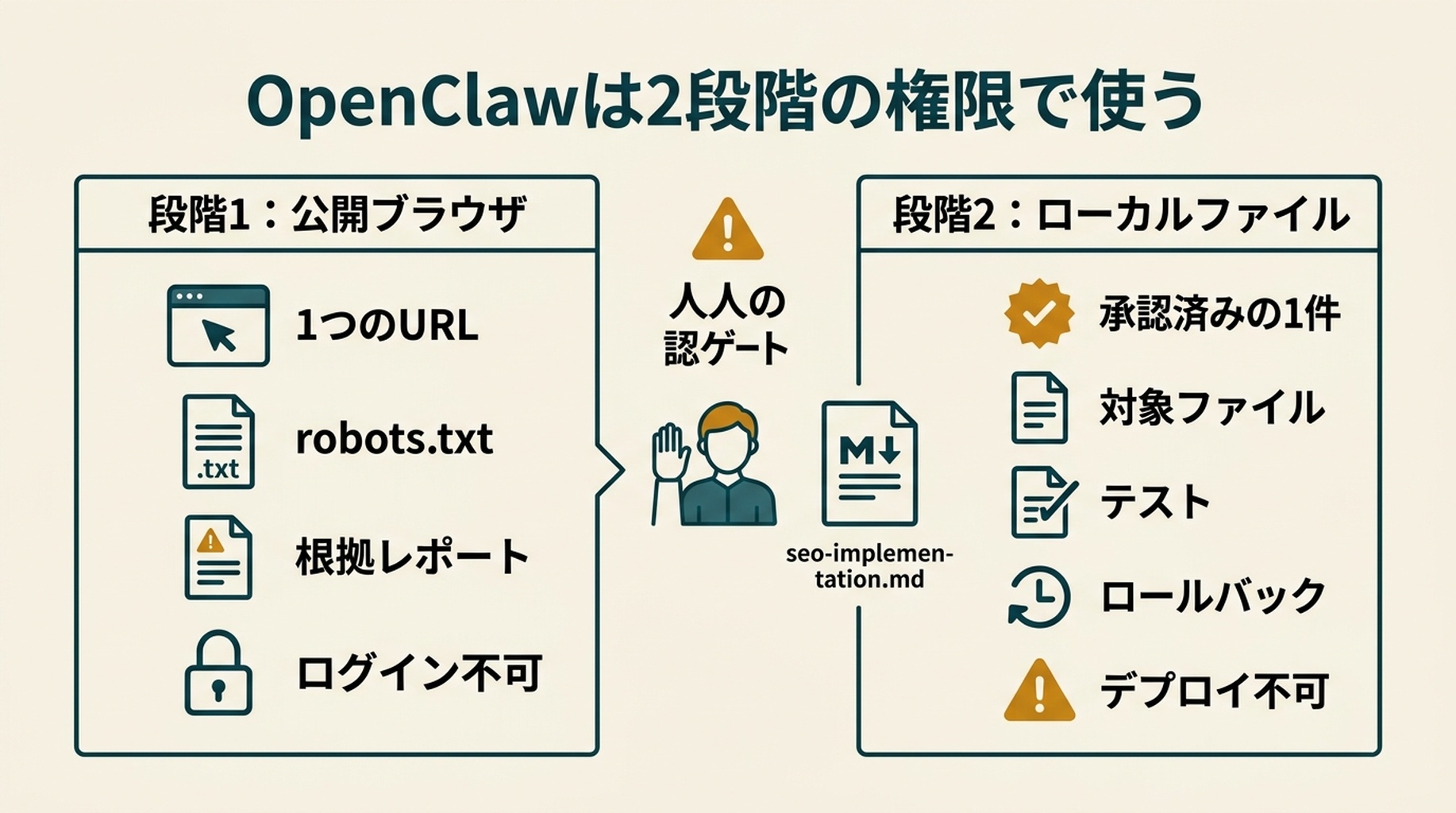
2つの権限を使う:先にブラウザの根拠、次にファイル
OpenClawは公開ブラウザ作業を扱えるため便利ですが、ブラウザアクセスには境界が必要です。最初のSEO確認では、指定した公開URLと、robots.txtや発見できるサイトマップなど、確認に必要な同一ドメインの公開ファイルだけを訪問できるようにします。ログイン済みCMS、Search Console、ホスティング、デプロイへのアクセスは与えないでください。
ワークスペースにseo-task.mdという小さなタスクファイルを作成します。
# SEOタスクの境界

対象URL: [公開URLを1つ貼り付け]
ブラウザアクセス: このドメインの公開ページのみ。
許可する公開ファイル: robots.txt、発見できるサイトマップ、ページソース、指摘を検証するために必要な同一ドメインのリンク。
禁止: ログイン、CMS変更、Search Console、Bing Webmaster Tools、ホスティング、デプロイ、リンク購入、フォーム送信。
出力: 根拠に基づくレポートのみ。Pass、Issue、Opportunity、Needs data、Not applicableを使うこと。
ブラウザを使う前に、このタスクファイルをOpenClawに読ませます。レポート後は、レビュー中にブラウザアクセスを削除するか、制限したままにします。ローカルプロジェクトへのアクセスは、承認したP1またはP2の変更に対してだけ与え、最初の変更は1つのページまたはコンポーネントに限定してください。
OpenClawに変更を頼む前にページを確認する
OpenClawを開き、次のプロンプトを貼り付けます。例のURLを自分のページURLに置き換えてください。
このページを調べるために$seo-auto-optimizerを使ってください:
https://example.com/your-page

私はSEO初心者です。すべての指摘を平易な日本語で説明してください。
ファイルを変更したり、ページを公開したり、何かを送信したり、本番サイトを変更したりしないでください。

各提案について、次を示してください:
1. OpenClawが何を、どこで見つけたか。
2. それが訪問者または検索エンジンにとってなぜ重要になり得るか。
3. 確認済みの問題、改善機会、追加データが必要な項目のどれか。
4. 最も安全な次の行動。
5. 開発者またはGoogle Search Consoleのデータが必要かどうか。

作業はP0、P1、P2、P3の優先順に並べてください。
最初の出力は変更済みのサイトではなく、レポートであるべきです。それで正しいのです。
OpenClawは通常、ページタイトル、meta description、主見出し、画像のaltテキスト、内部リンク、canonicalタグ、robots指示、構造化データ、モバイルviewport、明らかなリンク切れなど、目に見えるシグナルを確認できます。ページ単位で明確なコンテンツ不足を見つけることもできます。
ただし、すべてを知っているように振る舞うべきではありません。1つのURLからサイト全体を断定するレポートよりも、「要データ」と書かれたレポートの方が信頼できる場合が多いです。
SEO専門家にならずにレポートを読む
このスキルは、ステータスと優先度という2つのシンプルなラベルを使います。何かを承認する前に、両方を確認してください。
ラベル | 意味 | 初心者向けの対応 |
|---|---|---|
| 公開情報から、この点は目的を満たしていると考えられます。 | そのままにします。 |
| H1の欠落や不正なリンクなど、OpenClawが具体的な問題を見つけました。 | 根拠を確認し、修正を検討します。 |
| ページは壊れていませんが、より明確または有用にできる可能性があります。 | 任意の改善作業として扱います。 |
| 判断にはGSC、Bing、分析データ、ログ、または完全なクロールが必要です。 | 推測しません。後でデータを集めます。 |
優先度は、最初に確認すべきものを示します。
優先度 | 平易な意味 | よくある例 |
|---|---|---|
| 重要ページが検索に出なくなったり、正しく動かなくなったりする深刻な問題です。 | 誤った |
| ページの構造、意図、技術設定に大きな弱点があります。 | title/H1の欠落または競合、ページ意図の不一致、不適切な関連schema、重要な内部リンクの不足。 |
| 価値のある改善ですが、緊急ではありません。 | より良い画像altテキスト、明確なFAQ、著者・更新情報、titleとdescriptionのテスト。 |
| データ、別チーム、または継続的な実験を要する作業です。 | リンク獲得、ローカルプロフィール、順位監視、キーワード調査。 |
レポートに載っているからといって、すべてを承認しないでください。最初の実装は、低リスクの変更を1〜3個に絞るべきです。小さな初回リリースの方が確認しやすく、元に戻しやすいからです。
安全な最初の変更を選び、リスクの高い判断は後回しにする
多くの初心者は、明確なページ単位の改善から始められます。次の表は有用な境界線です。
通常は準備してレビューしてよいもの | 立ち止まり、技術またはSEOレビューを依頼するもの |
|---|---|
より正確なtitleまたはmeta description | URL変更やページ削除 |
明確なH1を1つ、合理的なH2見出し |
|
意味のある画像への具体的なaltテキスト | リダイレクトルールまたは移行設定 |
正しい行き先が明らかな内部リンク切れ | 似て見えるという理由だけでページを統合すること |
表示内容と一致するschema | 実在しない評価、レビュー、価格、著者、FAQの追加 |
既存ページを分かりやすくする短い回答 | キーワードのために大量のAI生成ページを公開すること |
たとえばcanonicalタグは、似たページのどの版を主要版と見なすべきかを検索エンジンに伝える小さな指示です。変更は重要になり得ますが、大切なページをGoogleに無視させてしまうこともあります。変更前に、現在のcanonical URLと提案URLをOpenClawに表示させ、技術レビューを受けてください。
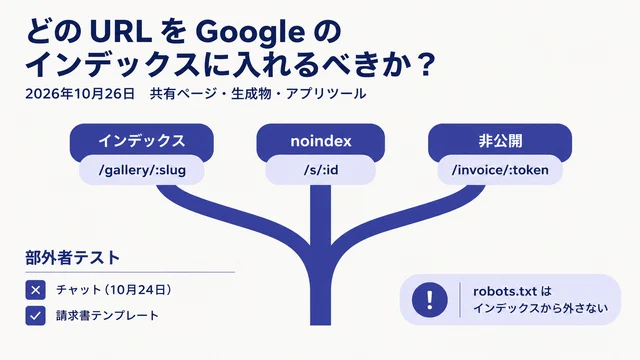
同じルールはrobots.txtとnoindexにも当てはまります。サンクスページ、非公開プレビュー、絞り込み結果ページでは、これらの設定が正しい場合があります。自動的に間違いとは限りません。
承認したブラウザの指摘を、ローカルの修正1件に変える
OpenClawをブラウザ上の根拠から、すぐに広範囲なコード編集へ進ませないでください。まずseo-implementation.mdという2つ目のタスクファイルを作り、承認した項目だけを貼り付けます。
# 承認済みSEO実装

承認した指摘: [ISSUEまたはOPPORTUNITYを1つ貼り付け]
根拠: [URL、タグ、リンク、またはレポートの行を貼り付け]
許可するファイルまたはコンポーネント: [分かる場合]
禁止: URL、リダイレクト、robots.txt、noindex、canonicalタグ、サイトマップファイル、CMS公開、デプロイ、無関係な整理。
必要な出力: 計画、影響するファイル一覧、テスト手順、ロールバック手順。編集前に承認を待つこと。
この引き継ぎが、OpenClaw固有のワークフローです。ブラウザタスクは何が見えているかを証明します。ローカルファイルタスクは、あなたが承認した判断だけを変更します。1つのエージェントが両方を実行できても、この2つを分けてください。
突然の編集ではなく、実装計画をOpenClawに依頼する
レポートで承認した項目をコピーし、次のプロンプトをサイトプロジェクト内で使います。これはOpenClawに、変更してよいことと、同じくらい重要な「触れてはいけないこと」を伝えるものです。
seo-implementation.mdを読んでください。そこに記録したSEO変更だけを承認します。

ローカルのサイトプロジェクトを確認し、実装計画を作成してください。
ファイルを編集する前に、次を示してください:
1. 変更予定のすべてのファイル。
2. 各ファイルが影響する正確なページまたはコンポーネント。
3. 訪問者と検索エンジンに見える変更内容。
4. 結果のテスト方法。
5. 変更が誤っていた場合のロールバック手順。

ブラウザ自動化を使ったり、何かにログインしたり、URLを変更したり、ページを削除したり、
robots.txtを編集したり、noindexタグを追加したり、リダイレクトを変更したり、コンテンツを公開したり、
サイトをデプロイしたり、seo-implementation.md以外を変更したりしないでください。

計画を示した後、私の承認を待ってください。
返信する前にファイル一覧を確認します。OpenClawが見覚えのないファイルを触ろうとするなら、理由を聞いてください。計画が「SEOを最適化する」とだけ書き、ファイル名と期待結果を示せないなら、具体化するように求めましょう。
計画が適切に見えたら、範囲を絞って承認します。
承認します。上の計画だけを実装してください。

編集後に:
- ファイルごとの簡潔な要約を示してください。
- 関連するdiffまたは変更前後のテキストを示してください。
- 私が手動で確認すべきことを説明してください。
- 使える場合は、プロジェクトにある既存のチェックを実行してください。
- デプロイはしないでください。
この部分が自動化を役立つものにします。OpenClawは反復的な編集を行えますが、何を変更し、いつ公開するかの決定権はあなたに残ります。
ページを公開する前に結果を確認する
プレビューを飛ばさないでください。技術的に正しい変更でも、不自然に読めたり、レイアウトを壊したり、ページの有用性を下げたりすることがあります。
次の公開チェックリストを使ってください。
確認項目 | 見るべきこと |
|---|---|
ブラウザプレビュー | ページが読み込まれ、変更した文章が自然に読めること。 |
モバイルプレビュー | 狭い画面でも見出し、画像、メニュー、ボタンが動くこと。 |
titleとdescription | 実際のページを説明し、訪問者が得られないことを約束していないこと。 |
見出し構造 | 明確なH1が1つあり、H2が実際のセクションを整理していること。 |
リンク | 変更した内部リンクが、意図した本番またはステージングページへ進むこと。 |
画像 | 重要な画像には役立つaltテキストがあり、装飾画像のaltにキーワードを詰め込んでいないこと。 |
ソースまたはSEO拡張機能 | 想定したcanonical、robots指示、構造化データが意図せず変わっていないこと。 |
プロジェクトチェック | 既存のbuild、test、lint、検証コマンドが通ること。 |
schemaを変更した場合は、デプロイ後、またはアクセス可能なステージングページに対してGoogleのRich Results TestかSchema Markup Validatorを実行します。schemaの形式が有効なだけでは不十分で、ユーザーがページ上で見られる内容とも一致していなければなりません。
チェックに失敗したら、OpenClawに無作為な追加編集を頼まないでください。正確なエラー、どの承認済み変更が原因かを伝え、最小限の修正を求めます。変更を説明できない、または検証できない場合は、デプロイ前に元に戻してください。
1ページだけではSEO自動化に分からないこと
初心者が自信ありげなAI出力に惑わされやすいのは、ここです。SEOに関する質問の中には、ブラウザから見えないデータを必要とするものがあります。
質問 | OpenClawが責任を持って答えるために必要なもの |
|---|---|
なぜトラフィックが減ったのか? | 比較可能な2期間のGSCおよび分析データ。 |
表示回数は多いがクリック率が低いページはどれか? | GSCのクエリとページのエクスポート。 |
2ページが同じキーワードで競合しているか? | GSCのクエリ別ページデータとコンテンツ比較。 |
孤立ページはどれか? | サイト全体のクロール、サイトマップ、内部リンクグラフ。 |
訪問者にとってCore Web Vitalsは実際に悪いのか? | ローカルテストだけでなく、CrUXまたはPageSpeed Insightsなどのフィールドデータ。 |
難易度の低いキーワードは何を狙うべきか? | キーワードとSERPの調査に加え、実際のオーディエンスと提供価値。 |
サイトマップを送信、またはインデックス登録をリクエストすべきか? | GSCまたはBing Webmaster Toolsへのアクセスと、実行する理由。 |
こうした入力の収集と整理は後から自動化できます。最初の1ページでは、推測を診断のように扱うより、OpenClawにNeeds dataと印を付けさせれば十分です。
無理なく続けられるシンプルな毎週の習慣
最初のページを公開して確認したら、毎週、重要なページ1つに対してワークフローを繰り返します。
- 無作為なURLではなく、事業上の目的があるページを選びます。
- 読み取り専用のOpenClawチェックを実行します。
- 明確で低リスクな更新を数件まで承認します。
- 実装計画とファイルdiffをレビューします。
- デプロイ前にローカルまたはステージングでテストします。
- ページ、日付、変更、未解決の質問を簡単なスプレッドシートまたはMarkdownファイルに記録します。
数週間分の変更がたまったら、GSCのエクスポートを追加してください。するとOpenClawは、実際の表示回数、クリック、クエリデータに裏付けられた次の改善対象ページを見つける助けになります。より広い診断には、コードレベルのレビューと併せてWebサイトSEOスコアチェッカーを使えます。
よくある質問
OpenClawはサイトのSEOをすべて自動化できますか?
いいえ。OpenClawは、公開ページのシグナル確認、課題リストの整理、titleとdescriptionの下書き、コードまたはコンテンツ変更の準備、承認済み変更リストのチェックといった反復作業を自動化できます。ページ削除、リダイレクト、インデックス制御、canonical、事業上の主張、デプロイ、パフォーマンスデータに関わる判断には、引き続き人のレビューが必要です。
始める前にSEOキーワードを知っている必要がありますか?
いいえ。重要なページから始め、目に見えるSEO設定を平易な日本語でOpenClawに説明させてください。キーワード調査は、新しいページを作るとき、または既存ページのどれにより多く取り組むべきか決めるときに役立ちます。必要なのは、エージェントが作ったリストだけではなく、調査データと顧客への理解です。
OpenClawにWordPress、Webflow、Shopifyのページを編集してもらえますか?
OpenClaw環境に、そのシステムまたはサイトファイルへの承認済みアクセスがある場合に限ります。初回のワークフローでは、正確なテキスト、コード、またはファイル単位の変更をOpenClawに準備させ、CMSでの更新は自分で行うか、サイト所有者に承認してもらいましょう。信頼できるレビュー手順ができる前に、公開権限を与えないでください。
この変更でGoogle検索1位になれますか?
いいえ。SEOの変更は、クロール可能性、関連性、明確さ、ユーザー体験を改善する可能性があります。順位は競合、検索意図、サイト品質、リンク、検索エンジンが時間をかけてページを評価する方法にも左右されます。OpenClawは順位を保証する手段ではなく、より良く安全な判断を行うための手段として扱ってください。
著者:AuspiaのテクニカルSEO実務家、Julian Mercer(経験14年)。Julianはクロール可能性、schema、レンダリング、サイトアーキテクチャ、AIが読み取りやすいコンテンツの技術的基盤について執筆しています。