


Google: How to Read Search Console's Page Indexing Report
Open Search Console, see hundreds or thousands of URLs under "Not indexed," and the reflex is immediate: something is broken and every red status needs a fix.
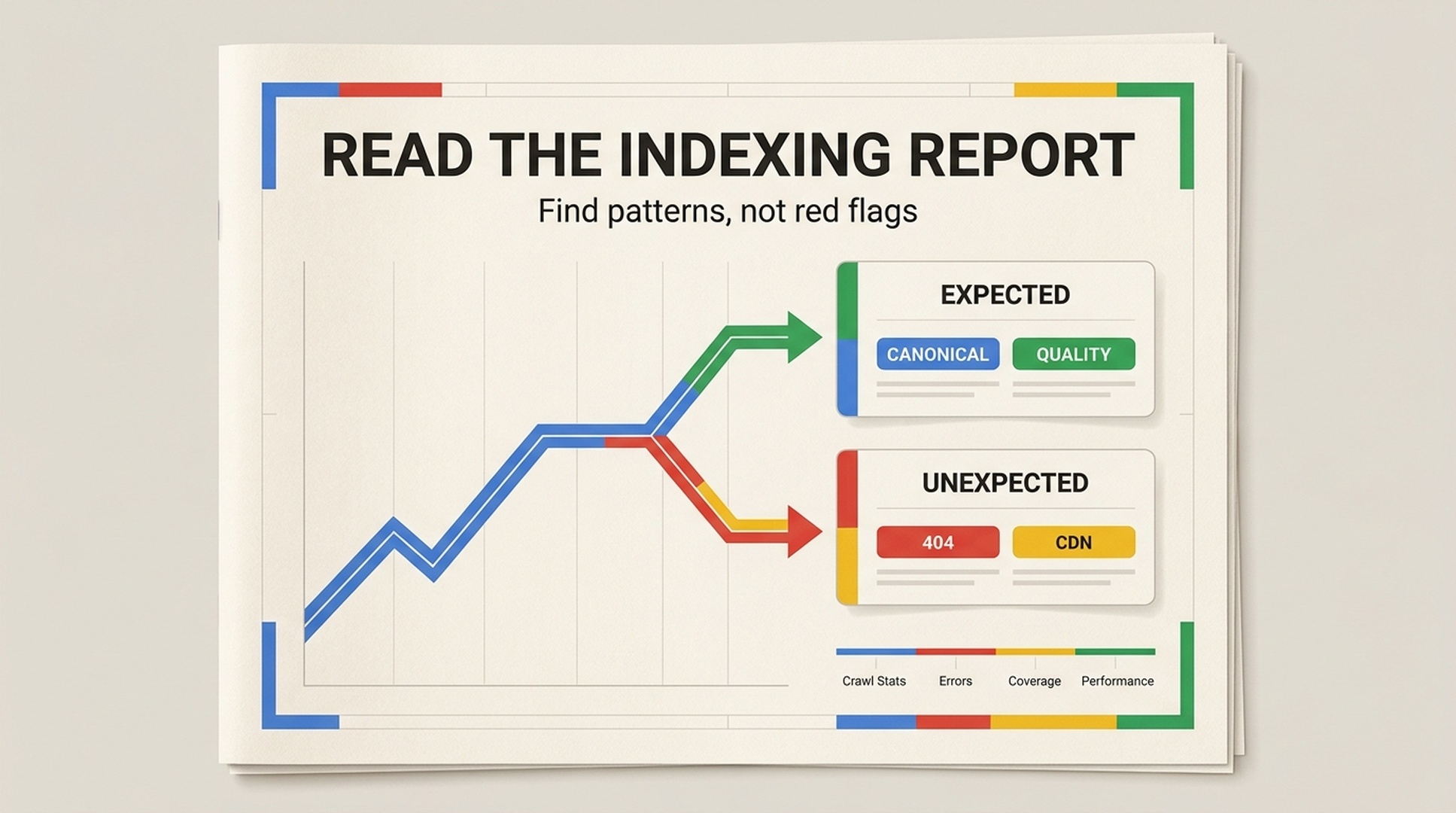
Google's Search Relations team makes a different case. The Page Indexing report is neither a to-do list nor a static inventory of every URL on your site. It is a change detector. The useful question is not "Which page is missing?" It is "Did this change make sense, and is there a pattern behind it?"
That distinction saves a great deal of busywork. It also makes it easier to notice the issues that deserve real urgency: a CDN blocking Googlebot, a template returning the wrong page, an unexpected canonical change, or a whole directory losing indexability after a deployment.
This guide synthesizes the Google Search Relations episode "How to read the Indexing Report," featuring Martin Splitt and John Mueller, and turns its discussion into a practical operating method for SEO teams.
The short answer: Treat Page Indexing as a report about expected and unexpected patterns. Do not treat the indexed-to-not-indexed ratio as a quality score, and do not try to make every status disappear.
Start with the change, not an individual URL
At roughly 3:40 in the episode, the team offers the framing that should guide the entire report: look for patterns and unexpected changes. Do not read it as a list of items that must be fixed.
Imagine a domain migration. You add redirects from the old URLs to their replacements. A sharp rise in "Page with redirect" is not evidence that you lost a batch of pages. It is the expected footprint of the change you made. The more concerning outcome would be no change at all after enough processing time, or important new URLs failing to appear as expected.
The same report can point to either success or failure. Context decides which.
What you see | First question to ask | Likely next move |
|---|---|---|
A new section has no immediate indexing movement | Has Google had time to process the change, and is there a reported data delay? | Wait, then recheck. Avoid repeatedly submitting the same URLs. |
404s rise after you delete old pages | Were those URLs meant to disappear? | If yes, the response may be correct. |
A group of pages gets another canonical | Is this an expected URL variant or an unrelated destination? | Sample the URLs and compare their content, canonical tags, and internal links. |
403, 404, 410, or 5xx statuses jump suddenly | Did a hosting, CDN, WAF, or bot-protection setting change? | Start with server and CDN evidence. |
"Crawled - currently not indexed" rises across a template | Is there a technical block, or is this a wider quality and value question? | Separate technical checks from a content and page-experience review. |
Keep a dated log of migrations, releases, bulk removals, canonical changes, and infrastructure rule changes. Without that record, trend lines are much harder to interpret.
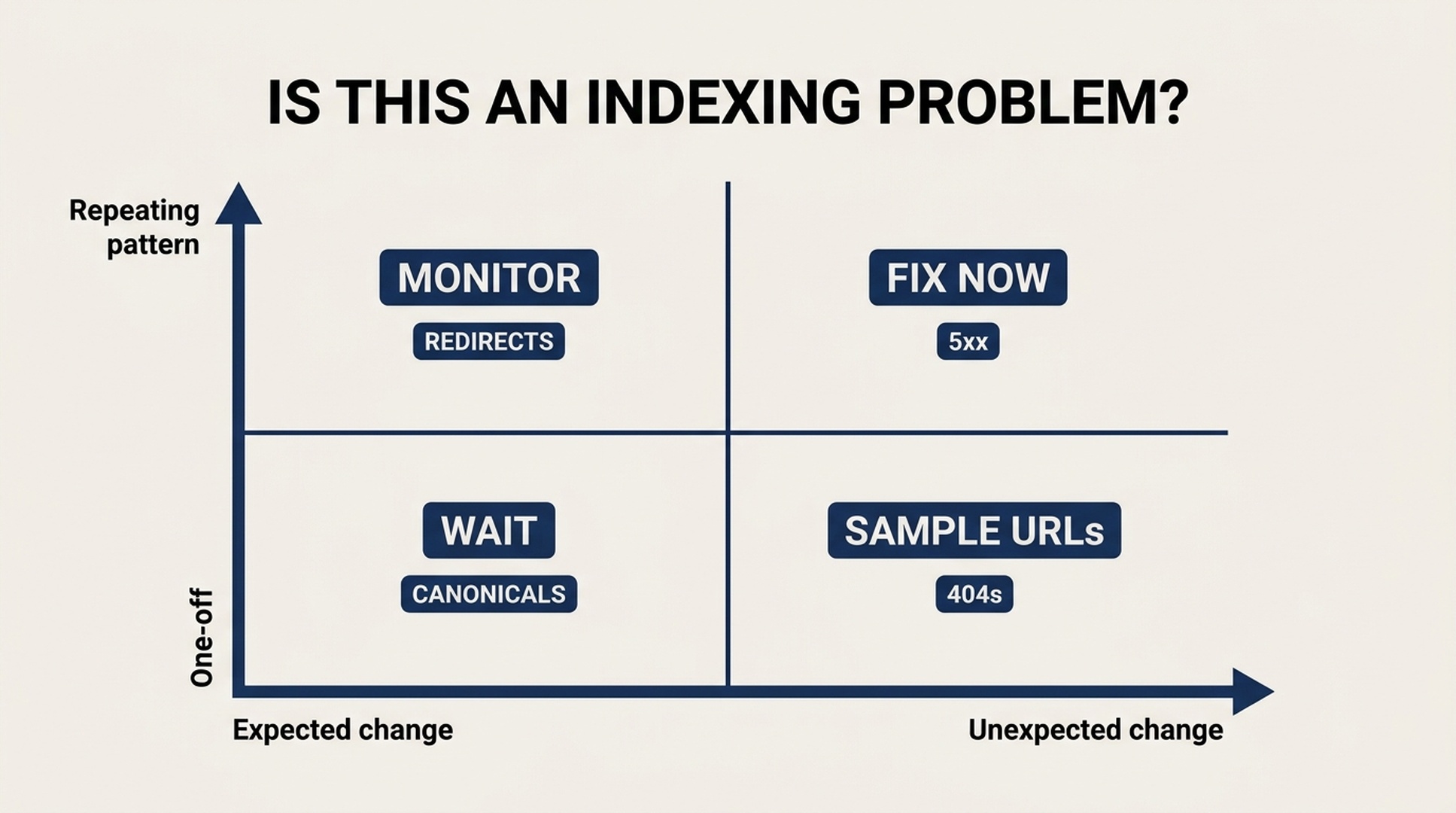
A Page Indexing status becomes actionable when it is both unexpected and repeatable across a meaningful group of URLs.
A 404 can be the correct outcome
Around 6:25, the conversation turns to one of the most persistent Search Console misunderstandings. A 404 is labelled as an error, so it is tempting to assume Google must never encounter one. Google agrees that it is an HTTP error. It can still be an expected and appropriate error.
If a page was deliberately removed, or an external link, typo, or crawler requests a URL that never existed, a 404 is an honest response. Redirecting every 404 to the home page just to make a report look cleaner tends to hide useful information and can create a poor user experience.
The right question is whether the 404 conflicts with your intent. Investigate when a page should exist, when your own navigation or sitemap still references it, when a valuable linked URL has a relevant replacement, or when a release unexpectedly generated a large family of dead URLs. Do not turn "Search Console must be green" into a management KPI. A site that is deliberately retiring old products or completing a migration can be technically healthy while its report looks noisy for a while.
Another Google-selected canonical is often normal
The "Google chose different canonical than user" status can sound alarming, but the discussion at about 8:05 puts it in perspective. Google selecting another URL within the same site as canonical happens routinely. It does not automatically mean that the content has vanished from the index.
For example, links across the web may consistently use the non-www version of a domain while the site has expressed a preference for www, or the reverse. Google may consolidate those signals around one version. Parameters, trailing slashes, protocol variants, language URLs, and duplicate paths can produce similar cases.
Start with two checks:
- Are the affected URLs a coherent, explainable family of variants?
- Is Google's selected canonical the URL that you actually want users and search engines to use?
If both answers are yes, you may simply be seeing consolidation at work. If unrelated product pages, articles, or language versions are being folded into the wrong destination, inspect canonical tags, rendered HTML, duplicate content, internal links, and HTTP responses. For sites spanning multiple protocol or subdomain variants, a Domain property gives a less fragmented view of these changes.
Use site: as a clue, not the final word
Google also addresses the familiar contradiction: a site: query does not show a URL, but Search Console says that URL is indexed. Around 11:00, the advice is clear. A site: query is an artificial kind of search and can help with a quick check, but Search Console is the better source for indexing state.
This matters during migrations. Google may still return old-domain URLs in a site: query long after a correct redirect migration, because the old addresses remain known and users may still search for them. Clicking a result can lead to the new site as intended. That is not proof that the migration failed.
Use a sensible evidence order:
- Use URL Inspection for a critical individual URL, including the canonical Google selected.
- Use the Page Indexing report for examples, categories, and trend patterns.
- Use
site:queries as supplementary observation, not as evidence that overrides Search Console.
The infrastructure failure that looks like an indexing mystery
The most useful technical warning in the episode comes between about 13:40 and 16:45. A CDN, host, or bot-protection system may mistake Googlebot for unwanted traffic during heavier crawling. It can respond with a 403, 404, or 410, even though the content exists.
The harder version returns an interstitial challenge page with HTTP 200. The site can look fine to a normal visitor, while Googlebot receives the same "Are you a bot?" page for many URLs. Google then sees duplicate challenge-page content instead of your actual pages. That can lead to missing content, duplicate-page statuses, or apparently bizarre canonical selections.
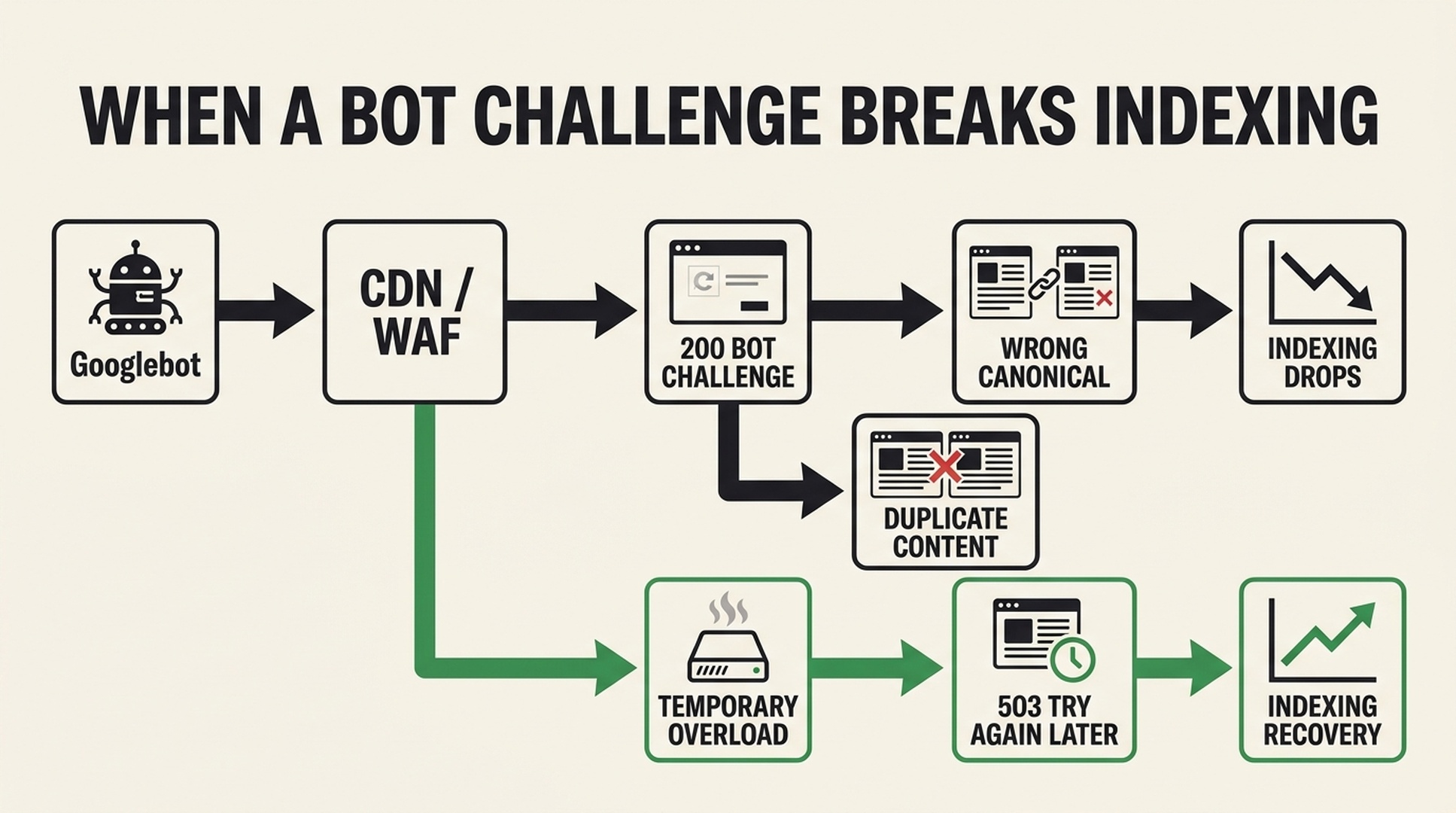
A bot challenge served with HTTP 200 can replace real content in Google's view and collapse unrelated URLs into duplicate-content patterns.
Do not solve that by rewriting titles or adding more keywords. Inspect the infrastructure: WAF and CDN bot rules, challenge pages, rate limits, edge-cache behavior, and what Googlebot receives at different times. For a temporary overload, a 503 response communicates "try again later" more accurately than pretending a working page is gone with a 404 or forbidden with a 403.
When "Validate Fix" is useful
The label "Validate Fix" makes it easy to assume that every report item should be validated. Google describes a narrower role around 17:00. Once you have fixed a real underlying issue, Google samples the URLs you marked as fixed. If those samples pass, the system will generally move more quickly to recrawl the related pages.
That makes validation a good fit after a CDN rule incorrectly blocked existing pages, a bad template served the same interstitial across indexable URLs, or a release broke canonical tags, meta robots, or rendering dependencies. It is not the right action for intentionally deleted URLs, normal redirects, or newly published pages that simply have not finished processing.
The button is a way to accelerate verification after a genuine repair. It is not a delete key for inconvenient report rows.
Read the line, not just the label
The report gives you categories and trend lines. You need both. A brief spike in 5xx errors could come from a host move, a server hiccup, or a short-lived deployment problem. If logs explain the incident and later requests recover, a small blip is not the same as a site-wide indexing emergency.
Sustained increases, repeated spikes, or a category spreading through a directory or template are different. They warrant investigation.
Signal | More likely a temporary blip | More likely an incident |
|---|---|---|
Duration | A short spike that settles | A rise that persists or repeats |
Scope | A few scattered URLs | One template, directory, region, or the entire site |
Change history | A known maintenance event explains it | No known cause, or a match with CDN/WAF changes |
User impact | Key pages still render normally | Existing pages are blocked, redirected, or replaced |
Follow-up samples | Later crawls recover | New samples keep showing the same condition |
Google's point is not that teams should ignore errors. Computers and networks fail briefly, and Google retries. The work is to distinguish a recoverable event from a persistent system-level problem.
"Discovered" and "crawled" but not indexed ask different questions
At around 20:45, the team separates two statuses that are often thrown into the same bucket.
Status | What Google has done | What to examine first |
|---|---|---|
Discovered - currently not indexed | Google knows the URL exists but has not visited it yet | Crawl and processing timing, site scale, internal linking, and priority |
Crawled - currently not indexed | Google visited the URL but has not placed it in the index for now | Page value, duplication, quality, rendering, and broader site signals |
Neither phrase automatically translates to "technical bug." Google says that when its systems have stronger reservations about a site's overall quality, they may crawl and index less. When a large important set of URLs sits in these statuses and no technical obstacle explains it, the next step is often a step back: what does this site offer that is genuinely useful and distinct?
That is not a blanket rejection of AI-generated content. The video explicitly avoids that claim. The more practical test is whether a reader gets information, experience, evidence, or utility that any other quick rewrite could not provide. Quality also includes the page around the text. A good paragraph buried below ads, interstitials, filler, and heavy scripts is not a good user experience simply because the copy itself is original.
Indexing ratio is not a site-quality score
At about 25:30, Google rejects another common metric: there is no universal indexed-versus-not-indexed ratio that tells you whether a site is good.
Large sites can legitimately contain many noindex pages, old document versions, redirects, 404s, parameter URLs, technical examples, and duplicate variants. The discussion notes that even a Google developer documentation property may show a low indexed proportion while its important content is indexed and visible in the Performance report.
Use two questions instead:
- Are the URLs that matter to the business indexed under the correct canonical URL?
- Do non-indexed URLs, retired content, and URL variants have states that match the site's strategy?
That is a much more useful measure of indexing health than chasing a percentage.
A 30-minute weekly Page Indexing review
Use this short review after meaningful releases and once a week for an active site:
- Record site and infrastructure changes with dates.
- Scan trend lines before opening individual examples.
- Sample a small number of URLs from each new or unusual category.
- Group the samples by template, directory, language version, host path, or security rule.
- Separate expected policy states such as redirects,
noindex, and intentional 404s from technical faults. - Confirm important commercial and editorial URLs with URL Inspection, HTTP responses, canonical checks, and rendered output.
- Validate only the issues whose underlying cause has actually been fixed.
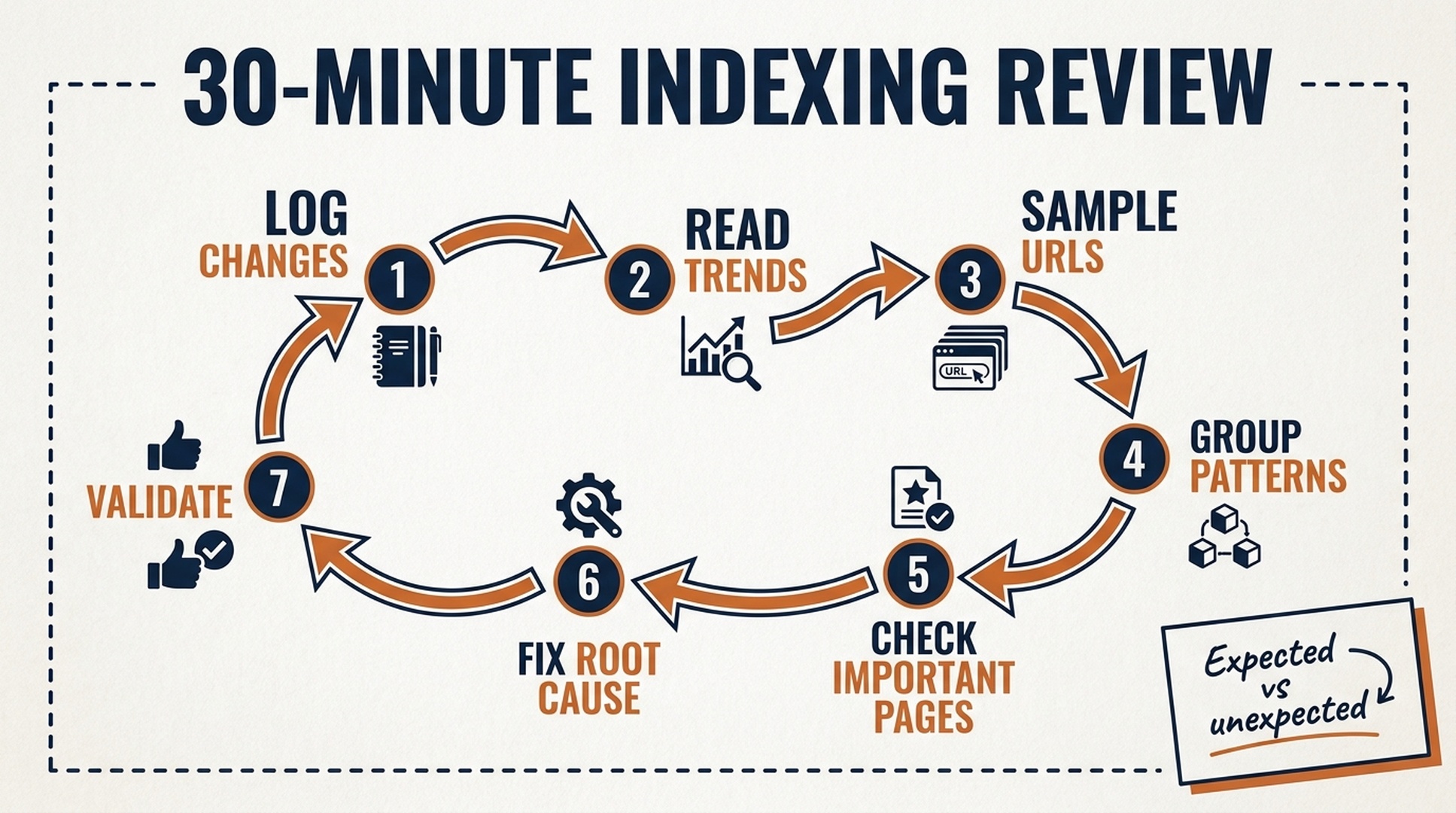
A weekly review works best when every decision is tied to an expected change, observed evidence, and a clear owner.
For teams formalizing this process, Auspia's technical SEO resources can sit alongside release notes and infrastructure change logs. The value is not in checking the report more often. It is in being able to explain each meaningful movement.
The practical takeaway
Google's message can be reduced to four operating rules:
- A URL outside the index is not automatically a problem.
- An HTTP error can be the correct response.
- Unexpected, repeating changes that touch important URLs deserve priority.
- The indexing ratio is not a quality grade.
Treat the Page Indexing report as a detector for change and patterns rather than a report card. It will create less panic, and it will point more directly to the issues that matter: broken deployments, infrastructure interference, canonical mistakes, duplicated pages, and poor page-level experiences.
FAQ
Should I redirect every 404 reported in Search Console?
No. First decide whether the URL was supposed to exist. A deliberately retired page or a URL that never existed can correctly return 404. Consider a redirect when an important URL still has internal or valuable external references and there is a genuinely relevant replacement.
Does "Crawled - currently not indexed" mean my content is low quality?
One URL cannot prove that. If the status rises across important pages and technical checks show no block, Google recommends stepping back to assess the site's overall value, duplication, and page experience.
If a site: query does not show a URL, is it definitely not indexed?
No. Google describes site: as a useful but artificial query. For index state, Search Console and URL Inspection are stronger evidence, especially during migrations or canonical changes.
When should I use Validate Fix?
Use it after resolving a genuine issue, such as an incorrect bot block, a template error, or broken canonical or rendering behavior. It is not necessary for intentional 404s, ordinary redirects, or pages that are still being processed.
Is a 20% indexing rate a sign that my website is poor quality?
Not by itself. noindex, redirects, 404s, parameter URLs, legacy content, and site purpose all affect the ratio. Check whether your important URLs are indexed correctly and whether the rest reflects your intended URL policy.
Author: Julian Mercer, 14-Year Technical SEO Practitioner at Auspia. Julian writes about crawlability, schema, rendering, site architecture, and technical foundations for AI-readable content.
Source note
- Source video: Google Search Relations, "How to read the Indexing Report" (YouTube ID:
1-PcVLHplwc). - This article is an original English synthesis and expansion based on the video's English CC transcript, not a transcript or a line-by-line rewrite.
- Video checkpoints: patterns at 3:40; expected 404s at 6:25; canonicals at 8:05;
site:queries at 11:00; CDN and host blocks at 13:40; validation at 17:00; trend lines at 18:30; non-indexed statuses at 20:45; indexing ratios at 25:30; conclusion at 27:55.


