


Google announced Gemini 4 Argon on October 13, 2026, with access in AI Mode for Google AI Pro and Ultra subscribers. For a search team, the useful next move is a small review of how this experience answers your customers' questions. Check what it says about your business, which pages it links to, and whether those pages help someone make a decision. Google's announcement
The announcement establishes product availability. A claim that Argon improves your visibility needs observations from your own market. Start with a record you can revisit, rather than rewriting pages because a new model has arrived.
The release changes the test environment
Google says Argon is available through the Gemini API and is rolling out across several Google products. Access conditions differ by product; for the Gemini app and AI Mode, the announcement specifies Pro and Ultra subscriptions. That distinction matters when deciding whose experience your team is checking. Google's rollout details
An API answer is useful for evaluating a model's handling of a task. An AI Mode answer is useful for observing the search product, including the sources it presents. Keep those records separate. Likewise, a comparison between a free account and a paid account has an account difference as well as a possible model difference.
Before drawing conclusions, record the product, account tier, date, language, location, and any model label actually visible in the interface. If the interface does not identify the model, describe the result as an AI Mode observation. A release date alone cannot establish which model produced every answer.
Confirmed fact or boundary | What it means for a search team |
|---|---|
Google announced Argon access in AI Mode for Pro and Ultra subscribers | Check whether that experience is available to the account doing the review |
Different Google products have different access conditions | Keep API, Gemini app, and AI Mode results in separate records |
The rollout announcement contains no measurements for your website | Establish your own visibility baseline before claiming an effect |
The model may be unidentifiable in a particular answer | Record the product state instead of assigning a model by inference |
Three questions worth checking
A useful prompt set follows the questions a buyer asks before contacting you. The point is to catch a missing or inaccurate answer while there is still a clear page you can improve.
For a small software company, these questions might be:
- "Does AcmeDesk integrate with our existing ticketing system?"
- "Which help-desk tools suit a team with regional data-storage requirements?"
- "What should we check before moving our customer-support history?"
AcmeDesk is a fictional example. Replace it with your company and actual buying constraints.
The first question tests brand facts. The second tests category discovery. The third tests whether useful implementation content appears when someone has moved beyond a simple comparison. These are different jobs for your website, so report them separately.
A company might appear in branded answers and still be absent from category questions. It might also receive a supporting link without being recommended. Treating all three outcomes as one "AI visibility" number hides the work your team needs to do.
Read the answer and follow the links
For each prompt, save the complete answer and the supporting URLs. Then inspect the pages behind the important claims.
A linked homepage can identify a business, but may not support a claim about a specific integration. A detailed documentation page could support that claim even if the business is barely mentioned in the answer. Record both the mention and the evidence supporting it.
Use a compact review sheet:
Field | What to record |
|---|---|
Prompt and buyer task | Exact wording and the decision it is meant to support |
Product state | AI Mode, account tier, language, location, date, visible model label |
Brand appearance | Mentioned, recommended, compared, or absent |
Supporting pages | Exact URLs, with the claim each page supports |
Fact check | Accurate, outdated, contradictory, or unresolved |
Follow-up question | The buyer question the answer leaves open |
Proposed repair | One page change with an owner and a reason |
Repeat important prompts in fresh conversations so prior discussion does not become an unnoticed input. Use the same wording and account conditions when possible. A few repetitions can expose unstable answers, but they do not measure the experience of every searcher.
If you have a saved pre-release baseline, compare it using the same fields. If you do not, the first run becomes your baseline. Do not reconstruct an older answer from memory.
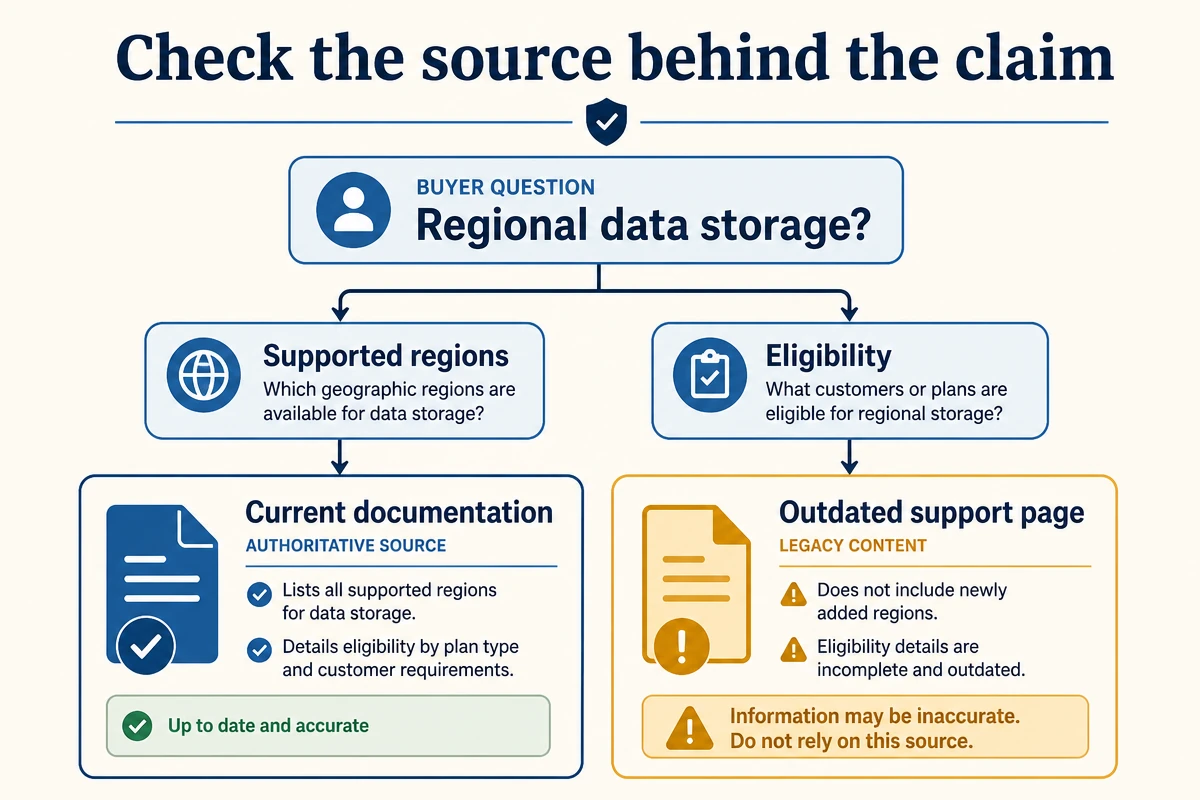
Check which page supports each important claim.
Turn a bad answer into a page task
The most useful output is a specific repair, not a general instruction to "optimize for Argon."
Suppose the answer says your product stores all customer data in one country, while your current documentation offers several regional options. Inspect the pages that could have supplied the statement. Look for old product copy, conflicting support articles, and missing conditions on the current page.
The repair might be to consolidate the regional-storage explanation, add the relevant eligibility conditions, and update an outdated article. Save the URLs and wording before changing anything. After publication, verify the page itself and revisit the prompt later. An unchanged answer immediately after a page edit does not establish that the edit failed.
Use this decision table to keep the work proportionate:
Observation | First action |
|---|---|
Incorrect product fact | Find and reconcile the conflicting public statements |
Accurate fact, unsupported link | Improve the page that should substantiate the claim |
Brand absent from a relevant category answer | Review whether you have useful content addressing the buyer's actual constraints |
Different result across repeated runs | Record the variation before choosing a repair |
No access to the intended experience | Resolve access or label the test as unavailable |
These are editorial diagnostic steps. They are not proven mechanisms for changing Argon's source selection.
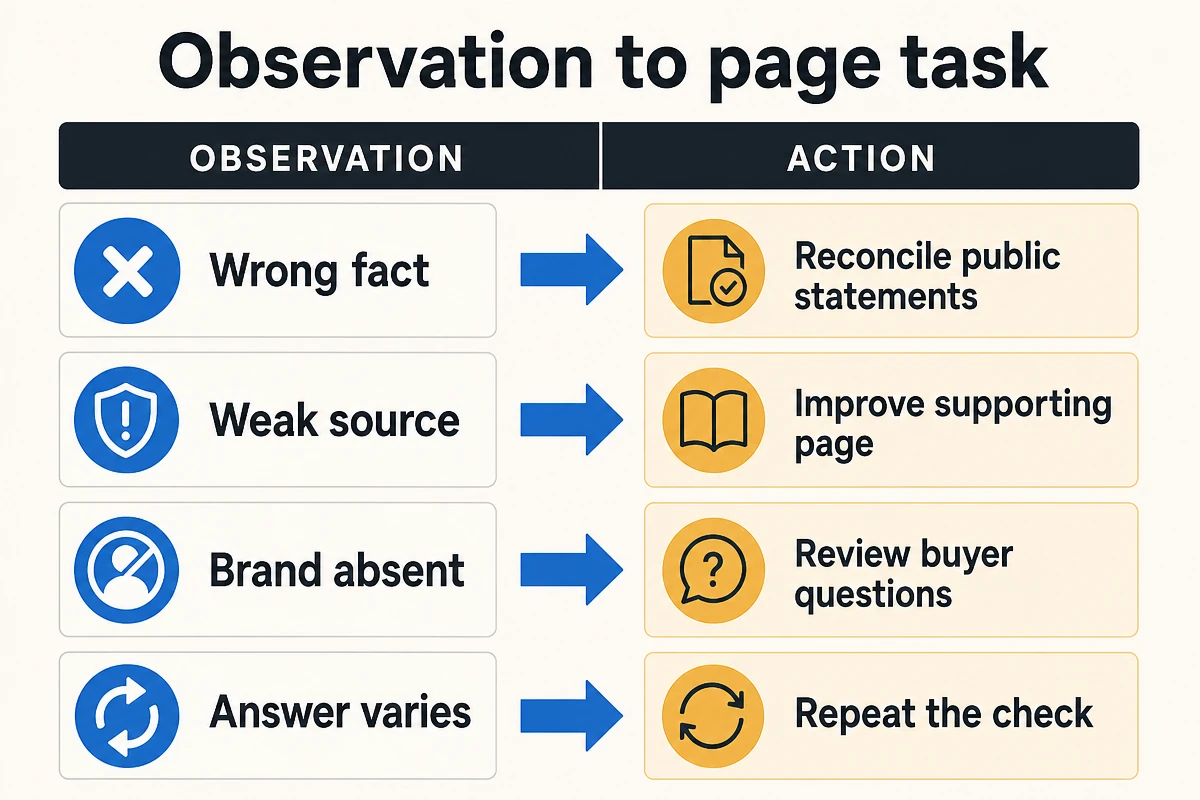
Turn each observation into a specific page task or repeat check.
Keep the existing search foundations
Google's guidance for AI features says supporting pages need to be indexed and eligible for a search snippet. It also says no special AI markup or additional technical requirements are needed. That gives a useful starting point: confirm the page can participate in Search before trying to interpret its absence from an answer. Google Search Central's AI-feature guidance
At Auspia, we would put conflicting facts and unanswered buyer questions ahead of cosmetic page rewrites. A model release is a good reason to check those weaknesses. It is a poor reason to add unsupported claims about being "AI optimized."
A repaired page should also help someone who arrives through an ordinary search result or a colleague's link. The customer should be able to understand the answer, verify the conditions, and find the next relevant action.
Keep the reporting claim small enough to defend
Write a finding that another person could reproduce:
In our recorded AI Mode checks, the regional-storage answer cited an outdated support URL. We updated the current documentation and scheduled a repeat check under the same account conditions.
That statement is useful even before a visibility improvement appears. It names the observed problem and the action taken.
Google includes traffic from AI features in Search Console's Web performance data. The overall report therefore cannot, by itself, establish an Argon-specific traffic effect. Use the prompt log for observed answer changes and your search and conversion reports for business outcomes. Google's measurement guidance
Questions that remain after the first review
Does Argon access mean every AI Mode answer uses Argon?
The announcement establishes access for eligible subscribers. For any particular answer, retain the visible product and model information. If the interface does not identify a model, avoid making an answer-level attribution.
Should we test the Gemini API instead?
Use the API if you are evaluating a content or research workflow. Use AI Mode if the question is how the search experience presents your business and supporting websites. Each test answers a different operational question.
How many prompts are enough?
Begin with a small set your team can review carefully. Ten high-value buyer questions is a suggested pilot size, not a statistical standard. Expand only when the first set produces a useful repair process.
Author: Jasper Quinn, AI Search Product Researcher Tracking 60+ Feature Changes at Auspia. Jasper writes about search product updates and their practical effects on website teams.


