


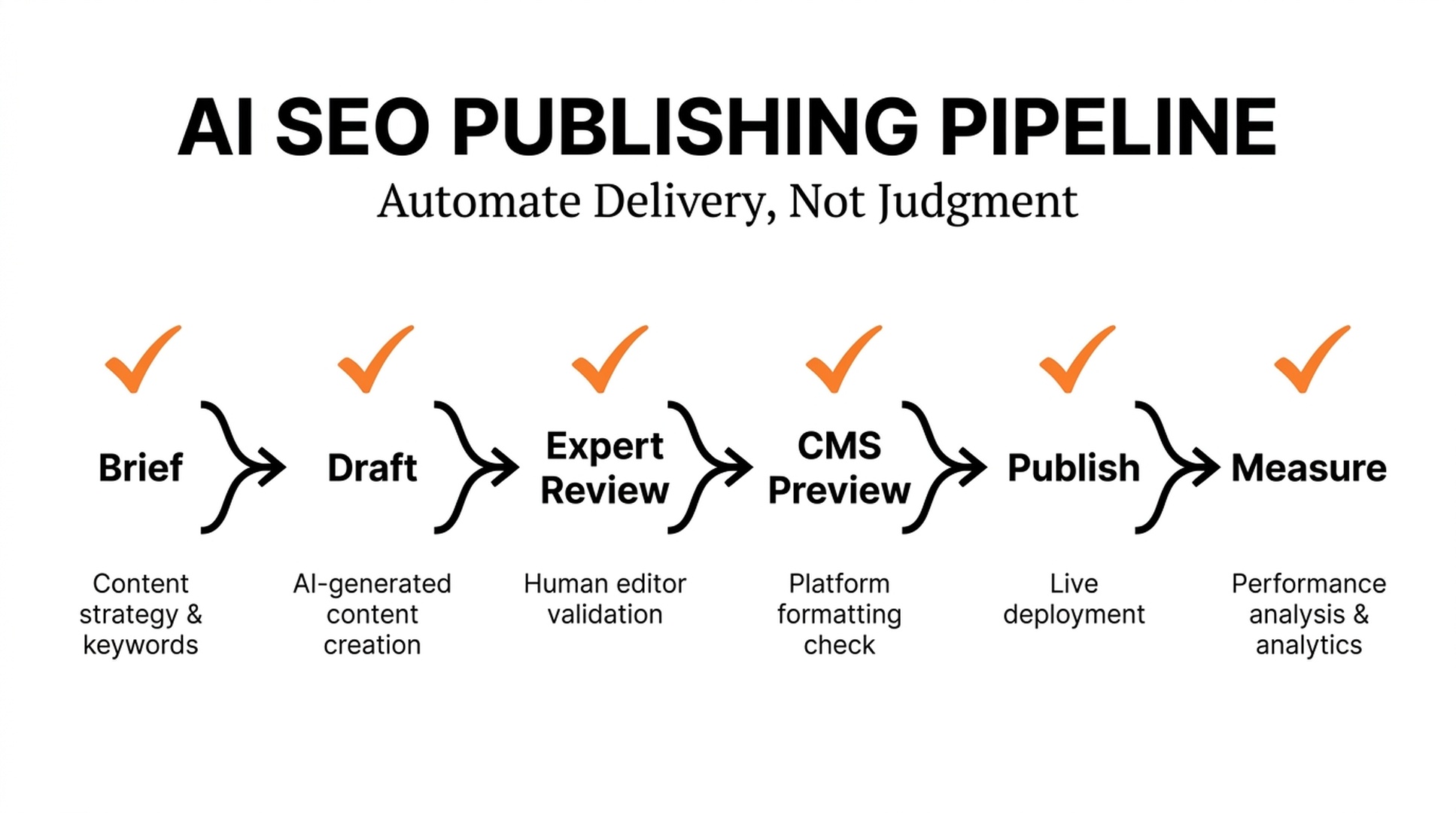
The honest answer: tools can publish, but they should not publish blindly
Several types of AI SEO tools can move content into a CMS automatically: AI writing platforms with WordPress or Webflow integrations, content-operations systems that connect briefs and approvals to a CMS, and automation tools such as Zapier, Make, or custom API workflows. Some SEO suites can also generate briefs, metadata, and optimization recommendations before the content reaches the publishing layer.
The important distinction is between automatic delivery and automatic editorial approval. A dependable system can create a draft, populate structured fields, run checks, assign a reviewer, and schedule a release. Fully unattended publication is a poor default for any site that cares about accuracy, brand voice, topical focus, or search quality.
Google's documentation does not prohibit AI-assisted writing. It does make clear that using automation to produce many pages without adding value can violate spam policies. A publishing pipeline needs quality gates alongside an API key.
The three layers of an automated publishing stack
1. SEO intelligence and briefing
This layer takes a target topic and turns it into a workable assignment. Common outputs include query groups, search intent, competing formats, missing subtopics, suggested internal links, source requirements, page type, title candidates, and a content outline. Research suites and content-optimization platforms often operate here.
The brief should also contain what the AI is not allowed to assume. For example: prices require approval, customer claims need a source, dates must be current, and regulated advice needs an expert check. These constraints are more useful than a long prompt full of adjectives.
2. Content generation and editorial review
Writing tools can create a first draft from an approved brief. The strongest workflows keep citations or source notes connected to factual claims, flag uncertain statements, and preserve a revision history. A reviewer should be able to reject a draft without restarting the whole process.
This is where many automated publishing programs fail. They optimize for a word count, then discover after publication that each article uses the same examples, repeats the same heading pattern, or says nothing the site could not have said last year. A human editor needs to ask: what does this page know, show, or explain that a generic answer does not?
3. CMS delivery and release controls
The final layer uses a CMS API or integration to create the post, add title and metadata, set category and author, upload approved media, insert internal links, run preview checks, and either schedule or publish it. WordPress, Webflow, Contentful, Sanity, and headless CMS platforms can support this when configured carefully.
An automated workflow should distinguish draft, in-review, scheduled, and published states. It should also retain a log of the source brief, reviewers, assets, and any transformations made by the CMS.
What "optimized" should mean before a post goes live
The word is often used to mean "contains keywords." That is much too narrow. A publish-ready page needs several kinds of readiness.
Check | Why it belongs in the pipeline | Can it be automated? |
|---|---|---|
Intent match | Keeps the page aligned with the searcher's decision | Partly; editorial review remains necessary |
Evidence and accuracy | Prevents invented facts and weak claims | Partly; a subject-matter review is essential |
On-page structure | Makes headings, links, images, and summaries usable | Largely, with a final visual check |
Technical accessibility | Helps crawlers find and render the page | Largely, but fixes may require developers |
Metadata and schema | Clarifies the page for search systems | Largely, if the CMS has validated fields |
Duplication risk | Avoids near-identical pages competing with each other | Partly; strategy decides consolidation |
Brand and conversion fit | Makes the page useful after the click | Requires human judgment |
Structured data is not a shortcut to rankings. Google describes it as a way to help systems understand page information and potentially enable eligible rich-result features. Use it to describe real content consistently, then validate it as part of the release process.
A release gate worth copying
Instead of treating a publish button as the final step, use a compact release gate. One person can own it for a small site; larger teams can split the roles.
- The topic owner approves the brief and the intent.
- The writer or AI workflow creates the draft with source notes.
- A subject expert checks claims, examples, prices, and product language.
- An editor checks usefulness, originality, headings, internal links, and reader flow.
- The CMS workflow creates a preview and runs link, metadata, image-alt-text, and schema checks.
- The owner schedules publication after a desktop and mobile preview.
- The team checks indexing, impressions, and conversions after release.
That sequence sounds slower than one-click publishing. In practice, it prevents expensive clean-up work and makes automation safe enough to scale.
Where Auspia can fit without becoming another publishing robot
Auspia is most useful after a page is drafted or published, when a team needs to assess SEO and AI-search readiness rather than generate another generic article. For example, an editor can use the Auspia tools directory to run a website SEO check or assess whether AI crawlers have access to important content. Teams that care about answer-oriented discovery can also add an AI-search visibility review to the post-publication checklist.
This is a better use of automation than treating any platform as an unsupervised content factory: identify a gap, make a defensible improvement, and measure what changes.
Choose the integration pattern that matches your risk
Draft-only integration
The AI tool creates a CMS draft with fields populated, but no one can publish it without review. This is the safest starting point and usually the best choice for a new workflow.
Scheduled publishing with approval status
Once reviews are complete, the system schedules posts at an agreed cadence. The automation controls timing and formatting, while people control content quality. This works well for editorial teams with repeatable page types.
Fully automatic publishing
Reserve this for low-risk, tightly structured updates with trusted source data, such as a daily inventory note or a validated data table. It is rarely appropriate for opinion, advice, sales content, comparisons, or pages that make factual claims about a business.
Common mistakes in AI publishing pipelines
The first is confusing an optimization score with a quality decision. The second is letting a model cite sources it did not actually use. The third is publishing near-duplicate pages for every long-tail query variation. The fourth is abandoning preview checks because the API call succeeded. The fifth is measuring only how many posts went live.
An automated system should improve the ratio of useful pages to editorial effort. If the backlog grows while traffic quality and conversions do not, pause the pipeline and inspect the inputs.
A small pilot before full automation
Choose one repeatable content type, such as product FAQs, integration guides, or monthly data-led updates. Automate draft creation and CMS delivery, but keep the release gate manual. Run ten posts through the process. Track review time, factual corrections, technical errors, indexing, organic impressions, clicks, and downstream actions. Only then decide whether more autonomy is justified.
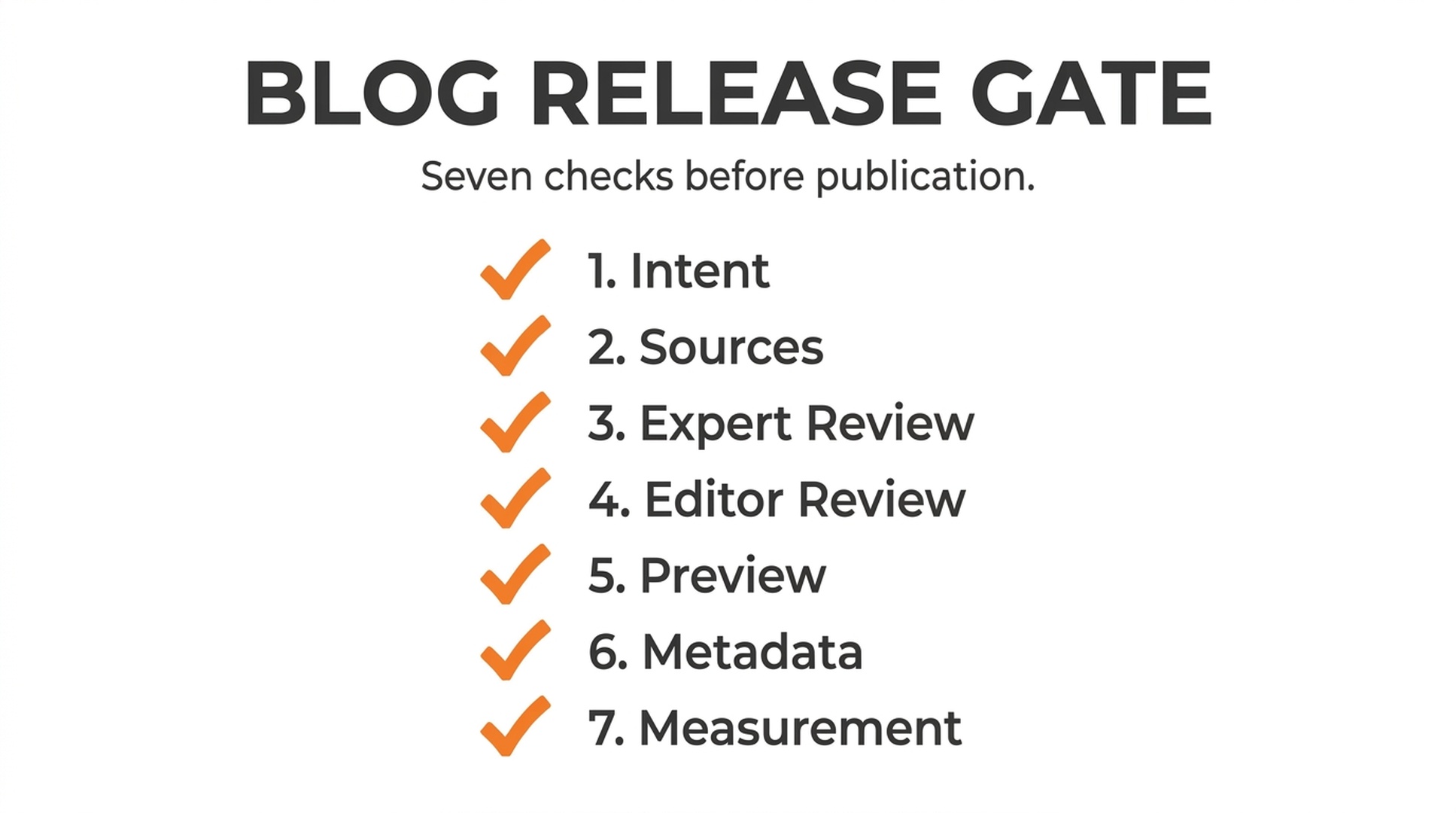
Seven editorial and technical checks before an AI-prepared blog post is published
FAQ
Can WordPress automatically publish AI-written articles?
Yes. WordPress supports API-based creation and scheduling, and many AI or automation tools integrate with it. The technical capability does not remove the need for editorial approval and site-level checks.
Will auto-published content rank in Google?
It may be indexed and can rank if it is genuinely useful, accessible, and competitive. The fact that it was automatically published neither guarantees nor prevents ranking. Low-value scaled content can create policy and quality risks.
What should block automatic publication?
Missing sources, unreviewed claims, broken links, incorrect author or category fields, unsupported structured data, absent alt text, duplicate intent, and unresolved legal or product questions should all block the release.
Which official guidance applies?
See Google Search Central's guidance on generative AI content, spam policies, and structured data.
Author: Rowan Blake, Content Automation Analyst for 100+ Publishing Pipelines at Auspia. Rowan writes about reliable editorial automation, CMS handoffs, and quality gates that teams can sustain.


