如果你只想完成一次竞争对手流量分析,可以把本文整篇交给 Codex,并说:“按这篇文章的流程分析 competitor.com。”它会按文中的 skill 检查可用数据源、处理 Ahrefs、Semrush 或 DataForSEO 的连接设置,再向你索取真正影响分析结果的信息:要查看的域名、目标市场、语言,以及你自己的域名(如果要做内容缺口)。
先把一件事说清楚:除非对方把 Google Analytics、Search Console 或服务器日志共享给你,否则你看到的不是它的真实访问量。Ahrefs、Semrush 和 DataForSEO 依据各自的关键词库、排名、点击模型与抓取数据生成估算。这并不让数据失去价值。正确的用法是比较同一市场、同一时间窗中哪些域名在增长,哪些页面和关键词值得研究;错误的用法是把“预估月流量”当成对方财务报表。
什么时候该用这套方法
不是每次看到一个同行网站都值得做完整分析。下面这些时刻,竞争对手流量数据最有用:
你的情况 | 为什么这时值得查 | 你会得到的答案 |
|---|---|---|
你要做年度或季度内容计划,但不知道先覆盖哪个主题 | 竞争者的页面和关键词能暴露市场已经在搜索什么 | 哪些主题已经有需求,哪些 URL 值得优先更新或新建 |
你发现竞争对手增长很快 | 总流量没有解释原因,页面和关键词变化才有用 | 增长是否集中在工具、模板、博客、产品页或某一个国家 |
你准备写“竞品替代”或比较页 | 先理解对方靠什么意图获得曝光,避免只按品牌词猜测 | 用户到底在比较功能、价格、使用场景,还是寻找解决方案 |
你的自然流量停滞 | 需要找到“我们没有覆盖”与“已有页面没有做好”的区别 | 值得补的内容缺口,以及可能造成关键词自相竞争的旧页面 |
你要向团队解释为什么一个内容项目值得做 | 主观的“大家都在写”很难获得资源 | 带有页面、查询、市场和趋势证据的优先级说明 |
它不适合回答“对方昨天到底有多少真实访客”或“照着对方做一定能带来多少流量”。没有对方第一方 Analytics 时,任何第三方工具都无法给出这两个答案。
用完后你会多出什么判断能力
这套方法的价值不是得到一个漂亮的流量数字,而是把模糊的竞品观察变成几项可验证的决策:
- 知道该看谁。 区分直接商业竞争者和自然搜索竞争者。一个媒体、模板站或工具站可能不卖和你相同的产品,却抢走了你最重要的搜索需求。
- 知道增长来自哪里。 找到带来估算曝光的页面组、关键词和国家,而不是只看到一条上升曲线。
- 知道机会是不是你的机会。 将竞争者覆盖的主题与自己的 URL、客户需求和产品能力对照,排除不相关的关键词。
- 知道下一步该做什么。 在“更新现有页面”“新增一个内容资产”“研究工具页”与“暂不做”之间做选择,并保留理由。
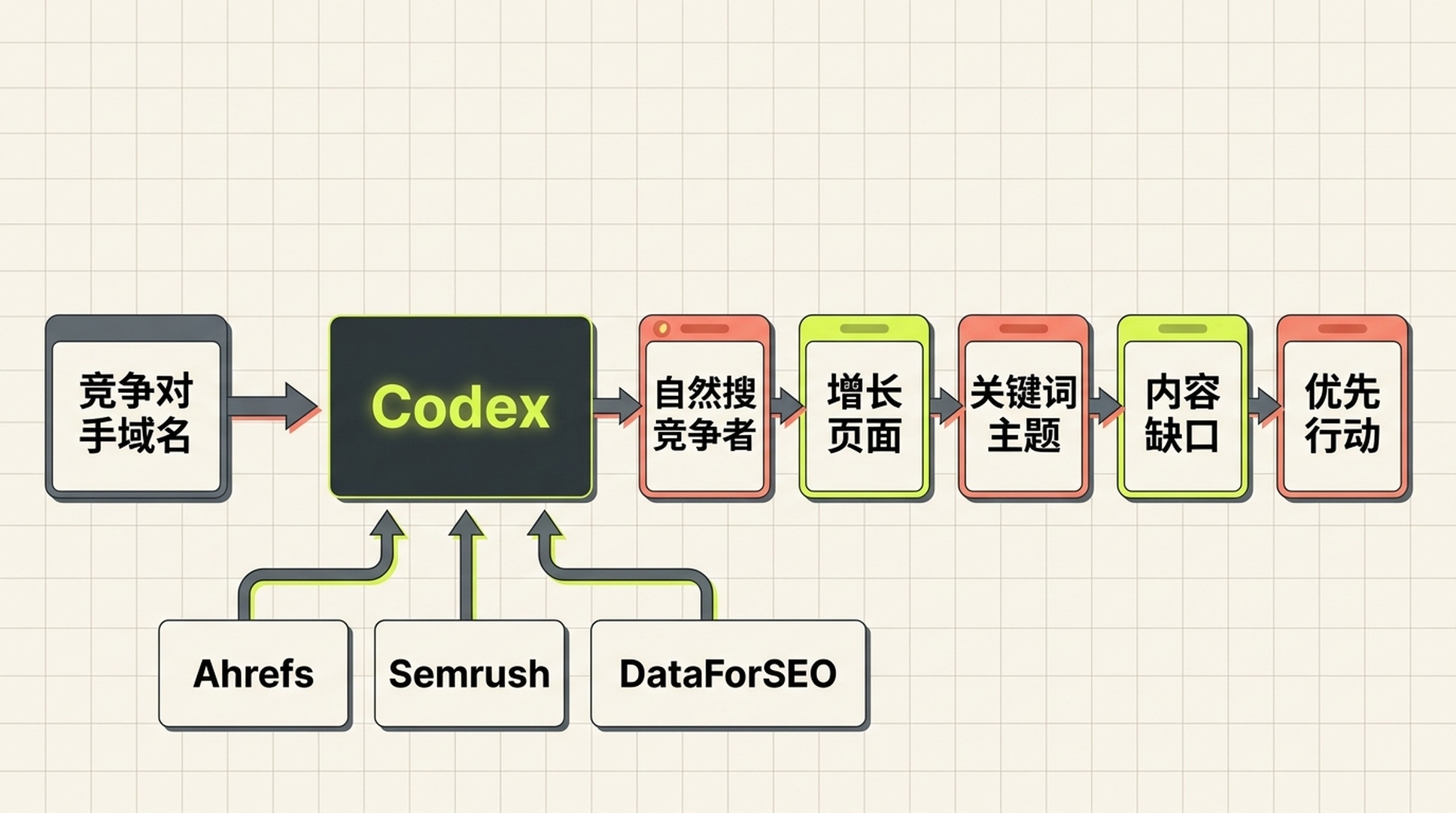
竞争对手流量研究的终点不是一串数字,而是一组可讨论的页面、主题和行动选择。
你会完成什么
这是一套给第一次使用 Codex 做 SEO 研究的人准备的只读流程。
项目 | 本教程的约定 |
|---|---|
适合谁 | 想研究一个或多个竞争网站,但没有 SEO 分析师或自己的脚本的人 |
完成结果 |
|
最少输入 | 一个规范域名,例如 |
可选输入 | 你的域名、竞争对手名单、目标国家、语言、设备、时间范围和业务主题 |
默认市场 | United States / English;这只是默认值,不是“全球数据” |
建议时间 | 首次让 Codex 完成数据源连接后,每个域名通常只需几分钟到十几分钟,取决于配额和可用数据 |
定义为完成 | 每个关键数字都标有提供方、报告或端点、获取时间、市场和含义;报告列出不确定性与下一步,而非只报一个流量数 |
把它想成一张证据表,而不是一个“查流量”按钮。流量总量只能回答“谁看起来更大”;热门页面、排名关键词、变化趋势和内容缺口才帮助你判断下一步写什么、改什么,或者根本不该追什么。
先选好数据源,不必一次买齐三个
三家工具可以互相校验,但它们并不是同一份数据库的不同外壳。先接入你已经拥有 API 权限的那一家;第二家适合在数字差异很大、要做重要决策,或要补齐某类报告时再加。
数据源 | 这次研究最适合拿什么 | 你应如何解释结果 | 开始前要确认 |
|---|---|---|---|
域名的自然搜索概览、排名关键词、热门页面、自然竞争者、反向链接线索 | Ahrefs 对指定数据库的估算,不是竞争者 Analytics | 你的套餐是否有 API 访问,以及需要的 Site Explorer 或相关报告是否被授权 | |
域名概览、自然关键词、竞争域名、自然趋势和页面线索 | Semrush 数据库中的估算;数据库与地区必须写入报告 | API v4 的账户授权、单位额度和目标数据库是否可用 | |
可脚本化的排名关键词、SERP、关键词指标、流量估算和反链数据 | 端点返回的数据及其模型,不等同于真实会话数 | 登录名/密码(或账户支持的授权方式)、余额、目标地点与语言 |
不要把不同提供方的“traffic”直接加总,也不要因为它们给出不同数字就认定谁错了。先检查四件事:是否都是根域名、市场是否相同、语言是否相同、指标到底是自然流量、全站访问还是付费流量。只有定义一致,比较才有意义。
最小可行路径: 只有 DataForSEO 也可以完成本教程。它适合希望让 Codex 把数据整理为 CSV 和 Markdown 的用户。拥有 Ahrefs 或 Semrush API 时,再用其更擅长的竞品、页面和历史报告补充即可。
给 Codex 一项稳定、可重复的工作
Codex 中的 skill 是一个包含 SKILL.md 的文件夹。它告诉 Codex 何时触发、需要哪些输入、按什么顺序工作,以及不能做什么。当前的 Codex 文档建议将仓库级技能放在当前项目或上级目录的 .agents/skills/ 下;个人级技能可放在 ~/.agents/skills/。前者适合团队复用,后者适合你在任何项目中使用。
在一个专门的研究仓库或工作目录中创建目录:
mkdir -p .agents/skills/competitor-traffic-research
然后新建 .agents/skills/competitor-traffic-research/SKILL.md,把下面的完整内容原样放进去。连接、凭据、默认市场和提供方脚本的处理都由这份 skill 负责;正文不需要让读者逐个配置。
SKILL.md 完整文件 的完整内容
下面是完整的 Markdown 文件。请完整复制代码框内容并保存为 .agents/skills/competitor-traffic-research/SKILL.md;不要复制代码框外的文章说明。
---
name: competitor-traffic-research
description: Analyze a public competitor domain's estimated search traffic, top pages, ranked keywords, trends, and content gaps with Ahrefs, Semrush, or DataForSEO data. Use when a user asks to check competitor website traffic, competitor organic keywords, top pages, or organic search competitors. Set up any required provider connection, then produce a read-only, sourced report without inventing metrics.
---

# Competitor traffic research

## Purpose and boundary

Turn a public domain into a reviewable competitor-search report. This is research only. Do not edit a website, create a provider project, alter billing, change account settings, publish content, send email, or make any other external write action.

All third-party traffic values are estimates unless the user supplies first-party analytics for a domain they own. Never call an estimated value "actual traffic," "sessions," "revenue," or "conversions."

## Required input

Ask only for what is missing:

1. Competitor domain, subdomain, path, or exact URL. Normalize it and state which scope will be measured.
2. At least one available authorized provider: Ahrefs, Semrush, or DataForSEO.

Use `United States` and `English` when market and language are not supplied. State this default prominently in the final report. Optional inputs are the user's domain, additional competitors, device, date range, seed topic, and business goal.

## Provider connection and setup

Handle the provider setup so the user does not have to read API documentation or write request code.

1. Inspect installed provider skills and local integration scripts first. Prefer an existing authorized connection.
2. If no connection is ready, tell the user which provider connection is needed and guide them through its ordinary setup one step at a time. Use the provider's official documentation and configuration method; do not invent endpoints or settings.
3. Store provider settings in the location expected by the installed integration. Use `AHREFS_API_KEY`, `SEMRUSH_API_KEY`, `DATAFORSEO_LOGIN`, and `DATAFORSEO_PASSWORD` when a local script expects those names. Set DataForSEO's `DATAFORSEO_DEFAULT_LOCATION` and `DATAFORSEO_DEFAULT_LANGUAGE` to the selected market and language when the installed toolkit uses them.
4. Do not copy provider credentials into research artifacts, report tables, CSV output, or user-facing summaries. Keep connection setup out of the analysis report.
5. Use read-only reports/endpoints. Before a potentially billable request, state the provider, report or endpoint class, market, language, intended request count, and any known quota/credit uncertainty. Stop if the user declines.
6. On a 401, 403, quota, coverage, or provider error, record the provider as `unavailable` with the safe error category and a recovery suggestion. Do not retry repeatedly, switch providers silently, or invent a substitute metric.

## Provider query map

Choose the least complicated available route. Do not force all three providers into one run.

| Provider | First lookup | Extend the analysis with | Use it when |
| --- | --- | --- | --- |
| Ahrefs | Site Explorer domain overview or the installed Ahrefs connector's closest equivalent | Top pages, Organic keywords, Organic competitors, Content Gap | The connection exposes these reports and the user needs page-level competitor research |
| Semrush | Domain Overview or the installed Semrush connector's closest equivalent | Organic Research, Organic Competitors, Keyword Gap, historical position data | The connection exposes the target database and the user needs a second point of view or keyword-gap workflow |
| DataForSEO | `bulk_traffic_estimation` and `ranked_keywords` from the installed `dataforseo-toolkit` | `keywords_for_site`, `google_organic_serp`, `backlinks_summary`, `referring_domains` | A scriptable local workflow is available or a reproducible CSV is the main need |

For DataForSEO, use the installed toolkit before writing new HTTP code. Its normal sequence for a domain is:

```text
bulk_traffic_estimation -> ranked_keywords -> keywords_for_site
```

Run `google_organic_serp` only for a small, human-selected set of important keywords to validate intent and result-page format. Run backlink reports only when the user asks about referral or link opportunities. If an Ahrefs or Semrush connector uses different report names, use the closest documented read-only equivalent and record the exact report name.

## Data collection order

1. Create a timestamped folder under `competitor-research/` using a safe normalized domain name. Do not overwrite an existing run.
2. Create `research-scope.md` before any API call. Record target scope, market, language, date/time in UTC, available providers, user goal, and the meanings of requested metrics.
3. Inspect installed provider skills, local scripts, and official provider documentation before choosing a report/endpoint. Use only capabilities that are actually available to the authorized account. Do not guess an endpoint from memory.
4. Collect the smallest useful evidence set from each available provider:
   - domain-level estimated organic traffic or visibility and any available trend;
   - top organic pages with their leading keyword or traffic contribution when the provider supplies it;
   - ranked organic keywords with position, volume, and URL when available;
   - organic competitors or intersecting keywords when available;
   - paid-search or backlink signals only when the user asks for them, and label them separately.
5. If the user provides their own domain, run a content-gap comparison only when the provider supports it. Return only relevant keyword opportunities; do not treat every missing keyword as a content brief.
6. Normalize domains, country/database, language, device, date window, URL scope, and metric definitions before comparing providers. Keep each provider's original metric in a separate column. Never average or sum traffic estimates across providers.
7. Save concise normalized CSV files only: `competitor-pages.csv`, `competitor-keywords.csv`, and, when applicable, `content-gap.csv`. Omit unavailable fields rather than filling them with zero.

## Output schemas

Write a `field-dictionary.md` beside the report. Use these columns where the provider returns them; preserve blanks as blanks.

### `competitor-pages.csv`

`url, page_role, leading_keyword, estimated_organic_traffic, ranking_keywords, traffic_change, provider, report_or_endpoint, retrieved_at_utc, market, language, scope, metric_definition, notes`

### `competitor-keywords.csv`

`keyword, intent, position, previous_position, search_volume, estimated_traffic, ranking_url, keyword_group, provider, report_or_endpoint, retrieved_at_utc, market, language, scope, metric_definition, relevance_note`

### `content-gap.csv`

Create this file only when the user's domain is supplied and a provider supports a comparison. Use:

`keyword, intent, competitor_domains, competitor_urls, user_domain_status, search_volume, position_gap, recommended_action, existing_url_risk, provider, report_or_endpoint, retrieved_at_utc, market, language, human_review_reason`

Do not manufacture a top-pages table from ranked keywords alone. If a provider cannot supply page-level estimated traffic, include the ranking URL and label the traffic field `not_available`.

## Analysis rules

- Separate a direct business competitor from an organic search competitor. A publisher, marketplace, directory, or tool can compete for keywords without selling the same product.
- Treat abrupt changes as observations, not causal claims. Check the changed pages and keywords before suggesting a reason.
- Prefer page groups, intent, relevance, and trend direction over one headline traffic number.
- For every quantitative field, retain `provider`, `report_or_endpoint`, `retrieved_at_utc`, `market`, `language`, `scope`, and `metric_definition` in the relevant output or its data dictionary.
- Label data `not_available`, `not_comparable`, or `estimated` rather than guessing. Explain why it cannot be compared when possible.
- Do not claim that an SEO metric predicts ranking, traffic, revenue, conversion, market share, or AI citations.

## Required report

Write `competitor-traffic-report.md` with these sections:

1. **Executive answer:** target, scope, market, language, retrieval time, provider coverage, and the shortest useful conclusion.
2. **What the numbers mean:** which metrics are estimates, what they do and do not measure, and comparison limits.
3. **Traffic and visibility snapshot:** a provider-by-provider table. Do not merge values.
4. **Trend and change check:** observed movement, relevant changed pages/keywords, and confidence or gaps.
5. **Top pages:** a compact table with URL, apparent page role, leading keyword when available, estimated contribution, provider, and a human interpretation.
6. **Keyword and intent patterns:** group a limited set of relevant keywords by searcher job. Identify themes, not a dump of thousands of rows.
7. **Competitors and gaps:** distinguish direct competitors from organic competitors. If the user's domain is supplied, show only review-worthy content gaps and cannibalization risks.
8. **Prioritized actions:** no more than five actions. Each must cite the evidence, likely owner, expected output, and a human approval gate.
9. **Data availability and caveats:** unavailable providers, errors, scope mismatches, freshness limits, and exact recovery steps.
10. **Artifact index:** paths to generated CSVs and a field dictionary.

## Quality gates before finishing

- Verify that target scope is explicit: root domain, subdomain, path, or exact URL.
- Verify market and language are stated; highlight defaults.
- Verify provider connection details do not appear in research artifacts, report tables, CSV output, or the final summary.
- Verify every headline metric names its provider and says `estimated` when it is not first-party data.
- Verify provider values were not added, averaged, or compared across mismatched markets, languages, scopes, or dates.
- Verify all recommended actions are evidence-backed and require human approval before website changes or publishing.
- If data is unavailable, complete the report with the availability log and the exact next input needed; do not return a fictional analysis.

## Final response to the user

State the target, market, language, available providers, top three observations, most important caveat, generated artifact paths, and the one decision the user should make next.
保存后重新启动 Codex,或在新会话中使用 $competitor-traffic-research 显式调用它。首次使用时,显式调用更稳妥;之后它也可以根据任务描述自动匹配。
第一次运行:从一个域名开始,而不是从十个开始
进入研究目录并启动 Codex。若某个数据源尚未连接,Codex 会按 skill 处理相应设置;你不需要在正文的指引里逐项处理 key。随后输入下面这句:
$competitor-traffic-research
请分析 competitor.com 的自然搜索流量。使用所有可用的提供方;默认市场和语言即可。先说明计划调用的报告类型、市场、语言和可能的计费请求数,再开始。
如果你有自己的网站,第二次再增加它。这样 Codex 才能做真正的内容缺口比较,而不是凭感觉判断“这个词我们没做过”:
$competitor-traffic-research
我的网站是 mysite.com,竞争对手是 competitor.com。请在同一市场和语言下检查自然搜索内容缺口,只保留与 B2B 项目管理软件相关、值得人工复核的机会。不要建议发布页面,先交付研究报告。
这里的“先交付研究报告”很重要。它把数据收集和网站改动分开了。让 Codex 发现机会很快;决定是否写一篇文章、更新一个产品页或投入链接建设,仍然需要你看意图、现有内容和业务价值。
读懂输出:不要只盯住“月流量”
一份可靠的报告会把“数字”翻译成可以讨论的线索。下面的读法比比较谁的流量更大更有用。
你在报告里看到的内容 | 先问什么 | 可以采取的行动 | 不该得出的结论 |
|---|---|---|---|
某竞争者的预估自然流量上升 | 是哪些 URL 和关键词带动?市场、范围和时间窗相同吗? | 查看增长页面的搜索意图、内容格式、更新日期和内链位置 | “它一定做了某个 SEO 操作” |
一个工具页远高于其博客 | 这些访问来自什么查询,页面解决了什么可重复任务? | 评估你是否也有真实的输入、规则与可解释输出可做工具页 | “多做工具一定会有同样流量” |
很多关键词排在 4-15 名 | 这些词是否匹配你的客户和现有 URL? | 合并为主题簇,优先优化已有页面或补内容缺口 | “把所有关键词各写一篇文章” |
Ahrefs 与 Semrush 数字差很大 | 域名范围、国家数据库、语言和日期一致吗? | 以趋势和共同出现的页面/关键词交叉验证,记录差异 | “取较大的一个就是正确答案” |
数据源没有返回流量 | 该市场、域名或套餐是否覆盖? | 标为不可得,缩小范围、换已授权源或等待配额恢复 | “没有数据就等于没有流量” |
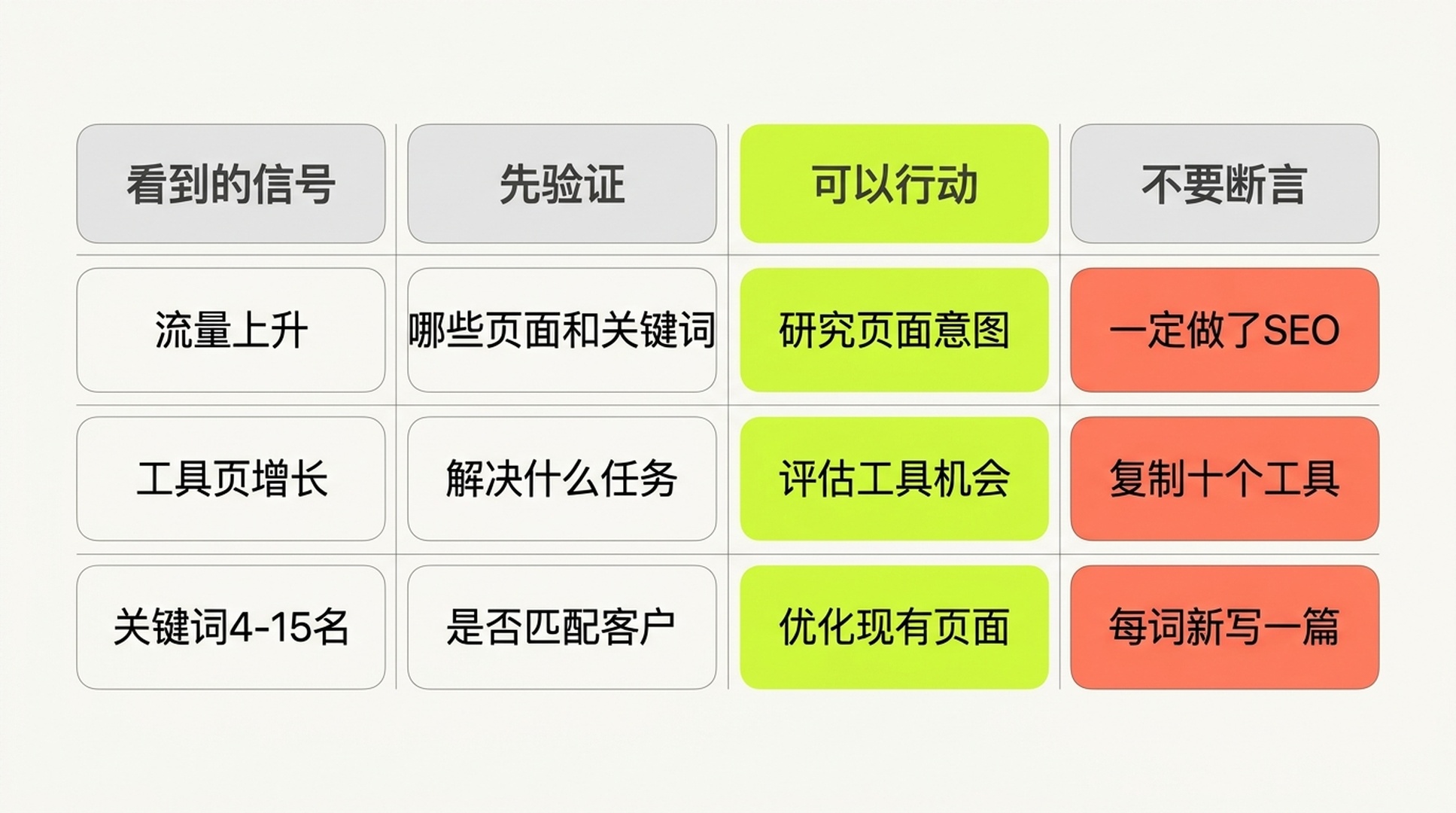
先验证,再行动。第三方流量数据适合帮助你提出好问题,而不是替你下结论。
一个虚构的阅读示例
假设报告显示 rival.example 的增长主要集中在 /templates/ 下的十个页面,关键词集中在“proposal template”“project brief template”等任务型搜索。正确的下一步不是复制十个标题,而是验证:你的客户是否真的需要模板?你能否提供可以下载、修改或在线生成的版本?目前站内是否已有一个可以改进的资源页?只有前三个答案都合理,才将它放进内容计划。
遇到常见失败时,按这个顺序处理
症状 | 最可能的原因 | 让 Codex 做什么 | 你需要做什么 |
|---|---|---|---|
| 提供方连接未完成,或套餐没有该报告权限 | 停止重试;写入 | 按 skill 的连接提示完成授权,或确认套餐权限 |
| 额度不足或请求太密 | 保存已完成结果,停止批量请求,报告未完成范围 | 检查余额/额度;下次缩小域名数、行数或时间范围 |
没有关键词或流量 | 域名太新、样本太小、选错国家/语言,或 API 覆盖有限 | 将“无数据”和“零流量”分开写;检查根域名与子域名 | 确认目标范围和市场;必要时提供同类竞争者 |
报告看起来互相矛盾 | 使用了不同数据库、日期、设备或 URL scope | 不合并指标;输出可比性检查表 | 指定一个业务市场作为主报告,另一个仅做交叉验证 |
某个提供方无法连接 | skill 找不到可用连接、权限或配置 | 标记该提供方不可用,继续使用其余数据源 | 按 Codex 给出的连接步骤完成一次设置后重跑 |
把一次分析变成每月可用的竞争情报
第一次报告解决“现在看到了什么”;每月复查才会告诉你变化是否值得行动。不要一上来监控五十个域名。对一个小团队而言,选择 3-5 个直接或自然搜索竞争者,保持同一市场和语言,已经足够。
每月让 Codex 复跑同一 skill,并额外问四个问题:
- 哪些页面的预估可见性或排名关键词变化最大?
- 变化来自新页面、已有页面更新,还是关键词排名改变?数据能否支持这个判断?
- 哪三个主题与你的业务最相关,但你现有 URL 没有很好回答?
- 哪个机会应该“更新已有页面”“新增一个内容资产”或“暂不做”?为什么?
保存每次的 research-scope.md 和报告,而不是只保存最终表格。市场、语言、提供方、获取时间与数据空缺会让三个月后的趋势比较仍然能被解释。
完成检查清单
- [ ] 已经确认分析范围是根域名、子域名、路径还是单个 URL。
- [ ] 已选择并在报告中写明国家/市场与语言;若使用默认值,已明确写出。
- [ ] 所需数据源已经由 skill 连接完成,且报告没有混入连接设置。
- [ ] Codex 在调用前说明了提供方、报告类型和可能的计费范围。
- [ ] 报告为每个估算数字保留了提供方、获取时间和指标定义。
- [ ] 没有把 Ahrefs、Semrush、DataForSEO 的估算相加,也没有把它们当作真实 Analytics。
- [ ] 热门页面和关键词被转成了有限、可人工复核的行动,而不是一份无穷长的关键词清单。
- [ ] 任何内容更新、发布或网站改动都留给下一步的人工批准。
常见问题
我只给 Codex 一个域名,真的可以吗?
可以。skill 有美国/英语的默认数据库,因此最少输入可以是域名和已经在安全环境中配置好的一个数据源。只是默认市场未必是你的客户所在市场。只要你开始做本地、非英语或特定国家业务,就应该明确提供国家和语言。
我需要同时购买 Ahrefs、Semrush 和 DataForSEO 吗?
不需要。一个已授权的、覆盖你的目标市场的数据源足以开始。第二个来源主要用于重要决策的交叉验证,或补充第一个来源没有的报告。不要为了让报告“看起来全面”而购买你不会使用的 API 单位。
为什么竞争者在 Similarweb 或工具后台显示的总访问量和这里不同?
指标范围不同。本文的主流程关注自然搜索可见性、页面与关键词;一些产品提供的是所有渠道的访问估算。先看它是否包含直接、引荐、社交和付费渠道,再决定能否比较。无论哪一种,第三方数据都不等于对方第一方分析数据。
Codex 能否替我判断要写哪些文章?
它可以基于证据提出有限的候选和风险提示,但不应该自行发布。关键词与页面数据看不到你的销售对话、产品能力、法务要求或内容资源。将 Codex 的输出当作研究助理的备忘录,再由内容、产品或销售负责人批准。
Author: Theo Langford, Competitive AI Visibility Analyst for 120+ Markets at Auspia. Theo writes about competitor research, market maps, and the evidence boundaries behind search-visibility comparisons.